Lit is a JavaScript library for web components, and lit-html is its template part. You write HTML inside a JavaScript template literal and call render(). Later renders update only the values that changed.
A search for "lit html 3.2.1" means that version of the lit-html package. It loads into a single HTML file from a CDN, with no npm and no build step. Here, "Lit" means the library at lit.dev.
Try it first. Type a name, then click the button.
<!doctype html>
<html lang="en">
<head>
<meta charset="utf-8">
<meta name="viewport" content="width=device-width, initial-scale=1">
<title>lit-html basics</title>
<style>
  body { margin: 0; padding: 20px; font-family: system-ui, sans-serif; background: #f4f5f7; color: #1d2330; }
  .card { max-width: 340px; padding: 16px 18px; border-radius: 12px; background: #fff; box-shadow: 0 6px 20px rgba(0, 0, 0, .1); }
  input { font: inherit; padding: 8px 10px; width: 100%; box-sizing: border-box; border: 1px solid #c9ced8; border-radius: 8px; }
  button { font: inherit; padding: 8px 14px; margin-top: 10px; border: 0; border-radius: 8px; background: #2563eb; color: #fff; cursor: pointer; }
  p { margin: 12px 0 0; }
</style>
</head>
<body>
<div class="card" id="app"></div>

<script type="module">
  // The CDN file is a ready-made ES module: no npm, no build step
  import { html, render } from 'https://cdn.jsdelivr.net/npm/lit-html@3.2.1/+esm';

  let name = 'world';
  let clicks = 0;

  // A template is a function of the data; html`...` only describes the DOM
  const view = () => html`
    <input .value=${name} @input=${(e) => { name = e.target.value; update(); }} aria-label="Your name">
    <p>Hello, <b>${name}</b>!</p>
    <button @click=${() => { clicks++; update(); }}>Clicked ${clicks} times</button>
  `;

  const update = () => render(view(), document.getElementById('app'));
  update();
</script>
</body>
</html>
The whole recipe is four steps:
- Put your code in a
<script type="module">. - Import
htmlandrenderfrom a pinned CDN URL. - Write a function that returns html followed by a template literal.
- Call
render(template, element)again after each change to the data.
Pin the version and pick a package
An import URL with an exact version asks for exactly that release. This is the line used in the example above:
import { html, render } from 'https://cdn.jsdelivr.net/npm/lit-html@3.2.1/+esm';
The Lit docs write their own bundle URLs with @3, which names only the major version. When this page was updated, the newest lit-html release was 3.3.3.
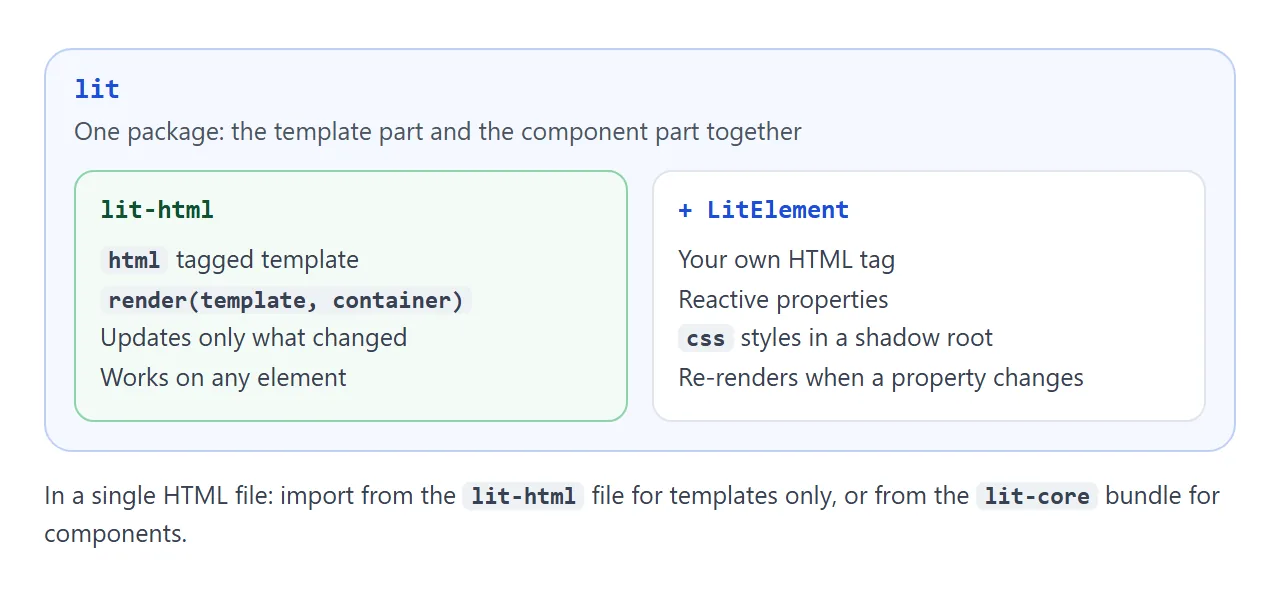
You can import from two places:
- lit-html gives you
htmlandrender. Use it when you only want templates on an existing page. - The lit core bundle also exports
LitElementandcss. Use it when you want your own tags.
// Components: LitElement, html, css and render in one file
import { LitElement, html, css } from 'https://cdn.jsdelivr.net/gh/lit/dist@3.2.1/core/lit-core.min.js';
The Lit docs say the bundles are standard JavaScript modules with no dependencies. Lit's code is under the BSD-3-Clause licence.
Where an expression can go
Inside the template literal, ${...} marks a hole. What the hole does depends on where you put it.
| Write | What it does |
|---|---|
<p>Hi ${name}</p> |
Adds content between the tags |
class=${cls} |
Sets an attribute |
?hidden=${flag} |
Adds the attribute when true, removes it when false |
.value=${text} |
Sets a JavaScript property |
@click=${fn} |
Adds an event listener |
Expressions work only where an attribute value or a child element would go. They cannot replace a tag name or an attribute name, and they do not work inside <textarea>, <template> or contenteditable content.
A string in a child expression is shown as text, not parsed as HTML. If it contains <b>, you see those characters instead of bold.
For lists, turn the data into an array of templates:
html`<ul>${items.map((item) => html`<li>${item}</li>`)}</ul>`
Why render() beats innerHTML
Setting innerHTML throws away every node and builds new ones. A text box loses what you typed and its focus. render() builds the static markup once and afterwards changes only the holes.
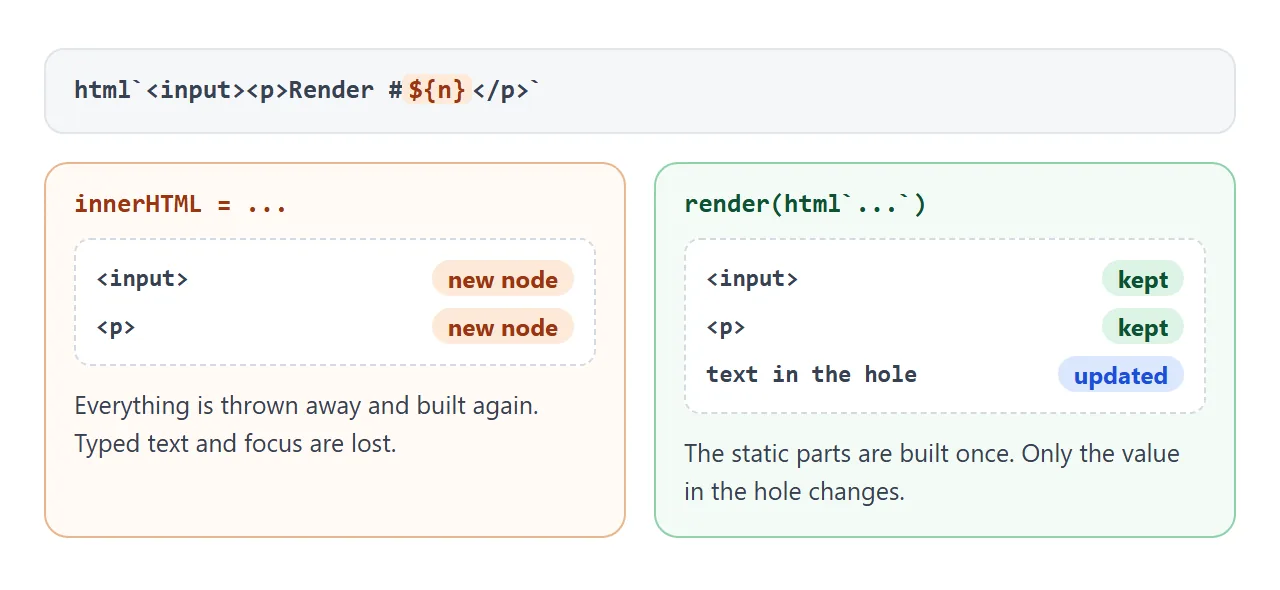
Type in both boxes below, then press the button.
<!doctype html>
<html lang="en">
<head>
<meta charset="utf-8">
<meta name="viewport" content="width=device-width, initial-scale=1">
<title>innerHTML vs lit-html render</title>
<style>
  body { margin: 0; padding: 16px; font-family: system-ui, sans-serif; background: #f4f5f7; color: #1d2330; }
  .row { display: grid; grid-template-columns: 1fr 1fr; gap: 12px; }
  .box { padding: 12px; border-radius: 12px; background: #fff; box-shadow: 0 4px 14px rgba(0, 0, 0, .08); }
  .box h3 { margin: 0 0 8px; font-size: 14px; }
  .bad h3 { color: #9a3412; }
  .good h3 { color: #0f5132; }
  input { font: inherit; width: 100%; box-sizing: border-box; padding: 7px 8px; border: 1px solid #c9ced8; border-radius: 8px; }
  p { margin: 8px 0 0; font-size: 14px; }
  button { font: inherit; margin-top: 14px; padding: 9px 16px; border: 0; border-radius: 8px; background: #2563eb; color: #fff; cursor: pointer; }
  .hint { font-size: 13px; color: #4b5563; margin: 0 0 12px; }
</style>
</head>
<body>
<p class="hint">Type in both boxes, then press the button.</p>
<div class="row">
  <div class="box bad"><h3>innerHTML</h3><div id="left"></div></div>
  <div class="box good"><h3>lit-html render()</h3><div id="right"></div></div>
</div>
<button id="go">Re-render both</button>

<script type="module">
  import { html, render } from 'https://cdn.jsdelivr.net/npm/lit-html@3.2.1/+esm';

  let n = 0;
  const left = document.getElementById('left');
  const right = document.getElementById('right');

  function draw() {
    n++;
    // Replaces every node, so the typed text is lost
    left.innerHTML = '<input placeholder="Type here"><p>Render #' + n + '</p>';
    // Same template again: only the changed ${n} is updated
    render(html`<input placeholder="Type here"><p>Render #${n}</p>`, right);
  }

  draw();
  document.getElementById('go').addEventListener('click', draw);
</script>
</body>
</html>
Calling render() again with a new template of the same shape is all it takes. There is no diffing code to write.
Make your own tag with LitElement
The core bundle adds LitElement. Extend it, describe the properties, return a template from render(), and register the class under a name with a hyphen. Then the tag works like any other HTML.
<!doctype html>
<html lang="en">
<head>
<meta charset="utf-8">
<meta name="viewport" content="width=device-width, initial-scale=1">
<title>split-bill: a Lit component</title>
<style>
  body { margin: 0; padding: 16px; font-family: system-ui, sans-serif; background: #f4f5f7; color: #1d2330; }
  .grid { display: grid; grid-template-columns: repeat(auto-fit, minmax(240px, 1fr)); gap: 14px; }
</style>
</head>
<body>
<!-- Plain HTML tags: the attributes become the component's starting values -->
<div class="grid">
  <split-bill bill="80" people="4" tip="15"></split-bill>
  <split-bill bill="40" people="2" tip="10"></split-bill>
</div>

<script type="module">
  // Core bundle: LitElement, html and css in one pinned file
  import { LitElement, html, css } from 'https://cdn.jsdelivr.net/gh/lit/dist@3.2.1/core/lit-core.min.js';

  class SplitBill extends LitElement {
    static properties = {
      bill: { type: Number },
      people: { type: Number },
      tip: { type: Number },
    };

    // Scoped to this component's shadow root
    static styles = css`
      :host { display: block; }
      .card { background: #fff; border-radius: 12px; padding: 14px 16px; box-shadow: 0 4px 14px rgba(0, 0, 0, .08); }
      label { display: block; font-size: 13px; margin-top: 10px; }
      input[type=number] { font: inherit; width: 100%; box-sizing: border-box; padding: 6px 8px; border: 1px solid #c9ced8; border-radius: 8px; }
      input[type=range] { width: 100%; }
      .out { margin-top: 14px; font-size: 22px; font-weight: 700; color: #0f5132; }
      .out small { font-size: 13px; font-weight: 400; color: #4b5563; }
    `;

    constructor() {
      super();
      // JavaScript: set defaults here, not as class fields
      this.bill = 0; this.people = 1; this.tip = 0;
    }

    set(prop) { return (e) => { this[prop] = Number(e.target.value); }; }

    // Runs again whenever bill, people or tip changes
    render() {
      const each = (this.bill * (1 + this.tip / 100)) / Math.max(1, this.people);
      return html`
        <div class="card">
          <label>Bill <input type="number" min="0" .value=${String(this.bill)} @input=${this.set('bill')}></label>
          <label>People <input type="number" min="1" .value=${String(this.people)} @input=${this.set('people')}></label>
          <label>Tip: ${this.tip}% <input type="range" min="0" max="30" .value=${String(this.tip)} @input=${this.set('tip')}></label>
          <div class="out">${each.toFixed(2)} <small>each</small></div>
        </div>`;
    }
  }
  customElements.define('split-bill', SplitBill);
</script>
</body>
</html>
- Attributes become properties. With
type: Number, an attribute such aspeople="4"is converted withNumber(). - Set defaults in the constructor. In plain JavaScript, Lit says not to use class fields for reactive properties, because they break the accessors.
render()reruns on change. Changethis.tipand the component updates by itself.- Styles are scoped.
static styles = cssapplies inside the component's shadow root, and page styles do not reach in. - Decorators need a build step. Lit's TypeScript examples use
@customElementand@property. Those require a compiler such as TypeScript or Babel, so they do not run in a plain HTML file.
This is the decorator form. It is shown for comparison and does not run as a single file:
// Needs a build step (TypeScript or Babel)
@customElement('split-bill')
class SplitBill extends LitElement {
  @property({ type: Number }) bill = 0;
}
Script and import mistakes
Check the script tag before blaming Lit.
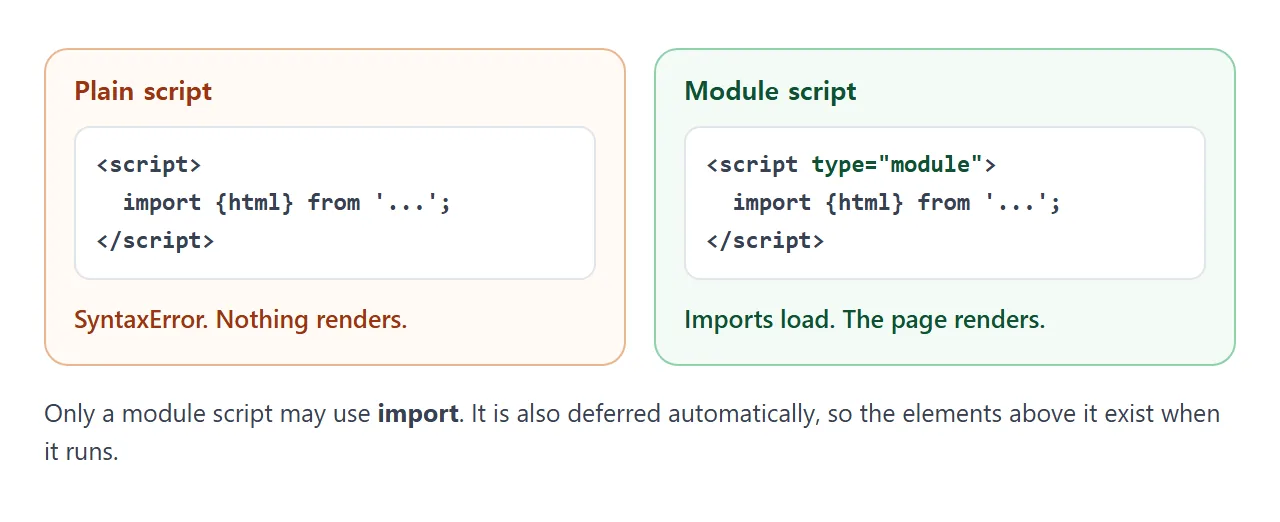
Only a module script can use import. Modules are also deferred automatically, so the elements written above the script already exist when it runs.
A bare specifier such as from 'lit' needs an import map or a bundler. In one file, write the full URL.
Importing your own file, such as ./app.js, fails when you open the page by double-clicking it, because browsers apply CORS rules to module files loaded from file://. A CDN URL is not affected.
When it does not work
| Symptom | Cause | Fix |
|---|---|---|
| Blank page and an import error in the console | The script has no type="module" |
Add type="module" |
The page shows ${...} as text |
Quotes were used, or the html tag is missing |
Use backticks and write html before them |
| Nothing renders, no error | render() was never called |
Call render(template, element) |
Import of 'lit' fails |
A bare specifier has no import map | Use the full CDN URL |
| Own file fails on double-click only | Module files are blocked from file:// |
Keep the code inline |
| The new tag does nothing | The class was never registered | Call customElements.define |
| Define throws an error | A custom tag name needs a hyphen | Rename it, for example split-bill |
| Properties are undefined | Class fields were used in JavaScript | Set them in the constructor |
Syntax error on @customElement |
Decorators need a compiler | Use static properties and define |
| Page CSS does not reach inside | Shadow DOM scopes styles | Put styles in static styles |
Share it as a link
A Lit page is a normal HTML file with one module import. That makes it easy to send, but an .html attachment may open as plain code on a phone. Sharing HTML code as a link covers the options.
To send the working version, paste the page into a NOS document and choose Create share link. HTML to link walks through it.
The page renders as written and its scripts run, including scripts loaded from cdn.jsdelivr.net or unpkg.com. The people you send it to can type and click themselves. If you change the code later, the same link shows the new version.
If the page does not behave, HTML JavaScript not working lists the causes in order.