Material UI (MUI) is an open-source React component library that implements Google's Material Design. It gives you ready-made buttons, text fields, dialogs, lists and a theme system, all as React components.
That last part matters for a single HTML file. Material UI is not a stylesheet you link. The page also needs React, and a script that renders the components. Here is the smallest version that works:
<!doctype html>
<html lang="en">
<head>
<meta charset="utf-8">
<meta name="viewport" content="width=device-width, initial-scale=1">
<title>Material UI in one HTML file</title>
<!-- Roboto, the font Material UI uses by default -->
<link rel="stylesheet" href="https://fonts.googleapis.com/css2?family=Roboto:wght@300;400;500;700&display=swap">
<!-- The import map must come before the module script.
     The last four entries send every copy of React to one version. -->
<script type="importmap">
{
  "imports": {
    "react": "https://cdn.jsdelivr.net/npm/react@19.2.8/+esm",
    "react-dom/client": "https://cdn.jsdelivr.net/npm/react-dom@19.2.8/client/+esm",
    "@mui/material": "https://cdn.jsdelivr.net/npm/@mui/material@9.4.0/+esm",

    "https://cdn.jsdelivr.net/npm/react@18.2.0/": "https://cdn.jsdelivr.net/npm/react@19.2.8/",
    "https://cdn.jsdelivr.net/npm/react@19.0.0/": "https://cdn.jsdelivr.net/npm/react@19.2.8/",
    "https://cdn.jsdelivr.net/npm/react@19.1.0/": "https://cdn.jsdelivr.net/npm/react@19.2.8/",
    "https://cdn.jsdelivr.net/npm/react@%5E17.0.0%20%7C%7C%20%5E18.0.0%20%7C%7C%20%5E19.0.0/": "https://cdn.jsdelivr.net/npm/react@19.2.8/"
  }
}
</script>
<style>
  body { margin: 0; font-family: Roboto, system-ui, sans-serif; }
</style>
</head>
<body>
<div id="root"><p style="padding: 20px">Loading Material UI…</p></div>

<script type="module">
  import React from 'react';
  import { createRoot } from 'react-dom/client';
  import { Box, Button, Stack, Typography } from '@mui/material';

  const h = React.createElement;  // plain JavaScript instead of JSX: no build step

  function App() {
    const [count, setCount] = React.useState(0);
    return h(Box, { sx: { p: 3 } },
      h(Typography, { variant: 'h5', gutterBottom: true }, 'Hello, Material UI'),
      h(Typography, { color: 'text.secondary', sx: { mb: 2 } },
        'Real MUI components, loaded from jsDelivr.'),
      h(Stack, { direction: 'row', spacing: 1.5 },
        h(Button, { id: 'add', variant: 'contained', onClick: () => setCount(count + 1) },
          'Clicked ' + count + (count === 1 ? ' time' : ' times')),
        h(Button, { id: 'reset', variant: 'outlined', onClick: () => setCount(0) }, 'Reset')
      )
    );
  }

  createRoot(document.getElementById('root')).render(h(App));
</script>
</body>
</html>
No npm, no bundler and no server. The file opens in a browser as it is.
What you need in the file
The Material UI docs install it with npm, and list React and React DOM as peer dependencies. In a single file, those three packages come from a CDN instead:
| Piece | What it does | Where it comes from here |
|---|---|---|
| Roboto | The font Material UI uses by default | Google Fonts link |
| React and React DOM | Run the components and draw them | jsDelivr |
@mui/material |
The components and the theme | jsDelivr |
| Your script | Builds the page from components | A module script in the file |
The docs also describe a CDN option and call it "a great option for rapid prototyping". Their official CDN example loads the packages from esm.sh and compiles JSX with Babel in the browser. This guide uses cdn.jsdelivr.net and plain JavaScript instead.
The smallest working page
Every example on this page has the same five parts, in this order:
- The Roboto link in the head.
- An import map, also in the head. It gives short names such as
reactand@mui/materialto pinned jsDelivr URLs. - An empty
<div id="root">. React draws the page inside it. - A module script that imports React,
createRootand the components. - One render call:
createRoot(root).render(h(App)).
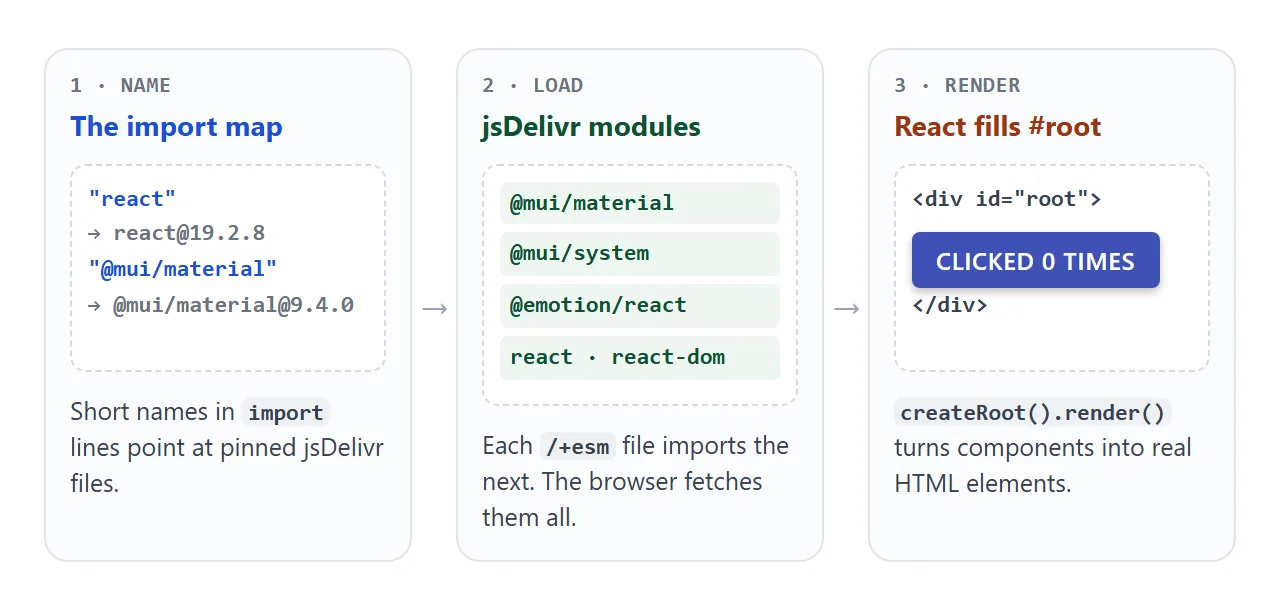
The import map has to come before the module script. MDN says import maps must be processed before any script that imports modules using the names they declare.
<script type="importmap">
{
  "imports": {
    "react": "https://cdn.jsdelivr.net/npm/react@19.2.8/+esm",
    "react-dom/client": "https://cdn.jsdelivr.net/npm/react-dom@19.2.8/client/+esm",
    "@mui/material": "https://cdn.jsdelivr.net/npm/@mui/material@9.4.0/+esm"
  }
}
</script>

<div id="root"></div>

<script type="module">
  import React from 'react';
  import { createRoot } from 'react-dom/client';
  import { Button } from '@mui/material';

  const h = React.createElement;
  createRoot(document.getElementById('root'))
    .render(h(Button, { variant: 'contained' }, 'Hello'));
</script>
Adding /+esm to a jsDelivr npm URL returns the package as an ES module. Pin the exact version in every URL so the page does not change under you.
Why the import map has four extra lines
The short map above is not enough on its own. Run it and the page stays blank, with this error in the console:
Cannot read properties of null (reading 'useContext')
The cause is two copies of React. Material UI imports helper packages such as Emotion, its default styling engine. When we checked on 2026-10-01, jsDelivr's builds of some of those helpers imported other React versions, such as 19.0.0, instead of 19.2.8.
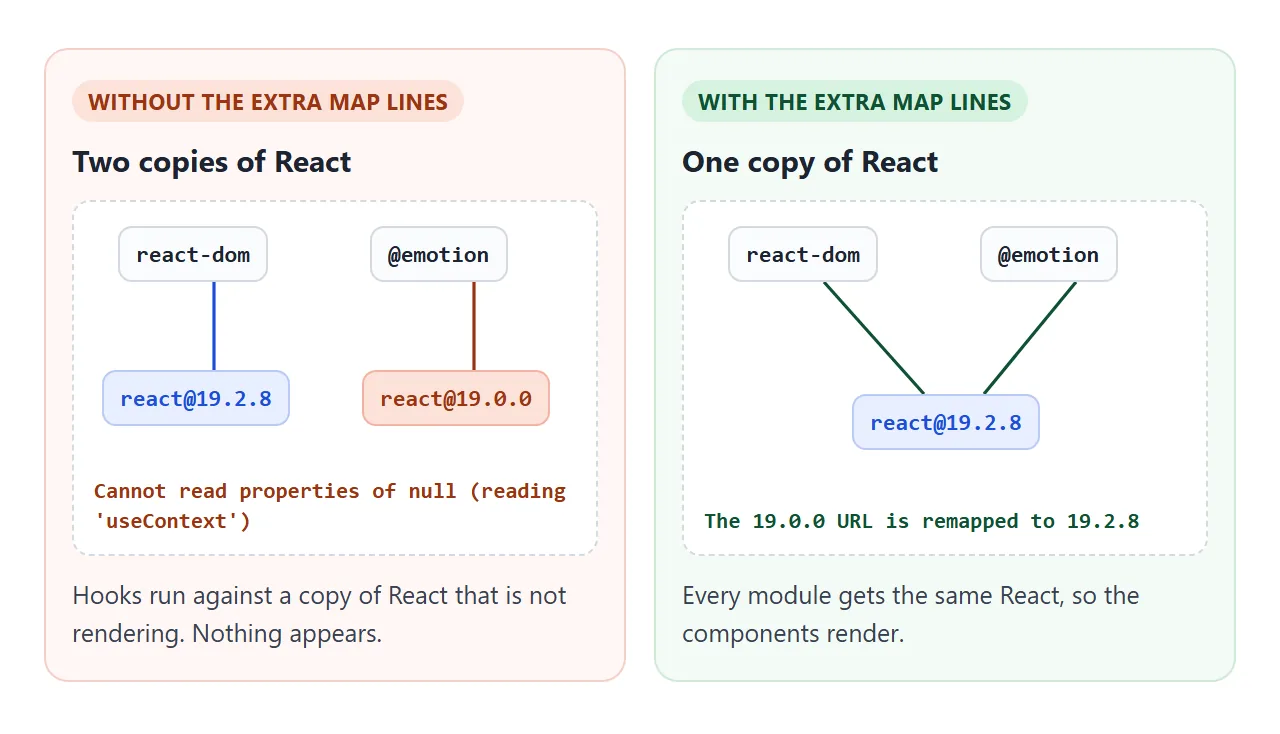
The React docs explain it: for hooks to work, the react your code imports must be the same module that react-dom uses.
Import map keys can be full URLs, and a key ending in / remaps every address that starts with it. So these lines send the stray versions to one copy:
"https://cdn.jsdelivr.net/npm/react@18.2.0/": "https://cdn.jsdelivr.net/npm/react@19.2.8/",
"https://cdn.jsdelivr.net/npm/react@19.0.0/": "https://cdn.jsdelivr.net/npm/react@19.2.8/",
"https://cdn.jsdelivr.net/npm/react@19.1.0/": "https://cdn.jsdelivr.net/npm/react@19.2.8/",
"https://cdn.jsdelivr.net/npm/react@%5E17.0.0%20%7C%7C%20%5E18.0.0%20%7C%7C%20%5E19.0.0/": "https://cdn.jsdelivr.net/npm/react@19.2.8/"
These lines match the versions pinned here. If you change versions, open the Network panel in DevTools, filter by react@, and add a line for any React version other than yours.
JSX, or plain createElement
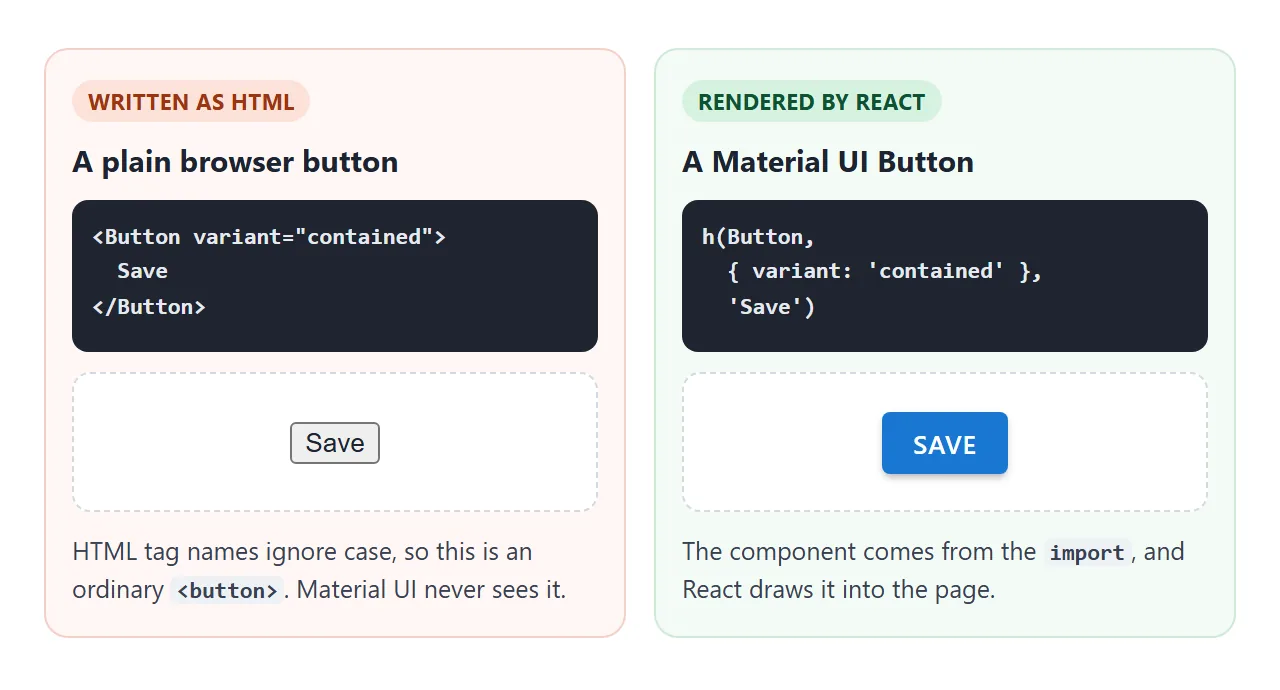
Material UI examples are usually written in JSX, such as <Button variant="contained">. The React docs call JSX a syntax extension for JavaScript, and a plain module script cannot run it. The browser stops at the first < with Unexpected token '<'.
The examples here use React.createElement, renamed to h. The React docs list it as an alternative to JSX. Each JSX tag becomes one call:
// JSX (needs a compile step)
<Button variant="contained" onClick={save}>Save</Button>

// The same thing, runs as is
h(Button, { variant: 'contained', onClick: save }, 'Save')
If you prefer JSX, Babel standalone compiles <script type="text/babel"> tags in the browser. The Babel docs advise against it in production and recommend compiling ahead of time.
A related mistake is writing the component straight into the HTML. The browser reads it as an ordinary tag:
Theme: colour and dark mode
Components take their colours, corners and fonts from a theme. Create one with createTheme, wrap the page in ThemeProvider, and every component inside follows it. CssBaseline makes the page background and text colour follow too.
<!doctype html>
<html lang="en">
<head>
<meta charset="utf-8">
<meta name="viewport" content="width=device-width, initial-scale=1">
<title>Material UI theme: colour and dark mode</title>
<link rel="stylesheet" href="https://fonts.googleapis.com/css2?family=Roboto:wght@300;400;500;700&display=swap">
<script type="importmap">
{
  "imports": {
    "react": "https://cdn.jsdelivr.net/npm/react@19.2.8/+esm",
    "react-dom/client": "https://cdn.jsdelivr.net/npm/react-dom@19.2.8/client/+esm",
    "@mui/material": "https://cdn.jsdelivr.net/npm/@mui/material@9.4.0/+esm",

    "https://cdn.jsdelivr.net/npm/react@18.2.0/": "https://cdn.jsdelivr.net/npm/react@19.2.8/",
    "https://cdn.jsdelivr.net/npm/react@19.0.0/": "https://cdn.jsdelivr.net/npm/react@19.2.8/",
    "https://cdn.jsdelivr.net/npm/react@19.1.0/": "https://cdn.jsdelivr.net/npm/react@19.2.8/",
    "https://cdn.jsdelivr.net/npm/react@%5E17.0.0%20%7C%7C%20%5E18.0.0%20%7C%7C%20%5E19.0.0/": "https://cdn.jsdelivr.net/npm/react@19.2.8/"
  }
}
</script>
</head>
<body>
<div id="root"><p style="padding: 20px; font-family: sans-serif">Loading Material UI…</p></div>

<script type="module">
  import React from 'react';
  import { createRoot } from 'react-dom/client';
  import {
    createTheme, ThemeProvider, CssBaseline,
    Box, Stack, Button, TextField, Alert, Switch, FormControlLabel, Typography
  } from '@mui/material';

  const h = React.createElement;
  const colors = { Indigo: '#3f51b5', Teal: '#00897b', Orange: '#e65100' };

  function App() {
    const [dark, setDark] = React.useState(false);
    const [main, setMain] = React.useState(colors.Indigo);

    // One theme object styles every component inside ThemeProvider
    const theme = React.useMemo(() => createTheme({
      palette: { mode: dark ? 'dark' : 'light', primary: { main } },
      shape: { borderRadius: 10 },
    }), [dark, main]);

    return h(ThemeProvider, { theme },
      h(CssBaseline),  // page background and text colour follow the theme
      h(Box, { sx: { p: 2.5, maxWidth: 520 } },
        h(Stack, { direction: 'row', spacing: 1, sx: { mb: 2, flexWrap: 'wrap' } },
          Object.entries(colors).map(([name, hex]) =>
            h(Button, {
              key: name, size: 'small', onClick: () => setMain(hex),
              variant: hex === main ? 'contained' : 'outlined',
            }, name)),
          h(FormControlLabel, {
            sx: { ml: 1 },
            label: 'Dark',
            control: h(Switch, { id: 'dark', checked: dark, onChange: (e) => setDark(e.target.checked) }),
          })
        ),
        h(Typography, { variant: 'subtitle2', sx: { mb: 1 } }, 'The three Button variants'),
        h(Stack, { direction: 'row', spacing: 1, sx: { mb: 2.5 } },
          h(Button, { variant: 'text' }, 'Text'),
          h(Button, { variant: 'outlined' }, 'Outlined'),
          h(Button, { id: 'contained', variant: 'contained' }, 'Contained')
        ),
        h(TextField, { label: 'Your name', size: 'small', fullWidth: true, sx: { mb: 2 } }),
        h(Alert, { severity: 'info' }, 'Change the colour or switch to dark: every component follows.')
      )
    );
  }

  createRoot(document.getElementById('root')).render(h(App));
</script>
</body>
</html>
Dark mode is one palette setting. The docs say Material UI has two palette modes, light (the default) and dark:
const theme = createTheme({
  palette: { mode: 'dark', primary: { main: '#00897b' } },
});
The Button comes in three variants: text (the default), outlined and contained. Smaller adjustments go in the sx prop, such as sx: { p: 2, mb: 1 } for padding and margin.
A finished example: a task list
This one adds a form, a list with checkboxes, two icons and a Snackbar message. The form is handled inside the page, so nothing is sent anywhere.
<!doctype html>
<html lang="en">
<head>
<meta charset="utf-8">
<meta name="viewport" content="width=device-width, initial-scale=1">
<title>Material UI task list</title>
<link rel="stylesheet" href="https://fonts.googleapis.com/css2?family=Roboto:wght@300;400;500;700&display=swap">
<script type="importmap">
{
  "imports": {
    "react": "https://cdn.jsdelivr.net/npm/react@19.2.8/+esm",
    "react-dom/client": "https://cdn.jsdelivr.net/npm/react-dom@19.2.8/client/+esm",
    "@mui/material": "https://cdn.jsdelivr.net/npm/@mui/material@9.4.0/+esm",
    "@mui/icons-material/Delete": "https://cdn.jsdelivr.net/npm/@mui/icons-material@9.4.0/Delete/+esm",
    "@mui/icons-material/Add": "https://cdn.jsdelivr.net/npm/@mui/icons-material@9.4.0/Add/+esm",

    "https://cdn.jsdelivr.net/npm/react@18.2.0/": "https://cdn.jsdelivr.net/npm/react@19.2.8/",
    "https://cdn.jsdelivr.net/npm/react@19.0.0/": "https://cdn.jsdelivr.net/npm/react@19.2.8/",
    "https://cdn.jsdelivr.net/npm/react@19.1.0/": "https://cdn.jsdelivr.net/npm/react@19.2.8/",
    "https://cdn.jsdelivr.net/npm/react@%5E17.0.0%20%7C%7C%20%5E18.0.0%20%7C%7C%20%5E19.0.0/": "https://cdn.jsdelivr.net/npm/react@19.2.8/"
  }
}
</script>
</head>
<body>
<div id="root"><p style="padding: 20px; font-family: sans-serif">Loading Material UI…</p></div>

<script type="module">
  import React from 'react';
  import { createRoot } from 'react-dom/client';
  import {
    createTheme, ThemeProvider, CssBaseline, Paper, Typography, Stack, TextField, Button,
    List, ListItem, ListItemIcon, ListItemText, Checkbox, IconButton, Chip, Snackbar
  } from '@mui/material';
  import DeleteIcon from '@mui/icons-material/Delete';
  import AddIcon from '@mui/icons-material/Add';

  const h = React.createElement;
  const theme = createTheme({ palette: { primary: { main: '#00796b' }, background: { default: '#eef2f1' } } });
  let nextId = 3;

  function App() {
    const [tasks, setTasks] = React.useState([
      { id: 1, text: 'Pick a theme colour', done: true },
      { id: 2, text: 'Send the share link', done: false },
    ]);
    const [text, setText] = React.useState('');
    const [toast, setToast] = React.useState('');

    // The form is handled in the page: nothing is sent to a server
    function add(e) {
      e.preventDefault();
      const value = text.trim();
      if (!value) return;
      setTasks([...tasks, { id: nextId++, text: value, done: false }]);
      setText('');
      setToast('Added "' + value + '"');
    }
    const toggle = (id) => setTasks(tasks.map((t) => t.id === id ? { ...t, done: !t.done } : t));
    const remove = (id) => setTasks(tasks.filter((t) => t.id !== id));
    const left = tasks.filter((t) => !t.done).length;

    return h(ThemeProvider, { theme },
      h(CssBaseline),
      h(Paper, { elevation: 2, sx: { m: 2, p: 2, maxWidth: 480 } },
        h(Stack, { direction: 'row', sx: { alignItems: 'center', justifyContent: 'space-between', mb: 1.5 } },
          h(Typography, { variant: 'h6' }, 'Tasks'),
          h(Chip, { id: 'left', size: 'small', color: 'primary', label: left + ' open' })
        ),
        h('form', { id: 'add-form', onSubmit: add },
          h(Stack, { direction: 'row', spacing: 1 },
            h(TextField, {
              id: 'task', label: 'New task', size: 'small', fullWidth: true,
              value: text, onChange: (e) => setText(e.target.value),
            }),
            h(Button, { type: 'submit', variant: 'contained', startIcon: h(AddIcon) }, 'Add')
          )
        ),
        h(List, { id: 'list', dense: true },
          tasks.map((t) => h(ListItem, {
            key: t.id,
            secondaryAction: h(IconButton, { edge: 'end', 'aria-label': 'Delete', onClick: () => remove(t.id) }, h(DeleteIcon)),
          },
            h(ListItemIcon, null, h(Checkbox, { edge: 'start', checked: t.done, onChange: () => toggle(t.id) })),
            h(ListItemText, {
              primary: t.text,
              sx: { textDecoration: t.done ? 'line-through' : 'none', color: t.done ? 'text.disabled' : 'text.primary' },
            })
          ))
        )
      ),
      h(Snackbar, {
        open: !!toast, message: toast, autoHideDuration: 2500, onClose: () => setToast(''),
        anchorOrigin: { vertical: 'bottom', horizontal: 'center' },
      })
    );
  }

  createRoot(document.getElementById('root')).render(h(App));
</script>
</body>
</html>
- The form:
onSubmitcallse.preventDefault()and adds the task to state. To send it to a server instead, see submitting an HTML form. - Icons: the docs export each icon as its own component from
@mui/icons-material. Map only the ones you use, such as@mui/icons-material/Delete. - State:
React.useStateholds the list, and Material UI redraws when it changes.
When to move to npm
The Material UI docs do not recommend the CDN approach for production. The browser downloads the entire library, whichever components you use. For a product, install the packages and build:
npm install @mui/material @emotion/react @emotion/styled
Your code then imports the installed packages instead of CDN URLs. Hosting a built front end covers putting the built app online.
When it does not work
| What you see | Cause | Fix |
|---|---|---|
Blank page, useContext error in the console |
Two copies of React | Add the React remap lines to the import map |
Unexpected token '<' |
JSX in a plain module script | Use h(...) or Babel standalone |
Failed to resolve module specifier |
A name is missing from the import map, or the map comes after the script | Add the name and keep the map above the script |
| A grey browser button, no styling | Component written as an HTML tag | Render it from the module script |
| The wrong font | No Roboto link | Add the Google Fonts link in the head |
| Page changes after a new release | Version not pinned in the URL | Put the exact version in every URL |
For other script problems, why HTML JavaScript is not working goes through the usual checks.
Share it as a link
A Material UI page is easier to show than to describe. A screenshot cannot be clicked, and an .html attachment may open as plain code, or not at all, on a phone.
To send the working version, paste the page into a NOS document and choose Create share link. HTML to link walks through it.
The page renders as written, its scripts run, and the modules from cdn.jsdelivr.net load, so the people you send it to can click the real components themselves. If you change the code later, the same link shows the new version.