Sunday evening. Someone asks what is for dinner this week, and you say "I'll sort it out".
On Tuesday you are in the shop. The plan is in your head, the list is on the back of an envelope at home, and you buy garlic you already had.
A plan only helps if it is with you where the decisions happen. In the kitchen, in the shop, and in the family chat.
These days people ask ChatGPT, Claude or Gemini for it and get a finished page in one reply. A whole meal planner, with the shopping list already sorted.
Here is a week for a made-up family. Tap a day for the cooking notes, then tick things off the list at the bottom.
<!doctype html>
<html lang="en">
<head>
<meta charset="utf-8">
<meta name="viewport" content="width=device-width, initial-scale=1">
<title>Our week of meals</title>
<style>
  * { box-sizing: border-box; }
  body { margin: 0; background: radial-gradient(circle at 0% 0%, #ffe9d6, transparent 40%), radial-gradient(circle at 100% 20%, #e3f4e6, transparent 38%), #fffbf5; color: #2b2420; font-family: system-ui, -apple-system, "Segoe UI", sans-serif; }
  .page { max-width: 680px; margin: 0 auto; padding: 20px 14px 30px; }
  header { display: flex; align-items: flex-end; justify-content: space-between; gap: 10px; margin-bottom: 14px; }
  h1 { margin: 0; font-size: 24px; letter-spacing: -.01em; }
  h1 small { display: block; font-size: 13px; font-weight: 600; color: #8a7a6c; margin-bottom: 2px; letter-spacing: .06em; text-transform: uppercase; }
  .count { font-size: 13px; color: #8a7a6c; text-align: right; }
  .count b { display: block; font-size: 22px; color: #e0662f; }
  h2 { font-size: 14px; letter-spacing: .1em; text-transform: uppercase; color: #8a7a6c; margin: 22px 0 10px; }
  .week { display: grid; grid-template-columns: 1fr; gap: 10px; }
  @media (min-width: 560px) { .week { grid-template-columns: 1fr 1fr; } }
  .day { position: relative; background: #fff; border-radius: 16px; padding: 12px 14px 12px; box-shadow: 0 1px 0 #efe4d8, 0 6px 18px -10px rgba(120, 70, 30, .35); cursor: pointer; transition: transform .15s, box-shadow .15s; outline: none; }
  .day:hover, .day:focus-visible { transform: translateY(-2px); box-shadow: 0 1px 0 #efe4d8, 0 12px 24px -12px rgba(120, 70, 30, .45); }
  .day.today { box-shadow: 0 0 0 2px #e0662f, 0 10px 24px -12px rgba(224, 102, 47, .55); }
  .day.today::after { content: "Today"; position: absolute; top: 10px; right: 12px; font: 700 11px system-ui; color: #fff; background: #e0662f; border-radius: 999px; padding: 3px 8px; }
  .dname { margin: 0; font-size: 12px; font-weight: 800; letter-spacing: .1em; text-transform: uppercase; color: #e0662f; }
  .meals { margin: 4px 0 6px; padding: 0; list-style: none; }
  .meals li { font-size: 14px; color: #6b5d52; line-height: 1.45; }
  .meals li.dinner { font-size: 18px; font-weight: 750; color: #2b2420; }
  .meals li span { display: inline-block; width: 52px; font-size: 11px; font-weight: 700; color: #b3a394; text-transform: uppercase; letter-spacing: .06em; }
  .ing { margin: 0; padding: 8px 0 0; list-style: none; border-top: 1px dashed #eadfd3; font-size: 13px; color: #6b5d52; line-height: 1.5; }
  .ing b { font-weight: 700; color: #3f8a5a; }
  .ing b::after { content: ":"; }
  .notes { margin: 6px 0 0; font-size: 13px; color: #8a7a6c; line-height: 1.45; display: -webkit-box; -webkit-line-clamp: 1; -webkit-box-orient: vertical; overflow: hidden; }
  .day::before { content: "Cooking notes \203A"; position: absolute; right: 14px; bottom: 10px; font: 700 12px system-ui; color: #e0662f; }
  .day { padding-bottom: 30px; }

  .shop { background: #fff; border-radius: 18px; padding: 14px; box-shadow: 0 6px 22px -14px rgba(60, 90, 60, .5); }
  .bar { height: 10px; border-radius: 999px; background: #eef3ea; overflow: hidden; margin: 2px 0 6px; }
  .bar i { display: block; height: 100%; width: 0; background: linear-gradient(90deg, #6cc38a, #3f8a5a); border-radius: inherit; transition: width .35s ease; }
  .prog { font-size: 13px; color: #6b5d52; margin-bottom: 8px; }
  .aisle { margin-top: 12px; break-inside: avoid; }
  @media (min-width: 560px) { #list { columns: 2; column-gap: 18px; } .aisle:first-child { margin-top: 0; } }
  .aisle h3 { margin: 0 0 6px; font-size: 13px; display: flex; align-items: center; gap: 8px; color: #2b2420; }
  .aisle h3 em { font-style: normal; font-weight: 600; font-size: 12px; color: #fff; background: #3f8a5a; border-radius: 999px; padding: 1px 8px; }
  .item { display: flex; align-items: center; gap: 10px; width: 100%; padding: 6px 6px; border: 0; border-radius: 10px; background: transparent; text-align: left; font: 15px system-ui; color: #2b2420; cursor: pointer; transition: background .15s; }
  .item:hover { background: #f6f9f3; }
  .box { flex: none; width: 22px; height: 22px; border-radius: 7px; border: 2px solid #b9cdb0; display: grid; place-items: center; transition: all .2s; }
  .box svg { width: 14px; height: 14px; stroke: #fff; stroke-width: 3; fill: none; stroke-dasharray: 20; stroke-dashoffset: 20; transition: stroke-dashoffset .25s .05s; }
  .item.done .box { background: #3f8a5a; border-color: #3f8a5a; transform: scale(1.08); }
  .item.done .box svg { stroke-dashoffset: 0; }
  .item.done .nm { text-decoration: line-through; color: #a59a90; }
  .nm { flex: 1; }
  .days { font-size: 11px; color: #8a7a6c; white-space: nowrap; }

  .sheet-bg { position: fixed; inset: 0; background: rgba(43, 36, 32, .45); opacity: 0; pointer-events: none; transition: opacity .2s; }
  .sheet { position: fixed; left: 0; right: 0; bottom: 0; max-width: 560px; margin: 0 auto; max-height: 82vh; overflow: auto; background: #fffbf5; border-radius: 22px 22px 0 0; padding: 18px 18px 24px; transform: translateY(105%); visibility: hidden; transition: transform .3s cubic-bezier(.2, .9, .3, 1.1), visibility 0s .3s; box-shadow: 0 -10px 40px rgba(0, 0, 0, .2); }
  .open .sheet-bg { opacity: 1; pointer-events: auto; }
  .open .sheet { transform: none; visibility: visible; transition: transform .3s cubic-bezier(.2, .9, .3, 1.1); }
  .sheet .grab { width: 44px; height: 5px; border-radius: 3px; background: #e2d6ca; margin: -6px auto 12px; }
  .sheet .sd { font-size: 12px; font-weight: 800; letter-spacing: .1em; text-transform: uppercase; color: #e0662f; }
  .sheet h4 { margin: 2px 0 4px; font-size: 24px; }
  .sheet .lunch { font-size: 14px; color: #6b5d52; margin-bottom: 12px; }
  .sheet ol { margin: 0 0 12px; padding: 0; list-style: none; counter-reset: s; }
  .sheet ol li { counter-increment: s; position: relative; padding: 10px 10px 10px 44px; margin-bottom: 6px; background: #fff; border-radius: 12px; font-size: 15px; line-height: 1.45; cursor: pointer; }
  .sheet ol li::before { content: counter(s); position: absolute; left: 10px; top: 9px; width: 24px; height: 24px; border-radius: 50%; background: #ffe2cf; color: #e0662f; font: 800 13px/24px system-ui; text-align: center; }
  .sheet ol li.done { color: #a59a90; text-decoration: line-through; }
  .sheet ol li.done::before { content: "\2713"; background: #3f8a5a; color: #fff; }
  .sheet .si { font-size: 13px; color: #6b5d52; line-height: 1.6; }
  .sheet .si b { color: #3f8a5a; }
  .sheet .close { display: block; width: 100%; margin-top: 14px; padding: 12px; border: 0; border-radius: 12px; background: #2b2420; color: #fff; font: 700 15px system-ui; cursor: pointer; }
  .foot { margin-top: 18px; font-size: 12px; color: #a59a90; text-align: center; }
</style>
</head>
<body>
<main class="page">
  <header>
    <h1><small>The Reyes house</small>Our week of meals</h1>
    <div class="count"><b id="nDinners">7</b>dinners planned</div>
  </header>

  <section class="week" id="week">
    <article class="day" tabindex="0">
      <p class="dname">Monday</p>
      <ul class="meals"><li><span>Lunch</span>Cheese toasties</li><li class="dinner"><span>Dinner</span>Spaghetti bolognese</li></ul>
      <ul class="ing"><li><b>Produce</b> onion, carrots, garlic</li><li><b>Meat and fish</b> beef mince</li><li><b>Pantry</b> spaghetti, chopped tomatoes</li><li><b>Dairy</b> cheddar, parmesan</li><li><b>Bakery</b> sliced bread</li></ul>
      <p class="notes">Brown the mince first. Add the vegetables and tomatoes and simmer for 20 minutes. Cook double and keep half for Tuesday's lunch.</p>
    </article>
    <article class="day" tabindex="0">
      <p class="dname">Tuesday</p>
      <ul class="meals"><li><span>Lunch</span>Leftover bolognese</li><li class="dinner"><span>Dinner</span>Tray-bake chicken and potatoes</li></ul>
      <ul class="ing"><li><b>Produce</b> potatoes, red peppers, lemon, garlic</li><li><b>Meat and fish</b> chicken thighs</li><li><b>Pantry</b> olive oil</li></ul>
      <p class="notes">Everything goes on one tray. Roast at 200°C for about 40 minutes, turning once. Squeeze the lemon over at the end.</p>
    </article>
    <article class="day" tabindex="0">
      <p class="dname">Wednesday</p>
      <ul class="meals"><li><span>Lunch</span>Tuna wraps</li><li class="dinner"><span>Dinner</span>Chicken tacos</li></ul>
      <ul class="ing"><li><b>Produce</b> limes, avocado, lettuce, red onion</li><li><b>Meat and fish</b> chicken thighs</li><li><b>Bakery</b> tortillas</li><li><b>Dairy</b> sour cream</li><li><b>Pantry</b> tinned tuna</li></ul>
      <p class="notes">Slice and fry the chicken with a pinch of cumin. Warm the tortillas in a dry pan. Put everything in bowls so everyone builds their own.</p>
    </article>
    <article class="day" tabindex="0">
      <p class="dname">Thursday</p>
      <ul class="meals"><li><span>Lunch</span>Egg fried rice</li><li class="dinner"><span>Dinner</span>Salmon, rice and greens</li></ul>
      <ul class="ing"><li><b>Produce</b> broccoli, spring onions</li><li><b>Meat and fish</b> salmon fillets</li><li><b>Pantry</b> rice, soy sauce</li><li><b>Dairy</b> eggs</li></ul>
      <p class="notes">Cook a big pot of rice at lunch and keep half. Bake the salmon at 200°C for 12 to 15 minutes. Steam the broccoli while it cooks.</p>
    </article>
    <article class="day" tabindex="0">
      <p class="dname">Friday</p>
      <ul class="meals"><li><span>Lunch</span>Cheese toasties</li><li class="dinner"><span>Dinner</span>Homemade pizza night</li></ul>
      <ul class="ing"><li><b>Bakery</b> pizza bases, sliced bread</li><li><b>Dairy</b> mozzarella, cheddar</li><li><b>Produce</b> mushrooms</li><li><b>Pantry</b> passata</li></ul>
      <p class="notes">Everyone tops their own base. Bake at the hottest oven setting until the edges are golden, around 10 minutes.</p>
    </article>
    <article class="day" tabindex="0">
      <p class="dname">Saturday</p>
      <ul class="meals"><li><span>Lunch</span>Sandwiches at football</li><li class="dinner"><span>Dinner</span>Burgers</li></ul>
      <ul class="ing"><li><b>Meat and fish</b> beef burgers</li><li><b>Bakery</b> burger buns, sliced bread</li><li><b>Produce</b> tomatoes, lettuce</li><li><b>Dairy</b> cheddar</li></ul>
      <p class="notes">Pack sandwiches before the match. Grill or pan-fry the burgers, about 5 minutes a side. Toast the buns cut side down.</p>
    </article>
    <article class="day" tabindex="0">
      <p class="dname">Sunday</p>
      <ul class="meals"><li><span>Lunch</span>Roast chicken</li><li class="dinner"><span>Dinner</span>Chicken soup and bread</li></ul>
      <ul class="ing"><li><b>Meat and fish</b> whole chicken</li><li><b>Produce</b> potatoes, carrots, onion</li><li><b>Bakery</b> sourdough loaf</li><li><b>Pantry</b> stock cubes</li></ul>
      <p class="notes">Roast the chicken for lunch. Pick the leftover meat for the soup. Simmer it with carrots, onion and stock for 25 minutes.</p>
    </article>
  </section>

  <h2>Shopping list</h2>
  <section class="shop">
    <div class="bar"><i id="fill"></i></div>
    <div class="prog" id="prog"></div>
    <div id="list"></div>
  </section>

  <p class="foot">Made-up family and meals. Tap a day for the cooking notes. The list is built from the ingredient lines above.</p>
</main>

<div id="sheetWrap">
  <div class="sheet-bg" id="bg"></div>
  <div class="sheet" role="dialog" aria-modal="true" aria-labelledby="sTitle">
    <div class="grab"></div>
    <div class="sd" id="sDay"></div>
    <h4 id="sTitle"></h4>
    <div class="lunch" id="sLunch"></div>
    <ol id="sSteps"></ol>
    <div class="si" id="sIng"></div>
    <button class="close" id="close">Back to the week</button>
  </div>
</div>

<script>
  // Everything is read from the visible text above, so editing a meal or an ingredient line changes the list.
  const ORDER = ['Produce', 'Bakery', 'Meat and fish', 'Dairy', 'Pantry', 'Frozen'];
  const days = [...document.querySelectorAll('.day')];
  const tick = '<svg viewBox="0 0 16 16"><path d="M3 8.5l3.2 3L13 4.5"/></svg>';
  const t = (el) => (el ? el.textContent.replace(/\s+/g, ' ').trim() : '');
  const mealText = (li) => t(li).replace(/^(Lunch|Dinner)\s*/i, '');

  function build() {
    const aisles = new Map();
    days.forEach((d) => {
      const dn = t(d.querySelector('.dname')).slice(0, 3);
      d.querySelectorAll('.ing li').forEach((li) => {
        const aisle = t(li.querySelector('b')) || 'Other';
        const rest = t(li).slice(aisle.length).replace(/^[:\s]+/, '');
        rest.split(',').map((s) => s.trim()).filter(Boolean).forEach((name) => {
          if (!aisles.has(aisle)) aisles.set(aisle, new Map());
          const m = aisles.get(aisle), key = name.toLowerCase();
          if (!m.has(key)) m.set(key, { name, days: [] });
          if (!m.get(key).days.includes(dn)) m.get(key).days.push(dn);
        });
      });
    });
    const names = [...aisles.keys()].sort((a, b) => {
      const ia = ORDER.indexOf(a), ib = ORDER.indexOf(b);
      return (ia < 0 ? 99 : ia) - (ib < 0 ? 99 : ib);
    });
    const list = document.getElementById('list');
    list.innerHTML = '';
    names.forEach((a) => {
      const sec = document.createElement('div'); sec.className = 'aisle';
      const items = [...aisles.get(a).values()];
      sec.innerHTML = '<h3>' + a + ' <em>' + items.length + '</em></h3>';
      items.forEach((it) => {
        const b = document.createElement('button'); b.className = 'item'; b.setAttribute('aria-pressed', 'false');
        b.innerHTML = '<span class="box">' + tick + '</span><span class="nm"></span><span class="days"></span>';
        b.querySelector('.nm').textContent = it.name;
        b.querySelector('.days').textContent = it.days.join(' · ');
        b.onclick = () => { b.classList.toggle('done'); b.setAttribute('aria-pressed', b.classList.contains('done')); progress(); };
        sec.append(b);
      });
      list.append(sec);
    });
    document.getElementById('nDinners').textContent = days.filter((d) => t(d.querySelector('.dinner'))).length;
    progress();
  }

  function progress() {
    const all = document.querySelectorAll('.item').length, done = document.querySelectorAll('.item.done').length;
    document.getElementById('fill').style.width = (all ? (done / all) * 100 : 0) + '%';
    document.getElementById('prog').textContent = done === all && all ? 'All ' + all + ' items in the basket.' : done + ' of ' + all + ' items in the basket';
  }

  const wrap = document.getElementById('sheetWrap');
  function openDay(d) {
    document.getElementById('sDay').textContent = t(d.querySelector('.dname'));
    document.getElementById('sTitle').textContent = mealText(d.querySelector('.dinner'));
    const lunch = d.querySelector('.meals li:not(.dinner)');
    document.getElementById('sLunch').textContent = lunch ? 'Lunch: ' + mealText(lunch) : '';
    const steps = document.getElementById('sSteps'); steps.innerHTML = '';
    t(d.querySelector('.notes')).split(/(?<=\.)\s+/).filter(Boolean).forEach((s) => {
      const li = document.createElement('li'); li.textContent = s; li.onclick = () => li.classList.toggle('done'); steps.append(li);
    });
    const si = document.getElementById('sIng'); si.innerHTML = '';
    d.querySelectorAll('.ing li').forEach((li) => {
      const row = document.createElement('div'), b = document.createElement('b'), aisle = t(li.querySelector('b'));
      b.textContent = aisle + ': '; row.append(b, document.createTextNode(t(li).slice(aisle.length).trim())); si.append(row);
    });
    wrap.classList.add('open');
  }
  function closeDay() { wrap.classList.remove('open'); }
  days.forEach((d) => {
    d.onclick = () => openDay(d);
    d.onkeydown = (e) => { if (e.key === 'Enter' || e.key === ' ') { e.preventDefault(); openDay(d); } };
  });
  document.getElementById('bg').onclick = closeDay;
  document.getElementById('close').onclick = closeDay;
  document.onkeydown = (e) => { if (e.key === 'Escape') closeDay(); };

  // Mark today's card.
  const today = new Date().toLocaleDateString('en-US', { weekday: 'long' });
  days.forEach((d) => { if (t(d.querySelector('.dname')) === today) d.classList.add('today'); });

  build();
</script>
</body>
</html>
Three things that make a plan you will follow
1. Plan dinners you already cook. A week of new recipes is a week of new problems. Pick five or six meals your household already likes and add one new one at most.
2. Let one cook feed the next day. Cook double bolognese on Monday and Tuesday's lunch is done. Roast a chicken on Sunday and the soup has its meat. The plan above does this twice, and it shows in a shorter list.
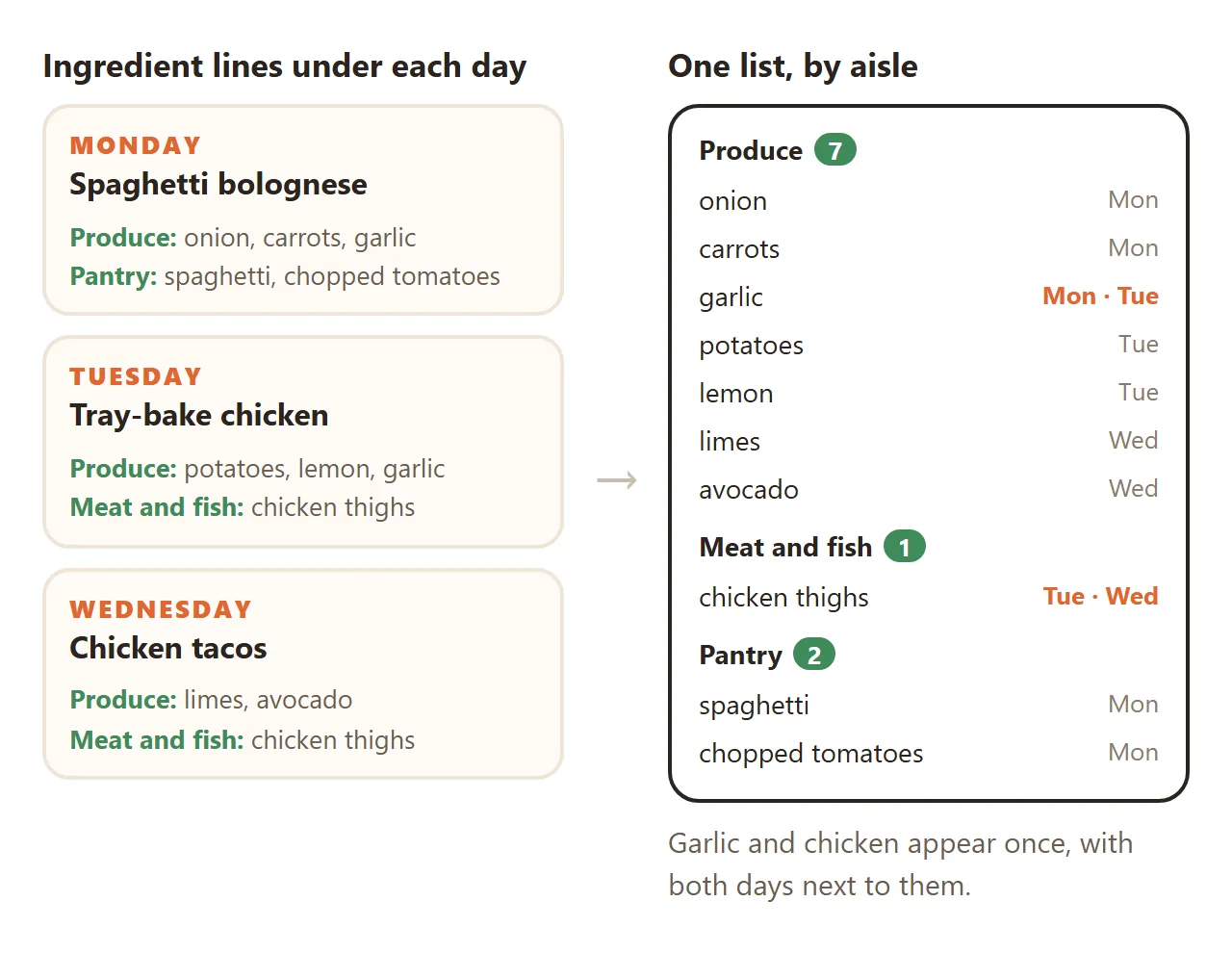
3. Write ingredients by aisle, under each day. "Produce: onion, carrots, garlic" is easy to type and easy for a page to read. The page then joins all the days into one list, puts garlic in once, and notes that Monday and Tuesday both need it.
Make it with AI
Open ChatGPT, Claude or Gemini and paste this. Change the words in capitals and put your week at the end.
Make one complete HTML file: a weekly meal planner.
Household name: NAME
Seven days, Monday to Sunday. For each day show
lunch and dinner as text, then ingredient lines,
one per aisle, like "Produce: onion, carrots".
Tap a day to open its cooking notes as steps.
At the bottom, build a shopping list from the
ingredient lines on the page: group by aisle, list
each item once, show which days need it, and let
me tick items off with a progress bar.
Rules: all CSS and JavaScript inside the file, no
images or fonts from other sites, nothing sent
anywhere, works on a phone. Use only my meals and
ingredients. Do not invent meals, amounts or
nutrition information.
My week: PASTE DAY, MEALS, INGREDIENTS, NOTES
"Build a shopping list from the ingredient lines on the page" matters most. It keeps the list tied to the plan you can see, so changing a meal on the page changes what you buy.
The same prompt works for a shared flat. Ask for a cook's name on each night and a button that sorts the list by who buys what.
<!doctype html>
<html lang="en">
<head>
<meta charset="utf-8">
<meta name="viewport" content="width=device-width, initial-scale=1">
<title>Flat 4B dinner rota</title>
<style>
  * { box-sizing: border-box; }
  body { margin: 0; background: linear-gradient(160deg, #1f2a44 0%, #2d2350 55%, #3a2147 100%); color: #f4f1ff; font-family: system-ui, -apple-system, "Segoe UI", sans-serif; min-height: 100vh; }
  .page { max-width: 680px; margin: 0 auto; padding: 20px 14px 28px; }
  h1 { margin: 0; font-size: 24px; }
  .sub { margin: 4px 0 16px; font-size: 14px; color: #b9b2d8; }
  .rota { display: flex; gap: 10px; overflow-x: auto; padding: 4px 2px 12px; scroll-snap-type: x mandatory; }
  @media (min-width: 600px) { .rota { display: grid; grid-template-columns: repeat(3, 1fr); overflow: visible; } }
  .night { flex: 0 0 220px; scroll-snap-align: start; position: relative; border-radius: 18px; padding: 14px 14px 12px; background: rgba(255, 255, 255, .07); border: 1px solid rgba(255, 255, 255, .12); backdrop-filter: blur(6px); transition: transform .2s, background .2s; }
  .night:hover { transform: translateY(-3px); background: rgba(255, 255, 255, .11); }
  .night.tonight { background: linear-gradient(160deg, rgba(255, 190, 92, .25), rgba(255, 120, 140, .18)); border-color: rgba(255, 200, 120, .6); }
  .night.tonight::after { content: "Tonight"; position: absolute; top: 12px; right: 12px; font: 800 11px system-ui; color: #2d2350; background: #ffbe5c; border-radius: 999px; padding: 3px 8px; }
  .nn { margin: 0; font: 800 12px system-ui; letter-spacing: .12em; text-transform: uppercase; color: #ffbe5c; }
  .dish { margin: 6px 0 8px; font-size: 19px; font-weight: 750; line-height: 1.25; }
  .cook { display: flex; align-items: center; gap: 8px; margin: 0 0 8px; font-size: 14px; color: #ded8f5; }
  .av { width: 28px; height: 28px; border-radius: 50%; display: grid; place-items: center; font: 800 12px system-ui; color: #fff; flex: none; }
  .ing { margin: 0; padding: 8px 0 0; list-style: none; border-top: 1px solid rgba(255, 255, 255, .12); font-size: 13px; line-height: 1.55; color: #cfc8ea; }
  .ing b { color: #8fe3c0; font-weight: 700; }
  .ing b::after { content: ":"; }

  .shop { margin-top: 10px; border-radius: 22px; background: #fbfaff; color: #2d2350; padding: 16px; box-shadow: 0 20px 50px -20px rgba(0, 0, 0, .6); }
  .shead { display: flex; align-items: center; gap: 14px; }
  .ring { position: relative; width: 66px; height: 66px; flex: none; }
  .ring svg { width: 66px; height: 66px; transform: rotate(-90deg); }
  .ring circle { fill: none; stroke-width: 8; }
  .ring .bg { stroke: #ece8f8; }
  .ring .fg { stroke: url(#g); stroke-linecap: round; stroke-dasharray: 163.4; stroke-dashoffset: 163.4; transition: stroke-dashoffset .45s cubic-bezier(.3, .9, .3, 1); }
  .ring span { position: absolute; inset: 0; display: grid; place-items: center; font: 800 15px system-ui; }
  .stitle { font-size: 18px; font-weight: 800; }
  .sline { font-size: 13px; color: #6d6590; margin-top: 2px; }
  .tools { display: flex; gap: 6px; margin: 14px 0 4px; flex-wrap: wrap; }
  .tools button { border: 0; border-radius: 999px; padding: 8px 13px; font: 700 13px system-ui; background: #ece8f8; color: #2d2350; cursor: pointer; }
  .tools button.on { background: #2d2350; color: #fff; }
  .grp { margin-top: 12px; }
  .grp h3 { margin: 0 0 4px; font-size: 13px; display: flex; align-items: center; gap: 8px; }
  .grp h3 small { font-weight: 600; color: #8b83ad; }
  .item { display: flex; align-items: center; gap: 10px; width: 100%; padding: 7px 8px; border: 0; border-radius: 12px; background: transparent; text-align: left; font: 15px system-ui; color: #2d2350; cursor: pointer; transition: background .15s, opacity .3s; }
  .item:hover { background: #f2effb; }
  .dot { flex: none; width: 22px; height: 22px; border-radius: 50%; border: 2px solid #c9c1e8; display: grid; place-items: center; transition: all .2s; }
  .item.done .dot { background: #34b98a; border-color: #34b98a; transform: scale(1.1); }
  .item.done .dot::after { content: ""; width: 8px; height: 4px; border: solid #fff; border-width: 0 0 2.5px 2.5px; transform: rotate(-45deg) translate(1px, -1px); }
  .item.done .nm { text-decoration: line-through; color: #a59fc0; }
  .nm { flex: 1; }
  .who { font-size: 11px; color: #8b83ad; }
  .hide .item.done { display: none; }
  .empty { display: none; padding: 18px; text-align: center; font-weight: 800; color: #34b98a; }
  .foot { margin-top: 14px; font-size: 12px; color: #a59fc0; text-align: center; }
</style>
</head>
<body>
<main class="page">
  <h1>Flat 4B dinner rota</h1>
  <p class="sub">One cook a night, one shared shop on Sunday.</p>

  <section class="rota" id="rota">
    <article class="night">
      <p class="nn">Monday</p>
      <p class="dish">Chickpea curry</p>
      <p class="cook"><span class="av"></span><span class="cn">Priya</span></p>
      <ul class="ing"><li><b>Produce</b> onions, ginger, spinach</li><li><b>Pantry</b> chickpeas, coconut milk, curry paste, rice</li></ul>
    </article>
    <article class="night">
      <p class="nn">Tuesday</p>
      <p class="dish">Pesto pasta</p>
      <p class="cook"><span class="av"></span><span class="cn">Tom</span></p>
      <ul class="ing"><li><b>Pantry</b> penne, pesto</li><li><b>Produce</b> cherry tomatoes, rocket</li><li><b>Dairy</b> parmesan</li></ul>
    </article>
    <article class="night">
      <p class="nn">Wednesday</p>
      <p class="dish">Sausage and mash</p>
      <p class="cook"><span class="av"></span><span class="cn">Jonas</span></p>
      <ul class="ing"><li><b>Meat and fish</b> sausages</li><li><b>Produce</b> potatoes, onions</li><li><b>Dairy</b> butter, milk</li><li><b>Frozen</b> peas</li></ul>
    </article>
    <article class="night">
      <p class="nn">Thursday</p>
      <p class="dish">Veg stir-fry</p>
      <p class="cook"><span class="av"></span><span class="cn">Mei</span></p>
      <ul class="ing"><li><b>Produce</b> peppers, pak choi, ginger</li><li><b>Pantry</b> noodles, soy sauce</li><li><b>Dairy</b> eggs</li></ul>
    </article>
    <article class="night">
      <p class="nn">Friday</p>
      <p class="dish">Fish finger sandwiches</p>
      <p class="cook"><span class="av"></span><span class="cn">Tom</span></p>
      <ul class="ing"><li><b>Frozen</b> fish fingers, peas</li><li><b>Bakery</b> soft rolls</li><li><b>Produce</b> lettuce</li></ul>
    </article>
  </section>

  <section class="shop" id="shop">
    <div class="shead">
      <div class="ring"><svg viewBox="0 0 66 66"><defs><linearGradient id="g"><stop offset="0" stop-color="#7c5cff"/><stop offset="1" stop-color="#34b98a"/></linearGradient></defs><circle class="bg" cx="33" cy="33" r="26"/><circle class="fg" id="fg" cx="33" cy="33" r="26"/></svg><span id="pct">0%</span></div>
      <div><div class="stitle">Sunday shop</div><div class="sline" id="sline"></div></div>
    </div>
    <div class="tools">
      <button id="byAisle" class="on">By aisle</button>
      <button id="byCook">By cook</button>
      <button id="hide">Hide ticked</button>
    </div>
    <div id="list"></div>
    <div class="empty" id="empty">Basket full. See you at home.</div>
  </section>

  <p class="foot">Made-up housemates and dinners. Everything on the list comes from the ingredient lines on each card.</p>
</main>

<script>
  // The list reads the visible cards: night, dish, cook name and ingredient lines.
  const ORDER = ['Produce', 'Bakery', 'Meat and fish', 'Dairy', 'Frozen', 'Pantry'];
  const COLORS = ['#ff7a8a', '#7c5cff', '#34b98a', '#ffa94d', '#4dabf7', '#e64980'];
  const t = (el) => (el ? el.textContent.replace(/\s+/g, ' ').trim() : '');
  const nights = [...document.querySelectorAll('.night')];
  let mode = 'aisle';
  const done = new Set();

  const cooks = [...new Set(nights.map((n) => t(n.querySelector('.cn'))))];
  nights.forEach((n) => {
    const c = t(n.querySelector('.cn')), av = n.querySelector('.av');
    av.textContent = c.charAt(0).toUpperCase();
    av.style.background = COLORS[cooks.indexOf(c) % COLORS.length];
  });

  function items() {
    const map = new Map();
    nights.forEach((n) => {
      const night = t(n.querySelector('.nn')).slice(0, 3), cook = t(n.querySelector('.cn'));
      n.querySelectorAll('.ing li').forEach((li) => {
        const aisle = t(li.querySelector('b')) || 'Other';
        t(li).slice(aisle.length).replace(/^[:\s]+/, '').split(',').map((s) => s.trim()).filter(Boolean).forEach((name) => {
          const key = name.toLowerCase();
          if (!map.has(key)) map.set(key, { key, name, aisle, nights: [], cooks: [] });
          const it = map.get(key);
          if (!it.nights.includes(night)) it.nights.push(night);
          if (!it.cooks.includes(cook)) it.cooks.push(cook);
        });
      });
    });
    return [...map.values()];
  }

  const rank = (a) => (ORDER.indexOf(a) < 0 ? 99 : ORDER.indexOf(a));

  function render() {
    const all = items(), list = document.getElementById('list');
    list.innerHTML = '';
    const groups = new Map();
    all.forEach((it) => {
      const g = mode === 'aisle' ? it.aisle : it.cooks[0];
      if (!groups.has(g)) groups.set(g, []);
      groups.get(g).push(it);
    });
    const keys = [...groups.keys()].sort((a, b) => mode === 'aisle'
      ? rank(a) - rank(b)
      : cooks.indexOf(a) - cooks.indexOf(b));
    keys.forEach((g) => {
      const sec = document.createElement('div'); sec.className = 'grp';
      const h = document.createElement('h3'); h.textContent = mode === 'aisle' ? g : g + ' buys';
      const sm = document.createElement('small'); const c = groups.get(g).length; sm.textContent = c + (c === 1 ? ' item' : ' items'); h.append(sm); sec.append(h);
      groups.get(g).forEach((it) => {
        const b = document.createElement('button'); b.className = 'item' + (done.has(it.key) ? ' done' : '');
        b.innerHTML = '<span class="dot"></span><span class="nm"></span><span class="who"></span>';
        b.querySelector('.nm').textContent = it.name;
        b.querySelector('.who').textContent = mode === 'aisle' ? it.nights.join(' · ') : it.aisle;
        b.onclick = () => { done.has(it.key) ? done.delete(it.key) : done.add(it.key); b.classList.toggle('done'); progress(all.length); };
        sec.append(b);
      });
      list.append(sec);
    });
    progress(all.length);
  }

  function progress(total) {
    const n = done.size;
    const pct = total ? Math.round((n / total) * 100) : 0;
    document.getElementById('fg').style.strokeDashoffset = 163.4 * (1 - n / total);
    document.getElementById('pct').textContent = pct + '%';
    document.getElementById('sline').textContent = (total - n) + ' left to buy for ' + nights.length + ' dinners';
    document.getElementById('empty').style.display = n === total ? 'block' : 'none';
  }

  const bA = document.getElementById('byAisle'), bC = document.getElementById('byCook'), bH = document.getElementById('hide');
  bA.onclick = () => { mode = 'aisle'; bA.classList.add('on'); bC.classList.remove('on'); render(); };
  bC.onclick = () => { mode = 'cook'; bC.classList.add('on'); bA.classList.remove('on'); render(); };
  bH.onclick = () => { document.getElementById('shop').classList.toggle('hide'); bH.classList.toggle('on'); };

  const today = new Date().toLocaleDateString('en-US', { weekday: 'long' });
  nights.forEach((n) => { if (t(n.querySelector('.nn')) === today) { n.classList.add('tonight'); } });

  render();
</script>
</body>
</html>
Getting the plan to the household
You have a meal planner. The AI gave it to you as HTML code, though, and code is not something you can tick off in the dairy aisle.
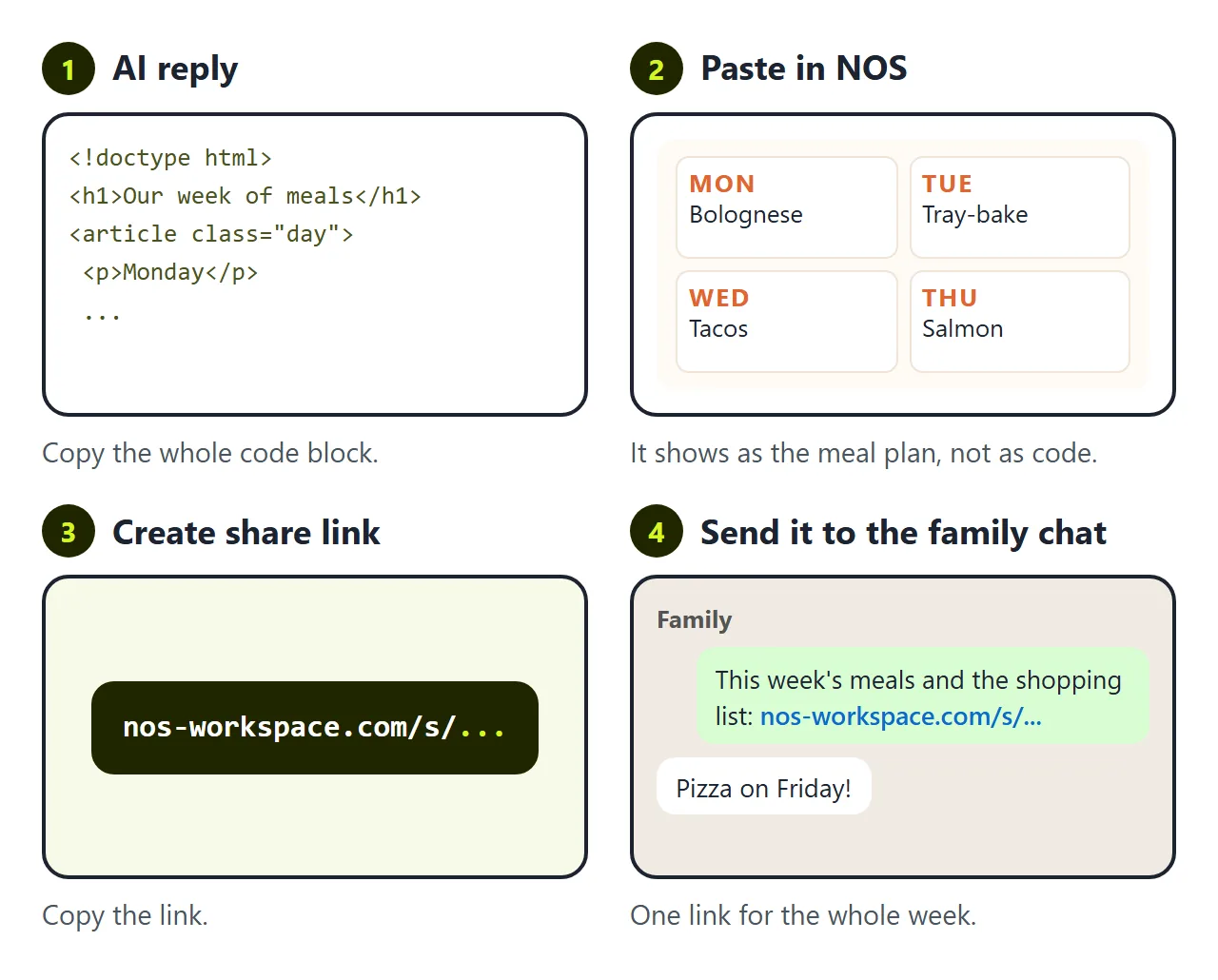
The first wall is getting it onto everyone's phone. Send the file in a chat and on most phones it opens as code or lands in downloads. Nobody taps a download on the way to the shop. To be a page people open, it has to live somewhere.
In NOS you paste the code into a document and it becomes the page straight away. Choose Create share link and drop that link in the family chat. Viewers need no account and cannot edit it. Share an HTML page on WhatsApp covers that side.
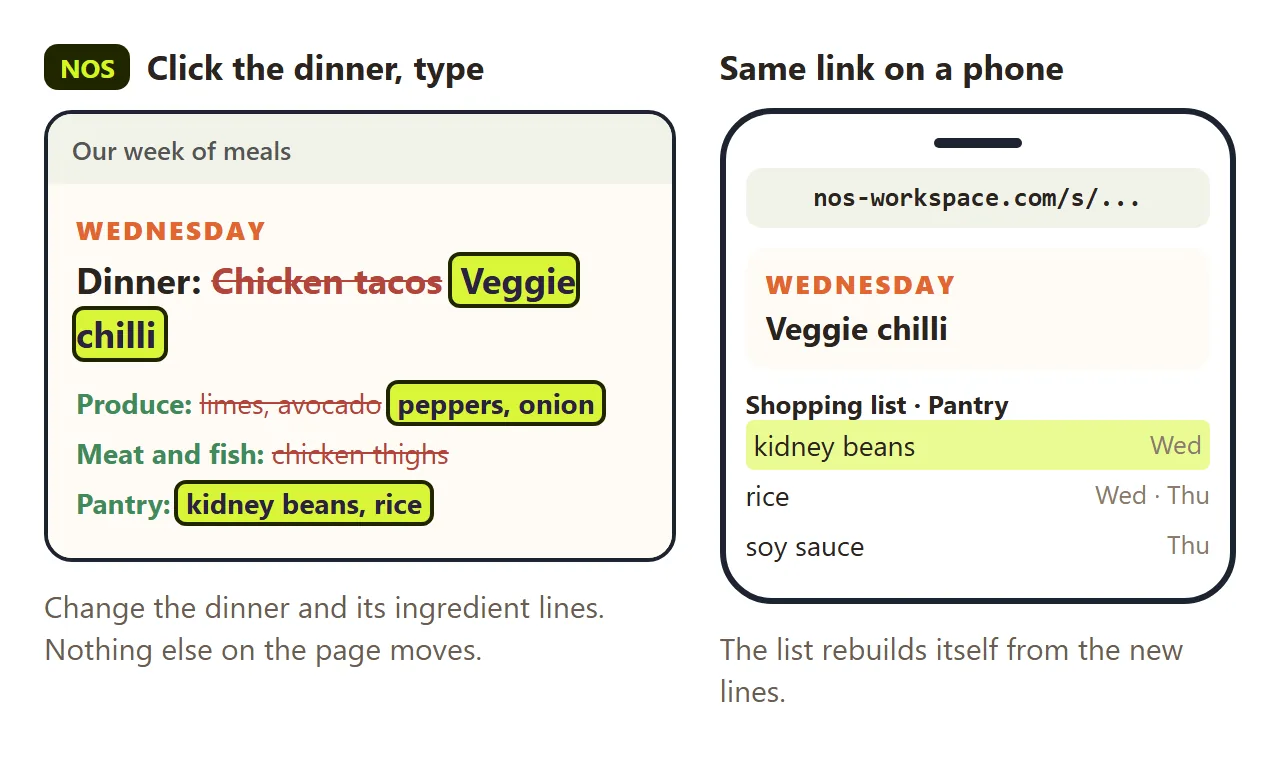
The second wall comes on Wednesday. Someone does not want tacos. You decide on veggie chilli instead.
If you ask the AI again, you wait for a new reply. It often reorders days, rewrites notes or changes the colours while it is at it, so you check the whole week again. Then you have a new file and a new link, and half the family is still looking at the old one.
In NOS you click "Chicken tacos" on the page and type "Veggie chilli". Then you change Wednesday's ingredient lines the same way. The link stays the same, and anyone who opens it sees the new dinner, with kidney beans already on the shopping list.
What it does not do
It does not count calories, check nutrition, or plan around allergies. It shows the meals you chose and the things you need to buy for them.
Ticks stay in each person's browser for that visit, and nothing is sent anywhere. If two people split the shop, agree who takes which aisle.
For a simpler list you can tick off, see HTML checklist. For a plan built around workouts instead of dinners, see Host a fitness plan.