A meeting recap template needs four parts: a two-sentence summary, the decisions, the actions with one owner and one date each, and the open questions. Put them on one web page and post the link in Slack or Teams.
The channel then holds one recap, not a pile of files.
Here is a finished recap you can copy. Tick an action off, or show only one person's actions. An AI chat can write the same page from your notes.
<!doctype html>
<html lang="en">
<head>
<meta charset="utf-8">
<meta name="viewport" content="width=device-width, initial-scale=1">
<title>Recap: Pricing page kickoff</title>
<style>
* { box-sizing: border-box; }
body { margin: 0; padding: 16px; font-family: system-ui, "Segoe UI", sans-serif; background: #f3f4f6; color: #1d2330; line-height: 1.45; }
.page { max-width: 640px; margin: 0 auto; background: #fff; border-radius: 14px; padding: 20px 20px 22px; box-shadow: 0 2px 10px rgba(0,0,0,.07); }
.kicker { font-size: 12px; font-weight: 700; letter-spacing: .06em; text-transform: uppercase; color: #6b7280; }
h1 { font-size: 22px; line-height: 1.2; margin: 4px 0 6px; }
.meta { font-size: 14px; color: #4b5563; margin: 0 0 14px; }
.sum { background: #eef4ff; border-left: 4px solid #2563eb; border-radius: 6px; padding: 10px 12px; font-size: 15px; margin: 0 0 18px; }
h2 { font-size: 13px; letter-spacing: .06em; text-transform: uppercase; color: #374151; margin: 20px 0 8px; }
ol.dec { margin: 0; padding: 0; list-style: none; counter-reset: d; }
ol.dec li { counter-increment: d; position: relative; padding: 8px 0 8px 34px; border-top: 1px solid #eceff3; font-size: 15px; }
ol.dec li:first-child { border-top: 0; }
ol.dec li::before { content: counter(d); position: absolute; left: 0; top: 8px; width: 24px; height: 24px; border-radius: 50%; background: #166534; color: #fff; font-size: 13px; font-weight: 700; display: grid; place-items: center; }
ol.dec small { display: block; color: #6b7280; font-size: 13px; }
.chips { display: flex; flex-wrap: wrap; gap: 6px; margin: 0 0 8px; }
.chips button { font: inherit; font-size: 13px; padding: 5px 11px; border-radius: 999px; border: 1px solid #cbd2dc; background: #fff; color: #1d2330; cursor: pointer; }
.chips button[aria-pressed="true"] { background: #1d2330; border-color: #1d2330; color: #fff; }
ul.act { margin: 0; padding: 0; list-style: none; }
ul.act li { display: flex; align-items: flex-start; gap: 10px; padding: 9px 0; border-top: 1px solid #eceff3; }
ul.act li:first-child { border-top: 0; }
ul.act input { width: 20px; height: 20px; margin: 2px 0 0; flex: none; }
ul.act .t { flex: 1; font-size: 15px; min-width: 0; }
ul.act .who { display: block; font-size: 13px; color: #4b5563; margin-top: 2px; }
ul.act .who b { color: #1d2330; }
ul.act li.done .t { color: #8a93a1; text-decoration: line-through; }
ul.act li[hidden] { display: none; }
.count { font-size: 13px; color: #4b5563; margin: 8px 0 0; }
.open { background: #fff7ed; border: 1px solid #fed7aa; border-radius: 8px; padding: 10px 12px; font-size: 15px; margin: 0; }
</style>
</head>
<body>
<div class="page">
<div class="kicker">Meeting recap</div>
<h1>Pricing page kickoff</h1>
<p class="meta">Thu 25 Sep 2026 · 30 min · Maya, Tomas, Priya, Daniel</p>
<p class="sum"><b>In short:</b> the pricing page launches on 14 Oct instead of 7 Oct, because the legal review needs one more week. Nothing else changes.</p>
<h2>Decisions</h2>
<ol class="dec">
<li>Launch the new pricing page on 14 Oct, not 7 Oct.<small>Why: legal copy review needs one more week.</small></li>
<li>Keep the current logo on the page.<small>The logo refresh is a separate project.</small></li>
<li>The weekly check-in moves to Tuesdays at 10:00.</li>
</ol>
<h2>Actions</h2>
<div class="chips" id="chips">
<button type="button" data-who="all" aria-pressed="true">Everyone</button>
<button type="button" data-who="Maya" aria-pressed="false">Maya</button>
<button type="button" data-who="Tomas" aria-pressed="false">Tomas</button>
<button type="button" data-who="Priya" aria-pressed="false">Priya</button>
<button type="button" data-who="Daniel" aria-pressed="false">Daniel</button>
</div>
<ul class="act" id="act">
<li data-who="Maya"><input type="checkbox" aria-label="Done"><span class="t">Send the final pricing copy to legal<span class="who"><b>Maya</b> · due 3 Oct</span></span></li>
<li data-who="Priya"><input type="checkbox" aria-label="Done"><span class="t">Book the Tuesday 10:00 slot<span class="who"><b>Priya</b> · due 2 Oct</span></span></li>
<li data-who="Tomas"><input type="checkbox" aria-label="Done"><span class="t">Update the plan comparison table<span class="who"><b>Tomas</b> · due 8 Oct</span></span></li>
<li data-who="Daniel"><input type="checkbox" aria-label="Done"><span class="t">Share the staging link with the support team<span class="who"><b>Daniel</b> · due 9 Oct</span></span></li>
</ul>
<p class="count" id="count"></p>
<h2>Open question</h2>
<p class="open">Who approves the wording of the annual-plan discount? <b>No owner yet.</b> Raise it on Tuesday.</p>
</div>
<script>
const chips = document.querySelectorAll('#chips button');
const rows = document.querySelectorAll('#act li');
const count = document.getElementById('count');
function update() {
const done = document.querySelectorAll('#act input:checked').length;
count.textContent = done + ' of ' + rows.length + ' actions done';
}
// Show only one person's actions
chips.forEach((chip) => {
chip.addEventListener('click', () => {
chips.forEach((c) => c.setAttribute('aria-pressed', c === chip));
rows.forEach((row) => {
row.hidden = chip.dataset.who !== 'all' && row.dataset.who !== chip.dataset.who;
});
});
});
// Tick an action as done
rows.forEach((row) => {
row.querySelector('input').addEventListener('change', (e) => {
row.classList.toggle('done', e.target.checked);
update();
});
});
update();
</script>
</body>
</html>
The order is on purpose. Decisions and actions come before any discussion, because that is what people open a recap to find. How to host meeting notes explains the reasoning in more detail.
Make it with AI
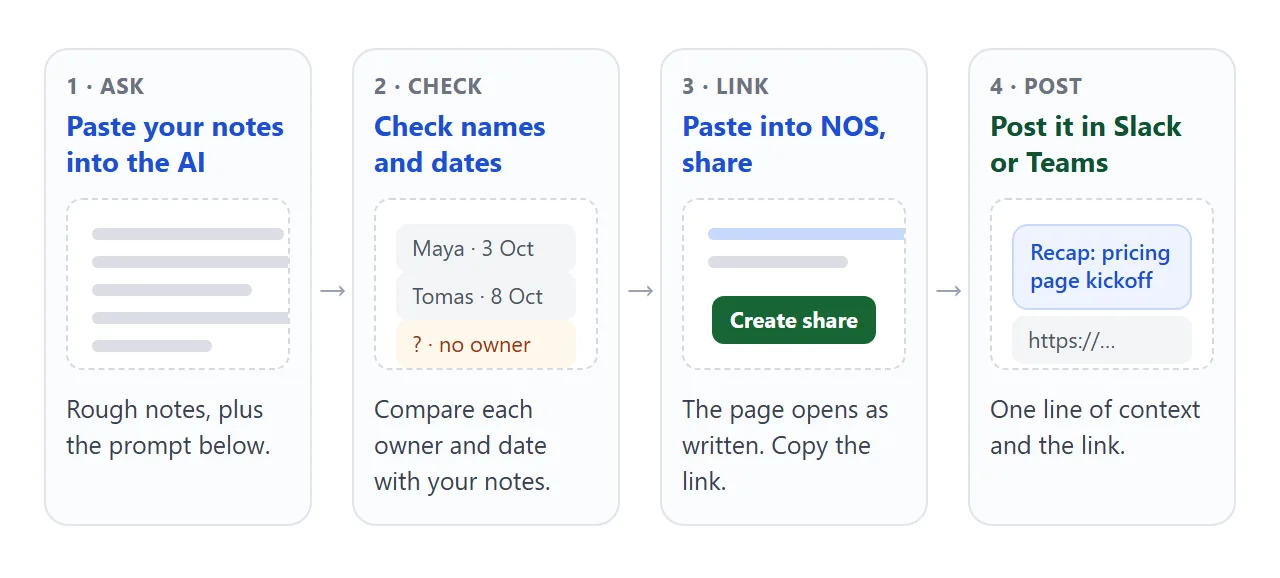
Paste this into ChatGPT, Claude or Gemini and put your notes after the last line. Rough notes are enough.
Turn my meeting notes into ONE self-contained HTML file: a meeting recap page.

Order: title and date, a two-sentence summary, Decisions (numbered,
each with one line of why), Actions, Open questions.

Actions: one line each, with ONE owner's name, a due date and a
checkbox. If the notes give no owner or date, write "No owner yet"
or "No date yet". Do not guess.

Use only what is in the notes. Do not add anything.
Plain HTML, CSS and JavaScript in the one file. No outside images,
fonts or scripts. Large readable text, good on a phone.

Notes:
[paste your notes here]
Before you use the result, check these:
- Every action has one name and one date. Where the notes had none, the page should say so.
- Each decision is a whole sentence that makes sense to someone who was not there.
- Names, dates and numbers match your notes. You wrote the notes, so you check the page.
- Nothing appears that nobody said in the meeting.
- The page has no outside images and no form that sends data.
If the notes are confidential, check your organisation's rules before pasting them into an AI tool. Sharing ChatGPT's HTML output covers the ChatGPT side of copying the result.
Or start from the blank version
No AI, or a meeting too short to bother? Copy this blank page, replace each highlighted placeholder, and add rows to the actions list as needed.
<!doctype html>
<html lang="en">
<head>
<meta charset="utf-8">
<meta name="viewport" content="width=device-width, initial-scale=1">
<title>Blank meeting recap</title>
<style>
* { box-sizing: border-box; }
body { margin: 0; padding: 16px; font-family: system-ui, "Segoe UI", sans-serif; background: #f3f4f6; color: #1d2330; line-height: 1.45; }
.page { max-width: 640px; margin: 0 auto; background: #fff; border-radius: 14px; padding: 20px 20px 22px; box-shadow: 0 2px 10px rgba(0,0,0,.07); }
.kicker { font-size: 12px; font-weight: 700; letter-spacing: .06em; text-transform: uppercase; color: #6b7280; }
h1 { font-size: 22px; line-height: 1.2; margin: 4px 0 6px; }
.meta { font-size: 14px; color: #4b5563; margin: 0 0 14px; }
h2 { font-size: 13px; letter-spacing: .06em; text-transform: uppercase; color: #374151; margin: 20px 0 8px; }
.ph { background: #fef3c7; border-radius: 4px; padding: 0 4px; color: #78350f; }
.box { border: 1px dashed #cbd2dc; border-radius: 8px; padding: 10px 12px; font-size: 15px; margin: 0 0 8px; }
.row { display: grid; grid-template-columns: 1fr auto auto; gap: 8px 12px; align-items: center; padding: 9px 0; border-top: 1px solid #eceff3; font-size: 15px; }
.row:first-of-type { border-top: 0; }
.row .o, .row .d { font-size: 14px; white-space: nowrap; }
.head { font-size: 12px; color: #6b7280; font-weight: 700; text-transform: uppercase; letter-spacing: .05em; }
button { font: inherit; font-size: 14px; padding: 8px 14px; border-radius: 8px; border: 1px solid #1d2330; background: #1d2330; color: #fff; cursor: pointer; margin-top: 10px; }
.hint { font-size: 13px; color: #6b7280; margin: 14px 0 0; }
.row .ph { justify-self: start; }
@media (max-width: 460px) { .row { grid-template-columns: 1fr; gap: 2px; } .row.head { display: none; } }
</style>
</head>
<body>
<div class="page">
<div class="kicker">Meeting recap</div>
<h1><span class="ph">Meeting name</span></h1>
<p class="meta"><span class="ph">Date</span> · <span class="ph">Length</span> · <span class="ph">Who was there</span></p>
<h2>In short</h2>
<p class="box"><span class="ph">One or two sentences: what changed because of this meeting.</span></p>
<h2>Decisions</h2>
<p class="box">1. <span class="ph">What was decided, in a full sentence.</span> Why: <span class="ph">one line.</span></p>
<p class="box">2. <span class="ph">What was decided.</span></p>
<h2>Actions</h2>
<div id="rows">
<div class="row head"><span>Action</span><span>Owner</span><span>Due</span></div>
<div class="row"><span class="ph">What will be done</span><span class="o ph">Name</span><span class="d ph">Date</span></div>
</div>
<button type="button" id="add">+ Add an action row</button>
<h2>Open questions</h2>
<p class="box"><span class="ph">Anything not settled, and who will settle it.</span></p>
<p class="hint">Replace each highlighted placeholder. Every action needs one person and one date.</p>
</div>
<script>
const rows = document.getElementById('rows');
// Add one more empty action row
document.getElementById('add').addEventListener('click', () => {
const row = document.createElement('div');
row.className = 'row';
row.innerHTML = '<span class="ph">What will be done</span><span class="o ph">Name</span><span class="d ph">Date</span>';
rows.appendChild(row);
});
</script>
</body>
</html>
Each action row has three slots: what, who and when. A row with no name is not an action yet. Move it to open questions and say who will settle it.
Send it as a link
- Paste the page into a NOS document. Paste the HTML the AI gave you, or the blank template once you have filled it in.
- Choose Create share link and copy the link. HTML to link walks through it.
- Post the link in the channel with one line saying what it is and the main decision in words.
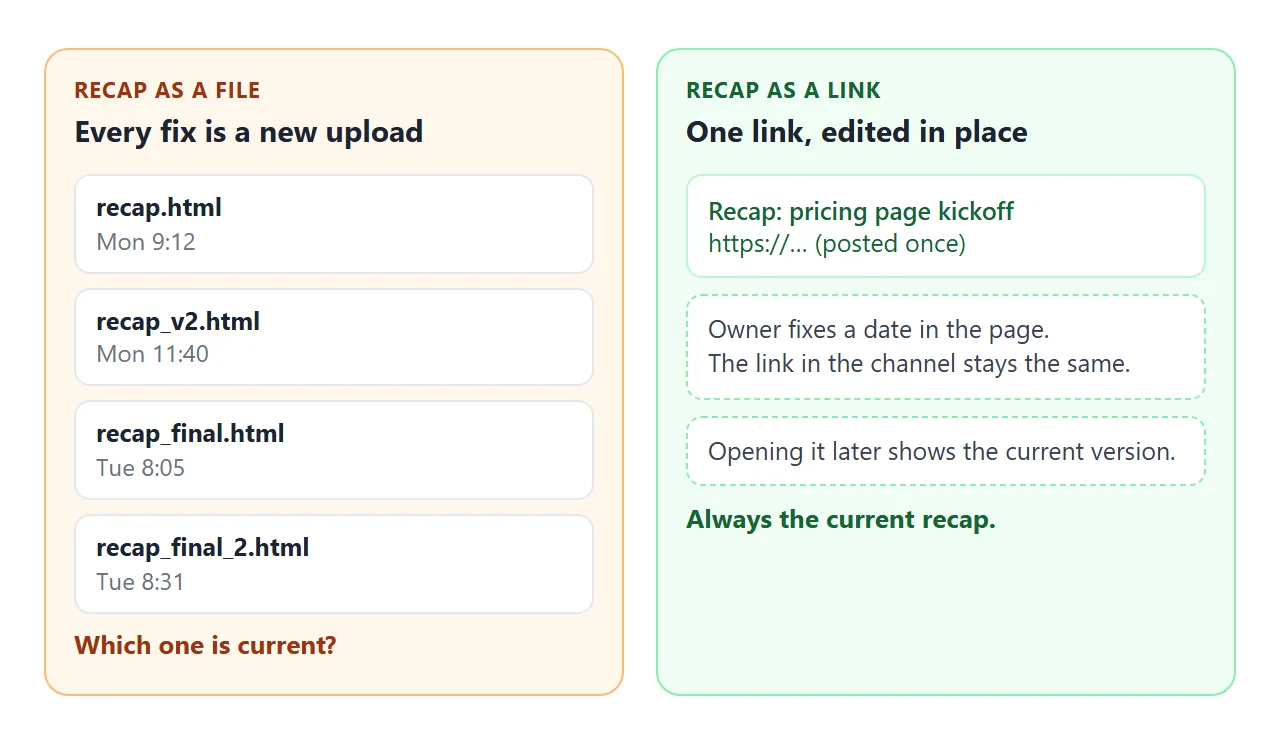
- Fix mistakes in the page. Edit the code in NOS. The link you posted shows the new version.
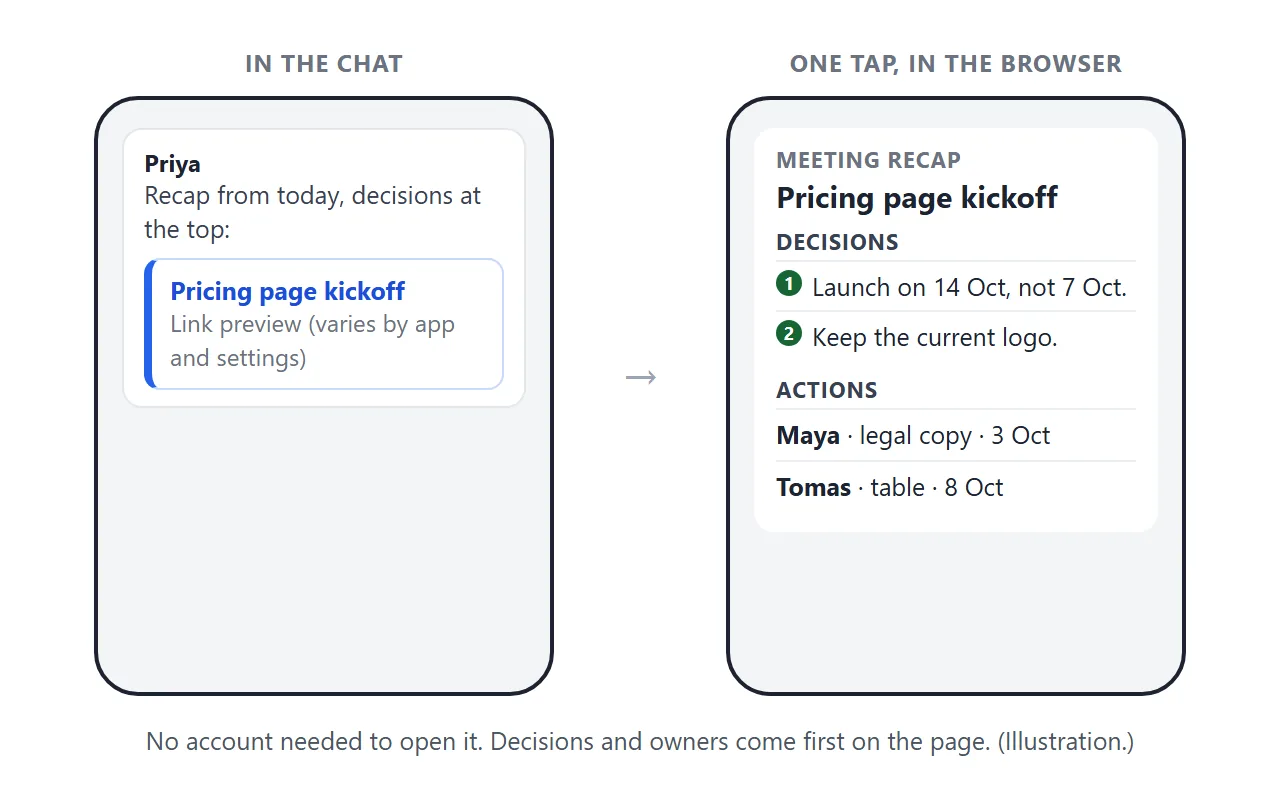
Whoever opens the link sees the page in a normal browser tab, on a laptop or a phone, without an account. They can read it but cannot edit it. The scripts in the page run, so the filter buttons work for them too.
A tick you make in NOS's View mode is saved. A tick a visitor makes is not. So the saved state of the actions is yours.
Anyone with the link can open the page, and there is no password. Leave out anything that should not leave the room, and post the link only where the right people are.
What Slack and Teams do with the link
Slack shows a preview of a shared link just below the message, and each person can switch link previews off in their own preferences. In Teams, an admin can turn URL previews on or off in a messaging policy.
Both work this way as of October 2026.
So do not rely on the card. Write the link after one line such as "Recap of today: launch moves to 14 Oct. Actions with owners are on the page." The message then makes sense even with no preview.
In Teams, you can also select Format under the message box and insert the link with your own display text. The file route is covered in sending an HTML file in Slack and in Teams.
File, pasted text or link
A recap sent as a file tends to multiply. One agency's write-up of a client project describes it like this: "By presentation day there were four versions of the file floating around Slack and no one could say with certainty which one was final."
| Way to send it | A correction takes | Which version is current |
|---|---|---|
| Text pasted into the message | Editing the message or posting another | The latest message, if people scroll that far |
| HTML file attached | Uploading a new file | Unclear, because every upload stays in the channel |
| Link to a NOS page | Editing the page | The same link always shows the current version |
A link is also just text, so the same one fits in an email follow-up or a project page. Why links beat attachments goes further.
When it does not work
| What you see | Cause | Fix |
|---|---|---|
| No preview card under the link | Previews can be switched off for a person (Slack) or an organisation (Teams) | Say what the link is in the message text |
| A tick on the page does not stay for other people | A visitor's changes are not saved; the owner's View mode changes are | Treat the page as read-only for others; track progress in the thread |
| An image is missing | Images loaded from other sites are blocked | Ask the AI for no outside images; use shapes drawn in the page |
| A "send comments" form does nothing | Sending a form to a server is blocked | Collect replies in the thread |
| The text looks plain, the font is wrong | A font or script came from a site that is not allowed | Use Google Fonts, cdnjs, jsDelivr, unpkg, or none |
| A name or date on the page is wrong | The AI misread the notes, or the notes were unclear | Correct it in NOS. The same link updates |
| Someone outside the project opened it | Anyone with the link can open it | Keep sensitive items out and post only where intended |