Mermaid is an open-source JavaScript library that draws diagrams from text: flowcharts, sequence diagrams, Gantt charts, class diagrams and more. In HTML, put the diagram text in a <pre class="mermaid"> and add one module script.
There is nothing to install and no build step.
Here is the smallest working page. The flowchart below is a few lines of text.
<!doctype html>
<html lang="en">
<head>
<meta charset="utf-8">
<meta name="viewport" content="width=device-width, initial-scale=1">
<title>Mermaid in one HTML file</title>
<style>
  body { margin: 0; padding: 16px; font-family: system-ui, sans-serif; background: #fff; }
  .mermaid { margin: 0; text-align: center; }
</style>
</head>
<body>

<!-- The diagram is plain text. Mermaid replaces it with an SVG. -->
<pre class="mermaid">
flowchart TD
  A[Write the diagram as text] --> B{Does it render?}
  B -->|Yes| C[Share the page]
  B -->|No| D[Check the syntax]
  D --> A
</pre>

<!-- type="module" is required for import. Pin the exact version. -->
<script type="module">
  import mermaid from 'https://cdn.jsdelivr.net/npm/mermaid@12.0.0/dist/mermaid.esm.min.mjs';
  mermaid.initialize({ startOnLoad: true });
</script>
</body>
</html>
The two parts that matter, ready to copy:
<pre class="mermaid">
flowchart TD
  A[Write the diagram as text] --> B{Does it render?}
  B -->|Yes| C[Share the page]
  B -->|No| D[Check the syntax]
</pre>

<script type="module">
  import mermaid from 'https://cdn.jsdelivr.net/npm/mermaid@12.0.0/dist/mermaid.esm.min.mjs';
  mermaid.initialize({ startOnLoad: true });
</script>
Mermaid is released under the MIT licence. The current version on npm and jsDelivr is 12.0.0.
How the page turns text into a diagram
Until the script runs, the browser shows the <pre> as ordinary text. When the page has loaded, Mermaid finds every element with class="mermaid", reads its text and replaces it with an SVG drawing.
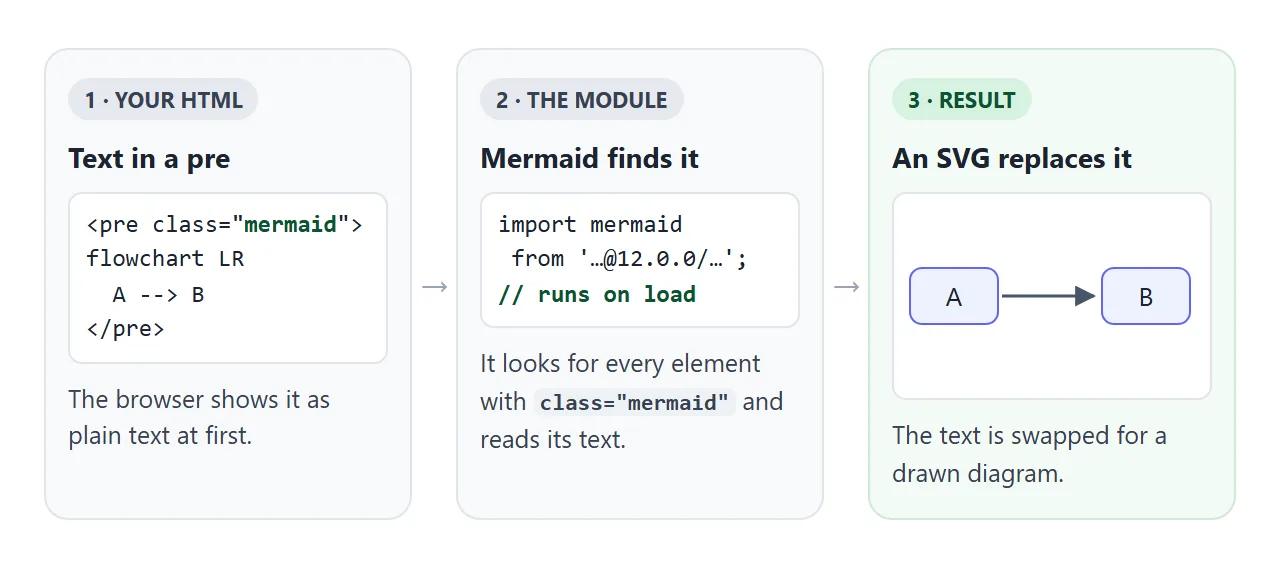
flowchart TDsets the type and direction. TD is top-down, LR is left to right.A[text]is a box,B{text}is a decision diamond, andC(text)has round edges.-->is an arrow. Put a label on it with-->|Yes|.
The result is a normal SVG in the page, so it scales and stays sharp when zoomed. If you would rather draw boxes and arrows by hand with no library, see a flowchart in HTML, CSS and SVG.
The script must be type="module"
The code imports mermaid.esm.min.mjs, an ES module. The import statement only works in a module script. In a plain <script> the browser throws a SyntaxError, nothing renders, and the page still shows the raw text.
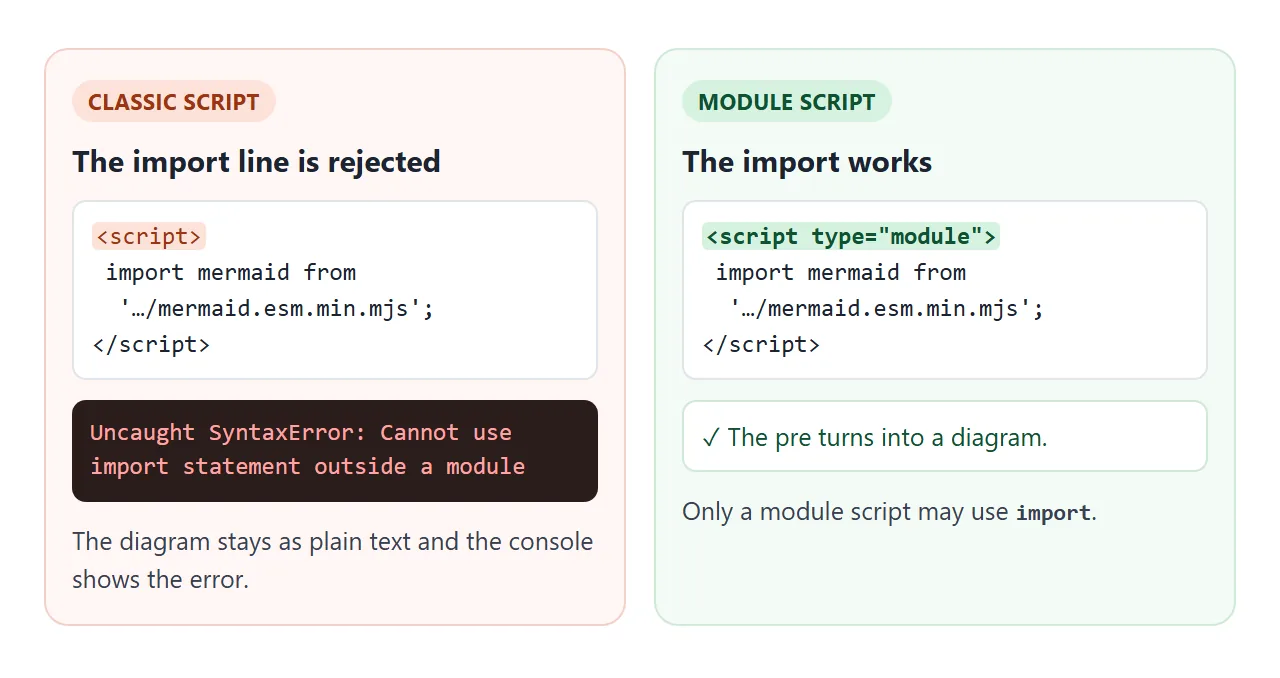
Two related details:
- A module script waits until the HTML is parsed, so it can sit in the head or the body.
- Variables declared inside a module are not global. Code in a separate classic script cannot see
mermaid, so keep your Mermaid calls in the same module.
Pin the version in the address
The address decides which release you get. jsDelivr treats mermaid@12 as a range and serves the newest 12.x release. mermaid@12.0.0 is one exact file that will not change.
| Address | What loads | Use it for |
|---|---|---|
mermaid@12.0.0 |
Exactly 12.0.0 | Pages you share or keep |
mermaid@12 |
The newest 12.x | Quick experiments |
mermaid (no version) |
The newest release | Not recommended for real pages |
This matters because major releases change how diagrams look. Version 12.0.0 made redux-color the default theme and neo the default look, and it now lays out diagrams with ELK instead of dagre. A page loading an unpinned version can look different next month.
To keep the earlier appearance in version 12, the release notes give this setting:
mermaid.initialize({ layout: 'dagre', theme: 'default', look: 'classic' });
Characters the HTML parser takes first
The text inside <pre> is parsed as HTML before Mermaid sees it. A < followed by a letter starts a tag. In the example below, the browser reads <b] --> as an element, so Mermaid receives broken text and shows "Syntax error in text".
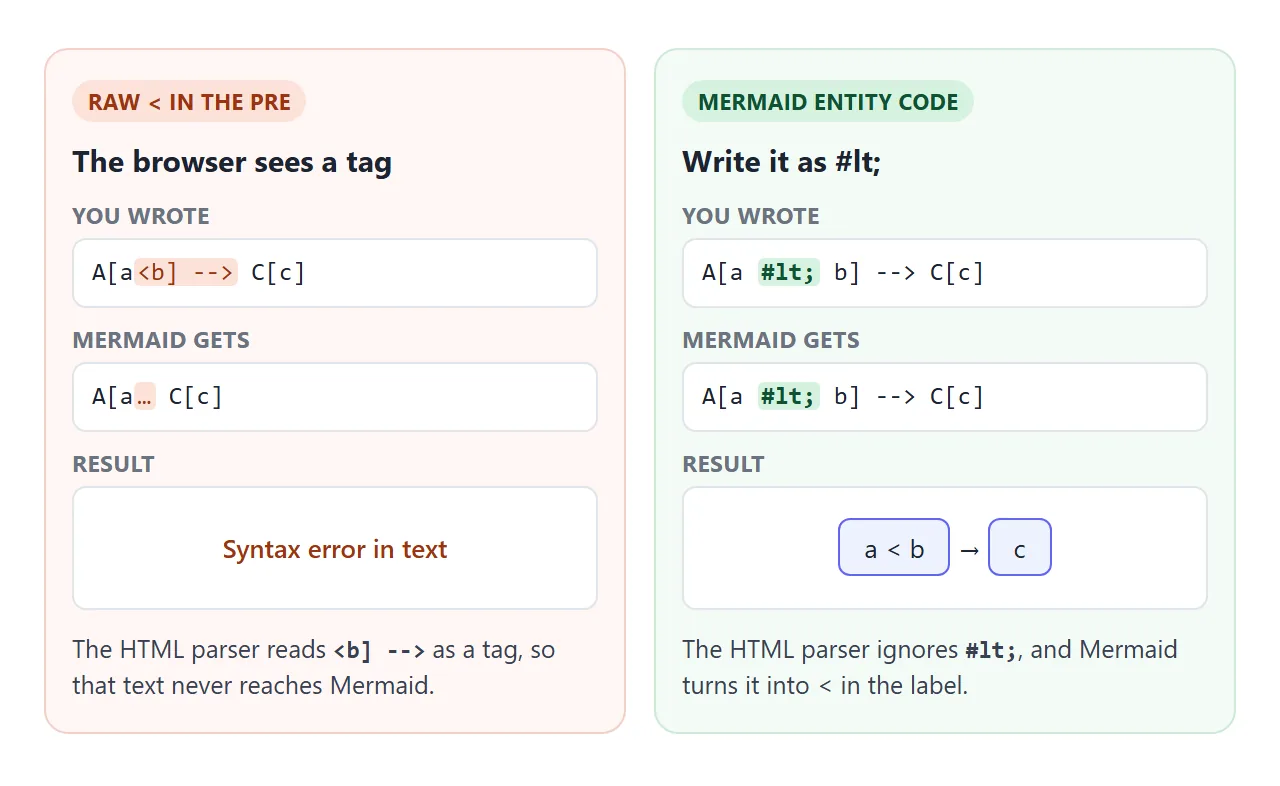
Writing < does not fully help: the browser turns it back into <, and the label is cut short. What worked in our test is Mermaid's own entity code, written with # instead of &:
flowchart LR
  A[a #lt; b] --> C[c]
The same entity codes cover quotes (#quot;) and other awkward characters. For the general HTML side, see HTML entities.
One more word to watch: a lowercase end as a node name breaks a flowchart. Write End or END instead.
Draw diagrams from text you build in JavaScript
startOnLoad only handles elements that are already on the page when it loads. To draw from a text box, a fetch result or a template, turn it off and call mermaid.render yourself.
<!doctype html>
<html lang="en">
<head>
<meta charset="utf-8">
<meta name="viewport" content="width=device-width, initial-scale=1">
<title>Mermaid live editor</title>
<style>
  body { margin: 0; padding: 14px; font-family: system-ui, sans-serif; background: #f6f7f9; color: #1d2330; }
  label { font-weight: 600; font-size: 14px; }
  textarea {
    display: block; width: 100%; box-sizing: border-box; height: 150px; margin: 6px 0 8px;
    font: 14px/1.4 ui-monospace, Consolas, monospace; padding: 8px; border: 1px solid #cdd3dc; border-radius: 8px;
  }
  #status { font-size: 13px; min-height: 18px; color: #0f5132; }
  #status.error { color: #9a3412; }
  #out { background: #fff; border: 1px solid #e1e4ea; border-radius: 10px; padding: 10px; margin-top: 8px; text-align: center; overflow-x: auto; }
</style>
</head>
<body>
<label for="src">Diagram text (edit it)</label>
<textarea id="src" spellcheck="false">sequenceDiagram
  Browser->>CDN: import mermaid
  CDN-->>Browser: library code
  Browser->>Browser: text becomes SVG</textarea>
<div id="status"></div>
<div id="out"></div>

<script type="module">
  import mermaid from 'https://cdn.jsdelivr.net/npm/mermaid@12.0.0/dist/mermaid.esm.min.mjs';
  mermaid.initialize({ startOnLoad: false });  // we render ourselves

  const src = document.getElementById('src');
  const out = document.getElementById('out');
  const status = document.getElementById('status');
  let count = 0, timer;

  async function draw() {
    try {
      await mermaid.parse(src.value);               // throws on bad syntax
      const { svg } = await mermaid.render('d' + (++count), src.value);
      out.innerHTML = svg;
      status.className = '';
      status.textContent = 'Rendered.';
    } catch (err) {
      status.className = 'error';                    // keep the last good diagram
      status.textContent = 'Syntax error: ' + String(err.message || err).split('\n')[0];
    }
  }

  src.addEventListener('input', () => { clearTimeout(timer); timer = setTimeout(draw, 400); });
  draw();
</script>
</body>
</html>
The core of it:
mermaid.initialize({ startOnLoad: false });

await mermaid.parse(text);  // throws on bad syntax
const { svg } = await mermaid.render('diagram1', text);
out.innerHTML = svg;
mermaid.parsechecks the text without drawing it, and throws on bad syntax. A try/catch can show the message.mermaid.rendertakes an id and the text, and returns an object whosesvgproperty is the SVG code.- Give each render a new id. The demo counts up:
d1,d2, and so on.
Themes, and drawing the same diagram again
Pick a theme for the whole page with initialize, or for one diagram with a config block at the top of its text. Version 12 lists eleven themes, among them default, neutral, dark, forest and base.
<!doctype html>
<html lang="en">
<head>
<meta charset="utf-8">
<meta name="viewport" content="width=device-width, initial-scale=1">
<title>Mermaid diagrams with a theme switch</title>
<style>
  body { margin: 0; padding: 14px; font-family: system-ui, sans-serif; background: #fff; color: #1d2330; }
  .bar { display: flex; gap: 8px; align-items: center; flex-wrap: wrap; margin-bottom: 10px; }
  select { font: inherit; padding: 4px 6px; }
  .grid { display: grid; grid-template-columns: repeat(auto-fit, minmax(240px, 1fr)); gap: 12px; }
  .card { border: 1px solid #e1e4ea; border-radius: 10px; padding: 8px; overflow-x: auto; }
  h2 { font-size: 14px; margin: 0 0 6px; }
  .mermaid { margin: 0; text-align: center; }
  body.dark { background: #1f2020; color: #e5e7eb; }  /* page follows the dark theme */
  body.dark .card { border-color: #3a3d42; }
</style>
</head>
<body>
<div class="bar">
  <label for="theme"><b>Theme</b></label>
  <select id="theme">
    <option>redux-color</option><option>default</option><option>neutral</option>
    <option>dark</option><option>forest</option>
  </select>
</div>

<div class="grid">
  <div class="card"><h2>Flowchart</h2>
    <pre class="mermaid">
flowchart TD
  Idea --> Draft --> Review
  Review -->|changes| Draft
  Review -->|ok| Done</pre></div>
  <div class="card"><h2>Pie chart</h2>
    <pre class="mermaid">
pie title Time spent
  "Writing" : 50
  "Review" : 30
  "Fixes" : 20</pre></div>
</div>

<script type="module">
  import mermaid from 'https://cdn.jsdelivr.net/npm/mermaid@12.0.0/dist/mermaid.esm.min.mjs';

  const boxes = [...document.querySelectorAll('.mermaid')];
  const sources = boxes.map((el) => el.textContent);  // keep the text: rendering replaces it

  const select = document.getElementById('theme');

  async function drawAll(theme) {
    select.disabled = true;                            // one render at a time
    mermaid.initialize({ startOnLoad: false, theme });
    document.body.classList.toggle('dark', theme === 'dark');
    boxes.forEach((el, i) => {
      el.removeAttribute('data-processed');            // allow a second render
      el.textContent = sources[i];
    });
    await mermaid.run({ nodes: boxes });
    select.disabled = false;
  }

  select.addEventListener('change', () => drawAll(select.value));
  drawAll(select.value);
</script>
</body>
</html>
Two things make a redraw work:
- Keep the original text. Rendering replaces the element's contents, so save the text first.
- Clear the processed mark. Mermaid adds
data-processedto each element it has drawn and skips it next time. Remove that attribute before callingmermaid.runagain.
el.removeAttribute('data-processed');
el.textContent = savedText;
await mermaid.run({ nodes: [el] });
To set the theme for a single diagram instead, start its text with a config block:
---
config:
  theme: forest
---
flowchart LR
  A --> B
When it does not work
| What you see | Cause | Fix |
|---|---|---|
| The raw text shows and nothing is drawn | The script is not a module | Add type="module" to the script tag |
| "Cannot use import statement outside a module" | Same as above | Add type="module" |
| "Syntax error in text" | Mermaid could not parse the diagram | Check the line the error names, or test the text in mermaid.live |
Syntax error near a < |
The HTML parser read it as a tag | Write #lt; instead |
| A flowchart breaks on a node called end | end is a reserved word |
Write End or END |
| Diagrams look different than last month | The address has no exact version | Pin mermaid@12.0.0 |
| Added a diagram later and it stays as text | startOnLoad only runs once |
Call mermaid.run() after adding it |
A second mermaid.run does nothing |
The element has data-processed |
Remove it and restore the text |
| Click links on nodes do nothing | The default securityLevel is strict |
Set securityLevel to loose |
If the page shows nothing at all, not even the text, the problem is outside Mermaid. JavaScript not working in an HTML file covers the general checks.
Share it as a link
A Mermaid diagram is drawn by a script. An .html attachment may open as plain code on a phone, and a screenshot cannot be edited. The person you send it to needs a page where the script runs.
To share the working version, paste the page into a NOS document and choose Create share link. HTML to link walks through it.
The page renders as written and the script from cdn.jsdelivr.net loads, so the diagram is drawn for anyone who opens the link, with no account needed. If you edit the diagram text later, the same link shows the new version.