MJML is a markup language from Mailjet for coding responsive email. You write short tags such as <mj-section> and <mj-button>, and its open-source engine turns them into the HTML an email needs.
The mjml-browser package runs that engine in a web page, so a single HTML file is enough.
Here is a whole MJML email, compiled in the page you are looking at:
<!doctype html>
<html lang="en">
<head>
<meta charset="utf-8">
<meta name="viewport" content="width=device-width, initial-scale=1">
<title>MJML in one HTML file</title>
<style>
  body { margin: 0; padding: 14px; font-family: system-ui, sans-serif; background: #eef0f3; color: #1d2330; }
  #status { margin: 0 0 10px; font-size: 14px; color: #4b5563; }
  /* the compiled email is drawn inside this box */
  #preview { background: #fff; border-radius: 10px; overflow: hidden; }
</style>
</head>
<body>
<p id="status">Compiling...</p>
<div id="preview"></div>

<!-- 1. the email, written in MJML. type="text/plain" keeps the browser from running or parsing it -->
<script type="text/plain" id="email">
<mjml>
  <mj-body background-color="#f4f4f7">
    <mj-section background-color="#ffffff">
      <mj-column>
        <mj-text font-size="22px" font-weight="bold">Your order has shipped</mj-text>
        <mj-text>Hi Sam, parcel #4821 left our warehouse today and should arrive on Friday.</mj-text>
        <mj-button background-color="#2563eb" href="#">Track parcel</mj-button>
      </mj-column>
    </mj-section>
  </mj-body>
</mjml>
</script>

<!-- 2. the MJML compiler for browsers (pinned version) -->
<script src="https://cdn.jsdelivr.net/npm/mjml-browser@5.4.1/lib/index.js"></script>

<!-- 3. compile, then show the HTML it made -->
<script>
  const source = document.getElementById('email').textContent;

  mjml(source).then((result) => {
    // result.html is a full email HTML document: tables and inline styles
    const box = document.getElementById('preview').attachShadow({ mode: 'open' });
    box.innerHTML = result.html;  // shadow root keeps the email's CSS away from this page
    document.getElementById('status').textContent =
      'MJML ' + source.length + ' characters  ->  HTML ' + result.html.length + ' characters, ' +
      result.errors.length + ' errors';
  });
</script>
</body>
</html>
The page holds three things: the MJML, one script tag for the compiler, and a few lines that call it and show the result.
Responsive email HTML usually means nested tables and CSS written for particular email clients. MJML writes that part for you. The 11 lines above become a document of more than 5,000 characters.
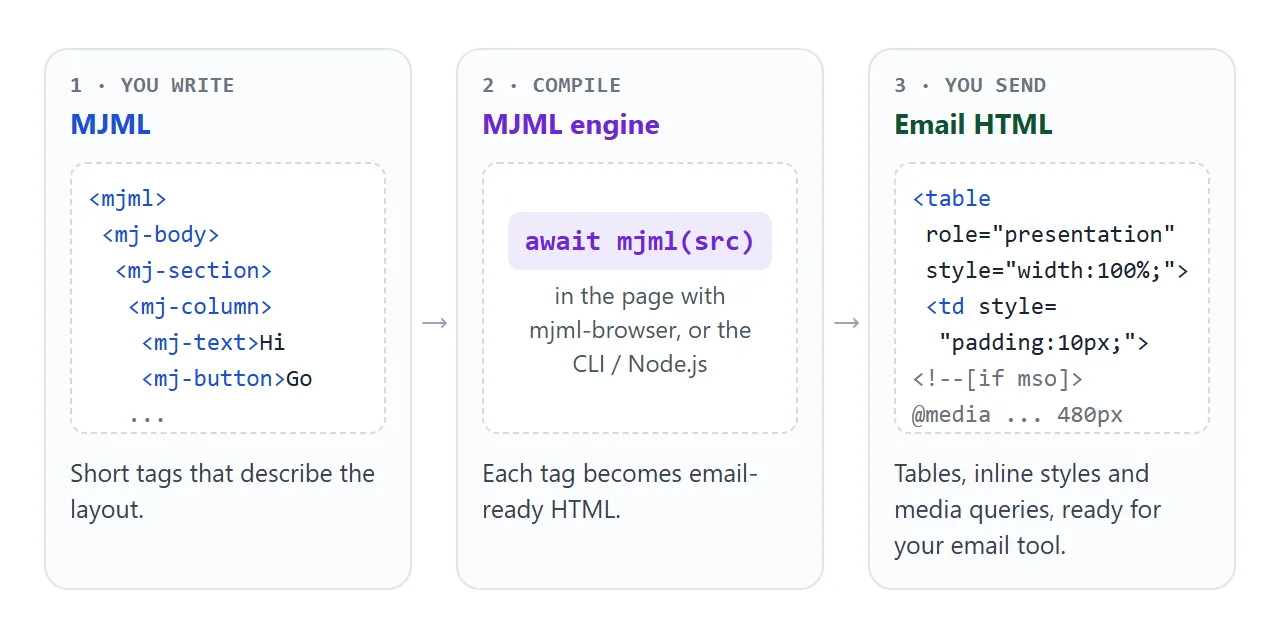
The output is a complete document starting with <!doctype html>. It contains tables, inline styles and @media rules, and no script. That HTML, not the MJML, is what goes into your email tool. Send raw HTML email covers that last step.
The smallest working HTML file
Four pieces, in this order:
- Write the email in MJML inside
<script type="text/plain">. The browser treats a script with an unknown type as a block of data, so it neither runs it nor turns the tags into elements. - Load the browser compiler with a pinned version. The file defines a global function called
mjml. - Compile and wait.
mjml(source)returns a Promise. The result hashtml,jsonand anerrorslist. - Show or save the HTML. The demo puts it into a shadow root, so the email's CSS cannot restyle the rest of the page.
<script type="text/plain" id="email">
<mjml>
  <mj-body>
    <mj-section>
      <mj-column>
        <mj-text>Hello</mj-text>
      </mj-column>
    </mj-section>
  </mj-body>
</mjml>
</script>

<script src="https://cdn.jsdelivr.net/npm/mjml-browser@5.4.1/lib/index.js"></script>
<script>
  const source = document.getElementById('email').textContent;
  mjml(source).then((result) => {
    document.getElementById('preview')
      .attachShadow({ mode: 'open' }).innerHTML = result.html;
  });
</script>
Version 5.4.1 was the latest on npm on 1 October 2026. Pinning it means a new release cannot change your page without you knowing.
The one rule: section, then column, then content
An MJML document holds only mj-head and mj-body. Inside the body, every mj-section needs at least one mj-column, and text, images and buttons go inside the column. A column cannot hold another column or a section.
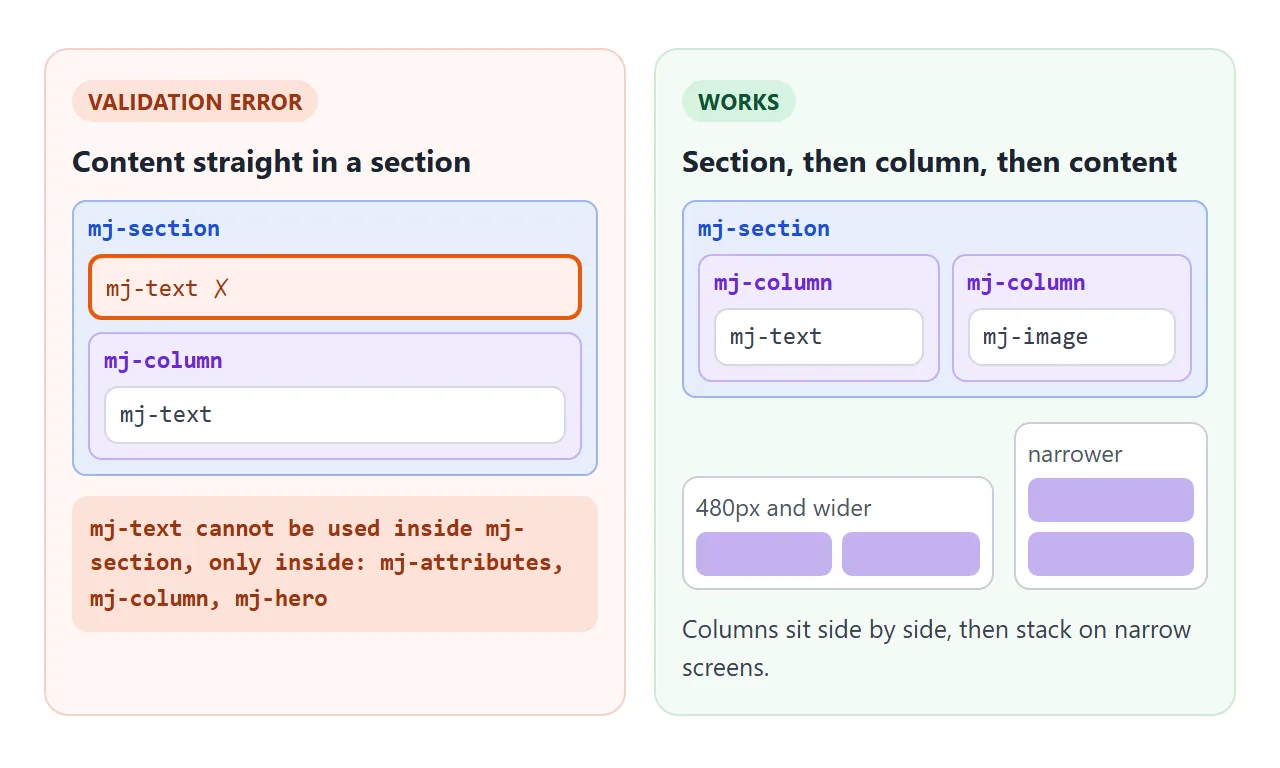
The email is 600px wide by default, set by width on mj-body. Columns in a section share that width evenly unless you give them a width.
On a narrow screen the columns stack. In the compiled output, the switch happens at 480px unless you set <mj-breakpoint> in the head.
| Tag | Goes inside | What it is for |
|---|---|---|
mj-head |
mjml |
Title, preview text, default attributes, styles |
mj-body |
mjml |
The email itself, 600px wide by default |
mj-section |
mj-body |
One horizontal band of the email |
mj-column |
mj-section |
A column; stacks on narrow screens |
mj-text, mj-button, mj-image |
mj-column |
The content |
mj-text and mj-button are "ending tags". They accept ordinary HTML such as <b> and <br>, but no other MJML tags. The MJML docs advise writing < and > for literal angle brackets in them.
Version 5 compiles asynchronously
Code written for version 4, like the example in the version 4 README, calls the compiler and reads the result on the next line.
In version 5, the README awaits it instead. Copy the old pattern and result.html is undefined. No error appears; the preview just shows the word "undefined".
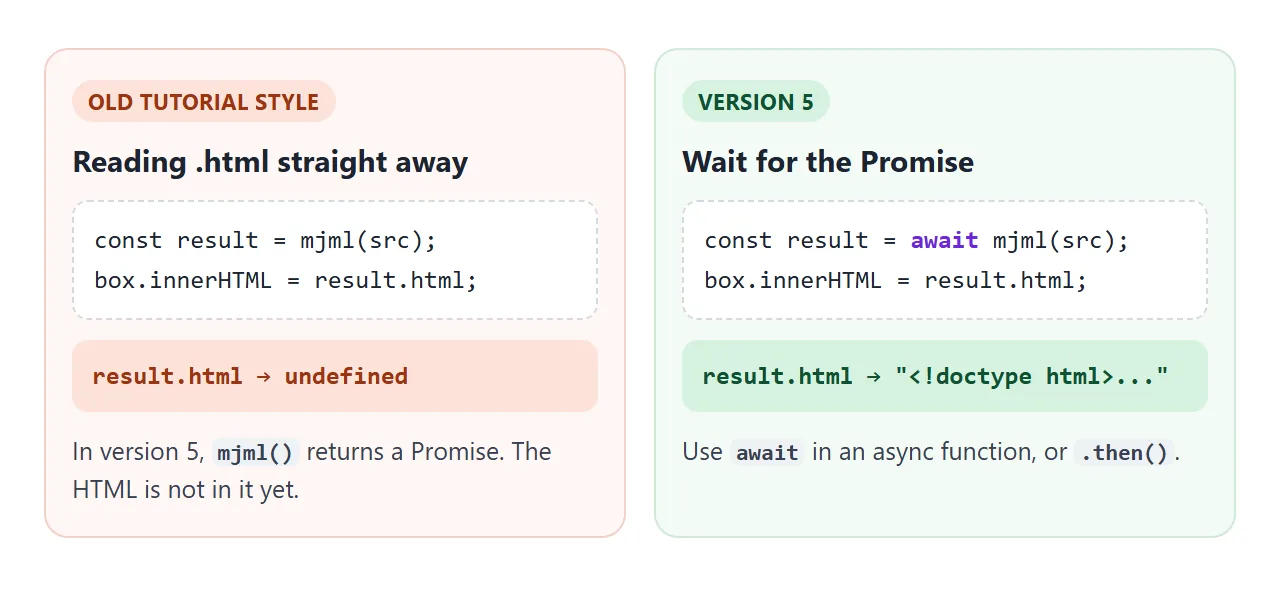
Use await inside an async function, or .then() as in the example above. Async and await in JavaScript explains the pattern if it is new.
Catching mistakes: soft and strict validation
MJML checks your tags before it builds the email. The default level, soft, builds the email anyway and lists the problems in result.errors. strict refuses to build and throws. skip does not check at all.
<!doctype html>
<html lang="en">
<head>
<meta charset="utf-8">
<meta name="viewport" content="width=device-width, initial-scale=1">
<title>MJML errors, soft and strict</title>
<style>
body { margin: 0; padding: 14px; font-family: system-ui, sans-serif; background: #eef0f3; color: #1d2330; }
.bar { display: flex; flex-wrap: wrap; gap: 8px; align-items: center; margin-bottom: 8px; font-size: 14px; }
button, select { padding: 6px 10px; font: inherit; border: 1px solid #c9ced6; border-radius: 6px; background: #fff; color: #1d2330; cursor: pointer; }
textarea { box-sizing: border-box; width: 100%; height: 215px; padding: 8px; font: 13px/1.45 ui-monospace, Consolas, monospace; border: 1px solid #c9ced6; border-radius: 8px; resize: vertical; }
#errors { margin: 8px 0; padding: 8px 10px; border-radius: 8px; font-size: 13px; line-height: 1.45; }
#errors.ok { background: #e3f5e9; color: #0f5132; }
#errors.bad { background: #fde2da; color: #9a3412; }
#errors ul { margin: 4px 0 0; padding-left: 18px; }
#preview { background: #fff; border-radius: 10px; overflow: hidden; min-height: 40px; }
</style>
</head>
<body>
<div class="bar">
<button id="broken">Broken example</button>
<button id="fixed">Fixed example</button>
<label>Validation <select id="level">
<option value="soft">soft (default)</option>
<option value="strict">strict</option>
</select></label>
</div>
<textarea id="src" spellcheck="false" aria-label="MJML source"></textarea>
<div id="errors"></div>
<div id="preview"></div>
<script src="https://cdn.jsdelivr.net/npm/mjml-browser@5.4.1/lib/index.js"></script>
<script>
// mj-text sits straight inside mj-section: not allowed, it needs an mj-column
const BROKEN = `<mjml>
<mj-body>
<mj-section background-color="#ffffff">
<mj-text font-size="20px">Spring sale</mj-text>
<mj-column>
<mj-text>Everything 20% off until Sunday.</mj-text>
</mj-column>
</mj-section>
</mj-body>
</mjml>`;
const FIXED = BROKEN
.replace(' <mj-text font-size="20px">Spring sale</mj-text>\n <mj-column>\n',
' <mj-column>\n <mj-text font-size="20px">Spring sale</mj-text>\n');
const src = document.getElementById('src');
const level = document.getElementById('level');
const errors = document.getElementById('errors');
const preview = document.getElementById('preview').attachShadow({ mode: 'open' });
function list(messages) {
return '<ul>' + messages.map((m) => '<li>' + m.replace(/</g, '<') + '</li>').join('') + '</ul>';
}
async function compile() {
try {
const result = await mjml(src.value, { validationLevel: level.value });
preview.innerHTML = result.html;
if (result.errors.length) {
// soft: the email is still built, the problems come back in result.errors
errors.className = 'bad';
errors.innerHTML = 'Rendered anyway, with ' + result.errors.length + ' problem(s):' +
list(result.errors.map((e) => e.formattedMessage));
} else {
errors.className = 'ok';
errors.textContent = 'No errors. The email below is the compiled HTML.';
}
} catch (err) {
// strict, or input that is not MJML at all: nothing is rendered
preview.innerHTML = '';
errors.className = 'bad';
errors.innerHTML = 'Not rendered:' + list([err.message]);
}
}
let timer;
src.addEventListener('input', () => { clearTimeout(timer); timer = setTimeout(compile, 300); });
level.addEventListener('change', compile);
document.getElementById('broken').addEventListener('click', () => { src.value = BROKEN; compile(); });
document.getElementById('fixed').addEventListener('click', () => { src.value = FIXED; compile(); });
src.value = BROKEN;
compile();
</script>
</body>
</html>
Under soft, a misplaced tag still renders, often in the wrong place, so check result.errors.length before you send anything. Use strict when a bad template should stop the job. Under the default level, input without an <mjml> root fails with "Malformed MJML".
try {
  const result = await mjml(source, { validationLevel: 'strict' });
  save(result.html);
} catch (err) {
  console.log(err.message);  // which line, which tag, what is wrong
}
A finished newsletter you can download
This one adds the parts a real email uses: mj-title, mj-preview for the inbox preview text, and mj-attributes so every tag shares one font without repeating it.
<!doctype html>
<html lang="en">
<head>
<meta charset="utf-8">
<meta name="viewport" content="width=device-width, initial-scale=1">
<title>MJML newsletter</title>
<style>
  body { margin: 0; padding: 14px; font-family: system-ui, sans-serif; background: #eef0f3; color: #1d2330; }
  .bar { display: flex; flex-wrap: wrap; gap: 8px; align-items: center; margin-bottom: 10px; font-size: 14px; }
  button { padding: 7px 12px; font: inherit; border: 0; border-radius: 6px; background: #2563eb; color: #fff; cursor: pointer; }
  #info { color: #4b5563; }
  details { margin-bottom: 10px; font-size: 14px; }
  textarea { box-sizing: border-box; width: 100%; height: 160px; margin-top: 6px; font: 12px/1.4 ui-monospace, Consolas, monospace; }
  #preview { background: #fff; border-radius: 10px; overflow: hidden; }
</style>
</head>
<body>
<div class="bar">
  <button id="download">Download email.html</button>
  <span id="info">Compiling...</span>
</div>
<details>
  <summary>Show the compiled HTML</summary>
  <textarea id="out" readonly aria-label="Compiled HTML"></textarea>
</details>
<div id="preview"></div>

<script type="text/plain" id="email">
<mjml>
  <mj-head>
    <mj-title>Garden Club - May</mj-title>
    <mj-preview>Seed swap on Saturday, plus two new beds</mj-preview>
    <mj-attributes>
      <!-- defaults for every component, so each tag stays short -->
      <mj-all font-family="Helvetica, Arial, sans-serif" />
      <mj-text font-size="15px" line-height="1.5" color="#333333" />
    </mj-attributes>
  </mj-head>
  <mj-body background-color="#eef2ee">
    <mj-section background-color="#2f6b3a">
      <mj-column>
        <mj-text align="center" color="#ffffff" font-size="24px" font-weight="bold">Garden Club</mj-text>
        <mj-text align="center" color="#d7ead9" padding-top="0">May newsletter</mj-text>
      </mj-column>
    </mj-section>
    <mj-section background-color="#ffffff">
      <mj-column>
        <mj-text font-size="20px" font-weight="bold">Seed swap this Saturday</mj-text>
        <mj-text>Bring spare seeds in labelled envelopes. Tables open at 10:00 by the shed.</mj-text>
        <mj-button background-color="#2f6b3a" href="#">Add to calendar</mj-button>
      </mj-column>
    </mj-section>
    <!-- two columns side by side; on a narrow screen they stack -->
    <mj-section background-color="#ffffff">
      <mj-column>
        <mj-image width="120px" alt="Tomato" src="data:image/svg+xml,%3Csvg xmlns='http://www.w3.org/2000/svg' viewBox='0 0 120 120'%3E%3Ccircle cx='60' cy='66' r='44' fill='%23e04a3a'/%3E%3Cpath d='M44 22h32l-16 18z' fill='%232f6b3a'/%3E%3C/svg%3E" />
        <mj-text align="center"><b>Bed 4: tomatoes</b><br>Planted by the Lee family.</mj-text>
      </mj-column>
      <mj-column>
        <mj-image width="120px" alt="Pea pod" src="data:image/svg+xml,%3Csvg xmlns='http://www.w3.org/2000/svg' viewBox='0 0 120 120'%3E%3Crect x='14' y='44' width='92' height='34' rx='17' fill='%2365a844'/%3E%3Ccircle cx='38' cy='61' r='9' fill='%23a6d67f'/%3E%3Ccircle cx='60' cy='61' r='9' fill='%23a6d67f'/%3E%3Ccircle cx='82' cy='61' r='9' fill='%23a6d67f'/%3E%3C/svg%3E" />
        <mj-text align="center"><b>Bed 5: peas</b><br>Free to anyone who waters it.</mj-text>
      </mj-column>
    </mj-section>
    <mj-section>
      <mj-column>
        <mj-divider border-color="#c8d6c8" border-width="1px" />
        <mj-text align="center" font-size="12px" color="#6b7280">You get this because you joined the Garden Club. Reply STOP to leave.</mj-text>
      </mj-column>
    </mj-section>
  </mj-body>
</mjml>
</script>

<script src="https://cdn.jsdelivr.net/npm/mjml-browser@5.4.1/lib/index.js"></script>
<script>
  const source = document.getElementById('email').textContent;
  let html = '';

  mjml(source).then((result) => {
    html = result.html;
    document.getElementById('preview').attachShadow({ mode: 'open' }).innerHTML = html;
    document.getElementById('out').value = html;
    document.getElementById('info').textContent =
      (html.length / 1024).toFixed(1) + ' KB of email HTML, ' + result.errors.length + ' errors';
  });

  // save the compiled HTML as a file, ready to paste into an email tool
  document.getElementById('download').addEventListener('click', () => {
    const link = document.createElement('a');
    link.href = URL.createObjectURL(new Blob([html], { type: 'text/html' }));
    link.download = 'email.html';
    link.click();
    setTimeout(() => URL.revokeObjectURL(link.href), 1000);
  });
</script>
</body>
</html>
- Defaults in one place:
<mj-all font-family="...">insidemj-attributesapplies to every component. - Images: the demo draws its pictures as
data:SVGs so the page stays self-contained. In the email you send, pointsrcat images hosted on your own server, as the examples in the MJML docs do. - Saving: the button wraps
result.htmlin aBloband clicks a link with adownloadattribute.
Before you send, look at the result in more than one inbox. Preview HTML email in multiple clients lists ways to do that.
The same email with the command line
For a project, the MJML README installs the npm package and compiles files on disk. The command line tool can also process mj-include once you turn on its allowIncludes setting. The browser build always ignores it.
npm install mjml
npx mjml input.mjml -o output.html
import mjml2html from 'mjml';
const { html, errors } = await mjml2html(source, { validationLevel: 'strict' });
That code runs in Node.js, not in a plain HTML file. The MJML you write is the same either way, so a template tested in the browser moves across unchanged.
When it does not work
| What you see | Cause | Fix |
|---|---|---|
mjml is not defined |
Your script runs before the compiler's script tag | Put the mjml-browser tag above your code |
| The preview shows "undefined" | result.html read without waiting |
await mjml(source) or .then() |
| "mj-text cannot be used inside mj-section" | Content placed straight in a section | Wrap it in mj-column |
| Tags end up inside the tag before them | MJML placed in a normal div, so the HTML parser ignores /> |
Keep MJML in script type="text/plain" or a JS string |
| "Malformed MJML" | No <mjml> root around the email |
Start with <mjml> and <mj-body> |
An mj-include part is missing |
The browser build ignores mj-include |
Paste the part in, or use the CLI with includes on |
| Your page's fonts and colours change | The email's CSS was injected into the page | Put result.html in a shadow root |
The HTML parser only honours /> on void elements such as <br>. An MJML tag like <mj-divider /> inside a div stays open, and the next tag is nested inside it. The same email in a text block compiles cleanly.
Share it as a link
An email template is easier to approve when people can see it render. Sending the compiled .html as an attachment may show code, or nothing, on a phone. Sending the MJML file shows only tags.
To send the working page, paste it into a NOS document and choose Create share link. HTML to link walks through it.
The page renders as written, its scripts run and the compiler loads from jsDelivr, so reviewers see the email and can download the HTML themselves. Change the MJML later and the same link shows the new version.