Notification HTML is really the browser's Notification API. HTML itself has no tag for it. You ask permission with Notification.requestPermission(), and once the user allows it, new Notification() shows a desktop-style notification outside the page.
Try the smallest version. Press the first button, answer the browser's prompt if it appears, then press the second.
<!doctype html>
<html lang="en">
<head>
<meta charset="utf-8">
<meta name="viewport" content="width=device-width, initial-scale=1">
<title>Notification basics</title>
<style>
  body { margin: 0; padding: 18px; font-family: system-ui, sans-serif; background: #f4f5f7; color: #1d2330; }
  .row { display: flex; flex-wrap: wrap; gap: 10px; margin-bottom: 14px; }
  button {
    font: inherit; font-weight: 600; padding: 10px 16px; border: 0; border-radius: 8px;
    background: #2563eb; color: #fff; cursor: pointer;
  }
  button.alt { background: #0f766e; }
  .state { font-size: 15px; margin: 0 0 14px; }
  #state { font-weight: 700; padding: 2px 9px; border-radius: 99px; background: #e5e7eb; }
  #state.granted { background: #d6f2df; color: #0f5132; }
  #state.denied { background: #fde2da; color: #9a3412; }
  #toast {
    min-height: 22px; padding: 12px 14px; border-radius: 10px; background: #fff;
    border: 1px dashed #c5cad3; font-size: 14px; color: #4b5563;
  }
  #toast.on { border-style: solid; border-color: #2563eb; color: #1d2330; box-shadow: 0 4px 14px rgba(0, 0, 0, .1); }
</style>
</head>
<body>
<p class="state">Permission: <span id="state">default</span></p>
<div class="row">
  <button id="ask">1. Ask permission</button>
  <button id="send" class="alt">2. Send notification</button>
</div>
<div id="toast" role="status">In-page message appears here when no system notification can be shown.</div>

<script>
  const stateEl = document.getElementById('state');
  const toast = document.getElementById('toast');

  function inPage(msg) {                       // fallback the page controls itself
    toast.textContent = msg;
    toast.classList.add('on');
  }

  function refresh() {
    const p = 'Notification' in window ? Notification.permission : 'unsupported';
    stateEl.textContent = p;
    stateEl.className = p;
  }
  refresh();

  document.getElementById('ask').addEventListener('click', async () => {
    if (!('Notification' in window)) return inPage('This browser has no Notification API.');
    try {
      await Notification.requestPermission();  // must run inside a click
    } catch (err) {
      inPage('Could not ask: ' + err.message);
    }
    refresh();
  });

  document.getElementById('send').addEventListener('click', () => {
    if ('Notification' in window && Notification.permission === 'granted') {
      try {
        new Notification('Hello from the page', { body: 'This is a system notification.' });
        return;
      } catch (err) { /* some mobile browsers throw here */ }
    }
    inPage('Hello from the page (in-page fallback, permission: ' + stateEl.textContent + ')');
  });
</script>
</body>
</html>
The permission label is read from Notification.permission. In this article's example frame the browser may refuse to ask at all, and the label goes straight to denied.
MDN notes that Chrome and Firefox no longer allow cross-origin iframes to request this permission. The in-page message is there for that case.
How the code works: ask first, then show
Two calls do the whole job. The first needs a user action. The second needs the first to have said yes.
button.addEventListener('click', async () => {
  const result = await Notification.requestPermission();
  if (result === 'granted') {
    new Notification('Hello', { body: 'It works.' });
  }
});
- Put the code in a click handler. MDN says the request must be made in response to a user interaction.
- Wait for the promise. It resolves to a string with the user's decision.
- Create the notification only when the string is
granted.
The older form of requestPermission takes a callback. MDN lists that form as deprecated, so use the promise.
The three permission values
Notification.permission is read-only and has three values. The page can look at it at any time, but only the user can change it.
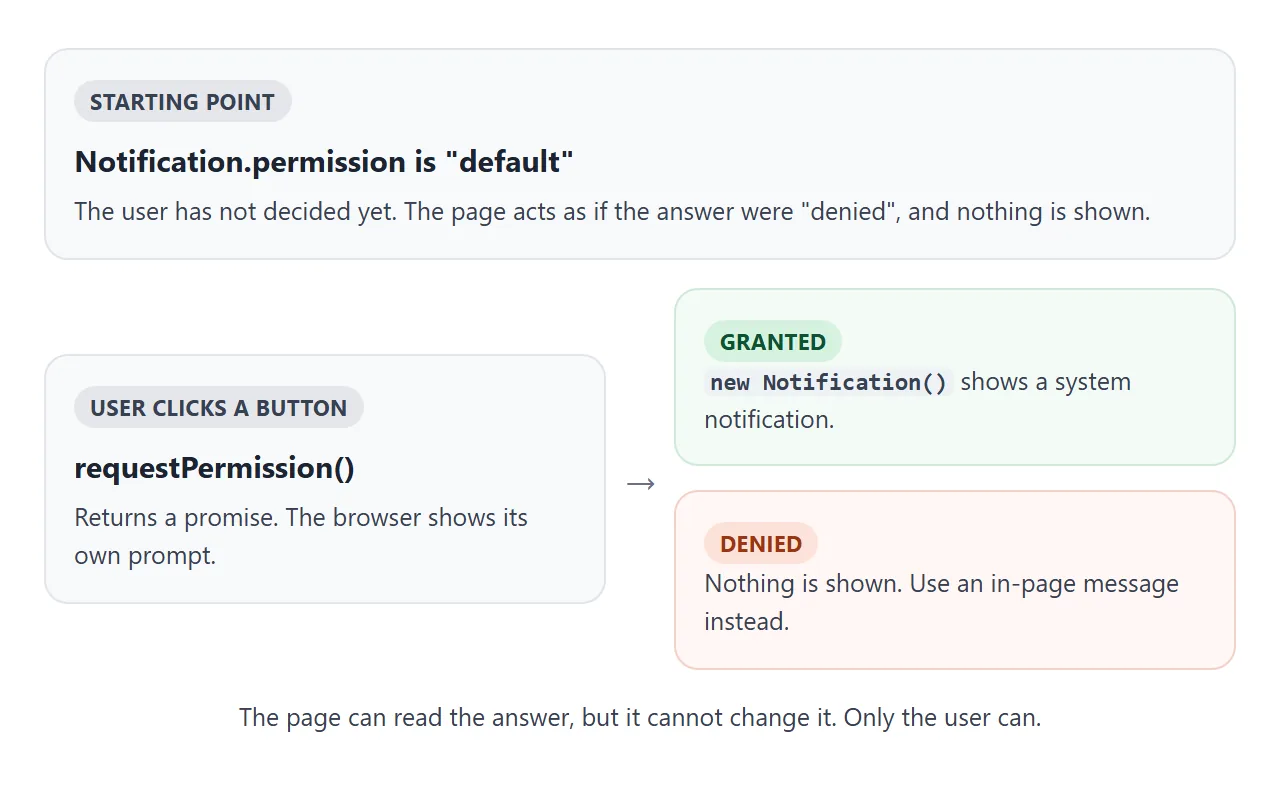
| Value | Meaning | What your page does |
|---|---|---|
default |
The user has not decided. The page acts as if it were denied | Show a button that asks |
granted |
The user allowed notifications for this origin | Call new Notification() |
denied |
The user said no | Show the message inside the page |
If the user denied it, there is nothing the page can do to override that. The browser keeps the decision per site, and it is changed in the browser's own site settings.
Ask at the moment of a click
A prompt that appears on page load arrives before the reader knows what the page is for. A prompt that follows a button labelled "Remind me in 10 min" arrives with a reason attached.
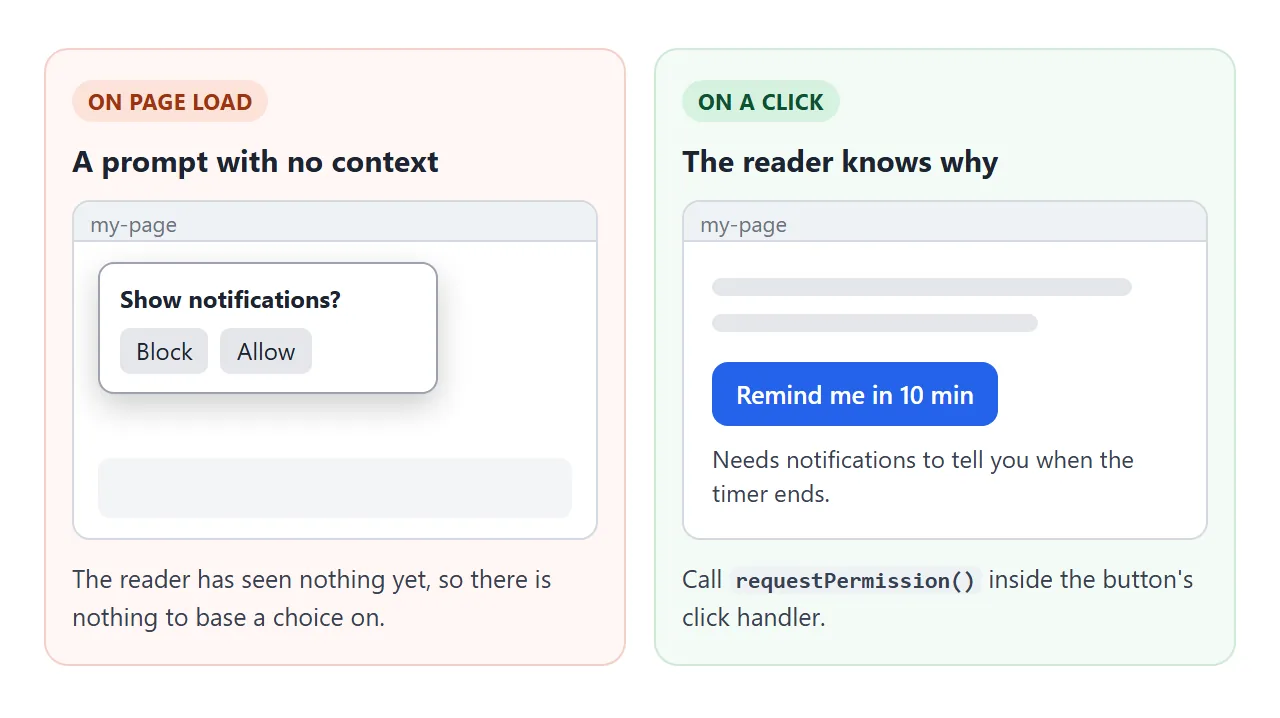
- Say why, next to the button. One short line, such as "Tells you when the timer ends."
- Keep a way forward without it. The reminder still shows on screen if the answer is no.
- Ask once. After the user has answered, read
Notification.permissioninstead of asking again.
Options and events
new Notification(title, options) takes an options object. Every key is optional. The next example lets you switch three of them on and prints each event.
<!doctype html>
<html lang="en">
<head>
<meta charset="utf-8">
<meta name="viewport" content="width=device-width, initial-scale=1">
<title>Notification options and events</title>
<style>
  body { margin: 0; padding: 18px; font-family: system-ui, sans-serif; background: #f4f5f7; color: #1d2330; }
  .opts { display: grid; gap: 8px; margin: 0 0 12px; font-size: 14px; }
  .opts label { display: flex; gap: 8px; align-items: center; }
  .row { display: flex; flex-wrap: wrap; gap: 10px; margin-bottom: 12px; }
  button {
    font: inherit; font-weight: 600; padding: 10px 16px; border: 0; border-radius: 8px;
    background: #2563eb; color: #fff; cursor: pointer;
  }
  button.alt { background: #6b7280; }
  h4 { margin: 4px 0 6px; font-size: 13px; color: #4b5563; text-transform: uppercase; letter-spacing: .4px; }
  pre {
    margin: 0 0 12px; padding: 10px 12px; background: #fff; border: 1px solid #e1e4ea; border-radius: 8px;
    font: 12.5px/1.5 ui-monospace, Consolas, monospace; white-space: pre-wrap; word-break: break-word;
  }
  #log { min-height: 90px; max-height: 150px; overflow: auto; }
</style>
</head>
<body>
<div class="opts">
  <label><input type="checkbox" id="useTag"> tag: "news" (a new one replaces the old one)</label>
  <label><input type="checkbox" id="useSilent"> silent: true (no sound or vibration)</label>
  <label><input type="checkbox" id="useStay"> requireInteraction: true (stays until dismissed)</label>
</div>
<div class="row">
  <button id="ask" class="alt">Ask permission</button>
  <button id="send">Send notification</button>
</div>

<h4>Options sent</h4>
<pre id="shown"></pre>
<h4>Event log</h4>
<pre id="log">Nothing yet.</pre>

<script>
  const $ = (id) => document.getElementById(id);
  const log = $('log');
  let n = 0;

  function line(text) {
    if (log.textContent === 'Nothing yet.') log.textContent = '';
    log.textContent += text + '\n';
    log.scrollTop = log.scrollHeight;
  }

  function buildOptions() {
    n += 1;
    const o = { body: 'Message number ' + n };
    if ($('useTag').checked) o.tag = 'news';
    if ($('useSilent').checked) o.silent = true;
    if ($('useStay').checked) o.requireInteraction = true;
    return o;
  }

  $('ask').addEventListener('click', async () => {
    if (!('Notification' in window)) return line('No Notification API here.');
    try {
      line('requestPermission -> ' + await Notification.requestPermission());
    } catch (err) {
      line('requestPermission failed: ' + err.message);
    }
  });

  $('send').addEventListener('click', () => {
    const options = buildOptions();
    $('shown').textContent = 'new Notification("Update", ' + JSON.stringify(options, null, 1) + ')';
    if (!('Notification' in window)) return line('No Notification API here.');
    try {
      const note = new Notification('Update', options);
      // each event fires on the notification object
      note.addEventListener('show', () => line('show'));
      note.addEventListener('click', () => { line('click'); note.close(); });
      note.addEventListener('close', () => line('close'));
      note.addEventListener('error', () => line('error (permission is "' + Notification.permission + '")'));
    } catch (err) {
      line('constructor threw ' + err.name);
    }
  });
</script>
</body>
</html>
| Option | What it does |
|---|---|
body |
The text shown under the title |
tag |
A label. A new notification with the same tag replaces the old one |
silent |
When true, no sound or vibration, whatever the device settings are |
requireInteraction |
When true, it stays until the user clicks or dismisses it |
icon |
The URL of an icon to show |
The notification object also fires four events: show, click, close and error. By default a click moves focus to the page that created the notification. Call preventDefault() on the click event to stop that. close() removes a notification from code.
If permission is not granted when you call the constructor, the specification says an error event is queued. In a headless Chromium test, a page with permission denied logged exactly that, with no exception. Check Notification.permission first, and listen for error while you build.
Phones and the constructor
MDN's guide says the constructor is fine on desktop but throws a TypeError in most mobile browsers. For mobile it points to a service worker and showNotification().
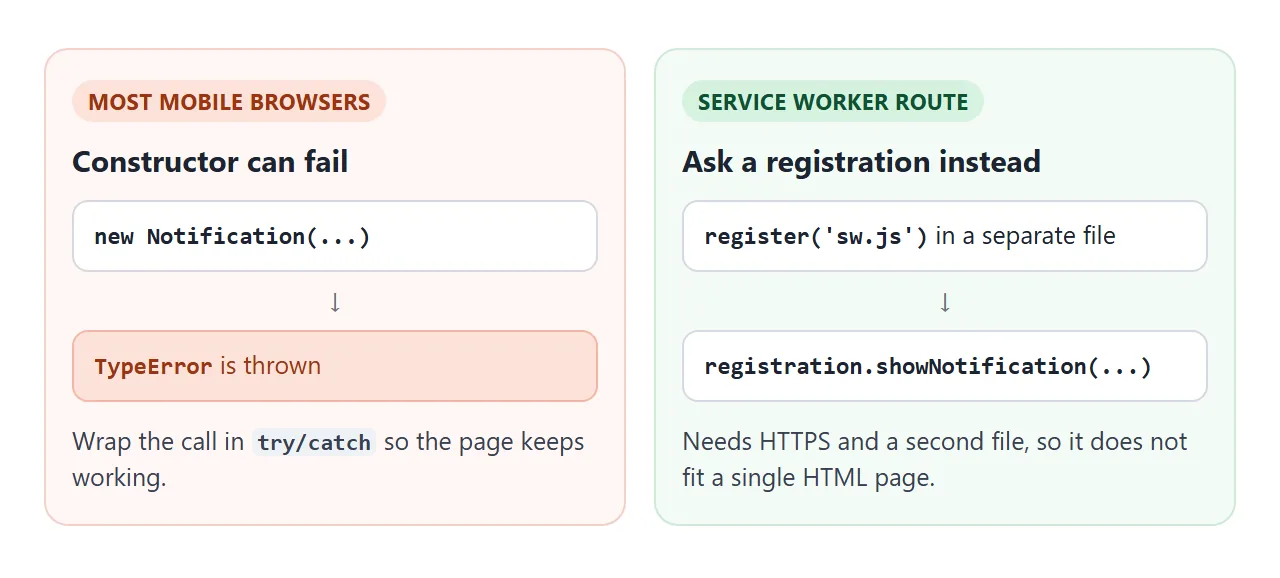
A service worker is a separate script file, and registering one needs a secure context. That cannot live inside one pasted HTML page. It looks like this across two files:
// page.js
await navigator.serviceWorker.register('/sw.js');
const registration = await navigator.serviceWorker.ready;
registration.showNotification('Hello', { body: 'From a service worker.' });
// sw.js
self.addEventListener('notificationclick', (event) => {
  event.notification.close();
});
In a single HTML file, wrap the constructor in try/catch and fall back to a message in the page. Every example here does that, so the page never breaks.
A finished example: a break reminder
This one puts the pieces together. You pick a time, press Start, and when the countdown hits zero the page shows a banner, marks the tab title, and sends a notification if you allowed it.
<!doctype html>
<html lang="en">
<head>
<meta charset="utf-8">
<meta name="viewport" content="width=device-width, initial-scale=1">
<title>Break reminder</title>
<style>
  body { margin: 0; padding: 18px; font-family: system-ui, sans-serif; background: #f4f5f7; color: #1d2330; }
  .card { background: #fff; border-radius: 14px; padding: 18px; box-shadow: 0 6px 20px rgba(0, 0, 0, .1); }
  .time { font: 700 44px/1 ui-monospace, Consolas, monospace; margin: 4px 0 14px; }
  .row { display: flex; flex-wrap: wrap; gap: 10px; align-items: center; margin-bottom: 12px; }
  select, button { font: inherit; padding: 9px 12px; border-radius: 8px; border: 1px solid #c5cad3; background: #fff; }
  button { border: 0; background: #2563eb; color: #fff; font-weight: 600; cursor: pointer; }
  button.alt { background: #6b7280; }
  .meta { font-size: 13px; color: #4b5563; margin: 0 0 12px; }
  #banner {
    display: none; padding: 12px 14px; border-radius: 10px; background: #fff7e6;
    border: 1px solid #f2d28b; font-weight: 600;
  }
  #banner.on { display: block; }
</style>
</head>
<body>
<div class="card">
  <div class="time" id="time">00:10</div>
  <div class="row">
    <label for="len">Remind me in</label>
    <select id="len">
      <option value="5">5 seconds</option>
      <option value="10" selected>10 seconds</option>
      <option value="30">30 seconds</option>
    </select>
    <button id="start">Start</button>
    <button id="ask" class="alt">Allow notifications</button>
  </div>
  <p class="meta" id="meta">Permission: default</p>
  <div id="banner" role="status">Time for a break. Stand up and stretch.</div>
</div>

<script>
  const $ = (id) => document.getElementById(id);
  const baseTitle = document.title;
  let timer = null;

  const fmt = (s) => String(Math.floor(s / 60)).padStart(2, '0') + ':' + String(s % 60).padStart(2, '0');
  const perm = () => ('Notification' in window ? Notification.permission : 'unsupported');
  const showPerm = () => { $('meta').textContent = 'Permission: ' + perm(); };
  showPerm();
  $('time').textContent = fmt(Number($('len').value));
  $('len').addEventListener('change', () => { $('time').textContent = fmt(Number($('len').value)); });

  $('ask').addEventListener('click', async () => {
    if ('Notification' in window) {
      try { await Notification.requestPermission(); } catch (e) { /* keep going */ }
    }
    showPerm();
  });

  function done() {
    $('banner').classList.add('on');          // always works, even if notifications are blocked
    document.title = '(!) ' + baseTitle;
    if (perm() === 'granted') {
      try {
        const n = new Notification('Break time', { body: 'Your timer is up.', tag: 'break' });
        n.addEventListener('click', () => { window.focus(); n.close(); });
      } catch (e) { /* constructor can throw on some mobile browsers */ }
    }
  }

  $('start').addEventListener('click', () => {
    clearInterval(timer);
    $('banner').classList.remove('on');
    document.title = baseTitle;
    let left = Number($('len').value);
    $('time').textContent = fmt(left);
    timer = setInterval(() => {
      left -= 1;
      $('time').textContent = fmt(left);
      if (left <= 0) { clearInterval(timer); done(); }
    }, 1000);
  });
</script>
</body>
</html>
The order matters. The in-page banner comes first, so the reminder is never lost. The notification is an extra for people who have allowed it and switched to another tab. It uses a tag, so a second reminder replaces the first instead of stacking up.
Notifications need a secure context. MDN describes that as HTTPS, and its secure contexts page also lists localhost and file: URLs. For a page you share, check window.isSecureContext if you need to know. What HTTPS is explains the rest.
When it does not work
| What you see | Cause | Fix |
|---|---|---|
| No prompt appears | requestPermission() ran on page load, not on a click |
Move it into a click handler |
| No prompt inside an embedded example | Cross-origin iframes cannot request the permission in Chrome and Firefox | Open the page on its own, and keep the in-page fallback |
permission is denied |
The user declined, now or earlier | Ask them to allow it in the browser's site settings |
| No notification and no exception | Permission was not granted, so an error event fired |
Check Notification.permission; listen for error |
TypeError on a phone |
The constructor is not supported in most mobile browsers | Use try/catch, or a service worker |
| The second one replaces the first | Both share a tag |
Remove the tag, or give each its own |
| It vanishes by itself | Notifications close on their own by default | Set requireInteraction: true |
For the click handlers themselves, see addEventListener. For frames and what they block, see the sandbox attribute. Another API that asks first and needs a secure page is Geolocation.
Share it as a link
A notification demo is hard to show with a screenshot, and an .html attachment may not open at all on a phone. Opening an HTML file on a phone covers why.
To send the working version, paste the page into a NOS document and choose Create share link. HTML to link walks through it.
The page renders as written and its scripts run, so the people you send it to can press the buttons themselves. If you change the code later, the same link shows the new version.
Keep the in-page fallback in whatever you share. If a browser does not allow the prompt in that setting, the banner still tells the reader what would have happened.