Here, Nuxt means the Vue framework at nuxt.com, and "UI examples" means cards, buttons and forms written with it. Nuxt itself needs Node.js and a build, so it cannot run from one HTML file.
Vue can, because it loads from a CDN script tag, and Vue is where those examples get their behaviour.
Try it first. This page is Vue from a CDN, with no install and no build.
<!doctype html>
<html lang="en">
<head>
<meta charset="utf-8">
<meta name="viewport" content="width=device-width, initial-scale=1">
<title>Vue from a CDN</title>
<style>
  body { margin: 0; padding: 20px; font-family: system-ui, sans-serif; background: #f4f5f7; color: #1d2330; }
  .card { max-width: 360px; padding: 18px; border-radius: 12px; background: #fff; box-shadow: 0 6px 20px rgba(0,0,0,.1); }
  h1 { margin: 0 0 6px; font-size: 20px; }
  p { margin: 0 0 14px; color: #4b5563; }
  button { font: inherit; padding: 8px 14px; border: 0; border-radius: 8px; background: #16a34a; color: #fff; cursor: pointer; }
  button.off { background: #6b7280; }
  .count { font-weight: 700; font-size: 22px; margin-right: 10px; }
  [v-cloak] { display: none; }  /* hide the raw {{ }} until Vue has compiled the markup */
</style>
</head>
<body>
<!-- Vue compiles this markup, so the {{ }} below are filled in by the script -->
<div id="app" class="card" v-cloak>
  <h1>{{ title }}</h1>
  <p>{{ done ? 'Thanks for clicking!' : 'Click the button three times.' }}</p>
  <span class="count">{{ count }}</span>
  <button :class="{ off: done }" @click="count++">Add one</button>
  <button class="off" @click="count = 0">Reset</button>
</div>

<!-- Global build: everything is exposed on the Vue object -->
<script src="https://cdn.jsdelivr.net/npm/vue@3.5.43/dist/vue.global.prod.js"></script>
<script>
  const { createApp, ref, computed } = Vue;

  createApp({
    setup() {
      const count = ref(0);
      const done = computed(() => count.value >= 3);
      return { title: 'Hello from Vue', count, done };
    }
  }).mount('#app');
</script>
</body>
</html>
The whole thing is one markup block and one script. Vue's own guide says there is no build step involved when you use it from a CDN.
What fits in one file, and what does not
Nuxt's introduction describes it as a free and open-source framework for full-stack web applications built with Vue.js. Its installation page asks for Node.js 22.x or newer and starts a project with npm create nuxt@latest.
That is the dividing line. A Nuxt project is a folder, a terminal and a build. A single HTML file is the page itself.
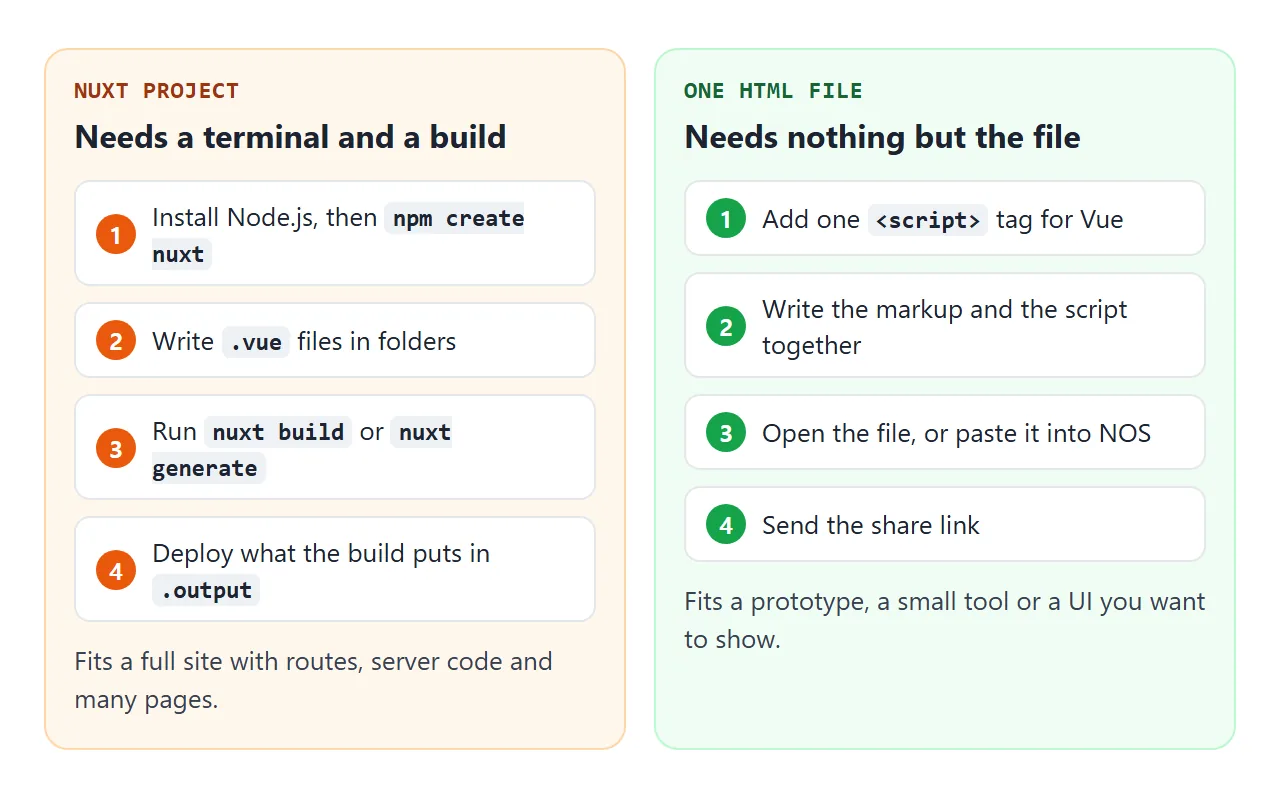
Choose a Nuxt project when you need routes across many files or server code. Choose one file when you want to prototype a screen, share a small tool, or show how a UI should behave.
Translate a Nuxt page into a script tag
A page in a Nuxt example uses a few conveniences that a plain file has to spell out. The docs describe auto-imports, so ref and computed work without an import line. They also say every Vue file in the pages folder becomes a route.
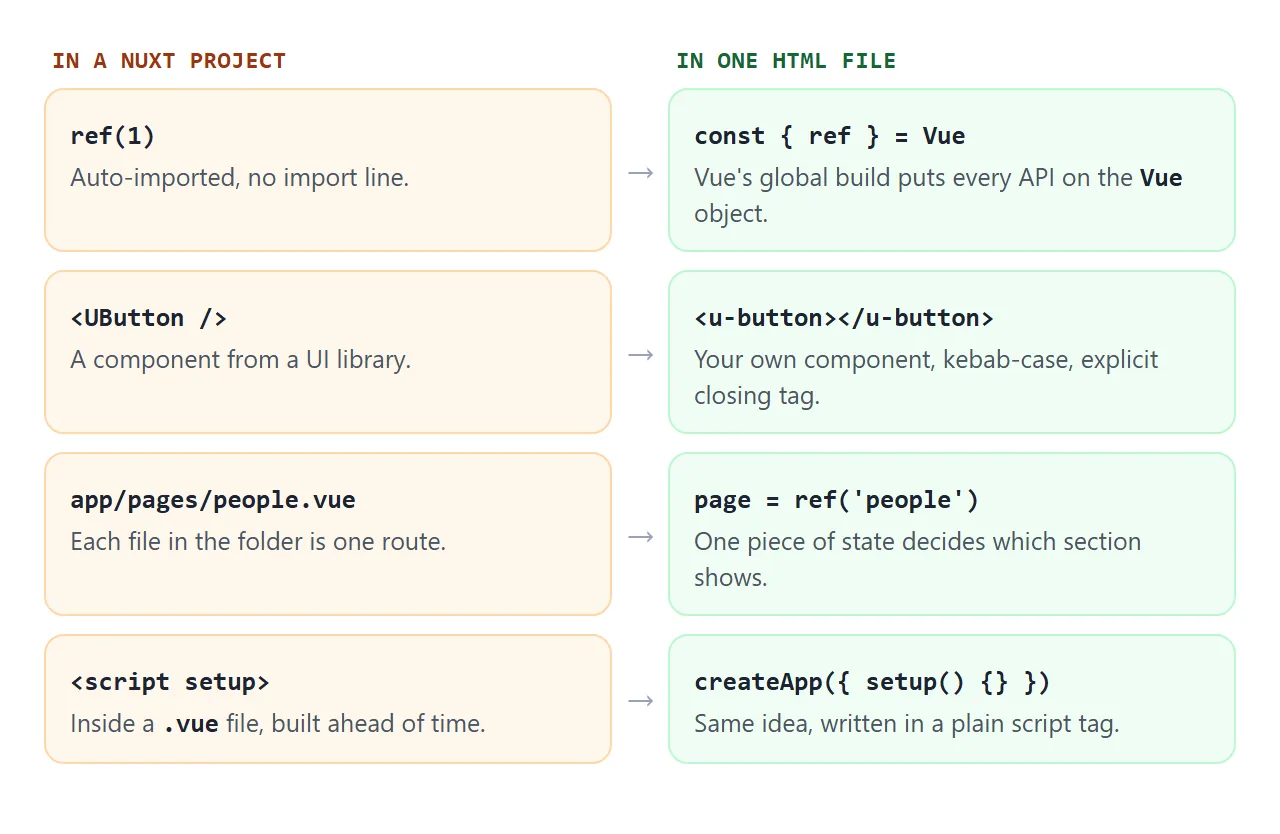
To port an example, follow these steps:
- Add the Vue script tag from a CDN, with a pinned version number.
- Move the template into a div, and give that div an id.
- Read the Vue functions from the global object, for example
const { createApp, ref } = Vue. - Replace the routing with one piece of state that decides which section shows.
Vue's guide calls this the global build, where all top-level APIs are properties of the global Vue object.
Nuxt UI examples as plain components
Nuxt UI is a Vue component library built on Reka UI and Tailwind CSS, and its docs say it works with any Vue project, not only Nuxt. Its examples use tags such as UButton, UCard and UBadge.
The install steps in its docs use a package manager, a config file and a CSS import. So this guide does not load the library. It writes three tiny components with the same names and slots, which is enough to read and reuse the pattern.
<!doctype html>
<html lang="en">
<head>
<meta charset="utf-8">
<meta name="viewport" content="width=device-width, initial-scale=1">
<title>UI components in one file</title>
<style>
  body { margin: 0; padding: 18px; font-family: system-ui, sans-serif; background: #f4f5f7; color: #1d2330; }
  .u-card { max-width: 380px; border-radius: 14px; background: #fff; box-shadow: 0 6px 20px rgba(0,0,0,.1); overflow: hidden; }
  .u-card-head { padding: 14px 18px; border-bottom: 1px solid #e5e7eb; font-weight: 700; display: flex; justify-content: space-between; align-items: center; }
  .u-card-body { padding: 16px 18px; }
  .u-badge { font-size: 12px; padding: 2px 8px; border-radius: 999px; background: #dcfce7; color: #166534; font-weight: 600; }
  .u-field { display: block; margin-bottom: 12px; }
  .u-field span { display: block; font-size: 13px; margin-bottom: 4px; color: #374151; }
  .u-input { width: 100%; box-sizing: border-box; font: inherit; padding: 9px 11px; border: 1px solid #cbd5e1; border-radius: 8px; }
  .u-input:focus { outline: 2px solid #86efac; border-color: #16a34a; }
  .u-button { font: inherit; padding: 9px 16px; border: 0; border-radius: 8px; background: #16a34a; color: #fff; cursor: pointer; }
  .u-button.soft { background: #e5e7eb; color: #1d2330; margin-left: 6px; }
  pre { margin: 12px 0 0; padding: 10px; border-radius: 8px; background: #0f172a; color: #e2e8f0; font-size: 12.5px; white-space: pre-wrap; word-break: break-word; }
  [v-cloak] { display: none; }
</style>
</head>
<body>
<div id="app" v-cloak>
  <!-- In-HTML templates need kebab-case names and explicit closing tags -->
  <u-card>
    <template #head>
      Sign up <u-badge>{{ status }}</u-badge>
    </template>

    <form @submit.prevent="send">
      <u-field label="Name">
        <input class="u-input" name="name" v-model="name" required>
      </u-field>
      <u-field label="Email">
        <input class="u-input" name="email" type="email" v-model="email" required>
      </u-field>
      <u-button type="submit">Send</u-button>
      <u-button type="button" soft @click="clear">Clear</u-button>
    </form>

    <pre v-if="result">{{ result }}</pre>
  </u-card>
</div>

<script src="https://cdn.jsdelivr.net/npm/vue@3.5.43/dist/vue.global.prod.js"></script>
<script>
  const { createApp, ref } = Vue;
  const app = createApp({
    setup() {
      const name = ref(''), email = ref(''), result = ref(''), status = ref('draft');
      function send(e) {
        // Read the form inside the page. Nothing is sent to a server.
        const data = Object.fromEntries(new FormData(e.target));
        result.value = JSON.stringify(data, null, 2);
        status.value = 'ready';
      }
      function clear() { name.value = email.value = result.value = ''; status.value = 'draft'; }
      return { name, email, result, status, send, clear };
    }
  });

  // Small components: the same idea as UCard, UButton and UBadge, written by hand
  app.component('u-card', {
    template: `<div class="u-card">
      <div class="u-card-head"><slot name="head"></slot></div>
      <div class="u-card-body"><slot></slot></div>
    </div>`
  });
  app.component('u-badge', { template: `<span class="u-badge"><slot></slot></span>` });
  app.component('u-field', {
    props: ['label'],
    template: `<label class="u-field"><span>{{ label }}</span><slot></slot></label>`
  });
  app.component('u-button', {
    props: { type: { default: 'button' }, soft: Boolean },
    template: `<button :type="type" :class="['u-button', { soft }]"><slot></slot></button>`
  });

  app.mount('#app');
</script>
</body>
</html>
The form calls preventDefault on submit and reads the fields with FormData. Nothing is sent anywhere, so the result prints on the page. See FormData in JavaScript for the reading side.
Why a self-closing tag swallows the next element
Nuxt examples write <UButton />. In a single HTML file, the browser parses your template before Vue sees it, so that habit breaks in three ways.
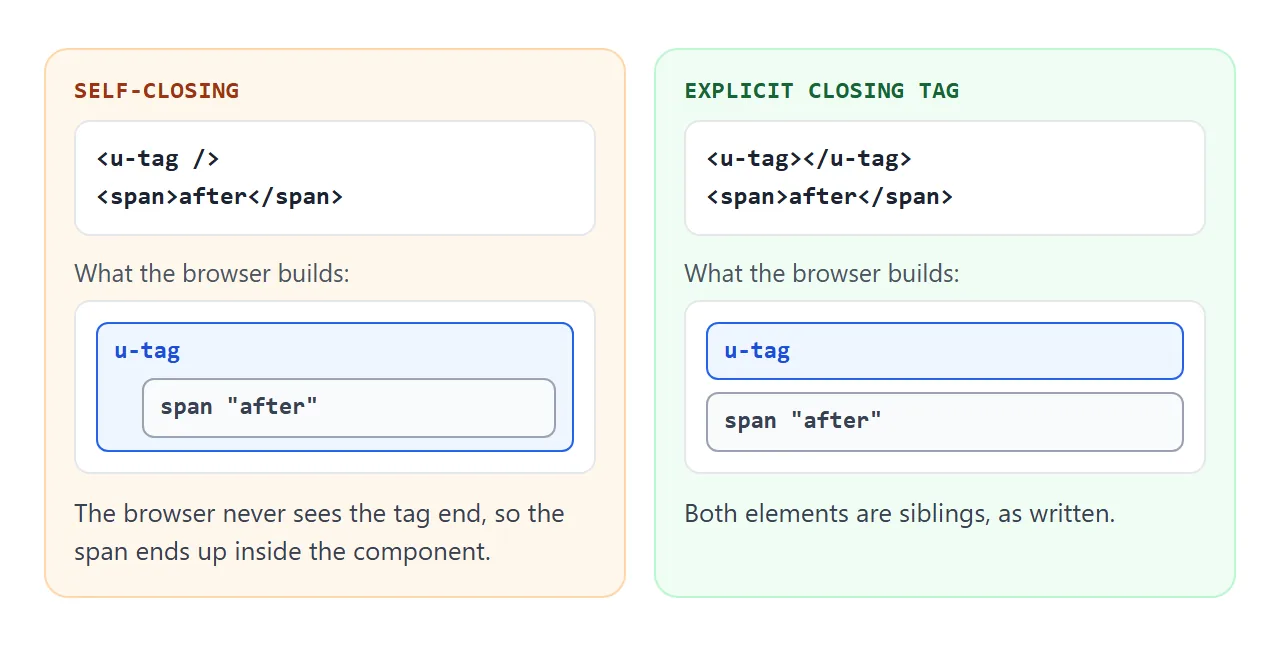
Vue's guide lists the rules for templates written in the page:
- Use kebab-case for components and props, such as
u-buttonandpost-title, because HTML is case-insensitive. - Always write the closing tag. Only a few elements, like input and img, may omit it.
- Inside table, ul or select, write the real element and add the
isattribute, for example<tr is="vue:my-row">.
The example above already uses the fixed form: <u-button></u-button>.
A finished example: a team board
This one adds two sections that switch with a button, a search box, a status toggle and a modal form. It loads Vue and the Tailwind browser build from the same CDN host.
<!doctype html>
<html lang="en">
<head>
<meta charset="utf-8">
<meta name="viewport" content="width=device-width, initial-scale=1">
<title>Team board: Vue and Tailwind in one file</title>
<script src="https://cdn.jsdelivr.net/npm/@tailwindcss/browser@4.3.3"></script>
<style>[v-cloak] { display: none; }</style>
</head>
<body class="bg-slate-100 text-slate-900 font-sans">
<div id="app" v-cloak class="mx-auto max-w-md p-4">

  <!-- Two "pages": one piece of state decides which one shows -->
  <nav class="mb-4 flex gap-2">
    <button v-for="p in pages" :key="p"
            @click="page = p"
            :class="page === p ? 'bg-green-600 text-white' : 'bg-white text-slate-700'"
            class="rounded-lg px-3 py-1.5 text-sm font-medium shadow-sm capitalize">
      {{ p }}
    </button>
  </nav>

  <section v-if="page === 'overview'" class="rounded-xl bg-white p-5 shadow">
    <h1 class="text-lg font-bold">Team board</h1>
    <p class="mt-1 text-sm text-slate-600">{{ people.length }} people, {{ onlineCount }} online.</p>
    <div class="mt-3 h-2 overflow-hidden rounded-full bg-slate-200">
      <div class="h-full bg-green-500 transition-all" :style="{ width: onlinePct + '%' }"></div>
    </div>
    <button @click="page = 'people'" class="mt-4 rounded-lg bg-green-600 px-3 py-2 text-sm font-medium text-white">See people</button>
  </section>

  <section v-else class="rounded-xl bg-white p-5 shadow">
    <div class="flex gap-2">
      <input v-model="query" placeholder="Search by name" class="min-w-0 flex-1 rounded-lg border border-slate-300 px-3 py-2 text-sm focus:outline-2 focus:outline-green-300">
      <button @click="open = true" class="rounded-lg bg-green-600 px-3 py-2 text-sm font-medium text-white">Add</button>
    </div>
    <ul class="mt-3 divide-y divide-slate-100">
      <li v-for="p in shown" :key="p.name" class="flex items-center justify-between py-2">
        <span class="text-sm font-medium">{{ p.name }}</span>
        <button @click="p.online = !p.online"
                :class="p.online ? 'bg-green-100 text-green-800' : 'bg-slate-100 text-slate-600'"
                class="rounded-full px-2.5 py-0.5 text-xs font-semibold">
          {{ p.online ? 'online' : 'away' }}
        </button>
      </li>
      <li v-if="!shown.length" class="py-3 text-sm text-slate-500">No match.</li>
    </ul>
  </section>

  <!-- Modal: shown with v-if, closed by the backdrop or Cancel -->
  <div v-if="open" @click.self="open = false" class="fixed inset-0 flex items-center justify-center bg-black/40 p-4">
    <form @submit.prevent="add" class="w-full max-w-xs rounded-xl bg-white p-5 shadow-xl">
      <h2 class="font-bold">Add a person</h2>
      <input v-model="newName" required placeholder="Name" class="mt-3 w-full rounded-lg border border-slate-300 px-3 py-2 text-sm">
      <div class="mt-4 flex justify-end gap-2">
        <button type="button" @click="open = false" class="rounded-lg bg-slate-200 px-3 py-2 text-sm">Cancel</button>
        <button class="rounded-lg bg-green-600 px-3 py-2 text-sm font-medium text-white">Save</button>
      </div>
    </form>
  </div>
</div>

<script src="https://cdn.jsdelivr.net/npm/vue@3.5.43/dist/vue.global.prod.js"></script>
<script>
  const { createApp, ref, computed } = Vue;

  createApp({
    setup() {
      const pages = ['overview', 'people'];
      const page = ref('overview');
      const query = ref('');
      const open = ref(false);
      const newName = ref('');
      const people = ref([
        { name: 'Ada Lee', online: true },
        { name: 'Ben Ortiz', online: false },
        { name: 'Chen Wei', online: true },
      ]);

      const shown = computed(() =>
        people.value.filter(p => p.name.toLowerCase().includes(query.value.trim().toLowerCase())));
      const onlineCount = computed(() => people.value.filter(p => p.online).length);
      const onlinePct = computed(() => people.value.length ? Math.round(onlineCount.value / people.value.length * 100) : 0);

      function add() {
        people.value.push({ name: newName.value.trim(), online: false });
        newName.value = '';
        open.value = false;
      }
      return { pages, page, query, open, newName, people, shown, onlineCount, onlinePct, add };
    }
  }).mount('#app');
</script>
</body>
</html>
- Pages: one
pagevalue andv-ifstand in for the pages folder. - Search: a
computedlist filters the people as you type. - Modal:
v-ifshows it, and@click.selfcloses it from the backdrop.
Tailwind describes its Play CDN as designed for development only. That is fine for a prototype you hand to a few people.
When it does not work
| What you see | Cause | Fix |
|---|---|---|
| Raw double curly braces flash | The browser shows markup before Vue compiles | Add v-cloak and hide [v-cloak] in CSS |
| Content after a component is missing | Self-closing tag in the page | Write an explicit closing tag |
| A component never renders | The tag uses PascalCase | Use kebab-case in the page |
ref is not defined |
No auto-import outside Nuxt | Read it from the Vue object |
| Rows jump out of a table | A component sits directly in the table | Use the is attribute on a real tr |
| Page is blank, console mentions Vue | The script tag failed to load | Check the URL and the pinned version |
| A fetch to an API fails | Another site is not reachable from the shared page | Keep data inside the page |
Still blank? HTML JavaScript not working walks through the console checks in order.
Share it as a link
A UI example is easier to show than to describe, and a screenshot cannot be clicked. Sending the file as an attachment may open it as plain code on a phone.
To send the working version, paste the page into a NOS document and choose Create share link. HTML to link walks through it.
The page renders as written, its scripts run, and the Vue and Tailwind scripts from the CDN load, so the people you send it to can click through the board themselves. Editing the code keeps the same link, which then shows the new version.
If the example grows into a real application, hosting a built front end covers the next step.