A one page proposal template is four blocks in a fixed order: the problem, your offer, the price, and the next step. Everything else is optional. Build it as one web page and send the address, not a file.
The part that eats time is usually the look. One freelancer wrote that after buying a Canva template they "spent an embarrassing amount of time on something I hoped looked polished enough to send." A plain page with four blocks needs no template.
Here is a finished one. It is a single column that reads on a phone. Edit the numbers at the top of the script and it reruns.
<!doctype html>
<html lang="en">
<head>
<meta charset="utf-8">
<meta name="viewport" content="width=device-width, initial-scale=1">
<title>Proposal - Newsletter setup for Fernhill Yoga Studio</title>
<style>
  * { box-sizing: border-box; }
  body { margin: 0; background: #f3f4f6; font-family: system-ui, -apple-system, "Segoe UI", sans-serif; color: #1f2937; line-height: 1.55; }
  .page { max-width: 680px; margin: 0 auto; background: #fff; padding: 24px 20px 30px; min-height: 100vh; }
  .tag { margin: 0; font-size: 13px; letter-spacing: .06em; text-transform: uppercase; color: #6b7280; }
  h1 { margin: 6px 0 4px; font-size: 26px; line-height: 1.2; }
  .meta { margin: 0 0 6px; font-size: 14px; color: #6b7280; }
  h2 { display: flex; align-items: center; gap: 10px; margin: 24px 0 8px; font-size: 13px; letter-spacing: .08em; text-transform: uppercase; color: #6b7280; }
  h2 i { font-style: normal; display: inline-grid; place-items: center; width: 24px; height: 24px; border-radius: 50%; background: #1d4ed8; color: #fff; font-size: 13px; letter-spacing: 0; }
  p { margin: 0 0 8px; font-size: 16px; }
  ul { margin: 0; padding-left: 20px; }
  li { margin-bottom: 4px; font-size: 16px; }
  .price { background: #eff6ff; border: 1px solid #bfdbfe; border-radius: 12px; padding: 14px 16px; }
  .price b { display: block; font-size: 28px; color: #1d4ed8; line-height: 1.2; }
  .price span { font-size: 15px; color: #374151; }
  .pay { display: flex; justify-content: space-between; gap: 12px; margin-top: 10px; font-size: 15px; }
  .pay div { flex: 1; padding: 8px 10px; background: #f9fafb; border-radius: 8px; }
  .pay b { display: block; font-size: 18px; }
  .small { font-size: 14px; color: #6b7280; }
  .next { border: 2px solid #1d4ed8; border-radius: 12px; padding: 14px 16px; }
  .next .ask { font-size: 18px; font-weight: 700; margin-bottom: 8px; }
  .steps { list-style: none; padding: 0; margin: 0; }
  .steps li { display: flex; gap: 12px; padding: 6px 0; margin: 0; border-top: 1px solid #eef0f3; font-size: 15px; }
  .steps b { min-width: 64px; color: #1d4ed8; }
</style>
</head>
<body>
<div class="page">
  <p class="tag">Proposal</p>
  <h1>Newsletter setup for Fernhill Yoga Studio</h1>
  <p class="meta">For Noor Haldane · from Jonas Lind · valid until <span id="valid"></span></p>

  <h2><i>1</i>The problem</h2>
  <p>Class changes are posted on the studio's front door and in three chat groups. Members miss them, and you answer the same "is Thursday on?" message every week.</p>

  <h2><i>2</i>My offer</h2>
  <ul>
    <li>One email template in the studio's colours, set up in your mailing tool.</li>
    <li>Your 140 current members imported and tidied.</li>
    <li>A one-hour call showing you how to send an update in five minutes.</li>
  </ul>
  <p class="small">Ready within 10 days of your yes.</p>

  <h2><i>3</i>The price</h2>
  <div class="price">
    <b id="price"></b>
    <span>Fixed. Covers everything in block 2.</span>
    <div class="pay">
      <div><span>Deposit (<span id="dep-pct"></span>)</span><b id="dep"></b></div>
      <div><span>On handover</span><b id="rest"></b></div>
    </div>
  </div>
  <p class="small" style="margin-top:8px">Not included: the mailing tool's own subscription, and copywriting for each update.</p>

  <h2><i>4</i>The next step</h2>
  <div class="next">
    <p class="ask">Reply "yes" to this email by <span id="reply-by"></span>.</p>
    <ul class="steps">
      <li><b>You</b><span>Send "yes" and the member list.</span></li>
      <li><b>Me</b><span>Send the deposit invoice the same day.</span></li>
      <li><b id="start"></b><span>I start. First draft within a week.</span></li>
    </ul>
    <p class="small" style="margin:8px 0 0">Questions first? jonas@example.com</p>
  </div>
</div>

<script>
  // ---- Change the numbers and dates here. The whole page follows. ----
  const PRICE = 780;
  const DEPOSIT_PERCENT = 40;
  const VALID_UNTIL = '31 Oct 2026';
  const REPLY_BY = '23 Oct 2026';
  const START = '26 Oct';
  // ---------------------------------------------------------------------

  const money = (n) => '$' + n.toLocaleString('en-US');
  const deposit = Math.round(PRICE * DEPOSIT_PERCENT / 100);

  document.getElementById('price').textContent = money(PRICE);
  document.getElementById('dep-pct').textContent = DEPOSIT_PERCENT + '%';
  document.getElementById('dep').textContent = money(deposit);
  document.getElementById('rest').textContent = money(PRICE - deposit);
  document.getElementById('valid').textContent = VALID_UNTIL;
  document.getElementById('reply-by').textContent = REPLY_BY;
  document.getElementById('start').textContent = START;
</script>
</body>
</html>
The four blocks, in order
Each block answers one question the client has while reading.
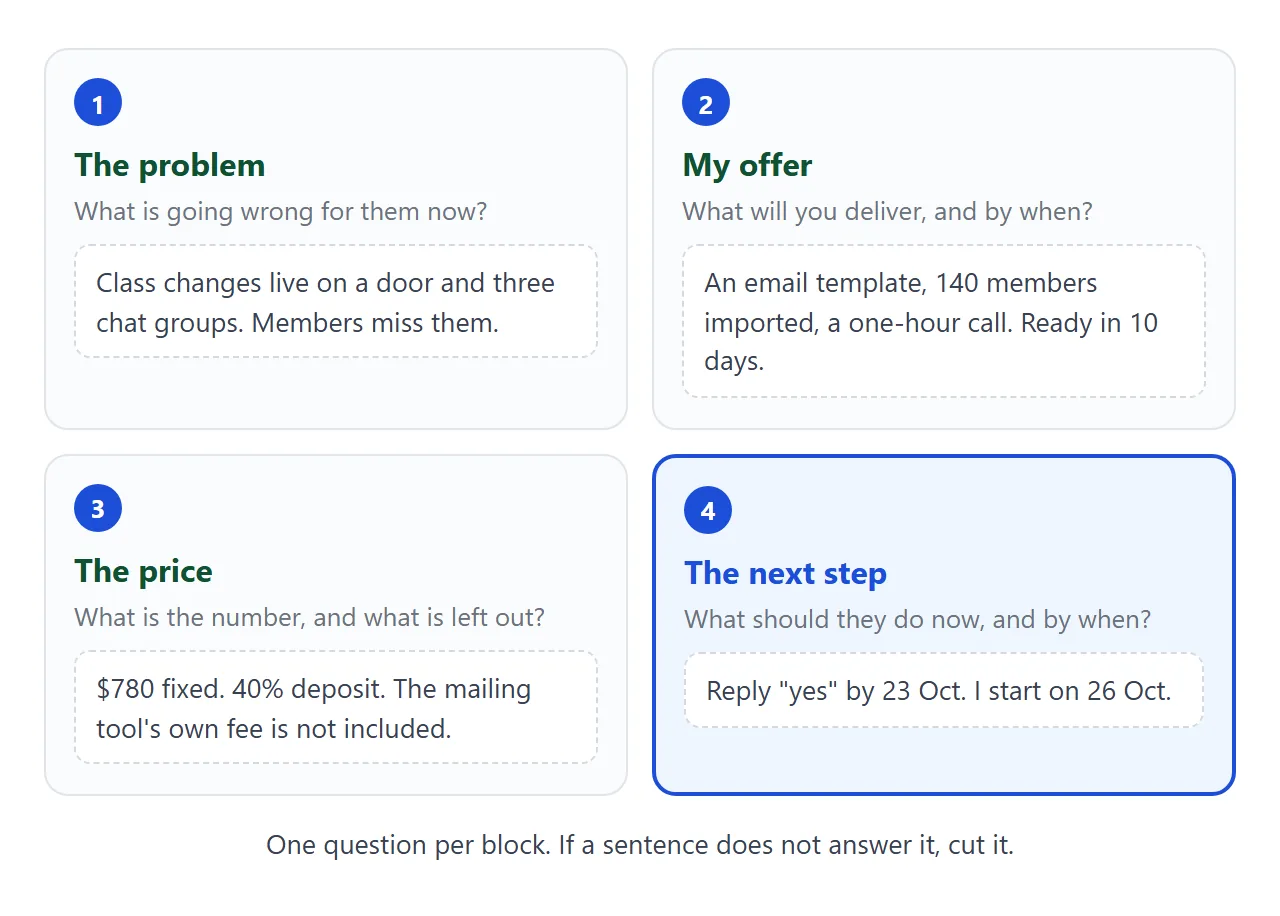
- The problem – what is going wrong for them now, in their words. Two sentences.
- My offer – what you will deliver, as three short lines, and by when.
- The price – one number, what it covers, and what is left out. Add the deposit if you take one.
- The next step – one action and a reply-by date, so the client does not have to decide what to do.
The next step is the block people skip. Without it the page ends with a price and a silence. With it, the client has a sentence to answer: "Reply yes by 23 Oct."
One freelancer who writes about proposals says theirs are usually a one-page Google Doc or a 5-7 slide deck. This is the one-page kind, as a web page instead of a document.
What to cut to stay on one page
A one page proposal is short because you left things out, not because the text is small. These are the usual cuts.
- About me – one line. A link to your work is enough.
- Process – the timeline fits in the offer block, as one date.
- Case studies – one sentence, or nothing.
- Legal terms – leave them for the contract, sent after the yes.
- A long price table – one number. If the client only asked for a number, send a quote instead.
For the longer version, with background and sections for people who were not on the call, see the proposal link guide.
Make it with AI
Paste this prompt into ChatGPT, Claude or Gemini. Put your own facts at the bottom.
Write ONE self-contained HTML file: a one page freelance proposal, to be read on a phone.
Rules:
- Plain HTML, CSS and JavaScript in one file. No images, no external files, no form that sends data.
- One column. Add a viewport meta tag. Text at least 16px.
- Exactly four blocks, numbered 1 to 4: The problem, My offer, The price, The next step.
- The price block shows the price, the deposit and the balance, and one line about what is not included.
- The next step block asks for ONE action with a reply-by date, then lists who does what.
- Put every number and date (price, deposit percent, valid-until, reply-by, start date) in one block at the top of the script, with the comment "Change the numbers here". Work out the deposit and balance in the script.
- Show my email address as plain text, not as a form.
- If I did not give you a fact, write TODO. Do not invent clients, past work or prices.
My facts:
Client and project: ...
Their problem: ...
What I will deliver and by when: ...
Price, deposit percent, what is not included: ...
Reply-by date and start date: ...
My name and email: ...
Asking for every number in one block means a later price change is one edit, not a hunt through the page.
What to check in the result
An AI is good at layout and loose with facts. Read the page the way the client will.
- Every number. Price, deposit, balance, dates. Compare them with your notes.
- Every TODO. Replace it or delete the line.
- Invented details. Past clients, results and promises you never gave it.
- The next step. One action, one date. Not two.
- Your phone. Open the page on it before the client does.
If the page looks wrong, fixing AI-generated HTML covers the usual causes. For a shorter general prompt, see a prompt for an HTML one-pager.
Send it as a link
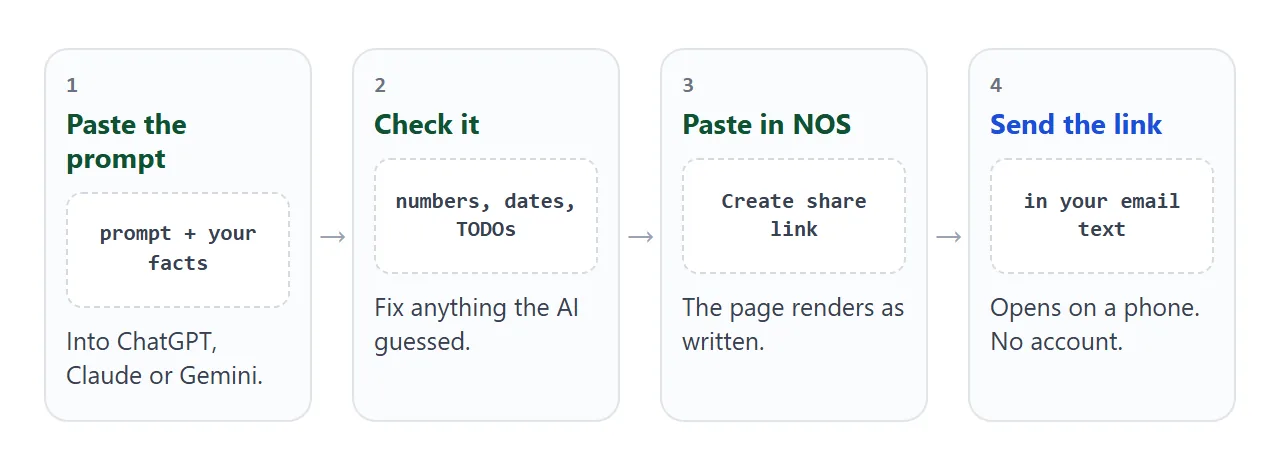
Paste the HTML into a NOS document and choose Create share link. HTML to link walks through it.
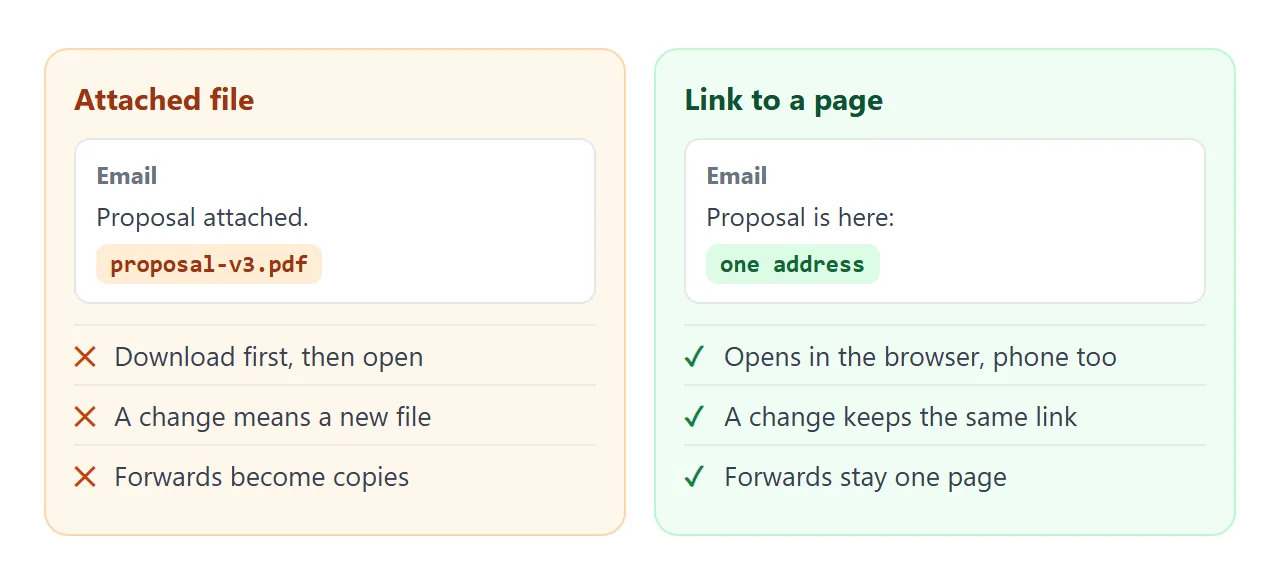
The result is a page anyone with the link can open in a browser, on a phone too, with no account. They can read it but not edit it. Scripts run on the page, so a button or a total works for them.
Send the link in the body of your email, with one line saying what it is. Write your email address on the page as plain text. A form that sends data to a server is blocked on a share link.
If you change the code later, the same link shows the new version. Add a short dated line such as "Price updated 12 Oct" so the client knows what moved.
If you want to offer two prices, the second example does it with two buttons. The client taps an option and the offer, price and reply line change. Their tap is theirs alone: it is not saved, so ask them to reply with the letter.
<!doctype html>
<html lang="en">
<head>
<meta charset="utf-8">
<meta name="viewport" content="width=device-width, initial-scale=1">
<title>Proposal with two options - Fernhill Yoga Studio</title>
<style>
  * { box-sizing: border-box; }
  body { margin: 0; background: #f3f4f6; font-family: system-ui, -apple-system, "Segoe UI", sans-serif; color: #1f2937; line-height: 1.55; }
  .page { max-width: 680px; margin: 0 auto; background: #fff; padding: 24px 20px 30px; min-height: 100vh; }
  .tag { margin: 0; font-size: 13px; letter-spacing: .06em; text-transform: uppercase; color: #6b7280; }
  h1 { margin: 6px 0 4px; font-size: 26px; line-height: 1.2; }
  .meta { margin: 0 0 14px; font-size: 14px; color: #6b7280; }
  h2 { margin: 22px 0 8px; font-size: 13px; letter-spacing: .08em; text-transform: uppercase; color: #6b7280; }
  p { margin: 0 0 8px; font-size: 16px; }
  ul { margin: 0; padding-left: 20px; }
  li { margin-bottom: 4px; font-size: 16px; }
  .pick { display: flex; gap: 10px; }
  .pick button { flex: 1; font: inherit; text-align: left; padding: 12px 14px; border: 2px solid #d1d5db; border-radius: 12px; background: #fff; cursor: pointer; min-height: 44px; }
  .pick button b { display: block; font-size: 16px; }
  .pick button span { font-size: 14px; color: #6b7280; }
  .pick button[aria-pressed="true"] { border-color: #1d4ed8; background: #eff6ff; }
  .price { margin-top: 14px; background: #eff6ff; border: 1px solid #bfdbfe; border-radius: 12px; padding: 14px 16px; }
  .price b { display: block; font-size: 28px; color: #1d4ed8; line-height: 1.2; }
  .price span { font-size: 15px; color: #374151; }
  .small { font-size: 14px; color: #6b7280; }
  .next { border: 2px solid #1d4ed8; border-radius: 12px; padding: 14px 16px; font-size: 18px; font-weight: 700; }
  @media (max-width: 420px) { .pick { flex-direction: column; } }
</style>
</head>
<body>
<div class="page">
  <p class="tag">Proposal · two options</p>
  <h1>Newsletter for Fernhill Yoga Studio</h1>
  <p class="meta">For Noor Haldane · from Jonas Lind · valid until 31 Oct 2026</p>

  <h2>The problem</h2>
  <p>Class changes live on the front door and in three chat groups. Members miss them.</p>

  <h2>Pick an option</h2>
  <div class="pick" id="pick"></div>

  <h2>What you get</h2>
  <ul id="offer"></ul>

  <h2>The price</h2>
  <div class="price"><b id="price"></b><span id="price-note"></span></div>
  <p class="small" style="margin-top:8px">Not included: the mailing tool's own subscription.</p>

  <h2>The next step</h2>
  <div class="next" id="next"></div>
</div>

<script>
  // ---- Change the options here. Tap an option to see the page follow. ----
  const OPTIONS = {
    A: {
      name: 'Setup only', blurb: 'You send the updates',
      price: 780, note: 'Fixed. One payment on handover.',
      offer: ['One email template in the studio\'s colours.', 'Your 140 members imported and tidied.', 'A one-hour call on sending an update in five minutes.']
    },
    B: {
      name: 'Setup + 3 months', blurb: 'I send the updates',
      price: 1350, note: 'Fixed. Setup now, then three monthly payments.',
      offer: ['Everything in option A.', 'I send your weekly class update for three months.', 'A short monthly list of what went out.']
    }
  };
  const REPLY_BY = '23 Oct 2026';
  // ------------------------------------------------------------------------

  const money = (n) => '$' + n.toLocaleString('en-US');
  const pick = document.getElementById('pick');

  for (const key in OPTIONS) {
    const btn = document.createElement('button');
    btn.type = 'button';
    btn.dataset.key = key;
    btn.innerHTML = '<b>Option ' + key + '</b><span>' + OPTIONS[key].name + ' · ' + OPTIONS[key].blurb + '</span>';
    pick.appendChild(btn);
  }

  function show(key) {
    const o = OPTIONS[key];
    pick.querySelectorAll('button').forEach((b) => b.setAttribute('aria-pressed', b.dataset.key === key));
    document.getElementById('offer').innerHTML = o.offer.map((t) => '<li>' + t + '</li>').join('');
    document.getElementById('price').textContent = money(o.price);
    document.getElementById('price-note').textContent = o.note;
    document.getElementById('next').textContent = 'Reply "' + key + '" to this email by ' + REPLY_BY + '. I start the next working day.';
  }

  pick.addEventListener('click', (e) => {
    const b = e.target.closest('button');
    if (b) show(b.dataset.key);
  });
  show('A');
</script>
</body>
</html>
Ways to send a one page proposal, compared
| Attached file or PDF | Text in the email | Link to a page | |
|---|---|---|---|
| Opens on a phone | After a download | Yes | Yes, in the browser |
| Change after sending | Send a new file | Send a new email | Edit the page, same link |
| Two options or a live total | No | No | Yes |
| Client needs an account | No | No | No |
| Forwarded inside the client | Many copies | Pasted text | One address |
For personal Gmail accounts, Google's help page says the attachment limit is 25 MB, and Gmail adds a larger file as a Drive link (as of October 2026). Work and school accounts have limits set by an administrator.
A one page proposal is far below any limit, so size is rarely the problem. Changing it after you press send is. See email vs link for documents, or sending a proposal to a client for the wider picture.
When it does not work
| What you see | Cause | Fix |
|---|---|---|
| The page shows raw code in the chat | You copied the chat text, not the code block | Copy only the code, from the first doctype line to the last html tag |
| A logo or picture is missing | Images from other sites are blocked | Ask for no images, or a logo drawn in SVG |
| The deposit does not match the price | The AI typed the numbers instead of working them out | Ask: "Work out the deposit and balance in the script" |
| An option button does nothing | The AI left the script out or broke it | Ask: "Make the buttons switch the offer and price" |
| A contact form does nothing | Forms cannot send to a server from the link | Write your email address as plain text |
| The client sees an old price | They are reading an old file | Send only the link, never the file |
| The text is tiny on a phone | No viewport meta tag | Ask for one, and a 16px base size |