A parent teacher conference template can be one small web page instead of a printed sheet or a Word file. It holds the times, the room and what to bring, and parents open it from a link.
If a time changes, you correct the page once and the same link shows the fix.
Here is an example. Tick the boxes under "What to bring", and open the questions at the bottom, to see how it behaves on a phone.
<!doctype html>
<html lang="en">
<head>
<meta charset="utf-8">
<meta name="viewport" content="width=device-width, initial-scale=1">
<title>Parent-Teacher Conferences, Room 14</title>
<style>
  * { box-sizing: border-box; }
  body { margin: 0; font-family: system-ui, sans-serif; background: #f1f5f4; color: #1f2937; line-height: 1.5; font-size: 16px; }
  .wrap { max-width: 620px; margin: 0 auto; background: #fff; min-height: 100vh; }
  header { background: #0f766e; color: #fff; padding: 22px 20px 18px; display: flex; gap: 14px; align-items: center; }
  header svg { flex: none; }
  header h1 { margin: 0; font-size: 1.4rem; line-height: 1.2; }
  header p { margin: 3px 0 0; opacity: .92; font-size: .95rem; }
  .update { background: #fff7ed; border-bottom: 2px solid #fdba74; color: #7c2d12; padding: 10px 20px; font-size: .95rem; }
  .update b { color: #9a3412; }
  section { padding: 16px 20px 4px; }
  h2 { margin: 0 0 8px; font-size: 1.1rem; color: #0f766e; }
  .days { display: grid; grid-template-columns: 1fr 1fr; gap: 10px; }
  .day { background: #f0fdfa; border: 1px solid #99f6e4; border-radius: 10px; padding: 10px 12px; }
  .day .d { font-weight: 700; color: #115e59; }
  .day .t { font-size: 1.15rem; font-weight: 700; margin: 2px 0; }
  .day .n { font-size: .9rem; color: #4b5563; }
  .place { display: flex; gap: 14px; align-items: center; background: #f8fafc; border-radius: 10px; padding: 10px 12px; }
  .place svg { flex: none; }
  .place p { margin: 0; }
  .pack label { display: flex; gap: 10px; align-items: center; padding: 6px 0; cursor: pointer; }
  .pack input { width: 20px; height: 20px; }
  .pack input:checked + span { text-decoration: line-through; color: #6b7280; }
  .count { font-size: .9rem; color: #4b5563; margin: 4px 0 0; }
  details { background: #f8fafc; border-radius: 10px; padding: 10px 12px; margin-bottom: 8px; }
  summary { cursor: pointer; font-weight: 600; }
  details p { margin: 8px 0 0; }
  footer { padding: 16px 20px 26px; font-size: .9rem; color: #6b7280; }
  @media (max-width: 420px) { .days { grid-template-columns: 1fr; } }
</style>
</head>
<body>
<div class="wrap">
  <header>
    <svg width="46" height="46" viewBox="0 0 46 46" aria-hidden="true"><circle cx="23" cy="23" r="22" fill="#fff"/><rect x="11" y="12" width="24" height="22" rx="3" fill="#99f6e4"/><rect x="11" y="12" width="24" height="7" rx="3" fill="#0f766e"/><rect x="16" y="23" width="5" height="5" rx="1" fill="#0f766e"/><rect x="25" y="23" width="5" height="5" rx="1" fill="#f59e0b"/></svg>
    <div>
      <h1>Parent-Teacher Conferences</h1>
      <p>Room 14 · Ms. Alvarez · Fall 2026</p>
    </div>
  </header>

  <!-- Edit this line when something changes -->
  <div class="update"><b>Updated Mon 19 Oct:</b> Tuesday now starts at 4:00 pm, not 3:30.</div>

  <section>
    <h2>When</h2>
    <div class="days">
      <div class="day"><div class="d">Tuesday 20 October</div><div class="t">4:00 – 7:00 pm</div><div class="n">10 minutes each</div></div>
      <div class="day"><div class="d">Thursday 22 October</div><div class="t">3:30 – 6:30 pm</div><div class="n">10 minutes each</div></div>
    </div>
    <p>Your own time was sent to you in the class app. Please arrive five minutes early and wait outside the door.</p>
  </section>

  <section>
    <h2>Where</h2>
    <div class="place">
      <svg width="86" height="64" viewBox="0 0 86 64" aria-hidden="true"><rect x="1" y="1" width="84" height="62" rx="4" fill="#fff" stroke="#9ca3af"/><rect x="6" y="6" width="26" height="22" fill="#e5e7eb"/><rect x="34" y="6" width="22" height="22" fill="#e5e7eb"/><rect x="58" y="6" width="22" height="22" fill="#0f766e"/><text x="69" y="21" font-size="9" text-anchor="middle" fill="#fff" font-family="sans-serif">14</text><rect x="6" y="34" width="74" height="8" fill="#f3f4f6"/><rect x="6" y="46" width="22" height="12" fill="#fde68a"/><text x="17" y="55" font-size="7" text-anchor="middle" fill="#92400e" font-family="sans-serif">Door</text></svg>
      <p><b>Room 14, first floor.</b> Come in through the main door, turn left, and it is the last room on the right.</p>
    </div>
  </section>

  <section class="pack">
    <h2>What to bring</h2>
    <label><input type="checkbox"><span>Your questions, written down</span></label>
    <label><input type="checkbox"><span>The reading log from home</span></label>
    <label><input type="checkbox"><span>Your child's folder (optional)</span></label>
    <label><input type="checkbox"><span>Your appointment time</span></label>
    <p class="count" id="count">0 of 4 ready</p>
  </section>

  <section>
    <h2>Good to know</h2>
    <details>
      <summary>Can I come with someone else?</summary>
      <p>Yes. Another family member is welcome. Please tell Ms. Alvarez in the class app so there are enough chairs.</p>
    </details>
    <details>
      <summary>I cannot make my time</summary>
      <p>Message Ms. Alvarez in the class app. She will offer you another slot on the same days.</p>
    </details>
    <details>
      <summary>Can we talk online?</summary>
      <p>Ask in the class app. She will send you a separate meeting link.</p>
    </details>
  </section>

  <footer>Cedar Hill Elementary · Example page, all names and times are made up</footer>
</div>

<script>
  const boxes = document.querySelectorAll('.pack input');
  const count = document.getElementById('count');

  function update() {
    const done = [...boxes].filter((b) => b.checked).length;
    count.textContent = done + ' of ' + boxes.length + ' ready';
  }
  boxes.forEach((b) => b.addEventListener('change', update));
</script>
</body>
</html>
All the names and times are made up, so replace them with yours. The page has no sign-up form on purpose. It tells families the plan, and they get their own time from you in the way you already use.
What goes on the page
Parents look at this page on a phone, often once, and again on the day. So it holds only what they need to arrive in the right place at the right time. The example has five blocks:
- A line that says when it was last changed. Parents see at once if the page is new.
- When: the days, the time window and how long each meeting lasts.
- Where: the room, the floor and the way to find it.
- What to bring: a short tick list.
- Good to know: two or three short answers, such as "I cannot make my time".
Keep it to one column and a normal reading size. The example uses a 16-pixel base font and stacks its blocks on a narrow screen, so nobody has to pinch and zoom.
Make it with AI
You do not need to write HTML. Paste this prompt into ChatGPT, Claude or Gemini, and put your own details where it says so.
Make a parent-teacher conference information page as ONE
HTML file. Use plain HTML and CSS only. No external images,
fonts or scripts. Design for a phone first: one column,
readable text, a viewport meta tag. Sections: a line at the
top that says when the page was last updated, When (days,
time windows, minutes per meeting), Where (room and how to
find it), What to bring (a checkbox list), Good to know (three
short questions with answers). No sign-up form. Use my details
below. Do not invent times, rooms or names; if something is
missing, leave a clear [placeholder]. Output only the HTML.

My details:
[paste your days, times, room and list here]
Then check the result before you send it:
- Times and weekdays: is each date on the right weekday, and is am or pm right?
- Room: does it match the sign on your door?
- Invented details: did the AI add a rule or a policy you never mentioned?
- Images: outside images are blocked in NOS, so a picture linked from another site will show as empty.
- On a phone: look at the preview at a narrow width. Text should not run off the edge.
If something is off, reply in the same chat with the fix, such as "make Tuesday start at 4:00 pm". Change one thing at a time.
Send it as a link
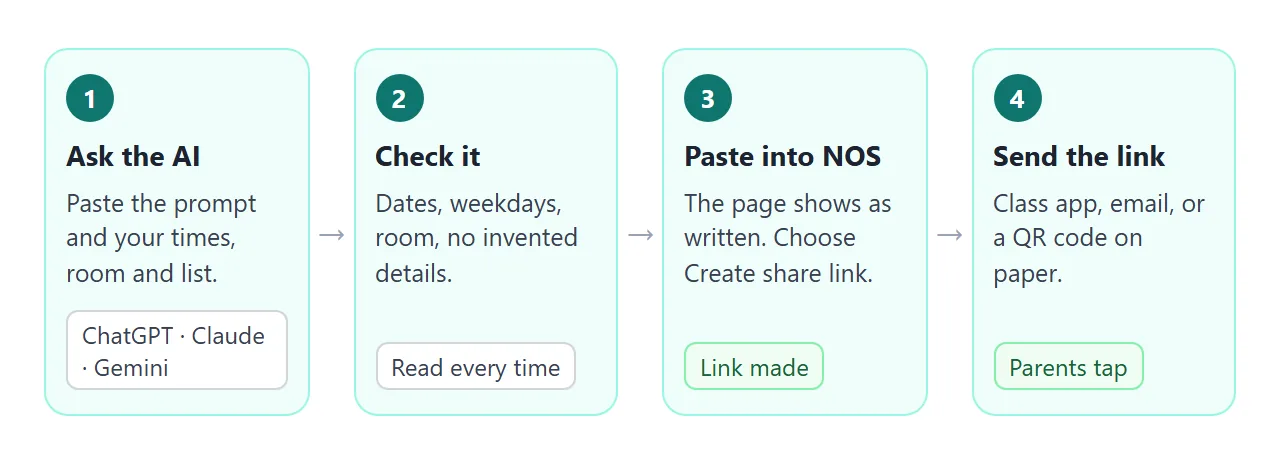
- Copy the HTML the AI gave you.
- Open HTML to link and paste it into a NOS document. The page renders as written and its scripts run.
- Choose Create share link and copy the address.
- Paste the address into your class app, an email or a post.
Whoever has the link can open the page in a browser, a phone included, without an account. They can read it but cannot edit it.
NOS does not tell you who opened it, so ask families to confirm in your usual way if you need to know.
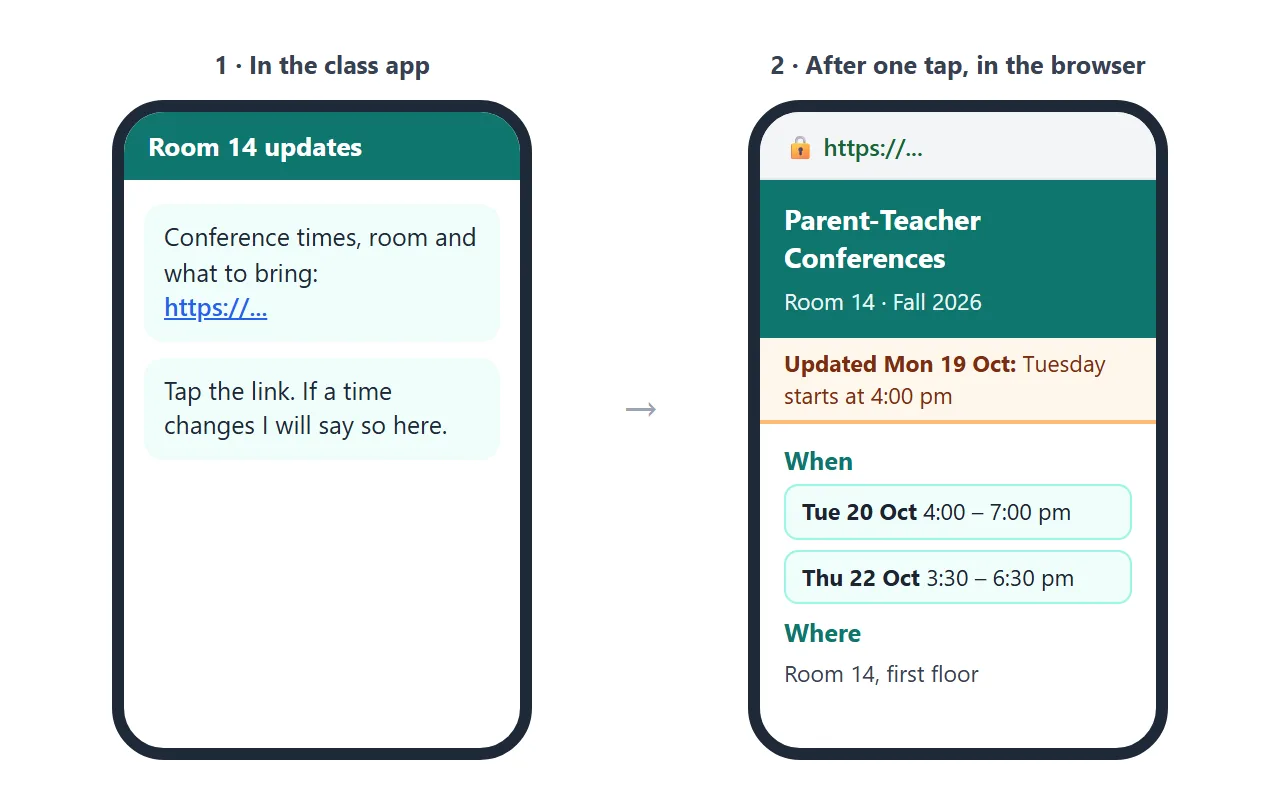
Google Classroom, email and paper
In Google Classroom, an announcement can carry a link. On the Stream page choose Announce something to your class, write some text, then choose Add and Link and paste the address.
Google's help page says Post stays inactive if you add an attachment without text. It also describes picking several classes or particular students, and scheduling a post for later. Menus can change, so check the page as of October 2026.
In email, paste the link into the message. On paper, print a QR code that holds the same address; QR code link covers that.
When a time changes
This is the reason to use a link instead of a file. A printed sheet or an attachment is a copy, and a correction means a second message that says to ignore the first.
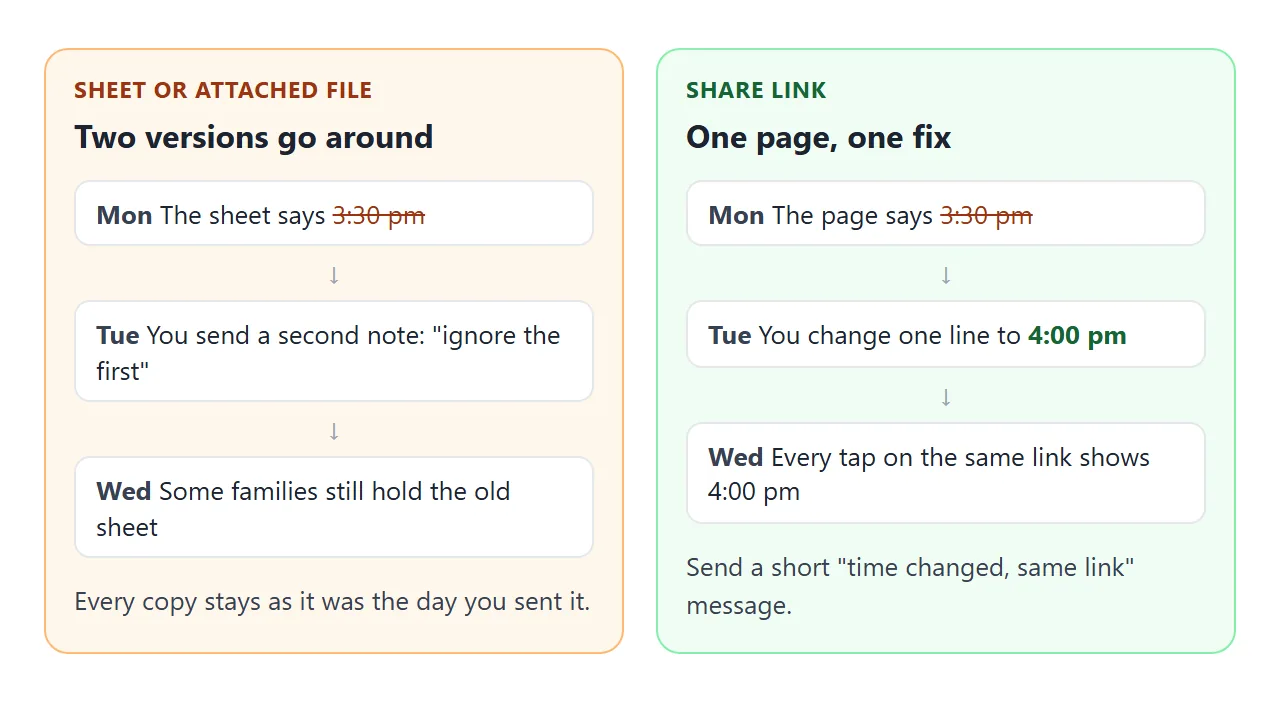
To fix the page, open it in NOS, change the time in the code, and change the "Updated" line. Parents who already have the link see the new version the next time they open it. Then send one short message: "time changed, same link".
The second example is built for an evening where families visit several teachers. A search box finds a teacher or subject, and one row carries a "Room changed" tag.
<!doctype html>
<html lang="en">
<head>
<meta charset="utf-8">
<meta name="viewport" content="width=device-width, initial-scale=1">
<title>Conference Evening, Find Your Teacher</title>
<style>
* { box-sizing: border-box; }
body { margin: 0; font-family: system-ui, sans-serif; background: #f3f4f8; color: #1f2937; line-height: 1.5; font-size: 16px; }
.wrap { max-width: 620px; margin: 0 auto; background: #fff; min-height: 100vh; }
header { background: #4338ca; color: #fff; padding: 20px 20px 16px; }
header h1 { margin: 0; font-size: 1.35rem; line-height: 1.2; }
header p { margin: 4px 0 0; font-size: .95rem; opacity: .92; }
.facts { display: grid; grid-template-columns: 1fr 1fr; gap: 10px; padding: 14px 20px 0; }
.fact { background: #eef2ff; border-radius: 10px; padding: 8px 12px; font-size: .95rem; }
.fact b { display: block; color: #3730a3; }
.search { padding: 14px 20px 6px; }
.search label { display: block; font-weight: 600; margin-bottom: 4px; }
.search input { width: 100%; font: inherit; padding: 10px 12px; border: 1.5px solid #c7d2fe; border-radius: 10px; }
.list { list-style: none; margin: 0; padding: 6px 20px 10px; }
.list li { display: grid; grid-template-columns: 1fr auto; gap: 2px 12px; padding: 10px 0; border-bottom: 1px solid #e5e7eb; }
.list .who { font-weight: 700; }
.list .what { color: #4b5563; font-size: .95rem; }
.list .room { text-align: right; font-weight: 700; color: #3730a3; }
.list .floor { text-align: right; color: #6b7280; font-size: .9rem; }
.tag { display: inline-block; background: #fff7ed; border: 1px solid #fdba74; color: #9a3412; border-radius: 999px; padding: 0 8px; font-size: .8rem; font-weight: 700; margin-left: 6px; }
.none { padding: 0 20px 10px; color: #6b7280; display: none; }
footer { padding: 12px 20px 26px; font-size: .9rem; color: #6b7280; }
</style>
</head>
<body>
<div class="wrap">
<header>
<h1>Conference Evening</h1>
<p>Thursday 22 October · 4:00 – 7:00 pm · Grade 7</p>
</header>
<div class="facts">
<div class="fact"><b>Where</b>Main building, signs at the front door</div>
<div class="fact"><b>Each meeting</b>10 minutes. A bell rings at the end.</div>
</div>
<div class="search">
<label for="q">Find a teacher or subject</label>
<input id="q" type="search" placeholder="Try "math" or "Okafor"" autocomplete="off">
</div>
<ul class="list" id="list">
<li><span class="who">Mr. Okafor</span><span class="room">Room 201</span><span class="what">Math</span><span class="floor">2nd floor</span></li>
<li><span class="who">Ms. Lindqvist</span><span class="room">Room 105</span><span class="what">English</span><span class="floor">1st floor</span></li>
<li><span class="who">Mr. Dube <span class="tag">Room changed</span></span><span class="room">Gym office</span><span class="what">Physical education</span><span class="floor">Ground floor</span></li>
<li><span class="who">Ms. Tanaka</span><span class="room">Room 112</span><span class="what">Science</span><span class="floor">1st floor</span></li>
<li><span class="who">Mr. Brennan</span><span class="room">Room 208</span><span class="what">History and geography</span><span class="floor">2nd floor</span></li>
<li><span class="who">Ms. Castillo</span><span class="room">Room 303</span><span class="what">Art and music</span><span class="floor">3rd floor</span></li>
</ul>
<p class="none" id="none">No teacher matches. Try a shorter word.</p>
<footer>Cedar Hill Middle School · Example page, all names and rooms are made up</footer>
</div>
<script>
const q = document.getElementById('q');
const rows = document.querySelectorAll('#list li');
const none = document.getElementById('none');
q.addEventListener('input', () => {
const word = q.value.trim().toLowerCase();
let shown = 0;
rows.forEach((r) => {
const match = r.textContent.toLowerCase().includes(word);
r.style.display = match ? '' : 'none';
if (match) shown++;
});
none.style.display = shown ? 'none' : 'block';
});
</script>
</body>
</html>
If you want a record of what changed, keep the old page as it is and make a new page for the new plan. Each page gets its own link, so you would send the new link.
Link, file or paper: what changes
| Printed sheet | Attached file | NOS share link | |
|---|---|---|---|
| What parents do | Keep it in a bag | Tap, download, open in another app | Tap, read in the browser |
| A time changes | Print and send again | Send a new file and a note | Edit the page, same link |
| Looks the same for everyone | Yes | Depends on the app that opens it | Yes, it is your page |
| Collects replies | No | No | No, reply by your usual channel |
The link is not better at everything. A sheet in a school bag still works for a family that does not use a phone for school news. You can also print a QR code on the sheet that points to the same page.
For more on the choice, see email vs link for documents, and opening an HTML file on a phone explains why a bare file often fails there.
You, the owner, can tick items in View mode and your changes are saved. A parent's ticks are not saved, so they reset on reload. Treat the "What to bring" list as a reminder to look at, not a form that comes back to you.
When it does not work
| What you see | Cause | Fix |
|---|---|---|
| Parents still arrive at the old time | They are looking at an old message or a printout | Send "time changed, same link" and update the line at the top |
| A picture is missing | The image is linked from another site, and outside images are blocked | Use a drawing made in HTML or CSS, or leave the image out |
| A booking form sends nothing | Sending form data to a server is blocked | Collect times in the tool you already use |
| Text runs off the edge on a phone | The AI used fixed widths | Ask it for one column and a viewport meta tag |
| The AI added a rule you did not write | It filled gaps from guesswork | Add "do not invent details" and read every line |
| Parents' ticks disappear | Only the owner's changes in View mode are saved | Use the list as a reminder, not a form |