Here, Phaser means the JavaScript game framework, not anything else that shares the name. It is an open source HTML5 game framework that renders with WebGL or Canvas.
One script tag from a CDN plus a short config gives you a working game in a single .html file.
Try it first. Move the pointer, or touch the game on a phone.
<!doctype html>
<html lang="en">
<head>
<meta charset="utf-8">
<meta name="viewport" content="width=device-width, initial-scale=1">
<title>Phaser: the smallest game</title>
<style>
  html, body { margin: 0; height: 100%; background: #1d2330; }
  #game { height: 100%; }
  canvas { display: block; touch-action: none; }  /* a finger on the game is not a page scroll */
</style>
<!-- the library comes first, pinned to one version -->
<script src="https://cdn.jsdelivr.net/npm/phaser@4.2.1/dist/phaser.min.js"></script>
</head>
<body>
<div id="game"></div>

<script>
  let ball, readout;
  let targetX = 240, targetY = 135;   // where the ball is heading; starts at the centre

  const game = new Phaser.Game({
    type: Phaser.AUTO,            // WebGL if available, otherwise Canvas
    parent: 'game',               // id of the element that holds the canvas
    width: 480, height: 270,      // the game's own coordinate system
    backgroundColor: '#1d2330',
    scale: {
      mode: Phaser.Scale.FIT,     // shrink or grow the canvas to fit the parent
      autoCenter: Phaser.Scale.CENTER_BOTH
    },
    scene: { create, update }
  });

  function create() {
    ball = this.add.circle(240, 135, 24, 0x4f8cff);
    readout = this.add.text(12, 10, 'Move the pointer, or touch the game', {
      fontFamily: 'sans-serif', fontSize: '16px', color: '#cfd6e4'
    });
    // pointer positions arrive already converted to game coordinates
    this.input.on('pointermove', (p) => { targetX = p.x; targetY = p.y; });
    this.input.on('pointerdown', (p) => { targetX = p.x; targetY = p.y; });
  }

  // runs on every frame
  function update() {
    ball.x += (targetX - ball.x) * 0.1;   // ease toward the pointer
    ball.y += (targetY - ball.y) * 0.1;
    readout.setText('ball x ' + Math.round(ball.x) + '  y ' + Math.round(ball.y));
  }
</script>
</body>
</html>
What goes in the file
The page has three parts, in this order.
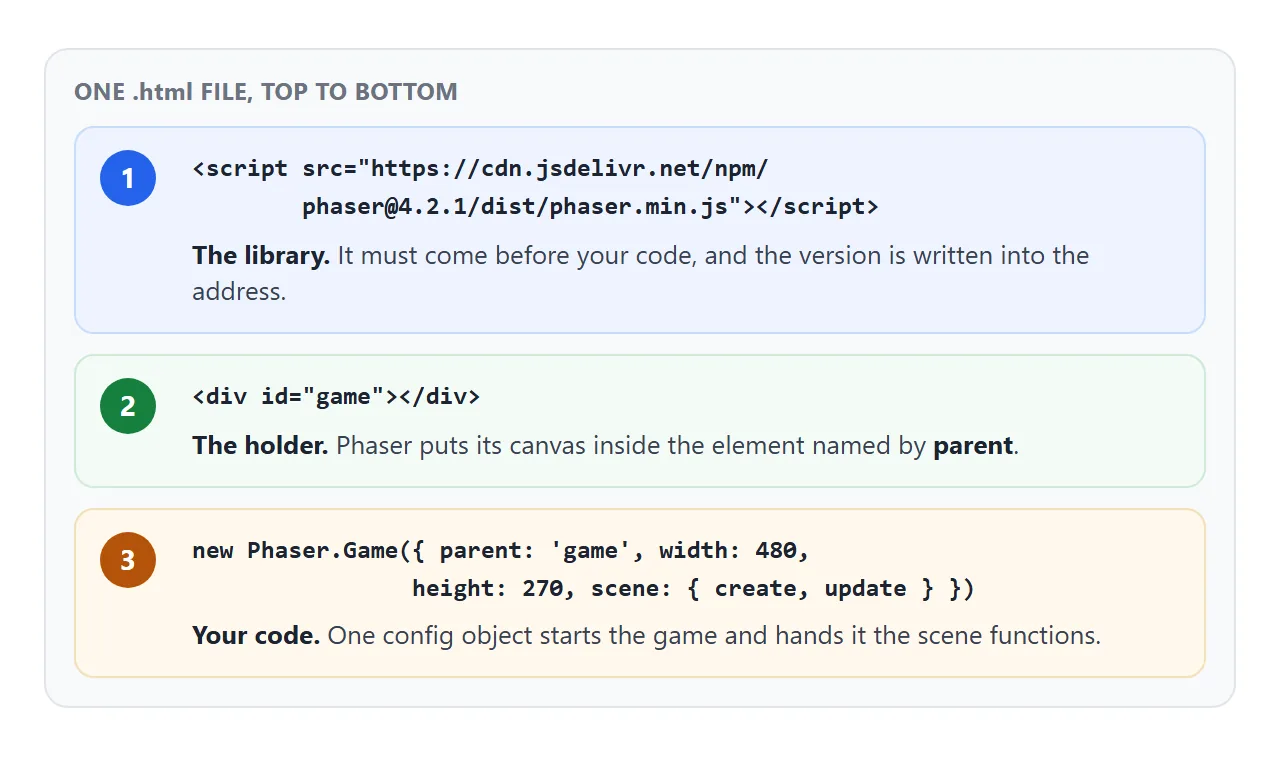
- The library. A
<script src>forphaser.min.js. Phaser's README lists jsDelivr and cdnjs as places to load it from. It goes first, so that the namePhaserexists when your code runs. - A holder. An empty
<div id="game">. Theparentsetting names it, and Phaser puts its canvas inside. - Your code.
new Phaser.Game(config)starts everything. The config sets the size, the scale mode and the scene.
The address in the demo contains 4.2.1. Keep a version number there. The page then loads the release you tested, not whichever one is newest.
Three scene functions
A scene holds the game's logic. Phaser calls up to three of its functions, and you only write the ones you need.
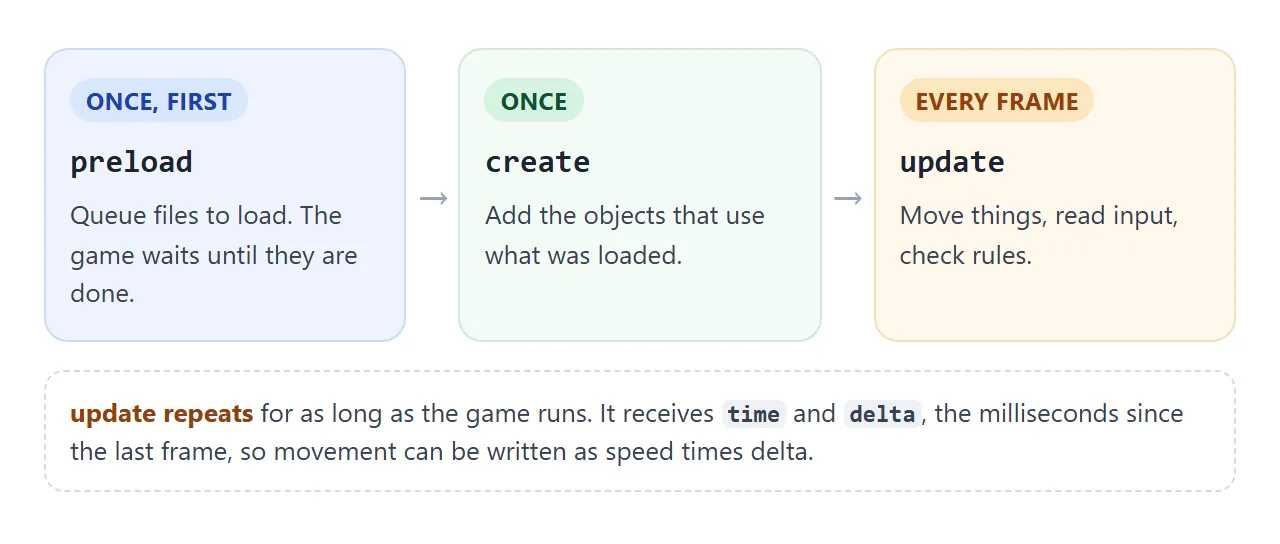
preloadqueues files to download. Skip it when there is nothing to load.createruns once and adds objects: shapes, images, text, input handlers.update(time, delta)runs on every frame.deltais the time since the last frame in milliseconds, sospeed * deltagives the same motion on slow and fast screens.
The config's type: Phaser.AUTO lets Phaser use WebGL when the browser supports it and fall back to Canvas when it does not. The v4 migration guide recommends WebGL for new projects.
Draw without image files
A single file has no folder of pictures beside it. Phaser's guide says a game that loads images, audio or JSON needs http:// access, and files opened straight from disk are restricted. You can avoid the problem by not loading files at all.
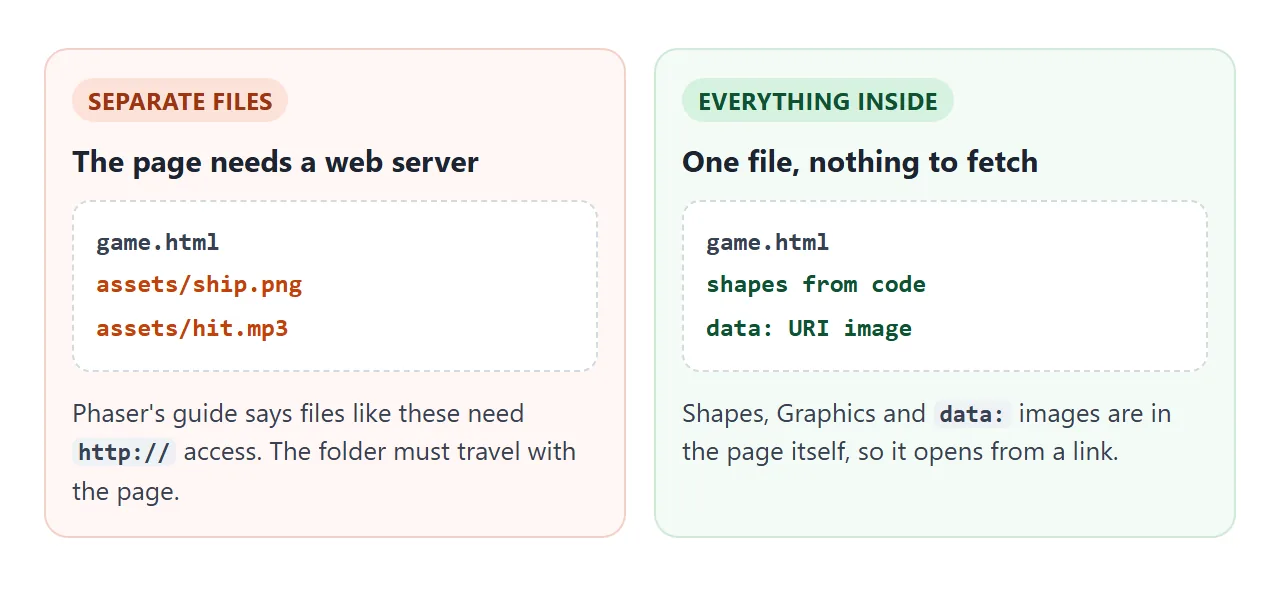
Three ways to get a picture on screen with nothing to fetch:
<!doctype html>
<html lang="en">
<head>
<meta charset="utf-8">
<meta name="viewport" content="width=device-width, initial-scale=1">
<title>Phaser: three ways to draw without image files</title>
<style>
  html, body { margin: 0; height: 100%; background: #1d2330; }
  #game { height: 100%; }
  canvas { display: block; touch-action: none; }
</style>
<script src="https://cdn.jsdelivr.net/npm/phaser@4.2.1/dist/phaser.min.js"></script>
</head>
<body>
<div id="game"></div>

<script>
  // An SVG written as text and turned into a data: URI, so there is no file to fetch
  const STAR = 'data:image/svg+xml;utf8,' + encodeURIComponent(
    '<svg xmlns="http://www.w3.org/2000/svg" width="64" height="64">' +
    '<polygon points="32,2 40,24 62,24 44,38 51,60 32,46 13,60 20,38 2,24 24,24" fill="#f5b400"/></svg>');

  let spinners = [];

  const game = new Phaser.Game({
    type: Phaser.AUTO,
    parent: 'game',
    width: 480, height: 270,
    backgroundColor: '#1d2330',
    scale: { mode: Phaser.Scale.FIT, autoCenter: Phaser.Scale.CENTER_BOTH },
    scene: {
      preload() {
        this.load.image('star', STAR);      // preload() finishes before create() starts
      },
      create() {
        const label = { fontFamily: 'sans-serif', fontSize: '15px', color: '#cfd6e4', align: 'center' };

        // 1. a ready-made shape object
        const box = this.add.rectangle(90, 115, 64, 64, 0x4f8cff);

        // 2. a Graphics object: draw around (0, 0), then move it into place
        const tri = this.add.graphics();
        tri.fillStyle(0x34c38f, 1);
        tri.fillTriangle(-34, 30, 34, 30, 0, -34);
        tri.setPosition(240, 115);

        // 3. an Image using the texture loaded from the data: URI
        const star = this.add.image(390, 115, 'star');

        spinners = [box, tri, star];
        spinners.forEach((o) => this.tweens.add({ targets: o, angle: 360, duration: 3000, repeat: -1 }));

        this.add.text(90, 190, 'Rectangle', label).setOrigin(0.5, 0);
        this.add.text(240, 190, 'Graphics', label).setOrigin(0.5, 0);
        this.add.text(390, 190, 'Image from\ninline SVG', label).setOrigin(0.5, 0);
      }
    }
  });
</script>
</body>
</html>
- Shape objects such as
this.add.rectangleandthis.add.circletake a position, a size and a colour. - Graphics lets you draw fills and triangles in code, around the point (0, 0), then move the object.
- A
data:URI holds a small file inline. Phaser's loader recognises it, sothis.load.image('star', uri)needs no request. Encode the SVG text withencodeURIComponent.
Fit the screen and the finger
Three small settings make the page behave on a phone.
- Add the viewport meta tag. Without it, some phones lay the page out in a virtual window wider than the screen and shrink it down.
- Set a scale mode in the config, shown below. FIT adjusts the canvas to the parent while keeping the aspect ratio. CENTER_BOTH centres it.
- Add
canvas { touch-action: none; }. The value disables the browser's panning and zooming on that element, so a drag on the game is not a page scroll. CSS touch-action has the details.
scale: {
  mode: Phaser.Scale.FIT,
  autoCenter: Phaser.Scale.CENTER_BOTH
}
A finished example: star catcher
The same three parts hold a complete game. Move the pointer, a finger, or the arrow keys to slide the paddle. Miss three stars and the game ends.
<!doctype html>
<html lang="en">
<head>
<meta charset="utf-8">
<meta name="viewport" content="width=device-width, initial-scale=1">
<title>Phaser: star catcher</title>
<style>
  html, body { margin: 0; height: 100%; background: #1d2330; }
  #game { height: 100%; }
  canvas { display: block; touch-action: none; }
</style>
<script src="https://cdn.jsdelivr.net/npm/phaser@4.2.1/dist/phaser.min.js"></script>
</head>
<body>
<div id="game"></div>

<script>
  const W = 360, H = 440;
  const STAR = 'data:image/svg+xml;utf8,' + encodeURIComponent(
    '<svg xmlns="http://www.w3.org/2000/svg" width="36" height="36" viewBox="0 0 64 64">' +
    '<polygon points="32,2 40,24 62,24 44,38 51,60 32,46 13,60 20,38 2,24 24,24" fill="#f5b400"/></svg>');

  class Main extends Phaser.Scene {
    preload() {
      this.load.image('star', STAR);
    }

    create() {
      this.score = 0;
      this.lives = 3;
      this.over = false;

      this.paddle = this.add.rectangle(W / 2, H - 34, 96, 16, 0x4f8cff);
      this.physics.add.existing(this.paddle);          // gives the rectangle an Arcade body
      this.stars = this.physics.add.group();
      this.hud = this.add.text(12, 10, '', { fontFamily: 'sans-serif', fontSize: '18px', color: '#ffffff' });
      this.banner = this.add.text(W / 2, H / 2, '', {
        fontFamily: 'sans-serif', fontSize: '24px', color: '#ffffff', align: 'center'
      }).setOrigin(0.5);
      this.showHud();

      this.cursors = this.input.keyboard.createCursorKeys();
      // mouse and touch both arrive as pointer events
      const follow = (p) => { this.paddle.x = Phaser.Math.Clamp(p.x, 48, W - 48); };
      this.input.on('pointermove', follow);
      this.input.on('pointerdown', follow);

      // a star every 0.7 s
      this.time.addEvent({ delay: 700, loop: true, callback: () => this.drop() });

      // runs when a star's body overlaps the paddle's body
      this.physics.add.overlap(this.paddle, this.stars, (paddle, star) => {
        star.destroy();
        this.score += 1;
        this.showHud();
      });
    }

    drop() {
      if (this.over) return;
      const star = this.stars.create(Phaser.Math.Between(20, W - 20), -20, 'star');
      star.setVelocityY(110 + Math.min(this.score * 4, 160));
    }

    showHud() {
      this.hud.setText('Score ' + this.score + '   Lives ' + this.lives);
    }

    update(time, delta) {
      if (this.over) return;
      const step = 0.45 * delta;                       // pixels per millisecond, so speed is frame-rate independent
      if (this.cursors.left.isDown) this.paddle.x = Math.max(48, this.paddle.x - step);
      if (this.cursors.right.isDown) this.paddle.x = Math.min(W - 48, this.paddle.x + step);

      this.stars.getChildren().forEach((star) => {
        if (star.y > H + 20) {                         // fell past the bottom
          star.destroy();
          this.lives -= 1;
          this.showHud();
          if (this.lives <= 0) this.gameOver();
        }
      });
    }

    gameOver() {
      this.over = true;
      this.banner.setText('Game over\nScore ' + this.score + '\nTap or press space');
      this.time.delayedCall(500, () => {               // short pause so a stray tap does not restart at once
        this.input.once('pointerdown', () => this.scene.restart());
        this.input.keyboard.once('keydown-SPACE', () => this.scene.restart());
      });
    }
  }

  const game = new Phaser.Game({
    type: Phaser.AUTO,
    parent: 'game',
    width: W, height: H,
    backgroundColor: '#1d2330',
    physics: { default: 'arcade' },
    scale: { mode: Phaser.Scale.FIT, autoCenter: Phaser.Scale.CENTER_BOTH },
    scene: Main
  });
</script>
</body>
</html>
- Physics:
physics: { default: 'arcade' }in the config turns on Arcade Physics, a light system for rectangles and circles.physics.add.overlapruns a function when two bodies touch. - Input:
createCursorKeys()returns the arrow keys, Space and Shift.pointerdownandpointermovelisteners follow a mouse or a finger. - Restart:
this.scene.restart()starts the scene again. Reset your counters increate, not at the top of the file.
For a game loop of your own that does not use Phaser, see requestAnimationFrame. For more on this kind of page, single HTML file games covers what fits in one file.
Sound needs a tap first
Browsers allow audio to start only in some cases. MDN lists them: the audio is muted, the user has interacted with the page, the site is allowlisted, or a permissions policy allows it. So start music from a tap or key press, not from create.
When it does not work
| What you see | Cause | Fix |
|---|---|---|
Blank page, Phaser is not defined |
The library tag is missing, or sits below your code | Put the phaser.min.js tag first |
| An image or sound never shows up | A file path such as assets/ship.png needs http:// |
Use shapes or data: URIs, or serve the files |
A TypeError reading add of undefined in create |
Arcade Physics is not enabled | Add physics: { default: 'arcade' } to the config |
| A tutorial's code fails or looks different | It was written for Phaser 3 | Pin one version and read the migration guide |
| The page scrolls while you play on a phone | The browser took the touch as a pan | touch-action: none on the canvas |
| The game is tiny or off-centre on a phone | No viewport tag, or no scale mode | Add the tag, use FIT with CENTER_BOTH |
| No sound until a tap | The browser blocks audio before interaction | Start audio from a tap or key press |
Share it as a link
A game is easier to play than to describe. An .html attachment may open as plain code on a phone, and a screenshot cannot be played. Opening an HTML file on a phone covers why.
To send the working version, paste the page into a NOS document and choose Create share link. HTML to link walks through it.
The page renders as written, the Phaser script loads from the CDN, and the game runs, so the people you send it to can play it themselves. If you change the code later, the same link shows the new version.