A photography proposal is a page that tells a new client three things: what each package includes, when they get the pictures, and the terms of the booking. Put them on one page and send it as a link. Keep sample photos in your gallery.
The question shows up in plain words. One Quora question reads How do you send a new client an estimate and invoice? A photographer has a version of it: the packages, the shoot-day timing and the terms usually live in three different files.
Here is a page that puts them together. It is for a made-up wedding. Choose a package, tick an add-on, and the total and deposit change.
<!doctype html>
<html lang="en">
<head>
<meta charset="utf-8">
<meta name="viewport" content="width=device-width, initial-scale=1">
<title>Photography proposal - Harbor Light Photography</title>
<style>
  * { box-sizing: border-box; }
  body { margin: 0; background: #f3f1ee; font-family: system-ui, -apple-system, "Segoe UI", sans-serif; color: #26221e; line-height: 1.55; }
  .page { max-width: 720px; margin: 0 auto; background: #fff; padding: 24px 20px 32px; min-height: 100vh; }
  .tag { margin: 0; font-size: 13px; letter-spacing: .08em; text-transform: uppercase; color: #8a7b6b; }
  h1 { margin: 6px 0 4px; font-size: 27px; line-height: 1.18; }
  .meta { margin: 0 0 16px; font-size: 14px; color: #7a6f64; }
  .top { display: grid; grid-template-columns: 1fr 1fr; gap: 10px; margin-bottom: 4px; }
  .top div { background: #faf6f1; border: 1px solid #eadfd2; border-radius: 12px; padding: 10px 12px; }
  .top small { display: block; font-size: 12px; letter-spacing: .06em; text-transform: uppercase; color: #8a7b6b; }
  .top b { font-size: 18px; }
  h2 { margin: 26px 0 8px; font-size: 13px; letter-spacing: .08em; text-transform: uppercase; color: #8a7b6b; }
  p { margin: 0 0 8px; font-size: 16px; }
  .pkg { display: block; border: 2px solid #e8e1d8; border-radius: 12px; padding: 12px 14px; margin-bottom: 10px; cursor: pointer; }
  .pkg:has(input:checked) { border-color: #9a5b2c; background: #fbf5ee; }
  .pkg .row { display: flex; align-items: baseline; gap: 10px; }
  .pkg input { width: 20px; height: 20px; flex: none; align-self: center; accent-color: #9a5b2c; }
  .pkg .name { flex: 1; font-size: 18px; font-weight: 700; }
  .pkg .price { font-size: 18px; font-weight: 700; white-space: nowrap; }
  .pkg ul { margin: 8px 0 6px 30px; padding: 0; font-size: 15px; }
  .pkg .look { margin: 0 0 0 30px; font-size: 14px; color: #6b5f54; font-style: italic; }
  .opt { display: flex; align-items: center; gap: 10px; padding: 10px 12px; border: 1px solid #e8e1d8; border-radius: 10px; margin-bottom: 8px; cursor: pointer; }
  .opt input { width: 20px; height: 20px; flex: none; accent-color: #9a5b2c; }
  .opt .t { flex: 1; font-size: 15px; }
  .opt .p { font-weight: 600; white-space: nowrap; }
  .total { margin-top: 12px; padding: 12px 14px; background: #26221e; color: #fff; border-radius: 12px; }
  .total .l { display: flex; justify-content: space-between; align-items: baseline; font-size: 15px; padding: 2px 0; }
  .total .big { font-size: 24px; font-weight: 700; }
  .steps { list-style: none; padding: 0; margin: 0; }
  .steps li { display: flex; gap: 12px; padding: 9px 0; border-bottom: 1px solid #f0ebe4; font-size: 16px; }
  .steps b { min-width: 112px; color: #9a5b2c; }
  .terms li { margin-bottom: 6px; font-size: 15px; }
  .small { font-size: 14px; color: #7a6f64; }
  .who { margin-top: 24px; padding-top: 14px; border-top: 1px solid #e8e1d8; font-size: 15px; }
</style>
</head>
<body>
<div class="page">
  <p class="tag">Photography proposal</p>
  <h1>Wedding photography for Dana and Mika</h1>
  <p class="meta">From Harbor Light Photography · prepared <span id="prepared"></span></p>

  <div class="top">
    <div><small>Date held with deposit</small><b id="wedding"></b></div>
    <div><small>Prices valid until</small><b id="valid"></b></div>
  </div>

  <h2>1. Choose a package</h2>
  <div id="packages"></div>

  <h2>2. Add anything you like</h2>
  <div id="addons"></div>

  <div class="total" aria-live="polite">
    <div class="l"><span>Your total</span><span class="big" id="total"></span></div>
    <div class="l"><span id="depositLabel"></span><span id="deposit"></span></div>
    <div class="l"><span id="balanceLabel"></span><span id="balance"></span></div>
  </div>
  <p class="small" style="margin-top:8px">Your choices change this page on your screen only. Tell me your choice by email and I will confirm it.</p>

  <h2>3. Timing</h2>
  <ul class="steps">
    <li><b>Within 7 days</b><span>Sneak peek: 10 pictures by email.</span></li>
    <li><b>Within 4 weeks</b><span>Full edited gallery, ready to download.</span></li>
    <li><b>Before the day</b><span>A call to walk through the schedule.</span></li>
  </ul>

  <h2>4. Terms</h2>
  <ul class="terms" id="terms"></ul>

  <p class="who">Harbor Light Photography · hello@example.com<br>
  <span class="small">My gallery address is in the email that came with this page.</span></p>
</div>

<script>
  // ---- Change the numbers here ----
  const CONFIG = {
    prepared: '1 Oct 2026',
    wedding: '12 Jun 2027',
    valid: '31 Oct 2026',
    depositPercent: 30,
    balanceDaysBefore: 14
  };
  const PACKAGES = [
    { id: 'ceremony', name: 'Ceremony', price: 1200,
      list: ['3 hours, 1 photographer', 'About 250 edited pictures'],
      look: 'Soft window light, quiet moments, a few formal groups.' },
    { id: 'half', name: 'Half day', price: 2100,
      list: ['6 hours, 1 photographer', 'About 450 edited pictures'],
      look: 'Getting ready, ceremony, portraits and the first dance.' },
    { id: 'full', name: 'Full day', price: 3300,
      list: ['9 hours, 2 photographers', 'About 700 edited pictures'],
      look: 'The whole day, from the first coffee to the last song.' }
  ];
  const ADDONS = [
    { id: 'album', name: 'Printed album, 30 pages', price: 350 },
    { id: 'engage', name: 'Engagement session, 1 hour', price: 300 },
    { id: 'hour', name: 'One extra hour on the day', price: 250 }
  ];
  const TERMS = [
    'A deposit of ' + CONFIG.depositPercent + '% holds your date. The balance is due ' + CONFIG.balanceDaysBefore + ' days before the day.',
    'You can move the date once, free of charge, with 30 days notice. After that the deposit is not returned.',
    'Travel within 40 km is included. Beyond that I charge a flat fee, agreed before you book.',
    'You get the right to print and share all your pictures. I may show a few in my portfolio unless you tell me not to.'
  ];
  // ---- End of numbers ----

  const money = n => '$' + n.toLocaleString('en-US');
  const $ = id => document.getElementById(id);
  let pkg = PACKAGES[1].id;
  const picked = {};

  $('prepared').textContent = CONFIG.prepared;
  $('wedding').textContent = CONFIG.wedding;
  $('valid').textContent = CONFIG.valid;
  $('terms').innerHTML = TERMS.map(t => '<li>' + t + '</li>').join('');

  $('packages').innerHTML = PACKAGES.map(p =>
    '<label class="pkg"><div class="row"><input type="radio" name="pkg" value="' + p.id + '"' + (p.id === pkg ? ' checked' : '') + '>' +
    '<span class="name">' + p.name + '</span><span class="price">' + money(p.price) + '</span></div>' +
    '<ul>' + p.list.map(x => '<li>' + x + '</li>').join('') + '</ul>' +
    '<p class="look">' + p.look + '</p></label>').join('');

  $('addons').innerHTML = ADDONS.map(a =>
    '<label class="opt"><input type="checkbox" value="' + a.id + '"><span class="t">' + a.name + '</span><span class="p">+ ' + money(a.price) + '</span></label>').join('');

  function update() {
    let total = PACKAGES.find(p => p.id === pkg).price;
    ADDONS.forEach(a => { if (picked[a.id]) total += a.price; });
    const deposit = Math.round(total * CONFIG.depositPercent / 100);
    $('total').textContent = money(total);
    $('depositLabel').textContent = 'Deposit now (' + CONFIG.depositPercent + '%)';
    $('deposit').textContent = money(deposit);
    $('balanceLabel').textContent = 'Balance, ' + CONFIG.balanceDaysBefore + ' days before';
    $('balance').textContent = money(total - deposit);
  }

  document.querySelectorAll('input[name=pkg]').forEach(r =>
    r.addEventListener('change', () => { pkg = r.value; update(); }));
  document.querySelectorAll('#addons input').forEach(c =>
    c.addEventListener('change', () => { picked[c.value] = c.checked; update(); }));
  update();
</script>
</body>
</html>
What goes on a photography proposal
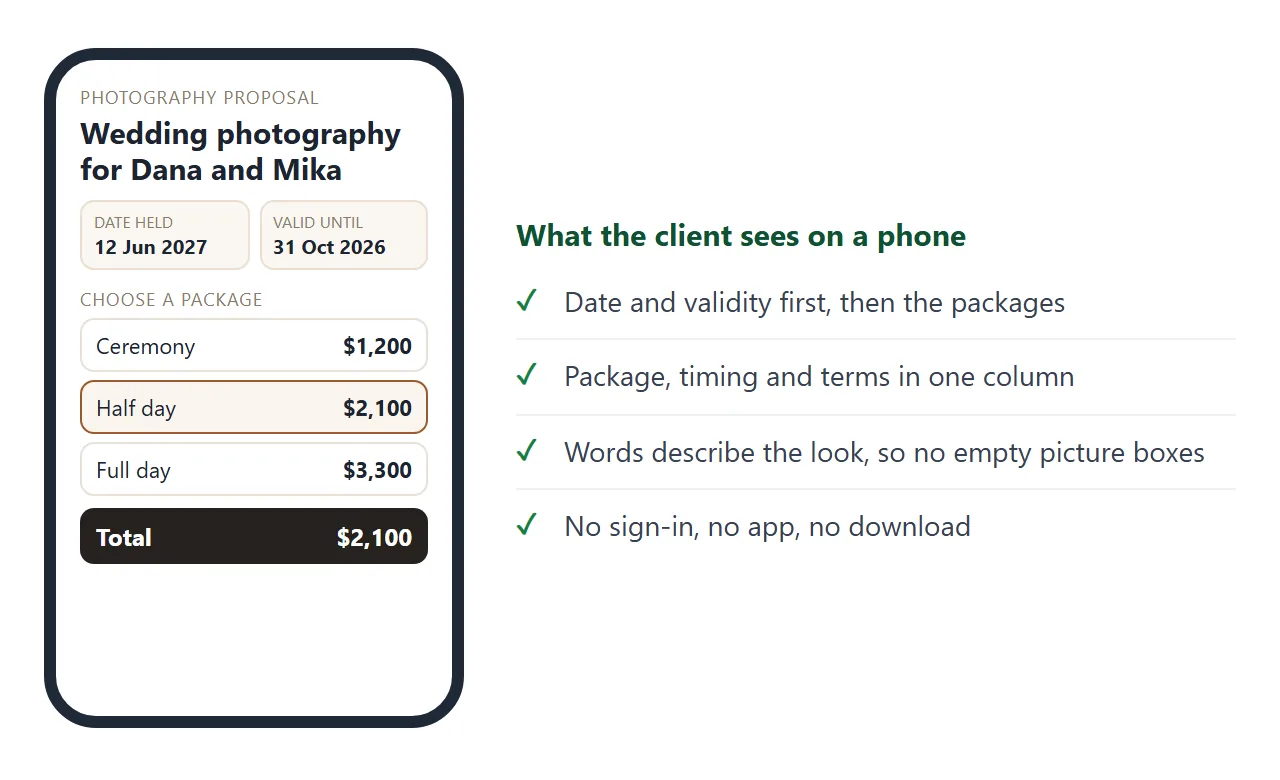
The example follows the order a client reads in. The date and the validity come first, because those are the two things they check before anything else.
- Date held and valid until – the shoot date you are keeping for them, and when the prices stop applying.
- Packages – name, price, hours, photographers, and how many edited pictures.
- Add-ons – an album, a second session, an extra hour. Each with its own price.
- Timing – when the sneak peek and the full gallery arrive.
- Terms – deposit, balance, moving the date, travel, and how the pictures may be used.
The terms in the example are made up. Replace them with your own, and have the wording read by someone qualified.
Writing a proposal people read to the end covers how to order the page for a client who forwards it.
Make it with AI
Paste this into ChatGPT, Claude or Gemini and put your own facts at the bottom.
Write ONE self-contained HTML file: a photography proposal for a phone.
Rules:
- Plain HTML, CSS and JavaScript in one file.
- No external images, fonts or files. No form that sends data.
- Instead of picture thumbnails, give each package one line that describes the look.
- One column, text at least 16px, with a viewport meta tag.
- Top: the date held and the date prices are valid until.
- Sections in order: Packages, Add-ons, Timing, Terms.
- Packages are choose-one cards. Add-ons are tick boxes. Show a total, the deposit and the balance.
- Put every number in one block at the top of the script, with the comment "Change the numbers here".
- If I did not give you a fact, write TODO. Do not invent prices, hours or terms.
My facts:
Studio name: ...
Client and shoot date: ...
Packages (name, price, hours, what is delivered): ...
Add-ons and prices: ...
Timing after the shoot: ...
Terms (deposit, balance, moving the date, usage): ...
Then read the result like the client will.
- Every number. Prices, total, deposit, balance, hours and dates, against your notes.
- Every TODO. Replace it or delete the line.
- Invented terms. A cancellation rule or a usage right you did not give it.
- Empty boxes. If a picture box appears, ask the AI to remove it.
- The phone. Open it on your own phone first.
If the page looks wrong, fixing AI-generated HTML lists the usual causes.
Words instead of thumbnails
Photographers want to show pictures, and that is where this page differs from other proposals. NOS blocks images that load from other sites, so thumbnails pulled from your website or gallery do not appear on a shared page.
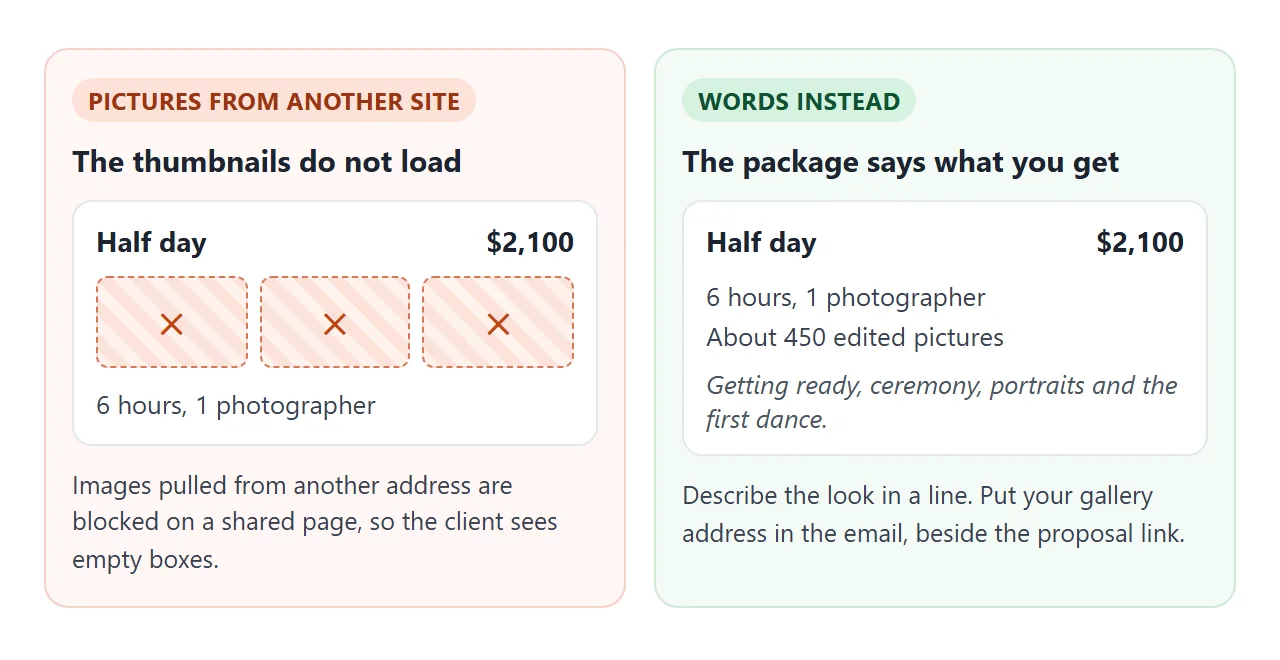
Two things work instead. Describe each package in a sentence, such as "Soft window light, quiet moments, a few formal groups."
Then send your gallery address in the email, next to the proposal link. The client reads the offer on one and judges the work on the other. For the gallery side, see sharing a photo gallery as a link.
Timing as its own page
Hours of coverage are the part clients misread most. A second page can show the day and grey out what a shorter package would miss. Tap a number of hours.
<!doctype html>
<html lang="en">
<head>
<meta charset="utf-8">
<meta name="viewport" content="width=device-width, initial-scale=1">
<title>Coverage timeline - Harbor Light Photography</title>
<style>
  * { box-sizing: border-box; }
  body { margin: 0; background: #f3f1ee; font-family: system-ui, -apple-system, "Segoe UI", sans-serif; color: #26221e; line-height: 1.5; }
  .page { max-width: 720px; margin: 0 auto; background: #fff; padding: 22px 18px 28px; min-height: 100vh; }
  h1 { margin: 0 0 4px; font-size: 24px; line-height: 1.2; }
  .sub { margin: 0 0 14px; font-size: 15px; color: #7a6f64; }
  .pick { display: flex; gap: 8px; margin-bottom: 14px; }
  .pick button { flex: 1; font: inherit; font-size: 16px; font-weight: 600; padding: 12px 6px; border: 2px solid #e8e1d8; background: #fff; border-radius: 10px; cursor: pointer; color: #26221e; }
  .pick button[aria-pressed="true"] { border-color: #9a5b2c; background: #fbf5ee; color: #7a4519; }
  ol { list-style: none; margin: 0; padding: 0; }
  li { display: flex; gap: 12px; padding: 10px 12px; margin-bottom: 6px; border-radius: 10px; border: 1px solid #eadfd2; background: #faf6f1; }
  li.off { background: #f6f6f6; border-color: #eee; color: #9a9a9a; }
  li .time { min-width: 66px; font-weight: 700; color: #9a5b2c; }
  li.off .time { color: #9a9a9a; }
  li .what { flex: 1; font-size: 16px; }
  li .flag { font-size: 12px; font-weight: 700; letter-spacing: .05em; text-transform: uppercase; white-space: nowrap; align-self: center; }
  li.on .flag { color: #2e6b3d; }
  li.off .flag { color: #9a9a9a; }
  .note { margin: 14px 0 0; padding: 12px 14px; border-radius: 10px; background: #26221e; color: #fff; font-size: 15px; }
</style>
</head>
<body>
<div class="page">
  <h1>What your coverage includes</h1>
  <p class="sub">Saturday, 12 Jun 2027. Choose the hours you are booking.</p>
  <div class="pick" id="pick"></div>
  <ol id="list"></ol>
  <p class="note" id="note"></p>
</div>
<script>
  // ---- Change the day here: start time, then each moment (hours after start) ----
  const START = 12;
  const OPTIONS = [3, 6, 9];
  const MOMENTS = [
    { at: 0, label: 'Getting ready' },
    { at: 1, label: 'First look and couple portraits' },
    { at: 2, label: 'Ceremony' },
    { at: 3, label: 'Family groups' },
    { at: 4, label: 'Drinks reception' },
    { at: 6, label: 'Dinner and speeches' },
    { at: 7, label: 'Cutting the cake' },
    { at: 8, label: 'First dance' }
  ];
  // ---- End of the day plan ----

  let hours = 6;
  const clock = h => {
    const x = (START + h) % 24, am = x < 12 ? 'am' : 'pm';
    return ((x + 11) % 12 + 1) + ':00 ' + am;
  };

  function draw() {
    document.getElementById('pick').innerHTML = OPTIONS.map(o =>
      '<button type="button" data-h="' + o + '" aria-pressed="' + (o === hours) + '">' + o + ' hours</button>').join('');
    document.getElementById('list').innerHTML = MOMENTS.map(m => {
      const on = m.at < hours;
      return '<li class="' + (on ? 'on' : 'off') + '"><span class="time">' + clock(m.at) + '</span>' +
        '<span class="what">' + m.label + '</span><span class="flag">' + (on ? 'Covered' : 'Not covered') + '</span></li>';
    }).join('');
    const last = MOMENTS.filter(m => m.at < hours).pop();
    document.getElementById('note').textContent =
      hours + ' hours: I am with you from ' + clock(0) + ' to ' + clock(hours) + (last ? ', through ' + last.label.toLowerCase() + '.' : '.');
    document.querySelectorAll('#pick button').forEach(b =>
      b.addEventListener('click', () => { hours = Number(b.dataset.h); draw(); }));
  }
  draw();
</script>
</body>
</html>
To use it, change the start time and the list of moments in the script. Send it as its own link, or paste the same idea into the proposal.
Send it as a link
Paste the HTML into a NOS document and choose Create share link. HTML to link walks through it.
The page renders as written. Anyone with the link can open it in a browser, on a phone too, with no account. They can read it but not edit it.
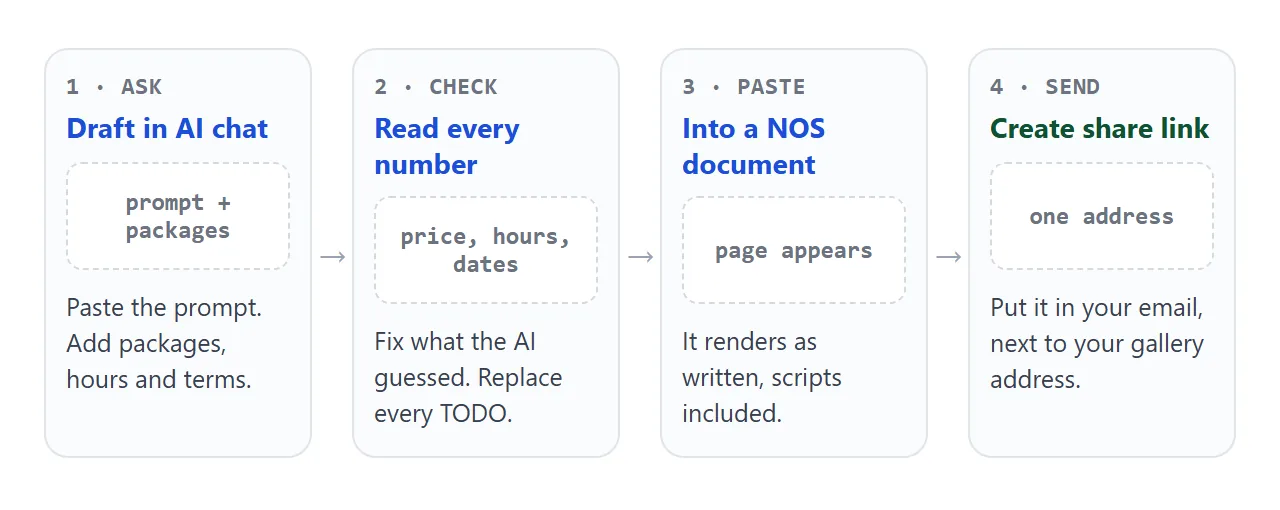
Scripts run on the page, so the package cards and the total work for the client. Their choices stay on their screen and are not saved. Ask them to reply with the package they want, and confirm it in writing.
To change a price, edit the numbers in your NOS document. The same link shows the new version. Add a dated line so nobody is surprised.
Ways to send a proposal, compared
| Attached PDF | Text in the email | Link to a page | |
|---|---|---|---|
| Opens on a phone | After a download | Yes | Yes, in the browser |
| Choose a package, see a total | No | No | Yes |
| Sample photos inside | Yes, as part of the file | Only as attachments | No, use your gallery |
| Change after sending | Send a new file | Send a new email | Edit the page, same link |
| Client needs an account | No | No | No |
Size is a reason people hesitate to attach photos. For personal Gmail accounts, Google's help page says the limit is 25 MB, and Gmail adds a larger attachment as a Drive link instead (as of October 2026).
Work and school accounts can have limits set by an administrator. A text-only page avoids the question. See email vs link for documents.
When it does not work
| What you see | Cause | Fix |
|---|---|---|
| Empty boxes where pictures should be | The AI used images from another site, which are blocked | Ask for no images, and describe the look in words |
| The total does not change | The AI left the script out or broke it | Ask: "Make the package and add-on choices update the total" |
| A form button does nothing | Forms cannot send data to a server from the link | Write your email address as text and ask for replies |
| A price or hour looks wrong | The AI guessed where your notes had a gap | Compare every number with your notes before sending |
| The client sees an old price | They have an old file or an old email | Send only the link, never the file |
| The text is tiny on a phone | No viewport meta tag | Ask for one, and a 16px base size |
The proposal is the first of several documents. After a yes you will likely send a quote, a contract and an invoice, and each can be a link too. Sending a proposal to a client covers what happens after it lands.