A postcss.config.js file is the list of PostCSS plugins a project applies to its CSS. PostCSS is not a framework. It is a tool for transforming CSS with JavaScript, and it normally runs on Node during a build.
A single HTML file has no build step, so there the same plugin list sits in a script.
Try it first. Type CSS on the left and watch a one-plugin list rewrite it.
<!doctype html>
<html lang="en">
<head>
<meta charset="utf-8">
<meta name="viewport" content="width=device-width, initial-scale=1">
<title>PostCSS in one HTML file</title>
<style>
  * { box-sizing: border-box; }
  body { margin: 0; padding: 14px; font-family: system-ui, sans-serif; color: #1d2330; background: #fff; }
  h1 { font-size: 16px; margin: 0 0 4px; }
  p { margin: 0 0 10px; font-size: 13px; color: #4b5563; }
  .cols { display: grid; grid-template-columns: 1fr 1fr; gap: 10px; }
  @media (max-width: 520px) { .cols { grid-template-columns: 1fr; } }
  label { display: block; font: 700 12px/1 ui-monospace, Consolas, monospace; margin-bottom: 5px; color: #374151; }
  textarea, pre {
    width: 100%; height: 190px; margin: 0; padding: 10px; border: 1px solid #d5d9e0; border-radius: 8px;
    font: 13px/1.5 ui-monospace, Consolas, monospace; background: #fafbfc; color: #1d2330; overflow: auto;
  }
  textarea { resize: vertical; }
  pre { background: #f0fdf4; border-color: #bbf7d0; white-space: pre-wrap; }
  pre.err { background: #fff7ed; border-color: #fdba74; color: #9a3412; }
</style>
</head>
<body>
<h1>One plugin, one function call</h1>
<p>Type CSS on the left. The plugin turns every <b>px</b> value into <b>rem</b> (16px = 1rem).</p>
<div class="cols">
  <div><label for="src">input.css</label>
<textarea id="src" spellcheck="false">.card {
  padding: 16px 24px;
  border-radius: 8px;
  font-size: 14px;
}</textarea></div>
  <div><label for="out">result.css</label><pre id="out">Loading PostCSS…</pre></div>
</div>

<script>
  const src = document.getElementById('src');
  const out = document.getElementById('out');

  // A PostCSS plugin is a function that returns an object with listeners.
  const pxToRem = () => ({
    postcssPlugin: 'px-to-rem',
    Declaration(decl) {
      decl.value = decl.value.replace(/(\d*\.?\d+)px/g, (m, n) => (n / 16) + 'rem');
    },
  });
  pxToRem.postcss = true;  // marks this function as a PostCSS 8 plugin

  let postcss;
  async function run() {
    if (!postcss) return;
    try {
      // the plugins array is the same list you would put in postcss.config.js
      const result = await postcss([pxToRem]).process(src.value, { from: undefined });
      out.className = '';
      out.textContent = result.css;
    } catch (e) {
      out.className = 'err';
      out.textContent = e.message;
    }
  }

  src.addEventListener('input', run);
  import('https://cdn.jsdelivr.net/npm/postcss@8.5.28/+esm')
    .then((m) => { postcss = m.default; run(); })
    .catch(() => { out.className = 'err'; out.textContent = 'Could not load PostCSS from the CDN.'; });
</script>
</body>
</html>
An example postcss.config.js
This is the usual shape. Plugins are installed with npm, then listed in the file.
// postcss.config.js
module.exports = {
  plugins: [
    require('autoprefixer'),
    require('postcss-nested'),
  ],
};
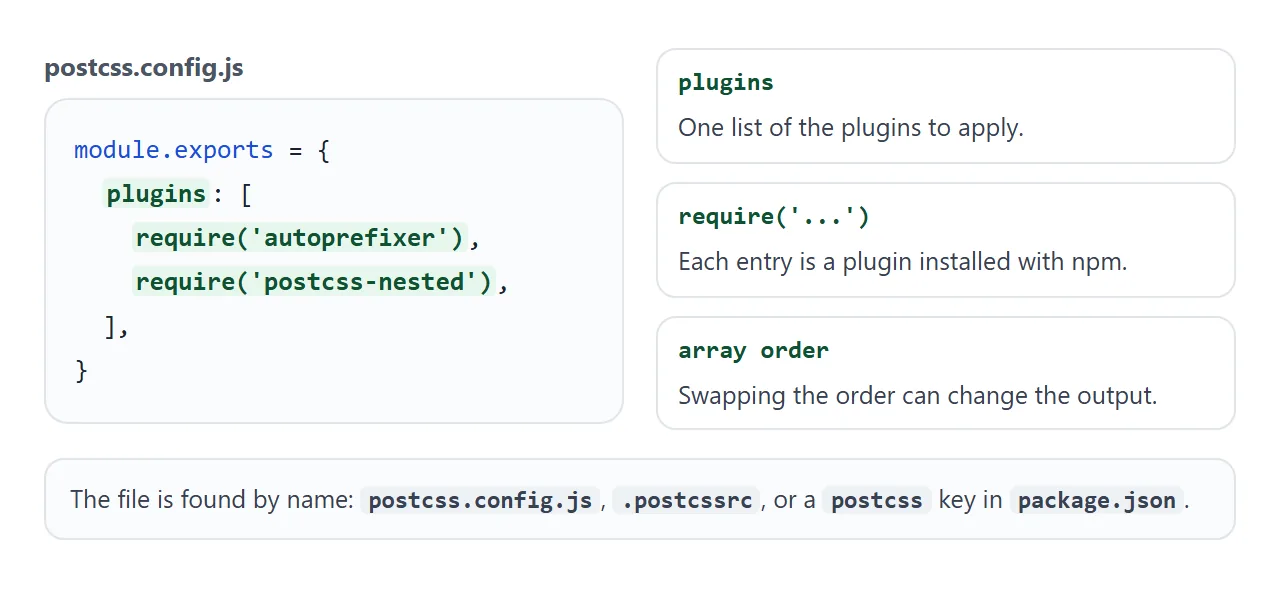
The loader that reads this file, postcss-load-config, also accepts an object form, where each key is a plugin name and each value is that plugin's options:
module.exports = {
  plugins: {
    autoprefixer: {},
    'postcss-nested': {},
  },
};
Besides postcss.config.js, the loader looks for the .cjs, .mjs and TypeScript variants, files named .postcssrc, and a postcss section in package.json. Vite, for one, applies a valid PostCSS config to all the CSS it imports.
What PostCSS does, and what it leaves to plugins
On its own, PostCSS parses CSS into a tree and prints it back out. The useful work is done by plugins that change the tree in between.
Autoprefixer is one such plugin. It adds vendor prefixes to CSS rules using values from Can I Use, and it takes the browsers you target from Browserslist. A query such as > 5% is one example from its README.
PostCSS is released under the MIT licence. Its project site describes it as a tool for transforming CSS with JavaScript.
Running PostCSS in one HTML file
In a project, Node runs PostCSS before the page exists. In a pasted page, the browser runs it after the page opens. The plugin list is the same idea either way.
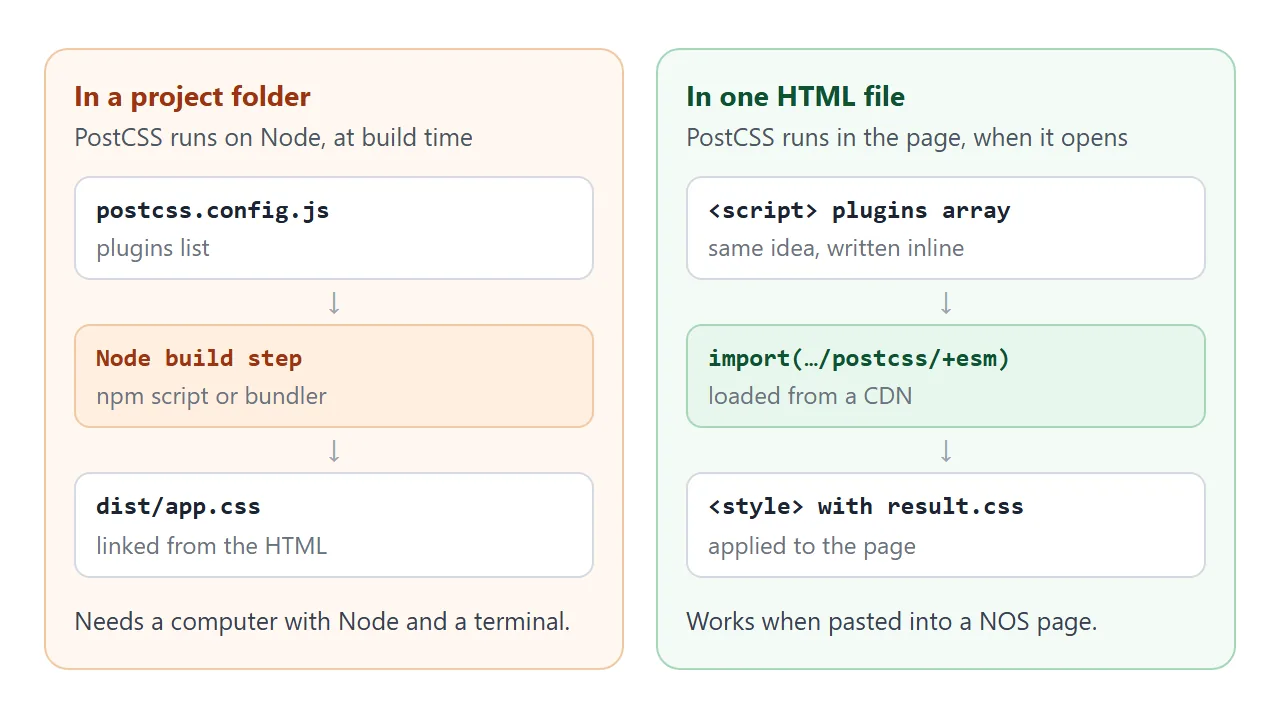
The steps for a page:
- Import PostCSS with
import()from jsDelivr, using the/+esmpath and a pinned version. - Define your plugins, or paste in small ones like those below.
- Call
processon the processor, as in the snippet below, and await it. - Use
result.css: show it, or put it in a<style>tag.
<script>
  import('https://cdn.jsdelivr.net/npm/postcss@8.5.28/+esm').then(async (m) => {
    const postcss = m.default;
    const result = await postcss([myPlugin]).process(css, { from: undefined });
    document.getElementById('live').textContent = result.css;
  });
</script>
Dynamic import() returns a promise and works in a normal script tag. A static import line needs type="module". jsDelivr builds the /+esm file by turning the npm package into a browser-ready ES module.
The call to process returns a promise-like result. Without await or .then, result.css is not ready.
Writing a plugin
A PostCSS 8 plugin is a function that returns an object. The object has a postcssPlugin name and listeners. Declaration runs for every declaration, and Once runs once per file. Set postcss = true on the function so PostCSS recognises it:
const pxToRem = () => ({
  postcssPlugin: 'px-to-rem',
  Declaration(decl) {
    decl.value = decl.value.replace(/(\d*\.?\d+)px/g, (m, n) => (n / 16) + 'rem');
  },
});
pxToRem.postcss = true;
PostCSS revisits nodes that a plugin changed or added. Only Once and OnceExit are not called again. The plugin above is safe to revisit because its output contains no px for it to match.
Plugin order is part of the config
The array order is not decoration. Two plugins can each be correct and still give different CSS when swapped.
<!doctype html>
<html lang="en">
<head>
<meta charset="utf-8">
<meta name="viewport" content="width=device-width, initial-scale=1">
<title>PostCSS plugin order</title>
<style>
  * { box-sizing: border-box; }
  body { margin: 0; padding: 14px; font-family: system-ui, sans-serif; color: #1d2330; background: #fff; }
  h1 { font-size: 16px; margin: 0 0 4px; }
  p { margin: 0 0 10px; font-size: 13px; color: #4b5563; line-height: 1.45; }
  .list { display: grid; gap: 6px; margin-bottom: 12px; }
  .item { display: flex; align-items: center; gap: 8px; padding: 8px 10px; border: 1px solid #d5d9e0; border-radius: 8px; background: #fafbfc; }
  .item b { font: 700 13px ui-monospace, Consolas, monospace; flex: 1; }
  .item span { font-size: 12px; color: #6b7280; }
  button { font: inherit; font-size: 13px; padding: 6px 12px; border: 1px solid #c3c9d4; border-radius: 6px; background: #fff; cursor: pointer; }
  button:hover { background: #f1f3f7; }
  label { display: block; font: 700 12px/1 ui-monospace, Consolas, monospace; margin: 8px 0 5px; color: #374151; }
  pre { margin: 0; padding: 10px; border: 1px solid #bbf7d0; border-radius: 8px; background: #f0fdf4; font: 13px/1.5 ui-monospace, Consolas, monospace; white-space: pre-wrap; }
  pre.src { background: #fafbfc; border-color: #d5d9e0; }
  pre.err { background: #fff7ed; border-color: #fdba74; color: #9a3412; }
</style>
</head>
<body>
<h1>Plugins run in array order</h1>
<p><b>min-font</b> raises any font-size under 12px to 12px. <b>px-to-rem</b> turns px into rem. Press a button to swap them and watch the result change.</p>

<div class="list" id="list"></div>
<button id="swap" type="button">Swap order</button>

<label>input.css</label>
<pre class="src">.note { font-size: 11px; padding: 8px; }</pre>
<label>result.css</label>
<pre id="out">Loading PostCSS…</pre>

<script>
  const input = '.note { font-size: 11px; padding: 8px; }';

  const minFont = () => ({
    postcssPlugin: 'min-font',
    Declaration(decl) {
      if (decl.prop !== 'font-size') return;
      const m = /^(\d*\.?\d+)px$/.exec(decl.value);  // only sees px values
      if (m && Number(m[1]) < 12) decl.value = '12px';
    },
  });
  minFont.postcss = true;

  const pxToRem = () => ({
    postcssPlugin: 'px-to-rem',
    Declaration(decl) {
      decl.value = decl.value.replace(/(\d*\.?\d+)px/g, (m, n) => (n / 16) + 'rem');
    },
  });
  pxToRem.postcss = true;

  const all = { 'min-font': minFont, 'px-to-rem': pxToRem };
  let order = ['min-font', 'px-to-rem'];
  let postcss;

  const list = document.getElementById('list');
  const out = document.getElementById('out');

  async function render() {
    list.innerHTML = order.map((n, i) => '<div class="item"><span>' + (i + 1) + '</span><b>' + n + '</b></div>').join('');
    if (!postcss) return;
    try {
      const result = await postcss(order.map((n) => all[n])).process(input, { from: undefined });
      out.className = '';
      out.textContent = result.css;
    } catch (e) {
      out.className = 'err';
      out.textContent = e.message;
    }
  }

  document.getElementById('swap').addEventListener('click', () => { order.reverse(); render(); });
  render();
  import('https://cdn.jsdelivr.net/npm/postcss@8.5.28/+esm')
    .then((m) => { postcss = m.default; render(); })
    .catch(() => { out.className = 'err'; out.textContent = 'Could not load PostCSS from the CDN.'; });
</script>
</body>
</html>
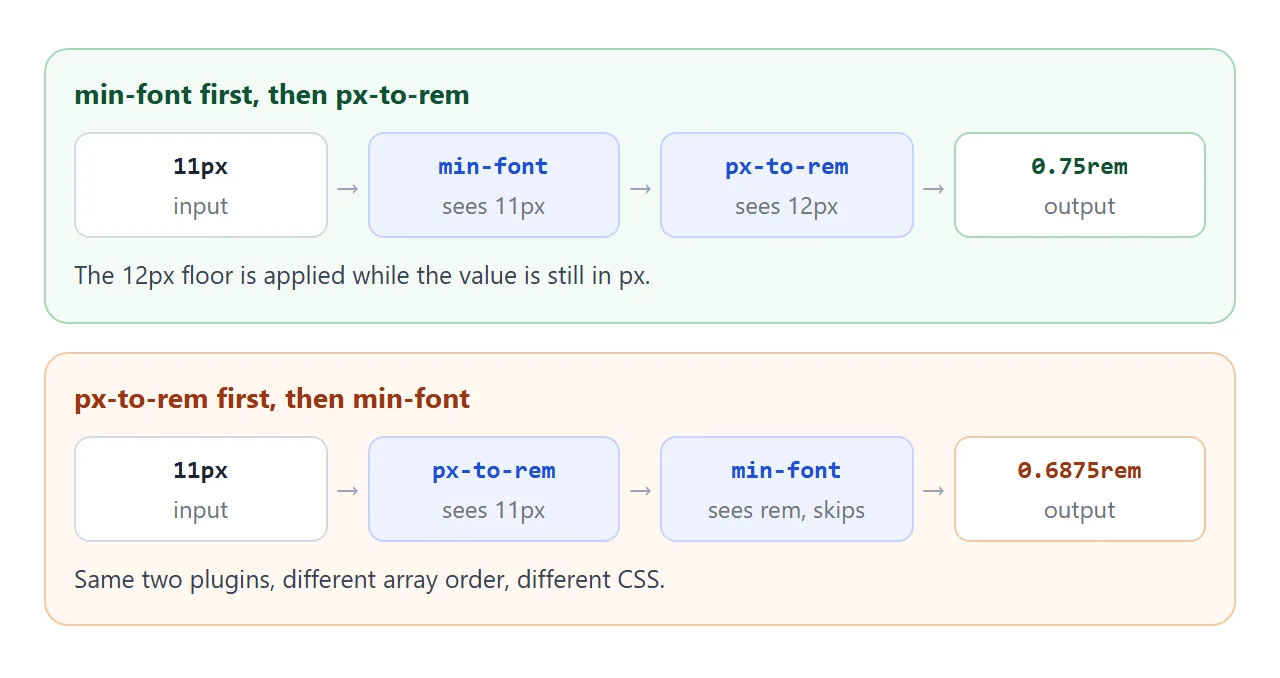
Here the font-size floor only understands px values. When it runs first, 11px becomes 12px, then 0.75rem. When rem conversion runs first, the floor no longer sees px and leaves 0.6875rem alone.
A finished example: source CSS in, plain CSS out
This page keeps variables, px sizes and comments in the source CSS, then ships plain CSS to the badge below it. Switch plugins off to see the raw source take over.
<!doctype html>
<html lang="en">
<head>
<meta charset="utf-8">
<meta name="viewport" content="width=device-width, initial-scale=1">
<title>PostCSS live preview</title>
<style>
  * { box-sizing: border-box; }
  body { margin: 0; padding: 14px; font-family: system-ui, sans-serif; color: #1d2330; background: #fff; }
  h1 { font-size: 16px; margin: 0 0 8px; }
  .opts { display: flex; flex-wrap: wrap; gap: 6px 14px; margin-bottom: 10px; font-size: 13px; }
  .opts label { display: flex; align-items: center; gap: 5px; cursor: pointer; }
  .cols { display: grid; grid-template-columns: 1fr 1fr; gap: 10px; }
  @media (max-width: 520px) { .cols { grid-template-columns: 1fr; } }
  .lab { display: block; font: 700 12px/1 ui-monospace, Consolas, monospace; margin-bottom: 5px; color: #374151; }
  #src, #out {
    width: 100%; height: 200px; margin: 0; padding: 10px; border: 1px solid #d5d9e0; border-radius: 8px;
    font: 12.5px/1.5 ui-monospace, Consolas, monospace; background: #fafbfc; color: #1d2330; overflow: auto;
  }
  #src { resize: vertical; }
  #out { background: #f0fdf4; border-color: #bbf7d0; white-space: pre-wrap; }
  #out.err { background: #fff7ed; border-color: #fdba74; color: #9a3412; }
  .stage { margin-top: 12px; padding: 16px; border: 1px dashed #c3c9d4; border-radius: 10px; background: #f6f7f9; }
</style>
<style id="live"></style>
</head>
<body>
<h1>Write source CSS, ship plain CSS</h1>
<div class="opts">
  <label><input type="checkbox" id="vars" checked> $variables</label>
  <label><input type="checkbox" id="rem" checked> px to rem</label>
  <label><input type="checkbox" id="pre" checked> copy user-select</label>
  <label><input type="checkbox" id="cm" checked> strip comments</label>
</div>
<div class="cols">
  <div><label class="lab" for="src">input.css</label>
<textarea id="src" spellcheck="false">/* brand colour, set once */
$brand: #2563eb;
$radius: 12px;

.badge {
  padding: 12px 20px;
  border-radius: $radius;
  background: $brand;
  color: #fff;
  font-size: 18px;
  user-select: none;
}</textarea></div>
  <div><label class="lab">result.css</label><pre id="out">Loading PostCSS…</pre></div>
</div>
<div class="stage"><span class="badge">The result.css styles this badge</span></div>

<script>
  const src = document.getElementById('src');
  const out = document.getElementById('out');
  const live = document.getElementById('live');

  // $name: value at the top level is stored, removed, and substituted below
  const vars = () => ({
    postcssPlugin: 'dollar-vars',
    Once(root) {
      const map = {};
      root.walkDecls((d) => { if (d.prop[0] === '$') { map[d.prop] = d.value; d.remove(); } });
      root.walkDecls((d) => { d.value = d.value.replace(/\$[\w-]+/g, (k) => map[k] || k); });
    },
  });
  const rem = () => ({
    postcssPlugin: 'px-to-rem',
    Declaration(d) { d.value = d.value.replace(/(\d*\.?\d+)px/g, (m, n) => (n / 16) + 'rem'); },
  });
  const pre = () => ({
    postcssPlugin: 'copy-user-select',
    Declaration(d) {
      if (d.prop === 'user-select') d.cloneBefore({ prop: '-webkit-user-select' });
    },
  });
  const cm = () => ({
    postcssPlugin: 'strip-comments',
    Once(root) { root.walkComments((c) => c.remove()); },
  });
  [vars, rem, pre, cm].forEach((p) => { p.postcss = true; });
  const plugins = { vars, rem, pre, cm };

  let postcss;
  async function run() {
    if (!postcss) return;
    const chosen = Object.keys(plugins).filter((k) => document.getElementById(k).checked).map((k) => plugins[k]);
    try {
      const result = await postcss(chosen).process(src.value, { from: undefined });
      out.className = '';
      out.textContent = result.css;
      live.textContent = result.css;
    } catch (e) {
      out.className = 'err';
      out.textContent = e.message;
    }
  }

  src.addEventListener('input', run);
  document.querySelectorAll('.opts input').forEach((c) => c.addEventListener('change', run));
  import('https://cdn.jsdelivr.net/npm/postcss@8.5.28/+esm')
    .then((m) => { postcss = m.default; run(); })
    .catch(() => { out.className = 'err'; out.textContent = 'Could not load PostCSS from the CDN.'; });
</script>
</body>
</html>
- Variables: a
Oncelistener collects$name: valuelines, removes them, and substitutes the values. - Copy a declaration:
cloneBeforeinserts a prefixed twin ofuser-select. This is a demo plugin, not Autoprefixer. - Comments:
root.walkCommentsremoves each comment node.
When it does not work
| What you see | Cause | Fix |
|---|---|---|
| Cannot find module for a plugin | The plugin is in the config but not installed | Install it with npm |
| The config seems ignored in a build tool | The file name is not one the loader looks for | Use postcss.config.js or another supported name |
| A plugin does nothing | The function lacks postcss = true |
Add that line after the function |
| Output is empty or old | process was not awaited |
Use await or .then before reading css |
| Unclosed block in the message | The input CSS has a missing brace | Close the block; the message gives line and column |
Unexpected token on import |
Static import in a normal script | Use dynamic import() or type="module" |
| Output differs after reordering | Plugins see each other's output | Put the plugin that needs px before the one that removes px |
Share it as a link
A plugin demo is better felt than described. A screenshot cannot take a typed rule, and a build setup cannot be sent to someone who has no Node. A single page can, because it needs nothing but a browser.
To send the working version, paste the page into a NOS document and choose Create share link. HTML to link walks through it.
The page renders as written and its scripts run, including the one that loads PostCSS from the CDN, so the people you send it to can edit the CSS themselves. If you change the code later, the same link shows the new version.
If you came for utility classes rather than PostCSS, adding Tailwind to an HTML file is the matching single-file recipe. For where a <style> tag goes, see the style tag.