Preact here means the JavaScript UI library, and "scores" means a score counter, scoreboard or leaderboard built with it. Its site describes Preact as a "Fast 3kB alternative to React with the same modern API".
You do not need npm or a build tool. The Preact guide says it "is packaged to be used directly in the browser, and doesn't require any build or tools." One HTML file with an import map is enough.
Try it first. Press the buttons.
<!doctype html>
<html lang="en">
<head>
<meta charset="utf-8">
<meta name="viewport" content="width=device-width, initial-scale=1">
<title>Preact score counter</title>
<style>
  body { margin: 0; padding: 24px 16px; font-family: system-ui, sans-serif; background: #f4f5f7; }
  .card { max-width: 320px; margin: 0 auto; padding: 20px; border-radius: 14px; background: #fff;
          box-shadow: 0 6px 20px rgba(0, 0, 0, .1); text-align: center; }
  .score { font-size: 64px; font-weight: 800; margin: 8px 0 14px; }
  button { font: inherit; font-size: 18px; min-width: 64px; padding: 10px 16px; margin: 0 4px;
           border: 0; border-radius: 10px; background: #2563eb; color: #fff; cursor: pointer; }
  button.minus { background: #e5e7eb; color: #111827; }
</style>

<!-- 1. Tell the browser where "preact" and "htm/preact" live. It must come before the module script. -->
<script type="importmap">
{
  "imports": {
    "preact": "https://cdn.jsdelivr.net/npm/preact@11.0.0/dist/preact.mjs",
    "preact/hooks": "https://cdn.jsdelivr.net/npm/preact@11.0.0/hooks/dist/hooks.mjs",
    "htm": "https://cdn.jsdelivr.net/npm/htm@3.1.1/dist/htm.module.js",
    "htm/preact": "https://cdn.jsdelivr.net/npm/htm@3.1.1/preact/index.module.js"
  }
}
</script>
</head>
<body>
<div id="app"></div>

<!-- 2. type="module" lets the script use import. -->
<script type="module">
  import { render } from 'preact';
  import { useState } from 'preact/hooks';
  import { html } from 'htm/preact';

  function Score() {
    const [score, setScore] = useState(0);
    return html`
      <div class="card">
        <b>Home team</b>
        <div class="score" id="score">${score}</div>
        <button class="minus" onClick=${() => setScore(score - 1)}>-1</button>
        <button onClick=${() => setScore(score + 1)}>+1</button>
      </div>`;
  }

  // 3. Draw the component into #app.
  render(html`<${Score} />`, document.getElementById('app'));
</script>
</body>
</html>
The smallest working page
Every single-file Preact page has the same three parts:
- An import map. It tells the browser which URL to fetch when a script says
import ... from 'preact'. - A module script. Only
<script type="module">can useimport. - A
render()call. It draws a component into an empty element on the page.
<script type="importmap">
{
  "imports": {
    "preact": "https://cdn.jsdelivr.net/npm/preact@11.0.0/dist/preact.mjs",
    "preact/hooks": "https://cdn.jsdelivr.net/npm/preact@11.0.0/hooks/dist/hooks.mjs",
    "htm": "https://cdn.jsdelivr.net/npm/htm@3.1.1/dist/htm.module.js",
    "htm/preact": "https://cdn.jsdelivr.net/npm/htm@3.1.1/preact/index.module.js"
  }
}
</script>
Then the component itself:
<div id="app"></div>
<script type="module">
  import { render } from 'preact';
  import { useState } from 'preact/hooks';
  import { html } from 'htm/preact';

  function Score() {
    const [score, setScore] = useState(0);
    return html`<button onClick=${() => setScore(score + 1)}>${score}</button>`;
  }

  render(html`<${Score} />`, document.getElementById('app'));
</script>
Why the import map comes first
'preact' is a bare name, not a URL. The import map turns it into one. MDN says the map "must be declared and processed before any <script> elements that import modules using specifiers declared in the map."
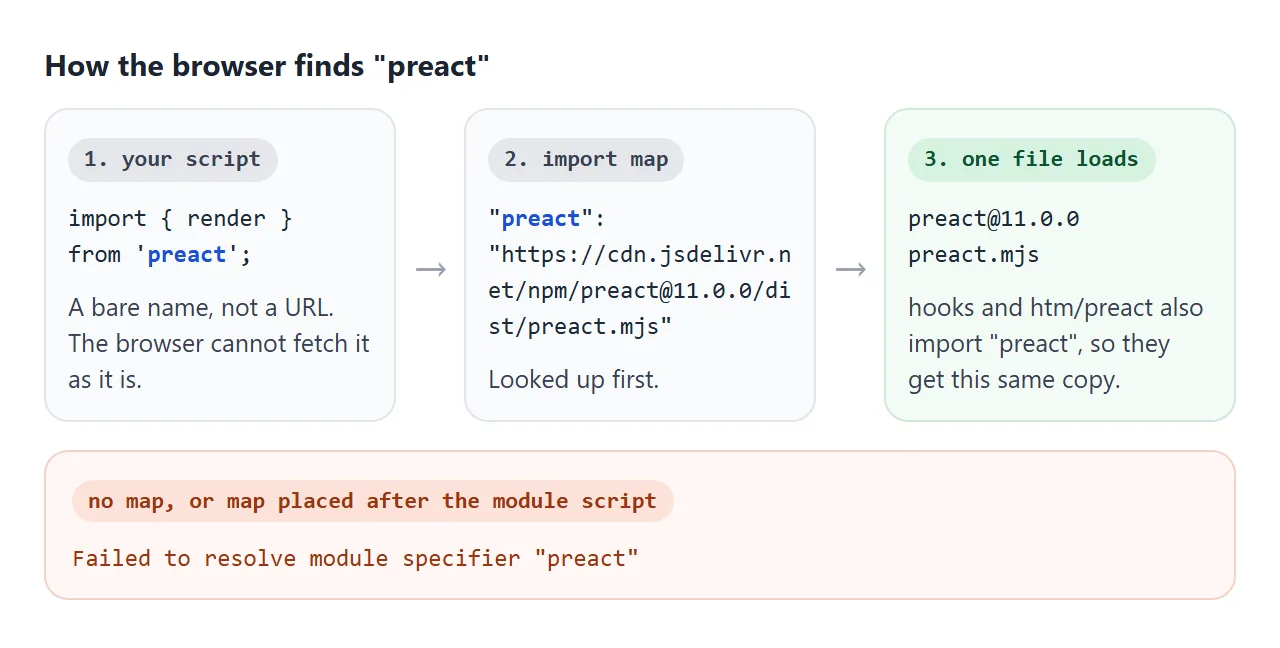
The map is also what keeps Preact to a single copy. The hooks file and htm/preact both import 'preact' by name, so they get the same file your script gets.
The Preact guide is firm on this: "Preact must be used only as a singleton with only a single copy included in your app."
MDN says the map "must be a valid JSON object", so leave no trailing comma after the last entry.
htm instead of JSX
JSX is the HTML-like syntax in code such as <Score />. The Preact guide notes that JSX "requires a build step". In a plain script, the browser hits the < and throws a SyntaxError.
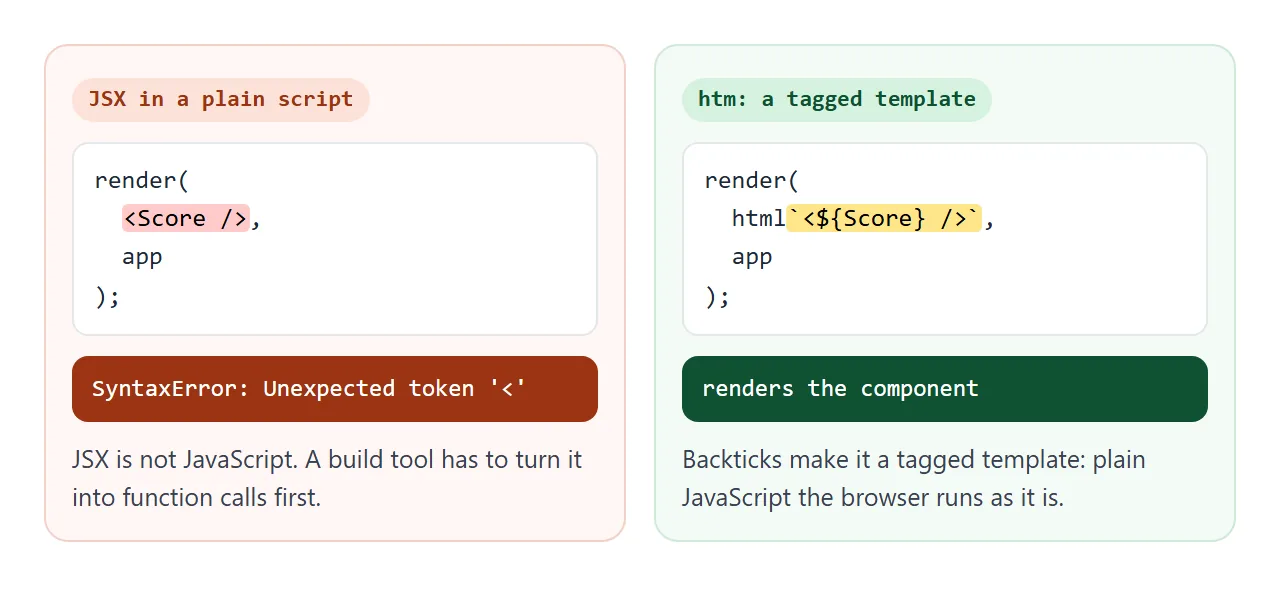
htm is the replacement the guide suggests. Its README calls it "JSX-like syntax in plain JavaScript - no transpiler necessary." It uses tagged templates, which the Preact guide notes are "supported in all modern browsers". The changes from JSX are small:
| JSX | htm |
|---|---|
<Score /> |
<${Score} /> |
{score} |
${score} |
onClick={add} |
onClick=${add} |
<div {...props}> |
<div ...${props}> |
</Score> |
</${Score}> or <//> |
Watch the component tag. If you write <Score /> inside htm, there is no error. Preact creates an empty element named Score and the component never runs.
If you would rather keep JSX, that means a project with a bundler. Host a React app as a page covers publishing that kind of build output.
State: how a click changes the score
useState comes from preact/hooks. The guide describes it: when invoked it "returns an array of two variables. The first being the current state and the second being the setter for our state."
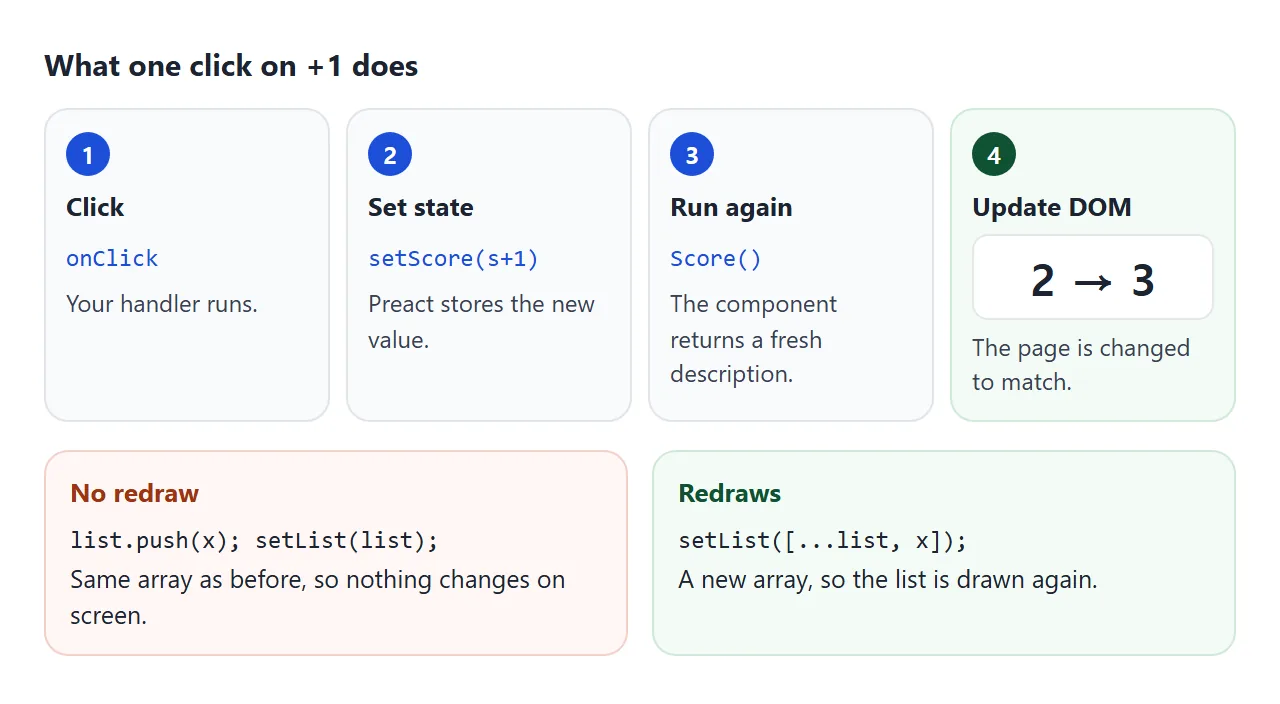
Calling the setter triggers "a rerender starting from the component where that useState has been used." The component returns a new description of the page. Preact compares it with the DOM and updates the DOM to match.
One trap: the setter compares the old and new value with Object.is. Pushing into an array and passing the same array back changes nothing on screen. Always hand it a new array or object.
One component, many teams
Components take inputs, called props. Here the Team component only draws. The two scores live in Board, which passes each one down with a function to change it.
<!doctype html>
<html lang="en">
<head>
<meta charset="utf-8">
<meta name="viewport" content="width=device-width, initial-scale=1">
<title>Preact: one component, two teams</title>
<style>
  body { margin: 0; padding: 18px 12px; font-family: system-ui, sans-serif; background: #f4f5f7; }
  .board { display: flex; gap: 10px; justify-content: center; }
  .team { flex: 1 1 0; max-width: 200px; padding: 14px 8px; border-radius: 14px; background: #fff;
          box-shadow: 0 6px 20px rgba(0, 0, 0, .1); text-align: center; border-top: 6px solid var(--c); }
  .score { font-size: 52px; font-weight: 800; margin: 4px 0 10px; }
  button { font: inherit; font-size: 16px; padding: 8px 12px; margin: 2px; border: 0; border-radius: 9px;
           background: var(--c); color: #fff; cursor: pointer; }
  .lead { margin: 14px 0 8px; text-align: center; font-weight: 600; color: #374151; }
  .reset { display: block; margin: 0 auto; background: #e5e7eb; color: #111827; }
</style>
<script type="importmap">
{
  "imports": {
    "preact": "https://cdn.jsdelivr.net/npm/preact@11.0.0/dist/preact.mjs",
    "preact/hooks": "https://cdn.jsdelivr.net/npm/preact@11.0.0/hooks/dist/hooks.mjs",
    "htm": "https://cdn.jsdelivr.net/npm/htm@3.1.1/dist/htm.module.js",
    "htm/preact": "https://cdn.jsdelivr.net/npm/htm@3.1.1/preact/index.module.js"
  }
}
</script>
</head>
<body>
<div id="app"></div>
<script type="module">
  import { render } from 'preact';
  import { useState } from 'preact/hooks';
  import { html } from 'htm/preact';

  // Team only draws. The score lives in Board and comes in as a prop.
  function Team({ name, color, score, onAdd }) {
    return html`
      <div class="team" style=${{ '--c': color }}>
        <b>${name}</b>
        <div class="score">${score}</div>
        <button onClick=${() => onAdd(1)}>+1</button>
        <button onClick=${() => onAdd(3)}>+3</button>
      </div>`;
  }

  function Board() {
    const [home, setHome] = useState(0);
    const [away, setAway] = useState(0);
    const lead = home === away ? 'Level'
      : (home > away ? 'Lions' : 'Hawks') + ' lead by ' + Math.abs(home - away);
    return html`
      <div class="board">
        <${Team} name="Lions" color="#2563eb" score=${home} onAdd=${n => setHome(home + n)} />
        <${Team} name="Hawks" color="#c2410c" score=${away} onAdd=${n => setAway(away + n)} />
      </div>
      <p class="lead" id="lead">${lead}</p>
      <button class="reset" onClick=${() => { setHome(0); setAway(0); }}>Reset</button>`;
  }

  render(html`<${Board} />`, document.getElementById('app'));
</script>
</body>
</html>
Because Board holds both numbers, the "Lions lead by 2" line is just a calculation in the same function. Nothing has to be kept in sync by hand.
A finished example: a quiz night leaderboard
This one adds players with a form, sorts by points, and resets. The form is handled in the page with preventDefault(), so nothing is sent anywhere.
<!doctype html>
<html lang="en">
<head>
<meta charset="utf-8">
<meta name="viewport" content="width=device-width, initial-scale=1">
<title>Preact leaderboard</title>
<style>
  body { margin: 0; padding: 18px 12px; font-family: system-ui, sans-serif; background: #f4f5f7; color: #111827; }
  .wrap { max-width: 420px; margin: 0 auto; padding: 16px; border-radius: 14px; background: #fff;
          box-shadow: 0 6px 20px rgba(0, 0, 0, .1); }
  h1 { font-size: 20px; margin: 0 0 12px; }
  form { display: flex; gap: 8px; margin-bottom: 12px; }
  input { flex: 1; min-width: 0; font: inherit; padding: 9px 10px; border: 1px solid #d1d5db; border-radius: 9px; }
  button { font: inherit; padding: 8px 12px; border: 0; border-radius: 9px; background: #2563eb; color: #fff; cursor: pointer; }
  ol { list-style: none; margin: 0; padding: 0; }
  li { display: flex; align-items: center; gap: 8px; padding: 8px 4px; border-bottom: 1px solid #eef0f3; }
  li:first-child .rank { background: #fde68a; }
  .rank { flex: none; width: 28px; height: 28px; border-radius: 50%; background: #f3f4f6;
          display: grid; place-items: center; font-weight: 700; }
  .name { flex: 1; min-width: 0; overflow-wrap: anywhere; }
  .pts { width: 36px; text-align: right; font-weight: 800; font-size: 18px; }
  li button { padding: 6px 10px; }
  li .minus { background: #e5e7eb; color: #111827; }
  .foot { display: flex; justify-content: space-between; align-items: center; margin-top: 12px; color: #6b7280; font-size: 14px; }
  .foot button { background: #e5e7eb; color: #111827; }
</style>
<script type="importmap">
{
  "imports": {
    "preact": "https://cdn.jsdelivr.net/npm/preact@11.0.0/dist/preact.mjs",
    "preact/hooks": "https://cdn.jsdelivr.net/npm/preact@11.0.0/hooks/dist/hooks.mjs",
    "htm": "https://cdn.jsdelivr.net/npm/htm@3.1.1/dist/htm.module.js",
    "htm/preact": "https://cdn.jsdelivr.net/npm/htm@3.1.1/preact/index.module.js"
  }
}
</script>
</head>
<body>
<div id="app"></div>
<script type="module">
  import { render } from 'preact';
  import { useState } from 'preact/hooks';
  import { html } from 'htm/preact';

  let nextId = 4;
  const start = [
    { id: 1, name: 'Ana', pts: 12 },
    { id: 2, name: 'Ben', pts: 9 },
    { id: 3, name: 'Chloe', pts: 15 },
  ];

  function Leaderboard() {
    const [players, setPlayers] = useState(start);
    const [name, setName] = useState('');

    // Always hand the setter a new array. Editing the old one in place does not redraw.
    const add = (id, n) => setPlayers(players.map(p => p.id === id ? { ...p, pts: p.pts + n } : p));

    function onSubmit(e) {
      e.preventDefault();  // handled in the page, nothing is sent anywhere
      if (!name.trim()) return;
      setPlayers([...players, { id: nextId++, name: name.trim(), pts: 0 }]);
      setName('');
    }

    const sorted = [...players].sort((a, b) => b.pts - a.pts);
    return html`
      <div class="wrap">
        <h1>Quiz night scores</h1>
        <form onSubmit=${onSubmit}>
          <input placeholder="Player name" value=${name} onInput=${e => setName(e.currentTarget.value)} />
          <button>Add</button>
        </form>
        <ol>
          ${sorted.map((p, i) => html`
            <li key=${p.id}>
              <span class="rank">${i + 1}</span>
              <span class="name">${p.name}</span>
              <span class="pts">${p.pts}</span>
              <button class="minus" onClick=${() => add(p.id, -1)}>-1</button>
              <button onClick=${() => add(p.id, 1)}>+1</button>
            </li>`)}
        </ol>
        <div class="foot">
          <span>${players.length} players</span>
          <button onClick=${() => setPlayers(players.map(p => ({ ...p, pts: 0 })))}>Reset scores</button>
        </div>
      </div>`;
  }

  render(html`<${Leaderboard} />`, document.getElementById('app'));
</script>
</body>
</html>
Three details worth copying:
keyon list rows. The Preact tutorial explains that elements with akey"are compared by finding the previous element with that samekeyprop value", rather than by position. Use a stable id, not the index.onInput, notonChange. In Preact core,onChangeis the DOMchangeevent, which fires when the value is committed. The guide says to useonInputfor form inputs, unlesspreact/compatis used.classworks. The guide says most Preact developers useclassinstead ofclassName, and both are supported.
For a scores page that needs no library at all, see the HTML quiz with a score.
When it does not work
| What you see | Cause | Fix |
|---|---|---|
| Failed to resolve module specifier "preact" | No import map, or it comes after the module script | Put the import map in <head>, above every module script |
| Cannot use import statement outside a module | The script has no type="module" |
Use <script type="module"> |
| SyntaxError: Unexpected token '<' | JSX in a plain script | Write the markup with htm |
An empty Score element, no content |
<Score /> inside htm |
Write <${Score} /> |
Error mentioning __H, nothing renders |
Two copies of Preact, such as hooks from a different URL | Load preact and preact/hooks from the same version and host |
| The number only changes when you leave the field | onChange on a text input |
Use onInput |
Clicking does nothing after push() |
The same array was passed to the setter | Pass a new array |
The error texts above are what Chromium shows in the console. If the page is blank and the console is empty, HTML JavaScript not working lists other causes.
Share it as a link
A scoreboard is meant to be used, not looked at. A screenshot cannot count points, so send the page itself.
To send the working version, paste the page into a NOS document and choose Create share link. HTML to link walks through it.
The page renders as written, its scripts run, and Preact loads from jsDelivr, so the people you send it to can press the buttons themselves without an account. If you change the code later, the same link shows the new version.