A professor website template can be one HTML page with a menu and three lists: courses, office hours and publications. Copy the example below, or ask an AI to build it from your CV, and publish it as a link yourself.
That helps when changing a faculty page means a request to someone else, and office hours change every term. A page you edit yourself changes the same day.
Here is a page of that kind for a made-up professor. Tap the menu, try the publication filters, and read the office hours box. Its text sits in lists near the bottom of the code, so you replace the lists and keep the layout.
<!doctype html>
<html lang="en">
<head>
<meta charset="utf-8">
<meta name="viewport" content="width=device-width, initial-scale=1">
<title>Dr. Imani Hartwell</title>
<style>
* { box-sizing: border-box; }
body { margin: 0; font-family: system-ui, sans-serif; color: #1f2933; background: #f6f7f9; line-height: 1.5; }
header { background: #1e3a5f; color: #fff; padding: 28px 20px 20px; }
.wrap { max-width: 760px; margin: 0 auto; }
header h1 { margin: 0 0 4px; font-size: 1.7rem; }
header p { margin: 0; opacity: .9; }
nav { position: sticky; top: 0; background: #fff; border-bottom: 1px solid #dde1e7; z-index: 5; }
nav .wrap { display: flex; gap: 4px; overflow-x: auto; padding: 0 12px; }
nav a { padding: 12px 10px; color: #1e3a5f; text-decoration: none; font-weight: 600; font-size: .95rem; white-space: nowrap; }
nav a:hover { background: #eef2f7; }
main .wrap { padding: 0 20px; }
section { padding: 22px 0 6px; scroll-margin-top: 48px; }
h2 { font-size: 1.2rem; margin: 0 0 10px; color: #1e3a5f; }
.card { background: #fff; border: 1px solid #dde1e7; border-radius: 10px; padding: 12px 14px; margin-bottom: 10px; }
.card b { display: block; }
.muted { color: #5b6673; font-size: .92rem; }
.next { background: #e8f3ec; border-color: #b7d9c3; }
.notice { background: #fff4e0; border: 1px solid #f0d19a; border-radius: 10px; padding: 10px 14px; margin-bottom: 10px; }
.filters { display: flex; gap: 8px; margin-bottom: 10px; flex-wrap: wrap; }
.filters button { font: inherit; padding: 6px 14px; border-radius: 999px; border: 1px solid #1e3a5f; background: #fff; color: #1e3a5f; cursor: pointer; }
.filters button[aria-pressed="true"] { background: #1e3a5f; color: #fff; }
.tag { display: inline-block; font-size: .78rem; background: #eef2f7; border-radius: 4px; padding: 0 6px; margin-left: 6px; color: #3b4a5c; }
footer { padding: 20px; text-align: center; color: #5b6673; font-size: .85rem; }
</style>
</head>
<body>
<header>
<div class="wrap">
<h1>Dr. Imani Hartwell</h1>
<p>Associate Professor of Environmental Studies, Example University (a made-up page)</p>
</div>
</header>
<nav><div class="wrap">
<a href="#about">About</a><a href="#courses">Courses</a><a href="#hours">Office hours</a><a href="#pubs">Publications</a><a href="#contact">Contact</a>
</div></nav>
<main><div class="wrap">
<section id="about">
<h2>About</h2>
<p>I study how small towns plan for flooding. My courses ask students to read local plans closely and to say what a plan leaves out.</p>
</section>
<section id="courses">
<h2>Courses this term</h2>
<div id="courseList"></div>
</section>
<section id="hours">
<h2>Office hours</h2>
<div class="notice" id="notice" hidden></div>
<div class="card next" id="nextHours"></div>
<div id="hoursList"></div>
</section>
<section id="pubs">
<h2>Selected publications</h2>
<div class="filters" id="filters">
<button data-f="all" aria-pressed="true">All</button>
<button data-f="Article" aria-pressed="false">Articles</button>
<button data-f="Chapter" aria-pressed="false">Chapters</button>
</div>
<div id="pubList"></div>
</section>
<section id="contact">
<h2>Contact</h2>
<div class="card">Email: <b style="display:inline">i.hartwell@example.edu</b><br>
<span class="muted">Office: Brook Hall 214 (invented). Replies within two working days.</span></div>
</section>
</div></main>
<footer>Page text last checked by the author: 1 October 2026</footer>
<script>
// ---- EDIT HERE: everything on the page comes from these lists ----
const COURSES = [
{ code: 'ENV 210', name: 'Flood Planning and Local Government', when: 'Mon/Wed 10:00', where: 'Brook Hall 105' },
{ code: 'ENV 455', name: 'Seminar: Reading a Hazard Plan', when: 'Thu 13:00', where: 'Brook Hall 214' }
];
const HOURS = [ // day: 0 = Sunday ... 6 = Saturday
{ day: 2, start: '14:00', end: '16:00', where: 'Brook Hall 214' },
{ day: 4, start: '10:00', end: '11:00', where: 'Online (link by email)' }
];
const NOTICE = 'No office hours on Thursday 8 October.'; // leave empty for no notice
const PUBS = [
{ year: 2026, type: 'Article', text: 'Hartwell, I. (2026). What the Plan Leaves Out. Journal of Imaginary Planning, 12(2), 41-58.' },
{ year: 2024, type: 'Chapter', text: 'Hartwell, I. (2024). Reading Hazard Maps with Students. In A Made-Up Handbook of Teaching Place (pp. 77-92).' },
{ year: 2023, type: 'Article', text: 'Hartwell, I., & Osei, K. (2023). Small Towns and Slow Water. Example Review of Regional Studies, 8(1), 5-19.' }
];
// ------------------------------------------------------------------
const DAYS = ['Sunday', 'Monday', 'Tuesday', 'Wednesday', 'Thursday', 'Friday', 'Saturday'];
const esc = (s) => s.replace(/[&<>]/g, (c) => ({ '&': '&', '<': '<', '>': '>' }[c]));
document.getElementById('courseList').innerHTML = COURSES.map((c) =>
'<div class="card"><b>' + esc(c.code) + ' ' + esc(c.name) + '</b><span class="muted">' + esc(c.when) + ', ' + esc(c.where) + '</span></div>').join('');
document.getElementById('hoursList').innerHTML = HOURS.map((h) =>
'<div class="card"><b>' + DAYS[h.day] + 's ' + h.start + '-' + h.end + '</b><span class="muted">' + esc(h.where) + '</span></div>').join('');
if (NOTICE) { const n = document.getElementById('notice'); n.textContent = NOTICE; n.hidden = false; }
// next slot, using the visitor's own clock
function nextSlot() {
const now = new Date(); let best = null;
HOURS.forEach((h) => {
const [hh, mm] = h.end.split(':').map(Number);
for (let add = 0; add < 8; add++) {
const d = new Date(now); d.setDate(now.getDate() + add); d.setHours(hh, mm, 0, 0);
if (d.getDay() === h.day && d > now) { if (!best || d < best.end) best = { h, end: d }; break; }
}
});
return best;
}
const nx = nextSlot();
document.getElementById('nextHours').innerHTML = nx
? '<b>Next: ' + DAYS[nx.h.day] + ' ' + nx.h.start + '-' + nx.h.end + '</b><span class="muted">' + esc(nx.h.where) + ' (judged by your device clock)</span>'
: 'No office hours listed.';
const list = document.getElementById('pubList');
function drawPubs(f) {
list.innerHTML = PUBS.filter((p) => f === 'all' || p.type === f)
.sort((a, b) => b.year - a.year)
.map((p) => '<div class="card">' + esc(p.text) + '<span class="tag">' + p.type + '</span></div>').join('');
}
document.getElementById('filters').addEventListener('click', (e) => {
const b = e.target.closest('button'); if (!b) return;
document.querySelectorAll('#filters button').forEach((x) => x.setAttribute('aria-pressed', String(x === b)));
drawPubs(b.dataset.f);
});
drawPubs('all');
</script>
</body>
</html>
What goes on the page
Visitors come with one of three questions. Which course is this, when can I see you, and what have you published. Put those first and keep the rest short.
- About: two or three sentences on what you study and teach.
- Courses: code, title, day, time and room for this term only.
- Office hours: days, times, place, and a one-line notice for cancellations.
- Publications: newest first, in the format your field uses.
- Contact: one email address and how fast you reply.
Make it with AI
Open ChatGPT, Claude or Gemini and paste the prompt below, then your own facts under it. Do not ask the AI to look up your papers.
Make one HTML page for a university faculty member.
A sticky menu: About, Courses, Office hours, Publications, Contact.
Put courses, office hours and publications in JavaScript lists
near the bottom, under a comment that says EDIT HERE.
Office hours: show the next slot and a one-line notice I can
fill in or leave empty. Publications: newest first, with buttons
to filter by type. Use only the facts I paste. Do not add papers,
links, dates or awards. Leave out anything I did not give you.
Works on a phone. No outside libraries, images or fonts.
Do not save any data.

[paste your name, title, courses, hours, publications, email]
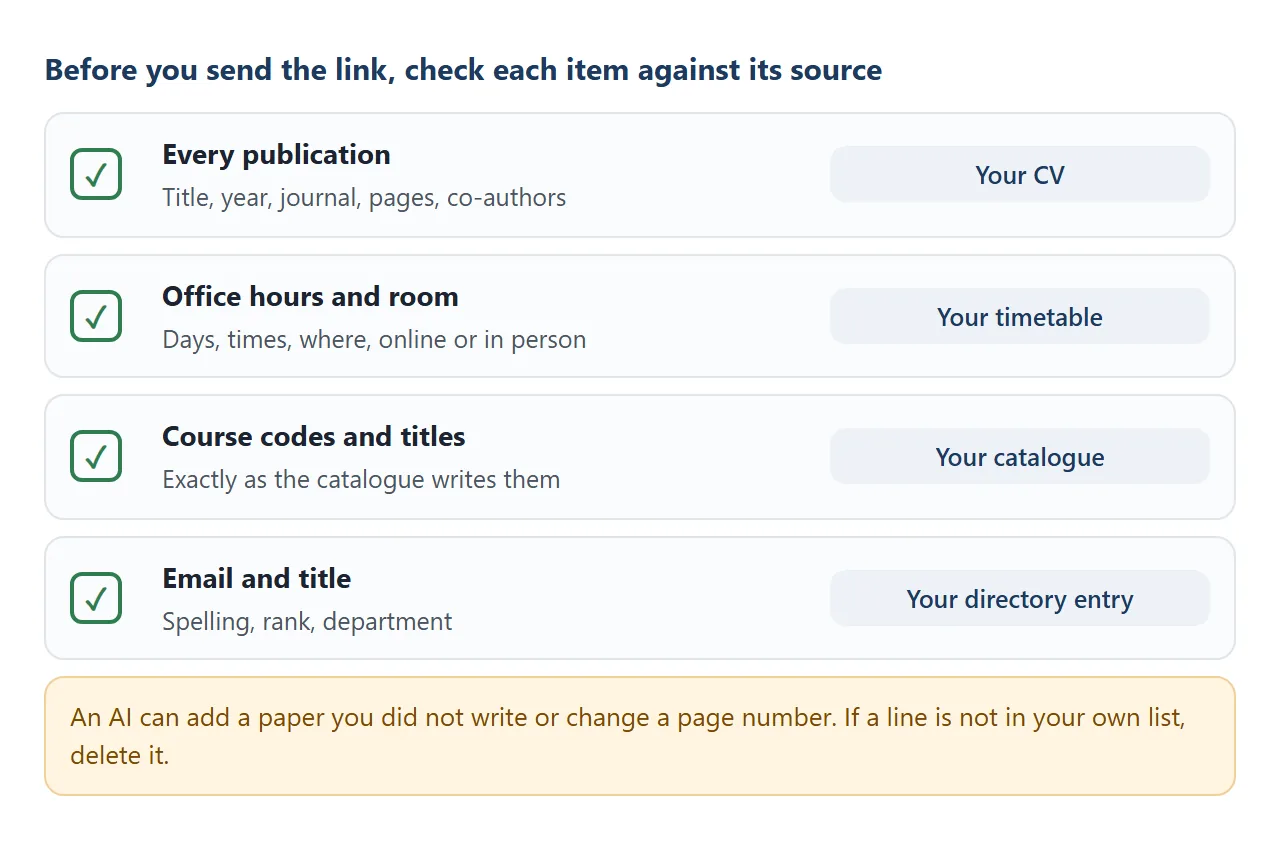
Check the result against your own documents before you send it. The list above shows what to compare with what.
- Publications. Read each one against your CV. An AI can invent a paper or alter pages without saying so.
- The next slot. It uses the visitor's own clock and time zone. If students are in other time zones, ask for it to be removed.
- Phone width. Make the browser window narrow and look for text running off the side.
Send it as a link
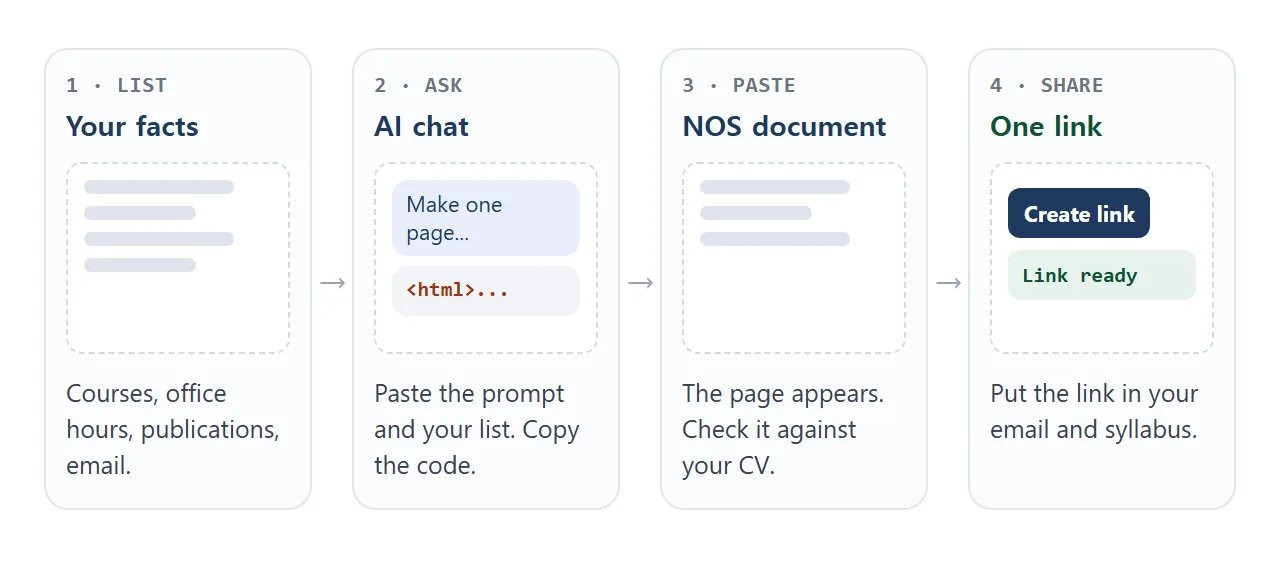
- Copy all of the code the AI returned.
- Paste it into a NOS document. The page renders and its scripts run, so test the menu and the filters yourself.
- Choose Create share link and copy the address. HTML to link walks through it.
- Put the address in your email signature, syllabus and course pages.
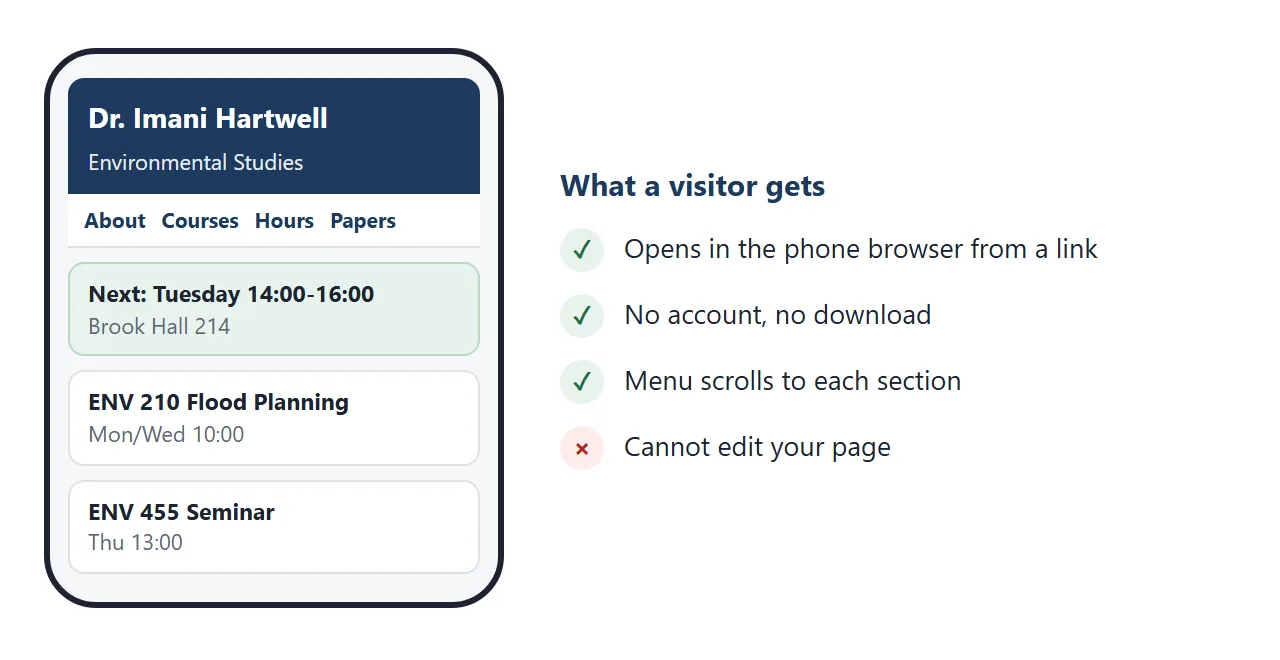
Anyone with the link can open the page in a browser, phone included, without an account. They cannot edit it. If you edit the code later, the same link shows the new version.
For a CV as a link rather than a page, see CV link. For a single paper, see research paper link.
Where to put the link
The link is plain text, so it goes wherever you already send things. Two Google routes are worth knowing, and both depend on your school's setup. Paper is the third.
- Google Classroom: Google's help says to choose Create, then Material, then Add, then Link. A posted material can be changed with More, then Edit. As of October 2026, check the current help page because menus can differ by device.
- Google Sites: Insert, then Embed, lets you add a URL or your own code, and Google notes that some websites will not let you add their content. This guide did not test NOS pages inside Sites, so a normal text link is safer.
- Paper: print the link as a QR code on your door or syllabus. QR code link explains why a printed code stays useful when the page changes.
Change the hours without changing the link
Office hours are the part that moves. The second example is a small card for a door sign or a message to a class. It marks today's slot and lists cancellations at the top.
<!doctype html>
<html lang="en">
<head>
<meta charset="utf-8">
<meta name="viewport" content="width=device-width, initial-scale=1">
<title>Office hours</title>
<style>
  * { box-sizing: border-box; }
  body { margin: 0; padding: 18px; font-family: system-ui, sans-serif; background: #eef1f5; color: #1f2933; }
  .card { max-width: 440px; margin: 0 auto; background: #fff; border-radius: 14px; padding: 20px; box-shadow: 0 4px 16px rgba(0,0,0,.1); }
  h1 { margin: 0; font-size: 1.35rem; color: #1e3a5f; }
  .sub { margin: 2px 0 14px; color: #5b6673; }
  .slot { display: flex; justify-content: space-between; gap: 10px; padding: 10px 12px; border-radius: 8px; border: 1px solid #dde1e7; margin-bottom: 8px; }
  .slot.today { background: #e8f3ec; border-color: #7fbf95; }
  .slot b { display: block; }
  .slot span { color: #5b6673; font-size: .92rem; }
  .badge { align-self: center; font-size: .8rem; font-weight: 700; color: #1b6b3a; }
  .cancel { background: #fff4e0; border: 1px solid #f0d19a; border-radius: 8px; padding: 8px 12px; margin-bottom: 8px; }
  .how { margin-top: 14px; padding-top: 12px; border-top: 1px solid #e5e8ed; font-size: .95rem; }
</style>
</head>
<body>
<div class="card">
  <h1>Dr. Hartwell: office hours</h1>
  <p class="sub">Brook Hall 214, an invented room. Today is <span id="today"></span>.</p>
  <div id="cancels"></div>
  <div id="slots"></div>
  <div class="how">
    <b>Can't make these times?</b> Email two times that suit you and what you want to talk about. Bring your draft or your question.
  </div>
</div>

<script>
  // ---- EDIT HERE ----
  const SLOTS = [  // day: 0 = Sunday ... 6 = Saturday
    { day: 2, time: '14:00-16:00', where: 'In person, Brook Hall 214' },
    { day: 4, time: '10:00-11:00', where: 'Online, link sent by email' }
  ];
  const CANCELLED = ['Thursday 8 October: no office hours (conference).'];
  // -------------------
  const DAYS = ['Sunday', 'Monday', 'Tuesday', 'Wednesday', 'Thursday', 'Friday', 'Saturday'];
  const todayNum = new Date().getDay();
  document.getElementById('today').textContent = DAYS[todayNum];

  document.getElementById('cancels').innerHTML = CANCELLED
    .map((t) => '<div class="cancel">' + t + '</div>').join('');

  document.getElementById('slots').innerHTML = SLOTS.map((s) =>
    '<div class="slot' + (s.day === todayNum ? ' today' : '') + '"><div><b>' + DAYS[s.day] + ' ' + s.time + '</b><span>' + s.where +
    '</span></div>' + (s.day === todayNum ? '<div class="badge">TODAY</div>' : '') + '</div>').join('');
</script>
</body>
</html>
When a conference clashes with your Thursday hour, add one line to the cancellations list, paste the code into the same document, and everyone with the link sees it.
Ways to share a faculty page compared
| PDF or file attachment | NOS share link | QR code on a door | |
|---|---|---|---|
| What visitors hold | A copy | An address | A picture of an address |
| After new office hours | Send a new file | Edit once, same link | Same code, same link |
| On a phone | Depends on the phone and app | Opens in the browser | Opens in the browser after a scan |
| Needs an account | No | No | No |
A file still has a use. Keep your CV as a PDF for applications that ask for one, and let the page carry what changes.
When it does not work
| Symptom | Cause | Fix |
|---|---|---|
| A paper you never wrote is listed | The AI added it | Delete it, and say in the prompt: use only my list |
| Hours show the wrong day | A line was changed or dropped | Fix the line in the code, paste again |
| A photo or font is missing | Outside images and fonts are blocked | Ask for initials or shapes, not a photo |
| Students try to book on the page | Forms cannot send to a server | Ask them to email you two times |
| Visitors see code, not a page | The file was sent as an attachment | Send the link, not the file |
| You cannot see who visited | NOS does not record who opened a link | Ask students to confirm in your class platform |
To send a page an AI wrote to someone who is not technical, see share AI-generated HTML. To change a wrong word without touching code, see edit AI-generated HTML without code.