Google Sites can run your own code on a page. Click Insert, then Embed, then the Embed code tab, and paste HTML with its CSS and JavaScript. Google's help gives two rules: JavaScript must be inside <script> tags, and CSS must be inside <style> tags.
Here is a snippet that follows both rules. Click the button, then edit the question and run it again.
<!doctype html>
<html lang="en">
<head>
<meta charset="utf-8">
<meta name="viewport" content="width=device-width, initial-scale=1">
<title>Flashcard for a Google Sites embed</title>
<!-- CSS goes inside <style> tags -->
<style>
  body { margin: 0; padding: 20px; font-family: system-ui, sans-serif; background: #f4f5f7; }
  .card {
    max-width: 340px; margin: 0 auto; padding: 18px 20px; border-radius: 12px;
    background: #fff; box-shadow: 0 6px 20px rgba(0, 0, 0, .1);
  }
  .card p { margin: 0 0 14px; font-size: 18px; }
  .answer { color: #0f5132; font-weight: 600; }
  button {
    font: inherit; padding: 9px 16px; border: 0; border-radius: 8px;
    background: #1d4ed8; color: #fff; cursor: pointer;
  }
</style>
</head>
<body>
<div class="card">
  <p>What does CSS stand for?</p>
  <p class="answer" id="answer" hidden>Cascading Style Sheets</p>
  <button id="flip">Show answer</button>
</div>

<!-- JavaScript goes inside <script> tags -->
<script>
  const answer = document.getElementById('answer');
  const flip = document.getElementById('flip');

  flip.addEventListener('click', () => {
    answer.hidden = !answer.hidden;
    flip.textContent = answer.hidden ? 'Show answer' : 'Hide answer';
  });
</script>
</body>
</html>
The part from <style> down to the closing </script> tag is what you paste into Google Sites. The <head> around it is there so the same file also opens on its own.
How to add embed code to Google Sites
These steps follow Google's own help page for adding HTML, CSS or JavaScript to a site.
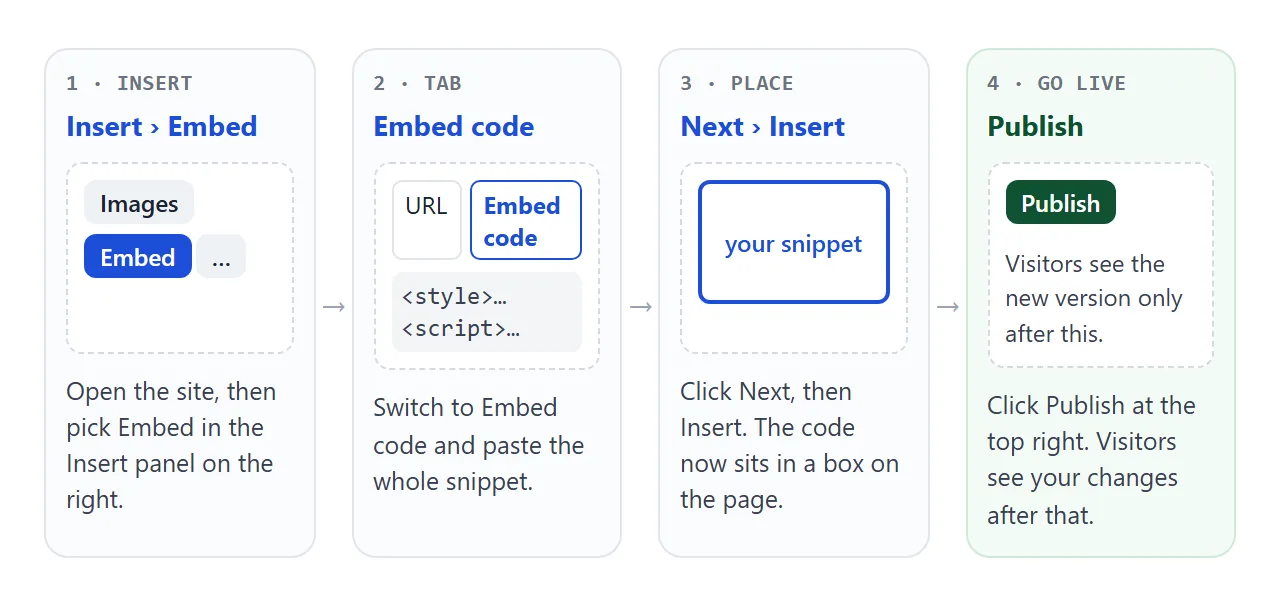
- On a computer, open the site in Google Sites.
- In the panel on the right, click Insert, then Embed.
- Click Embed code and paste your snippet.
- Click Next, then Insert. The code now sits in a box on the page.
- Click Publish at the top right. Visitors see your changes after you publish.
If you are not sure your snippet is ready, check it first in a plain browser tab. Save it as an .html file and open it. If it works there on its own, it carries everything it needs.
Keep the whole widget in one snippet
An embed often half-works because it still points at other files. On your computer, style.css and app.js sit next to the page. In the embed box there is no folder next to the code, so those relative paths find nothing.
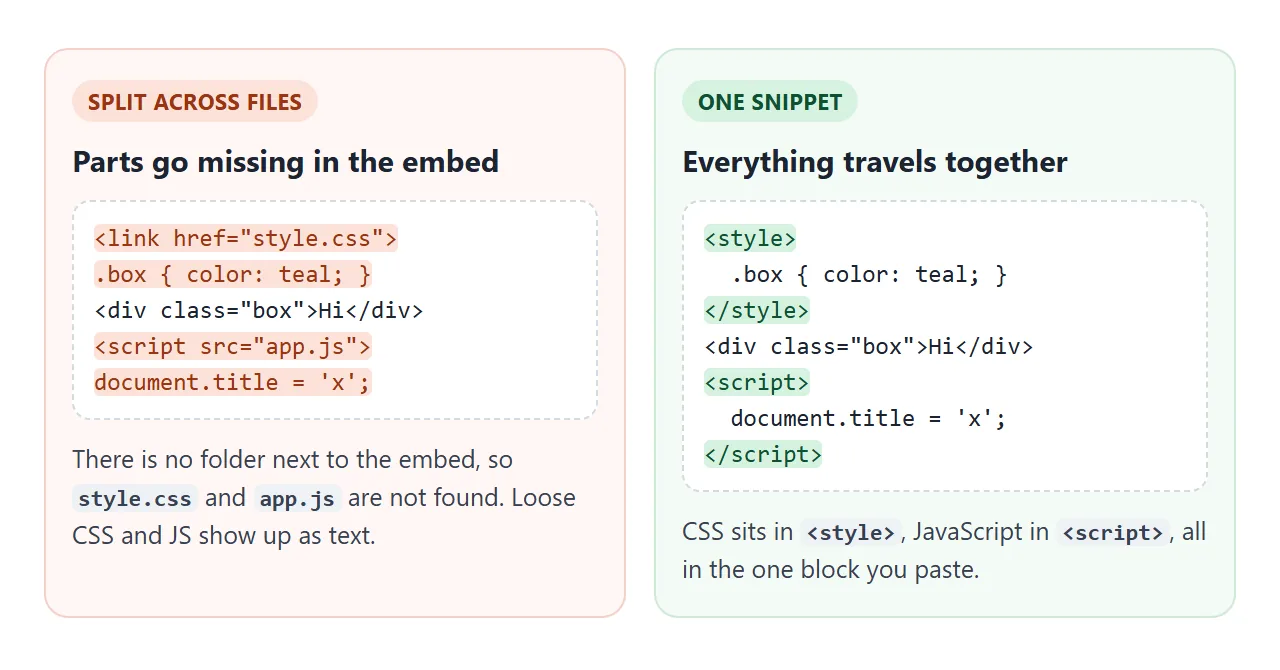
Paste the contents of those files into the snippet instead:
<style>
  /* everything from style.css */
</style>

<div id="app">...</div>

<script>
  // everything from app.js
</script>
If you do load a file from somewhere else, use its full https:// address. MDN notes that on an HTTPS page, browsers block insecure http:// requests for scripts and styles.
Check your snippet before you paste it
This checker looks for the mistakes above: files referenced by a relative path, http:// addresses, and CSS or JavaScript left outside its tag. Load the broken example, then the fixed one, or paste your own code.
<!doctype html>
<html lang="en">
<head>
<meta charset="utf-8">
<meta name="viewport" content="width=device-width, initial-scale=1">
<title>Embed code checker</title>
<style>
  body { margin: 0; padding: 16px; font-family: system-ui, sans-serif; background: #f4f5f7; color: #1d2330; }
  label { font-weight: 600; font-size: 14px; }
  textarea {
    display: block; box-sizing: border-box; width: 100%; height: 170px; margin: 6px 0 10px;
    padding: 10px; border: 1px solid #cfd4dc; border-radius: 8px;
    font: 13px/1.45 ui-monospace, Consolas, monospace;
  }
  .row { display: flex; flex-wrap: wrap; gap: 8px; }
  button { font: inherit; font-size: 14px; padding: 8px 13px; border: 1px solid #cfd4dc; border-radius: 8px; background: #fff; cursor: pointer; }
  button.main { background: #1d4ed8; border-color: #1d4ed8; color: #fff; }
  ul { list-style: none; margin: 14px 0 0; padding: 0; }
  li { margin-bottom: 8px; padding: 9px 12px; border-radius: 8px; font-size: 14px; line-height: 1.4; overflow-wrap: anywhere; }
  li.bad { background: #fff1ec; color: #9a3412; }
  li.good { background: #e8f7ee; color: #0f5132; }
</style>
</head>
<body>
<label for="code">Paste the code you plan to put in Embed code</label>
<textarea id="code" spellcheck="false"></textarea>
<div class="row">
  <button class="main" id="check">Check it</button>
  <button id="load-bad">Broken example</button>
  <button id="load-good">Fixed example</button>
</div>
<ul id="out"></ul>

<script>
  const code = document.getElementById('code');
  const out = document.getElementById('out');
  const end = '</' + 'script>';  // split so this page's own script tag does not close early

  const broken = [
    '<link rel="stylesheet" href="style.css">',
    '.box { color: teal; }',
    '<div class="box" id="msg">Hello</div>',
    '<script src="http://example.com/app.js">' + end,
    "document.getElementById('msg').textContent = 'Hi';"
  ].join('\n');

  const fixed = [
    '<style>',
    '  .box { color: teal; }',
    '</style>',
    '<div class="box" id="msg">Hello</div>',
    '<script>',
    "  document.getElementById('msg').textContent = 'Hi';",
    end
  ].join('\n');

  // A URL with no scheme points at a file next to the page. An embed has no such folder.
  const isRelative = (url) => !/^(https?:|data:|mailto:|tel:|#|\/\/)/i.test(url.trim());

  function check() {
    const problems = [];
    // Parse the snippet without running it
    const doc = new DOMParser().parseFromString(code.value, 'text/html');

    doc.querySelectorAll('script[src], link[href], img[src]').forEach((el) => {
      const url = el.getAttribute('src') || el.getAttribute('href');
      if (isRelative(url)) problems.push('"' + url + '" is a file next to your page. Paste its contents into the snippet instead.');
      else if (/^http:/i.test(url)) problems.push('"' + url + '" uses http://. An https page blocks insecure scripts and styles. Use https://.');
    });

    // Text left over after removing script and style tags shows up as plain text
    doc.querySelectorAll('script, style').forEach((el) => el.remove());
    const loose = doc.body ? doc.body.textContent : '';
    if (/[\w-]+\s*\{[^}]*:[^}]*\}/.test(loose)) problems.push('CSS rules are outside a <style> tag, so they appear as text.');
    if (/(document\.|function\s*\(|=>|addEventListener|console\.)/.test(loose)) problems.push('JavaScript is outside a <script> tag, so it appears as text.');
    if (!code.value.trim()) problems.push('The box is empty.');

    out.innerHTML = '';
    (problems.length ? problems : ['No problems found. This snippet is ready to paste.']).forEach((msg) => {
      const li = document.createElement('li');
      li.className = problems.length ? 'bad' : 'good';
      li.textContent = msg;
      out.append(li);
    });
  }

  document.getElementById('check').addEventListener('click', check);
  document.getElementById('load-bad').addEventListener('click', () => { code.value = broken; check(); });
  document.getElementById('load-good').addEventListener('click', () => { code.value = fixed; check(); });
  code.value = broken;
</script>
</body>
</html>
The checker reads the code with DOMParser, which builds a document without running its scripts.
It then removes every <script> and <style> element and looks at the text that is left. Anything that still looks like code there would appear on your site as plain words.
Embed by URL or embed code
The same Embed dialog takes either a web address or code. They behave differently.
| Embed by URL | Embed code | |
|---|---|---|
| What you give it | The address of a page | HTML, with CSS and JavaScript |
| Where the content lives | On the other website | In your Google site |
| Can it fail to show? | Yes, if that site refuses to be embedded | Yes, if the code has a mistake |
| How you update it | Change the other page | Change the code and publish again |
Google's help notes that some websites won't let you add their content, and suggests contacting the site's owner. A site does this with the X-Frame-Options header or the frame-ancestors rule of its Content Security Policy. Embedding a website in another page covers how framing works.
Your snippet is not the Sites page
Write the snippet as its own small page. It should style and script only its own elements, not reach for the Sites page around it.
Google's Arts & Culture help notes that to embed content into a Google Sites site, you permit embedding on the domain googleusercontent.com.
That points to your snippet being served from a different domain than the site itself. In practice, keep each widget self-contained, and do not try to change the Sites header, menu or theme from your script.
Full page embed
An embed does not have to be a box between other content. In the Pages panel, hover over Add and choose Full page embed.
The new page holds one embed, and you can enter a URL or click Embed code and paste HTML, just as with a box.
This fits a tool that needs the whole screen, such as a calculator or a quiz, while the rest of the site stays a normal Google site.
A finished widget: a class quiz
A short self-check quiz is a typical thing to put on a class or team site. This one marks answers in the page itself. It uses a form, but the submit handler calls preventDefault(), so nothing is sent anywhere.
<!doctype html>
<html lang="en">
<head>
<meta charset="utf-8">
<meta name="viewport" content="width=device-width, initial-scale=1">
<title>Class quiz for Google Sites</title>
<style>
body { margin: 0; padding: 16px; font-family: system-ui, sans-serif; background: #f4f5f7; color: #1d2330; }
.quiz { max-width: 460px; margin: 0 auto; padding: 18px; border-radius: 12px; background: #fff; box-shadow: 0 6px 20px rgba(0, 0, 0, .08); }
h2 { margin: 0 0 4px; font-size: 19px; }
.meta { margin: 0 0 14px; font-size: 13px; color: #6b7280; }
fieldset { margin: 0 0 12px; padding: 10px 12px; border: 1px solid #e1e4ea; border-radius: 9px; }
legend { padding: 0 4px; font-weight: 600; font-size: 15px; }
label { display: block; padding: 4px 0; font-size: 15px; cursor: pointer; }
fieldset.right { border-color: #6cc08b; background: #f0faf3; }
fieldset.wrong { border-color: #f0a58c; background: #fff5f1; }
button { font: inherit; padding: 9px 16px; border: 0; border-radius: 8px; background: #1d4ed8; color: #fff; cursor: pointer; }
button[type=reset] { background: #e5e7eb; color: #1d2330; margin-left: 6px; }
#score { margin: 12px 0 0; font-weight: 600; }
</style>
</head>
<body>
<form class="quiz" id="quiz">
<h2>Web basics quiz</h2>
<p class="meta">Three questions. Your answers stay in this page.</p>
<fieldset data-answer="b">
<legend>1. Which tag holds JavaScript?</legend>
<label><input type="radio" name="q1" value="a"> <js></label>
<label><input type="radio" name="q1" value="b"> <script></label>
<label><input type="radio" name="q1" value="c"> <code></label>
</fieldset>
<fieldset data-answer="a">
<legend>2. Which tag holds CSS rules?</legend>
<label><input type="radio" name="q2" value="a"> <style></label>
<label><input type="radio" name="q2" value="b"> <css></label>
<label><input type="radio" name="q2" value="c"> <meta></label>
</fieldset>
<fieldset data-answer="c">
<legend>3. What does HTML stand for?</legend>
<label><input type="radio" name="q3" value="a"> High Text Machine Language</label>
<label><input type="radio" name="q3" value="b"> Hyperlink Text Mode Layout</label>
<label><input type="radio" name="q3" value="c"> HyperText Markup Language</label>
</fieldset>
<button type="submit">Check answers</button>
<button type="reset">Start again</button>
<p id="score" aria-live="polite"></p>
</form>
<script>
const quiz = document.getElementById('quiz');
const score = document.getElementById('score');
quiz.addEventListener('submit', (e) => {
e.preventDefault(); // mark the answers here; nothing is sent anywhere
const data = new FormData(quiz);
let right = 0;
quiz.querySelectorAll('fieldset').forEach((set, i) => {
const ok = data.get('q' + (i + 1)) === set.dataset.answer;
set.className = ok ? 'right' : 'wrong';
if (ok) right++;
});
score.textContent = 'You got ' + right + ' of 3 right.';
});
quiz.addEventListener('reset', () => {
quiz.querySelectorAll('fieldset').forEach((set) => set.className = '');
score.textContent = '';
});
</script>
</body>
</html>
- Answers in markup: each
<fieldset>has adata-answerattribute, so adding a question means copying one block. - Marking:
FormDatareads the chosen radio buttons, and each fieldset turns green or orange. - Reset: the form's own reset button clears the choices, and one listener clears the colours.
If the quiz should save results somewhere, that needs a server or a form service. Embedding a Google Form is the simpler route there, and the Google Form embed guide explains it.
When it does not work
| What you see | Cause | Fix |
|---|---|---|
| Code appears as text on the page | CSS or JavaScript outside its tag | Wrap CSS in <style> and JavaScript in <script> |
| No styles, or buttons do nothing | The snippet points at style.css or app.js |
Paste those files into the snippet |
| A library from another site never loads | Its address starts with http:// |
Use the https:// address |
| Visitors still see the old version | The site was not published again | Click Publish |
| An embed by URL stays empty | That website does not allow embedding | Contact its owner, or use a link instead |
| Some people cannot open the site | The published site is set to Restricted | Add them, or set it to Public under Share |
For script errors that are not about Sites at all, HTML JavaScript not working goes through the usual causes.
Share it as a link
A Google Sites embed is the right home when the widget belongs on a site you already run. Under Share, the published site is Restricted or Public, and visitors open the site address.
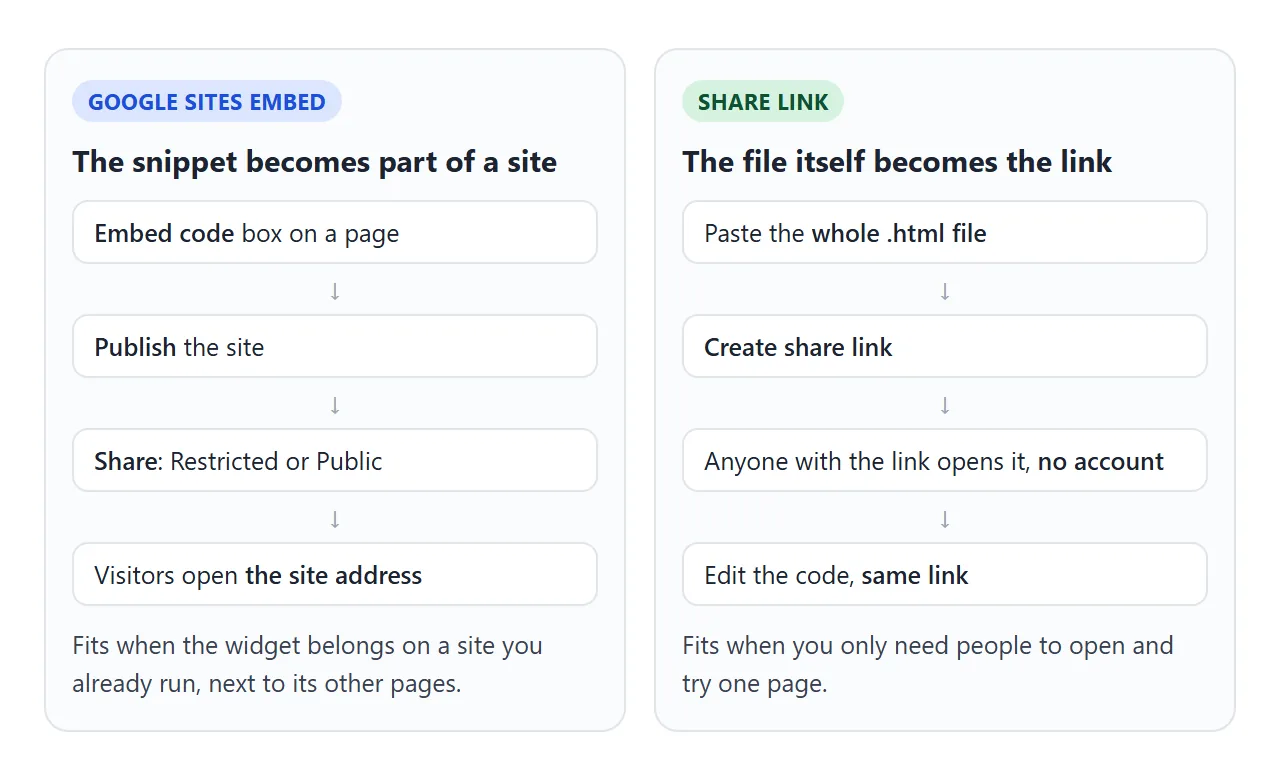
If you only need people to try one page, you do not need a site around it.
Paste the page into a NOS document and choose Create share link. HTML to link walks through it.
The page renders as written and its scripts run, so anyone with the link can click through the quiz without an account. If you change the code later, the same link shows the new version.