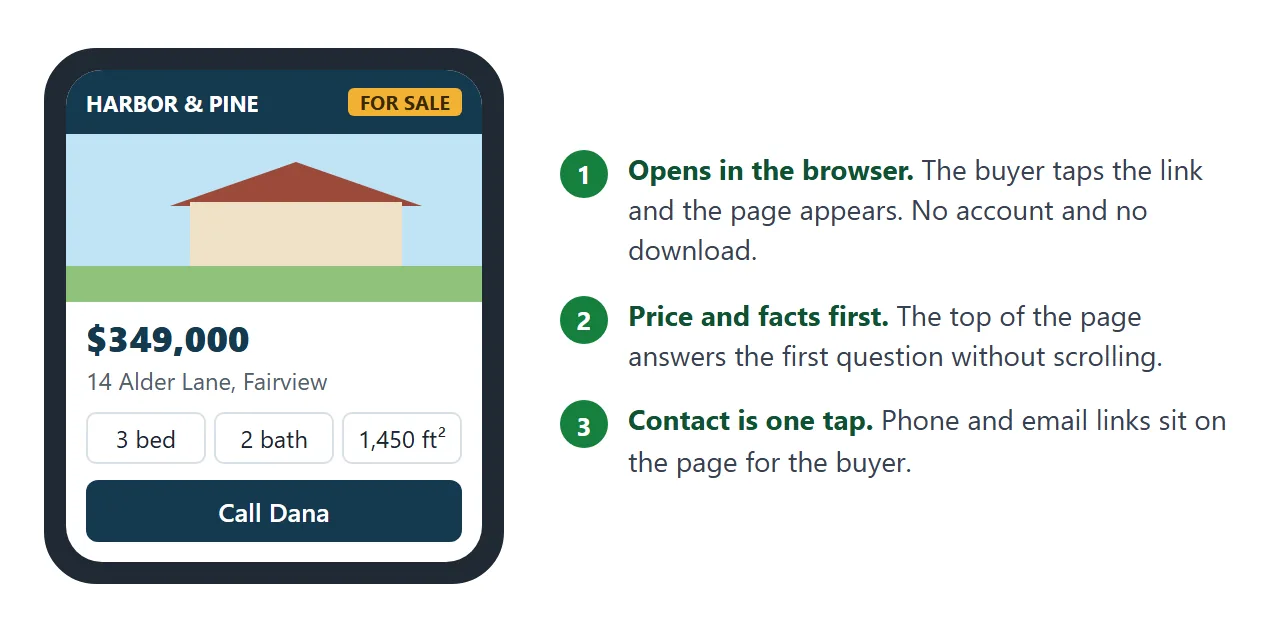
A property brochure can be one web page: the price and address at the top, then rooms, features, viewing times and your contact details. People ask "How do you create a brochure online?" For one property, a page you share as a link is enough.
Here is a complete example. Tap the square metres link under the facts, and look at the phone and email lines at the bottom.
<!doctype html>
<html lang="en">
<head>
<meta charset="utf-8">
<meta name="viewport" content="width=device-width, initial-scale=1">
<title>14 Alder Lane - property brochure</title>
<style>
* { box-sizing: border-box; }
body { margin: 0; font-family: system-ui, sans-serif; color: #1f2933; background: #eef1f4; line-height: 1.5; }
.page { max-width: 720px; margin: 0 auto; background: #fff; }
.top { display: flex; justify-content: space-between; align-items: center; padding: 12px 18px; background: #14394f; color: #fff; }
.top b { letter-spacing: .5px; }
.tag { background: #f2b134; color: #3a2a00; font-weight: 700; font-size: 12px; padding: 3px 9px; border-radius: 4px; }
.hero svg { display: block; width: 100%; height: auto; }
.main { padding: 18px; }
.price { font-size: 30px; font-weight: 800; margin: 0; color: #14394f; }
.addr { margin: 2px 0 14px; color: #52606d; }
.facts { display: grid; grid-template-columns: repeat(3, 1fr); gap: 8px; margin-bottom: 8px; }
.fact { border: 1px solid #d9e0e6; border-radius: 8px; padding: 10px 6px; text-align: center; }
.fact b { display: block; font-size: 20px; }
.fact span { font-size: 13px; color: #52606d; }
.unit { background: none; border: 0; padding: 0; color: #1d6fa5; font: inherit; font-size: 13px; text-decoration: underline; cursor: pointer; }
h2 { font-size: 17px; margin: 22px 0 8px; color: #14394f; }
ul.feat { margin: 0; padding: 0; list-style: none; display: grid; grid-template-columns: 1fr 1fr; gap: 6px 14px; }
ul.feat li::before { content: "\2713\00a0"; color: #2b8a3e; font-weight: 700; }
.open { background: #fff7e0; border-left: 4px solid #f2b134; padding: 10px 14px; border-radius: 4px; }
.links { display: flex; flex-wrap: wrap; gap: 8px; }
.links a { display: inline-block; padding: 9px 14px; border: 1px solid #14394f; border-radius: 6px; color: #14394f; text-decoration: none; font-weight: 600; }
.note { font-size: 13px; color: #52606d; margin: 8px 0 0; }
.agent { margin-top: 22px; background: #14394f; color: #fff; border-radius: 10px; padding: 16px; }
.agent b { font-size: 17px; }
.agent p { margin: 2px 0 10px; color: #c9d6df; }
.agent a { display: block; color: #fff; padding: 6px 0; font-size: 17px; }
.fine { font-size: 12px; color: #7b8794; padding: 12px 18px 22px; margin: 0; }
@media (max-width: 420px) { ul.feat { grid-template-columns: 1fr; } .price { font-size: 26px; } }
@media print { body { background: #fff; } .links { display: none; } }
</style>
</head>
<body>
<div class="page">
<div class="top"><b>HARBOR & PINE REALTY</b><span class="tag">FOR SALE</span></div>
<div class="hero">
<svg viewBox="0 0 720 300" role="img" aria-label="Drawing of a two-storey house with a tree">
<defs><linearGradient id="sky" x1="0" y1="0" x2="0" y2="1"><stop offset="0" stop-color="#bfe3f5"/><stop offset="1" stop-color="#eaf6fb"/></linearGradient></defs>
<rect width="720" height="300" fill="url(#sky)"/>
<rect y="232" width="720" height="68" fill="#8fc27a"/>
<rect x="230" y="110" width="260" height="130" fill="#f0e2c8"/>
<polygon points="215,112 360,42 505,112" fill="#9b4a3a"/>
<rect x="342" y="170" width="38" height="70" fill="#6b4a2f"/>
<rect x="260" y="140" width="52" height="42" fill="#cfe9f7" stroke="#14394f" stroke-width="3"/>
<rect x="408" y="140" width="52" height="42" fill="#cfe9f7" stroke="#14394f" stroke-width="3"/>
<rect x="130" y="170" width="14" height="70" fill="#6b4a2f"/>
<circle cx="137" cy="150" r="42" fill="#4f9a4a"/>
</svg>
</div>
<div class="main">
<p class="price">$349,000</p>
<p class="addr">14 Alder Lane, Fairview</p>
<div class="facts">
<div class="fact"><b>3</b><span>bedrooms</span></div>
<div class="fact"><b>2</b><span>bathrooms</span></div>
<div class="fact"><b id="area">1,450</b><span id="areaUnit">sq ft</span></div>
</div>
<button class="unit" id="unit" type="button">Show in square metres</button>
<h2>Features</h2>
<ul class="feat">
<li>New kitchen, 2024</li>
<li>South-facing garden</li>
<li>Garage for one car</li>
<li>Gas central heating</li>
<li>Ten minutes to the station</li>
<li>Quiet, no through road</li>
</ul>
<h2>Viewing</h2>
<div class="open"><b>Open house:</b> Saturday 11:00 to 13:00. Other times by appointment.</div>
<h2>Photos and virtual tour</h2>
<div class="links">
<!-- Replace these two addresses with your own gallery and tour -->
<a href="https://example.com/14-alder-lane/photos" target="_blank" rel="noopener">All photos</a>
<a href="https://example.com/14-alder-lane/tour" target="_blank" rel="noopener">Virtual tour</a>
</div>
<p class="note">The photos and the tour open on their own pages.</p>
<div class="agent">
<b>Dana Whitfield</b>
<p>Harbor & Pine Realty</p>
<a href="tel:+15550142">Call 555 0142</a>
<a href="mailto:dana@example.com">dana@example.com</a>
</div>
</div>
<p class="fine">Sizes are approximate. Details can change, so please confirm them when you view.</p>
</div>
<script>
const area = document.getElementById('area');
const areaUnit = document.getElementById('areaUnit');
const unit = document.getElementById('unit');
let metric = false; // flips between square feet and square metres
unit.addEventListener('click', () => {
metric = !metric;
area.textContent = metric ? '135' : '1,450';
areaUnit.textContent = metric ? 'sq m' : 'sq ft';
unit.textContent = metric ? 'Show in square feet' : 'Show in square metres';
});
</script>
</body>
</html>
One thing to know before you start: photos and virtual tours cannot be embedded in the page. They stay as links, and a section below shows how.
Make it with AI
You do not write the HTML. Paste this into ChatGPT, Claude or Gemini, and replace the bracketed parts with your own details.
Write one self-contained HTML file: a one-page property brochure.
Agency: [name]. Agent: [name], phone [number], email [address].
Property: [address], price [price], [beds] bedrooms,
[baths] bathrooms, size [size]. Viewing: [times].
Features: [paste your list here]
Rules:
- Works on a phone: viewport meta tag, large readable text.
- Price and address first, then facts, features, viewing, contact.
- Phone as a tel: link, email as a mailto: link.
- Draw a simple house in inline SVG. No outside images.
- Two plain links, "All photos" and "Virtual tour", that I will fill in.
- No iframes, no order form, no outside fonts or scripts.
- Do not add features, sizes or claims I did not give you.
ChatGPT and other chat tools put code in a block you can copy, according to OpenAI's help page. Copy the whole block, from the first line to the last.
What to check in the result:
- Price, address, rooms, size and viewing times match your list.
- Phone and email are exactly right. Tap them on your own phone.
- No features, school names or "close to" claims you did not write.
- The two links point to your real gallery and tour.
If something is off, tell the AI in plain words: "Move the viewing times above the features."
Send it as a link
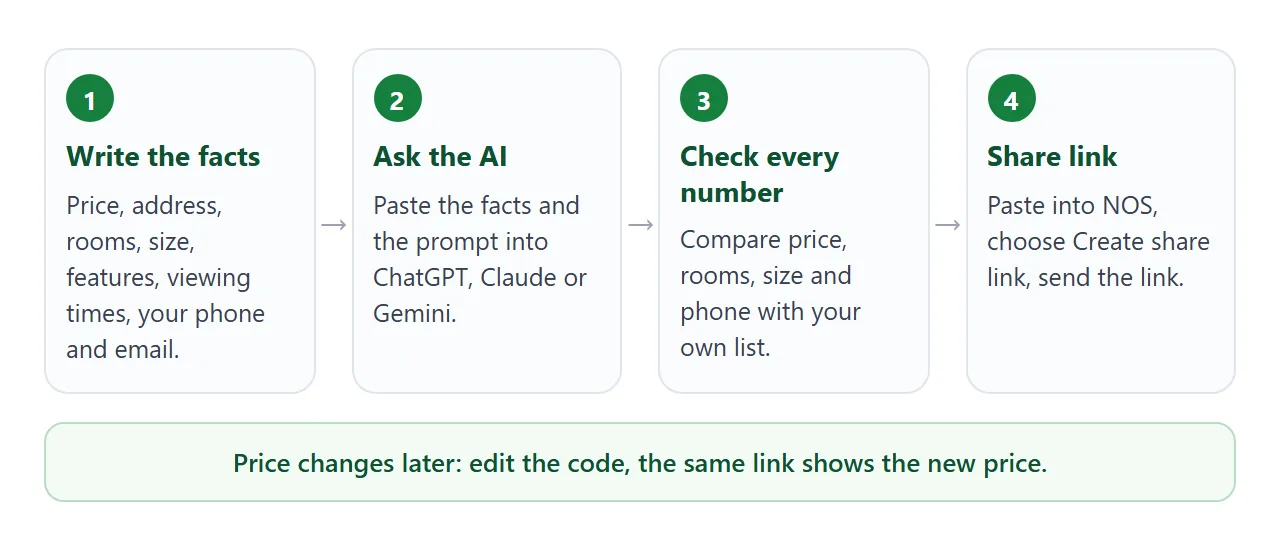
Open NOS, create a document, and paste the HTML. It shows as a finished page. Then choose Share and Create share link. HTML to link walks through it.
The buyer opens the link in their browser, phone included. No account is needed, and they cannot edit the page. If you change the price in the code later, the same link shows the new version.
Paste the link into an email or a message. For a sale board or a printed flyer, a QR code can hold the same address, as QR code link explains.
Photos and virtual tours: link to them
This is the limit to plan around. A shared page cannot show pictures that live on other sites, and it cannot show a tour or video in a frame. Both would be loaded from somewhere else, and those loads are blocked.
So the brochure carries the text, and the media stays a click away.
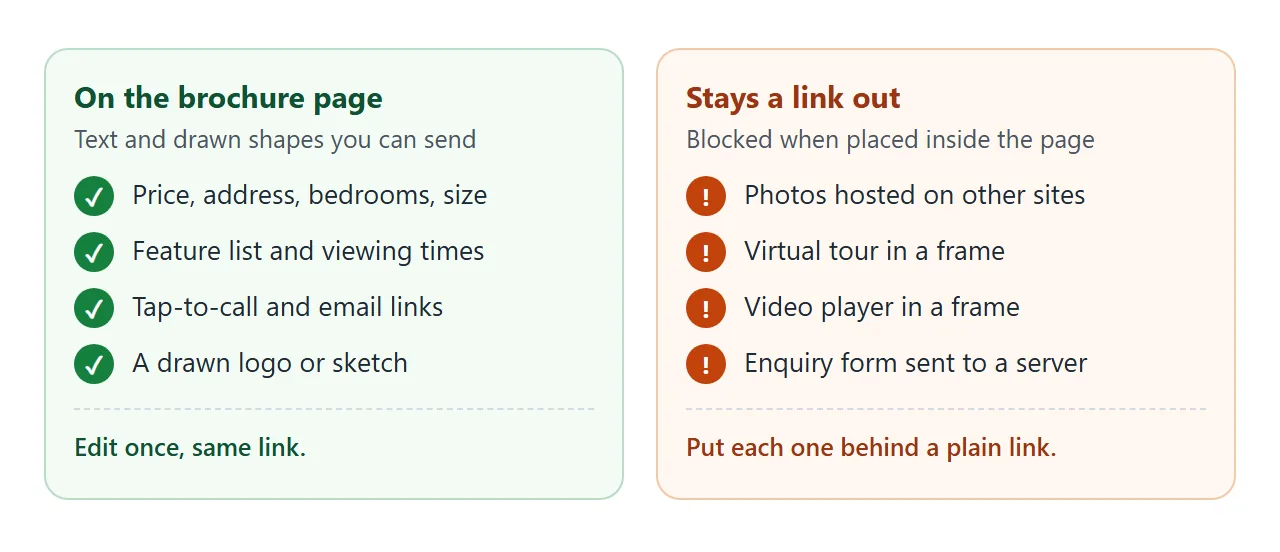
- Photos: keep them in the gallery you already have, and add a link named All photos. Photo gallery link covers that gallery.
- Virtual tour: add a link named Virtual tour. See virtual tour link for sharing one.
- Floor plan: it is a picture too, so link to it. Upload a floor plan shows how.
- A drawn house: ask the AI for a simple inline SVG, as in the example, so the page does not look empty.
A plain link is ordinary HTML, but test it on your own phone before you send the brochure.
What goes on a one-page brochure
Keep it to one screen of decisions and one scroll of detail.
- Price and address: first, in large type.
- Bedrooms, bathrooms, size: three boxes. A unit switch helps if buyers read square feet and square metres.
- Features: six to ten short lines. Only what is true today.
- Viewing times: the open house and how to book another time.
- Contact: a phone link and an email link, so one tap calls or writes.
- A small print line: that sizes are approximate.
In the US, HUD publishes Equal Housing Opportunity graphics for printing. Ask your broker or association whether your advertising needs that logo or line, and add it to the page if it does.
For the wider picture of selling with one address, see advertise a property with a link.
Ways to send a property brochure, compared
| Way | What the buyer does | Photos and tour | Changing the price |
|---|---|---|---|
| Brochure file attached | Opens a file | Inside the file | Send a new file |
| Brochure page as a link | Taps and reads in the browser | Plain links to each | Edit the page, same link |
| Link to a gallery or tour only | Looks at pictures | The whole thing | No price or contact on it |
The brochure link does not replace your gallery or tour. It is the page that puts price, features and your number in one place and points to both.
Several homes on one page
If you send a buyer a few options, one page can list them all. This second example keeps every home in one list at the top of the code. Change a price or set Under offer, and the page redraws. Try the bedroom buttons.
<!doctype html>
<html lang="en">
<head>
<meta charset="utf-8">
<meta name="viewport" content="width=device-width, initial-scale=1">
<title>Homes this week - Harbor & Pine Realty</title>
<style>
* { box-sizing: border-box; }
body { margin: 0; font-family: system-ui, sans-serif; color: #1f2933; background: #eef1f4; line-height: 1.5; }
header { background: #14394f; color: #fff; padding: 16px 18px; }
header h1 { margin: 0; font-size: 21px; }
header p { margin: 2px 0 0; color: #c9d6df; font-size: 14px; }
.wrap { max-width: 720px; margin: 0 auto; }
.bar { display: flex; gap: 8px; padding: 12px 18px; flex-wrap: wrap; position: sticky; top: 0; background: #eef1f4; }
.bar button { border: 1px solid #14394f; background: #fff; color: #14394f; border-radius: 999px; padding: 7px 14px; font: inherit; font-size: 14px; cursor: pointer; }
.bar button[aria-pressed="true"] { background: #14394f; color: #fff; }
#list { padding: 0 18px 8px; display: grid; gap: 12px; }
.card { background: #fff; border-radius: 10px; overflow: hidden; border: 1px solid #d9e0e6; }
.card svg { display: block; width: 100%; height: 72px; }
.body { padding: 12px 14px 14px; }
.row { display: flex; justify-content: space-between; align-items: baseline; gap: 8px; flex-wrap: wrap; }
.price { font-size: 21px; font-weight: 800; color: #14394f; margin: 0; }
.status { font-size: 12px; font-weight: 700; padding: 2px 8px; border-radius: 4px; background: #e3f4e7; color: #1f6b34; }
.status.under { background: #fff1d6; color: #7a4b00; }
.addr { margin: 0; color: #52606d; font-size: 14px; }
.facts { margin: 6px 0 4px; font-weight: 600; font-size: 14px; }
.blurb { margin: 0; font-size: 14px; }
.contact { margin: 14px 18px 24px; padding: 14px; background: #fff; border-radius: 10px; border: 1px solid #d9e0e6; }
.contact a { color: #1d6fa5; font-weight: 600; }
</style>
</head>
<body>
<div class="wrap">
<header>
<h1>Homes this week</h1>
<p>Harbor & Pine Realty, Fairview. Updated each Monday.</p>
</header>
<div class="bar" id="bar">
<button type="button" data-min="0" aria-pressed="true">All</button>
<button type="button" data-min="2" aria-pressed="false">2+ bedrooms</button>
<button type="button" data-min="3" aria-pressed="false">3+ bedrooms</button>
</div>
<div id="list"></div>
<div class="contact">
Ask Dana about any of these: <a href="tel:+15550142">555 0142</a>
or <a href="mailto:dana@example.com">dana@example.com</a>.
</div>
</div>
<script>
// One list holds every home. Edit a price or status here and the page redraws.
const homes = [
{ addr: '14 Alder Lane', price: '$349,000', beds: 3, baths: 2, size: '1,450 sq ft', status: 'For sale', color: '#9b4a3a', note: 'New kitchen, south-facing garden, garage.' },
{ addr: '8 Quay Street, flat 4', price: '$212,000', beds: 2, baths: 1, size: '780 sq ft', status: 'Under offer', color: '#3f6f8f', note: 'Top floor, lift, balcony over the harbour.' },
{ addr: '31 Millrace Road', price: '$455,000', beds: 4, baths: 3, size: '2,100 sq ft', status: 'For sale', color: '#6a7f3a', note: 'Detached, home office, double garage.' },
{ addr: '2 Chapel Court', price: '$149,000', beds: 1, baths: 1, size: '520 sq ft', status: 'For sale', color: '#8a5a8f', note: 'Ground floor, own entrance, no chain.' }
];
const list = document.getElementById('list');
const bar = document.getElementById('bar');
function draw(min) {
list.innerHTML = '';
homes.filter(h => h.beds >= min).forEach(h => {
const card = document.createElement('div');
card.className = 'card';
card.innerHTML =
'<svg viewBox="0 0 400 72" preserveAspectRatio="none" aria-hidden="true">' +
'<rect width="400" height="72" fill="' + h.color + '"/>' +
'<polygon points="150,72 200,24 250,72" fill="rgba(255,255,255,.28)"/></svg>' +
'<div class="body"><div class="row"><p class="price">' + h.price + '</p>' +
'<span class="status' + (h.status === 'Under offer' ? ' under' : '') + '">' + h.status + '</span></div>' +
'<p class="addr">' + h.addr + '</p>' +
'<p class="facts">' + h.beds + ' bed · ' + h.baths + ' bath · ' + h.size + '</p>' +
'<p class="blurb">' + h.note + '</p></div>';
list.appendChild(card);
});
}
bar.addEventListener('click', (e) => {
const btn = e.target.closest('button');
if (!btn) return;
bar.querySelectorAll('button').forEach(b => b.setAttribute('aria-pressed', b === btn ? 'true' : 'false'));
draw(Number(btn.dataset.min));
});
draw(0);
</script>
</body>
</html>
Ask your AI for this version with "Keep all homes in one JavaScript list at the top so I can edit prices easily." Then you only touch that list. Brochure link covers brochures for products and companies.
When it does not work
| Symptom | Cause | Fix |
|---|---|---|
| The page shows code, not a brochure | You pasted the AI's explanation too, or only part of the block | Copy the whole code block and paste only that |
| A photo is missing or shows a broken icon | Pictures from other sites are blocked on shared pages | Use a drawn picture, and link to the gallery |
| The virtual tour area is empty | Frames are blocked on shared pages | Replace the frame with a plain link |
| The enquiry button does nothing | Forms cannot send to a server from a shared page | Use the tap-to-call and email links |
| Text is tiny on a phone | The viewport meta tag is missing | Ask the AI to add the viewport meta tag |
| Tapping the phone number does nothing on a computer | A tel link depends on the device | Test it on your phone; show the number as text too |
| Buyers quote the old price | The brochure also went out as a file, and a file does not change | Send the link instead of the file |