A quote is a price for work that is already defined. A proposal explains how you will solve the client's problem and includes the price. If the client has already chosen you and only needs a number, send a quote. If they are still deciding, send a proposal.
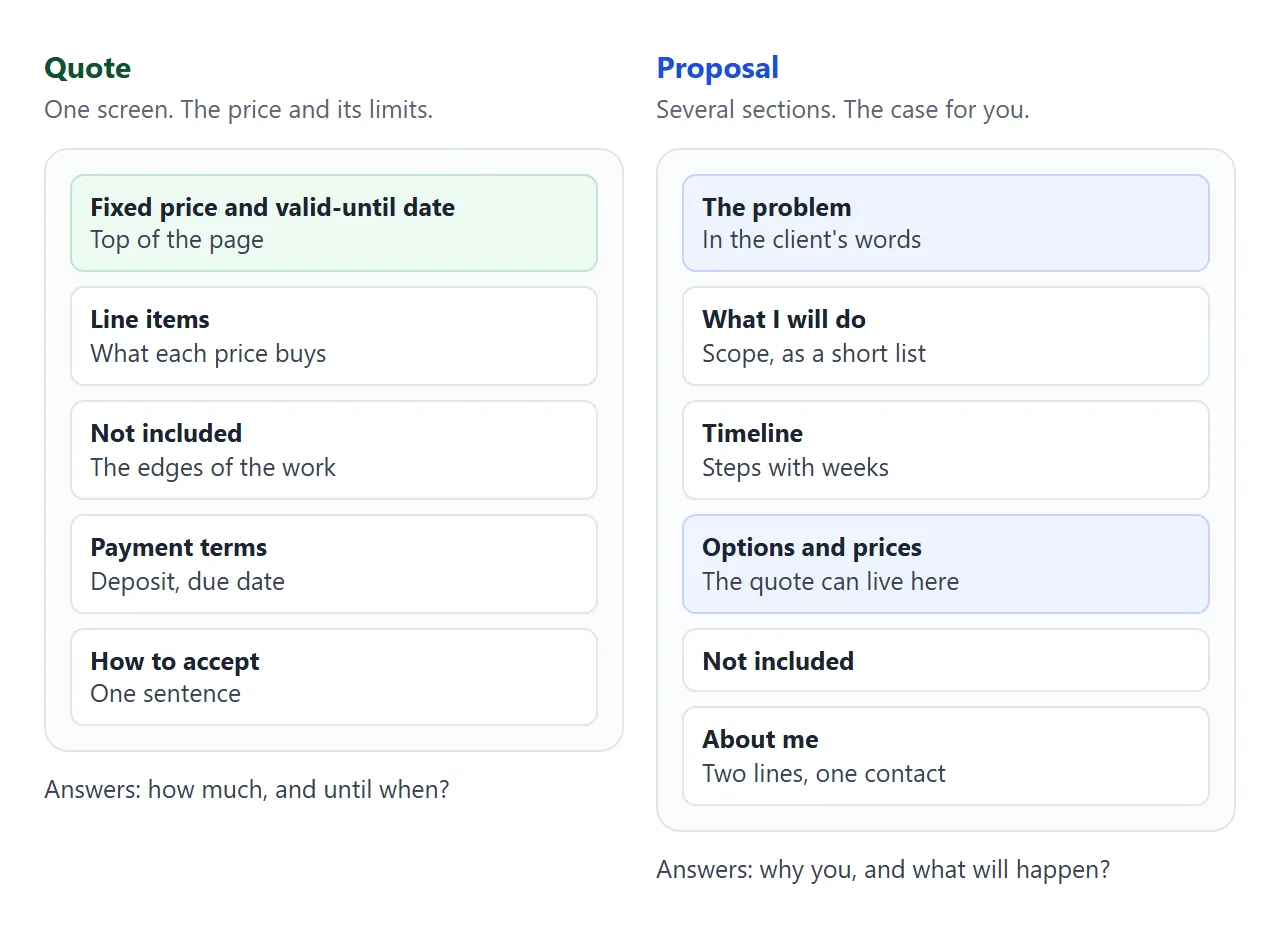
That is the whole difference, and the rest is layout. Here is a quote, laid out as one phone-sized page. The price and the valid-until date come first, and the items sit below.
<!doctype html>
<html lang="en">
<head>
<meta charset="utf-8">
<meta name="viewport" content="width=device-width, initial-scale=1">
<title>Quote Q-2026-014</title>
<style>
  * { box-sizing: border-box; }
  body { margin: 0; padding: 18px 14px 28px; background: #f4f5f7; color: #1d2330;
    font: 16px/1.5 system-ui, -apple-system, "Segoe UI", sans-serif; }
  .sheet { max-width: 600px; margin: 0 auto; background: #fff; border-radius: 12px;
    padding: 22px 20px; box-shadow: 0 4px 16px rgba(0,0,0,.08); }
  .top { display: flex; justify-content: space-between; gap: 12px; flex-wrap: wrap; }
  h1 { font-size: 22px; margin: 0 0 2px; }
  .muted { color: #5b6472; font-size: 14px; }
  .box { margin: 16px 0; padding: 14px 16px; border-radius: 10px; background: #eefaf2; border: 1px solid #bfe5cc; }
  .box .big { font-size: 30px; font-weight: 700; color: #0f5132; line-height: 1.1; }
  table { width: 100%; border-collapse: collapse; margin-top: 4px; }
  th, td { text-align: left; padding: 9px 4px; border-bottom: 1px solid #e6e8ee; vertical-align: top; font-size: 15px; }
  th { font-size: 12px; text-transform: uppercase; letter-spacing: .4px; color: #5b6472; }
  td.n, th.n { text-align: right; white-space: nowrap; }
  tfoot td { font-weight: 700; border-bottom: 0; }
  h2 { font-size: 15px; margin: 20px 0 6px; }
  ul { margin: 0; padding-left: 20px; }
  .accept { margin-top: 18px; padding: 12px 14px; border-radius: 10px; background: #f4f5f7; font-size: 15px; }
</style>
</head>
<body>
<div class="sheet">
  <div class="top">
    <div>
      <h1>Quote Q-2026-014</h1>
      <div class="muted">From Noor Calder, freelance web designer<br>For Juniper Row Cafe</div>
    </div>
    <div class="muted">Issued 1 Oct 2026<br><b>Valid until 15 Oct 2026</b></div>
  </div>

  <div class="box">
    <div class="muted">Fixed price for the work below</div>
    <div class="big" id="total">$0</div>
    <div class="muted" id="deposit"></div>
  </div>

  <table>
    <thead><tr><th>Item</th><th class="n">Qty</th><th class="n">Price</th></tr></thead>
    <tbody id="rows"></tbody>
    <tfoot><tr><td colspan="2">Total</td><td class="n" id="total2"></td></tr></tfoot>
  </table>

  <h2>Not included</h2>
  <ul>
    <li>Writing the text and taking photos</li>
    <li>Changes beyond the two rounds listed above</li>
  </ul>

  <h2>Payment</h2>
  <p style="margin:0">Deposit to start, the rest when the site goes live. Invoice due 14 days after it is sent.</p>

  <div class="accept"><b>To accept:</b> reply to the email with the word "Accepted" before the valid-until date.</div>
</div>

<script>
  // Change the numbers here
  const DEPOSIT_PERCENT = 30;
  const ITEMS = [
    { name: 'Home page, designed and built', qty: 1, price: 900 },
    { name: 'Menu page you can edit yourself', qty: 1, price: 350 },
    { name: 'Contact and map section', qty: 1, price: 150 },
    { name: 'Domain and hosting setup', qty: 1, price: 80 },
    { name: 'Two rounds of changes', qty: 1, price: 0 },
  ];

  const money = (n) => '$' + n.toLocaleString('en-US');
  let total = 0;
  const rows = document.getElementById('rows');
  ITEMS.forEach((it) => {
    const line = it.qty * it.price;
    total += line;
    const tr = document.createElement('tr');
    tr.innerHTML = '<td></td><td class="n"></td><td class="n"></td>';
    tr.children[0].textContent = it.name;
    tr.children[1].textContent = it.qty;
    tr.children[2].textContent = line === 0 ? 'included' : money(line);
    rows.appendChild(tr);
  });
  document.getElementById('total').textContent = money(total);
  document.getElementById('total2').textContent = money(total);
  document.getElementById('deposit').textContent =
    'Deposit ' + DEPOSIT_PERCENT + '%: ' + money(Math.round(total * DEPOSIT_PERCENT / 100));
</script>
</body>
</html>
Bonsai's guide describes a quote as a document focused on pricing, with a set amount valid for a specified period. That is why the example shows a valid-until date next to the price.
Make it with AI
Paste this prompt into ChatGPT, Claude or Gemini. Change the first line to "quote" or "proposal", and put your facts at the bottom.
Write ONE self-contained HTML file: a freelance [quote OR proposal], read on a phone.
Rules:
- Plain HTML, CSS and JavaScript in one file. No images, no external files, no form that sends data.
- One column, a viewport meta tag, text at least 16px.
- QUOTE: the fixed price and the valid-until date first, then line items, Not included, Payment, How to accept. Fit one screen where possible.
- PROPOSAL: sections in this order: The problem, What I will do, Timeline, Options and prices, About me. Add a small menu to jump between sections.
- Put every number (prices, deposit percent, dates) in one block at the top of the script, with the comment "Change the numbers here".
- If I did not give you a fact, write TODO. Do not invent clients, past work or prices.
My facts:
Client: ...
Work and prices: ...
Valid until: ...
Not included: ...
Payment terms: ...
Then check the result the way the client will.
- Every number. Item prices, the total, the deposit and the dates, against your own notes.
- Every TODO. Replace it or delete the line.
- Invented details. Past clients, results or promises you did not give it.
- The wording. Is the price called a fixed price or an estimate, and is that what you mean?
- Your phone. Open it there before anyone else does.
Send it as a link
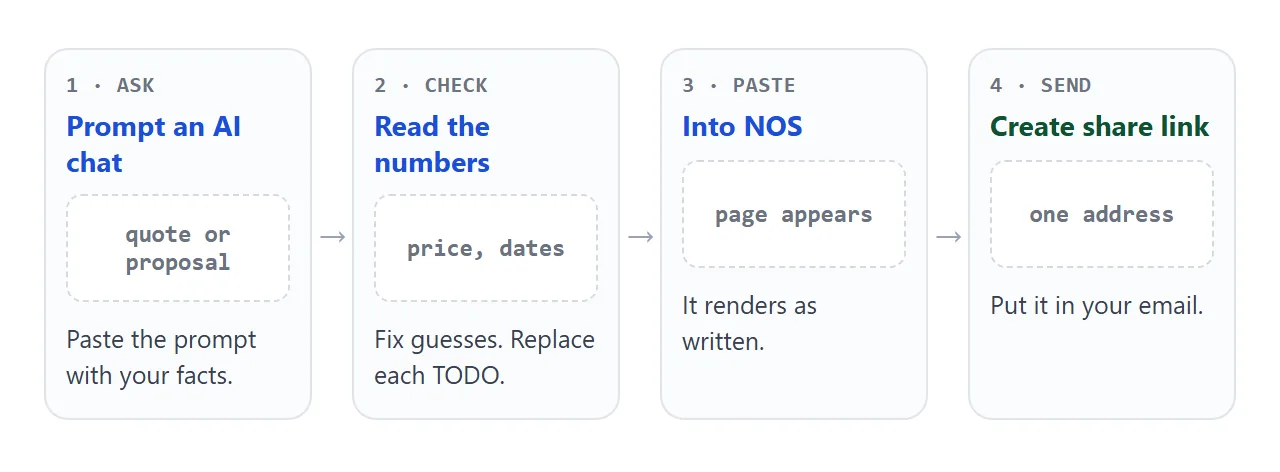
Paste the HTML into a NOS document and choose Create share link. HTML to link walks through it.
The page renders as written, scripts included, and anyone with the link can open it in a browser, on a phone too, with no account. They can read it but not edit it.
Put the link in the body of your email, with one line saying what it is. The client taps it and reads, with nothing to download.
If you change a price or a date later, edit the numbers in the code. The same link then shows the new version, so add a dated line such as "Price updated 12 Oct" to tell the client.
For more on writing each one, see sending a quote to a client and sending a proposal to a client. Quotes that sit next to a price list are covered in HTML for pricing sheets.
What goes in a proposal instead
A proposal does more work. Bonsai lists its parts as an introduction that restates the problem, scope and deliverables, a timeline, pricing, and terms. The example below follows that order, with a short menu at the top so the client can jump around on a phone.
<!doctype html>
<html lang="en">
<head>
<meta charset="utf-8">
<meta name="viewport" content="width=device-width, initial-scale=1">
<title>Proposal for Juniper Row Cafe</title>
<style>
  * { box-sizing: border-box; }
  html { scroll-behavior: smooth; }
  body { margin: 0; background: #f4f5f7; color: #1d2330;
    font: 16px/1.55 system-ui, -apple-system, "Segoe UI", sans-serif; }
  nav { position: sticky; top: 0; z-index: 2; background: #fff; border-bottom: 1px solid #e1e4ea;
    display: flex; gap: 6px; padding: 8px 12px; overflow-x: auto; }
  nav a { flex: none; padding: 6px 12px; border-radius: 999px; background: #eef1f5;
    color: #1d2330; text-decoration: none; font-size: 14px; }
  main { max-width: 640px; margin: 0 auto; padding: 16px 14px 40px; }
  section { background: #fff; border-radius: 12px; padding: 18px 18px 16px; margin-bottom: 14px;
    box-shadow: 0 3px 12px rgba(0,0,0,.06); scroll-margin-top: 56px; }
  h1 { font-size: 24px; margin: 0 0 4px; }
  h2 { font-size: 18px; margin: 0 0 8px; }
  .muted { color: #5b6472; font-size: 14px; }
  ol, ul { margin: 0; padding-left: 20px; }
  li { margin-bottom: 4px; }
  .step { display: grid; grid-template-columns: 76px 1fr; gap: 10px; padding: 8px 0; border-bottom: 1px solid #eef0f4; }
  .step:last-child { border-bottom: 0; }
  .step b { color: #1d4ed8; }
  .opts { display: grid; gap: 10px; }
  .opt { display: block; border: 2px solid #e1e4ea; border-radius: 10px; padding: 12px 14px; cursor: pointer; }
  .opt input { margin-right: 8px; }
  .opt.on { border-color: #0f5132; background: #eefaf2; }
  .opt .p { float: right; font-weight: 700; }
  .opt small { display: block; color: #5b6472; margin-left: 24px; }
  .sum { margin-top: 12px; padding: 12px 14px; border-radius: 10px; background: #1d2330; color: #fff; }
  .sum b { font-size: 20px; }
</style>
</head>
<body>
<nav>
  <a href="#problem">Problem</a><a href="#plan">Plan</a><a href="#timeline">Timeline</a>
  <a href="#options">Options</a><a href="#about">About</a>
</nav>
<main>
  <section>
    <h1>A website the cafe can keep up to date</h1>
    <div class="muted">Proposal for Juniper Row Cafe, from Noor Calder, 1 Oct 2026</div>
  </section>

  <section id="problem">
    <h2>What you told me</h2>
    <p style="margin:0">Customers look for the menu and opening hours on their phones. Today the menu is a photo of a printed sheet, and the hours differ between your listings. You want one page that is right, that you can change yourself.</p>
  </section>

  <section id="plan">
    <h2>What I will do</h2>
    <ol>
      <li>Design a home page that shows hours, address and the menu without scrolling past a banner.</li>
      <li>Build a menu page whose prices you can edit.</li>
      <li>Add a contact and map section, and set up the domain and hosting.</li>
      <li>Show you how to change the menu in ten minutes.</li>
    </ol>
    <p class="muted" style="margin:10px 0 0">Not included: writing the text and taking photos.</p>
  </section>

  <section id="timeline">
    <h2>Timeline</h2>
    <div class="step"><b>Week 1</b><span>You send the menu, hours and logo. I send a first design.</span></div>
    <div class="step"><b>Week 2</b><span>Your comments, then the build.</span></div>
    <div class="step"><b>Week 3</b><span>Second round of changes, then launch.</span></div>
  </section>

  <section id="options">
    <h2>Three ways to do it</h2>
    <div class="opts" id="opts"></div>
    <div class="sum" id="sum"></div>
    <p class="muted" style="margin:10px 0 0">Option A is the same work and price as quote Q-2026-014. Prices are fixed for the work listed, valid until 15 Oct 2026.</p>
  </section>

  <section id="about">
    <h2>About me</h2>
    <p style="margin:0">I am a freelance web designer. I build small sites for cafes and shops, one page at a time. Reach me at noor@example.com.</p>
  </section>
</main>

<script>
  // Change the numbers here
  const OPTIONS = [
    { id: 'A', name: 'Essentials', price: 1480, weeks: 3, text: 'Home, menu and contact pages.' },
    { id: 'B', name: 'Plus', price: 1980, weeks: 4, text: 'Essentials, plus a photo gallery and an events page.' },
    { id: 'C', name: 'Plus and care', price: 2580, weeks: 4, text: 'Plus, and three months of small updates by me.' },
  ];

  const box = document.getElementById('opts');
  const sum = document.getElementById('sum');
  const money = (n) => '$' + n.toLocaleString('en-US');

  function pick(id) {
    const o = OPTIONS.find((x) => x.id === id);
    box.querySelectorAll('.opt').forEach((l) => l.classList.toggle('on', l.dataset.id === id));
    sum.innerHTML = 'Your choice: <b></b><br><span class="muted" style="color:#c9cfdb"></span>';
    sum.querySelector('b').textContent = 'Option ' + o.id + ', ' + money(o.price);
    sum.querySelector('span').textContent = o.weeks + ' weeks to launch';
  }

  OPTIONS.forEach((o) => {
    const label = document.createElement('label');
    label.className = 'opt';
    label.dataset.id = o.id;
    label.innerHTML = '<span class="p"></span><input type="radio" name="opt"><b></b><small></small>';
    label.querySelector('.p').textContent = money(o.price);
    label.querySelector('b').textContent = o.name;
    label.querySelector('small').textContent = o.text;
    label.querySelector('input').addEventListener('change', () => pick(o.id));
    box.appendChild(label);
  });

  box.querySelector('input').checked = true;
  pick('A');
</script>
</body>
</html>
Its price section holds three options. Option A is the same work and price as the quote above, which is how a proposal can contain a quote.
Which one to send
Bonsai's guide suggests quotes for straightforward, well-defined tasks with fixed pricing. It suggests proposals for complex projects, several options, or a client who needs persuading.
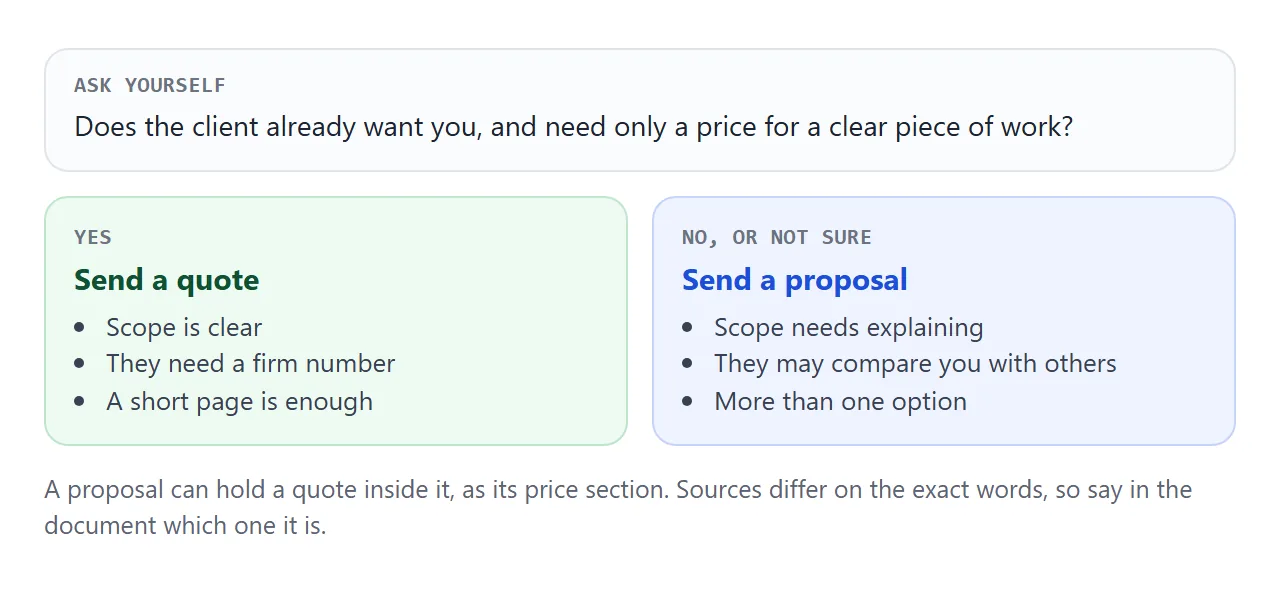
Be careful with the words. Sources do not agree on them. One freelance designer sends an early, flexible "quote" first and a fixed-price proposal after the client approves it. So whichever name you use, write on the page whether the number is a fixed price or an estimate.
The two compared
| Quote | Proposal | |
|---|---|---|
| Main question it answers | How much, and until when | Why you, and what will happen |
| Typical length | One screen | Several short sections |
| Price | Fixed, with a valid-until date | One section, often with options |
| Best when | Work is clear, client has chosen you | Work needs explaining, client is comparing |
| Can hold the other | No | Yes, a quote as the price section |
Ways to send either one
| Attached file | Text in the email | Link to a page | |
|---|---|---|---|
| Opens on a phone | After a download | Yes | Yes, in the browser |
| Change after sending | Send a new file | Send a new email | Edit the page, same link |
| Layout kept | Yes | Plain text | Yes |
| Client needs an account | No | No | No |
If you also need a copy for your records, keep the finished page as a PDF too. For the choice between the two formats, see email vs link for documents.
When it does not work
| What you see | Cause | Fix |
|---|---|---|
| The chat shows code, not a page | You copied the chat text, not the code block | Copy only the code, from the doctype line to the closing html tag |
| A logo or photo is missing | Images from other sites are blocked | Ask for no images, or a logo drawn in SVG |
| The total is wrong | The AI guessed or broke the script | Recheck the numbers block and ask it to fix the sum |
| A contact form does nothing | Forms cannot send to a server from the link | Write your email address as plain text |
| The client quotes an old price | They are looking at an old file | Send only the link, never the file |
| The text is tiny on a phone | No viewport meta tag | Ask the AI to add one and a 16px base size |