PyScript is an open-source platform for running Python in the browser. In HTML it takes two tags in the head, to load it, and a <script type="py"> tag in the body that holds your Python. Save the file, open it, and the Python runs.
One catch shapes the rest of this guide. PyScript downloads its Python runtime when the page opens, so a page that may not fetch from other sites cannot start it. That includes a NOS share link.
The live examples below build, check and mirror a PyScript page instead of running one.
Pick a runtime and an example, then copy or download the page. The generated file is the smallest working version of each.
<!doctype html>
<html lang="en">
<head>
<meta charset="utf-8">
<meta name="viewport" content="width=device-width, initial-scale=1">
<title>PyScript page builder</title>
<style>
  * { box-sizing: border-box; }
  body { margin: 0; padding: 14px; font-family: system-ui, sans-serif; background: #f4f5f7; color: #1d2330; }
  .row { display: flex; flex-wrap: wrap; gap: 10px 16px; margin-bottom: 10px; }
  label { font-size: 13px; font-weight: 600; display: block; margin-bottom: 4px; }
  select { font: inherit; font-size: 14px; padding: 7px 8px; border: 1px solid #c9ced8; border-radius: 8px; background: #fff; min-width: 150px; }
  .btns { display: flex; flex-wrap: wrap; gap: 8px; margin: 10px 0 8px; }
  button { font: inherit; font-size: 14px; font-weight: 600; padding: 8px 14px; border: 0; border-radius: 8px; background: #1d4ed8; color: #fff; cursor: pointer; }
  button.alt { background: #fff; color: #1d2330; border: 1px solid #c9ced8; }
  textarea { width: 100%; height: 360px; font: 12.5px/1.45 ui-monospace, Consolas, monospace; padding: 10px; border: 1px solid #c9ced8; border-radius: 8px; background: #fff; color: #1d2330; resize: vertical; }
  #msg { font-size: 13px; color: #0f5132; min-height: 18px; margin: 0; }
</style>
</head>
<body>
<div class="row">
  <div>
    <label for="rt">Python runtime</label>
    <select id="rt">
      <option value="py">Python (type="py")</option>
      <option value="mpy">MicroPython (type="mpy")</option>
    </select>
  </div>
  <div>
    <label for="ex">What the page does</label>
    <select id="ex">
      <option value="hello">Say hello</option>
      <option value="counter">Count button clicks</option>
      <option value="input">Read a text box</option>
    </select>
  </div>
</div>

<div class="btns">
  <button type="button" id="copy">Copy page</button>
  <button type="button" id="dl" class="alt">Download .html</button>
</div>
<p id="msg" aria-live="polite"></p>
<textarea id="out" readonly spellcheck="false" aria-label="Generated page"></textarea>

<script>
  const VERSION = '2026.7.3';
  const BASE = 'https://pyscript.net/releases/' + VERSION + '/';

  // body markup + Python for each example; the id on every element is what Python looks up
  const EXAMPLES = {
    hello: {
      html: '  <h1>Hello</h1>\n  <p id="out">Starting Python...</p>',
      py: 'from pyscript import document\n\ndocument.querySelector("#out").textContent = "Hello from Python"'
    },
    counter: {
      html: '  <button id="go">Count</button>\n  <p id="out">Clicks: 0</p>',
      py: 'from pyscript import document, when\n\nn = 0\n\n@when("click", "#go")\ndef bump(event):\n    global n\n    n += 1\n    document.querySelector("#out").textContent = "Clicks: " + str(n)'
    },
    input: {
      html: '  <input id="name" placeholder="Your name">\n  <p id="out">Type a name.</p>',
      py: 'from pyscript import document, when\n\n@when("input", "#name")\ndef show(event):\n    name = document.querySelector("#name").value\n    document.querySelector("#out").textContent = "Hello, " + name + " (" + str(len(name)) + " letters)"'
    }
  };

  function build() {
    const type = document.getElementById('rt').value;
    const ex = EXAMPLES[document.getElementById('ex').value];
    return [
      '<!doctype html>',
      '<html lang="en">',
      '<head>',
      '<meta charset="utf-8">',
      '<meta name="viewport" content="width=device-width, initial-scale=1">',
      '<title>PyScript page</title>',
      '<link rel="stylesheet" href="' + BASE + 'core.css">',
      '<script type="module" src="' + BASE + 'core.js"><\/script>',
      '</head>',
      '<body>',
      ex.html,
      '',
      '<script type="' + type + '">',
      ex.py,
      '<\/script>',
      '</body>',
      '</html>',
      ''
    ].join('\n');
  }

  const out = document.getElementById('out');
  const msg = document.getElementById('msg');
  function refresh() { out.value = build(); msg.textContent = ''; }
  document.getElementById('rt').addEventListener('change', refresh);
  document.getElementById('ex').addEventListener('change', refresh);

  document.getElementById('copy').addEventListener('click', async () => {
    try {
      await navigator.clipboard.writeText(out.value);
      msg.textContent = 'Copied. Save it as page.html.';
    } catch (err) {
      out.focus(); out.select();   // clipboard can be blocked in a frame: select instead
      msg.textContent = 'Selected. Press Ctrl+C (or Cmd+C) to copy.';
    }
  });

  document.getElementById('dl').addEventListener('click', () => {
    const url = URL.createObjectURL(new Blob([out.value], { type: 'text/html' }));
    const a = document.createElement('a');
    a.href = url; a.download = 'page.html';
    document.body.appendChild(a); a.click(); a.remove();
    setTimeout(() => URL.revokeObjectURL(url), 1000);
    msg.textContent = 'Saved page.html. Open it from a web address or by double-click.';
  });

  refresh();
</script>
</body>
</html>
Every page this builder makes was opened under real PyScript, release 2026.7.3, in Chromium, and the button, the text box and the greeting worked. This is the shortest one:
<!doctype html>
<html lang="en">
<head>
<meta charset="utf-8">
<meta name="viewport" content="width=device-width, initial-scale=1">
<link rel="stylesheet" href="https://pyscript.net/releases/2026.7.3/core.css">
<script type="module" src="https://pyscript.net/releases/2026.7.3/core.js"></script>
</head>
<body>
  <p id="out">Starting Python...</p>
  <script type="py">
from pyscript import document
document.querySelector("#out").textContent = "Hello from Python"
  </script>
</body>
</html>
The three parts of the file
The file has three parts: the two head tags, the page itself, and the Python.
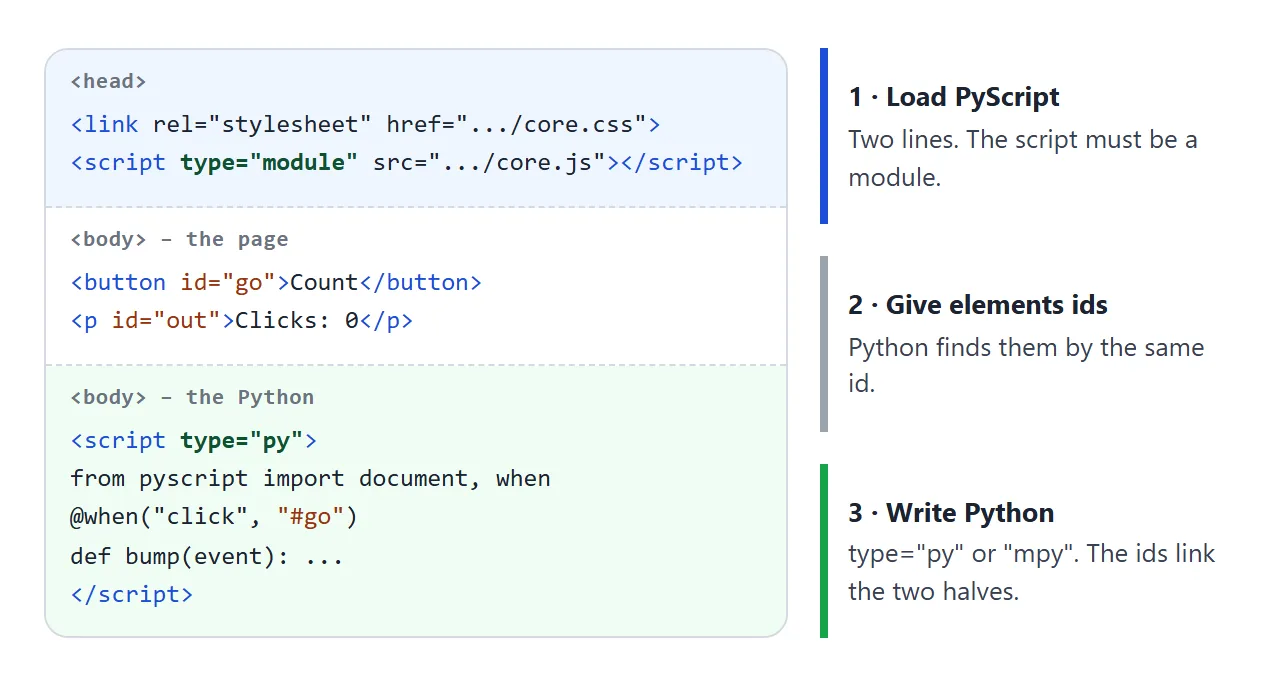
- Load PyScript. A stylesheet link and a script tag, both in the head.
- Give elements ids. Python looks elements up by id, so a button or output paragraph needs one.
- Write the Python. Put it in a script tag of type
pyormpy. - Show a result. Set
textContenton an element, or calldisplay(). - Open it. From a web address, or from disk when the Python is inside the tag.
The core.js tag must be a module. Without type="module", Chromium reported "Unexpected token 'export'" and PyScript never started.
The two addresses carry the release number, 2026.7.3, the version shown on the PyScript site and in its GitHub releases on 2026-10-01. Keeping the number in the address keeps the page on one version.
Python or MicroPython: the type attribute
The type on the script tag picks the interpreter. Both are Python running as WebAssembly inside your tab.
type="py" |
type="mpy" |
|
|---|---|---|
| Interpreter | Pyodide, full CPython | MicroPython |
| Standard library | The full one | A comprehensive subset |
| Start-up | Downloads the Pyodide runtime | The docs say it loads almost instantly |
| Extra packages | Pure Python packages from PyPI | Packages from micropython-lib |
The same three examples ran with both types in our test. Use py when you want the standard behaviour you know from a laptop, and mpy when the page must start quickly. Extra packages go in a config attribute on the tag.
Reach the page from Python
Python sees the page through the document object, and the calls match JavaScript. Two more helpers cover the basics: display() for output and when for events.
from pyscript import document, display, when

display("Shown where the script tag sits")

@when("click", "#go")
def bump(event):
    document.querySelector("#out").textContent = "Clicked"
@when takes an event name and a CSS selector, and runs the function each time that event fires. display() writes into the page at the script tag, or into the element named by its target argument.
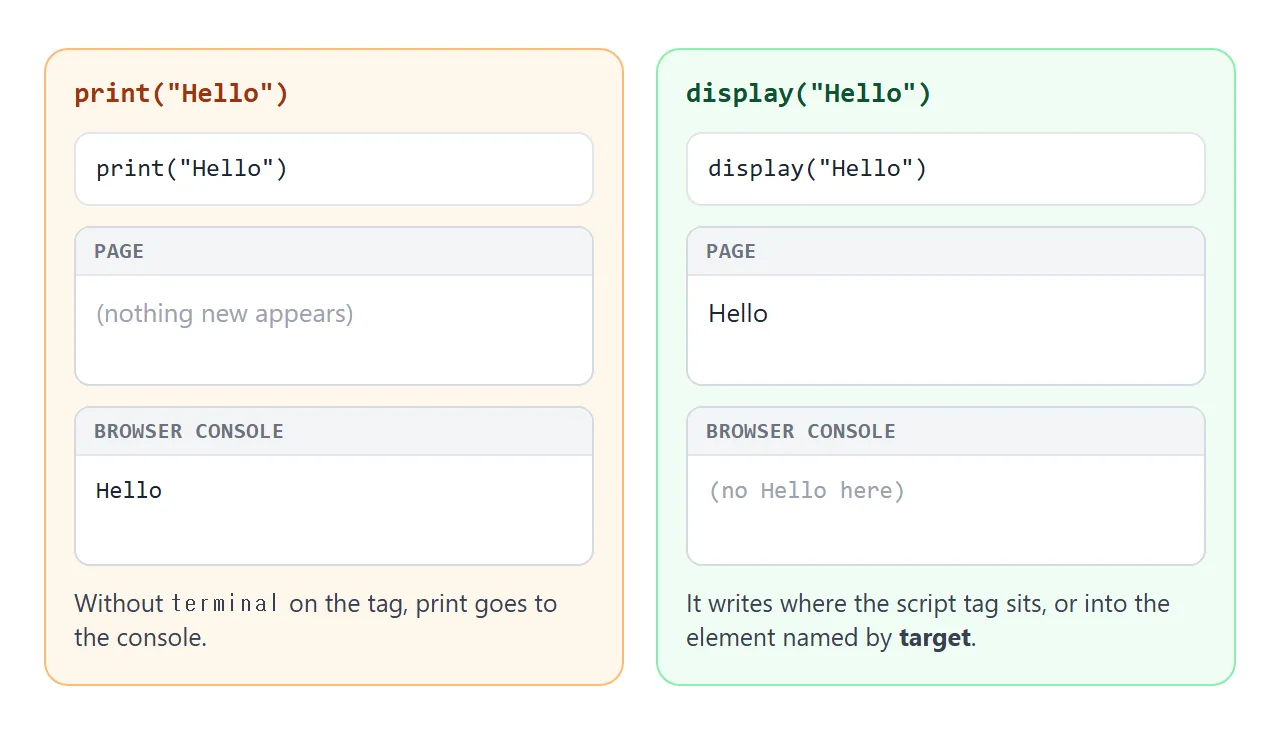
A plain print() went to the console in our test. To see print output on the page, add the terminal attribute to the tag. Calls to input() need the code to run in a worker, which the docs cover under the terminal.
Check a page before you open it
These are the usual mistakes. This checker reads a pasted page as text, never runs it, and lists what it finds. The broken sample has four blocking problems.
<!doctype html>
<html lang="en">
<head>
<meta charset="utf-8">
<meta name="viewport" content="width=device-width, initial-scale=1">
<title>PyScript page checker</title>
<style>
* { box-sizing: border-box; }
body { margin: 0; padding: 14px; font-family: system-ui, sans-serif; background: #f4f5f7; color: #1d2330; }
label { font-size: 13px; font-weight: 600; display: block; margin-bottom: 4px; }
textarea { width: 100%; height: 150px; font: 12.5px/1.45 ui-monospace, Consolas, monospace; padding: 10px; border: 1px solid #c9ced8; border-radius: 8px; background: #fff; color: #1d2330; resize: vertical; }
.btns { display: flex; flex-wrap: wrap; gap: 8px; margin: 10px 0; }
button { font: inherit; font-size: 14px; font-weight: 600; padding: 8px 14px; border: 0; border-radius: 8px; background: #1d4ed8; color: #fff; cursor: pointer; }
button.alt { background: #fff; color: #1d2330; border: 1px solid #c9ced8; }
ul { list-style: none; margin: 0; padding: 0; display: grid; gap: 6px; }
li { display: grid; grid-template-columns: 54px 1fr; gap: 8px; align-items: start; background: #fff; border: 1px solid #e1e4ea; border-radius: 8px; padding: 8px 10px; font-size: 13.5px; line-height: 1.4; }
.tag { font: 700 11px/1 ui-monospace, Consolas, monospace; padding: 4px 0; border-radius: 6px; text-align: center; }
.ok .tag { background: #dcfce7; color: #0f5132; }
.fix .tag { background: #ffedd5; color: #9a3412; }
.note .tag { background: #e0e7ff; color: #1d4ed8; }
code { font: 600 12px ui-monospace, Consolas, monospace; background: #eef1f5; border-radius: 4px; padding: 0 3px; }
#sum { font-size: 14px; font-weight: 600; margin: 0 0 8px; }
</style>
</head>
<body>
<label for="src">Paste a PyScript page</label>
<textarea id="src" spellcheck="false"></textarea>
<div class="btns">
<button type="button" id="run">Check page</button>
<button type="button" id="good" class="alt">Load a working page</button>
<button type="button" id="bad" class="alt">Load a broken page</button>
</div>
<p id="sum" aria-live="polite"></p>
<ul id="res"></ul>
<script>
const BASE = 'https://pyscript.net/releases/2026.7.3/';
const GOOD = [
'<!doctype html>', '<html lang="en">', '<head>', '<meta charset="utf-8">',
'<link rel="stylesheet" href="' + BASE + 'core.css">',
'<script type="module" src="' + BASE + 'core.js"><\/script>',
'</head>', '<body>',
' <button id="go">Count</button>', ' <p id="out">Clicks: 0</p>',
'<script type="py">',
'from pyscript import document, when', '', 'n = 0', '',
'@when("click", "#go")', 'def bump(event):', ' global n', ' n += 1',
' document.querySelector("#out").textContent = "Clicks: " + str(n)',
'<\/script>', '</body>', '</html>'
].join('\n');
const BAD = [
'<!doctype html>', '<html lang="en">', '<head>', '<meta charset="utf-8">',
'<script src="' + BASE + 'core.js"><\/script>',
'</head>', '<body>',
' <button id="go">Count</button>', ' <p id="out">Clicks: 0</p>',
'<script type="python">print("old")<\/script>',
'<script type="py" src="main.py"><\/script>',
'<script type="py">',
'from pyscript import when', '',
'@when("click", "#start")', 'def run(event):', ' name = input("Name? ")', ' print("Hi", name)',
'<\/script>', '</body>', '</html>'
].join('\n');
const src = document.getElementById('src');
const res = document.getElementById('res');
const sum = document.getElementById('sum');
function check(html) {
const doc = new DOMParser().parseFromString(html, 'text/html'); // parsed, never run
const out = [];
const add = (state, text) => out.push({ state, text });
const core = [...doc.querySelectorAll('script[src]')].find(s => /core\.js/.test(s.getAttribute('src')));
if (!core) add('fix', 'No <code>core.js</code> script. PyScript never loads, so Python never runs.');
else if (core.getAttribute('type') !== 'module') add('fix', 'The <code>core.js</code> tag needs <code>type="module"</code>.');
else add('ok', '<code>core.js</code> is loaded as a module.');
if (core) {
const css = [...doc.querySelectorAll('link[rel="stylesheet"]')].some(l => /core\.css/.test(l.getAttribute('href') || ''));
if (css) add('ok', '<code>core.css</code> is linked.');
else add('note', 'No <code>core.css</code> link. The docs ask for it next to <code>core.js</code>.');
}
const all = [...doc.querySelectorAll('script[type]')];
const py = all.filter(s => /^(py|mpy)$/.test(s.getAttribute('type')));
const odd = all.filter(s => /python|pyscript/i.test(s.getAttribute('type')) && !/^(py|mpy)$/.test(s.getAttribute('type')));
if (odd.length) add('fix', 'Script type <code>"' + odd[0].getAttribute('type') + '"</code> is not <code>py</code> or <code>mpy</code>, so PyScript skips it.');
if (!py.length) add('fix', 'No <code><script type="py"></code> or <code>type="mpy"</code> tag found.');
else add('ok', py.length + ' Python script' + (py.length > 1 ? 's' : '') + ' found.');
const withSrc = [...doc.querySelectorAll('script[type="py"][src], script[type="mpy"][src]')];
if (withSrc.length) add('note', '<code>src="' + withSrc[0].getAttribute('src') + '"</code> fetches a file. That needs a web server, not a double-click.');
const code = py.map(s => s.textContent).join('\n');
const ids = new Set([...doc.querySelectorAll('[id]')].map(e => e.id));
const missing = [];
for (const m of code.matchAll(/when\(\s*["'][^"']+["']\s*,\s*["']#([\w-]+)["']/g)) {
if (!ids.has(m[1])) missing.push(m[1]);
}
if (missing.length) add('fix', '<code>@when</code> looks for <code>#' + missing[0] + '</code> but no element has that id. PyScript raises an error.');
else if (/@when\(/.test(code)) add('ok', 'Every <code>@when</code> selector matches an id in the page.');
if (/\binput\(/.test(code) && !py.some(s => s.hasAttribute('worker'))) {
add('fix', '<code>input()</code> needs a worker. Add <code>worker</code> and <code>terminal</code> to the tag.');
}
if (/\bprint\(/.test(code) && !py.some(s => s.hasAttribute('terminal'))) {
add('note', '<code>print()</code> without <code>terminal</code> writes to the browser console. Use <code>display()</code> to show text on the page.');
}
return out;
}
function render() {
const items = check(src.value);
res.innerHTML = '';
for (const it of items) {
const li = document.createElement('li');
li.className = it.state;
li.innerHTML = '<span class="tag">' + { ok: 'OK', fix: 'FIX', note: 'NOTE' }[it.state] + '</span><span>' + it.text + '</span>';
res.appendChild(li);
}
const n = items.filter(i => i.state === 'fix').length;
sum.textContent = n ? n + ' thing' + (n > 1 ? 's' : '') + ' to fix' : 'No blocking problems found';
}
document.getElementById('run').addEventListener('click', render);
document.getElementById('good').addEventListener('click', () => { src.value = GOOD; render(); });
document.getElementById('bad').addEventListener('click', () => { src.value = BAD; render(); });
src.value = BAD;
render();
</script>
</body>
</html>
Two ways of opening the file behave differently. Inline Python ran when we opened the file from disk. A tag with src="main.py" did not, and PyScript explained that you must use a web server. The PyScript docs serve a folder locally with one command:
python3 -m http.server -d public/
Then open http://localhost:8000 in the browser. Workers need extra response headers from the server, which the PyScript FAQ lists, so start without them.
Why a share link cannot run PyScript
NOS shares a document as a page that runs your scripts and loads scripts and styles from five CDN hosts. It refuses requests to other sites.
PyScript can be loaded from a CDN, but the Python runtime is fetched afterwards, and that request is the kind that gets refused.
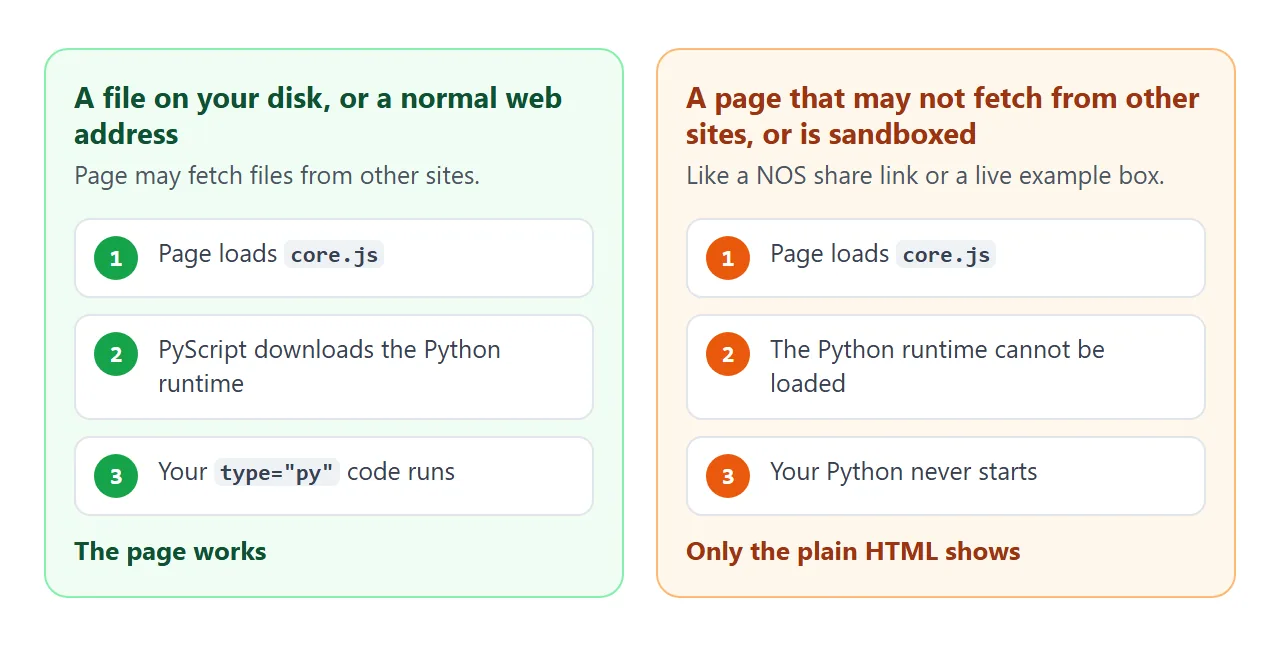
Two Chromium tests with release 2026.7.3 showed it. With a rule that forbids all fetching, the browser refused the runtime files from jsDelivr and Python never started.
With the page sandboxed, PyScript stopped on an IndexedDB security error before any runtime loaded. The live example boxes here are sandboxed, which is why they mirror PyScript instead.
What does run in a sandbox is the same tool in plain JavaScript. The Python listing below was run under PyScript and gave the same counts as the JavaScript twin.
<!doctype html>
<html lang="en">
<head>
<meta charset="utf-8">
<meta name="viewport" content="width=device-width, initial-scale=1">
<title>Word counter: Python and its JavaScript twin</title>
<style>
* { box-sizing: border-box; }
body { margin: 0; padding: 14px; font-family: system-ui, sans-serif; background: #f4f5f7; color: #1d2330; }
h2 { font-size: 15px; margin: 0 0 8px; }
.card { background: #fff; border: 1px solid #e1e4ea; border-radius: 12px; padding: 12px 14px; margin-bottom: 12px; }
textarea { width: 100%; height: 84px; font: 15px/1.4 system-ui, sans-serif; padding: 8px 10px; border: 1px solid #c9ced8; border-radius: 8px; resize: vertical; }
.stats { display: grid; grid-template-columns: repeat(3, 1fr); gap: 8px; margin-top: 10px; }
.stat { background: #f4f5f7; border-radius: 8px; padding: 8px; text-align: center; }
.stat b { display: block; font-size: 20px; }
.stat span { font-size: 12px; color: #4b5563; }
pre { margin: 0 0 6px; padding: 10px; overflow-x: auto; background: #0f172a; color: #e2e8f0; border-radius: 8px; font: 12px/1.5 ui-monospace, Consolas, monospace; }
.cap { font-size: 12.5px; color: #4b5563; margin: 0 0 8px; }
.cap.py b { color: #9a3412; }
.cap.js b { color: #0f5132; }
</style>
</head>
<body>
<div class="card">
<h2>The tool (this box runs the JavaScript twin)</h2>
<textarea id="text" aria-label="Text to count">PyScript runs Python in the browser</textarea>
<div class="stats">
<div class="stat"><b id="words">0</b><span>words</span></div>
<div class="stat"><b id="chars">0</b><span>characters</span></div>
<div class="stat"><b id="longest">-</b><span>longest word</span></div>
</div>
</div>
<div class="card">
<p class="cap py"><b>PyScript version</b> – needs a normal web address, so it is shown, not run:</p>
<pre>from pyscript import document, when
@when("input", "#text")
def count(event):
text = document.querySelector("#text").value
words = text.split()
document.querySelector("#words").textContent = len(words)
document.querySelector("#chars").textContent = len(text)
document.querySelector("#longest").textContent = max(words, key=len) if words else "-"</pre>
<p class="cap js"><b>Plain JavaScript twin</b> – runs here and on a share link:</p>
<pre>const box = document.getElementById('text');
box.addEventListener('input', () => {
const words = box.value.split(/\s+/).filter(Boolean);
document.getElementById('words').textContent = words.length;
document.getElementById('chars').textContent = box.value.length;
document.getElementById('longest').textContent =
words.reduce((a, b) => (b.length > a.length ? b : a), '') || '-';
});</pre>
</div>
<script>
const box = document.getElementById('text');
function count() {
const words = box.value.split(/\s+/).filter(Boolean);
document.getElementById('words').textContent = words.length;
document.getElementById('chars').textContent = box.value.length;
document.getElementById('longest').textContent =
words.reduce((a, b) => (b.length > a.length ? b : a), '') || '-';
}
box.addEventListener('input', count);
count();
</script>
</body>
</html>
Keep Python when the logic already exists in Python. Choose JavaScript for a page that must run on a share link.
When it does not work
| What you see | Cause | Fix |
|---|---|---|
| Page stays plain HTML, console says Unexpected token 'export' | core.js loaded without type="module" |
Add type="module" |
| Nothing happens and no error | Script type is python or text/python |
Use py or mpy |
| Error PY0001 about local files | src file opened from disk |
Serve the folder, or put the Python inside the tag |
| ValueError: No elements found for selector | @when selector matches no element yet |
Fix the id, or create the element first |
| print() text is not on the page | print writes to the console | Use display() or add terminal |
input() does not work |
It needs a worker | Run the code in a worker, as in the terminal docs |
| First screen looks empty | The runtime is still downloading | Show a Starting Python line and replace it |
| Blank in a NOS link or example box | Runtime cannot be loaded there | Host it normally, or share a JavaScript version |
Share it as a link
A PyScript page needs a normal web address to start, so a NOS link will not run it. For a PyScript file, use a web host that serves ordinary pages. To share a result that was computed in Python, Jupyter notebook link covers that case.
For a link people can actually use, send the JavaScript version. Paste the page into a NOS document and choose Create share link. HTML to link walks through it.
The page renders as written and its scripts run, so the people you send it to can type into the counter themselves, without an account. If you change the code later, the same link shows the new version.