A rate card template is a single page with the same parts every time: each service you sell, how it is priced, the price, and the date those prices apply from. The page below calculates every price from one hourly rate.
Freelancers ask, for example on Quora, how to write a quotation mail to a client. A rate card answers the part that repeats. You link to it instead of retyping your prices into each message.
Try it. In the amber panel, press + twice. Every price moves and a note says what the rate was.
<!doctype html>
<html lang="en">
<head>
<meta charset="utf-8">
<meta name="viewport" content="width=device-width, initial-scale=1">
<title>Rate card</title>
<style>
* { box-sizing: border-box; }
body { margin: 0; background: #f3f4f6; font-family: system-ui, -apple-system, "Segoe UI", sans-serif; color: #1f2937; line-height: 1.45; }
.page { max-width: 560px; margin: 0 auto; background: #fff; min-height: 100vh; padding: 20px 18px 26px; }
h1 { margin: 0; font-size: 26px; line-height: 1.2; }
.sub { margin: 4px 0 0; font-size: 15px; color: #4b5563; }
.stamp { display: inline-block; margin-top: 10px; padding: 3px 10px; border-radius: 999px; background: #ecfdf5; color: #065f46; font-size: 13px; font-weight: 600; }
/* OWNER PANEL: delete this block before you send the link */
.owner { margin: 16px 0 6px; padding: 12px 14px; border: 2px dashed #f59e0b; border-radius: 12px; background: #fffbeb; }
.owner b { display: block; font-size: 14px; }
.owner small { display: block; margin-top: 2px; color: #92400e; font-size: 13px; }
.ctl { display: flex; align-items: center; gap: 10px; margin-top: 10px; flex-wrap: wrap; }
.ctl button { width: 44px; height: 44px; border-radius: 10px; border: 1px solid #d1d5db; background: #fff; font-size: 22px; cursor: pointer; }
.ctl button:active { background: #fef3c7; }
.ctl output { min-width: 96px; text-align: center; font-size: 20px; font-weight: 700; font-variant-numeric: tabular-nums; }
.ctl span { font-size: 13px; color: #6b7280; }
.code { margin-top: 10px; font: 13px/1.4 ui-monospace, Consolas, monospace; background: #fff; border: 1px solid #fde68a; border-radius: 8px; padding: 6px 8px; overflow-wrap: anywhere; }
.group { margin: 20px 0 2px; font-size: 13px; font-weight: 700; letter-spacing: .04em; text-transform: uppercase; color: #6b7280; }
.row { display: grid; grid-template-columns: 1fr auto; gap: 0 12px; padding: 12px 0; border-bottom: 1px solid #eef0f3; align-items: baseline; }
.name { font-size: 16px; font-weight: 600; overflow-wrap: anywhere; }
.how { grid-column: 1; font-size: 14px; color: #6b7280; }
.price { grid-row: 1; grid-column: 2; font-size: 18px; font-weight: 700; font-variant-numeric: tabular-nums; text-align: right; white-space: nowrap; }
.price small { font-size: 13px; font-weight: 400; color: #6b7280; }
.fine { margin: 16px 0 0; font-size: 14px; color: #4b5563; }
.fine b { color: #1f2937; }
.changed { margin-top: 12px; font-size: 14px; color: #92400e; background: #fffbeb; border-radius: 8px; padding: 6px 10px; }
</style>
</head>
<body>
<div class="page">
<h1>Linden Studio</h1>
<p class="sub">Rate card for brand and web design</p>
<span class="stamp">Rates valid from 1 November 2026</span>
<!-- OWNER PANEL: delete this block before you send the link -->
<div class="owner">
<b>Owner panel: try a new hourly rate</b>
<small>Delete this block before you send the link.</small>
<div class="ctl">
<button type="button" id="down" aria-label="Lower the rate by 5">−</button>
<output id="rate"></output>
<button type="button" id="up" aria-label="Raise the rate by 5">+</button>
<span>per hour, steps of 5</span>
</div>
<div class="code" id="code"></div>
</div>
<div class="changed" id="changed" hidden></div>
<p class="group">Hourly and daily</p>
<div id="timed"></div>
<p class="group">Fixed-price work</p>
<div id="fixed"></div>
<p class="fine"><b>Rush work</b> (delivery within 3 working days): add <b id="rush"></b> to the price.</p>
<p class="fine">Not included: printing, stock photos, extra revision rounds. Prices are in US dollars.</p>
</div>
<script>
// The one number to change when your rate changes.
const hourlyRate = 85;
const startRate = 85; // the rate the card started with, only used for the "was" note
const rushPercent = 25;
const dayDiscount = 0.9; // a full day is 8 hours at 10% off
// Every price below is hours x rate, rounded to the nearest 5.
const timed = [
{ name: 'Hourly rate', how: 'Billed in 15-minute steps', hours: 1, label: '/ hour', exact: true },
{ name: 'Half day', how: '4 hours, one sitting', hours: 4 },
{ name: 'Full day', how: '8 hours, 10% off the hourly rate', hours: 8 * dayDiscount },
];
const fixed = [
{ name: 'Discovery call', how: '30 minutes, brief written up', hours: 0.5 },
{ name: 'Logo design', how: '3 concepts, 2 revision rounds', hours: 8 },
{ name: 'Brand guide', how: '4 pages: colours, type, logo use', hours: 6 },
{ name: 'Website page design', how: 'One page, desktop and phone', hours: 5 },
{ name: 'Extra revision round', how: 'After the included rounds', hours: 1.5 },
];
let rate = hourlyRate;
const money = (n) => '$' + n.toLocaleString('en-US');
const round5 = (n) => Math.round(n / 5) * 5;
function line(s) {
const value = s.exact ? rate : round5(s.hours * rate);
return '<div class="row"><span class="name">' + s.name + '</span>' +
'<span class="price">' + money(value) + (s.label ? ' <small>' + s.label + '</small>' : '') + '</span>' +
'<span class="how">' + s.how + '</span></div>';
}
function draw() {
document.getElementById('timed').innerHTML = timed.map(line).join('');
document.getElementById('fixed').innerHTML = fixed.map(line).join('');
document.getElementById('rate').textContent = money(rate);
document.getElementById('rush').textContent = rushPercent + '%';
document.getElementById('code').textContent = 'const hourlyRate = ' + rate + ';';
const ch = document.getElementById('changed');
ch.hidden = rate === startRate;
ch.textContent = 'Was ' + money(startRate) + ' an hour, now ' + money(rate) + '.';
}
document.getElementById('up').addEventListener('click', () => { rate += 5; draw(); });
document.getElementById('down').addEventListener('click', () => { rate = Math.max(5, rate - 5); draw(); });
draw();
</script>
</body>
</html>
The studio and every price are made up. Replace them with your own.
What goes on a rate card
Keep the same parts in the same order, so you never forget one. The first four are the ones a client looks for.
| Part | What to put in it |
|---|---|
| Valid-from date | The day these prices start to apply |
| Service name | What you do, in the words a client would use |
| How it is priced | Per hour, per day, or per project, with what is included |
| Price | One number per line, in one currency |
| Rush or extras | A surcharge or an add-on price, stated once |
| Not included | What costs extra, one short sentence each |
This is a price list for everyone. A price for one client and one job is a quote, covered in send a quote to a client.
Make it with AI
An AI chat can write this page in one reply. Paste this prompt into ChatGPT, Claude or Gemini, and put your real services in the last part.
Make one self-contained HTML page: a rate card for a freelancer.
- Header: my name, what I do, and a "rates valid from" date.
- One constant at the top of the script: hourlyRate.
- Each service has a name, a short description and a number
  of hours. Its price is hours x hourlyRate, rounded to the
  nearest 5. Show "per hour" for the hourly line itself.
- A rush surcharge percent in one constant.
- A block marked OWNER PANEL with plus and minus buttons that
  change the hourly rate on screen and show the new constant.
  Keep it in one block I can delete.
- A "not included" note at the bottom.
- No external libraries, fonts or images. No localStorage.
- It must work on a phone, 390 px wide.
- Do not invent names, prices or dates. Write TODO where I
  gave none.
My services: (list them here with hours)
My hourly rate: (number and currency)
Then check the result before you trust it:
- Multiply the hours by your rate for one service and compare it with the page.
- Press + in the owner panel. Every priced line should move, and the hourly line should show the new rate.
- Search the page for TODO and replace each one with your own value.
- Check the currency symbol and the valid-from date.
- Look at it at phone width. Names and prices should both be readable.
If the reply shows as code instead of a page, see AI HTML not rendering.
One rate behind every price
The page keeps the part you judge and the part that changes in separate places. Hours are your estimate of how long a service takes. The rate is the one number that changes when you raise your prices.
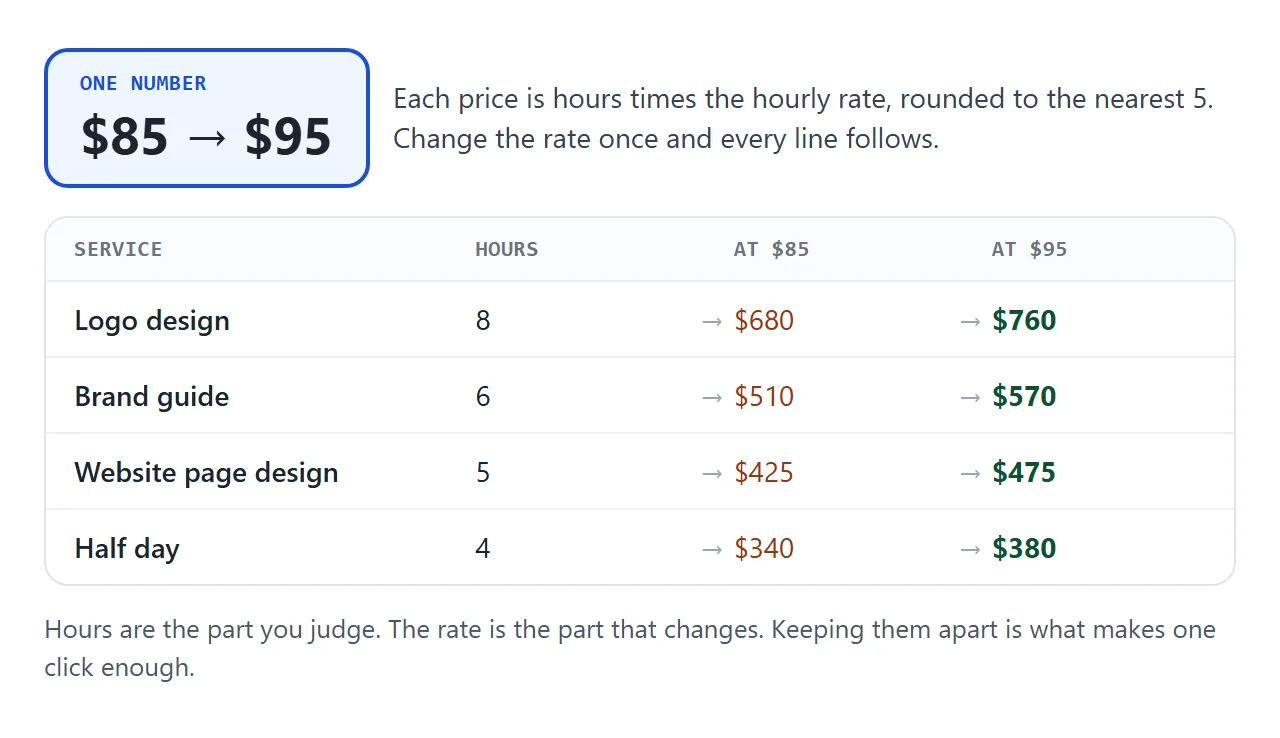
That is why one click is enough. A card where every price is typed by hand needs a dozen edits, and it is easy to miss one.
Rounding is a choice. This example rounds to the nearest 5 so the card shows $130, not $127.50. Ask your AI for rounding to 1 or 10 if you prefer.
Change a rate by clicking
Some changes are not a single rate. You might raise one service and leave the rest. This second page is a working sheet: click a price, type the new one, and a changed price keeps the old one next to it.
<!doctype html>
<html lang="en">
<head>
<meta charset="utf-8">
<meta name="viewport" content="width=device-width, initial-scale=1">
<title>Rate change sheet</title>
<style>
  * { box-sizing: border-box; }
  body { margin: 0; background: #f3f4f6; font-family: system-ui, -apple-system, "Segoe UI", sans-serif; color: #1f2937; line-height: 1.45; }
  .page { max-width: 560px; margin: 0 auto; background: #fff; min-height: 100vh; padding: 20px 18px 26px; }
  h1 { margin: 0; font-size: 24px; line-height: 1.2; }
  .sub { margin: 4px 0 12px; font-size: 15px; color: #4b5563; }
  .bar { display: flex; flex-wrap: wrap; gap: 8px; align-items: center; margin-bottom: 8px; }
  .bar button { height: 44px; padding: 0 14px; border-radius: 10px; border: 1px solid #d1d5db; background: #fff; font-size: 15px; cursor: pointer; }
  .bar button:active { background: #eef2ff; }
  label { font-size: 14px; color: #4b5563; display: flex; align-items: center; gap: 8px; }
  input[type=date] { height: 44px; border: 1px solid #d1d5db; border-radius: 10px; padding: 0 8px; font-size: 15px; }
  .row { display: grid; grid-template-columns: 1fr auto; align-items: center; gap: 2px 12px; padding: 10px 0; border-bottom: 1px solid #eef0f3; }
  .name { font-size: 16px; font-weight: 600; overflow-wrap: anywhere; }
  .unit { font-size: 14px; color: #6b7280; }
  .p { grid-row: 1 / span 2; grid-column: 2; display: flex; align-items: center; gap: 8px; justify-content: flex-end; }
  .was { font-size: 14px; color: #9ca3af; text-decoration: line-through; font-variant-numeric: tabular-nums; }
  .price { min-width: 76px; height: 44px; border: 1px dashed #d1d5db; border-radius: 10px; background: #fff; font-size: 18px; font-weight: 700; font-variant-numeric: tabular-nums; cursor: pointer; }
  .price:hover { border-color: #1d4ed8; }
  input.edit { width: 88px; height: 44px; border: 2px solid #1d4ed8; border-radius: 10px; padding: 0 8px; font-size: 18px; font-weight: 700; text-align: right; }
  .row.moved .price { background: #fffbeb; border-color: #f59e0b; border-style: solid; }
  .row.moved.off .was, .row.moved.off .tag { display: none; }
  .tag { font-size: 12px; font-weight: 700; color: #92400e; background: #fef3c7; border-radius: 999px; padding: 1px 8px; }
  .hint { font-size: 14px; color: #4b5563; margin: 4px 0 10px; }
  .note { margin-top: 18px; }
  .note h2 { margin: 0 0 6px; font-size: 16px; }
  textarea { width: 100%; min-height: 150px; padding: 10px; border: 1px solid #d1d5db; border-radius: 10px; font: 14px/1.45 ui-monospace, Consolas, monospace; color: #1f2937; background: #f9fafb; resize: vertical; }
</style>
</head>
<body>
<div class="page">
  <h1>Rate card update</h1>
  <p class="sub">Linden Studio. Click a price to type a new one.</p>

  <div class="bar">
    <button type="button" id="raise">Raise all by 5%</button>
    <button type="button" id="reset">Reset</button>
    <button type="button" id="mark" aria-pressed="true">Show what changed: on</button>
  </div>
  <div class="bar">
    <label>New rates from <input type="date" id="from" value="2026-12-01"></label>
  </div>
  <p class="hint">Changed prices turn amber and keep the old price next to them.</p>

  <div id="list"></div>

  <div class="note">
    <h2>Message to your clients</h2>
    <textarea id="msg" readonly aria-label="Message text"></textarea>
  </div>
</div>

<script>
  const items = [
    { name: 'Hourly rate', unit: 'per hour', was: 85 },
    { name: 'Day rate', unit: '8 hours', was: 610 },
    { name: 'Logo design', unit: '3 concepts', was: 680 },
    { name: 'Brand guide', unit: '4 pages', was: 510 },
    { name: 'Website page design', unit: 'one page', was: 425 },
    { name: 'Social media kit', unit: '6 templates', was: 300 },
  ];
  items.forEach((it) => { it.now = it.was; });
  let showMarks = true;

  const money = (n) => '$' + n.toLocaleString('en-US');
  const round5 = (n) => Math.round(n / 5) * 5;
  const months = ['Jan', 'Feb', 'Mar', 'Apr', 'May', 'Jun', 'Jul', 'Aug', 'Sep', 'Oct', 'Nov', 'Dec'];

  function dateText() {
    const v = document.getElementById('from').value;   // yyyy-mm-dd
    if (!v) return '(pick a date)';
    const [y, m, d] = v.split('-').map(Number);
    return d + ' ' + months[m - 1] + ' ' + y;
  }

  function draw() {
    const list = document.getElementById('list');
    list.innerHTML = '';
    items.forEach((it, i) => {
      const moved = it.now !== it.was;
      const row = document.createElement('div');
      row.className = 'row' + (moved ? ' moved' : '') + (showMarks ? '' : ' off');
      row.innerHTML = '<span class="name"></span><span class="unit"></span><span class="p">' +
        (moved ? '<span class="was">' + money(it.was) + '</span><span class="tag">new</span>' : '') +
        '<button type="button" class="price" aria-label="Edit price"></button></span>';
      row.querySelector('.name').textContent = it.name;
      row.querySelector('.unit').textContent = it.unit;
      const btn = row.querySelector('.price');
      btn.textContent = money(it.now);
      btn.addEventListener('click', () => edit(btn, i));
      list.appendChild(row);
    });
    writeMessage();
  }

  function edit(btn, i) {
    const input = document.createElement('input');
    input.className = 'edit'; input.type = 'number'; input.min = '0'; input.step = '5';
    input.inputMode = 'numeric'; input.value = items[i].now;
    input.setAttribute('aria-label', 'New price for ' + items[i].name);
    btn.replaceWith(input);
    input.focus(); input.select();
    let done = false;
    const commit = () => {
      if (done) return; done = true;
      const n = Number(input.value);
      if (input.value !== '' && n >= 0) items[i].now = n;
      draw();
    };
    input.addEventListener('blur', commit);
    input.addEventListener('keydown', (e) => { if (e.key === 'Enter') commit(); });
  }

  function writeMessage() {
    const changed = items.filter((it) => it.now !== it.was);
    let t;
    if (!changed.length) {
      t = 'No changes yet. Click a price, or raise them all.';
    } else {
      t = 'From ' + dateText() + ' these rates change:\n' +
        changed.map((it) => '- ' + it.name + ' (' + it.unit + '): ' + money(it.was) + ' to ' + money(it.now)).join('\n') +
        '\nEverything else stays the same. The rate card link shows the new prices.';
    }
    document.getElementById('msg').value = t;
  }

  document.getElementById('raise').addEventListener('click', () => {
    items.forEach((it) => { it.now = round5(it.now * 1.05); });
    draw();
  });
  document.getElementById('reset').addEventListener('click', () => { items.forEach((it) => { it.now = it.was; }); draw(); });
  document.getElementById('mark').addEventListener('click', (e) => {
    showMarks = !showMarks;
    e.currentTarget.textContent = 'Show what changed: ' + (showMarks ? 'on' : 'off');
    e.currentTarget.setAttribute('aria-pressed', String(showMarks));
    draw();
  });
  document.getElementById('from').addEventListener('input', writeMessage);
  draw();
</script>
</body>
</html>
Pick the date the new rates start. The box at the bottom turns the changes into a message you can paste into an email or chat, so clients hear about the change before they see it.
Here is what to remember about saving. The clicks on this sheet are a scratchpad. NOS keeps the owner's ticks and added rows made in View mode, and a visitor's changes are not kept. Typed values are not promised to be saved.
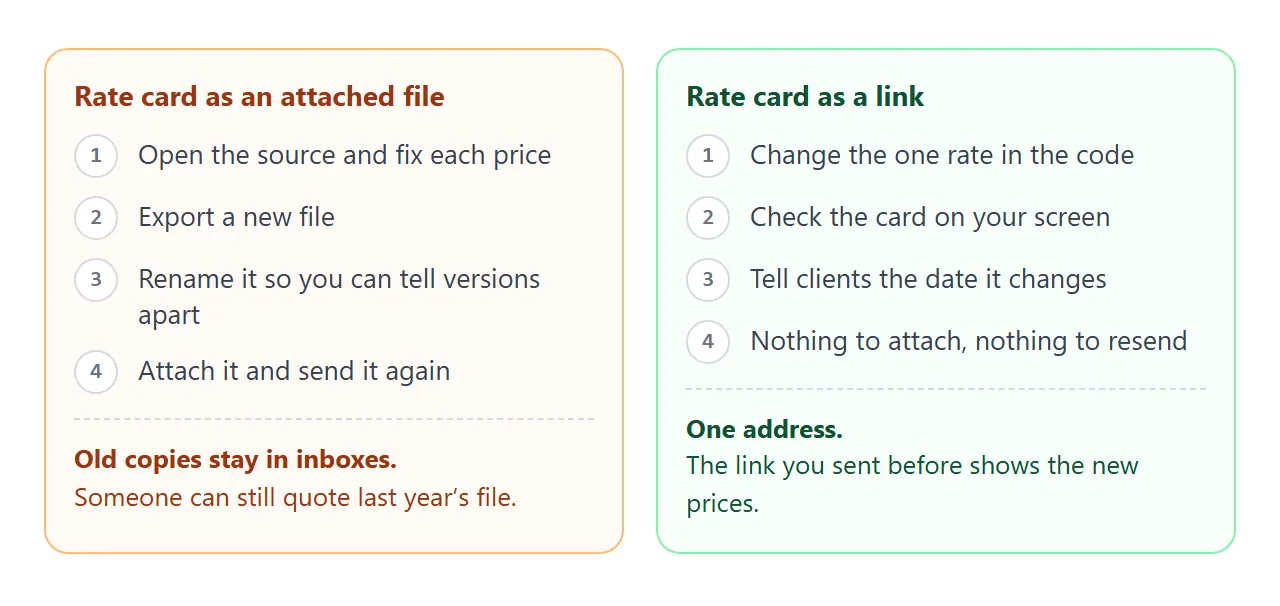
To make a new rate stick, change the number in the code, or ask your AI: "change hourlyRate to 95 and set the valid-from date to 1 December". Then the owner panel can go.
Send it as a link
Delete the owner panel, then paste the finished HTML into a NOS document and choose Create share link. Put the address in your email or message. HTML to link walks through the steps.
The client opens it in a browser, on a phone or a laptop, with no account. The page renders as written and its scripts run. They cannot edit your page, and NOS does not show you who opened it.
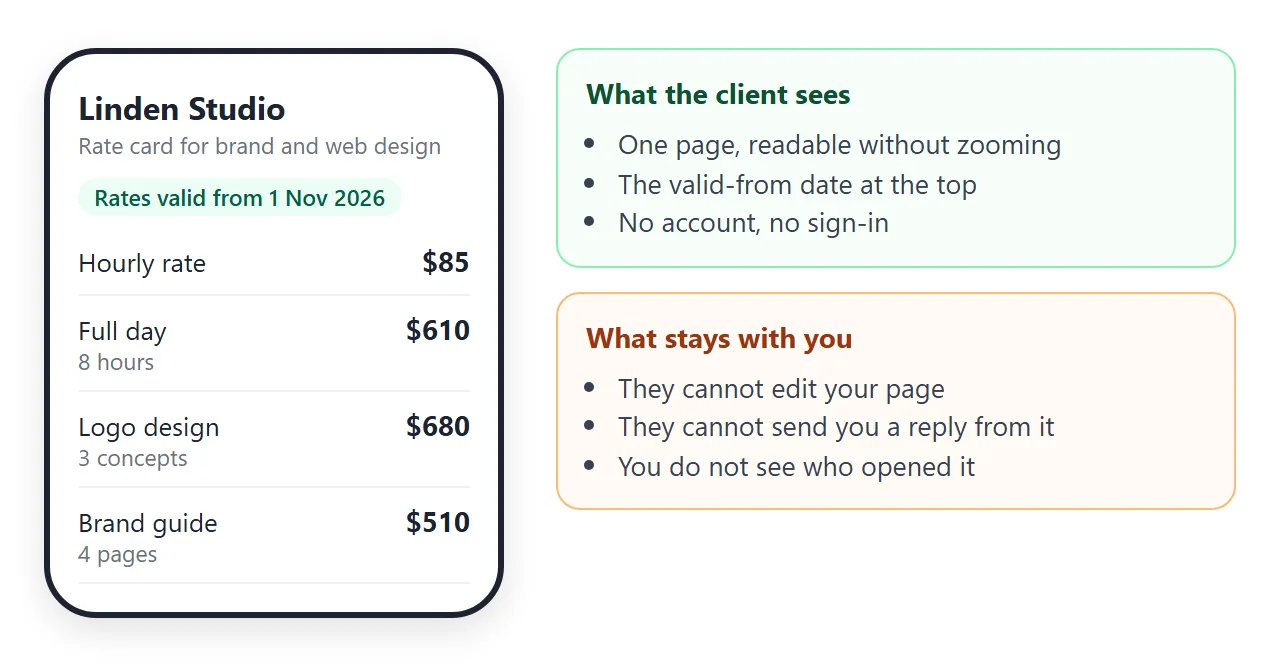
When a rate changes, edit the code. The same link shows the new version, so the address you sent last year stays right. Update the valid-from date in the same edit.
A form on the page cannot send anything to you, because sending a form to a server is blocked. Ask clients to reply to your message. Images from other sites are blocked too, so draw a logo as an inline SVG or leave it out.
Anyone with the link can open the page. Put only prices you would hand over on paper. For more on keeping one list current, read price list link and send a price list to customers.
Link, file or PDF
| PDF export | HTML file attached | Link from NOS | |
|---|---|---|---|
| Raise a rate | Edit, export again, send a new file | Edit, send a new file | Edit the code; same link |
| Prices | Fixed text | Calculated if opened in a browser | Calculated on the page |
| Old copies | One in every inbox it reached | One in every inbox it reached | One address |
For the reasons a link holds up better than a file, see why links beat attachments.
When it does not work
| What you see | Cause | Fix |
|---|---|---|
| The preview shows code, not a page | The chat text or fences came along with the HTML | Paste only the HTML, from the first tag to the last |
| A price shows NaN | An hours value is empty or has a letter in it | Use plain numbers for hours and the rate |
| A price differs from your calculator | The page rounds to the nearest 5 | Ask for exact figures, or round on purpose |
| A client sees amber buttons | The owner panel is still in the page | Delete the block before creating the link |
| A new rate is gone after reopening | Typed values are not what is saved | Change the number in the code |
| A logo does not show | Images from other sites are blocked | Draw it as an inline SVG, or leave it out |