Sass here means the CSS preprocessor from sass-lang.com, not software as a service. A browser reads CSS, not Sass, so a .scss file has to be compiled to CSS first.
In one HTML file you have two working routes: paste the compiled CSS into a <style> tag, or compile inside the page with the sass package loaded from a CDN.
Try the second route first. Edit the SCSS and the CSS and the card update as you type.
<!doctype html>
<html lang="en">
<head>
<meta charset="utf-8">
<meta name="viewport" content="width=device-width, initial-scale=1">
<title>Sass compiled inside the page</title>
<!-- The Sass module imports "immutable" by bare name, so map that name to a URL first -->
<script type="importmap">
{ "imports": { "immutable": "https://cdn.jsdelivr.net/npm/immutable@5.1.5/dist/immutable.es.js" } }
</script>
<style>
  * { box-sizing: border-box; }
  body { margin: 0; padding: 12px; font-family: system-ui, sans-serif; background: #f4f5f7; color: #1d2330; }
  h2 { font-size: 13px; margin: 10px 0 4px; text-transform: uppercase; letter-spacing: .4px; color: #5b6472; }
  textarea, pre {
    width: 100%; margin: 0; padding: 10px; border: 1px solid #d5d9e0; border-radius: 8px;
    font: 12.5px/1.45 ui-monospace, Consolas, monospace; background: #fff;
  }
  textarea { height: 190px; resize: vertical; }
  pre { height: 120px; overflow: auto; white-space: pre; }
  #status { font-size: 13px; margin: 6px 0 0; min-height: 18px; }
  #status.ok { color: #0f5132; }
  #status.err { color: #9a3412; }
  #stage { padding: 14px; background: #fff; border: 1px dashed #d5d9e0; border-radius: 8px; }
</style>
<!-- The compiled CSS is written into this element -->
<style id="live"></style>
</head>
<body>
<h2>SCSS (edit me)</h2>
<textarea id="src" spellcheck="false">$brand: #0a7a5a;

.card {
  padding: 14px 16px;
  border-radius: 12px;
  border: 2px solid $brand;

  h3 { margin: 0 0 6px; color: $brand; }

  button {
    padding: 8px 14px; border: 0; border-radius: 8px;
    background: $brand; color: #fff;
    &:hover { background: #075c44; }
  }
}</textarea>
<p id="status">Loading Sass from the CDN...</p>

<h2>Compiled CSS</h2>
<pre id="css"></pre>

<h2>Result</h2>
<div id="stage">
  <div class="card"><h3>Hello Sass</h3><p>This card is styled by the CSS above.</p><button>Hover me</button></div>
</div>

<script type="module">
  const src = document.getElementById('src');
  const status = document.getElementById('status');
  const out = document.getElementById('css');
  const live = document.getElementById('live');
  let sass;

  function run() {
    try {
      const result = sass.compileString(src.value);  // SCSS text in, CSS text out
      out.textContent = result.css;
      live.textContent = result.css;                 // the browser now styles the card
      status.className = 'ok';
      status.textContent = 'Compiled.';
    } catch (e) {
      status.className = 'err';                      // keep the last good CSS on screen
      status.textContent = 'Sass error: ' + e.message.split('\n')[0];
    }
  }

  try {
    sass = await import('https://cdn.jsdelivr.net/npm/sass@1.105.1/sass.default.js');
    src.addEventListener('input', run);
    run();
  } catch (e) {
    status.className = 'err';
    status.textContent = 'Could not load Sass (are you offline?).';
  }
</script>
</body>
</html>
What a browser does with Sass
Sass adds features such as nesting, mixins and inheritance. The Sass guide describes the workflow this way: Sass takes your preprocessed file and saves it as a normal CSS file you can use in your website.
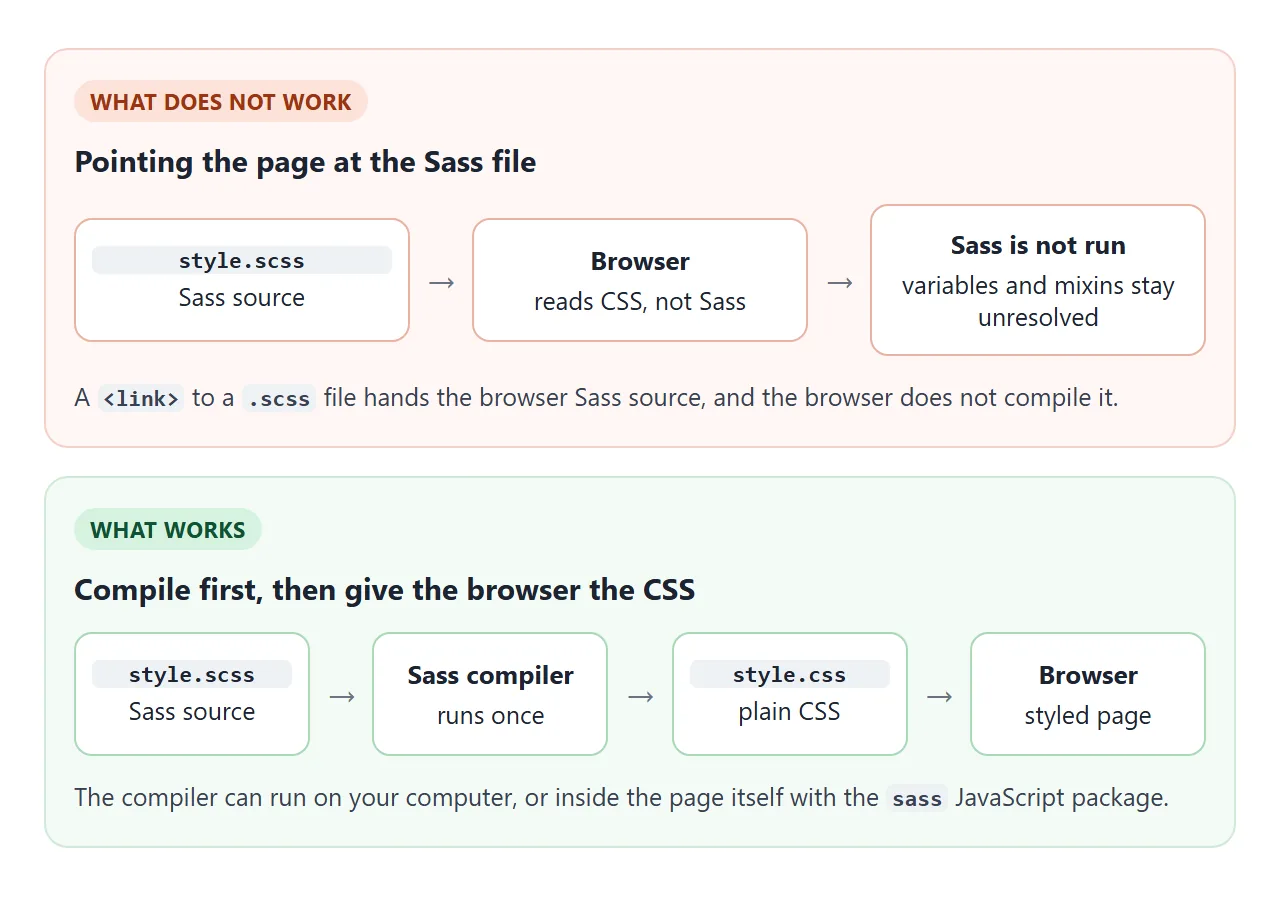
That is why this fails, however clean the Sass is:
<link rel="stylesheet" href="style.scss">
The link hands the browser Sass source. MDN makes the same point when it compares CSS nesting with Sass: nesting is parsed by the browser, while Sass is compiled before the browser sees it.
There are two syntaxes. SCSS is the popular one. With a few small exceptions it is a superset of CSS, so essentially all valid CSS is valid SCSS. The indented syntax is the original one, uses the .sass extension and drops braces and semicolons.
The live example reads SCSS because that is the default. To compile indented text, pass the option:
sass.compileString(text, { syntax: 'indented' });
Nesting is the feature most people reach for. Write one rule inside another and Sass joins the selectors for you. The & stands for the parent, so &:hover inside .card button compiles to .card button:hover.
Compile inside one HTML file
The sass package on npm is Dart Sass compiled to pure JavaScript. jsDelivr serves it, so one page can load it. Four steps:
- Keep the SCSS as a string or in a textarea.
- Add an import map, placed before the module script.
- Load the compiler with
import()and a pinned version. - Call
compileStringand putresult.cssin a<style>element.
<script type="importmap">
{ "imports": { "immutable": "https://cdn.jsdelivr.net/npm/immutable@5.1.5/dist/immutable.es.js" } }
</script>
<style id="live"></style>
<script type="module">
  const sass = await import('https://cdn.jsdelivr.net/npm/sass@1.105.1/sass.default.js');
  const result = sass.compileString('$c: teal; h1 { color: $c; }');
  document.getElementById('live').textContent = result.css;
</script>
The import map is needed because the compiler file imports a package named immutable by its bare name. An import map tells the browser which URL that name means, and it must be declared before any script that imports through it.
Version 1.105.1 was the latest release on jsDelivr on 1 October 2026. Keep the number in the URL so the page does not change when a newer release appears.
Two practical notes. The compiler file is about 5.7 MB uncompressed, so show a loading message while it arrives. And import() returns a promise that rejects when the network request fails, so wrap it in try and show a friendly line.
For smaller output, pass { style: 'compressed' } as the second argument. It writes the whole stylesheet on one line. The default is 'expanded'.
Compiling in the page is not the only choice. Which route fits depends on what the page is for.
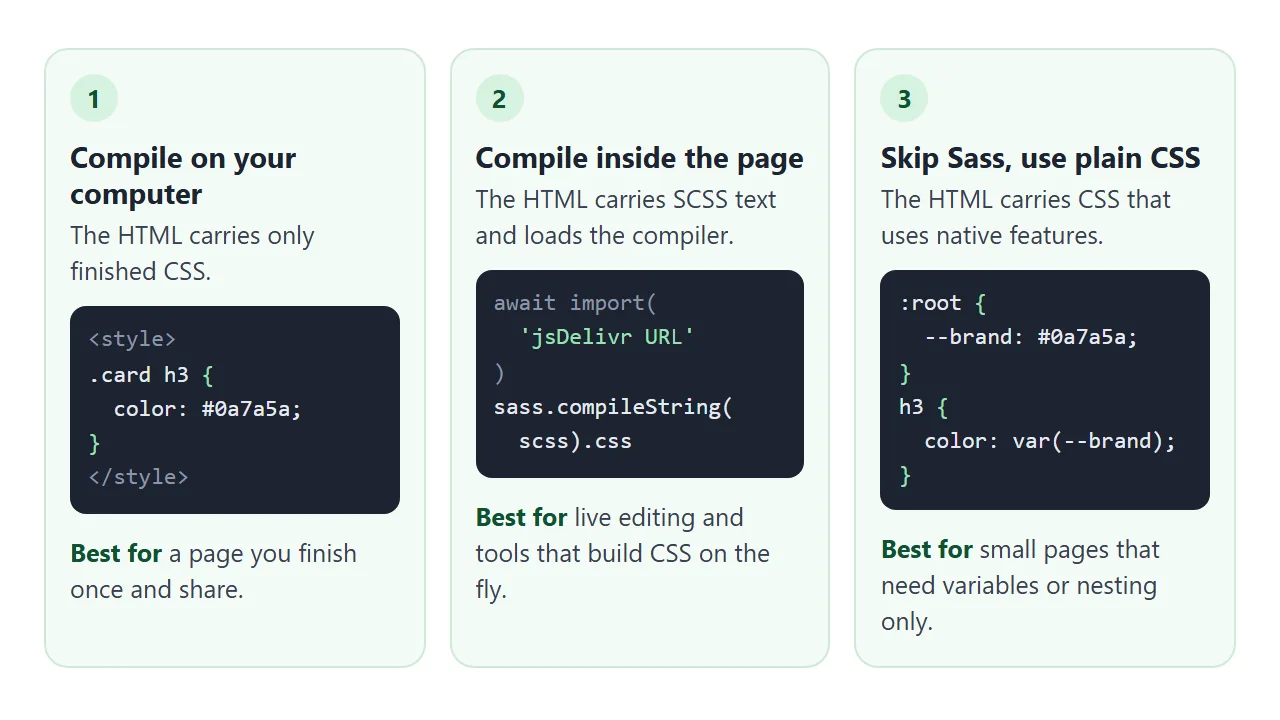
| Route | What the HTML carries | Pick it when |
|---|---|---|
| Compile ahead of time | Finished CSS in a style tag | The page is done and you share it once |
| Compile in the page | SCSS text plus the compiler | People edit styles live, or CSS is built on the fly |
| Plain CSS | CSS with variables and nesting | The page is small and needs nothing else |
The first route is the lightest for the reader, because nothing has to download or compile. See the style tag guide for where finished CSS goes.
Sass variables are not CSS variables
Both use a name for a value, and they behave differently. The Sass documentation puts it plainly: Sass variables are all compiled away by Sass, while CSS variables are included in the CSS output.
<!doctype html>
<html lang="en">
<head>
<meta charset="utf-8">
<meta name="viewport" content="width=device-width, initial-scale=1">
<title>Sass variable vs CSS variable</title>
<style>
  * { box-sizing: border-box; }
  body { margin: 0; padding: 12px; font-family: system-ui, sans-serif; background: #f4f5f7; color: #1d2330; }
  .row { display: grid; grid-template-columns: 1fr 1fr; gap: 12px; }
  @media (max-width: 560px) { .row { grid-template-columns: 1fr; } }
  .panel { background: #fff; border: 1px solid #e1e4ea; border-radius: 12px; padding: 12px; }
  .panel h2 { font-size: 15px; margin: 0 0 8px; }
  pre {
    margin: 0 0 10px; padding: 8px 10px; border-radius: 8px; background: #eef1f5;
    font: 12px/1.45 ui-monospace, Consolas, monospace; overflow-x: auto;
  }
  .lbl { font-size: 11px; font-weight: 700; letter-spacing: .4px; color: #5b6472; margin: 0 0 3px; }
  .swatch { height: 56px; border-radius: 10px; border: 3px solid; margin-bottom: 10px; }
  p { font-size: 13px; line-height: 1.45; margin: 6px 0 0; }
  label { display: block; font-size: 13px; margin-bottom: 6px; }
  input[type=range] { width: 100%; }

  /* Panel A: this is what the compiled Sass left behind, a plain value */
  .a-swatch { background: hsl(160, 60%, 90%); border-color: hsl(160, 50%, 40%); }

  /* Panel B: a CSS custom property, still alive in the browser */
  :root { --hue: 160; }
  .b-swatch { background: hsl(var(--hue) 60% 90%); border-color: hsl(var(--hue) 50% 40%); }
</style>
</head>
<body>
<div class="row">
  <div class="panel">
    <h2>Sass variable</h2>
    <div class="lbl">SCSS you write</div>
<pre>$hue: 160;
.box {
  background: hsl($hue 60% 90%);
}</pre>
    <div class="lbl">CSS the browser gets</div>
<pre>.box {
  background: hsl(160, 60%, 90%);
}</pre>
    <div class="swatch a-swatch"></div>
    <p>The name <b>$hue</b> is gone after compiling. Nothing on the page can change it.</p>
  </div>

  <div class="panel">
    <h2>CSS variable</h2>
    <div class="lbl">CSS you write (no compiler)</div>
<pre>:root { --hue: 160; }
.box {
  background: hsl(var(--hue) 60% 90%);
}</pre>
    <label for="hue">--hue: <b id="val">160</b></label>
    <input id="hue" type="range" min="0" max="360" value="160">
    <div class="swatch b-swatch" style="margin-top:10px"></div>
    <p>The browser keeps <b>--hue</b>, so a script can change it while the page runs.</p>
  </div>
</div>

<script>
  const slider = document.getElementById('hue');
  const val = document.getElementById('val');
  slider.addEventListener('input', () => {
    val.textContent = slider.value;
    // change the custom property; every rule that uses var(--hue) updates
    document.documentElement.style.setProperty('--hue', slider.value);
  });
</script>
</body>
</html>
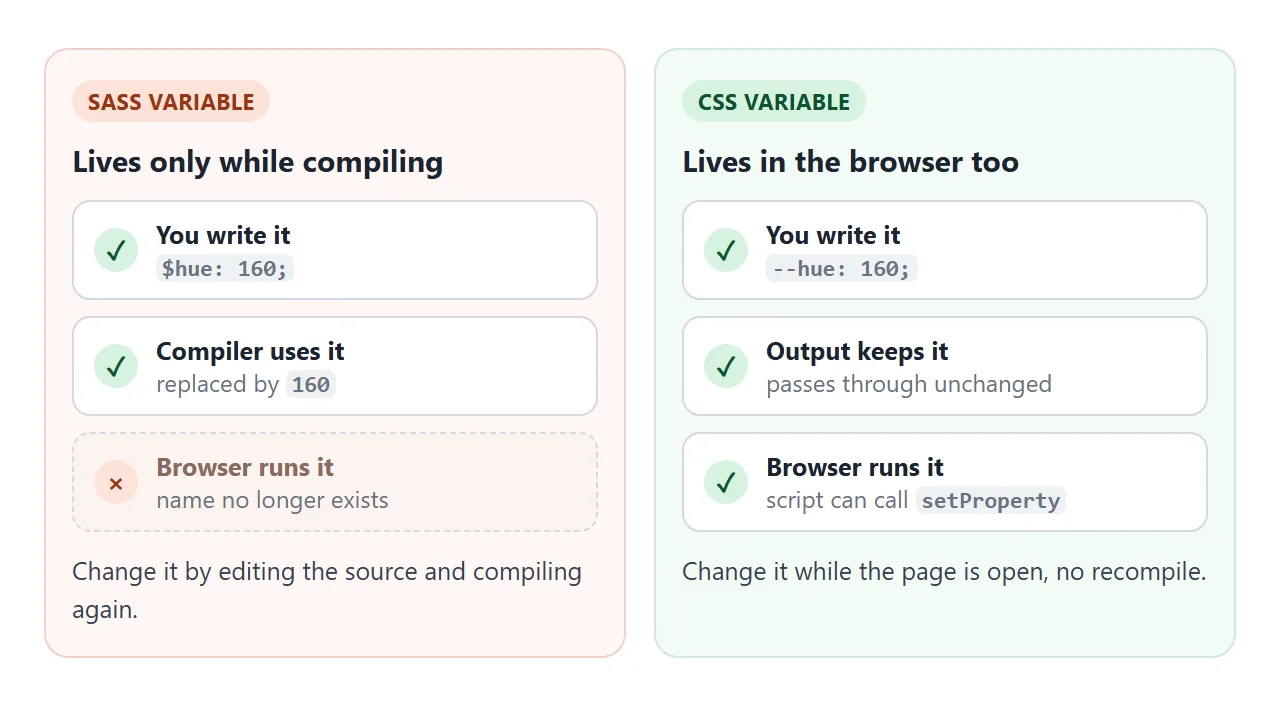
Sass $name |
CSS --name |
|
|---|---|---|
| In the compiled CSS | No, replaced by its value | Yes |
| Script can change it | No | Yes, with setProperty |
| Different value per element | No, one value at a time | Yes |
| Needs a compiler | Yes | No |
Use a Sass variable for a value fixed when you build. Use a CSS variable for a value that changes in the browser, such as a theme or a slider. CSS variables covers them in full.
Write modern Sass
Older tutorials use @import and global functions like darken(). As of Dart Sass 1.80.0 the @import rule is deprecated and will be removed in Dart Sass 3.0.0, and the Sass team discourages the global function aliases.
Load built-in modules with @use instead. All their URLs begin with sass:, and the functions sit behind a namespace:
@use "sass:color";
$brand: #0a7a5a;
.btn:hover { background: color.scale($brand, $lightness: -25%); }
A @use rule must come before any rules other than @forward. When you build the SCSS string in JavaScript, put it on the first line.
A mixin is a named group of declarations. Define it with @mixin, then pull it in with @include, with arguments if you like.
A finished example: a theme builder
This page keeps one SCSS template and fills two variables from the controls: the brand colour and the corner radius. Each change compiles the template again and swaps the CSS.
<!doctype html>
<html lang="en">
<head>
<meta charset="utf-8">
<meta name="viewport" content="width=device-width, initial-scale=1">
<title>Sass theme builder</title>
<script type="importmap">
{ "imports": { "immutable": "https://cdn.jsdelivr.net/npm/immutable@5.1.5/dist/immutable.es.js" } }
</script>
<style>
  * { box-sizing: border-box; }
  body { margin: 0; padding: 12px; font-family: system-ui, sans-serif; background: #f4f5f7; color: #1d2330; }
  .panel { background: #fff; border: 1px solid #e1e4ea; border-radius: 12px; padding: 12px; margin-bottom: 10px; }
  .ctl { display: flex; flex-wrap: wrap; align-items: center; gap: 8px 14px; }
  .ctl > span { font-size: 13px; font-weight: 600; }
  .sw { width: 34px; height: 34px; border-radius: 50%; border: 3px solid #fff; box-shadow: 0 0 0 1px #c5cad3; cursor: pointer; padding: 0; }
  .sw[aria-pressed="true"] { box-shadow: 0 0 0 3px #1d2330; }
  label { font-size: 13px; }
  input[type=range] { width: 130px; vertical-align: middle; }
  h2 { font-size: 13px; margin: 0 0 6px; text-transform: uppercase; letter-spacing: .4px; color: #5b6472; }
  textarea {
    width: 100%; height: 150px; padding: 8px 10px; border: 1px solid #d5d9e0; border-radius: 8px;
    font: 12px/1.45 ui-monospace, Consolas, monospace; background: #f8f9fb;
  }
  #copy { margin-top: 6px; padding: 7px 12px; border: 1px solid #c5cad3; border-radius: 8px; background: #fff; cursor: pointer; font-size: 13px; }
  #status { font-size: 13px; margin: 0 0 8px; min-height: 18px; color: #5b6472; }
  #status.err { color: #9a3412; }
</style>
<style id="live"></style>
</head>
<body>
<div class="panel">
  <div class="ctl">
    <span>Brand colour</span>
    <button class="sw" data-c="#0a7a5a" style="background:#0a7a5a" aria-label="Green" aria-pressed="true"></button>
    <button class="sw" data-c="#1d4ed8" style="background:#1d4ed8" aria-label="Blue" aria-pressed="false"></button>
    <button class="sw" data-c="#7e22ce" style="background:#7e22ce" aria-label="Purple" aria-pressed="false"></button>
    <button class="sw" data-c="#b4380f" style="background:#b4380f" aria-label="Orange" aria-pressed="false"></button>
    <label>Corner radius <input id="radius" type="range" min="0" max="24" value="12"> <b id="rv">12</b>px</label>
  </div>
</div>

<p id="status">Loading Sass from the CDN...</p>

<div class="panel">
  <h2>Preview</h2>
  <div class="card">
    <h3>Weekly plan</h3>
    <p>Three tasks left this week.</p>
    <button class="btn">Save</button>
    <button class="btn alt">Share</button>
  </div>
</div>

<div class="panel">
  <h2>Compiled CSS</h2>
  <textarea id="css" readonly spellcheck="false"></textarea>
  <button id="copy" type="button">Select all CSS</button>
</div>

<script type="module">
  const status = document.getElementById('status');
  const out = document.getElementById('css');
  const live = document.getElementById('live');
  const radius = document.getElementById('radius');
  const rv = document.getElementById('rv');
  let brand = '#0a7a5a';
  let sass;

  // The SCSS template. Only the two variables on top change.
  function scss() {
    return `@use "sass:color";
$brand: ${brand};
$radius: ${radius.value}px;

@mixin pill($bg) {
  background: $bg; color: #fff;
  border: 0; border-radius: $radius; padding: 9px 16px;
}

.card {
  padding: 16px; border: 2px solid $brand; border-radius: $radius;
  h3 { margin: 0 0 4px; color: $brand; }
  p { margin: 0 0 12px; }
  .btn {
    @include pill($brand);
    &:hover { background: color.scale($brand, $lightness: -25%); }
    &.alt { @include pill(color.scale($brand, $lightness: -50%)); }
  }
}`;
  }

  function run() {
    try {
      const css = sass.compileString(scss()).css;
      out.value = css;
      live.textContent = css;
      status.className = '';
      status.textContent = 'Recompiled from the controls above.';
    } catch (e) {
      status.className = 'err';
      status.textContent = 'Sass error: ' + e.message.split('\n')[0];
    }
  }

  document.querySelectorAll('.sw').forEach((b) => {
    b.addEventListener('click', () => {
      document.querySelectorAll('.sw').forEach((x) => x.setAttribute('aria-pressed', String(x === b)));
      brand = b.dataset.c;
      if (sass) run();
    });
  });
  radius.addEventListener('input', () => { rv.textContent = radius.value; if (sass) run(); });
  document.getElementById('copy').addEventListener('click', () => { out.focus(); out.select(); });

  try {
    sass = await import('https://cdn.jsdelivr.net/npm/sass@1.105.1/sass.default.js');
    run();
  } catch (e) {
    status.className = 'err';
    status.textContent = 'Could not load Sass (are you offline?).';
  }
</script>
</body>
</html>
- One template: the string holds the mixin, the nesting and
color.scale. Only the top two lines change. - Errors stay visible: a failed compile shows the first line of the message and keeps the last good CSS.
- Readable output: the compiled CSS sits in a textarea you can select and paste into a
<style>tag.
That last point is route one. Develop with live compiling, then ship the CSS if you want a lighter page. Minification covers shrinking it further.
When it does not work
| What you see | Cause | Fix |
|---|---|---|
| No styles, and DevTools lists style.scss | A link tag points at Sass source | Compile to CSS, or compile in the page |
| Console: Failed to resolve module specifier "immutable" | The import map is missing or comes late | Put the import map before the module script |
| Console: Failed to fetch dynamically imported module | A wrong URL or version, a blocked network, or offline | Check the URL, the version and the connection |
| Sass error: Undefined variable. | The variable is misspelled or defined later | Define the variable above its first use |
| Sass error: expected end of rule. | A closing brace is missing | Count the braces in the rule |
| Sass error: @use rules must be written before any other rules. | The @use line sits below a style rule | Move every @use to the top |
| Console shows Deprecation Warning for darken() | A global colour function | Use color.adjust or color.scale after @use |
| The card is unstyled for a moment | The compiler file is still loading | Show a loading line, or ship compiled CSS |
The first two console messages are the wording Chromium used when I tested. Other browsers phrase them differently. For a stylesheet that will not apply at all, see CSS not loading in HTML.
Share it as a link
A Sass page is easier to show than to describe. A screenshot cannot recompile, and an .html attachment may open as plain code on a phone. Sharing the page also shows people the live result, not just the CSS it produced.
To send the working version, paste the page into a NOS document and choose Create share link. HTML to link walks through it.
The page renders as written and its scripts run, so the compiler loads from jsDelivr and the people you send it to can edit the SCSS themselves. If you change the code later, the same link shows the new version.
If you would rather skip the compiler, Tailwind in one HTML file shows another way to style a page, with one script tag.