The RSVPs are in. You have spent two evenings moving names between tables.
Aunt June cannot sit with Uncle Walt. The college friends want to be together. Table 5 has nine people and eight chairs.
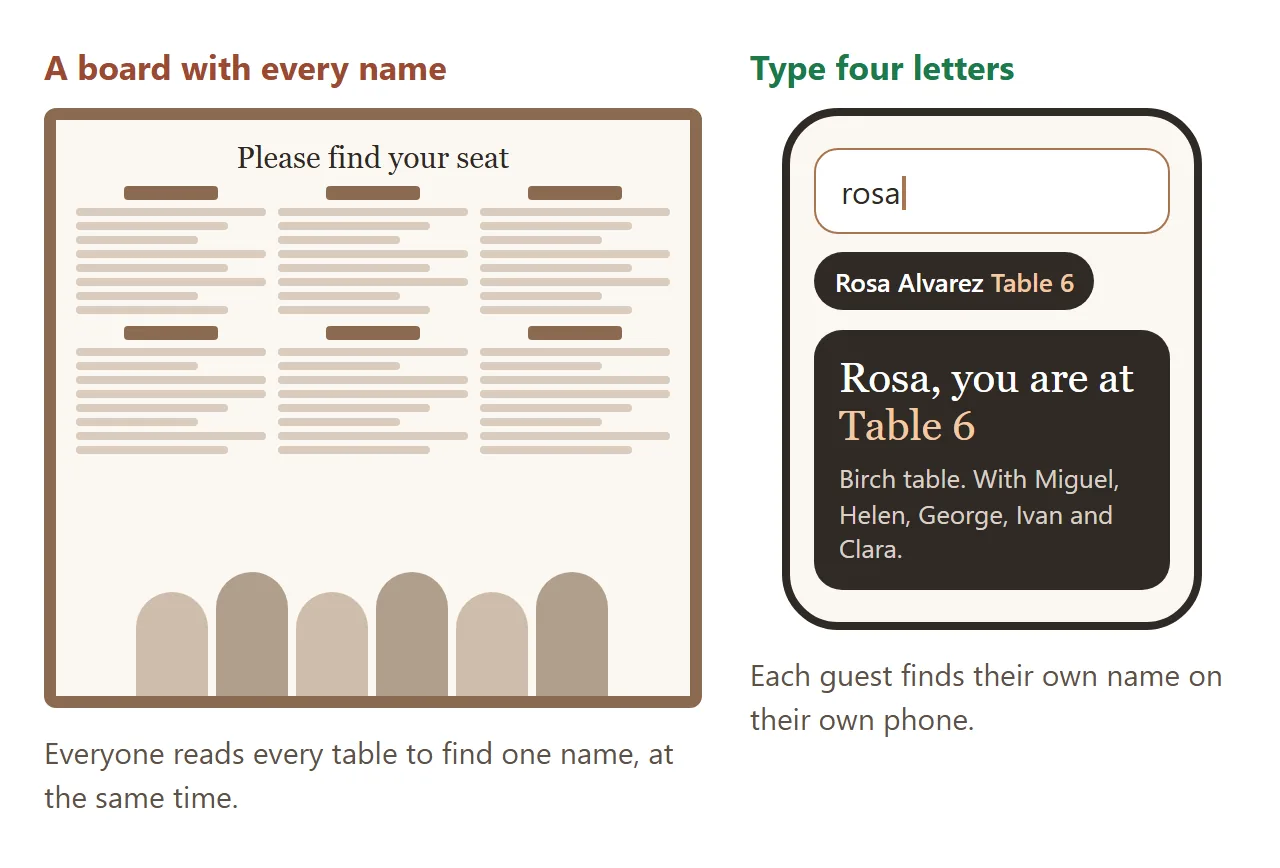
Then the day comes, and a hundred guests crowd one board at the door, all reading for one name.
These days people ask ChatGPT, Claude or Gemini for it and get a finished page in one reply. A seating chart maker that draws the tables from your guest list, with a search box so each guest finds their own seat.
Here is one for a wedding. Type a name, like "rosa" or "kim".
<!doctype html>
<html lang="en">
<head>
<meta charset="utf-8">
<meta name="viewport" content="width=device-width, initial-scale=1">
<title>Find your table</title>
<style>
* { box-sizing: border-box; }
body { margin: 0; background: radial-gradient(circle at 50% -10%, #fbe9dc, transparent 55%), #fbf7f1; color: #2f2a26; font-family: system-ui, -apple-system, "Segoe UI", sans-serif; }
.page { max-width: 680px; margin: 0 auto; padding: 22px 14px 28px; }
.hero { text-align: center; }
.k { font: 700 11px system-ui; letter-spacing: .22em; text-transform: uppercase; color: #a8754f; }
h1 { margin: 6px 0 2px; font: 400 30px/1.15 Georgia, "Times New Roman", serif; }
h1 em { color: #a8754f; }
.date { margin: 0 0 16px; font-size: 14px; color: #85786c; }
.search { position: relative; }
.search input { width: 100%; padding: 15px 16px 15px 46px; border: 1.5px solid #e4d6c8; border-radius: 16px; background: #fff; font: 17px system-ui; color: #2f2a26; box-shadow: 0 8px 22px rgba(120, 80, 40, .1); outline: none; }
.search input:focus { border-color: #a8754f; }
.search svg { position: absolute; left: 16px; top: 50%; transform: translateY(-50%); }
.hits { display: flex; flex-wrap: wrap; gap: 6px; margin: 10px 0 0; min-height: 4px; }
.hits button { border: 0; border-radius: 999px; padding: 8px 12px; background: #2f2a26; color: #fff; font: 600 14px system-ui; cursor: pointer; animation: in .25s both; }
.hits button span { color: #f2c9a4; margin-left: 4px; }
.hits p { margin: 0; font-size: 14px; color: #85786c; }
@keyframes in { from { opacity: 0; transform: translateY(4px); } }
.you { display: none; margin-top: 12px; padding: 14px 16px; border-radius: 18px; background: #2f2a26; color: #fff; animation: in .3s both; }
.you.show { display: block; }
.you .big { font: 400 26px/1.1 Georgia, serif; }
.you .big b { color: #f2c9a4; font-weight: 400; }
.you .with { margin-top: 6px; font-size: 14px; color: #d9cfc6; line-height: 1.45; }
.room { margin-top: 18px; padding: 16px 8px 18px; border-radius: 24px; background: #fff; box-shadow: 0 10px 30px rgba(120, 80, 40, .1); }
.room h2 { margin: 0 0 4px; text-align: center; font: 700 12px system-ui; letter-spacing: .14em; text-transform: uppercase; color: #a8754f; }
.stage { margin: 6px auto 12px; width: 60%; padding: 6px; border-radius: 10px; background: #f3e8dc; text-align: center; font: 600 12px system-ui; color: #85786c; }
.tables { display: grid; grid-template-columns: repeat(3, 1fr); gap: 6px 2px; }
.t { position: relative; aspect-ratio: 1; cursor: pointer; transition: opacity .3s, transform .3s; }
.t .top { position: absolute; inset: 24%; border-radius: 50%; background: radial-gradient(circle at 35% 30%, #fff, #f6ece2); border: 1.5px solid #e4d6c8; display: grid; place-items: center; text-align: center; transition: box-shadow .3s, border-color .3s; }
.t .num { font: 400 clamp(17px, 5vw, 24px)/1 Georgia, serif; }
.t .nm { font: 600 clamp(10px, 2.6vw, 12px) system-ui; color: #85786c; margin-top: 2px; }
.t .cnt { font: 600 10px system-ui; color: #b3a596; }
.t .cnt.over { color: #c2412d; }
.seat { position: absolute; width: 19%; aspect-ratio: 1; margin: -9.5% 0 0 -9.5%; border-radius: 50%; background: #efe3d6; color: #6d5f53; display: grid; place-items: center; font: 700 clamp(9px, 2.4vw, 11px) system-ui; transition: transform .3s, background .3s; }
.room.focus .t { opacity: .35; }
.room.focus .t.on { opacity: 1; transform: scale(1.04); }
.t.on .top { border-color: #a8754f; box-shadow: 0 0 0 6px rgba(168, 117, 79, .15); animation: glow 1.4s ease-in-out infinite; }
.seat.me { background: #a8754f; color: #fff; transform: scale(1.35); z-index: 1; }
@keyframes glow { 50% { box-shadow: 0 0 0 12px rgba(168, 117, 79, .06); } }
.list { margin-top: 18px; padding: 14px; border-radius: 16px; background: rgba(255, 255, 255, .7); font-size: 13px; color: #6d5f53; }
.list h3 { margin: 0 0 6px; font-size: 12px; letter-spacing: .1em; text-transform: uppercase; color: #a8754f; }
.list ul { margin: 0 0 12px; padding: 0; list-style: none; columns: 2; column-gap: 18px; line-height: 1.55; }
.list ul:last-child { margin-bottom: 0; }
@media (min-width: 560px) { .list ul { columns: 3; } }
</style>
</head>
<body>
<main class="page">
<section class="hero">
<div class="k">Welcome to the reception</div>
<h1>Priya <em>&</em> Sam</h1>
<p class="date">Saturday, June 13 · The Orchard Barn</p>
<div class="search">
<svg width="20" height="20" viewBox="0 0 24 24" fill="none" stroke="#a8754f" stroke-width="2.4" stroke-linecap="round"><circle cx="11" cy="11" r="7"/><path d="M20 20l-4-4"/></svg>
<input id="q" placeholder="Type your name to find your table" autocomplete="off" aria-label="Your name">
</div>
</section>
<div class="hits" id="hits"></div>
<div class="you" id="you"></div>
<section class="room" id="room">
<h2>Floor plan</h2>
<div class="stage">Dance floor & head table</div>
<div class="tables" id="tables"></div>
</section>
<section class="list">
<h3>Tables</h3>
<ul id="tablenames">
<li>1: Rosewood</li><li>2: Olive</li><li>3: Juniper</li><li>4: Maple</li><li>5: Willow</li><li>6: Birch</li>
</ul>
<h3>Guest list (name, table)</h3>
<ul id="guests">
<li>Anita Rao, table 1</li><li>Vikram Rao, table 1</li><li>Leela Rao, table 1</li><li>Dev Rao, table 1</li><li>Meera Iyer, table 1</li><li>Arjun Iyer, table 1</li>
<li>Grace Bennett, table 2</li><li>Tom Bennett, table 2</li><li>Nora Bennett, table 2</li><li>Paul Haines, table 2</li><li>Ruth Haines, table 2</li><li>Ellie Haines, table 2</li><li>Mark Ortiz, table 2</li>
<li>Jasmine Cole, table 3</li><li>Owen Park, table 3</li><li>Kiara Lopez, table 3</li><li>Ben Adler, table 3</li><li>Hana Sato, table 3</li><li>Luis Romero, table 3</li><li>Tess Walker, table 3</li><li>Ade Bello, table 3</li>
<li>Chris Moreau, table 4</li><li>Ivy Moreau, table 4</li><li>Sanjay Patel, table 4</li><li>Rita Patel, table 4</li><li>Daniel Kim, table 4</li><li>Lucy Kim, table 4</li>
<li>Fatima Noor, table 5</li><li>Ollie Grant, table 5</li><li>Mia Grant, table 5</li><li>Jonah Fields, table 5</li><li>Zoe Fields, table 5</li><li>Ravi Menon, table 5</li><li>Ana Silva, table 5</li>
<li>Rosa Alvarez, table 6</li><li>Miguel Alvarez, table 6</li><li>Helen Shaw, table 6</li><li>George Shaw, table 6</li><li>Ivan Petrov, table 6</li><li>Clara Petrov, table 6</li>
</ul>
</section>
</main>
<script>
const SEATS = 8;
const plain = (s) => s.normalize('NFD').replace(/[\u0300-\u036f]/g, '').toLowerCase();
const q = document.getElementById('q'), hits = document.getElementById('hits'), you = document.getElementById('you'), room = document.getElementById('room');
let guests = [], tables = [];
function read() {
// Everything comes from the two lists at the bottom of the page.
tables = [...document.querySelectorAll('#tablenames li')].map((li) => {
const m = li.textContent.trim().match(/^(\d+)\s*[:.-]?\s*(.*)$/);
return m ? { n: +m[1], name: m[2] } : null;
}).filter(Boolean);
guests = [...document.querySelectorAll('#guests li')].map((li) => {
const m = li.textContent.trim().match(/^(.+?),\s*table\s*(\d+)\s*$/i);
return m ? { name: m[1].trim(), t: +m[2] } : null;
}).filter(Boolean);
}
function draw() {
const box = document.getElementById('tables');
box.innerHTML = '';
tables.forEach((tb) => {
const at = guests.filter((g) => g.t === tb.n);
const el = document.createElement('div');
el.className = 't'; el.dataset.n = tb.n;
const over = at.length > SEATS;
el.innerHTML = '<div class="top"><div><div class="num">' + tb.n + '</div><div class="nm">' + esc(tb.name) + '</div><div class="cnt' + (over ? ' over' : '') + '">' + at.length + ' / ' + SEATS + '</div></div></div>';
const total = Math.max(SEATS, at.length);
for (let i = 0; i < total; i++) {
const a = (i / total) * Math.PI * 2 - Math.PI / 2;
const s = document.createElement('div');
s.className = 'seat';
s.style.left = 50 + Math.cos(a) * 39 + '%';
s.style.top = 50 + Math.sin(a) * 39 + '%';
if (at[i]) { s.textContent = at[i].name.split(/\s+/).map((w) => w[0]).join('').slice(0, 2); s.title = at[i].name; s.dataset.who = at[i].name; }
else { s.style.background = 'transparent'; s.style.border = '1.5px dashed #e4d6c8'; }
el.append(s);
}
el.onclick = () => focusTable(tb.n, null);
box.append(el);
});
}
function focusTable(n, who) {
room.classList.add('focus');
document.querySelectorAll('.t').forEach((t) => t.classList.toggle('on', +t.dataset.n === n));
document.querySelectorAll('.seat').forEach((s) => s.classList.toggle('me', !!who && s.dataset.who === who));
const tb = tables.find((t) => t.n === n) || { name: '' };
const at = guests.filter((g) => g.t === n).map((g) => g.name);
if (who) {
const others = at.filter((x) => x !== who).map((x) => x.split(' ')[0]);
const withText = others.length > 1 ? others.slice(0, -1).join(', ') + ' and ' + others[others.length - 1] : others.join('');
you.innerHTML = '<div class="big">' + esc(who.split(' ')[0]) + ', you are at <b>Table ' + n + '</b></div><div class="with">' + esc(tb.name) + ' table. With ' + esc(withText || 'no one else yet') + '.</div>';
} else {
you.innerHTML = '<div class="big"><b>Table ' + n + '</b> · ' + esc(tb.name) + '</div><div class="with">' + esc(at.join(', ') || 'No one yet') + '</div>';
}
you.classList.add('show');
document.querySelector('.t.on').scrollIntoView({ behavior: 'smooth', block: 'center' });
}
function search() {
const v = plain(q.value.trim());
hits.innerHTML = '';
if (v.length < 2) { room.classList.remove('focus'); document.querySelectorAll('.t').forEach((t) => t.classList.remove('on')); you.classList.remove('show'); return; }
const found = guests.filter((g) => plain(g.name).split(/\s+/).some((w) => w.startsWith(v)) || plain(g.name).startsWith(v)).slice(0, 8);
if (!found.length) { hits.innerHTML = '<p>No name starts with that. Try your first name.</p>'; return; }
found.forEach((g) => {
const b = document.createElement('button');
b.innerHTML = esc(g.name) + '<span>Table ' + g.t + '</span>';
b.onclick = () => focusTable(g.t, g.name);
hits.append(b);
});
if (found.length === 1) focusTable(found[0].t, found[0].name);
}
function esc(s) { return s.replace(/[&<>"]/g, (ch) => ({ '&': '&', '<': '<', '>': '>', '"': '"' }[ch])); }
q.addEventListener('input', search);
read(); draw();
</script>
</body>
</html>
Three things that make a seating chart easy to use
1. Search beats scanning. On a board, every guest reads every table to find one line. With a search box, they type four letters and the page shows one answer. Ask for it to match first names and last names.
2. Show who they sit with. "Table 6" is an answer. "Table 6, with Miguel, Helen and Clara" is a reason to smile on the way in. It also helps you spot a mistake before the guests do.
3. Count every table. A drawn table with eight chairs makes the ninth guest obvious. Ask the page to show how many people sit at each table and to flag one that is over.
Make it with AI
Open ChatGPT, Claude or Gemini and paste this. Change the words in capitals and paste your list at the end.
Make one complete HTML file: a seating chart maker.
Event: NAMES OR EVENT, DATE, PLACE
Tables: NUMBER OF TABLES, SEATS PER TABLE.
Draw the room from above, each table a circle with
its number, its name and its seats around it.
A search box at the top: as a guest types their
first or last name, show their table, highlight it
on the plan, and list who else sits there.
Show each table's count, red if it is over.
Show the table names and the guest list as plain
lists at the bottom, one line per guest written
"Name, table N", and read everything from those lists.
Rules: all CSS and JavaScript inside the file, no images
or fonts from other sites, nothing sent anywhere,
works on a phone. Use only my names, do not invent any.
Table names: PASTE ONE PER LINE
Guest list: PASTE "NAME, TABLE N" ONE PER LINE
"Read everything from those lists" matters most. It keeps every name and table number as plain text on the page, so moving a guest later is a one-character edit, not a new reply.
The same seating chart maker idea works in a classroom. This one seats a class from a name list. Tap a desk to keep that student in place, then shuffle the rest.
<!doctype html>
<html lang="en">
<head>
<meta charset="utf-8">
<meta name="viewport" content="width=device-width, initial-scale=1">
<title>Classroom seating chart</title>
<style>
* { box-sizing: border-box; }
body { margin: 0; background: #eef3f8; color: #1f2a37; font-family: system-ui, -apple-system, "Segoe UI", sans-serif; }
.page { max-width: 680px; margin: 0 auto; padding: 20px 12px 26px; }
.k { font: 700 11px system-ui; letter-spacing: .18em; text-transform: uppercase; color: #3a6fd8; }
h1 { margin: 4px 0 4px; font-size: 24px; }
.sub { margin: 0 0 12px; font-size: 14px; color: #5d6b7c; }
.bar { display: flex; flex-wrap: wrap; gap: 8px; align-items: center; }
.go { border: 0; border-radius: 12px; padding: 11px 14px; font: 700 14px system-ui; cursor: pointer; }
.shuffle { background: #3a6fd8; color: #fff; box-shadow: 0 3px 0 #2550a8; }
.shuffle:active { transform: translateY(2px); box-shadow: none; }
.flip { background: #fff; color: #1f2a37; box-shadow: 0 2px 0 #cfd8e3; }
.stat { margin-left: auto; font: 600 13px system-ui; color: #5d6b7c; }
.stat b { color: #1f2a37; }
.room { margin-top: 14px; padding: 14px 8px 16px; border-radius: 22px; background: #fff; box-shadow: 0 10px 28px rgba(30, 60, 110, .1); display: flex; flex-direction: column; gap: 12px; }
.room.teacher { flex-direction: column-reverse; }
.board { padding: 8px; border-radius: 10px; background: #24443a; color: #d6ecd9; text-align: center; font: 700 12px system-ui; letter-spacing: .12em; text-transform: uppercase; }
.grid { display: grid; grid-template-columns: 1fr 1fr 6px 1fr 1fr 6px 1fr 1fr; gap: 8px 4px; }
.desk { position: relative; min-height: 54px; border: 0; border-radius: 10px; background: linear-gradient(#fdf6e9, #f6e8cf); box-shadow: 0 3px 0 #e2cfaa; color: #3d3220; font: 700 clamp(11.5px, 3.2vw, 14px)/1.15 system-ui; padding: 6px 1px; cursor: pointer; text-align: center; overflow-wrap: anywhere; }
.desk.empty { background: #f3f5f8; box-shadow: none; border: 1.5px dashed #d3dae3; color: #9aa6b4; font-weight: 500; }
.desk.pin { background: linear-gradient(#e6efff, #d3e2ff); box-shadow: 0 3px 0 #a9c1f3; color: #1e3f86; }
.desk.pin::after { content: ""; position: absolute; top: 4px; right: 4px; width: 9px; height: 9px; border-radius: 50%; background: #3a6fd8; box-shadow: 0 0 0 2px #fff; }
.gap { visibility: hidden; }
.hint { margin: 10px 2px 0; font-size: 13px; color: #5d6b7c; }
.list { margin-top: 16px; padding: 12px 14px; border-radius: 14px; background: rgba(255, 255, 255, .75); font-size: 13px; color: #4b5869; }
.list h2 { margin: 0 0 6px; font-size: 12px; letter-spacing: .1em; text-transform: uppercase; color: #3a6fd8; }
.list ul { margin: 0; padding: 0; list-style: none; display: flex; flex-wrap: wrap; gap: 4px 12px; }
</style>
</head>
<body>
<main class="page">
<div class="k">Seating chart</div>
<h1>Room 12 · Period 3</h1>
<p class="sub">Names come from the class list below. Tap a desk to keep that student in place, then shuffle the rest.</p>
<div class="bar">
<button class="go shuffle" id="shuffle">Shuffle seats</button>
<button class="go flip" id="flip">Teacher's view</button>
<span class="stat" id="stat"></span>
</div>
<section class="room" id="room">
<div class="board" id="board">Front of the room</div>
<div class="grid" id="grid"></div>
</section>
<p class="hint">Blue desks stay put when you shuffle. Teacher's view turns the chart around so the front is at the bottom, the way you see the room from your desk.</p>
<section class="list">
<h2>Class list</h2>
<ul id="names">
<li>Aiden</li><li>Bella</li><li>Carlos</li><li>Dina</li><li>Eli</li><li>Farah</li>
<li>Gabe</li><li>Hannah</li><li>Isaac</li><li>Jada</li><li>Kenji</li><li>Lena</li>
<li>Marcus</li><li>Nadia</li><li>Omar</li><li>Priya</li><li>Quinn</li><li>Rosie</li>
<li>Sami</li><li>Tara</li><li>Umar</li><li>Violet</li>
</ul>
</section>
</main>
<script>
const DESKS = 24;
const grid = document.getElementById('grid');
let seats = []; // index = desk, value = name or ''
const pinned = new Set(); // desk indexes that stay put
function names() { return [...new Set([...document.querySelectorAll('#names li')].map((li) => li.textContent.trim()).filter(Boolean))]; }
function shuffle(a) { for (let i = a.length - 1; i > 0; i--) { const j = Math.floor(Math.random() * (i + 1)); [a[i], a[j]] = [a[j], a[i]]; } return a; }
function seat(animate) {
// Read the class list fresh each time, so an edited list is used straight away.
const list = names().slice(0, DESKS);
const keep = new Map();
pinned.forEach((d) => { if (seats[d] && list.includes(seats[d])) keep.set(d, seats[d]); else pinned.delete(d); });
const rest = shuffle(list.filter((n) => ![...keep.values()].includes(n)));
const free = shuffle([...Array(DESKS).keys()].filter((d) => !keep.has(d)));
const before = rects();
seats = Array(DESKS).fill('');
keep.forEach((n, d) => (seats[d] = n));
rest.forEach((n, i) => (seats[free[i]] = n));
render();
if (animate) fly(before);
}
function rects() {
const r = {};
grid.querySelectorAll('.desk').forEach((el) => { if (el.dataset.name) r[el.dataset.name] = el.getBoundingClientRect(); });
return r;
}
function fly(before) {
grid.querySelectorAll('.desk').forEach((el) => {
const b = before[el.dataset.name]; if (!b) return;
const a = el.getBoundingClientRect();
const dx = b.left - a.left, dy = b.top - a.top;
if (!dx && !dy) return;
el.animate([{ transform: 'translate(' + dx + 'px,' + dy + 'px) scale(1.06)', zIndex: 2 }, { transform: 'none' }], { duration: 650 + Math.random() * 250, easing: 'cubic-bezier(.2,.8,.2,1)' });
});
}
function render() {
grid.innerHTML = '';
const teacher = document.getElementById('room').classList.contains('teacher');
for (let p = 0; p < DESKS; p++) {
const d = teacher ? DESKS - 1 - p : p; // teacher's view is the same room turned around
if (p % 6 === 2 || p % 6 === 4) { const g = document.createElement('span'); g.className = 'gap'; grid.append(g); }
const b = document.createElement('button');
const n = seats[d];
b.className = 'desk' + (n ? '' : ' empty') + (pinned.has(d) ? ' pin' : '');
b.textContent = n || 'empty';
if (n) b.dataset.name = n;
b.onclick = () => { if (!seats[d]) return; pinned.has(d) ? pinned.delete(d) : pinned.add(d); render(); };
grid.append(b);
}
const count = seats.filter(Boolean).length;
document.getElementById('stat').innerHTML = '<b>' + count + '</b> students · <b>' + (DESKS - count) + '</b> empty · <b>' + pinned.size + '</b> kept';
}
document.getElementById('shuffle').onclick = () => seat(true);
document.getElementById('flip').onclick = (e) => {
const before = rects();
const t = document.getElementById('room').classList.toggle('teacher');
e.target.textContent = t ? "Students' view" : "Teacher's view";
document.getElementById('board').textContent = t ? 'Front of the room (you are here)' : 'Front of the room';
render(); fly(before);
};
seat(false);
</script>
</body>
</html>
Getting it to your guests
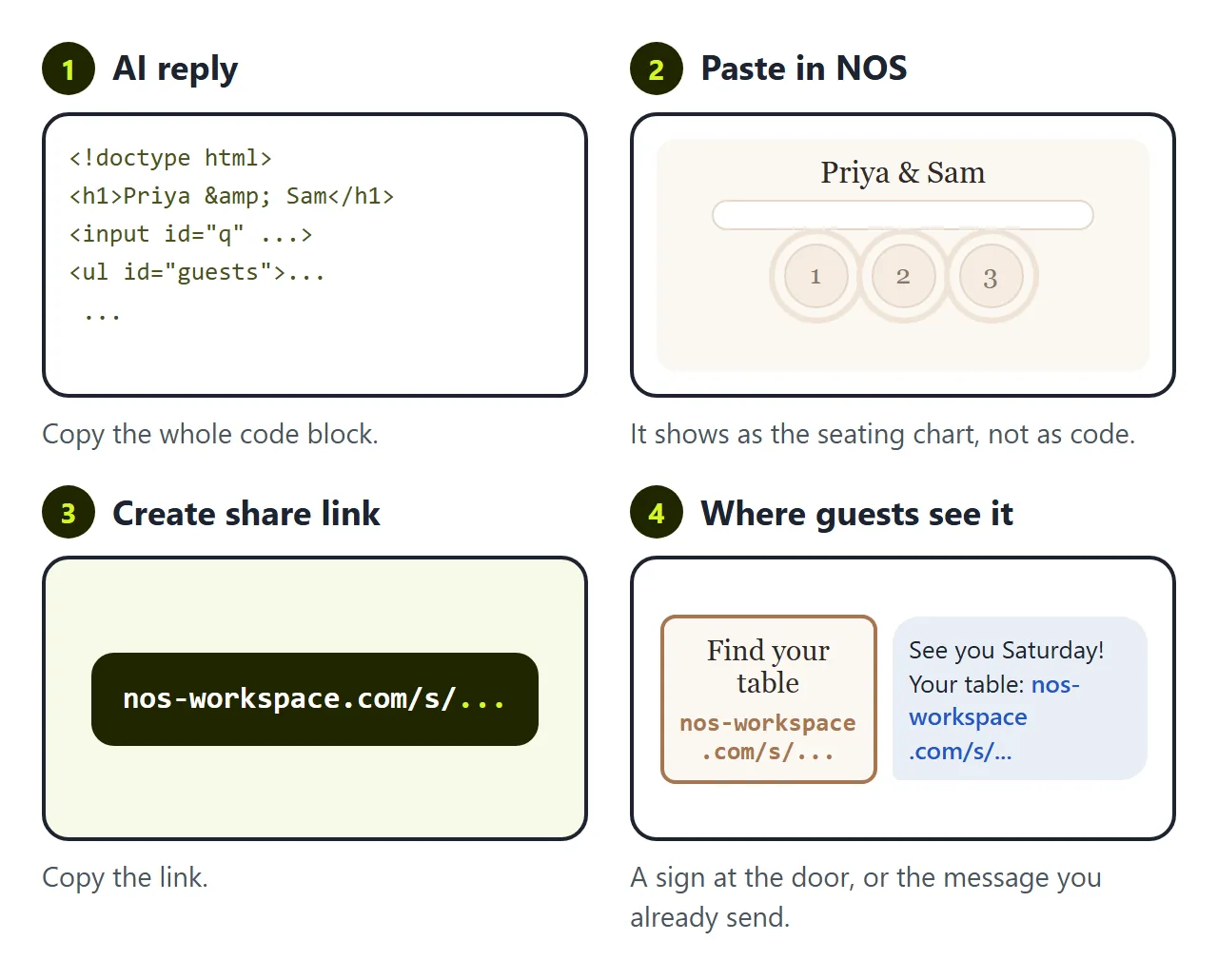
You have a seating chart maker of your own. The AI gave it to you as HTML code, though, and a guest at the door cannot do anything with code.
The first wall is getting the page onto a hundred phones. Attach the file to a message and on a phone it opens as a download or as a page of code. To be something a guest taps, the page has to live somewhere.
In NOS you paste the code into a document and it becomes the seating chart straight away. Choose Create share link. Put the link in the message you already send the week before, or on a small sign at the door with a QR code. Wedding invitation QR code covers the QR side.
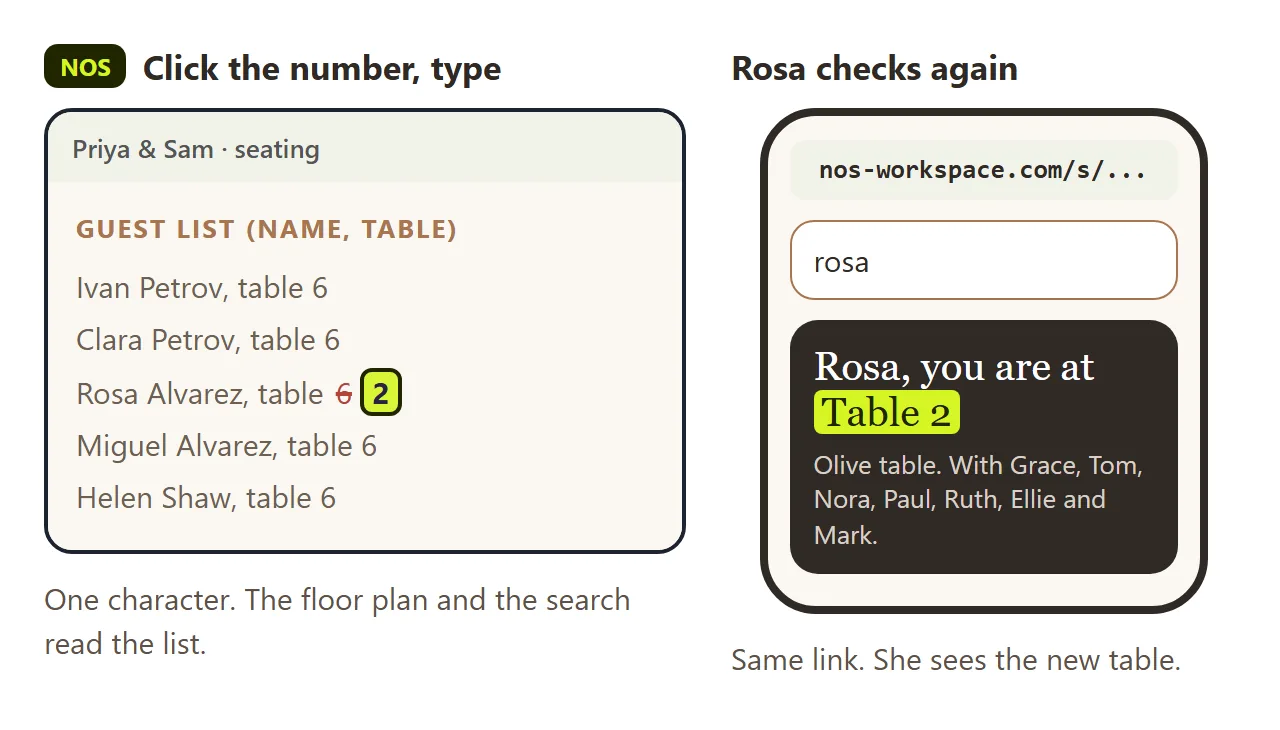
The second wall is the last-minute change. Rosa's plus-one cancels and she moves to table 2. Someone spells a name "Jonh". This happens the night before, and it happens more than once.
If you ask the AI again, you wait for a new reply. It often redraws the floor plan or changes the search while it is at it, so you check every table again. Then you have a new file and a new link, and half the guests already have the old one.
In NOS you click the guest's line in the list on the page and change the table number or fix the name. The link stays the same. Rosa searches again and sees table 2, and the floor plan shows her there.
Before you share it
- Search for five names, including someone with an accent and someone with two last names.
- Check every table count against your chairs.
- Leave out anything private. The page shows every guest's name and table to anyone with the link.
- Keep a printed list at the door for guests without a phone.
For the rest of the day's details in one place, see Share wedding details with guests. For the running order, see Wedding timeline template.