A wedding timeline template is a list of times where every row says what happens, where, and who is responsible. For the wedding party and vendors, the best form is one page at one link that opens on a phone, not a file each person keeps.
The situation is familiar: a dozen people need the same plan on the same Saturday, they use different apps, and the plan changes up to the last evening. Sending a file creates a dozen copies. One link keeps a single plan.
Try the example first. Tap a role to see only that person's rows, then use it as your starting point.
<!doctype html>
<html lang="en">
<head>
<meta charset="utf-8">
<meta name="viewport" content="width=device-width, initial-scale=1">
<title>Nora and Elias: day-of timeline</title>
<style>
  * { box-sizing: border-box; }
  body { margin: 0; font-family: system-ui, sans-serif; color: #26262b; background: #faf8f5; line-height: 1.4; }
  .wrap { max-width: 640px; margin: 0 auto; padding: 18px 16px 28px; }
  h1 { margin: 0; font-size: 22px; }
  .sub { margin: 4px 0 12px; color: #6b6b73; font-size: 14px; }
  .note { background: #fff4d6; border: 1px solid #ecd48a; border-radius: 8px; padding: 8px 10px; font-size: 13.5px; margin-bottom: 12px; }
  .chips { display: flex; flex-wrap: wrap; gap: 6px; margin-bottom: 14px; }
  .chips button { font: inherit; font-size: 13.5px; padding: 6px 12px; border-radius: 999px; border: 1px solid #cfc8bd; background: #fff; cursor: pointer; }
  .chips button[aria-pressed="true"] { background: #3b4a3f; color: #fff; border-color: #3b4a3f; }
  .tl { list-style: none; margin: 0; padding: 0 0 0 22px; border-left: 2px solid #ddd6ca; }
  .tl li { position: relative; padding: 0 0 16px 8px; }
  .tl li::before { content: ""; position: absolute; left: -31px; top: 5px; width: 12px; height: 12px; border-radius: 50%; background: #fff; border: 2px solid #8a9a8d; }
  .tl li.key::before { background: #3b4a3f; border-color: #3b4a3f; }
  .tl li[hidden] { display: none; }
  .when { font-weight: 700; font-size: 15px; font-variant-numeric: tabular-nums; }
  .what { font-weight: 600; }
  .where { color: #6b6b73; font-size: 13.5px; }
  .who { margin-top: 3px; }
  .who span { display: inline-block; font-size: 12px; background: #ece7de; border-radius: 4px; padding: 1px 6px; margin: 0 4px 2px 0; }
  .empty { color: #6b6b73; font-size: 14px; }
  @media print { .chips, .note { display: none; } body { background: #fff; } }
</style>
</head>
<body>
<div class="wrap">
  <h1>Nora and Elias: Saturday plan</h1>
  <p class="sub">Saturday 12 June 2027 · Harbour Hall (sample venue)</p>
  <div class="note"><b>Changed Friday 18:40:</b> ceremony now starts at 15:30 (was 15:00).</div>

  <div class="chips" id="chips">
    <button type="button" data-who="all" aria-pressed="true">Everyone</button>
    <button type="button" data-who="party" aria-pressed="false">Wedding party</button>
    <button type="button" data-who="photo" aria-pressed="false">Photographer</button>
    <button type="button" data-who="florist" aria-pressed="false">Florist</button>
    <button type="button" data-who="caterer" aria-pressed="false">Caterer</button>
    <button type="button" data-who="dj" aria-pressed="false">DJ</button>
  </div>

  <ol class="tl" id="tl">
    <li data-who="florist"><div class="when"><time datetime="09:00">9:00</time></div><div class="what">Flowers arrive, arch set up</div><div class="where">Garden terrace · side gate</div><div class="who"><span>Florist</span></div></li>
    <li data-who="party"><div class="when"><time datetime="10:00">10:00</time></div><div class="what">Hair and makeup start</div><div class="where">Bridal suite, 2nd floor</div><div class="who"><span>Wedding party</span></div></li>
    <li data-who="caterer"><div class="when"><time datetime="11:30">11:30</time></div><div class="what">Caterer load-in, kitchen set-up</div><div class="where">Service entrance</div><div class="who"><span>Caterer</span></div></li>
    <li data-who="dj"><div class="when"><time datetime="12:30">12:30</time></div><div class="what">Sound check</div><div class="where">Main hall</div><div class="who"><span>DJ</span></div></li>
    <li data-who="photo"><div class="when"><time datetime="13:00">13:00</time></div><div class="what">Detail shots: rings, shoes, invitations</div><div class="where">Bridal suite</div><div class="who"><span>Photographer</span></div></li>
    <li data-who="party"><div class="when"><time datetime="14:30">14:30</time></div><div class="what">Wedding party dressed, in the lobby</div><div class="where">Lobby</div><div class="who"><span>Wedding party</span></div></li>
    <li class="key" data-who="all"><div class="when"><time datetime="15:15">15:15</time></div><div class="what">Guests seated</div><div class="where">Garden terrace</div><div class="who"><span>Everyone</span></div></li>
    <li class="key" data-who="all"><div class="when"><time datetime="15:30">15:30</time></div><div class="what">Ceremony</div><div class="where">Garden terrace · about 25 minutes</div><div class="who"><span>Everyone</span></div></li>
    <li data-who="photo party"><div class="when"><time datetime="16:10">16:10</time></div><div class="what">Family photos, 20 minutes</div><div class="where">Beside the fountain</div><div class="who"><span>Photographer</span><span>Wedding party</span></div></li>
    <li data-who="caterer dj"><div class="when"><time datetime="17:00">17:00</time></div><div class="what">Cocktail hour</div><div class="where">Main hall</div><div class="who"><span>Caterer</span><span>DJ</span></div></li>
    <li class="key" data-who="all"><div class="when"><time datetime="18:30">18:30</time></div><div class="what">Dinner served</div><div class="where">Main hall</div><div class="who"><span>Everyone</span></div></li>
    <li data-who="party dj"><div class="when"><time datetime="19:30">19:30</time></div><div class="what">Toasts, three speakers</div><div class="where">Main hall</div><div class="who"><span>Wedding party</span><span>DJ</span></div></li>
    <li class="key" data-who="all"><div class="when"><time datetime="20:15">20:15</time></div><div class="what">First dance, then cake</div><div class="where">Main hall</div><div class="who"><span>Everyone</span></div></li>
    <li data-who="florist caterer dj photo"><div class="when"><time datetime="23:00">23:00</time></div><div class="what">Last song. Vendors load out by midnight</div><div class="where">Service entrance</div><div class="who"><span>Florist</span><span>Caterer</span><span>DJ</span><span>Photographer</span></div></li>
  </ol>
  <p class="empty" id="empty" hidden>Nothing listed for this group.</p>
</div>

<script>
  const chips = document.querySelectorAll('#chips button');
  const rows = document.querySelectorAll('#tl li');

  chips.forEach((chip) => {
    chip.addEventListener('click', () => {
      const who = chip.dataset.who;
      chips.forEach((c) => c.setAttribute('aria-pressed', String(c === chip)));
      // "Everyone" shows every row; other chips show rows tagged with that group
      rows.forEach((row) => {
        const tags = row.dataset.who.split(' ');
        row.hidden = who !== 'all' && !tags.includes(who) && !tags.includes('all');
      });
    });
  });
</script>
</body>
</html>
What goes on each row
Every row answers four questions. A florist should not have to read the whole page to find out when to arrive, and the best man should not have to guess where to stand.
- Time. Use a 24-hour clock or add am and pm everywhere. Mixing the two is how a 5 o'clock cocktail hour becomes a 5 am call.
- What. One short action, such as "Family photos, 20 minutes".
- Where. A room or a spot, written as text so it can be copied into a map app.
- Who. The role or the name that owns the row. A row with no owner is the one that gets missed.
Work backward from the moments that cannot move, such as the ceremony start, and add a buffer before each of them. Mark those rows so they stand out on a small screen.
In the markup, the list is an ordered list, because the order carries meaning, and each time sits in a time element with a machine-readable value in its datetime attribute.
Make it with AI
Ask ChatGPT, Claude or Gemini for the page, and give it your real rows. This prompt asks for the structure used in the example above.
Write one self-contained HTML file: a wedding day-of timeline.
Use an ordered list, one row per item, with a time element,
what happens, where, and who is responsible (role tags).
Add filter buttons by role that hide the other rows.
Put a "Changed" note at the top, a viewport meta tag,
print styles that hide the buttons, and a single column on phones.
No external images, fonts, forms or localStorage.

Date: Saturday 12 June 2027. Venue: (your venue)
Rows (time, what, where, who):
(paste your list here)
Then check the result before you use it.
- Times. They are in order and match your plan, with the same clock style on every row.
- Roles. The names on the buttons match the tags on the rows exactly, or a filter shows nothing.
- Complete file. A long answer can be cut off, so copy up to the closing html tag.
- Phone width. Open it narrow. The text should be readable without pinching.
Send it as a link
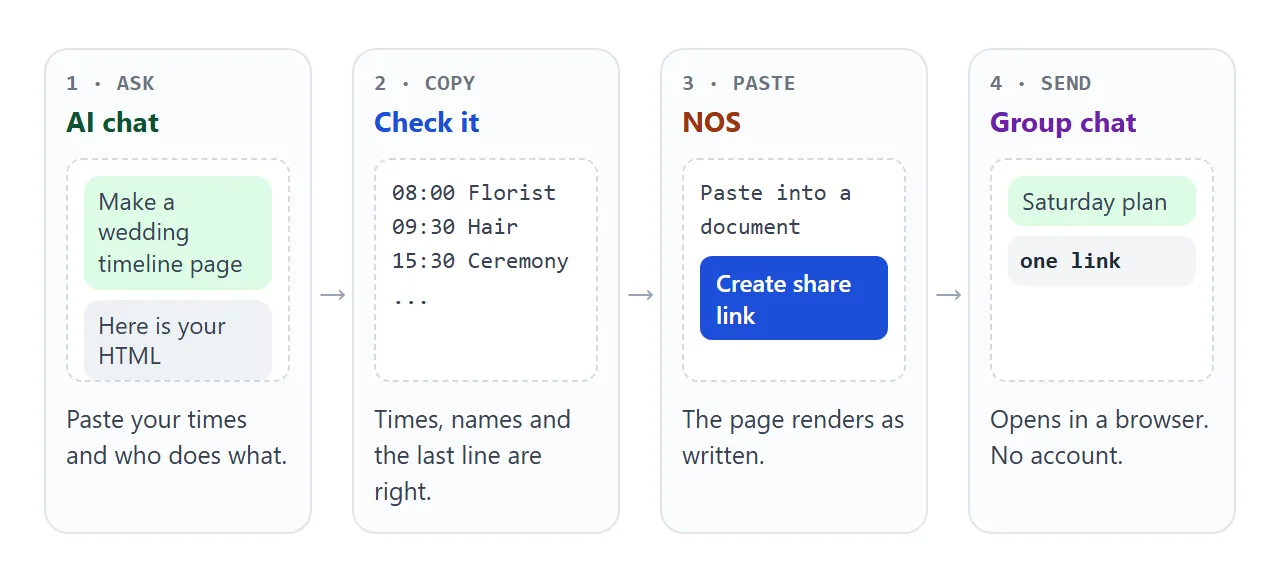
Paste the HTML into a NOS document. The page renders as written, and its script runs, so the role filter works. Then choose Share, then Share link, then Create share link. HTML to link walks through the same steps.
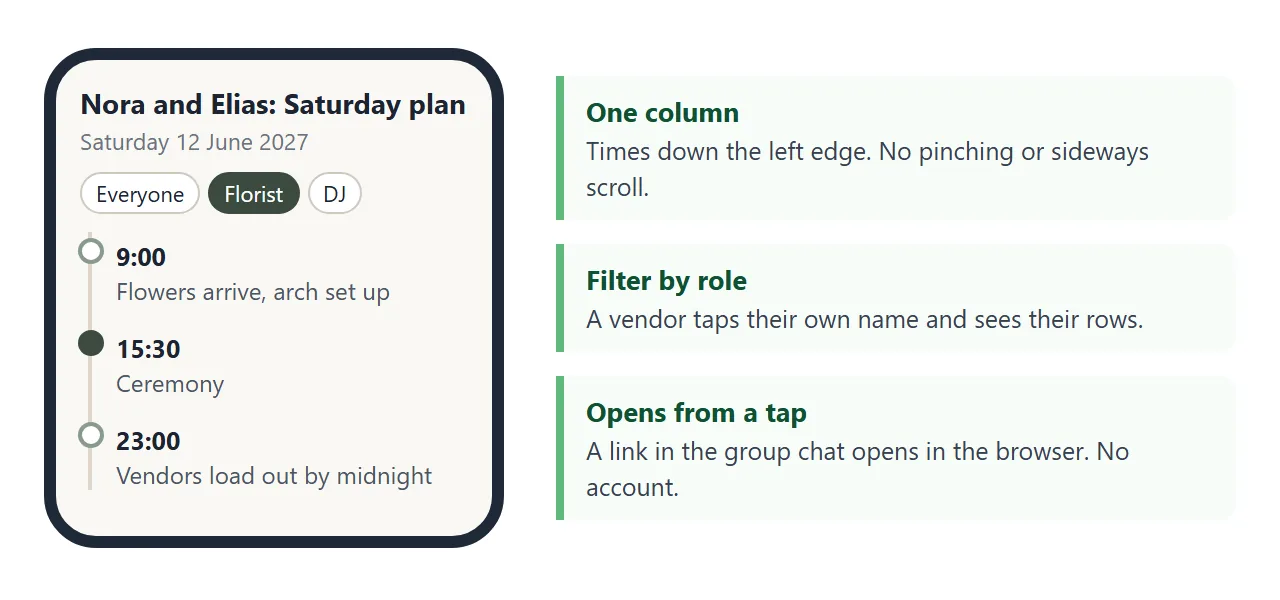
What the recipient sees: the page itself, opened in a browser, on a phone too. No account is needed, and they cannot edit it. When you change a time, you edit the document and the same link shows the new version.
Two limits to plan around. Images from other websites do not load, so use text or inline SVG for any decoration. A form on the page cannot send replies to a server, so collect RSVPs somewhere else.
A link works for anyone who has it, and it can be forwarded. Put vendor business numbers on the page. Leave out private numbers you would not want passed around.
Ways to share the timeline compared
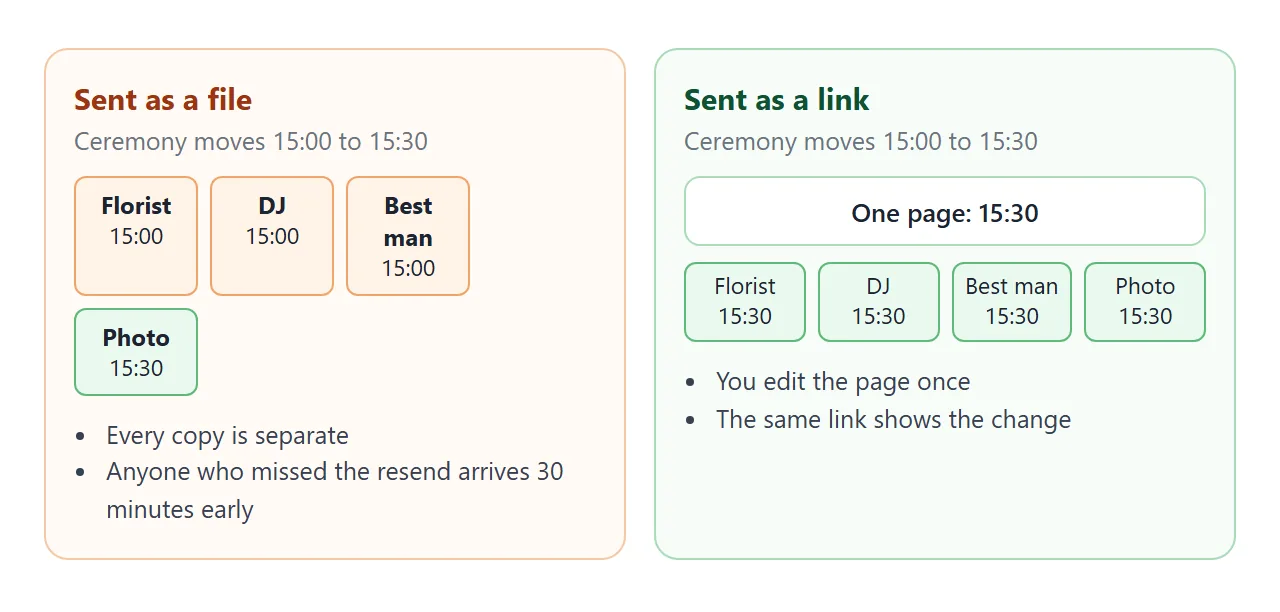
The choice matters most on the morning, when something has moved and half the group has not seen the news.
| Method | What each person holds | After a change | Good for |
|---|---|---|---|
| Attached file or PDF | Their own copy | Send it again and hope the old one is deleted | A record you keep |
| Screenshot in a chat | A picture | Post a new one | A quick reminder |
| Link to a page | The same page as everyone | Edit once, same link | Wedding party and vendors |
| Paper with a QR code | Paper that points to the link | Paper stays correct if the link does | Vendors at the venue |
For the paper version, see QR code to a link. For the same idea applied to a roadmap that keeps changing, see timeline to link.
Add a vendor call sheet
The day-of page says what happens. A second page can say who to call. Vendors want their arrival time, what they need on site, and a number that reaches a person.
<!doctype html>
<html lang="en">
<head>
<meta charset="utf-8">
<meta name="viewport" content="width=device-width, initial-scale=1">
<title>Vendor call sheet</title>
<style>
  * { box-sizing: border-box; }
  body { margin: 0; font-family: system-ui, sans-serif; color: #26262b; background: #faf8f5; line-height: 1.4; }
  .wrap { max-width: 720px; margin: 0 auto; padding: 18px 16px 28px; }
  h1 { margin: 0; font-size: 21px; }
  .sub { margin: 4px 0 14px; color: #6b6b73; font-size: 14px; }
  .count { font-weight: 600; margin-bottom: 10px; }
  table { width: 100%; border-collapse: collapse; background: #fff; border: 1px solid #ddd6ca; }
  th, td { text-align: left; padding: 9px 10px; border-bottom: 1px solid #eee8de; vertical-align: top; font-size: 14px; }
  th { background: #f1ede5; font-size: 12.5px; text-transform: uppercase; letter-spacing: .03em; color: #5d5d66; }
  td.t { font-weight: 700; font-variant-numeric: tabular-nums; white-space: nowrap; }
  a { color: #1f5f8b; }
  label { display: inline-flex; align-items: center; gap: 6px; cursor: pointer; }
  tr.ok td { background: #f2f8f2; }
  @media (max-width: 560px) {
    thead { display: none; }
    table, tbody, tr, td { display: block; width: 100%; }
    tr { border-bottom: 6px solid #faf8f5; padding: 6px 0; }
    td { border: 0; padding: 3px 12px; }
    td[data-l]::before { content: attr(data-l) ": "; color: #6b6b73; font-size: 12.5px; }
  }
</style>
</head>
<body>
<div class="wrap">
  <h1>Vendor call sheet</h1>
  <p class="sub">Saturday 12 June 2027 · Harbour Hall (sample venue). Tap a number to call.</p>
  <p class="count" id="count">0 of 5 confirmed for Saturday</p>

  <table>
    <thead><tr><th>Arrives</th><th>Vendor</th><th>Needs</th><th>Call</th><th>Confirmed</th></tr></thead>
    <tbody id="rows">
      <tr><td class="t" data-l="Arrives">9:00</td><td data-l="Vendor">Lark and Stem (florist)</td><td data-l="Needs">Side gate open, power at the arch</td><td data-l="Call"><a href="tel:+15550100">555-0100</a></td><td><label><input type="checkbox"> Confirmed</label></td></tr>
      <tr><td class="t" data-l="Arrives">11:30</td><td data-l="Vendor">Table Nine (caterer)</td><td data-l="Needs">Service entrance, kitchen from 12:00</td><td data-l="Call"><a href="tel:+15550101">555-0101</a></td><td><label><input type="checkbox"> Confirmed</label></td></tr>
      <tr><td class="t" data-l="Arrives">12:30</td><td data-l="Vendor">Blue Door Sound (DJ)</td><td data-l="Needs">Two sockets by the stage</td><td data-l="Call"><a href="tel:+15550102">555-0102</a></td><td><label><input type="checkbox"> Confirmed</label></td></tr>
      <tr><td class="t" data-l="Arrives">13:00</td><td data-l="Vendor">Fern Street Photo</td><td data-l="Needs">Bridal suite access, shot list</td><td data-l="Call"><a href="tel:+15550103">555-0103</a></td><td><label><input type="checkbox"> Confirmed</label></td></tr>
      <tr><td class="t" data-l="Arrives">14:00</td><td data-l="Vendor">Harbour Hall (venue)</td><td data-l="Needs">Lobby unlocked, chairs set for 80</td><td data-l="Call"><a href="tel:+15550104">555-0104</a></td><td><label><input type="checkbox"> Confirmed</label></td></tr>
    </tbody>
  </table>
</div>

<script>
  const boxes = document.querySelectorAll('#rows input');
  const count = document.getElementById('count');

  function update() {
    let n = 0;
    boxes.forEach((box) => {
      box.closest('tr').classList.toggle('ok', box.checked);
      if (box.checked) n++;
    });
    count.textContent = n + ' of ' + boxes.length + ' confirmed for Saturday';
  }

  boxes.forEach((box) => box.addEventListener('change', update));
</script>
</body>
</html>
A telephone link such as the ones in this sheet behaves according to the device: a phone can dial the number, and other devices may offer another action, such as saving it. The confirmed counter in this box does not keep its state here.
In your own NOS document, ticks you make as the owner in View mode are saved. Ticks a visitor makes are not saved. That suits a sheet where you confirm each vendor yourself.
Keep it right on the day
Three habits keep the page trustworthy.
- Say what changed. Put a "Changed Friday 18:40" line at the top, in the same words you use in the chat message.
- Test it on a phone. Open the link on a different phone from the one you built it on. The page needs the viewport meta tag, covered in viewport meta tag.
- Keep a paper copy. Printing the page uses the browser's print command, and a print style sheet can drop the buttons.
For the invitation side of the same event, see wedding invitation HTML.
When it does not work
| Symptom | Cause | Fix |
|---|---|---|
| A role button shows an empty list | The button name and the row tags differ in spelling | Make them identical, including capital letters |
| The page is tiny on a phone | The viewport meta tag is missing | Add the viewport line from the prompt |
| A picture is missing | It points to another website | Replace it with text or inline SVG |
| Someone still has the old time | They saved a screenshot or a file | Tell them to use the link only |
| Replies from a form never arrive | A form on the page cannot send to a server | Collect replies in another tool |
| The page cuts off at the bottom | The AI answer was truncated | Ask for the full file and copy it to the closing html tag |