An AI wedding website is one HTML page that a chat assistant such as ChatGPT, Claude or Gemini writes from the facts you give it. You check the page, paste it into NOS, and send guests a single link.
If you have been asking how to make a digital wedding invitation card without hiring a designer or learning a site builder, this is a short route. Here is a finished example to try.
<!doctype html>
<html lang="en">
<head>
<meta charset="utf-8">
<meta name="viewport" content="width=device-width, initial-scale=1">
<title>Mira and Jonas, 11 September 2027</title>
<style>
* { box-sizing: border-box; }
body {
margin: 0; background: #eef3ee; color: #25302a;
font-family: Georgia, "Times New Roman", serif; line-height: 1.55;
}
.wrap { max-width: 560px; margin: 0 auto; padding: 0 16px 36px; }
header { text-align: center; padding: 28px 0 14px; }
header svg { width: 84px; height: 36px; }
h1 { font-size: 2rem; font-weight: 400; margin: 6px 0 2px; }
.date { margin: 0; font-size: 1.1rem; color: #4d5f54; }
.place { margin: 2px 0 0; font: 600 .8rem system-ui, sans-serif; letter-spacing: 1.2px; text-transform: uppercase; color: #5f7a68; }
nav { display: flex; gap: 6px; margin: 12px 0 14px; background: #dfe8e0; padding: 5px; border-radius: 12px; }
nav button {
flex: 1; border: 0; background: transparent; padding: 10px 4px; border-radius: 8px;
font: 600 .9rem system-ui, sans-serif; color: #3d5245; cursor: pointer;
}
nav button[aria-selected="true"] { background: #fff; color: #1f3a2a; box-shadow: 0 1px 3px rgba(0, 0, 0, .12); }
nav button:focus-visible { outline: 3px solid #5f7a68; outline-offset: 1px; }
.panel { background: #fff; border-radius: 14px; padding: 18px; box-shadow: 0 1px 4px rgba(30, 50, 35, .08); }
.panel[hidden] { display: none; }
h2 { font: 700 .78rem system-ui, sans-serif; letter-spacing: 1.4px; text-transform: uppercase; color: #5f7a68; margin: 0 0 8px; }
.panel p { margin: 0 0 10px; }
.big { font-size: 1.2rem; }
.btn {
display: inline-block; padding: 10px 16px; border-radius: 8px; background: #3f6b4f; color: #fff;
text-decoration: none; font: 600 .95rem system-ui, sans-serif;
}
ul.times { list-style: none; margin: 0; padding: 0; }
ul.times li { display: flex; gap: 14px; padding: 8px 0; border-top: 1px solid #e3ebe4; }
ul.times li:first-child { border-top: 0; }
ul.times b { flex: 0 0 74px; font: 700 .95rem system-ui, sans-serif; }
details { border-top: 1px solid #e3ebe4; padding: 9px 0; }
details:first-of-type { border-top: 0; }
summary { cursor: pointer; font-weight: 700; }
details p { margin: 6px 0 0; color: #42524a; }
.note { margin-top: 14px; padding: 10px 12px; background: #f1f6f1; border-radius: 8px; font: .9rem system-ui, sans-serif; color: #3d5245; }
</style>
</head>
<body>
<div class="wrap">
<header>
<svg viewBox="0 0 84 36" aria-hidden="true">
<path d="M8 28 C 20 4, 34 4, 42 18 C 50 4, 64 4, 76 28" fill="none" stroke="#5f7a68" stroke-width="2.5" stroke-linecap="round"/>
<circle cx="42" cy="22" r="4" fill="#c9a24a"/>
</svg>
<h1>Mira & Jonas</h1>
<p class="date">Saturday 11 September 2027</p>
<p class="place">Alder Hall, Linden Bay</p>
</header>
<nav role="tablist" aria-label="Wedding site sections">
<button role="tab" aria-selected="true" aria-controls="p-home" id="t-home">Home</button>
<button role="tab" aria-selected="false" aria-controls="p-day" id="t-day">The day</button>
<button role="tab" aria-selected="false" aria-controls="p-trip" id="t-trip">Getting here</button>
<button role="tab" aria-selected="false" aria-controls="p-qa" id="t-qa">Q&A</button>
</nav>
<section class="panel" id="p-home" role="tabpanel" aria-labelledby="t-home">
<h2>Welcome</h2>
<p class="big">We are getting married, and we would love you to be there.</p>
<p>We met on a ferry that was late, and we have been arguing happily about timetables ever since. This page has everything you need for the day. Tap the tabs above.</p>
<p>Please tell us by 1 August 2027 if you can come, by messaging either of us.</p>
</section>
<section class="panel" id="p-day" role="tabpanel" aria-labelledby="t-day" hidden>
<h2>The day</h2>
<ul class="times">
<li><b>1:30 pm</b> Guests arrive, welcome drinks</li>
<li><b>2:00 pm</b> Ceremony in the hall</li>
<li><b>3:00 pm</b> Photos and lawn games</li>
<li><b>5:00 pm</b> Dinner</li>
<li><b>7:30 pm</b> Speeches, then dancing</li>
<li><b>11:00 pm</b> Last song</li>
</ul>
</section>
<section class="panel" id="p-trip" role="tabpanel" aria-labelledby="t-trip" hidden>
<h2>Getting here</h2>
<p><b>Alder Hall</b><br>4 Quarry Road, Linden Bay</p>
<p><a class="btn" href="https://www.google.com/maps/search/?api=1&query=Alder+Hall+4+Quarry+Road+Linden+Bay" target="_blank" rel="noopener">Open in maps</a></p>
<details open>
<summary>Parking</summary>
<p>Free parking in the gravel yard. A marshal will wave you in from 1:00 pm.</p>
</details>
<details>
<summary>Where to stay</summary>
<p>The Linden Bay Inn is a short walk away. Mention the wedding when you book.</p>
</details>
</section>
<section class="panel" id="p-qa" role="tabpanel" aria-labelledby="t-qa" hidden>
<h2>Questions</h2>
<details>
<summary>What should I wear?</summary>
<p>Smart, and comfortable shoes for the lawn.</p>
</details>
<details>
<summary>Can I bring my children?</summary>
<p>Yes, children are welcome all day.</p>
</details>
<details>
<summary>Will there be a vegetarian option?</summary>
<p>Yes. Tell us any food needs when you reply.</p>
</details>
<p class="note">Anything else? Message Mira or Jonas.</p>
</section>
</div>
<script>
// Show one panel at a time; the clicked tab is marked selected
const tabs = document.querySelectorAll('[role="tab"]');
const panels = document.querySelectorAll('[role="tabpanel"]');
tabs.forEach((tab, i) => {
tab.addEventListener('click', () => {
tabs.forEach((t, j) => {
t.setAttribute('aria-selected', j === i ? 'true' : 'false');
panels[j].hidden = j !== i;
});
});
});
</script>
</body>
</html>
The names, venue and times are invented. The tabs are a few lines of JavaScript, and they work on the shared link too. The map button and the folding answers need no extra tools.
What the AI does and what you do
The AI is good at the part that takes an evening: wording, layout and a design that fits a phone. It is not a source of facts about your wedding.
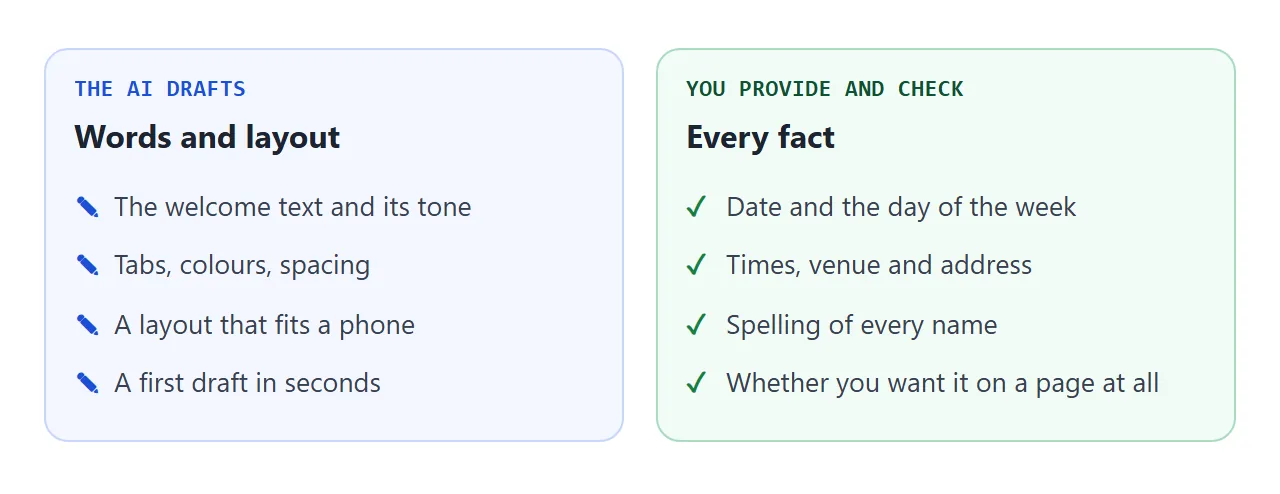
OpenAI's help says ChatGPT can sound confident when it is wrong, and it suggests checking important information. A wrong date or a swapped time on a wedding page reaches every guest, so the facts are yours to supply and to check.
Make it with AI
Collect the facts first, then paste them into this prompt in ChatGPT, Claude or Gemini. Replace the words in capitals.
Write one self-contained HTML file for a wedding website.
Names: NAME and NAME. Date: DAY, DATE, YEAR.
Venue: VENUE NAME, FULL ADDRESS.
Schedule: TIME - WHAT HAPPENS (one line each).
Notes: parking, dress code, children, where to stay.
Layout: tabs for Home, The day, Getting here and Q&A.
One column, readable on a phone, with the viewport meta tag.
Use only the facts above. Do not invent times, names or addresses.
Under the venue, add a button that links to a Google Maps
search URL for the address. Show the answers with details and summary.
No external images, no iframes, no libraries.
Decorate with CSS or inline SVG only. Return only the code.
Prefer a form? This one writes the same prompt from your answers, and it names the day of the week for your date.
<!doctype html>
<html lang="en">
<head>
<meta charset="utf-8">
<meta name="viewport" content="width=device-width, initial-scale=1">
<title>Wedding site prompt builder</title>
<style>
  * { box-sizing: border-box; }
  body { margin: 0; padding: 16px; background: #f7f7f4; color: #222; font: 15px/1.5 system-ui, "Segoe UI", sans-serif; }
  .wrap { max-width: 600px; margin: 0 auto; }
  .lead { margin: 0 0 14px; color: #555; font-size: .92rem; }
  form { display: grid; gap: 10px; }
  .two { display: grid; grid-template-columns: 1fr 1fr; gap: 10px; }
  label { display: block; font-size: .8rem; font-weight: 600; color: #444; }
  input, textarea {
    width: 100%; margin-top: 3px; padding: 9px 10px; font: inherit; color: #222;
    border: 1px solid #c9cdc6; border-radius: 8px; background: #fff;
  }
  textarea { min-height: 96px; resize: vertical; }
  button {
    padding: 11px 16px; border: 0; border-radius: 8px; background: #3f6b4f; color: #fff;
    font: 600 .95rem system-ui, sans-serif; cursor: pointer; white-space: nowrap;
  }
  button:focus-visible, input:focus-visible, textarea:focus-visible { outline: 3px solid #5f7a68; outline-offset: 1px; }
  .day { margin: 14px 0 6px; padding: 10px 12px; border-radius: 8px; background: #eaf3ec; border: 1px solid #b9d6c1; font-weight: 600; }
  .day.warn { background: #fff4e5; border-color: #f0c78a; }
  #out { min-height: 262px; font: 12.5px/1.45 ui-monospace, Consolas, monospace; }
  .row { display: flex; gap: 10px; align-items: center; margin-top: 8px; }
  #msg { font-size: .85rem; color: #3f6b4f; }
</style>
</head>
<body>
<div class="wrap">
  <p class="lead">Fill in your facts. The page writes the prompt and names the day of the week for your date. Nothing is sent anywhere.</p>

  <form id="f">
    <div class="two">
      <label>First name <input name="n1" value="Mira"></label>
      <label>Second name <input name="n2" value="Jonas"></label>
    </div>
    <div class="two">
      <label>Date <input type="date" name="date" value="2027-09-11"></label>
      <label>Venue name <input name="venue" value="Alder Hall"></label>
    </div>
    <label>Venue address <input name="addr" value="4 Quarry Road, Linden Bay"></label>
    <label>Schedule, one line each
      <textarea name="sched">1:30 pm - Guests arrive
2:00 pm - Ceremony
5:00 pm - Dinner
7:30 pm - Speeches and dancing</textarea>
    </label>
    <label>Notes guests ask about
      <input name="notes" value="parking, dress code, children, where to stay">
    </label>
    <button type="submit">Write my prompt</button>
  </form>

  <div class="day" id="day" aria-live="polite"></div>

  <label>Your prompt
    <textarea id="out" readonly></textarea>
  </label>
  <div class="row">
    <button type="button" id="copy">Copy prompt</button>
    <span id="msg" aria-live="polite"></span>
  </div>
</div>

<script>
  const form = document.getElementById('f');
  const out = document.getElementById('out');
  const day = document.getElementById('day');
  const msg = document.getElementById('msg');

  function build() {
    const f = new FormData(form);
    const [y, m, d] = String(f.get('date')).split('-').map(Number);
    let when = 'DATE';
    day.className = 'day warn';
    if (y) {
      const dt = new Date(y, m - 1, d);  // local date, no time zone shift
      when = dt.toLocaleDateString('en-GB', { weekday: 'long', day: 'numeric', month: 'long', year: 'numeric' });
      day.className = 'day';
      day.textContent = 'Your date is a ' + dt.toLocaleDateString('en-GB', { weekday: 'long' }) + '. Check the AI uses the same day.';
    } else {
      day.textContent = 'Pick a date so the page can name the day of the week.';
    }
    out.value =
      'Write one self-contained HTML file for a wedding website.\n' +
      'Names: ' + f.get('n1') + ' and ' + f.get('n2') + '. Date: ' + when + '.\n' +
      'Venue: ' + f.get('venue') + ', ' + f.get('addr') + '.\n' +
      'Schedule:\n' + f.get('sched') + '\n' +
      'Notes: ' + f.get('notes') + '.\n' +
      'Layout: tabs for Home, The day, Getting here and Q&A, one column,\n' +
      'readable on a phone, include the viewport meta tag.\n' +
      'Use only the facts above. Do not invent times, names or addresses.\n' +
      'No external images, no iframes, no libraries. Return only the code.';
    out.style.height = 'auto';
    out.style.height = out.scrollHeight + 2 + 'px';  // show the whole prompt
  }

  form.addEventListener('submit', (e) => { e.preventDefault(); build(); msg.textContent = ''; });

  document.getElementById('copy').addEventListener('click', async () => {
    out.select();
    try {
      await navigator.clipboard.writeText(out.value);
      msg.textContent = 'Copied.';
    } catch (err) {
      msg.textContent = 'Selected. Press Ctrl+C (or Copy on your phone).';
    }
  });

  build();
</script>
</body>
</html>
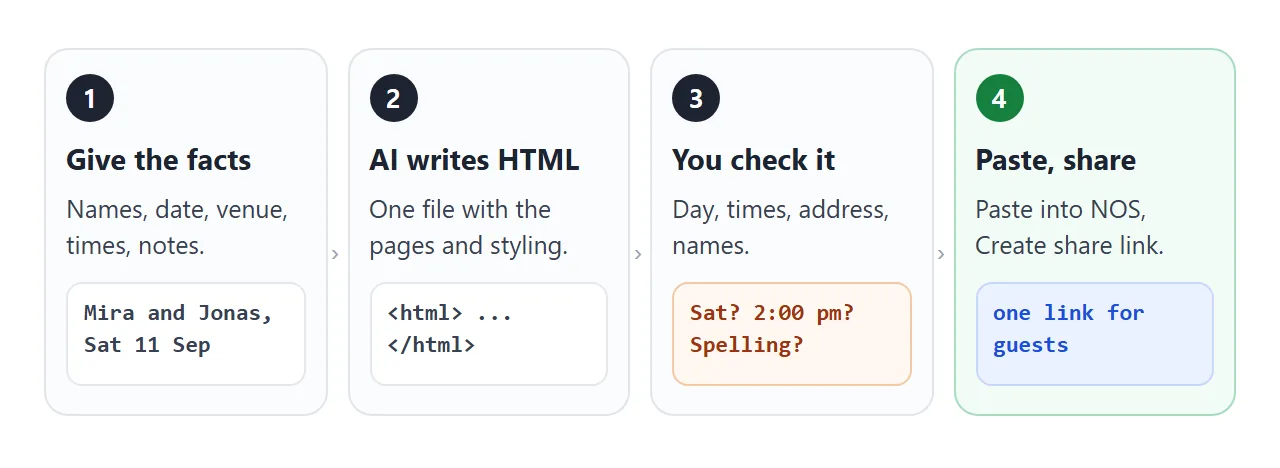
Then check the result yourself. The AI can change a fact without any sign.
- The day of the week matches your date. The builder above shows it.
- Every time, the venue and the address are exactly as you wrote them.
- The map button opens the right place when you tap it.
- Both names are spelled correctly.
- Nothing is invented: no dress code, menu or shuttle you did not mention.
- No placeholder text such as "Your venue here" is left.
The map button uses a Google Maps search address. Google's documentation says it needs no API key, and on a phone it opens the Maps app if that is installed, or a browser if not.
The folding answers use the HTML details element, which MDN documents as working without JavaScript.
Send it as a link
Paste the finished code into a NOS document and choose Create share link. The page renders as written, scripts included. HTML to link walks through it.
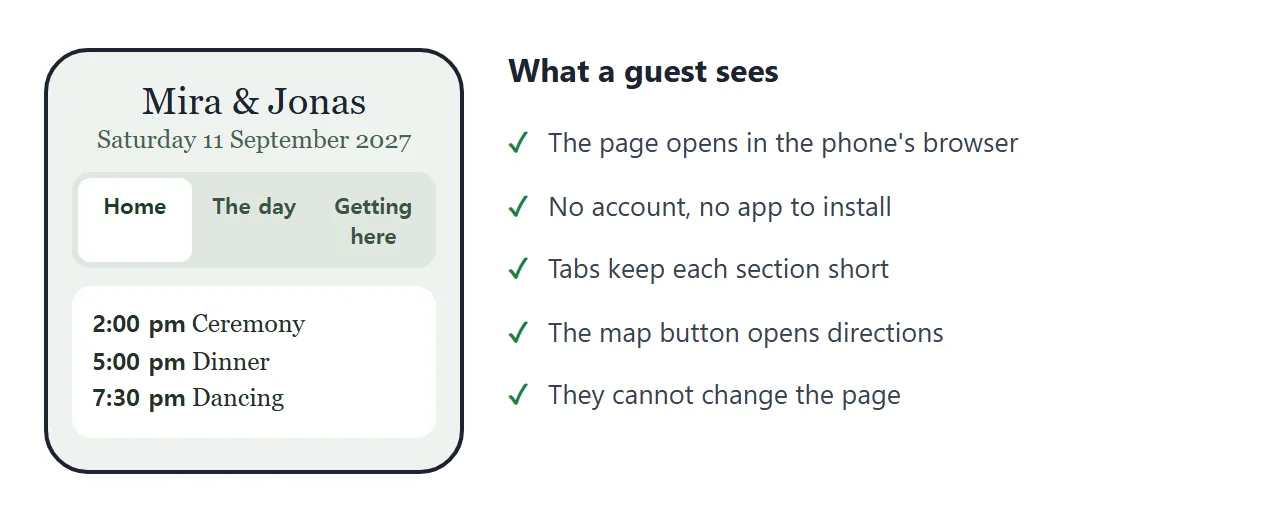
Anyone with the link opens the page in a browser, phone included, with no account. They cannot edit it. Test it first by opening the link on your own phone.
If the page looks tiny on a phone, the viewport meta tag is usually missing. Viewport meta tag explains it. For a printed card, turn the link into a QR code with QR code link.
Ways to put a wedding site online
An HTML file in a message is a copy, and a link is the page itself. Opening an HTML file on a phone covers why the file often fails.
| Way | Guest opens it | A change reaches guests |
|---|---|---|
| NOS share link | In the browser, no account | Yes, the same link updates |
| HTML file as attachment | Depends on the phone and the app | Only if you send it again |
| Google Sites page | In the browser, once published | See Google's help |
| Plain text message | Reads it in the chat | Only if you send it again |
Google Sites is a separate tool with an editor. As of October 2026, Google's help says you click Publish, choose a web address, and share the site as Restricted to people you add or Public on the web.
For a public Google Site you can ask search engines to leave it out, but Google says that is a request and does not guarantee it. Details change, so read Google's current page before you rely on it.
Changing it after the link is out
Plans shift: a time moves, a road closes. Edit the code in NOS and the same link shows the new version. Guests who already have the page open need to reload it.
Keep the page short. Guests need the date, the place, the times and a few answers. For what they ask most and how to word it, see sharing wedding details with guests, and for a card-style page, wedding invitation HTML.
Because anyone with the link can open the page, send it to guests one message at a time, and leave off anything private. The link is easy to forward.
When it does not work
| What you see | Cause | Fix |
|---|---|---|
| The AI changed a date or a name | Generated text can drift from what you typed | Read every fact in the result before sharing |
| The page looks tiny on a phone | The viewport meta tag is missing | Ask the AI to add it |
| A photo is missing | The image is hosted on another site, which NOS blocks | Use CSS or inline SVG instead |
| The map area is empty | An embedded map uses an iframe, which NOS blocks | Use a button that links to the map |
| A reply form does not reach you | NOS blocks sending a form to a server | Ask guests to message you |
| Tapping a tab does nothing | The AI left out the script or broke it | Tell the chat which tab fails and ask for a fix |
| A guest still sees the old time | They have the old page open | Ask them to reload the link |