A single property website is one web page for one home. It holds the details, the rooms, a map link and a way to ask for a viewing, and it has one address that you send to everyone.
If you are wondering how to create a brochure online for a house, this is a simple answer. You do not need a site builder. An AI chat writes the page from your facts, and a share link gives it its address.
Below is a made-up house. Flip through the three drawn pictures, tap Open in maps, and fill in the viewing form.
<!doctype html>
<html lang="en">
<head>
<meta charset="utf-8">
<meta name="viewport" content="width=device-width, initial-scale=1">
<title>14 Alder Court, Fernhill - For sale</title>
<style>
* { box-sizing: border-box; }
body { margin: 0; font-family: system-ui, -apple-system, 'Segoe UI', sans-serif; background: #f3f5f2; color: #1f2a24; line-height: 1.5; }
.wrap { max-width: 600px; margin: 0 auto; padding: 14px 14px 36px; }
.status { display: inline-block; font-size: 13px; font-weight: 700; background: #d9efe0; color: #14532d; border-radius: 99px; padding: 4px 11px; }
h1 { font-size: 26px; line-height: 1.2; margin: 8px 0 2px; }
.town { margin: 0 0 8px; color: #52605a; font-size: 15px; }
.price { font-size: 28px; font-weight: 800; margin: 6px 0 10px; }
.gal { background: #fff; border-radius: 14px; overflow: hidden; box-shadow: 0 2px 10px rgba(0,0,0,.08); }
.gal svg { display: block; width: 100%; height: auto; }
.gal .bar { display: flex; align-items: center; gap: 8px; padding: 8px 10px; }
.gal .cap { flex: 1; font-size: 14px; color: #3b4a42; }
.gal button { font: 600 14px system-ui, sans-serif; border: 1px solid #c9d3cc; background: #f7faf8; border-radius: 8px; padding: 8px 12px; cursor: pointer; }
.facts { display: grid; grid-template-columns: repeat(4, 1fr); gap: 8px; margin: 12px 0; }
.facts div { background: #fff; border-radius: 10px; padding: 10px 4px; text-align: center; box-shadow: 0 1px 4px rgba(0,0,0,.06); }
.facts b { display: block; font-size: 20px; }
.facts span { font-size: 12.5px; color: #52605a; }
h2 { font-size: 19px; margin: 22px 0 6px; }
p { margin: 0 0 10px; }
ul.tick { list-style: none; padding: 0; margin: 0; }
ul.tick li { padding: 5px 0 5px 24px; position: relative; border-bottom: 1px solid #e3e8e4; }
ul.tick li::before { content: ""; position: absolute; left: 3px; top: 12px; width: 10px; height: 6px; border-left: 2px solid #1f7a45; border-bottom: 2px solid #1f7a45; transform: rotate(-45deg); }
table { width: 100%; border-collapse: collapse; background: #fff; border-radius: 10px; overflow: hidden; font-size: 15px; }
th, td { text-align: left; padding: 8px 10px; border-bottom: 1px solid #e3e8e4; }
th { background: #e9efea; font-size: 13px; }
.where { background: #fff; border-radius: 12px; padding: 12px 14px; box-shadow: 0 1px 4px rgba(0,0,0,.06); }
.btn { display: inline-block; font-weight: 700; text-decoration: none; background: #1f7a45; color: #fff; border-radius: 10px; padding: 12px 16px; margin: 4px 6px 4px 0; }
.btn.alt { background: #fff; color: #1f7a45; border: 2px solid #1f7a45; padding: 10px 14px; }
form { background: #fff; border-radius: 12px; padding: 12px 14px; box-shadow: 0 1px 4px rgba(0,0,0,.06); }
label { display: block; font-size: 14px; font-weight: 600; margin: 8px 0 3px; }
input[type=text], select { width: 100%; font: 16px system-ui, sans-serif; padding: 9px; border: 1px solid #b9c4bd; border-radius: 8px; background: #fff; }
form button { margin-top: 12px; font: 700 16px system-ui, sans-serif; background: #1f2a24; color: #fff; border: 0; border-radius: 10px; padding: 12px 16px; cursor: pointer; }
#msg { display: none; margin-top: 12px; background: #fffbe6; border: 1px solid #e6d98a; border-radius: 10px; padding: 10px 12px; white-space: pre-wrap; font-size: 15px; }
.note { font-size: 13px; color: #52605a; }
</style>
</head>
<body>
<div class="wrap">
<span class="status">For sale</span>
<h1>14 Alder Court</h1>
<p class="town">Fernhill, a made-up street for this example</p>
<div class="price">$489,000</div>
<div class="gal">
<div id="scene"></div>
<div class="bar">
<button id="prev" aria-label="Previous picture">←</button>
<span class="cap" id="cap"></span>
<button id="next" aria-label="Next picture">→</button>
</div>
</div>
<div class="facts">
<div><b>3</b><span>bedrooms</span></div>
<div><b>2</b><span>bathrooms</span></div>
<div><b>128</b><span>sq m</span></div>
<div><b>1</b><span>garage</span></div>
</div>
<h2>About the house</h2>
<p>A detached family house at the end of a quiet cul-de-sac. The kitchen opens onto a south-facing garden, and the loft has been converted into a third bedroom.</p>
<h2>What is included</h2>
<ul class="tick">
<li>New boiler, fitted in 2023</li>
<li>Fitted wardrobes in two bedrooms</li>
<li>Single garage and space for one car</li>
<li>Garden shed</li>
</ul>
<h2>Rooms</h2>
<table>
<tr><th>Room</th><th>Size</th><th>Note</th></tr>
<tr><td>Living room</td><td>5.2 x 3.8 m</td><td>Wood burner</td></tr>
<tr><td>Kitchen-diner</td><td>6.0 x 3.4 m</td><td>Door to garden</td></tr>
<tr><td>Bedroom 1</td><td>4.1 x 3.5 m</td><td>Wardrobes</td></tr>
<tr><td>Bedroom 2</td><td>3.3 x 3.0 m</td><td>Wardrobes</td></tr>
<tr><td>Loft bedroom</td><td>4.4 x 3.6 m</td><td>Sloped ceiling</td></tr>
</table>
<h2>Where it is</h2>
<div class="where">
<p><b>14 Alder Court, Fernhill</b><br>Ten minutes' walk to the primary school. Bus stop at the end of the road.</p>
<a class="btn" id="map" href="https://www.google.com/maps/search/?api=1&query=14+Alder+Court%2C+Fernhill" target="_blank" rel="noopener">Open in maps</a>
<a class="btn alt" href="tel:+15550100142">Call the owner</a>
</div>
<h2>Ask for a viewing</h2>
<form id="f">
<label for="n">Your name</label>
<input type="text" id="n" placeholder="e.g. Sam Rivera" required>
<label for="s">Preferred time</label>
<select id="s">
<option>Saturday 10 October, 10:00</option>
<option>Saturday 10 October, 11:30</option>
<option>Wednesday 14 October, 17:30</option>
</select>
<button type="submit">Write my message</button>
<div id="msg" role="status"></div>
</form>
<p class="note">Nothing is sent from this page. It writes the message and you send it yourself.</p>
<p class="note">Details checked on 2 October 2026. Prices and times on this page are made up.</p>
</div>
<script>
// Three drawn "pictures": no image files, so nothing can fail to load
const scenes = [
{ cap: 'Front of the house', body: '<rect width="600" height="260" fill="#cfe6f5"/><rect y="200" width="600" height="60" fill="#8fbf8a"/><rect x="170" y="90" width="260" height="120" fill="#e8d9c0"/><polygon points="150,92 300,28 450,92" fill="#9a4b3a"/><rect x="275" y="140" width="50" height="70" fill="#5b6b78"/><rect x="200" y="120" width="52" height="42" fill="#bfe0f0"/><rect x="348" y="120" width="52" height="42" fill="#bfe0f0"/>' },
{ cap: 'Kitchen-diner, door to the garden', body: '<rect width="600" height="260" fill="#f1e9dc"/><rect y="190" width="600" height="70" fill="#c9b79a"/><rect x="40" y="70" width="230" height="120" fill="#fff" stroke="#b7a98f"/><rect x="40" y="40" width="230" height="30" fill="#7c8f7a"/><rect x="330" y="50" width="180" height="140" fill="#cfe6f5" stroke="#8a7e66" stroke-width="4"/><line x1="420" y1="50" x2="420" y2="190" stroke="#8a7e66" stroke-width="4"/><ellipse cx="170" cy="215" rx="70" ry="14" fill="#a8956f"/>' },
{ cap: 'South-facing garden', body: '<rect width="600" height="260" fill="#d9eefa"/><circle cx="500" cy="55" r="28" fill="#f7d65a"/><rect y="150" width="600" height="110" fill="#7fb77a"/><rect x="60" y="110" width="70" height="50" fill="#a9825b"/><polygon points="55,112 95,84 135,112" fill="#6e5238"/><rect x="250" y="190" width="150" height="40" fill="#c9b79a"/><circle cx="470" cy="150" r="34" fill="#4e8f56"/><rect x="465" y="170" width="10" height="40" fill="#6e5238"/>' }
];
let i = 0;
const scene = document.getElementById('scene');
const cap = document.getElementById('cap');
function show(n) {
i = (n + scenes.length) % scenes.length;
scene.innerHTML = '<svg viewBox="0 0 600 260" role="img" aria-label="' + scenes[i].cap + '">' + scenes[i].body + '</svg>';
cap.textContent = (i + 1) + ' of ' + scenes.length + ': ' + scenes[i].cap;
}
document.getElementById('prev').addEventListener('click', () => show(i - 1));
document.getElementById('next').addEventListener('click', () => show(i + 1));
show(0);
// The form never leaves the page: it only builds text to copy
document.getElementById('f').addEventListener('submit', (e) => {
e.preventDefault();
const name = document.getElementById('n').value.trim();
const slot = document.getElementById('s').value;
const box = document.getElementById('msg');
box.textContent = 'Hello, I am ' + name + '. I would like to see 14 Alder Court on ' + slot + '. Please let me know if that works.';
box.style.display = 'block';
});
</script>
</body>
</html>
What goes on the page
A buyer or tenant opens the page to answer a few plain questions. The demo above answers them in the order people usually ask:
- What is it, and what does it cost? Status, address and price at the very top.
- What does it look like? A picture or two, with the room named under each.
- How big is it? Bedrooms, bathrooms and area as large numbers.
- What comes with it? A short tick list.
- Where is it? The address as text, plus a button that opens the map.
- How do I see it? A phone number and a few viewing times.
If you want more on what to put first, Advertise a property goes through the order in detail.
The map link
A map button is an ordinary link to a map search. Google documents this format for its Maps URLs: the query can be an address or a pair of coordinates, and it should be URL-encoded.
https://www.google.com/maps/search/?api=1&query=14+Alder+Court%2C+Fernhill
Spaces become plus signs and the comma becomes %2C. You rarely need to do this by hand, because the AI will write it if you ask. HTML link to a map location explains the options, including coordinates.
Print the address as text too. Then it can still be read, copied or pasted into any other map if the button does not suit someone.
Make it with AI
Paste this into ChatGPT, Claude or Gemini. Replace the square brackets with the real facts of your home, and delete the lines you do not need.
Write one self-contained HTML page for a single property. Use only HTML, CSS and a little JavaScript. No images from other sites and no external files.

Property: [address], [town]. Status: [for sale or to rent]. Price: [price].
Facts: [bedrooms], [bathrooms], [area], [parking].
Rooms (name and size): [list].
Included: [list].
Viewing times: [list]. Phone: [number].

Rules: it must read well on a phone. Put status, address and price at the top. Draw one simple picture with inline SVG. Add a button "Open in maps" that links to a Google Maps search URL for the address, with the address URL-encoded. Add a tel: link for the phone number. Add a small viewing form that only writes a message to copy and sends nothing. Do not invent any fact. If something is missing, leave it out.
Then check the page against your own sheet. The AI writes confidently, and a wrong figure on a listing is yours to answer for.
- Price, area and room sizes match your sheet exactly.
- The address is spelled right, in the text and in the map link.
- The map button opens the right place when you tap it on a phone.
- Viewing times and phone number are the real ones.
- No extra features were added, such as a garden you do not have.
Send it as a link
Paste the finished page into NOS and choose Create share link. HTML to link walks through it.
The link opens in a browser, on a phone too, with no account and nothing to install. The people who open it can read the page but cannot edit it. Scripts on the page run, so the picture flipper and the form work for them.
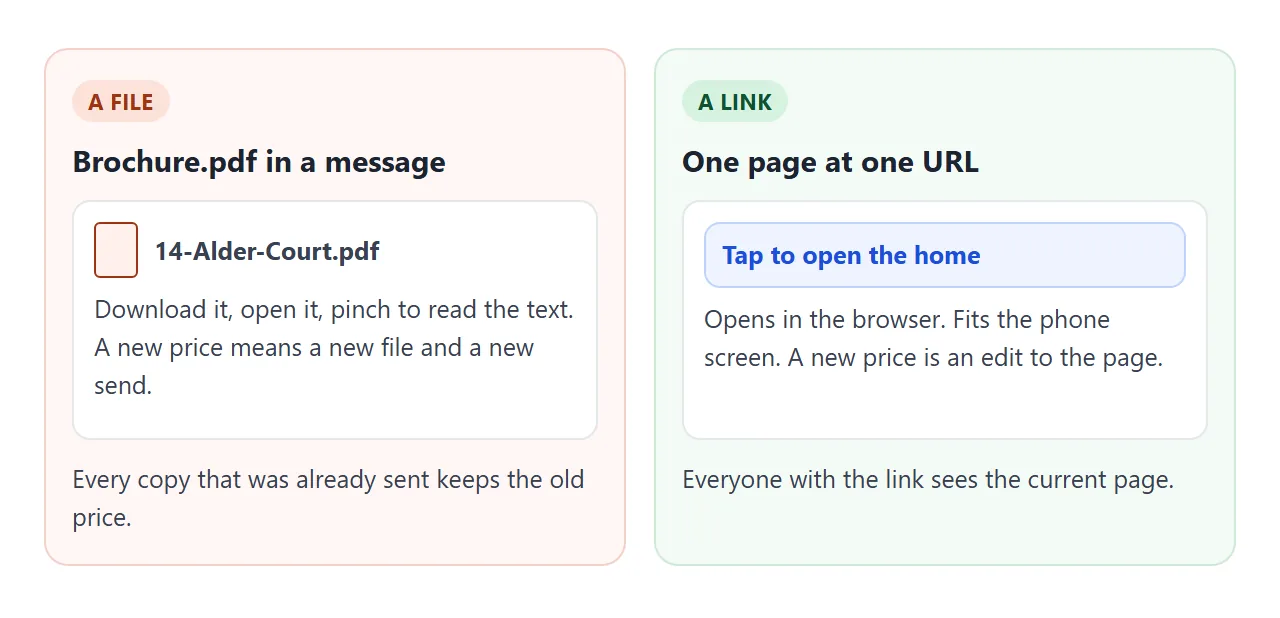
When the price or a viewing time changes, edit the code. The link stays the same, so every message you already sent shows the new version. Someone with the page already open needs to reload it.
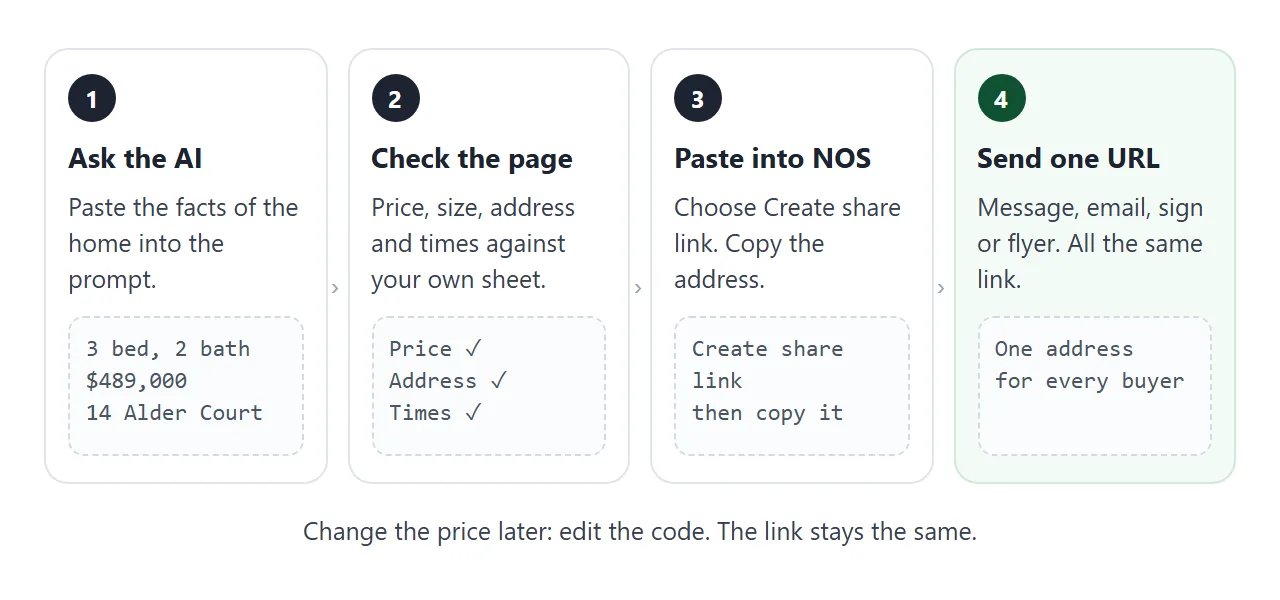
Then use the same address everywhere:
- In a message or email: paste the link and one line about the home. The link is the whole brochure.
- On a flyer or sign: turn the address into a QR code. QR code link shows how.
- On a portal or social profile: use it wherever the site gives you a field for a web address. Follow that site's own screens, as they can change.
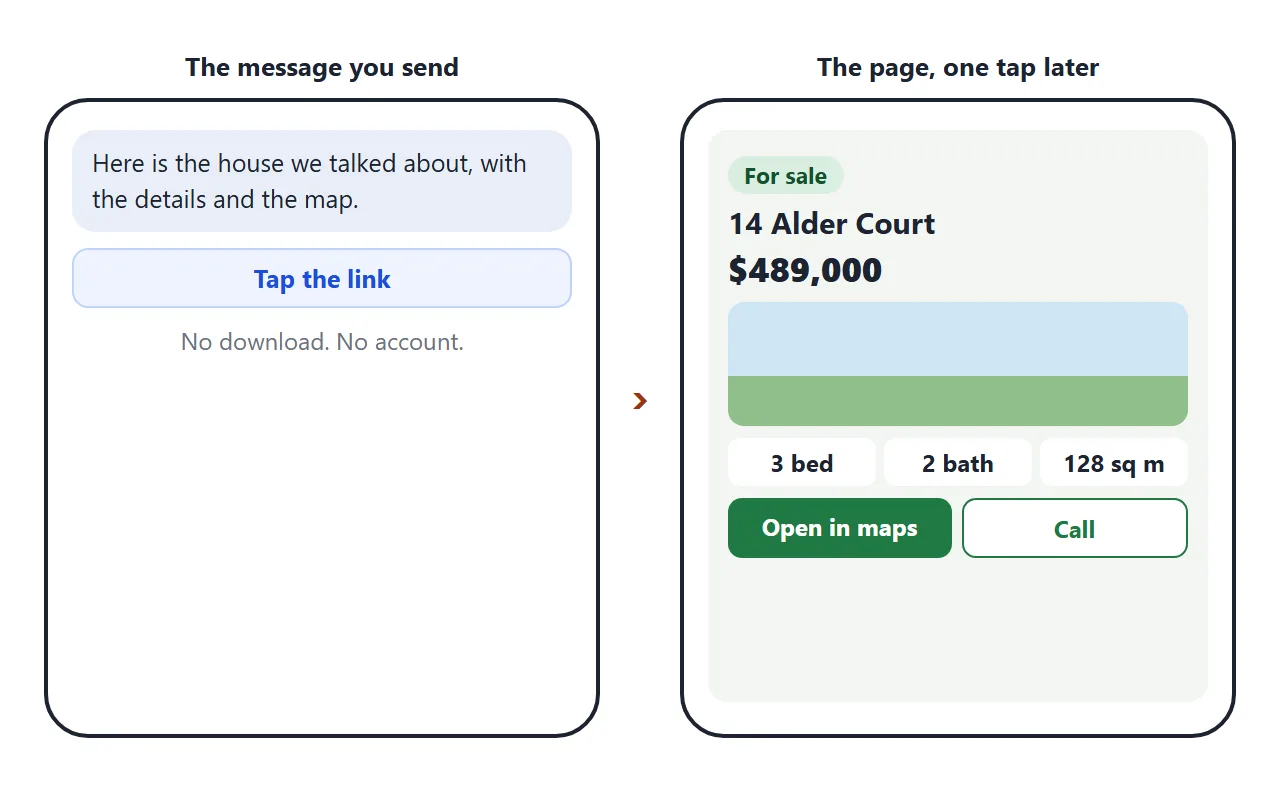
Ways to send a home compared
| PDF brochure | Photos in a message | Page at one URL | |
|---|---|---|---|
| Change the price | Make and send a new file | Send new messages | Edit the page, same link |
| Reading on a phone | Laid out for paper, may need zooming | Sharp enough to look at, no details | Fits the screen |
| Map | Printed address only | Printed address only | A button that opens the map |
| Old copies still around | Yes | Yes | No, one address |
| Forwarded to a partner | A file to find and open | A pile of images | One link |
A page does not replace good photographs. It is the place where the facts, the rooms and the map live, and the photographs can travel beside it. Why links beat attachments covers the general case.
A second page: a home to rent
The same idea works for a rental. Tenants ask a different question first: what will it cost each month? This page adds up the rent and the extras they tick.
<!doctype html>
<html lang="en">
<head>
<meta charset="utf-8">
<meta name="viewport" content="width=device-width, initial-scale=1">
<title>2 Bed Flat to Rent - Mill Lane</title>
<style>
* { box-sizing: border-box; }
body { margin: 0; font-family: system-ui, -apple-system, 'Segoe UI', sans-serif; background: #f6f4ef; color: #28231c; line-height: 1.5; }
.wrap { max-width: 600px; margin: 0 auto; padding: 14px 14px 36px; }
.hero { background: linear-gradient(135deg, #3d5a80, #98c1d9); color: #fff; border-radius: 16px; padding: 22px 18px; }
.hero small { font-weight: 700; letter-spacing: .5px; text-transform: uppercase; opacity: .9; }
.hero h1 { margin: 4px 0 2px; font-size: 25px; line-height: 1.2; }
.hero p { margin: 0; opacity: .95; }
.hero .rent { font-size: 26px; font-weight: 800; margin-top: 10px; }
h2 { font-size: 19px; margin: 22px 0 8px; }
.chips { display: flex; flex-wrap: wrap; gap: 8px; }
.chips span { background: #fff; border: 1px solid #ddd5c6; border-radius: 99px; padding: 6px 12px; font-size: 14px; font-weight: 600; }
.card { background: #fff; border-radius: 12px; padding: 12px 14px; box-shadow: 0 1px 4px rgba(0,0,0,.07); }
.line { display: flex; justify-content: space-between; align-items: center; gap: 10px; padding: 8px 0; border-bottom: 1px solid #eee7d9; }
.line label { flex: 1; font-size: 16px; }
.line input { width: 20px; height: 20px; margin-right: 8px; vertical-align: -4px; }
.total { display: flex; justify-content: space-between; font-size: 20px; font-weight: 800; padding-top: 12px; }
.small { font-size: 13px; color: #6b6355; margin: 8px 0 0; }
ol { margin: 0; padding-left: 22px; }
ol li { padding: 4px 0; }
.btn { display: inline-block; font-weight: 700; text-decoration: none; background: #3d5a80; color: #fff; border-radius: 10px; padding: 12px 16px; margin: 4px 6px 4px 0; }
.btn.alt { background: #fff; color: #3d5a80; border: 2px solid #3d5a80; padding: 10px 14px; }
</style>
</head>
<body>
<div class="wrap">
<div class="hero">
<small>To rent from 1 November</small>
<h1>2 bed flat, 8 Mill Lane</h1>
<p>Second floor, near the market square. A made-up flat for this example.</p>
<div class="rent">$1,250 per month</div>
</div>
<h2>The flat</h2>
<div class="chips">
<span>2 bedrooms</span><span>1 bathroom</span><span>62 sq m</span><span>Second floor</span><span>Unfurnished</span><span>12-month lease</span>
</div>
<h2>What will it cost each month?</h2>
<div class="card">
<div class="line"><span>Rent</span><b>$1,250</b></div>
<div class="line"><label><input type="checkbox" class="opt" data-amt="60"> Parking space</label><b>$60</b></div>
<div class="line"><label><input type="checkbox" class="opt" data-amt="35"> Storage cage in the cellar</label><b>$35</b></div>
<div class="line"><label><input type="checkbox" class="opt" data-amt="40"> Estimated heating and water</label><b>$40</b></div>
<div class="total"><span>Monthly total</span><span id="tot">$1,250</span></div>
<p class="small">Tick what you need. The extras and the estimate are made-up numbers.</p>
</div>
<h2>Getting there</h2>
<div class="card">
<ol>
<li>Walk out of the market square by the clock.</li>
<li>Take the second left, Mill Lane.</li>
<li>Number 8 is the green door. Buzzer 2B.</li>
</ol>
<p class="small">Free street parking after 18:00 and on Sundays.</p>
<a class="btn" href="https://www.google.com/maps/search/?api=1&query=8+Mill+Lane%2C+Fernhill" target="_blank" rel="noopener">Open in maps</a>
<a class="btn alt" href="tel:+15550100177">Call to view</a>
</div>
<h2>Before you apply</h2>
<div class="card">
<div class="line"><label><input type="checkbox" class="chk"> I have read the lease length</label></div>
<div class="line"><label><input type="checkbox" class="chk"> I know the monthly total</label></div>
<div class="line"><label><input type="checkbox" class="chk"> I have the address on my phone</label></div>
<p class="small" id="ready">Tick all three to continue.</p>
</div>
<p class="small">Details checked on 2 October 2026.</p>
</div>
<script>
// Add up the rent and every ticked extra
const base = 1250;
const opts = document.querySelectorAll('.opt');
const tot = document.getElementById('tot');
function sum() {
let t = base;
opts.forEach((o) => { if (o.checked) t += Number(o.dataset.amt); });
tot.textContent = '$' + t.toLocaleString('en-US');
}
opts.forEach((o) => o.addEventListener('change', sum));
const chk = document.querySelectorAll('.chk');
const ready = document.getElementById('ready');
chk.forEach((c) => c.addEventListener('change', () => {
const all = [...chk].every((x) => x.checked);
ready.textContent = all ? 'Good. Call to arrange a viewing.' : 'Tick all three to continue.';
}));
</script>
</body>
</html>
The amounts sit in the code as data attributes on each tick box. Change them there, or ask the AI to change them for you. If you want a floor plan too, upload a floor plan shows ways to share one.
When it does not work
| What you see | Cause | Fix |
|---|---|---|
| A photo shows as an empty box | The picture loads from another address, which is blocked | Use words and a drawn picture, and send photos separately |
| The map button opens the wrong place | The address in the link is incomplete | Add the town, or use coordinates |
| The call button does nothing on a computer | A tel: link works only on a device that can make calls | Test it on a phone, and print the number as text too |
| The page looks tiny on a phone | The viewport meta tag is missing | Ask the AI to add it |
| The page shows an old price | The visitor still has the old page open | Ask them to reload it |
| The viewing form sends nothing | Sending a form to a server is blocked | The page writes a message to copy, or use the call button |
| A figure is wrong | The AI guessed or mixed up two numbers | Correct it by hand and compare with your sheet |
If a page looks wrong on a phone, HTML not loading images goes through the usual causes.