A social media proposal template needs three blocks the client can compare quickly: the packages, a plan for the first month, and the price. Put them on one page and send one link.
The client reads it on a phone, and you can change a price without sending another file.
The time usually goes into the design, not the words. One freelancer writing about learning proposals bought a Canva template and "spent an embarrassing amount of time on something I hoped looked polished enough to send."
Here is a finished page. Tap a package and the price, the monthly counts and the reply sentence change. Tick an add-on and the total follows.
<!doctype html>
<html lang="en">
<head>
<meta charset="utf-8">
<meta name="viewport" content="width=device-width, initial-scale=1">
<title>Social media proposal - Fernhill Bakery</title>
<style>
* { box-sizing: border-box; }
body { margin: 0; padding: 14px; background: #f1f3f6; font-family: system-ui, -apple-system, "Segoe UI", sans-serif; color: #1f2430; line-height: 1.5; }
.page { max-width: 680px; margin: 0 auto; background: #fff; border-radius: 14px; padding: 22px 20px 24px; box-shadow: 0 2px 12px rgba(20, 30, 50, .08); }
.kicker { font-size: 13px; color: #6b7280; margin: 0 0 4px; }
h1 { font-size: 24px; line-height: 1.2; margin: 0 0 4px; }
h2 { font-size: 17px; margin: 26px 0 8px; }
.sub { margin: 0 0 14px; color: #4b5563; font-size: 15px; }
.top { display: grid; grid-template-columns: repeat(3, 1fr); gap: 8px; margin: 14px 0 4px; }
.top div { background: #f4f1fb; border-radius: 10px; padding: 10px 10px; }
.top small { display: block; font-size: 12px; color: #6b5b95; }
.top b { font-size: 17px; white-space: nowrap; }
.pk { display: grid; gap: 8px; }
.pk label { position: relative; display: block; border: 2px solid #e3e6ec; border-radius: 12px; padding: 12px 14px; cursor: pointer; }
.pk input { position: absolute; opacity: 0; pointer-events: none; }
.pk label:has(input:checked) { border-color: #6d4fc2; background: #faf8ff; }
.pk label:has(input:focus-visible) { outline: 3px solid #b9a6ec; }
.pk .row { display: flex; justify-content: space-between; gap: 10px; align-items: baseline; }
.pk .nm { font-weight: 700; }
.pk .pr { font-weight: 700; color: #4b2fa0; white-space: nowrap; }
.pk .in { margin: 4px 0 0; font-size: 14px; color: #4b5563; }
.add { display: grid; gap: 6px; }
.add label { display: flex; gap: 10px; align-items: center; font-size: 15px; padding: 8px 10px; border: 1px solid #e3e6ec; border-radius: 10px; cursor: pointer; }
.add input { width: 18px; height: 18px; accent-color: #6d4fc2; }
.add span { margin-left: auto; white-space: nowrap; color: #4b2fa0; font-weight: 600; }
table { width: 100%; border-collapse: collapse; font-size: 14px; }
th, td { text-align: left; padding: 8px 8px; border-bottom: 1px solid #e8ebf0; vertical-align: top; }
th { font-size: 12px; text-transform: uppercase; letter-spacing: .04em; color: #6b7280; }
.counts { display: grid; grid-template-columns: repeat(3, 1fr); gap: 8px; margin-bottom: 10px; }
.counts div { border: 1px solid #e3e6ec; border-radius: 10px; padding: 8px 10px; text-align: center; }
.counts b { display: block; font-size: 22px; color: #4b2fa0; }
.counts small { font-size: 12px; color: #6b7280; }
.tot { background: #1f2430; color: #fff; border-radius: 12px; padding: 14px 16px; margin-top: 8px; display: flex; justify-content: space-between; gap: 12px; align-items: baseline; flex-wrap: wrap; }
.tot b { font-size: 24px; }
.tot small { color: #c9ceda; }
textarea { width: 100%; min-height: 78px; font: inherit; font-size: 15px; padding: 10px 12px; border: 1px solid #cfd4de; border-radius: 10px; resize: vertical; }
button { margin-top: 8px; font: inherit; font-weight: 600; background: #6d4fc2; color: #fff; border: 0; border-radius: 10px; padding: 10px 16px; cursor: pointer; }
#msg { font-size: 14px; color: #1b6e3c; margin-left: 8px; }
.note { font-size: 13px; color: #6b7280; margin: 14px 0 0; }
@media (min-width: 600px) {
.pk { grid-template-columns: repeat(3, 1fr); }
.pk .row { display: block; }
.pk .pr { display: block; }
.add { grid-template-columns: repeat(3, 1fr); }
.add label { flex-wrap: wrap; }
.add span { margin-left: 28px; }
}
</style>
</head>
<body>
<main class="page">
<p class="kicker">Social media proposal · prepared by Ines Calloway</p>
<h1>Fernhill Bakery: three months of Instagram and Facebook</h1>
<p class="sub">Pick a package, add what you need, and the price and the monthly plan update. Valid until 31 Oct 2026.</p>
<div class="top">
<div><small>Monthly price</small><b id="topPrice">$1,100</b></div>
<div><small>Starts</small><b>2 Nov</b></div>
<div><small>Term</small><b>3 months</b></div>
</div>
<h2>1. Choose a package</h2>
<div class="pk" id="pk">
<label><input type="radio" name="pkg" value="starter"><div class="row"><span class="nm">Starter</span><span class="pr">$600 / month</span></div><p class="in">One platform, a monthly plan, and a short report.</p></label>
<label><input type="radio" name="pkg" value="growth" checked><div class="row"><span class="nm">Growth</span><span class="pr">$1,100 / month</span></div><p class="in">Two platforms, Reels, stories, and replies to comments.</p></label>
<label><input type="radio" name="pkg" value="full"><div class="row"><span class="nm">Full</span><span class="pr">$1,800 / month</span></div><p class="in">Everything in Growth, more Reels, and weekly planning calls.</p></label>
</div>
<h2>2. What you get each month</h2>
<div class="counts">
<div><b id="nPosts">12</b><small>feed posts</small></div>
<div><b id="nReels">4</b><small>Reels</small></div>
<div><b id="nStories">8</b><small>story sets</small></div>
</div>
<table>
<tr><th>Week</th><th>Theme</th><th>Feed post</th></tr>
<tr><td>1</td><td>Meet the bakers</td><td>Carousel</td></tr>
<tr><td>2</td><td>Behind the oven</td><td>Photo post</td></tr>
<tr><td>3</td><td>Customer favourites</td><td>Photo post</td></tr>
<tr><td>4</td><td>The month's special</td><td>Carousel</td></tr>
</table>
<h2>3. Add-ons</h2>
<div class="add" id="add">
<label><input type="checkbox" data-price="250"> Extra platform <span>+$250</span></label>
<label><input type="checkbox" data-price="300"> Four extra Reels <span>+$300</span></label>
<label><input type="checkbox" data-price="200"> Ad creative set <span>+$200</span></label>
</div>
<div class="tot">
<div><small>Per month</small><br><b id="month">$1,100</b></div>
<div><small>Three months</small><br><b id="three">$3,300</b></div>
</div>
<h2>4. Reply with one sentence</h2>
<textarea id="reply" readonly></textarea>
<button type="button" id="copy">Copy sentence</button><span id="msg"></span>
<p class="note">Example prices and names are made up. Replace them with yours.</p>
</main>
<script>
// Edit this table to change packages, prices and monthly counts.
const PACKAGES = {
starter: { name: 'Starter', price: 600, posts: 8, reels: 0, stories: 0 },
growth: { name: 'Growth', price: 1100, posts: 12, reels: 4, stories: 8 },
full: { name: 'Full', price: 1800, posts: 16, reels: 8, stories: 16 }
};
const ADDONS = ['an extra platform', 'four extra Reels', 'an ad creative set'];
const money = (n) => '$' + n.toLocaleString('en-US');
function update() {
const p = PACKAGES[document.querySelector('input[name=pkg]:checked').value];
const boxes = [...document.querySelectorAll('#add input')];
const extra = boxes.reduce((s, b) => s + (b.checked ? Number(b.dataset.price) : 0), 0);
const month = p.price + extra;
const reelAdd = boxes[1].checked ? 4 : 0;
document.getElementById('topPrice').textContent = money(month);
document.getElementById('month').textContent = money(month);
document.getElementById('three').textContent = money(month * 3);
document.getElementById('nPosts').textContent = p.posts;
document.getElementById('nReels').textContent = p.reels + reelAdd;
document.getElementById('nStories').textContent = p.stories;
const picked = ADDONS.filter((_, i) => boxes[i].checked);
const withText = picked.length ? ' with ' + picked.join(' and ') : '';
document.getElementById('reply').value =
'Hi Ines, we would like the ' + p.name + ' package' + withText +
', ' + money(month) + ' a month, starting 2 Nov.';
}
document.querySelectorAll('input').forEach((i) => i.addEventListener('change', update));
document.getElementById('copy').addEventListener('click', () => {
const t = document.getElementById('reply');
t.select();
const done = () => { document.getElementById('msg').textContent = 'Copied'; };
const fail = () => { document.getElementById('msg').textContent = 'Press Ctrl+C to copy'; };
if (navigator.clipboard) navigator.clipboard.writeText(t.value).then(done, fail);
else fail();
});
update();
</script>
</body>
</html>
What goes on the page
Most of a proposal is decisions the client has to make. Give each decision its own block, in the order they make it.
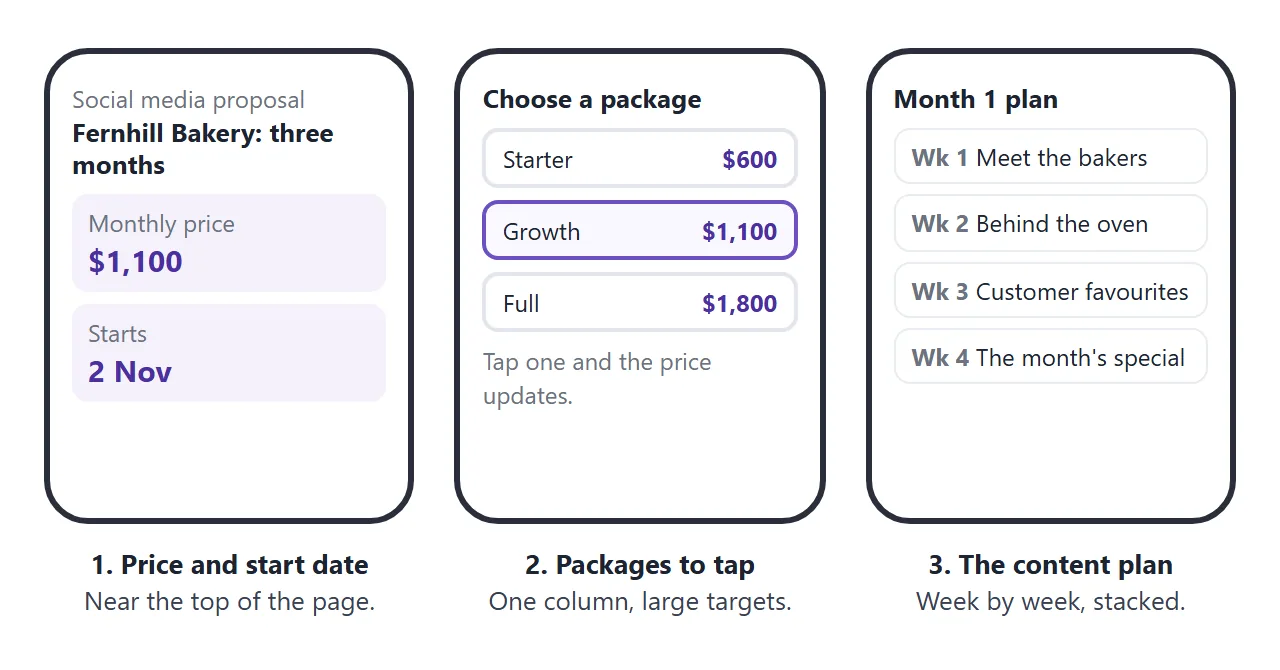
- Price and start date, at the top. The client sees the cost before anything else.
- Packages side by side. Two or three, each with a name, a monthly price and what is in it.
- Month one, week by week. A theme per week and the formats, so the client sees what they are paying for.
- Add-ons and the total. Extras with their own prices, and the sum they add up to.
- A next step. One sentence the client can send back.
For the broader structure of a proposal, see how to send a proposal to a client.
Make it with AI
You do not need to write the HTML. Paste this prompt into ChatGPT, Claude or Gemini, and fill in your own details at the bottom.
Make ONE self-contained HTML page for a social media proposal, to be read on a phone.
Rules:
- Plain HTML, CSS and JavaScript in one file. No images, no external files, no form that sends data.
- One column, a viewport meta tag, text at least 16px.
- Top: client name, my name, and a box with the monthly price and the start date.
- Three packages the client can tap. Tapping one changes the price and the monthly counts.
- A four-week plan for month one: one theme per week, with the formats.
- Add-ons as tick boxes that change the total.
- End with a sentence the client can copy to reply, using their choices.
- Use only the numbers, names and dates I give you. If something is missing, write TODO.
My details:
Client:
Packages (name, price per month, posts, Reels, stories):
Add-ons (name, price):
Month-one themes:
Start date and valid-until date:
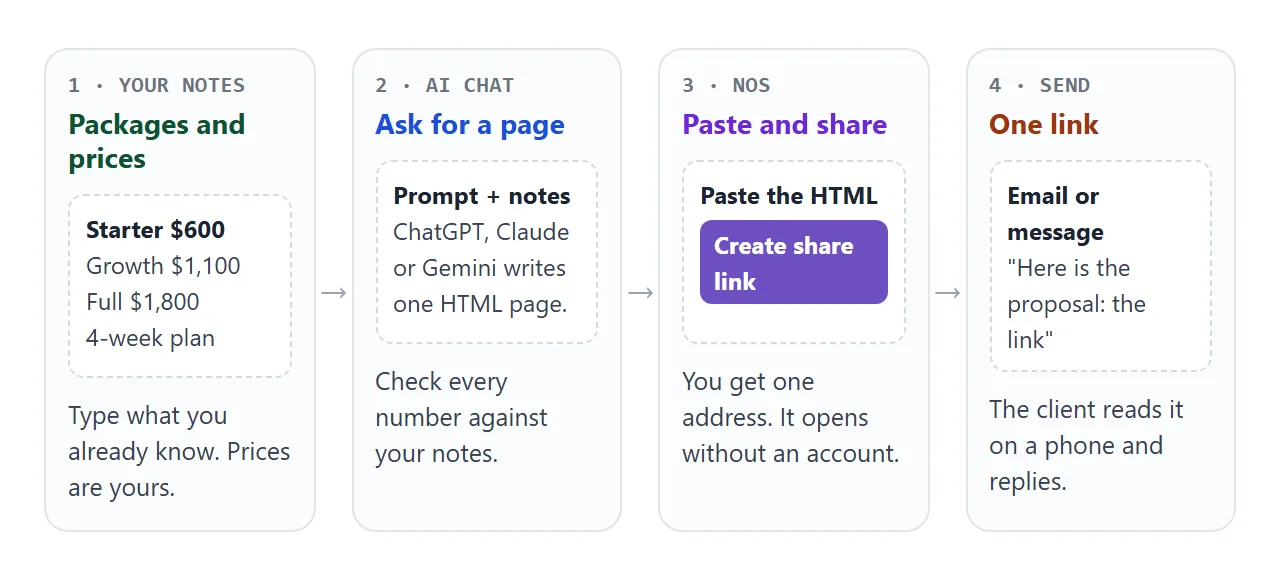
The last rule matters most. Without it, a model may round a price or add a package you never offered.
What to check in the result
A proposal is easy to skim and hard to proofread. Read it as the client will.
- Every number. Prices, add-ons, counts and dates. Compare each one with your notes, then tap every package and tick every add-on.
- Every TODO. Replace it or delete the line. Search the page for the word.
- Claims you did not make. Past clients, follower growth or results the AI added to sound confident.
- Your phone. Open it on your own phone and look for tiny text or a sideways scroll.
If the page looks wrong, fixing AI-generated HTML covers the usual causes.
Show the first month as a plan
Packages are abstract until the client sees what lands in their feed. A content plan makes it concrete. This page lists month one by week, and the client can filter by format to see only the Reels, the stories or the feed posts.
<!doctype html>
<html lang="en">
<head>
<meta charset="utf-8">
<meta name="viewport" content="width=device-width, initial-scale=1">
<title>Month 1 content plan - Fernhill Bakery</title>
<style>
  * { box-sizing: border-box; }
  body { margin: 0; padding: 14px; background: #f1f3f6; font-family: system-ui, -apple-system, "Segoe UI", sans-serif; color: #1f2430; line-height: 1.45; }
  .page { max-width: 680px; margin: 0 auto; background: #fff; border-radius: 14px; padding: 20px 18px 22px; box-shadow: 0 2px 12px rgba(20, 30, 50, .08); }
  h1 { font-size: 22px; line-height: 1.2; margin: 0 0 4px; }
  .sub { margin: 0 0 14px; color: #4b5563; font-size: 15px; }
  .chips { display: flex; flex-wrap: wrap; gap: 8px; margin-bottom: 8px; }
  .chips button { font: inherit; font-size: 14px; font-weight: 600; border: 2px solid #d8dce5; background: #fff; color: #374151; border-radius: 999px; padding: 6px 14px; cursor: pointer; }
  .chips button[aria-pressed="true"] { background: #1f2430; border-color: #1f2430; color: #fff; }
  #count { font-size: 14px; color: #6b7280; margin: 0 0 8px; }
  .week { border-top: 1px solid #e8ebf0; padding-top: 12px; margin-top: 12px; }
  .week h2 { font-size: 16px; margin: 0 0 8px; }
  .week h2 small { font-weight: 400; color: #6b7280; font-size: 13px; margin-left: 6px; }
  ul { list-style: none; margin: 0; padding: 0; display: grid; gap: 6px; }
  li { display: grid; grid-template-columns: 44px 1fr; gap: 8px; align-items: start; border: 1px solid #e8ebf0; border-radius: 10px; padding: 8px 10px; font-size: 15px; }
  .day { font-weight: 700; color: #6b7280; }
  .tag { display: inline-block; font-size: 12px; font-weight: 700; border-radius: 6px; padding: 1px 7px; margin-right: 6px; color: #fff; }
  .feed { background: #3b6fd4; } .reel { background: #c2410c; } .story { background: #2f8a5a; }
  .none { color: #6b7280; font-size: 14px; }
  @media (min-width: 600px) {
    #weeks { display: grid; grid-template-columns: 1fr 1fr; gap: 0 18px; }
    li { font-size: 14px; padding: 6px 8px; }
  }
</style>
</head>
<body>
<main class="page">
  <h1>Month 1 content plan</h1>
  <p class="sub">Fernhill Bakery, 2 to 29 Nov 2026. Tap a format to see only those posts.</p>
  <div class="chips" id="chips">
    <button type="button" data-f="all" aria-pressed="true">All</button>
    <button type="button" data-f="feed" aria-pressed="false">Feed posts</button>
    <button type="button" data-f="reel" aria-pressed="false">Reels</button>
    <button type="button" data-f="story" aria-pressed="false">Stories</button>
  </div>
  <p id="count"></p>
  <div id="weeks"></div>
</main>

<script>
  // Edit this list. Each entry is: week number, day, format, what is posted.
  const WEEKS = [
    'Meet the bakers', 'Behind the oven', 'Customer favourites', "The month's special"
  ];
  const POSTS = [
    [1, 'Mon', 'feed',  'Carousel: meet Dana, the head baker'],
    [1, 'Wed', 'story', 'Poll: what is your usual order?'],
    [1, 'Thu', 'feed',  'Photo: the inside of a sourdough loaf'],
    [1, 'Fri', 'reel',  'Reel: 5 a.m. in the bakery'],
    [1, 'Sat', 'story', 'Story set: the Saturday queue'],
    [1, 'Sun', 'feed',  'Photo: weekend cinnamon buns'],
    [2, 'Mon', 'feed',  'Carousel: how a loaf is made'],
    [2, 'Tue', 'story', 'Story set: dough proofing'],
    [2, 'Thu', 'reel',  'Reel: the oven door opens'],
    [2, 'Fri', 'feed',  'Photo: a tray of fresh rolls'],
    [2, 'Sat', 'story', 'Quiz: guess the flour'],
    [2, 'Sun', 'feed',  'Photo: a slow Sunday morning'],
    [3, 'Mon', 'feed',  'Carousel: the five most ordered items'],
    [3, 'Wed', 'story', 'Story set: customer shout-outs'],
    [3, 'Thu', 'feed',  'Photo: the cardamom bun'],
    [3, 'Fri', 'reel',  'Reel: ordering the usual'],
    [3, 'Sat', 'story', 'Poll: bun or loaf?'],
    [3, 'Sun', 'feed',  'Photo: the shared table'],
    [4, 'Mon', 'feed',  'Carousel: the November special'],
    [4, 'Tue', 'story', 'Countdown: the special starts'],
    [4, 'Thu', 'reel',  'Reel: the first taste'],
    [4, 'Fri', 'feed',  'Photo: the special on the counter'],
    [4, 'Sat', 'story', 'Story set: is it sold out yet?'],
    [4, 'Sun', 'feed',  'Photo: a thank-you post']
  ];
  const LABEL = { feed: 'Feed', reel: 'Reel', story: 'Story' };
  const weeksEl = document.getElementById('weeks');
  const countEl = document.getElementById('count');
  let filter = 'all';

  function render() {
    weeksEl.textContent = '';
    let shown = 0;
    WEEKS.forEach((theme, i) => {
      const rows = POSTS.filter((p) => p[0] === i + 1 && (filter === 'all' || p[2] === filter));
      shown += rows.length;
      const box = document.createElement('section');
      box.className = 'week';
      const h = document.createElement('h2');
      h.textContent = 'Week ' + (i + 1);
      const small = document.createElement('small');
      small.textContent = theme;
      h.appendChild(small);
      box.appendChild(h);
      if (!rows.length) {
        const none = document.createElement('p');
        none.className = 'none';
        none.textContent = 'Nothing of this format this week.';
        box.appendChild(none);
      } else {
        const ul = document.createElement('ul');
        rows.forEach((p) => {
          const li = document.createElement('li');
          const day = document.createElement('span');
          day.className = 'day';
          day.textContent = p[1];
          const text = document.createElement('span');
          const tag = document.createElement('span');
          tag.className = 'tag ' + p[2];
          tag.textContent = LABEL[p[2]];
          text.append(tag, p[3]);
          li.append(day, text);
          ul.appendChild(li);
        });
        box.appendChild(ul);
      }
      weeksEl.appendChild(box);
    });
    countEl.textContent = 'Showing ' + shown + ' of ' + POSTS.length + ' planned items';
  }

  document.getElementById('chips').addEventListener('click', (e) => {
    const b = e.target.closest('button');
    if (!b) return;
    filter = b.dataset.f;
    document.querySelectorAll('#chips button').forEach((x) => x.setAttribute('aria-pressed', String(x === b)));
    render();
  });

  render();
</script>
</body>
</html>
Keep the plan short enough to read in a minute. Themes and formats are enough. A full caption for every post belongs in the work itself, not in the proposal.
Send it as a link
Paste the finished HTML into a NOS document and choose Create share link. HTML to link walks through it.
The result is a page anyone with the link can open in a browser, on a phone too, with no account. They can read it but not edit it. Scripts run, so the package buttons and the add-ons work.
Send the link in the body of your email or message with one line saying what it is. To change anything later, edit the code in your NOS document and save. The same link shows the new version.
A client's tap on a package is theirs alone: it is not saved and you do not see it. Signing or payment happens in the tool you already use.
For personal Gmail accounts, Google's help page gives the attachment limit as 25 MB, and Gmail adds a larger file as a Drive link instead (as of October 2026). Work and school accounts can have limits set by an administrator.
Ways to send a proposal, compared
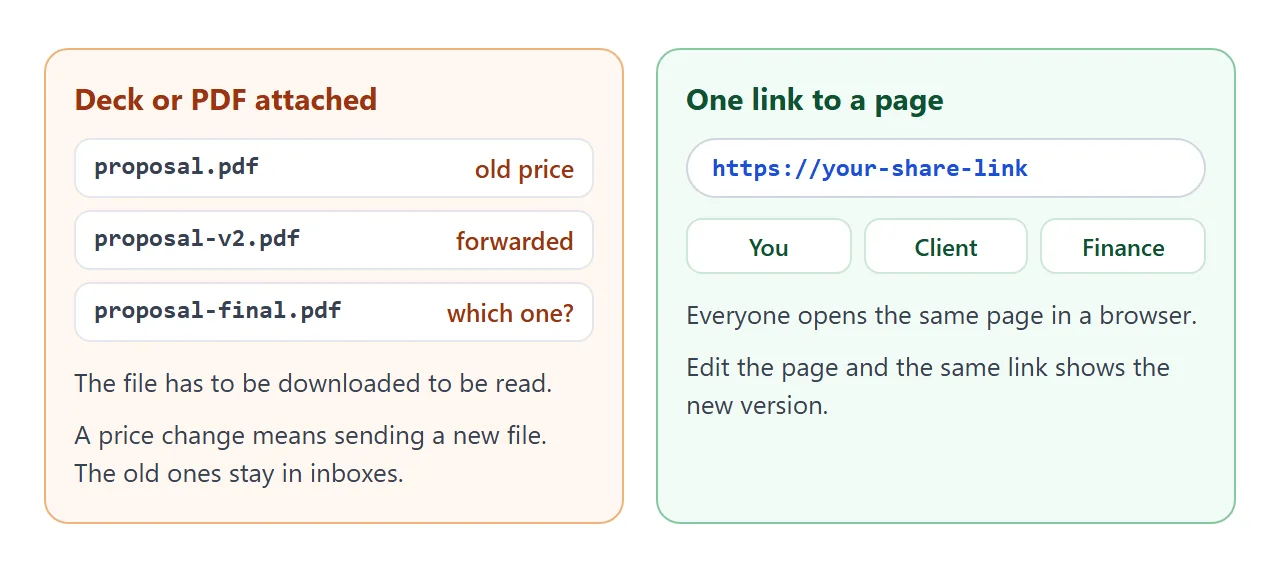
The same proposal can reach the client in three ways. They differ most on what happens after you press send.
| Text in the email | PDF or deck attached | Link to a page | |
|---|---|---|---|
| Opens on a phone | Yes | Depends on the mail app | Yes, in the browser |
| Price and start date first | Only if you format it | Depends on the file | Yes, by design |
| Tappable packages | No | No | Yes |
| Change after sending | Send a new email | Send a new file | Edit the page, same link |
| Forwarded inside the client | Pasted text | Many copies | One address |
If the client must have a file, send one alongside the link. For a wider look, see email vs link for documents. A rate sheet alone is covered in HTML for pricing sheets.
When it does not work
| What you see | Cause | Fix |
|---|---|---|
| The page shows code in the chat | You copied the chat text, not the code block | Copy only the code, from the doctype line to the last html tag |
| A logo or example post is missing | Images from other sites are blocked | Ask for no images, or a logo drawn in SVG |
| A price differs from your notes | The AI rewrote it | Fix it, and keep the "use only my numbers" rule |
| The client says nothing arrived | A tap on the page is not sent to you | Ask them to reply with the copied sentence |
| The client sees the old price | They hold an old file or a pasted copy | Send only the link from now on |
| The text is tiny on a phone | No viewport meta tag | Ask the AI to add one and a 16px base size |
Your contact is not the only reader. The proposal link guide covers writing for the colleague who was not on the call.