Searching for the best template gets you a layout, not a sheet that stays correct. A speaker one sheet puts your bio, talks and fees on one page, and it changes with every event.
Built as a web page, you edit one page and keep one link.
Here is a finished sheet for a fictional speaker. Press Short and Long to switch the bio. The yellow line at the top is the part you change for each event.
<!doctype html>
<html lang="en">
<head>
<meta charset="utf-8">
<meta name="viewport" content="width=device-width, initial-scale=1">
<title>Speaker one sheet</title>
<style>
* { box-sizing: border-box; }
body { margin: 0; font-family: system-ui, sans-serif; background: #f4f5f7; color: #1d2330; line-height: 1.5; }
.sheet { max-width: 760px; margin: 0 auto; background: #fff; }
.event { background: #fff4d6; color: #5c4400; padding: 10px 20px; font-size: 14px; }
.event b { color: #3d2e00; }
header { display: flex; gap: 18px; align-items: center; padding: 24px 20px 8px; }
.avatar { flex: none; width: 88px; height: 88px; border-radius: 50%; }
h1 { margin: 0; font-size: 26px; line-height: 1.15; }
.tag { margin: 4px 0 0; color: #4b5563; font-size: 15px; }
section { padding: 14px 20px; }
h2 { margin: 0 0 8px; font-size: 13px; letter-spacing: .08em; text-transform: uppercase; color: #6b7280; }
.toggle { display: inline-flex; border: 1px solid #cfd4dc; border-radius: 8px; overflow: hidden; margin-bottom: 10px; }
.toggle button { border: 0; background: #fff; padding: 7px 14px; font: inherit; font-size: 14px; cursor: pointer; }
.toggle button[aria-pressed="true"] { background: #1d4ed8; color: #fff; }
.bio p { margin: 0 0 8px; font-size: 15px; }
.talks { display: grid; gap: 10px; }
.talk { border: 1px solid #e1e4ea; border-radius: 10px; padding: 12px 14px; }
.talk h3 { margin: 0 0 2px; font-size: 16px; }
.talk .len { font-size: 13px; color: #6b7280; }
.talk p { margin: 6px 0 0; font-size: 14px; }
table { width: 100%; border-collapse: collapse; font-size: 14px; }
th, td { text-align: left; padding: 8px 6px; border-bottom: 1px solid #e8eaee; vertical-align: top; }
th { color: #6b7280; font-weight: 600; }
.note { font-size: 13px; color: #6b7280; margin: 8px 0 0; }
ul.past { margin: 0; padding-left: 18px; font-size: 14px; }
.contact { background: #eef3ff; border-radius: 10px; margin: 8px 20px 24px; padding: 14px 16px; font-size: 15px; }
.contact a { color: #1d4ed8; font-weight: 600; }
@media (max-width: 480px) { header { flex-direction: column; align-items: flex-start; } }
</style>
</head>
<body>
<div class="sheet">
<!-- Change this line for each event, or delete it -->
<div class="event">Prepared for <b>Harbor Design Summit 2027</b>. Suggested talk: <b>Small Teams, Clear Decisions</b>.</div>
<header>
<svg class="avatar" viewBox="0 0 88 88" role="img" aria-label="Initials MH">
<circle cx="44" cy="44" r="44" fill="#1d4ed8"/>
<text x="44" y="53" text-anchor="middle" font-size="30" font-weight="700" fill="#fff" font-family="system-ui, sans-serif">MH</text>
</svg>
<div>
<h1>Mira Halvorsen</h1>
<p class="tag">Speaker on team decision-making and calm product launches</p>
</div>
</header>
<section class="bio">
<h2>Bio</h2>
<div class="toggle" role="group" aria-label="Bio length">
<button type="button" id="b-short" aria-pressed="true">Short</button>
<button type="button" id="b-long" aria-pressed="false">Long</button>
</div>
<p id="bio-text"></p>
</section>
<section>
<h2>Talks</h2>
<div class="talks">
<div class="talk">
<h3>Small Teams, Clear Decisions</h3>
<div class="len">Keynote, 40 minutes</div>
<p>How a team of six decides faster by writing down who decides, and by when.</p>
</div>
<div class="talk">
<h3>The Quiet Launch</h3>
<div class="len">Talk, 25 minutes</div>
<p>A launch checklist that replaces the all-nighter.</p>
</div>
<div class="talk">
<h3>Decision Logs in Practice</h3>
<div class="len">Workshop, half day</div>
<p>Attendees leave with a working log for their own team.</p>
</div>
</div>
</section>
<section>
<h2>Fees</h2>
<table>
<tr><th>Format</th><th>Fee</th><th>Includes</th></tr>
<tr><td>Keynote</td><td>$3,000</td><td>Talk, Q&A, 20 min with organizers</td></tr>
<tr><td>Talk</td><td>$1,800</td><td>Talk and Q&A</td></tr>
<tr><td>Workshop</td><td>$4,500</td><td>Half day, up to 30 people</td></tr>
</table>
<p class="note">Example figures. Travel and lodging are billed separately. Fees last confirmed 1 October 2026.</p>
</section>
<section>
<h2>Recently spoken at</h2>
<ul class="past">
<li>Lakeside Product Days, 2026</li>
<li>Northwind Leaders Forum, 2026</li>
<li>Open Studio Conference, 2025</li>
</ul>
</section>
<div class="contact">
Book or ask a question: <a href="mailto:mira@example.com">mira@example.com</a>
· <a href="tel:+15550100">+1 555 0100</a>
</div>
</div>
<script>
// Two bio lengths, because organizers ask for different ones
const bios = {
short: 'Mira Halvorsen helps small teams make decisions without endless meetings. She has led product launches for ten years and speaks about calm, clear ways of working.',
long: 'Mira Halvorsen helps small teams make decisions without endless meetings. She has led product launches for ten years, first at a design studio and then at two software companies. Her talks cover decision logs, launch checklists and the habits that let a team of six work like a team of twenty. She lives by the sea and writes a monthly note on working well.'
};
const text = document.getElementById('bio-text');
const bShort = document.getElementById('b-short');
const bLong = document.getElementById('b-long');
function show(which) {
text.textContent = bios[which];
bShort.setAttribute('aria-pressed', which === 'short');
bLong.setAttribute('aria-pressed', which === 'long');
}
bShort.addEventListener('click', () => show('short'));
bLong.addEventListener('click', () => show('long'));
show('short');
</script>
</body>
</html>
The page is one file of HTML, so it works the same on a laptop and on a phone.
The email and phone lines are ordinary links. mailto: and tel: links are part of the HTML anchor element, and on a phone a tap can start a message or a call.
What goes on a speaker one sheet
Keep it to what a person deciding on a booking needs to see. Each block below is one section of the demo above.
| Block | What to write | Why it earns its place |
|---|---|---|
| Name and one line | Your name and the subject you speak on | The reader knows in a second if you fit |
| Bio, short and long | Two lengths of the same bio | Event pages and programs have different room |
| Talks | Title, format, length, one sentence | They can pick without asking |
| Fees | By format, with the date you last checked them | A dated figure shows it is current |
| Recent events | Three to five names and years | Shows you have done this before |
| Contact | One email, one phone | The next step is a tap |
Leave out anything you would not read aloud in a minute. A second page can hold a full talk outline, a photo set or a technical rider. For a creator-style kit with audience numbers, see media kit link.
Make it with AI
Collect your facts first, because the AI can only arrange what you give it. Then paste this into ChatGPT, Claude or Gemini, with your facts under it.
Make one self-contained HTML page: a speaker one sheet.
Sections in this order: a yellow line at the top that says
"Prepared for [EVENT]. Suggested talk: [TALK]", name and
one-line description, bio with Short and Long buttons,
talks (title, format, length, one sentence), a fee table by
format with the note "Fees last confirmed [DATE]", recent
events, and a contact box with mailto and tel links.
Use only inline CSS and a small script. No external images,
fonts or libraries. It must read well on a phone.
Use only the facts I give below. Do not invent anything.

[PASTE YOUR BIO, TALKS, FEES AND CONTACT HERE]
When the code comes back, check four things before you send it anywhere:
- Every name, date, length and fee matches your notes. Delete any line you did not write.
- The Short and Long buttons both show text.
- The email and phone links go to your real address and number.
- It looks right when you narrow the window to phone width.
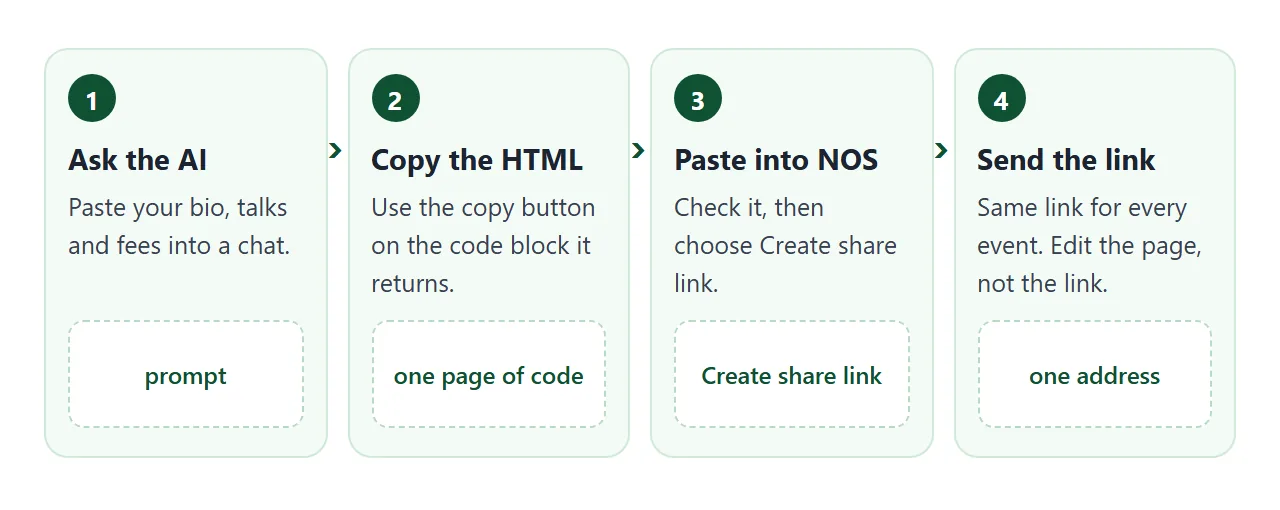
Update it for each event
The point of a page is that you edit it in place. Three spots change from one booking to the next.
- The event line. Replace the event name and the talk you suggest, or delete the line for a general version.
- The fee note. Change the date when you check your fees, so the sheet says when it was last true.
- Recent events. Add the newest, drop the oldest.
A second page can help organizers who already know which slot they have. This one shows the details for each format and gives a short introduction to read aloud.
<!doctype html>
<html lang="en">
<head>
<meta charset="utf-8">
<meta name="viewport" content="width=device-width, initial-scale=1">
<title>Event fit and introduction</title>
<style>
  * { box-sizing: border-box; }
  body { margin: 0; padding: 20px; font-family: system-ui, sans-serif; background: #f4f5f7; color: #1d2330; line-height: 1.5; }
  .wrap { max-width: 640px; margin: 0 auto; }
  h1 { margin: 0 0 4px; font-size: 22px; }
  .sub { margin: 0 0 16px; color: #4b5563; font-size: 14px; }
  .card { background: #fff; border-radius: 12px; padding: 16px; margin-bottom: 14px; box-shadow: 0 2px 8px rgba(0,0,0,.06); }
  h2 { margin: 0 0 10px; font-size: 13px; letter-spacing: .08em; text-transform: uppercase; color: #6b7280; }
  .chips { display: flex; flex-wrap: wrap; gap: 8px; margin-bottom: 12px; }
  .chips button { border: 1px solid #cfd4dc; background: #fff; border-radius: 99px; padding: 8px 16px; font: inherit; font-size: 14px; cursor: pointer; }
  .chips button[aria-pressed="true"] { background: #1d4ed8; border-color: #1d4ed8; color: #fff; }
  dl { margin: 0; display: grid; grid-template-columns: 110px 1fr; gap: 6px 12px; font-size: 14px; }
  dt { color: #6b7280; }
  dd { margin: 0; }
  .intro { font-size: 15px; margin: 0 0 10px; }
  .copy { border: 0; background: #1d4ed8; color: #fff; border-radius: 8px; padding: 9px 16px; font: inherit; font-size: 14px; cursor: pointer; }
  .status { margin-left: 10px; font-size: 13px; color: #0f5132; }
  @media (max-width: 480px) { dl { grid-template-columns: 1fr; gap: 0; } dt { margin-top: 6px; } }
</style>
</head>
<body>
<div class="wrap">
  <h1>Mira Halvorsen: formats</h1>
  <p class="sub">Pick the kind of slot you have. The details below change to match.</p>

  <div class="card">
    <h2>Your slot</h2>
    <div class="chips" role="group" aria-label="Format">
      <button type="button" data-f="keynote" aria-pressed="true">Keynote</button>
      <button type="button" data-f="talk" aria-pressed="false">Talk</button>
      <button type="button" data-f="workshop" aria-pressed="false">Workshop</button>
    </div>
    <dl id="details"></dl>
  </div>

  <div class="card">
    <h2>Introduction to read aloud</h2>
    <p class="intro" id="intro"></p>
    <button type="button" class="copy" id="copy">Copy introduction</button><span class="status" id="status" role="status"></span>
  </div>
</div>

<script>
  // One object per format: edit the text here, the page follows
  const formats = {
    keynote: {
      title: 'Small Teams, Clear Decisions',
      rows: [['Length', '40 minutes plus 10 for questions'], ['Room', 'Any size, stage or floor'], ['Needs', 'Screen, one microphone'], ['Fee', '$3,000 (example)']]
    },
    talk: {
      title: 'The Quiet Launch',
      rows: [['Length', '25 minutes plus 5 for questions'], ['Room', 'Any size'], ['Needs', 'Screen, one microphone'], ['Fee', '$1,800 (example)']]
    },
    workshop: {
      title: 'Decision Logs in Practice',
      rows: [['Length', 'Half day, with a break'], ['Room', 'Tables for up to 30 people'], ['Needs', 'Screen, flip chart, markers'], ['Fee', '$4,500 (example)']]
    }
  };

  const buttons = document.querySelectorAll('.chips button');
  const details = document.getElementById('details');
  const intro = document.getElementById('intro');
  const status = document.getElementById('status');

  function show(key) {
    const f = formats[key];
    buttons.forEach((b) => b.setAttribute('aria-pressed', b.dataset.f === key));
    details.innerHTML = '';
    f.rows.forEach(([k, v]) => {
      const dt = document.createElement('dt'); dt.textContent = k;
      const dd = document.createElement('dd'); dd.textContent = v;
      details.append(dt, dd);
    });
    intro.textContent = 'Our next speaker is Mira Halvorsen. She helps small teams make decisions without endless meetings, and today she will talk about "' + f.title + '". Please welcome Mira.';
    status.textContent = '';
  }
  buttons.forEach((b) => b.addEventListener('click', () => show(b.dataset.f)));

  document.getElementById('copy').addEventListener('click', () => {
    // Clipboard can be blocked in some contexts, so say so instead of failing silently
    if (!navigator.clipboard) { status.textContent = 'Select the text and copy it.'; return; }
    navigator.clipboard.writeText(intro.textContent)
      .then(() => { status.textContent = 'Copied'; })
      .catch(() => { status.textContent = 'Select the text and copy it.'; });
  });

  show('keynote');
</script>
</body>
</html>
Each format lives in one object in the code. Add a fourth format by copying one entry and changing the words. On this page the Copy button asks the browser to copy the text, and if the browser refuses it shows a message instead.
Send it as a link
Paste the HTML into a NOS document and choose Create share link. HTML to link walks through it. The page renders as written with its script running, so the Short and Long buttons work for the person reading.
The recipient opens the link in a browser, on a computer or a phone. They need no account, and they cannot edit your page. When you change the code later, the same link shows the new version.
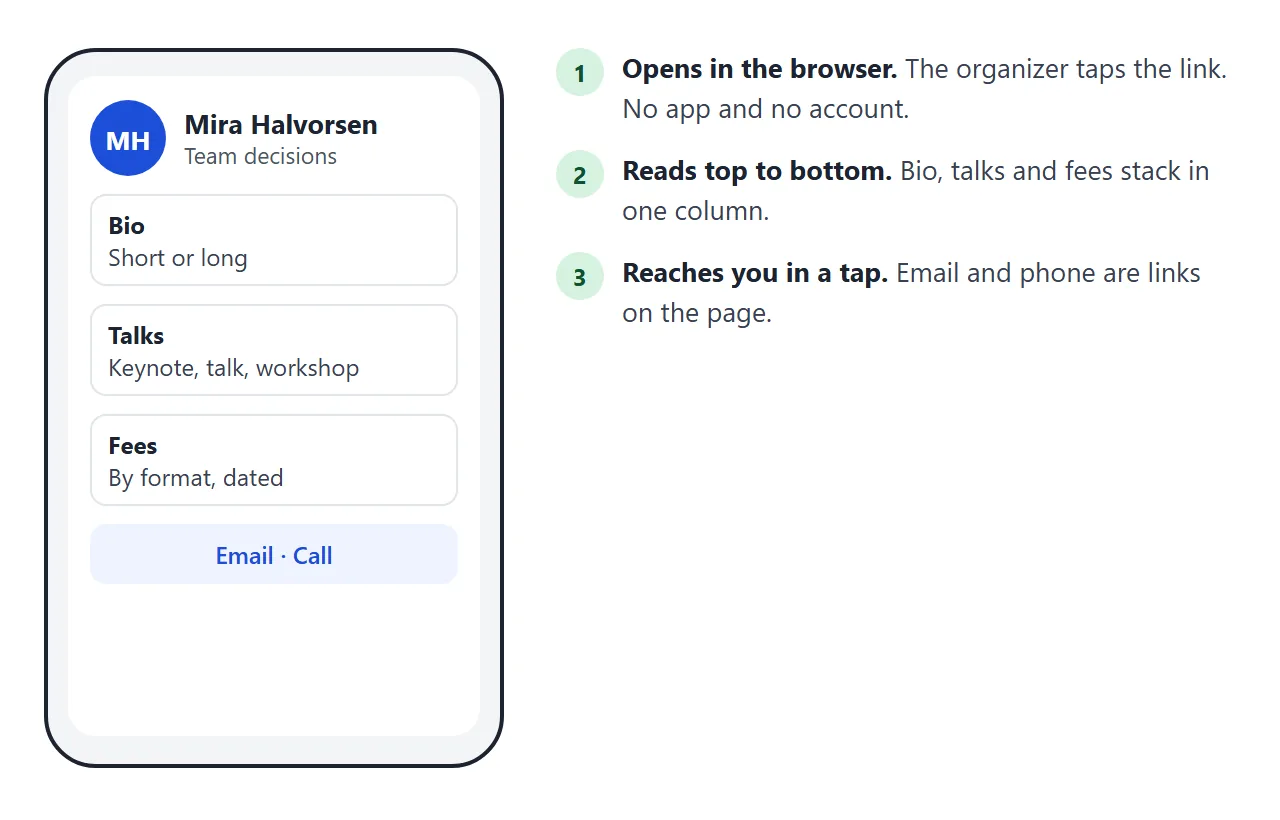
Two other places to put the link. Paste it in an email, so the recipient gets an address instead of an attachment. Or turn it into a QR code for a printed card or a slide, as covered in HTML file to QR code.
If the link will be opened on phones, opening HTML on a phone explains what goes wrong with attached files.
Link or PDF: which to send
A PDF is a fine thing to attach when an organizer asks for a file for their own system. For everything else, compare what happens the next time a fee or a bio changes.
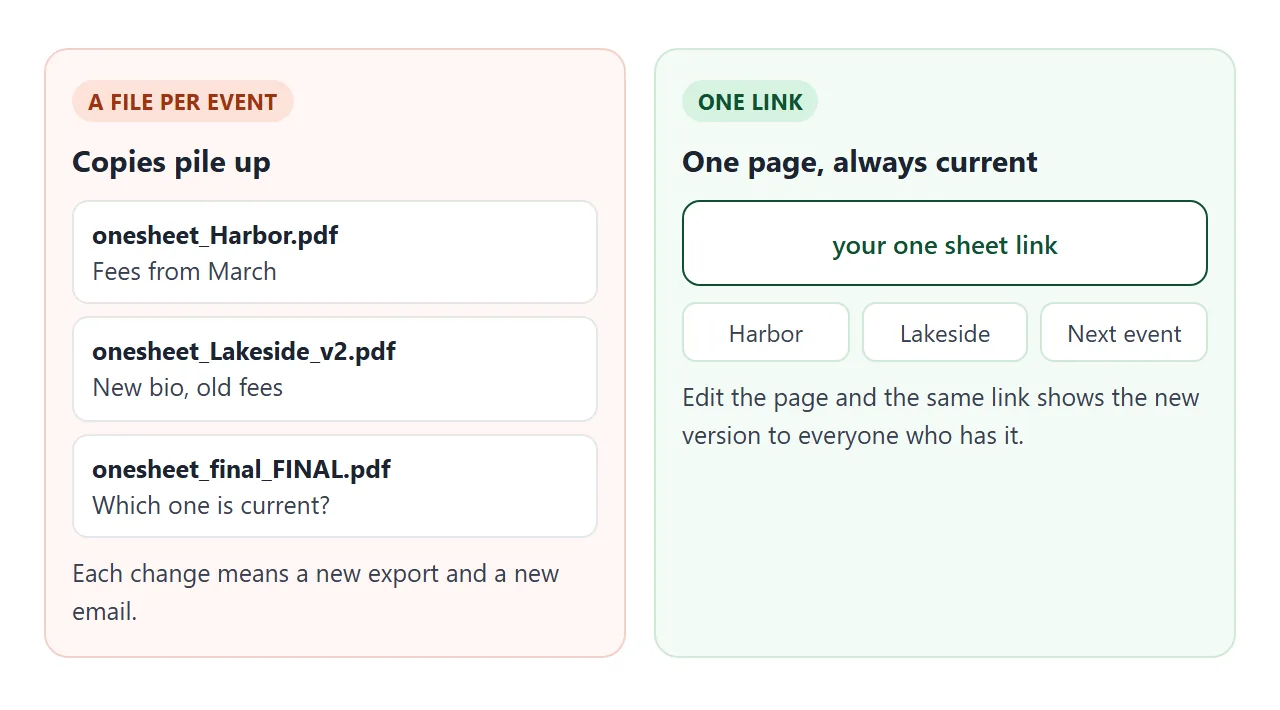
| PDF attachment | Share link | QR code on paper | |
|---|---|---|---|
| Change a fee | Export and send again | Edit the page, same link | Edit the page, same code |
| Who has the old version | Everyone you already emailed | Nobody, they see the new one | Nobody, it points to the page |
| What the reader opens | A file | A page in the browser | A page after scanning |
| Good for | A file the organizer must keep | Pitches and follow-ups | Cards, slides, posters |
The longer comparison is in HTML vs PDF for clients. If you also quote projects, proposal link uses the same idea.
When it does not work
| What you see | Cause | Fix |
|---|---|---|
| The page shows as plain code | The AI reply was pasted with its explanation text | Paste only the code from the first doctype line to the last closing html tag |
| Short and Long buttons do nothing | The script was cut off when copying | Copy the whole code block again, including the script at the bottom |
| A photo is missing | The AI linked an image on another website, which NOS blocks | Ask for an inline SVG or a CSS shape instead of a photo link |
| Email link opens nothing on a computer | The computer has no mail program set up | Show the address as text as well as a link |
| Page is cramped on a phone | No viewport line in the head | Ask the AI to add the viewport meta tag and a single-column layout |
| A fee on the sheet is out of date | The page was not edited after you changed your rates | Edit the table and its date, the link stays the same |