"StackBlitz" here means the online code editor at stackblitz.com, not a library you install. For plain HTML, a StackBlitz project is an index.html file with a live preview beside it. Everything the preview shows can sit in that one file.
Try the smallest working version. This is the whole page: markup, CSS and JavaScript in one file.
<!doctype html>
<html lang="en">
<head>
<meta charset="utf-8">
<meta name="viewport" content="width=device-width, initial-scale=1">
<title>One-file page</title>
<style>
  /* In a multi-file project this block would live in style.css */
  body {
    margin: 0; padding: 24px; font-family: system-ui, sans-serif;
    background: #f4f5f7; color: #1d2330;
  }
  .card {
    max-width: 340px; padding: 18px 20px; border-radius: 12px;
    background: #fff; box-shadow: 0 6px 20px rgba(0, 0, 0, .1);
  }
  h1 { margin: 0 0 6px; font-size: 20px; }
  p { margin: 0 0 14px; color: #4b5563; }
  button {
    font: inherit; padding: 10px 16px; border: 0; border-radius: 8px;
    background: #2563eb; color: #fff; cursor: pointer;
  }
  #count { font-weight: 700; }
</style>
</head>
<body>
  <div class="card">
    <h1>Hello from one file</h1>
    <p>Clicked <span id="count">0</span> times.</p>
    <button id="btn" type="button">Click me</button>
  </div>

  <!-- Placed after the elements it uses, so they exist when it runs -->
  <script>
    // In a multi-file project this block would live in script.js
    const btn = document.getElementById('btn');
    const count = document.getElementById('count');
    let n = 0;
    btn.addEventListener('click', () => {
      n += 1;
      count.textContent = n;
    });
  </script>
</body>
</html>
If it works here, it works pasted into the index.html of an HTML project. Nothing else is needed.
What StackBlitz is, in one paragraph
The StackBlitz docs say it is powered by WebContainers, which they describe as a WebAssembly-based operating system that boots a Node.js environment in milliseconds. They also say development, including Node.js and git, runs inside your browser tab.
You do not need any of that for an HTML page. The docs describe a second environment, EngineBlock, built for front-end projects only. A plain page is exactly that case.
Start a plain HTML project
- Open the StackBlitz start page and choose a starter without a framework. The docs group starters into sets such as popular, frontend and vanilla.
- Open
index.htmland replace its contents with your page. - Put the CSS in a
<style>tag in the head. - Put the JavaScript in a
<script>tag at the end of the body. - Check the preview. Reload it once to be sure it still works from a cold start.
The StackBlitz SDK uses the same idea. Its example creates a project from an object of file names and contents, with a template field. The html template is one of the documented values.
One file instead of three
Editors encourage splitting a page into index.html, style.css and script.js. That is tidy, but it means the page is three files. Copy only the first and the other two are left behind.
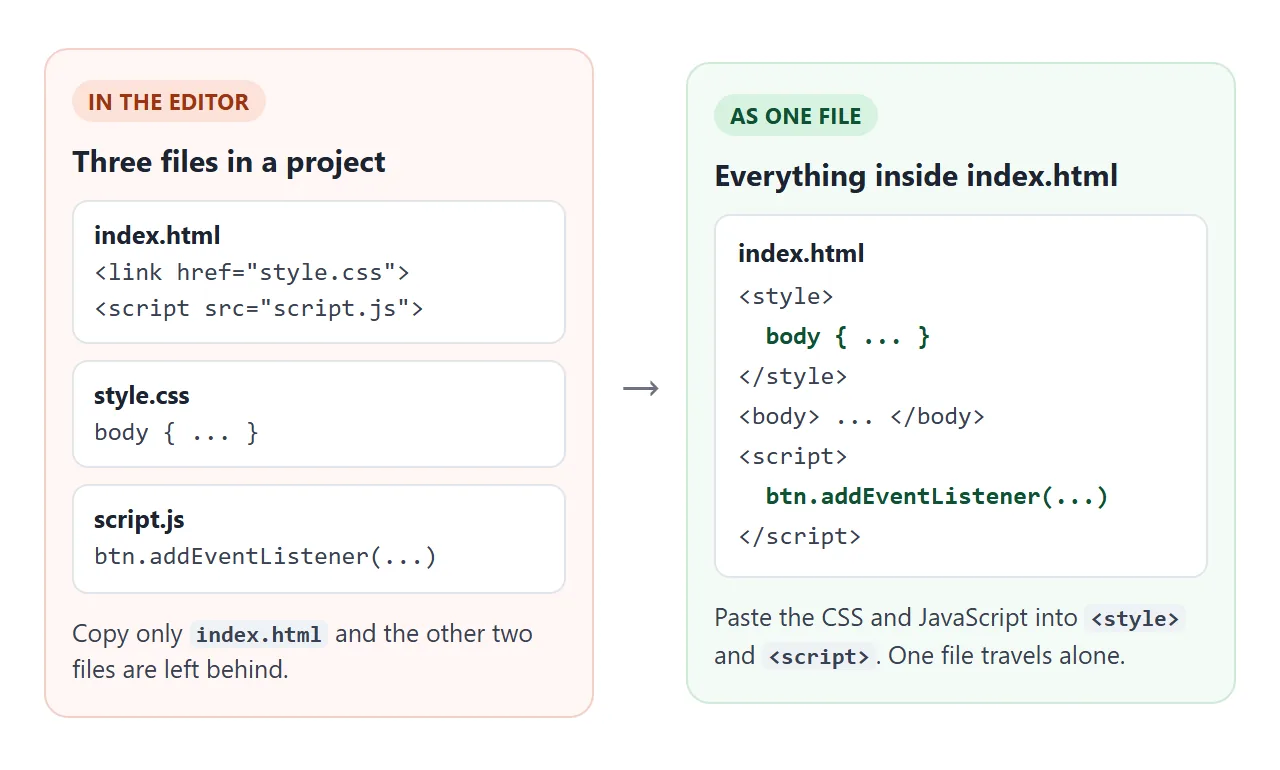
The fix is to paste the CSS between <style> tags and the JavaScript between <script> tags. The page keeps working, and one file is all you have to send. The self-contained HTML checklist covers the rest of what a one-file page needs.
Add a library with one script tag
A library does not need an install step in a plain page. A script tag that points at a CDN address is enough. This example loads canvas-confetti from jsDelivr.
<!doctype html>
<html lang="en">
<head>
<meta charset="utf-8">
<meta name="viewport" content="width=device-width, initial-scale=1">
<title>Library from a CDN</title>
<style>
  body {
    margin: 0; padding: 24px; font-family: system-ui, sans-serif;
    background: #f4f5f7; color: #1d2330;
  }
  .card {
    max-width: 340px; padding: 18px 20px; border-radius: 12px;
    background: #fff; box-shadow: 0 6px 20px rgba(0, 0, 0, .1);
  }
  h1 { margin: 0 0 6px; font-size: 20px; }
  p { margin: 0 0 14px; color: #4b5563; }
  button {
    font: inherit; padding: 10px 16px; border: 0; border-radius: 8px;
    background: #16a34a; color: #fff; cursor: pointer;
  }
  #status { margin-top: 12px; font-size: 14px; color: #6b7280; }
</style>
<!-- Pinned version: this URL always returns the same file. defer = run after the page is parsed -->
<script defer src="https://cdn.jsdelivr.net/npm/canvas-confetti@1.9.4/dist/confetti.browser.min.js"></script>
</head>
<body>
  <div class="card">
    <h1>A library, one script tag</h1>
    <p>No install step. The tag is the whole setup.</p>
    <button id="go" type="button">Throw confetti</button>
    <div id="status" aria-live="polite"></div>
  </div>

  <script>
    const status = document.getElementById('status');
    document.getElementById('go').addEventListener('click', () => {
      // If the CDN script did not load, the global does not exist
      if (typeof confetti !== 'function') {
        status.textContent = 'The library did not load. Check the script URL and your connection.';
        return;
      }
      status.textContent = '';
      confetti({ particleCount: 90, spread: 70, origin: { y: 0.7 } });
    });
  </script>
</body>
</html>
Three habits keep this reliable:
- Pin the version. The address contains
@1.9.4, which names one release. The library README shows its tag in that form. - Add
defer. MDN says a deferred script runs after the document is parsed, in the order the tags appear. - Use the library inside a handler. The click runs after everything has loaded, so
confettiexists by then.
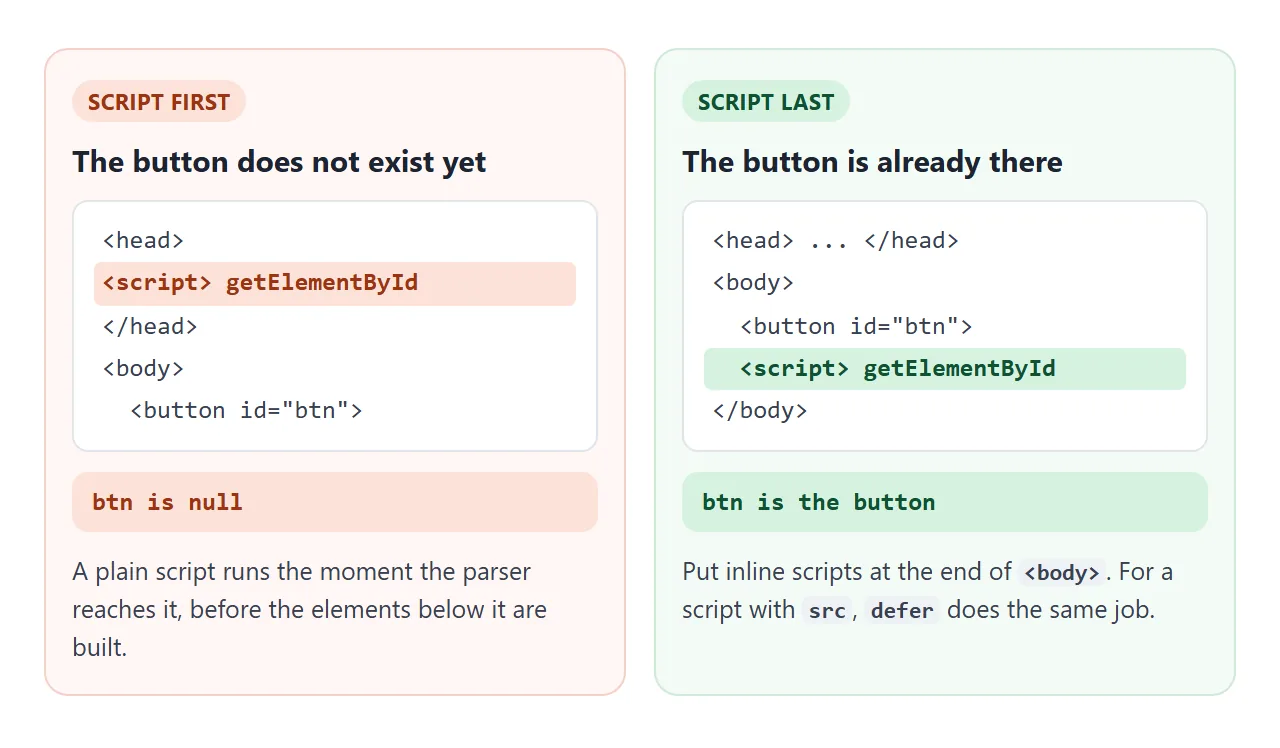
Order matters for your own scripts too. A plain script runs the moment the parser reaches it.
When the page needs a build step
Some StackBlitz projects use the node template, where you decide how the app is built, for example with Vite or webpack. Those projects are source code, not a finished page. A typical layout looks like this:
my-app/
  index.html      <- loads /src/main.js
  package.json
  src/main.js     <- uses import
The page you can share comes from the build. The Vite guide names the command vite build, and says the output goes to the folder set by build.outDir.
If the result will live under a sub-path, set the base option so asset paths are rewritten. Hosting a built front end walks through those two problems.
One more trap: an import of a separate file from an HTML file opened locally fails. MDN says loading a module page through a file:// address gives CORS errors. Inline <script type="module"> code avoids it.
A finished page, still one file
Here is a small tool that uses what we covered: inline CSS, one inline script at the end, and a form handled inside the page.
<!doctype html>
<html lang="en">
<head>
<meta charset="utf-8">
<meta name="viewport" content="width=device-width, initial-scale=1">
<title>Tip splitter</title>
<style>
  body {
    margin: 0; padding: 20px; font-family: system-ui, sans-serif;
    background: #f4f5f7; color: #1d2330;
  }
  form {
    max-width: 360px; margin: 0 auto; padding: 20px; border-radius: 14px;
    background: #fff; box-shadow: 0 6px 20px rgba(0, 0, 0, .1);
  }
  h1 { margin: 0 0 14px; font-size: 20px; }
  label { display: block; margin: 12px 0 4px; font-size: 14px; font-weight: 600; }
  input {
    width: 100%; box-sizing: border-box; padding: 10px 12px; font: inherit;
    border: 1px solid #cbd2dc; border-radius: 8px;
  }
  button {
    width: 100%; margin-top: 16px; padding: 12px; font: inherit; font-weight: 600;
    border: 0; border-radius: 8px; background: #2563eb; color: #fff; cursor: pointer;
  }
  #out {
    margin-top: 16px; padding: 12px 14px; border-radius: 8px;
    background: #f0f6ff; font-size: 15px; line-height: 1.5; min-height: 22px;
  }
  #out b { font-size: 20px; }
  .err { background: #fff1ec; color: #9a3412; }
</style>
</head>
<body>
  <form id="f" novalidate>
    <h1>Split the bill</h1>
    <label for="bill">Bill</label>
    <input id="bill" name="bill" type="number" inputmode="decimal" min="0" step="0.01" value="80">
    <label for="tip">Tip (%)</label>
    <input id="tip" name="tip" type="number" inputmode="numeric" min="0" max="100" value="15">
    <label for="people">People</label>
    <input id="people" name="people" type="number" inputmode="numeric" min="1" step="1" value="3">
    <button type="submit">Calculate</button>
    <div id="out" aria-live="polite">Press Calculate.</div>
  </form>

  <script>
    const form = document.getElementById('f');
    const out = document.getElementById('out');

    form.addEventListener('submit', (e) => {
      e.preventDefault();  // handled in the page, nothing is sent anywhere
      const d = new FormData(form);
      const bill = parseFloat(d.get('bill'));
      const tip = parseFloat(d.get('tip'));
      const people = parseInt(d.get('people'), 10);

      if (!(bill >= 0) || !(tip >= 0) || !(people >= 1)) {
        out.className = 'err';
        out.textContent = 'Enter a bill, a tip and at least 1 person.';
        return;
      }
      const total = bill * (1 + tip / 100);
      out.className = '';
      out.innerHTML = 'Total ' + total.toFixed(2) +
        '<br>Each pays <b>' + (total / people).toFixed(2) + '</b>';
    });
  </script>
</body>
</html>
The preventDefault() call stops the browser from reloading the page to submit the form. The result is calculated from FormData and written into the page.
Embedding and the editor address
StackBlitz documents an embed address: an iframe whose src is the project address with ?embed=1 added. The docs also list parameters such as view (editor or preview), file and hideNavigation.
<iframe src="https://stackblitz.com/edit/angular?embed=1"></iframe>
The SDK can do the same from JavaScript with embedProject and open a project in a new tab with openProject. The SDK page describes both as ways to put a project in docs, example pages or blog posts.
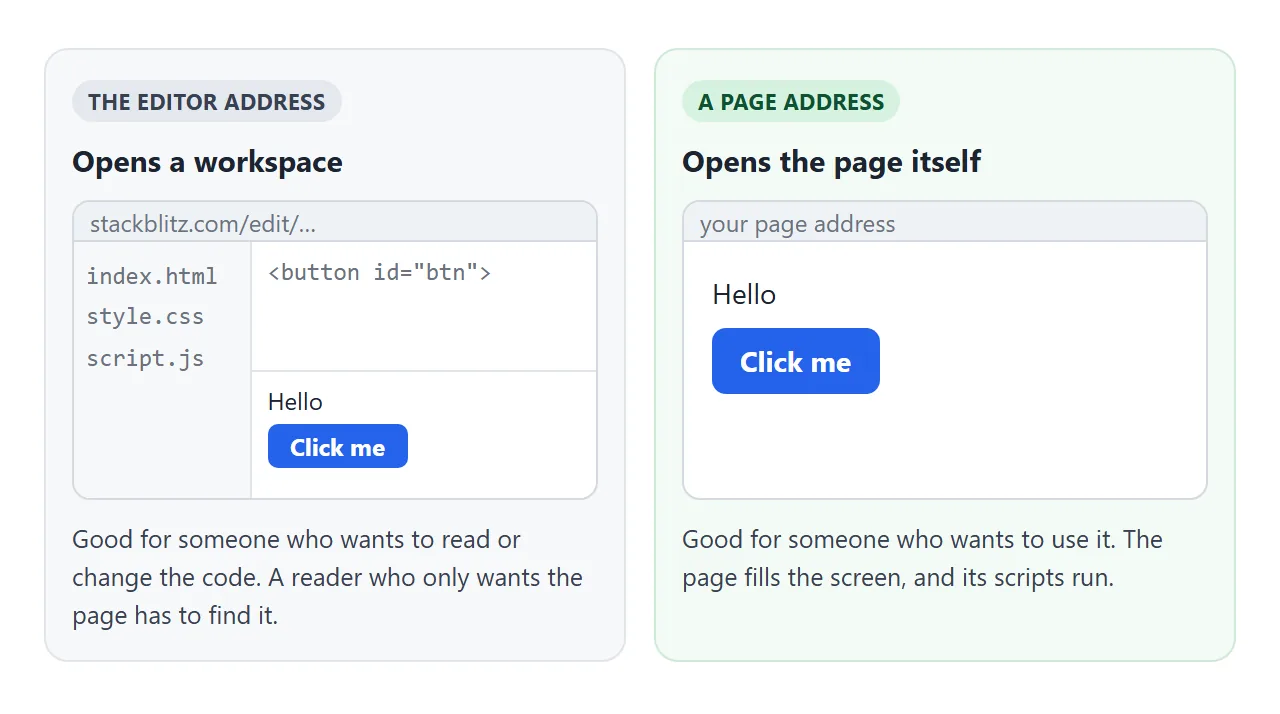
Compare what each kind of address gives the person who opens it:
| Reader wants | Send |
|---|---|
| To read or change the code | The project address |
| To use the page | A page address |
| The page inside another page | An embed, where iframes are allowed |
When it does not work
| What you see | Cause | Fix |
|---|---|---|
| Blank preview, console says null | The script runs before the element exists | Move the script to the end of body |
confetti is not defined |
The library tag is missing, wrong or later | Check the URL, call it inside a handler |
| Styling disappears after copying | style.css was left behind |
Paste the CSS into a style tag |
| Import fails from a local file | Module pages need http, not file | Inline the module or serve the folder |
| Reader lands in an editor | The editor address was shared | Share an address that opens the page |
| Form reloads the page | Default submit is not cancelled | Call preventDefault() in the handler |
| Works in the editor, not alone | The project needs a build | Run the build, share the output |
Share it as a link
An editor address is right for someone who wants to read the code. For someone who only wants to use the page, a screenshot cannot be clicked. A playground compared with a plain page covers that choice.
To send the working version, paste the page into a NOS document and choose Create share link. HTML to link walks through it. The page renders as written and its scripts run, so the people you send it to can click and try it themselves.
Scripts and styles from cdnjs.cloudflare.com, cdn.jsdelivr.net, cdn.tailwindcss.com, code.jquery.com and unpkg.com load, so the confetti example works as it is. Anyone with the link can open it without an account. If you change the code later, the same link shows the new version.
Inside a NOS page, iframes are blocked, so an embedded StackBlitz project will not show there. Put the page itself in the document and link to the project from a line of text instead.