A statement of work template needs a few fixed sections: purpose, scope, milestones with dates, fees, how work is accepted, and what you assume. Put them on one page the client can read in a browser before anyone signs.
That helps most when the document travels as a PDF. Each round of edits becomes a new attachment, and nobody on the client side is sure which one is current. A link keeps one version in front of everyone.
Here is a finished page. Tick the Delivered boxes to see the running total, and open it on a phone to see the table turn into cards.
<!doctype html>
<html lang="en">
<head>
<meta charset="utf-8">
<meta name="viewport" content="width=device-width, initial-scale=1">
<title>Statement of Work SOW-2026-014</title>
<style>
* { box-sizing: border-box; }
body { margin: 0; font-family: system-ui, sans-serif; color: #1f2937; background: #f4f5f7; line-height: 1.5; }
main { max-width: 760px; margin: 0 auto; padding: 20px 16px 28px; }
.head { background: #fff; border-radius: 12px; padding: 18px 20px; box-shadow: 0 1px 3px rgba(0,0,0,.08); }
.ref { font-size: 12px; color: #6b7280; letter-spacing: .3px; text-transform: uppercase; }
h1 { margin: 4px 0 6px; font-size: 22px; line-height: 1.25; }
.parties { display: flex; gap: 8px 24px; flex-wrap: wrap; font-size: 14px; color: #374151; }
.ver { display: inline-block; margin-top: 8px; font-size: 12px; background: #e0f2fe; color: #075985; border-radius: 999px; padding: 2px 10px; }
section { background: #fff; border-radius: 12px; padding: 14px 20px 16px; margin-top: 12px; box-shadow: 0 1px 3px rgba(0,0,0,.08); }
h2 { margin: 0 0 8px; font-size: 16px; }
p { margin: 0 0 8px; font-size: 14.5px; }
.two { display: grid; grid-template-columns: 1fr 1fr; gap: 12px; }
.two ul { margin: 0; padding-left: 18px; font-size: 14px; }
.in h3 { color: #166534; } .out h3 { color: #9a3412; }
h3 { margin: 0 0 4px; font-size: 13px; text-transform: uppercase; letter-spacing: .3px; }
table { width: 100%; border-collapse: collapse; font-size: 14px; }
th { text-align: left; font-size: 12px; color: #6b7280; font-weight: 600; padding: 4px 6px; border-bottom: 1px solid #e5e7eb; }
td { padding: 8px 6px; border-bottom: 1px solid #f0f1f3; vertical-align: top; }
td.fee, th.fee { text-align: right; white-space: nowrap; }
td.chk, th.chk { text-align: center; width: 64px; }
tfoot td { font-weight: 700; border-bottom: 0; }
input[type=checkbox] { width: 18px; height: 18px; }
.note { font-size: 13px; color: #4b5563; margin-top: 8px; }
.accept { border: 2px solid #1d4ed8; }
.accept p { margin-bottom: 4px; }
@media (max-width: 560px) {
.two { grid-template-columns: 1fr; }
table, tbody, tfoot, tr, td { display: block; }
thead { display: none; }
tbody tr { border-bottom: 1px solid #e5e7eb; padding: 8px 0; }
td { border: 0; padding: 1px 0; }
td:first-child { display: none; }
td.fee, td.chk, td.due { display: inline-block; text-align: left; width: auto; margin-right: 14px; }
td.fee::before { content: "Fee: "; color: #6b7280; }
td.due::before { content: "Due: "; color: #6b7280; }
td.chk::after { content: " Delivered"; font-size: 13px; color: #6b7280; }
td.chk { margin-right: 0; margin-top: 4px; }
tfoot td.fee { display: block; }
tfoot tr { padding-top: 8px; }
}
</style>
</head>
<body>
<main>
<div class="head">
<div class="ref">Statement of work · SOW-2026-014</div>
<h1>Ordering process review</h1>
<div class="parties"><span><b>Consultant:</b> Marlow Advisory</span><span><b>Client:</b> Quayside Foods</span></div>
<span class="ver">Version 2 · 1 October 2026</span>
</div>
<section>
<h2>Purpose</h2>
<p>Quayside Foods takes orders by phone, email and a shared spreadsheet. This project maps that process and recommends one way to take orders.</p>
</section>
<section>
<h2>Scope</h2>
<div class="two">
<div class="in"><h3>Included</h3>
<ul><li>Up to 6 interviews of 45 minutes</li><li>One process map</li><li>One findings report</li><li>One recommendations workshop</li></ul>
</div>
<div class="out"><h3>Not included</h3>
<ul><li>Buying or installing software</li><li>Staff training</li><li>Changes to the website</li></ul>
</div>
</div>
</section>
<section>
<h2>Milestones and fees</h2>
<table>
<thead><tr><th>#</th><th>Milestone and deliverable</th><th>Due</th><th class="fee">Fee</th><th class="chk">Delivered</th></tr></thead>
<tbody>
<tr><td>1</td><td>Kickoff and process map</td><td class="due">12 Nov 2026</td><td class="fee" data-fee="1800">$1,800</td><td class="chk"><input type="checkbox" aria-label="Milestone 1 delivered"></td></tr>
<tr><td>2</td><td>Findings report (draft)</td><td class="due">3 Dec 2026</td><td class="fee" data-fee="3200">$3,200</td><td class="chk"><input type="checkbox" aria-label="Milestone 2 delivered"></td></tr>
<tr><td>3</td><td>Recommendations workshop</td><td class="due">17 Dec 2026</td><td class="fee" data-fee="1500">$1,500</td><td class="chk"><input type="checkbox" aria-label="Milestone 3 delivered"></td></tr>
<tr><td>4</td><td>Final report and handover</td><td class="due">14 Jan 2027</td><td class="fee" data-fee="2500">$2,500</td><td class="chk"><input type="checkbox" aria-label="Milestone 4 delivered"></td></tr>
</tbody>
<tfoot>
<tr><td></td><td>Total fixed fee</td><td></td><td class="fee" id="total">$0</td><td></td></tr>
</tfoot>
</table>
<p class="note" id="done">Delivered so far: $0 of $0.</p>
</section>
<section>
<h2>Acceptance and payment</h2>
<p>Each deliverable is accepted when the client confirms it in writing, or 5 working days after delivery with no comments. Each milestone is invoiced on acceptance and due in 14 days.</p>
</section>
<section>
<h2>Assumptions</h2>
<p>Quayside Foods names one contact who answers questions within 2 working days. Extra interviews or a second round of edits are quoted as a change request.</p>
</section>
<section class="accept">
<h2>How to accept</h2>
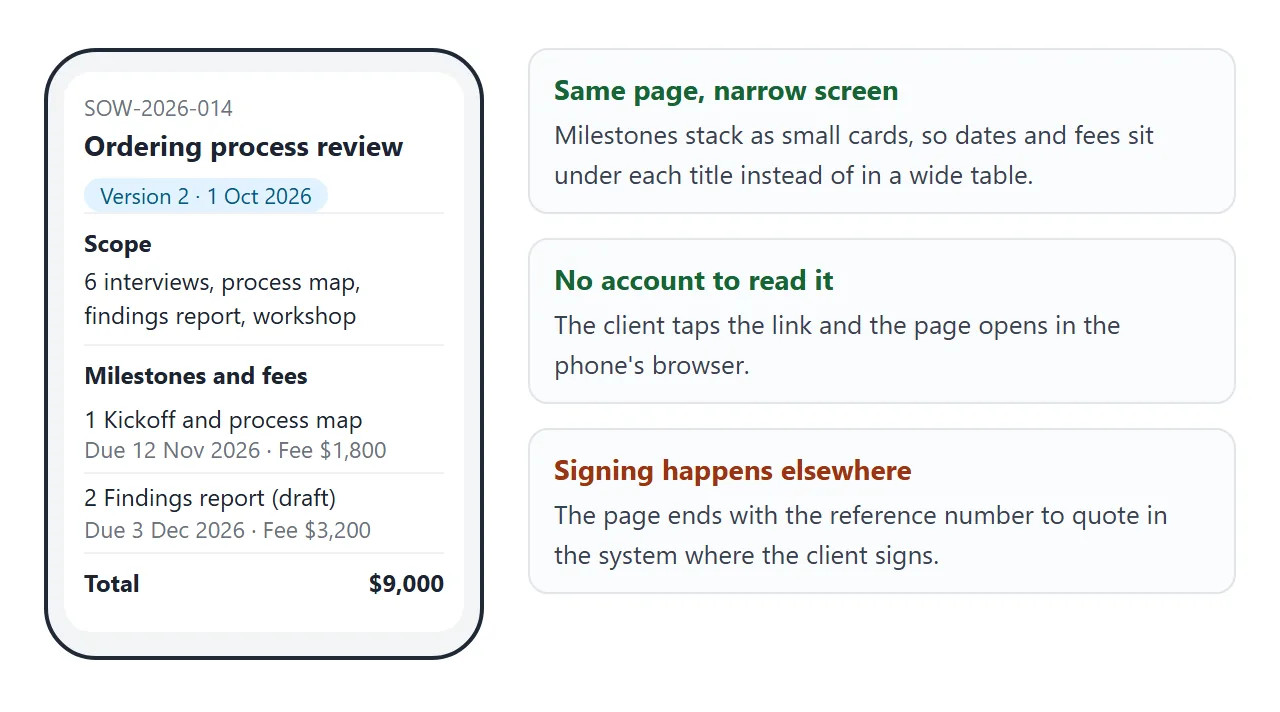
<p>Read this page, then sign in the contract system you already use. Quote reference <b>SOW-2026-014, version 2</b>.</p>
</section>
</main>
<script>
const fmt = (n) => '$' + n.toLocaleString('en-US');
const rows = [...document.querySelectorAll('td.fee[data-fee]')];
const total = rows.reduce((s, td) => s + Number(td.dataset.fee), 0);
document.getElementById('total').textContent = fmt(total);
function update() {
// add up the fees of ticked milestones
const done = rows.reduce((s, td) => {
const box = td.parentElement.querySelector('input');
return s + (box.checked ? Number(td.dataset.fee) : 0);
}, 0);
document.getElementById('done').textContent = 'Delivered so far: ' + fmt(done) + ' of ' + fmt(total) + '.';
}
document.querySelectorAll('input[type=checkbox]').forEach((b) => b.addEventListener('change', update));
update();
</script>
</body>
</html>
The page does not sign anything. It ends with a reference number, and the signature happens in whatever system you and the client already use.
What goes on the page
The usual contents of a statement of work are scope, a deliverables schedule, acceptance criteria and a payment schedule. Add location of work or applicable standards only if they apply to your job.
| Section | What to write | The question it answers |
|---|---|---|
| Purpose | Two sentences on why the project exists | Why are we doing this? |
| Scope | One list of what is included, one of what is not | Where does the work stop? |
| Milestones | A number, the deliverable and a due date for each | What arrives, and when? |
| Fees | A fee per milestone and a total | What does each step cost? |
| Acceptance and payment | How a deliverable is approved, when it is invoiced | When is a step finished? |
| Assumptions | What you need from the client, and how extras are handled | What could change the plan? |
The "not included" list does more work than any other line. It is where a vague request becomes a visible boundary.
Make it with AI
You do not need to write the HTML. Paste this into ChatGPT, Claude or Gemini, and replace the names and the facts with your own.
Write one self-contained HTML page for a statement of work.
No external files, images or fonts. It must read well on a phone.

Consultant: Marlow Advisory. Client: Quayside Foods.
Reference: SOW-2026-014, version 2, dated 1 October 2026.

Sections in this order: Purpose, Scope (two lists: included
and not included), Milestones and fees (a table with number,
deliverable, due date, fee and a total row), Acceptance and
payment, Assumptions, How to accept.

On a phone, turn the milestone table into stacked cards.
Add up the total with a few lines of JavaScript.

Use only these facts and invent nothing else:
[paste your scope, dates, fees and terms here]
Then check the result before it goes anywhere.
- Numbers: add the fees yourself and compare every date with your notes. The total on the page must equal your quote.
- Extra clauses: delete anything you did not give it, such as liability or ownership terms. Those are your decision.
- Phone width: open the page narrow. The milestones should stack, not run off the side.
- Version line: the page should say which version it is and when it is dated.
Send it as a link
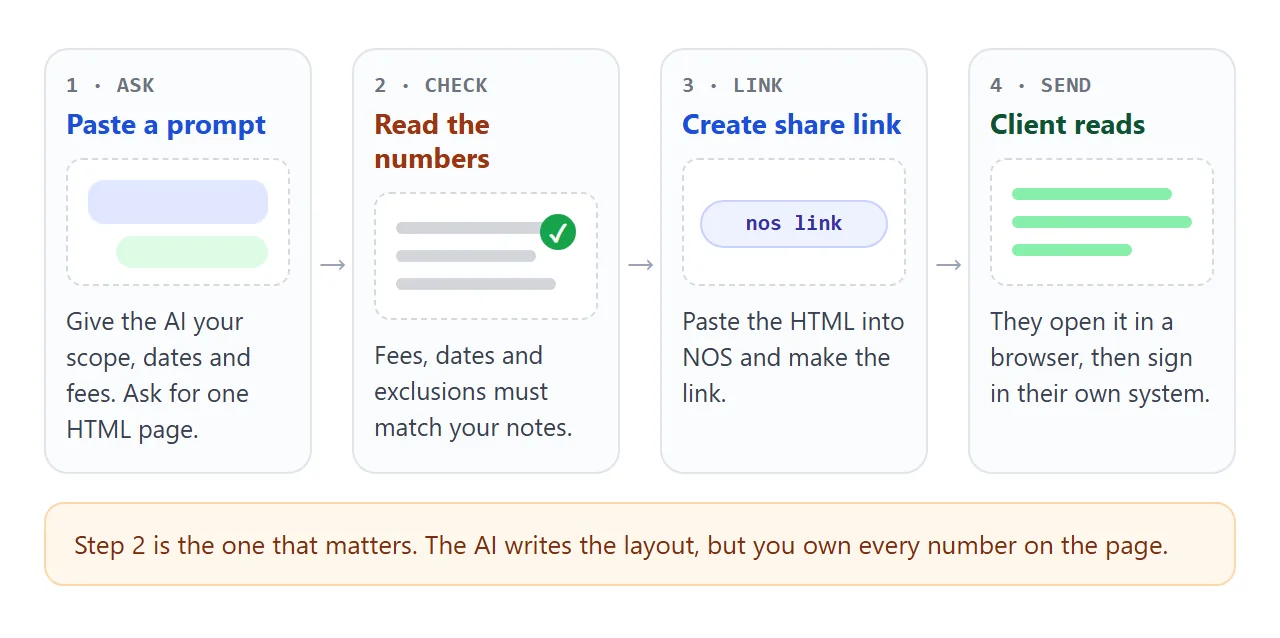
Paste the page into a NOS document and choose Create share link. HTML to link walks through it. Copy the address into an email or a message.
The client opens it in a browser, phone included, with no account. The page renders as written and the script that adds up the total runs. Nobody who opens it can edit it.
If you change the code later, the same link shows the new version. That is the point and the risk: when a fee or a date changes, bump the version line and tell the client, so nobody signs against a page they read last week.
Your own ticks work too. Changes the owner makes in View mode, such as ticking Delivered, are saved. A visitor's ticks are not saved.
Options the client can tick
Extras are easier to price when the client can see the total move. This page lists optional work with a price each, and the handover date shifts when options are ticked.
<!doctype html>
<html lang="en">
<head>
<meta charset="utf-8">
<meta name="viewport" content="width=device-width, initial-scale=1">
<title>SOW options and change requests</title>
<style>
* { box-sizing: border-box; }
body { margin: 0; font-family: system-ui, sans-serif; color: #1f2937; background: #f4f5f7; line-height: 1.5; }
main { max-width: 640px; margin: 0 auto; padding: 18px 16px 24px; }
h1 { margin: 0 0 2px; font-size: 20px; }
.sub { margin: 0 0 14px; font-size: 14px; color: #4b5563; }
.card { background: #fff; border-radius: 12px; padding: 12px 16px; box-shadow: 0 1px 3px rgba(0,0,0,.08); margin-bottom: 10px; }
.base { display: flex; justify-content: space-between; gap: 12px; font-size: 15px; }
label.opt { display: flex; gap: 10px; align-items: flex-start; cursor: pointer; }
label.opt input { width: 20px; height: 20px; margin-top: 2px; flex: none; }
.opt b { display: block; font-size: 15px; }
.opt span.d { display: block; font-size: 13px; color: #4b5563; }
.opt .p { margin-left: auto; white-space: nowrap; font-weight: 600; font-size: 14px; padding-left: 8px; }
.sum { background: #1e3a8a; color: #fff; border-radius: 12px; padding: 14px 16px; display: flex; justify-content: space-between; align-items: baseline; gap: 12px; }
.sum .big { font-size: 24px; font-weight: 700; }
.sum .small { font-size: 13px; opacity: .85; }
.cr { font-size: 13.5px; color: #374151; margin-top: 12px; }
.cr b { color: #111827; }
</style>
</head>
<body>
<main>
<h1>Ordering process review: options</h1>
<p class="sub">SOW-2026-014 · Tick what you want added to the fixed fee and watch the total.</p>
<div class="card base"><span>Base scope (4 milestones)</span><b>$9,000</b></div>
<div class="card"><label class="opt"><input type="checkbox" data-price="1200" data-days="5"><span><b>Three extra interviews</b><span class="d">Warehouse and driver staff, 45 minutes each.</span></span><span class="p">+ $1,200</span></label></div>
<div class="card"><label class="opt"><input type="checkbox" data-price="900" data-days="3"><span><b>Second recommendations workshop</b><span class="d">For the evening shift, same format.</span></span><span class="p">+ $900</span></label></div>
<div class="card"><label class="opt"><input type="checkbox" data-price="600" data-days="0"><span><b>Order form mock-up</b><span class="d">One screen, shown as a picture, not built.</span></span><span class="p">+ $600</span></label></div>
<div class="sum"><div><div class="small">Fixed fee with options</div><div class="big" id="total">$9,000</div></div><div class="small" id="end">Final handover: 14 Jan 2027</div></div>
<p class="cr"><b>Change requests.</b> Anything not listed here is quoted in writing before work starts, with its own fee and date. The fixed fee above changes only when you accept a quote.</p>
</main>
<script>
const BASE = 9000;
const boxes = [...document.querySelectorAll('input[type=checkbox]')];
const fmt = (n) => '$' + n.toLocaleString('en-US');
function update() {
let price = BASE, days = 0;
boxes.forEach((b) => {
if (b.checked) { price += Number(b.dataset.price); days += Number(b.dataset.days); }
});
document.getElementById('total').textContent = fmt(price);
document.getElementById('end').textContent = days
? 'Final handover moves out by ' + days + ' working days'
: 'Final handover: 14 Jan 2027';
}
boxes.forEach((b) => b.addEventListener('change', update));
</script>
</body>
</html>
Because a visitor's choices are not saved, treat this as a calculator. The client works out what they want, then replies with the options, or accepts a written quote for them. The base fee changes only when they do.
Link, attachment or signing system
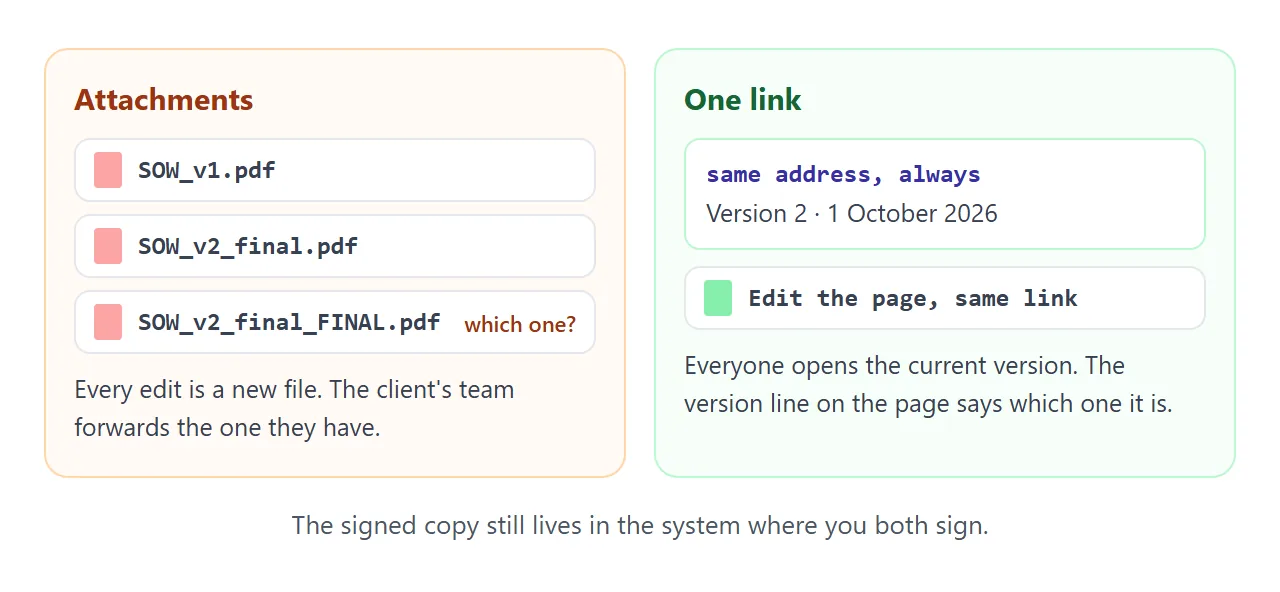
Each way of sending the statement has a job. Mixing them up is where versions go missing.
| Way | Which version people read | Where the signature happens | Watch out for |
|---|---|---|---|
| PDF attachment | The file each person saved | Wherever you sign it | Every edit is a new file, and large files can hit email size limits |
| Link to the page | The current page, same address after edits | Not on the page | Update the version line when terms change |
| Your signing system | The document uploaded there | Inside that system | Quote the reference from the page so both match |
A page can be edited, so it is not a record of what was agreed. Negotiate on the link, then sign in your signing system and keep that copy. Contract link covers that split in more depth, and proposal link covers the step before it.
When it does not work
| What you see | Cause | Fix |
|---|---|---|
| The total is not your quote | The AI rounded or changed a number | Add the fees by hand and fix the page |
| The client quotes old fees | They read before you edited | Bump the version line and date, and tell them |
| The table runs off a phone screen | It stayed a wide table | Ask for stacked cards on narrow screens |
| The client wants to sign on the page | The page has no signature feature | Sign in your signing system and quote the reference |
| The client's ticks are gone | A visitor's ticks are not saved | Ask them to reply with their choices |
| A logo or photo is missing | Outside images are blocked | Use a text heading or an inline SVG |
Next step: if the client also needs a price they can compare, a quote page uses the same method.