A sub plans template that stays correct is one web page, not a file. Put the schedule, seating notes and routines on a single screen and send one link.
If a room changes the night before, edit the page. The link you already sent shows the new version, so nobody has to work out which copy is the right one.
Here is a page to start from. Tap through the four tabs. The names, rooms and times are made up, and the yellow bar is the kind of late change you would add and later delete.
<!doctype html>
<html lang="en">
<head>
<meta charset="utf-8">
<meta name="viewport" content="width=device-width, initial-scale=1">
<title>Sub plan</title>
<style>
* { box-sizing: border-box; }
body { margin: 0; padding: 12px; font-family: system-ui, sans-serif; background: #eef2f6; color: #1d2330; }
.page { max-width: 640px; margin: 0 auto; background: #fff; border-radius: 12px; overflow: hidden; box-shadow: 0 2px 10px rgba(0,0,0,.08); }
header { background: #1f4e79; color: #fff; padding: 14px 16px 12px; }
header h1 { margin: 0; font-size: 19px; }
header p { margin: 4px 0 0; font-size: 13px; opacity: .92; }
.alert { background: #fff3cd; color: #5c4400; padding: 9px 16px; font-size: 14px; border-bottom: 1px solid #f0dc9a; }
nav { display: flex; border-bottom: 1px solid #dde3ea; }
nav button { flex: 1; padding: 11px 4px; font: 600 14px system-ui, sans-serif; background: #fff; border: 0; border-bottom: 3px solid transparent; color: #4b5563; cursor: pointer; }
nav button[aria-selected="true"] { color: #1f4e79; border-bottom-color: #1f4e79; }
section { padding: 12px 16px 16px; min-height: 330px; }
section[hidden] { display: none; }
table { width: 100%; border-collapse: collapse; font-size: 14px; }
td { padding: 7px 4px; border-bottom: 1px solid #edf0f4; vertical-align: top; }
td:first-child { white-space: nowrap; font-weight: 600; width: 64px; color: #1f4e79; }
td small { display: block; color: #5b6472; font-size: 12.5px; }
ul { margin: 0; padding-left: 20px; font-size: 14.5px; line-height: 1.5; }
li { margin-bottom: 6px; }
h2 { font-size: 15px; margin: 0 0 8px; }
label { display: block; padding: 8px 0; font-size: 14.5px; border-bottom: 1px solid #edf0f4; }
input[type=checkbox] { width: 18px; height: 18px; margin-right: 8px; vertical-align: -3px; }
.foot { padding: 8px 16px 12px; font-size: 12.5px; color: #5b6472; border-top: 1px solid #edf0f4; }
</style>
</head>
<body>
<div class="page">
<header>
<h1>Sub plan: Wednesday, Oct 7</h1>
<p>Grade 4 · Room 12 · Ms. Okafor is out today</p>
</header>
<div class="alert"><strong>Changed last night:</strong> Art is in Room 20 today, not the gym.</div>
<nav role="tablist">
<button role="tab" aria-selected="true" data-tab="day">Schedule</button>
<button role="tab" aria-selected="false" data-tab="routines">Routines</button>
<button role="tab" aria-selected="false" data-tab="notes">Notes</button>
<button role="tab" aria-selected="false" data-tab="help">Help</button>
</nav>
<section id="day">
<table>
<tr><td>8:15</td><td>Arrival and attendance<small>Sheet is on the clipboard by the door.</small></td></tr>
<tr><td>8:30</td><td>Reading<small>Silent reading, then read chapter 4 aloud.</small></td></tr>
<tr><td>9:30</td><td>Math<small>Worksheet pages 42 and 43. Copies are on my desk.</small></td></tr>
<tr><td>10:30</td><td>Recess<small>Duty on yard B, near the climbing frame.</small></td></tr>
<tr><td>10:50</td><td>Writing<small>Journal prompt is on the board.</small></td></tr>
<tr><td>11:45</td><td>Lunch<small>Walk the class to the lunch room.</small></td></tr>
<tr><td>12:30</td><td>Science<small>Watch the video, then answer the 3 questions.</small></td></tr>
<tr><td>1:30</td><td>Art<small>Walk the class to Room 20.</small></td></tr>
<tr><td>2:15</td><td>Pack up and dismissal</td></tr>
</table>
</section>
<section id="routines" hidden>
<h2>How the class runs</h2>
<ul>
<li><strong>Quiet signal:</strong> raise one hand and count down from five. The class copies you.</li>
<li><strong>Bathroom:</strong> one student at a time. The pass is the blue lanyard on the hook.</li>
<li><strong>Lining up:</strong> by table colour, red table first.</li>
<li><strong>Questions:</strong> students ask their table first, then you.</li>
<li><strong>Finished early:</strong> free reading from the book bin.</li>
</ul>
</section>
<section id="notes" hidden>
<h2>Before you leave today</h2>
<label><input type="checkbox"> Attendance sheet back in the office</label>
<label><input type="checkbox"> Worksheets collected on my desk</label>
<label><input type="checkbox"> Anything unusual written below</label>
<p style="font-size:14px;margin:12px 0 4px"><strong>Helpers today:</strong> Ada (door), Ben (handouts).</p>
<p style="font-size:13px;color:#5b6472;margin:0">Ticks here stay on your own screen. Leave your notes on my desk or by email.</p>
</section>
<section id="help" hidden>
<h2>Who to ask</h2>
<ul>
<li><strong>Front office:</strong> ext. 100</li>
<li><strong>Neighbour teacher:</strong> Mr. Lindqvist, Room 11</li>
<li><strong>Fire drill:</strong> exit by the east door, assembly point on the field. The class list is in the red folder.</li>
<li><strong>Wi-Fi for the video:</strong> the classroom screen is already signed in.</li>
</ul>
</section>
<div class="foot">Last updated Tuesday 8:40 pm</div>
</div>
<script>
const tabs = document.querySelectorAll('nav button');
tabs.forEach((btn) => {
btn.addEventListener('click', () => {
tabs.forEach((b) => b.setAttribute('aria-selected', b === btn));
document.querySelectorAll('section').forEach((s) => { s.hidden = s.id !== btn.dataset.tab; });
});
});
</script>
</body>
</html>
What goes on the page is your call. This layout is a starting point, and the same idea works for a house manual for a sitter: a page someone reads once, on the day, usually on a phone.
Make it with AI
You do not need to write code. Describe your day in plain words and ask for one file. Paste this into ChatGPT, Claude or Gemini and change the details.
Make a single-file HTML sub plan page for a substitute teacher.
Header: my name, grade, room number and the date. Under it, a
yellow bar "Changed last night" that I can delete.
Four tabs: Schedule (a table of times with one line of detail
each), Routines, Notes (a tick list of things to do before
leaving) and Help (office extension, neighbour teacher, drill).
Large text that reads well on a phone. No external images, fonts
or scripts. Use made-up example data and keep it easy to edit.
Return only the HTML.
Check these in the result before you rely on it:
- Every time, room and page number is yours. AI fills gaps with confident guesses.
- Each tab opens when you tap it. Ask again if one is empty or does nothing.
- Nothing loads from outside: no pictures from other sites, no web fonts.
- Text is readable on a phone held at arm's length.
Send it as a link
Open a NOS document and paste the HTML in. The page renders there and its scripts run, so test every tab yourself. Then choose Create share link and copy the address.
Anyone with that address can open the page in a browser, on a phone too, without an account. They cannot edit it. HTML to link walks through the steps.
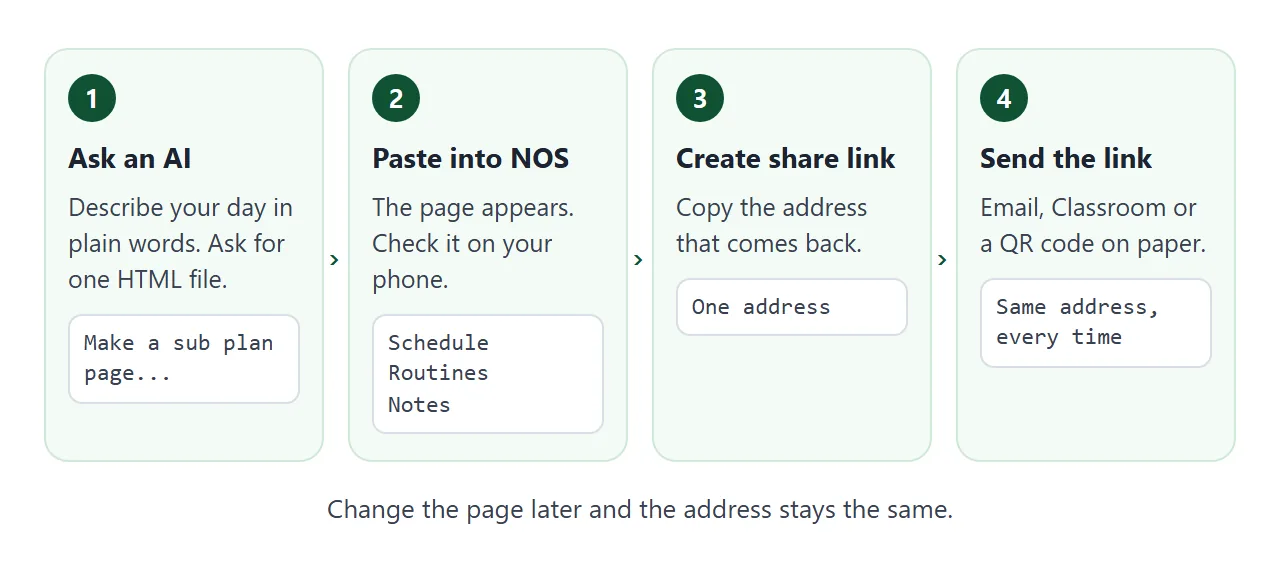
Because anyone with the link can open it, keep the page to what you would be happy to see on a noticeboard. Check what your school expects before you add student details.
Change it the night before
This is the reason to use a link. When you edit the code in your NOS document, the same link shows the new version. A sub who opens it on the day sees today's plan, whichever message they scrolled back to.
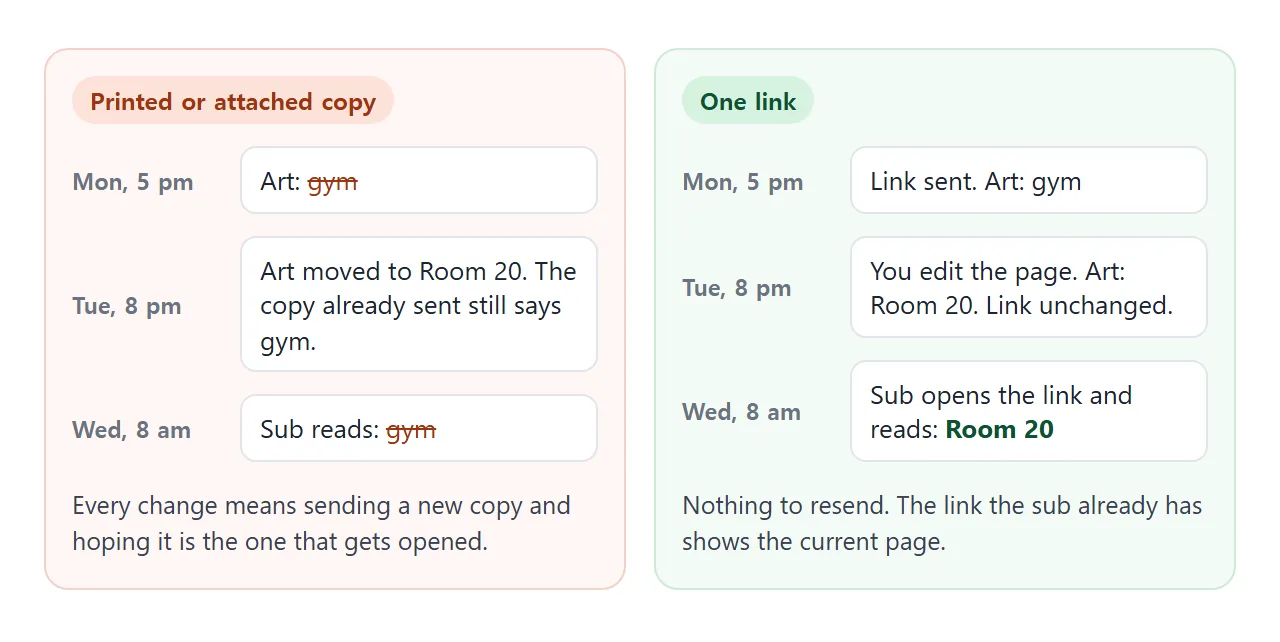
Before you depend on it, open your NOS document on your own phone once and change a word. That tells you whether a late edit works from the device you will have in hand.
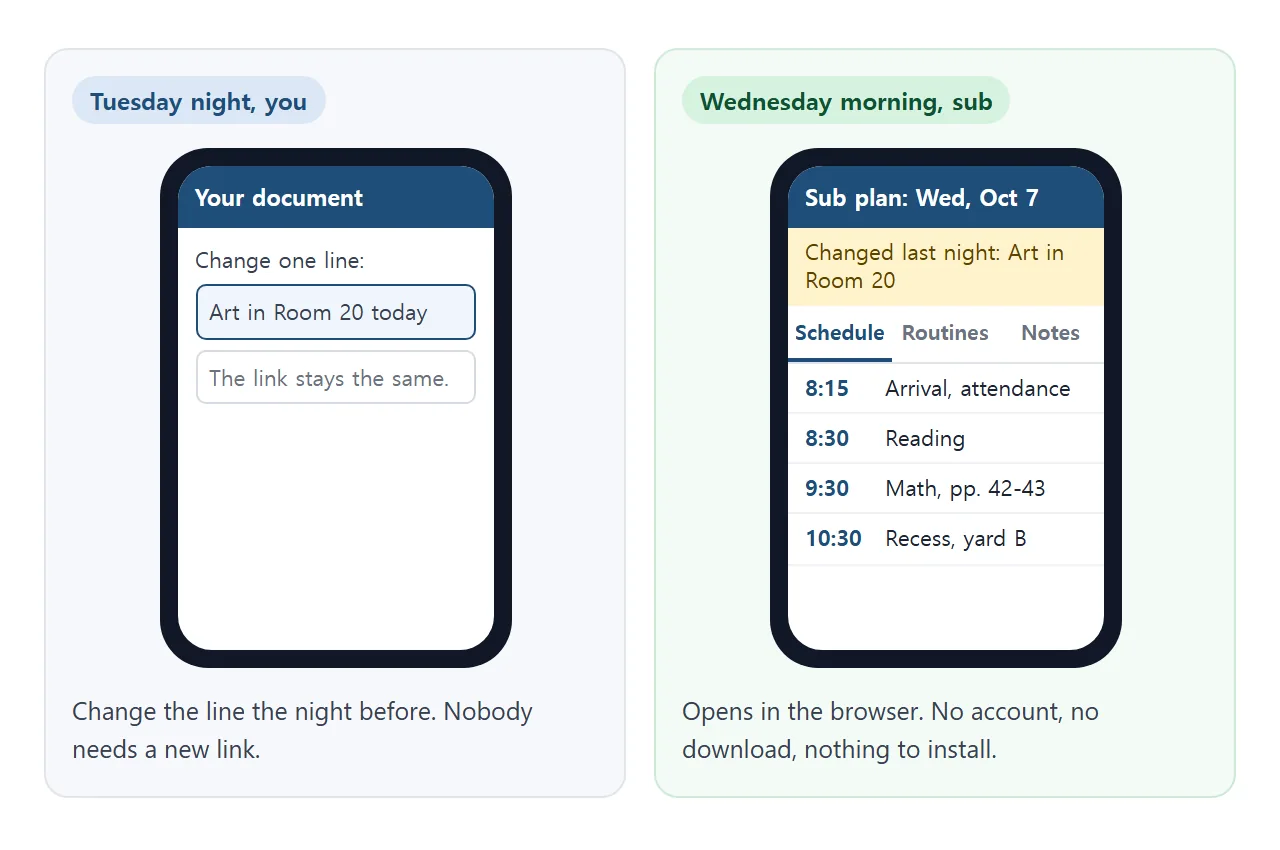
If the page has a tick list or a table, changes you make as the owner in View mode are saved. A visitor's are not, so a sub's ticks stay on their own screen.
Seating notes that open on tap
Seating is the part of a plan that is hardest to describe in words. A small chart helps: the sub taps a desk and reads one line about that seat.
<!doctype html>
<html lang="en">
<head>
<meta charset="utf-8">
<meta name="viewport" content="width=device-width, initial-scale=1">
<title>Seating chart</title>
<style>
  * { box-sizing: border-box; }
  body { margin: 0; padding: 12px; font-family: system-ui, sans-serif; background: #eef2f6; color: #1d2330; }
  .wrap { max-width: 520px; margin: 0 auto; }
  h1 { font-size: 18px; margin: 0 0 4px; }
  .sub { font-size: 13.5px; color: #4b5563; margin: 0 0 10px; }
  .board { text-align: center; background: #2f5d4a; color: #fff; font-size: 12.5px; padding: 6px; border-radius: 6px; margin-bottom: 10px; }
  .grid { display: grid; grid-template-columns: repeat(4, 1fr); gap: 8px; }
  .seat { padding: 12px 4px; border: 2px solid #cdd5df; border-radius: 10px; background: #fff; font: 600 14px system-ui, sans-serif; color: #1d2330; cursor: pointer; }
  .seat.red { border-color: #e08a7b; } .seat.blue { border-color: #7aa6e0; }
  .seat.star::after { content: " \2605"; color: #d98e04; }
  .seat[aria-pressed="true"] { background: #1f4e79; border-color: #1f4e79; color: #fff; }
  .seat.star[aria-pressed="true"]::after { color: #ffd479; }
  .note { margin-top: 12px; min-height: 64px; padding: 10px 12px; border-radius: 10px; background: #fff; border: 1px solid #dde3ea; font-size: 14.5px; line-height: 1.45; }
  .legend { font-size: 12.5px; color: #4b5563; margin-top: 10px; }
</style>
</head>
<body>
<div class="wrap">
  <h1>Room 12 seating</h1>
  <p class="sub">Tap a desk to read the note for that seat.</p>
  <div class="board">Board and door side</div>
  <div class="grid" id="grid"></div>
  <div class="note" id="note">Tap a desk.</div>
  <p class="legend">Red border: red table. Blue border: blue table. Star: helper who knows the routines.</p>
</div>

<script>
  // name, table colour, helper?, note shown when tapped
  const seats = [
    ['Ada', 'red', true, 'Helper for the door. Knows where the attendance clipboard goes.'],
    ['Ben', 'red', true, 'Helper for handouts. Hands out worksheets by table.'],
    ['Cai', 'blue', false, 'Sits near the door. Tends to talk with Dev, so please keep an eye on that corner.'],
    ['Dev', 'blue', false, 'Sits near the door. Likes to read in free time.'],
    ['Eli', 'red', false, 'Leaves at 10:00 for reading group in Room 14.'],
    ['Fay', 'red', false, 'Needs a reminder to start writing. A quick check-in works well.'],
    ['Gus', 'blue', false, 'Sits at the front. Is happy to read aloud if you ask.'],
    ['Hana', 'blue', true, 'Helper for the line. Leads the class to lunch.'],
    ['Ivo', 'red', false, 'Often finishes math early. Extra puzzles are in the grey tray.'],
    ['Jo', 'red', false, 'New this month. Pair with Ada if anything is unclear.'],
    ['Kit', 'blue', false, 'Has the blue lanyard for bathroom passes today.'],
    ['Lena', 'blue', false, 'Likes to help tidy art supplies.'],
    ['Milo', 'red', false, 'Sits near the board. Please say names aloud when calling on him.'],
    ['Nia', 'red', false, 'Sharpens pencils for the class. Remind her to do it at the start of lessons.'],
    ['Omar', 'blue', false, 'Often asks great questions in science.'],
    ['Pia', 'blue', false, 'Back from a cold. May take it slowly in the morning.']
  ];

  const grid = document.getElementById('grid');
  const note = document.getElementById('note');

  seats.forEach(([name, table, helper, text]) => {
    const b = document.createElement('button');
    b.className = 'seat ' + table + (helper ? ' star' : '');
    b.textContent = name;
    b.setAttribute('aria-pressed', 'false');
    b.addEventListener('click', () => {
      grid.querySelectorAll('.seat').forEach((s) => s.setAttribute('aria-pressed', 'false'));
      b.setAttribute('aria-pressed', 'true');
      note.textContent = name + ': ' + text;
    });
    grid.appendChild(b);
  });
</script>
</body>
</html>
The names are made up. Use first names only, and put anything private on paper, not on a page that anyone with the link can open.
Ways to share a sub plan compared
| Printed sheet | Attached file | One link | |
|---|---|---|---|
| What the sub gets | Paper | A file | A web address |
| Fix a mistake the night before | Reprint and re-place | Send a new file | Edit once, same link |
| Needs an account | No | Depends on the app | None for the NOS page |
| Can the sub edit it | They can write on it | Depends on the app | No |
An attachment depends on what the sub's device does with the file, which is covered in opening an HTML file on a phone and why links beat attachments.
Put the link where the sub will look
The link is only useful if it is easy to find. Pick one or two places and say where.
- Email: paste the address in the message body, near the top.
- Paper: leave a printed sheet on the desk with the address typed large, or turn the link into a QR code. QR codes for links explains how. The paper stays the same, and the code still opens the current page.
- Google Classroom: if you are posting work for students, you can add the link as a Link attachment. As of October 2026, Google's help page for creating an assignment lists Link among the attach options, and material posts on the Classwork page accept links too. You can post now, save a draft or schedule the post.
Google describes the steps in Create an assignment. Whether a sub can see a class is up to your school's Classroom settings.
When it does not work
| Symptom | Cause | Fix |
|---|---|---|
| The page looks tiny on a phone | The AI left out the viewport setting | Ask for a mobile-friendly page and test on your phone |
| A tab does nothing | The script is missing or has an error | Test in NOS and ask the AI to fix the tabs |
| Pictures are missing | The AI used an image from another site | Ask for inline SVG or plain CSS shapes |
| The sub sees the old room | They opened an earlier copy, not the link | Send only the link and ask them to ignore older copies |
| The link will not open at school | The school may block some sites on managed devices | Ask your school IT, and leave a printed copy too |
| The sub's ticks are gone after a reload | A visitor's changes are not saved | Say they are for the sub's own use |
School administrators can block or allow addresses on managed Chromebooks, according to Google's Allow or block access to websites page. Whether that applies depends on your school.