Here, Tauri means the open-source framework that wraps a web page in a desktop app, not a hosting service. Its frontend is plain web files, so a single index.html can be the whole interface.
The practical order: build and test the HTML in a browser, then add Tauri.
Try the page first. It checks whether it is inside Tauri and answers either way.
<!doctype html>
<html lang="en">
<head>
<meta charset="utf-8">
<meta name="viewport" content="width=device-width, initial-scale=1">
<title>Tauri page: where am I running?</title>
<style>
  body { margin: 0; padding: 18px; font-family: system-ui, sans-serif; background: #f4f5f7; color: #1d2330; }
  .card { max-width: 420px; padding: 16px 18px; border-radius: 12px; background: #fff; box-shadow: 0 6px 20px rgba(0, 0, 0, .1); }
  #badge { display: inline-block; padding: 3px 10px; border-radius: 999px; font-size: 13px; font-weight: 600; background: #fde8d6; color: #9a3412; }
  #badge.tauri { background: #d9f2e3; color: #0f5132; }
  .row { display: flex; gap: 8px; margin: 14px 0 10px; }
  input { flex: 1; min-width: 0; padding: 8px 10px; font: inherit; border: 1px solid #cfd4dc; border-radius: 8px; }
  button { padding: 8px 14px; font: inherit; border: 0; border-radius: 8px; background: #2563eb; color: #fff; cursor: pointer; }
  #out { margin: 0; min-height: 22px; font-weight: 600; }
</style>
</head>
<body>
<div class="card">
  <span id="badge">checking…</span>
  <div class="row">
    <input id="name" value="Ada" aria-label="Your name">
    <button id="go">Greet</button>
  </div>
  <p id="out"></p>
</div>

<script>
  // Tauri adds window.__TAURI__ only inside its own window, and only if withGlobalTauri is on
  const tauri = window.__TAURI__;
  const badge = document.getElementById('badge');
  badge.textContent = tauri ? 'Running inside Tauri' : 'Running in a browser';
  badge.classList.toggle('tauri', !!tauri);

  async function greet(name) {
    if (tauri) return tauri.core.invoke('greet', { name });  // calls the Rust command "greet"
    return 'Hello, ' + name + '! (answered by JavaScript)';    // same result without Tauri
  }

  document.getElementById('go').addEventListener('click', async () => {
    const name = document.getElementById('name').value.trim() || 'friend';
    document.getElementById('out').textContent = await greet(name);
  });
</script>
</body>
</html>
In this shared page there is no Tauri, so the badge says browser and JavaScript answers. Put the same file in a Tauri window with the global API on, and the same button reaches Rust.
What Tauri does with your HTML
Tauri describes itself as a framework for building small, fast binaries for desktop and mobile platforms. You bring any frontend that compiles to HTML, JavaScript and CSS, and Tauri shows it in the system's native webview instead of bundling a browser.
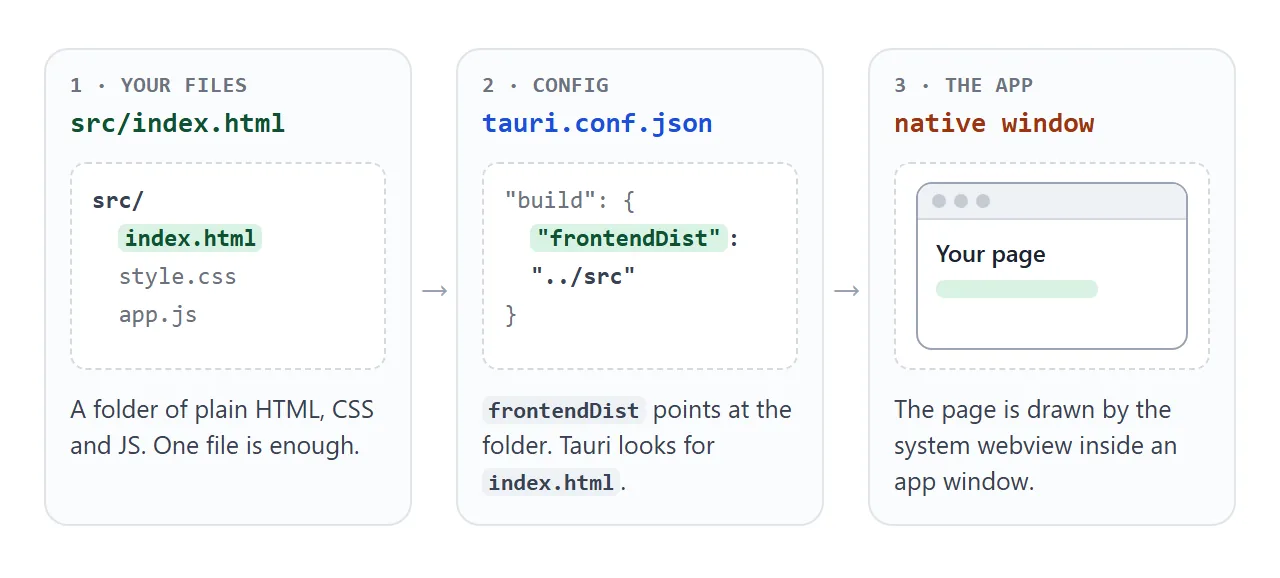
The webview depends on the operating system: WebView2 on Windows, WebKit on macOS through WKWebView, webkit2gtk on Linux, and the system Android WebView on Android. Because each machine supplies its own webview, test the page on every system you plan to ship to.
The smallest setup
Tauri needs Rust for development. Node.js is only needed if you use a JavaScript frontend framework. Create a project with the official scaffold:
npm create tauri-app@latest
The scaffold makes a src-tauri folder with the Rust code and tauri.conf.json. Point the build at the folder that holds your page, and turn on the global API:
{
  "build": { "frontendDist": "../src" },
  "app": { "withGlobalTauri": true }
}
Only the two relevant settings are shown here; the scaffold writes the rest. frontendDist can be a folder, and Tauri reads the folder, embeds the files in the app, and uses index.html as the entry point. withGlobalTauri injects the API as window.__TAURI__.
Then run npx tauri dev, which compiles the Rust code and opens a window with your web content. The build command of the same CLI makes the finished app.
Call Rust from the page
A Rust function marked as a command can be called from JavaScript. The Rust side:
#[tauri::command]
fn greet(name: String) -> String {
  format!("Hello, {}! (answered by Rust)", name)
}

pub fn run() {
  tauri::Builder::default()
    .invoke_handler(tauri::generate_handler![greet])
    .run(tauri::generate_context!())
    .expect("error while running tauri application")
}
And the page side, with no import and no bundler:
const invoke = window.__TAURI__.core.invoke;
invoke('greet', { name: 'Ada' }).then((text) => console.log(text));
Arguments go in as a JSON object with camelCase keys, and invoke returns a promise that resolves with the value the command returned.
Keep a fallback so the page runs in a browser
If the page assumes Tauri, it breaks everywhere else, including the share page you send a colleague. Check first, and keep a plain JavaScript branch.
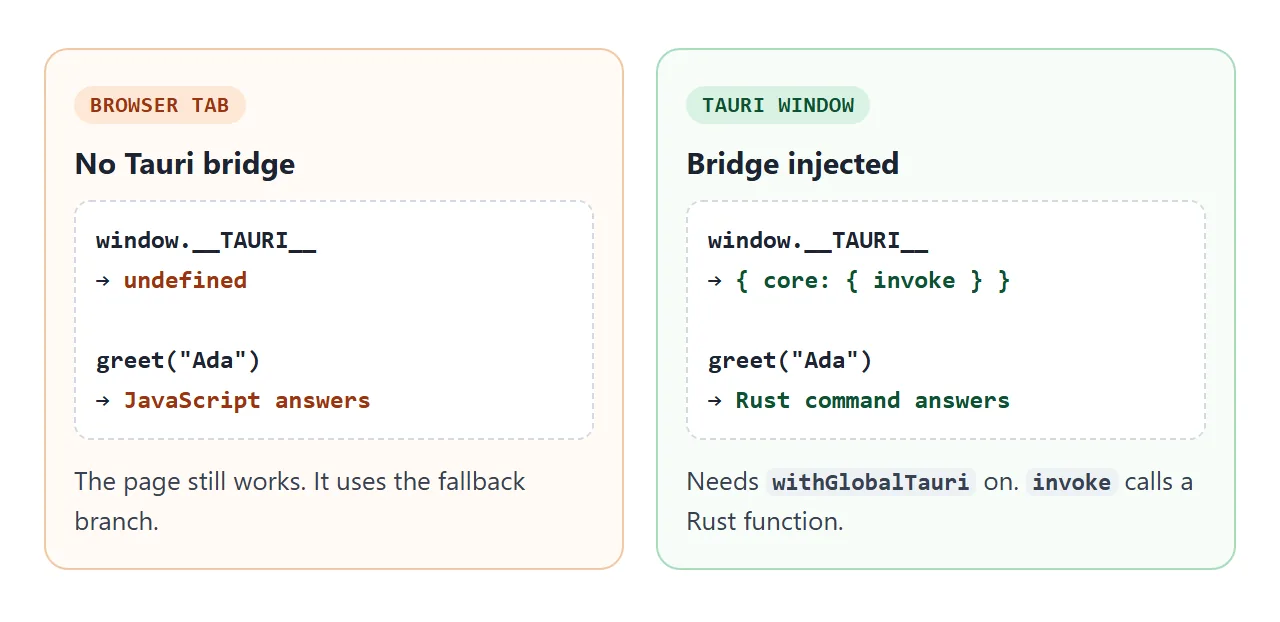
In a browser tab, window.__TAURI__ is undefined because nothing injects it. The next example lets you flip a stand-in on and off to watch both branches run.
<!doctype html>
<html lang="en">
<head>
<meta charset="utf-8">
<meta name="viewport" content="width=device-width, initial-scale=1">
<title>One page, two environments</title>
<style>
  body { margin: 0; padding: 16px; font-family: system-ui, sans-serif; background: #f4f5f7; color: #1d2330; }
  .card { max-width: 460px; padding: 16px 18px; border-radius: 12px; background: #fff; box-shadow: 0 6px 20px rgba(0, 0, 0, .1); }
  label.sw { display: flex; gap: 10px; align-items: center; font-weight: 600; cursor: pointer; }
  label.sw input { width: 18px; height: 18px; }
  .note { margin: 6px 0 14px; font-size: 13px; color: #5b6472; }
  button { padding: 8px 14px; font: inherit; border: 0; border-radius: 8px; background: #2563eb; color: #fff; cursor: pointer; }
  .res { margin-top: 14px; padding: 10px 12px; border-radius: 8px; background: #f4f5f7; font: 14px/1.5 ui-monospace, Consolas, monospace; }
  .res b { font-family: system-ui, sans-serif; }
  .ok { color: #0f5132; } .fb { color: #9a3412; }
</style>
</head>
<body>
<div class="card">
  <label class="sw"><input type="checkbox" id="pretend"> Pretend this window is Tauri</label>
  <p class="note">Adds a stand-in object called window.__TAURI__ so you can see both code paths. It is not real Tauri.</p>
  <button id="run">Run greet("Ada")</button>
  <div class="res" id="res">Press the button.</div>
</div>

<script>
  // The page's own check: is the Tauri bridge there?
  const inTauri = () => !!(window.__TAURI__ && window.__TAURI__.core);

  async function greet(name) {
    if (inTauri()) return { path: 'invoke', text: await window.__TAURI__.core.invoke('greet', { name }) };
    return { path: 'fallback', text: 'Hello, ' + name + '!' };
  }

  document.getElementById('pretend').addEventListener('change', (e) => {
    if (e.target.checked) {
      // stand-in with the same shape as the real bridge, for this demo only
      window.__TAURI__ = { core: { invoke: async (cmd, args) => 'Hello, ' + args.name + '! (stand-in for the Rust command ' + cmd + ')' } };
    } else {
      delete window.__TAURI__;
    }
  });

  document.getElementById('run').addEventListener('click', async () => {
    const r = await greet('Ada');
    const cls = r.path === 'invoke' ? 'ok' : 'fb';
    document.getElementById('res').innerHTML =
      '<b>inTauri():</b> ' + inTauri() + '<br><b>path:</b> <span class="' + cls + '">' + r.path + '</span><br>' + r.text;
  });
</script>
</body>
</html>
The stand-in is only a plain object made for this demo. Real calls need a real Tauri window.
A finished page that works in both
This bill splitter is one file with no external scripts, styles or images. Tauri's security guide says to avoid loading remote content such as scripts served over a CDN. If you need a library, save it beside index.html.
<!doctype html>
<html lang="en">
<head>
<meta charset="utf-8">
<meta name="viewport" content="width=device-width, initial-scale=1">
<title>Bill splitter</title>
<style>
  * { box-sizing: border-box; }
  body { margin: 0; padding: 16px; font-family: system-ui, sans-serif; background: #f4f5f7; color: #1d2330; }
  .app { max-width: 420px; margin: 0 auto; padding: 16px 18px 18px; border-radius: 12px; background: #fff; box-shadow: 0 6px 20px rgba(0, 0, 0, .1); }
  h1 { margin: 0 0 4px; font-size: 20px; }
  #env { margin: 0 0 14px; font-size: 13px; color: #5b6472; }
  form { display: grid; grid-template-columns: 1fr 1fr 1fr; gap: 10px; }
  label { display: grid; gap: 4px; font-size: 13px; font-weight: 600; }
  input { width: 100%; padding: 8px 10px; font: inherit; border: 1px solid #cfd4dc; border-radius: 8px; }
  button { grid-column: 1 / -1; padding: 10px; font: inherit; font-weight: 600; border: 0; border-radius: 8px; background: #2563eb; color: #fff; cursor: pointer; }
  #result { margin: 14px 0 6px; font-size: 22px; font-weight: 700; color: #0f5132; min-height: 30px; }
  ul { margin: 0; padding-left: 18px; font-size: 14px; color: #374151; }
</style>
</head>
<body>
<div class="app">
  <h1>Bill splitter</h1>
  <p id="env"></p>
  <form id="f">
    <label>Bill<input name="bill" type="number" min="0" step="0.01" value="86.40" required></label>
    <label>Tip %<input name="tip" type="number" min="0" step="1" value="10" required></label>
    <label>People<input name="people" type="number" min="1" step="1" value="3" required></label>
    <button type="submit">Split it</button>
  </form>
  <div id="result" aria-live="polite"></div>
  <ul id="history"></ul>
</div>

<script>
  // Everything is inline: no CDN, no network. The same file works in a browser tab or as a Tauri frontend.
  document.getElementById('env').textContent =
    window.__TAURI__ ? 'Running inside a Tauri window.' : 'Running in a browser tab.';

  document.getElementById('f').addEventListener('submit', (e) => {
    e.preventDefault();  // handled in the page, nothing is sent anywhere
    const d = new FormData(e.target);
    const bill = Number(d.get('bill')), tip = Number(d.get('tip')), people = Math.max(1, Number(d.get('people')));
    const each = bill * (1 + tip / 100) / people;
    document.getElementById('result').textContent = each.toFixed(2) + ' each';
    const li = document.createElement('li');
    li.textContent = bill.toFixed(2) + ' + ' + tip + '% over ' + people + ' = ' + each.toFixed(2);
    const list = document.getElementById('history');
    list.prepend(li);
    while (list.children.length > 4) list.lastChild.remove();  // keep the last four
  });
  document.getElementById('f').requestSubmit();  // show a first result
</script>
</body>
</html>
The page also needs the viewport meta tag for phones, and Tauri apps can target mobile. For more patterns, see single-file HTML apps.
When it does not work
| What you see | Cause | Fix |
|---|---|---|
| window.TAURI is undefined in a browser | Only Tauri injects it | Check for it and keep a fallback |
| It is undefined inside the Tauri window | withGlobalTauri is off | Set app.withGlobalTauri to true |
| invoke never reaches Rust | The command is not in generate_handler | List it there; only the last invoke_handler call counts |
| Rust receives empty arguments | JS keys are not camelCase | Use invokeMessage for invoke_message |
| No page appears in the window | frontendDist does not point at an index.html | Point it at the folder that holds the file |
| A CDN library is discouraged | Tauri advises against remote scripts | Save the file next to index.html |
| Layout differs between computers | Each OS supplies its own webview | Test on every target system |
| A server-rendered framework will not run | Tauri serves static assets, not SSR | Export the site as static HTML |
Share it as a link
A Tauri app has to be built and installed, so it is not the quickest way to let someone try an idea. Share the HTML first. Choosing a way to host an HTML file compares the options.
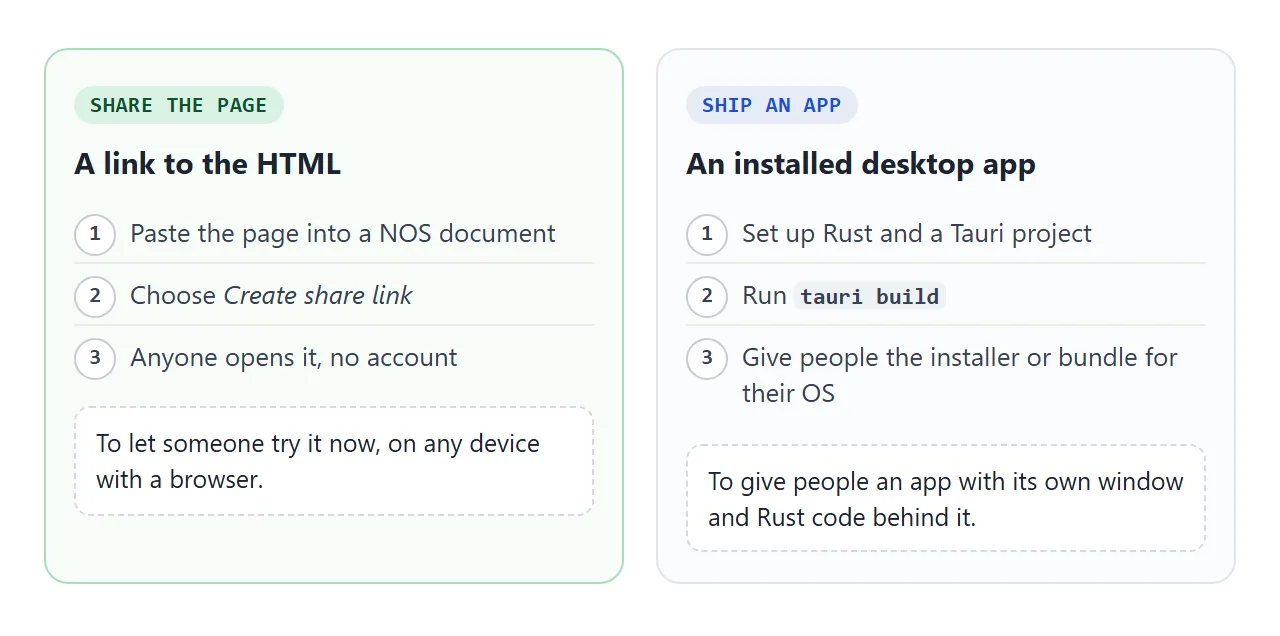
Paste the page into a NOS document and choose Create share link. HTML to link walks through it.
The page renders as written and its scripts run, so the people you send it to can press the buttons themselves, with no account. If you change the code later, the same link shows the new version.