Someone on Quora asked: "What should be included in your travel itinerary when going on a family vacation abroad?" For a client, the answer is the time, place and booking for each day, then hotels, what the price covers, and what to do before leaving.
A travel agent can put all of that on one web page.
That page replaces the PDF. A PDF is correct on the day you export it. A page behind a link can be corrected, and the client opens the same address every time.
Here is a page you can copy. Use the buttons to switch days, as a client would on a phone.
<!doctype html>
<html lang="en">
<head>
<meta charset="utf-8">
<meta name="viewport" content="width=device-width, initial-scale=1">
<title>Client itinerary</title>
<style>
*{box-sizing:border-box;margin:0;padding:0}
body{font-family:"Segoe UI",system-ui,sans-serif;background:#f4f7f8;color:#1f2a30;line-height:1.45;padding:16px}
.wrap{max-width:660px;margin:0 auto}
.hero{background:linear-gradient(135deg,#0e5a6b,#2a8c8f);color:#fff;border-radius:14px;padding:18px 18px 16px}
.hero small{display:block;font-size:12px;letter-spacing:.08em;text-transform:uppercase;opacity:.85}
.hero h1{font:600 24px/1.2 Georgia,serif;margin:4px 0 6px}
.hero p{font-size:14px;opacity:.95}
#chg{margin:12px 0;padding:9px 12px;border-radius:10px;background:#e7f2ee;color:#1d5a44;font-size:14px}
.tabs{display:flex;gap:6px;flex-wrap:wrap;margin-bottom:12px}
.tabs button{font:inherit;font-size:14px;padding:7px 13px;border:1px solid #cdd8dc;border-radius:99px;background:#fff;color:#1f2a30;cursor:pointer}
.tabs button[aria-pressed="true"]{background:#0e5a6b;color:#fff;border-color:#0e5a6b}
.day{margin-bottom:16px}
.day h2{font:700 13px/1 "Segoe UI",system-ui,sans-serif;letter-spacing:.07em;text-transform:uppercase;color:#587079;margin:0 0 8px}
.card{background:#fff;border:1px solid #dbe4e7;border-left:5px solid #2a8c8f;border-radius:10px;padding:10px 12px;margin-bottom:8px}
.card.new{border-left-color:#e8892b;background:#fffaf3}
.top{display:flex;gap:10px;align-items:baseline;flex-wrap:wrap}
.time{font-weight:700;min-width:70px;font-variant-numeric:tabular-nums}
.name{font-weight:600}
.tag{font-size:11.5px;font-weight:700;background:#e8892b;color:#fff;border-radius:5px;padding:1px 6px}
.meta{font-size:14px;color:#46606a;margin:3px 0 0 80px}
.meta a{color:#0e5a6b}
.ref{font-size:13px;color:#587079;margin:3px 0 0 80px}
.two{display:grid;grid-template-columns:1fr 1fr;gap:10px}
.box{background:#fff;border:1px solid #dbe4e7;border-radius:10px;padding:11px 13px;font-size:14px}
.box h3{font-size:14px;margin-bottom:6px}
.box ul{list-style:none}
.box li{padding:2px 0 2px 20px;position:relative}
.yes li:before{content:"\2713";position:absolute;left:0;color:#1d7a55;font-weight:700}
.no li:before{content:"\2013";position:absolute;left:3px;color:#a4551a;font-weight:700}
.contact{margin-top:10px;font-size:13.5px;color:#46606a}
@media(max-width:480px){.two{grid-template-columns:1fr}.meta,.ref{margin-left:0}.top{gap:2px 10px}}
</style>
</head>
<body>
<div class="wrap">
<div class="hero">
<small>Prepared by Harbor Light Travel</small>
<h1>Lisbon and Porto: the Lindqvist family</h1>
<p>14 to 19 March 2027 · 2 adults, 2 children · all times are local time</p>
</div>
<p id="chg">Version 2. Changed since version 1: the Porto train now leaves at 9:15 am (day 4).</p>
<div class="tabs" role="group" aria-label="Show">
<button type="button" data-show="all" aria-pressed="true">Whole trip</button>
<button type="button" data-show="d1" aria-pressed="false">Day 1</button>
<button type="button" data-show="d2" aria-pressed="false">Day 2</button>
<button type="button" data-show="d3" aria-pressed="false">Day 3</button>
<button type="button" data-show="d4" aria-pressed="false">Day 4</button>
</div>
<section class="day" data-id="d1">
<h2>Day 1 · Sun 14 March · Arrive in Lisbon</h2>
<div class="card">
<div class="top"><span class="time">11:40 am</span><span class="name">Flight lands, Lisbon airport</span></div>
<p class="meta">Driver waits at arrivals with a sign: LINDQVIST</p>
<p class="ref">Booking ref: shown in your email, not on this page</p>
</div>
<div class="card">
<div class="top"><span class="time">2:00 pm</span><span class="name">Check in, Casa Azulejo</span></div>
<p class="meta">Rua das Flores 18 · <a href="https://www.google.com/maps/search/?api=1&query=Rua+das+Flores+18+Lisbon" target="_blank" rel="noopener">Open in maps</a></p>
</div>
</section>
<section class="day" data-id="d2">
<h2>Day 2 · Mon 15 March · Old town</h2>
<div class="card">
<div class="top"><span class="time">10:00 am</span><span class="name">Walking tour with a local guide</span></div>
<p class="meta">Meet in the hotel lobby. About 2.5 hours, with a snack stop.</p>
</div>
<div class="card">
<div class="top"><span class="time">4:00 pm</span><span class="name">Free time</span></div>
<p class="meta">Pool, nap or the tram. Ideas are on the last page of your pack.</p>
</div>
</section>
<section class="day" data-id="d3">
<h2>Day 3 · Tue 16 March · Free day</h2>
<div class="card">
<div class="top"><span class="time">All day</span><span class="name">Nothing booked</span></div>
<p class="meta">Rest, or ask us to add a day trip.</p>
</div>
</section>
<section class="day" data-id="d4">
<h2>Day 4 · Wed 17 March · Train to Porto</h2>
<div class="card new">
<div class="top"><span class="time">9:15 am</span><span class="name">Train, Lisbon to Porto</span><span class="tag">Changed</span></div>
<p class="meta">Leaves from Station Central. Be at the platform by 9:00 am.</p>
</div>
<div class="card">
<div class="top"><span class="time">1:00 pm</span><span class="name">Check in, Hotel Ribeira</span></div>
<p class="meta">Praca do Cais 4 · <a href="https://www.google.com/maps/search/?api=1&query=Praca+do+Cais+4+Porto" target="_blank" rel="noopener">Open in maps</a></p>
</div>
</section>
<section class="day" data-id="all-only">
<h2>What your price covers</h2>
<div class="two">
<div class="box yes"><h3>Included</h3><ul><li>Flights, both ways</li><li>5 nights in two hotels</li><li>Airport driver</li><li>Walking tour</li><li>Train Lisbon to Porto</li></ul></div>
<div class="box no"><h3>Not included</h3><ul><li>Lunches and dinners</li><li>Travel insurance</li><li>Tips</li><li>Museum tickets</li></ul></div>
</div>
<p class="contact">Questions on the trip? Message Harbor Light Travel. Phone numbers stay in your email, not on this page.</p>
</section>
</div>
<script>
// Show one day, or the whole trip. The "covers" block only shows under Whole trip.
const tabs = document.querySelectorAll('.tabs button');
const days = document.querySelectorAll('.day');
tabs.forEach(function (b) {
b.addEventListener('click', function () {
tabs.forEach(function (t) { t.setAttribute('aria-pressed', t === b ? 'true' : 'false'); });
days.forEach(function (d) {
d.hidden = !(b.dataset.show === 'all' || d.dataset.id === b.dataset.show);
});
});
});
</script>
</body>
</html>
What goes on the page
Think of the client standing in a station or a hotel lobby. They want the next time, the next place and one line on what happens there.
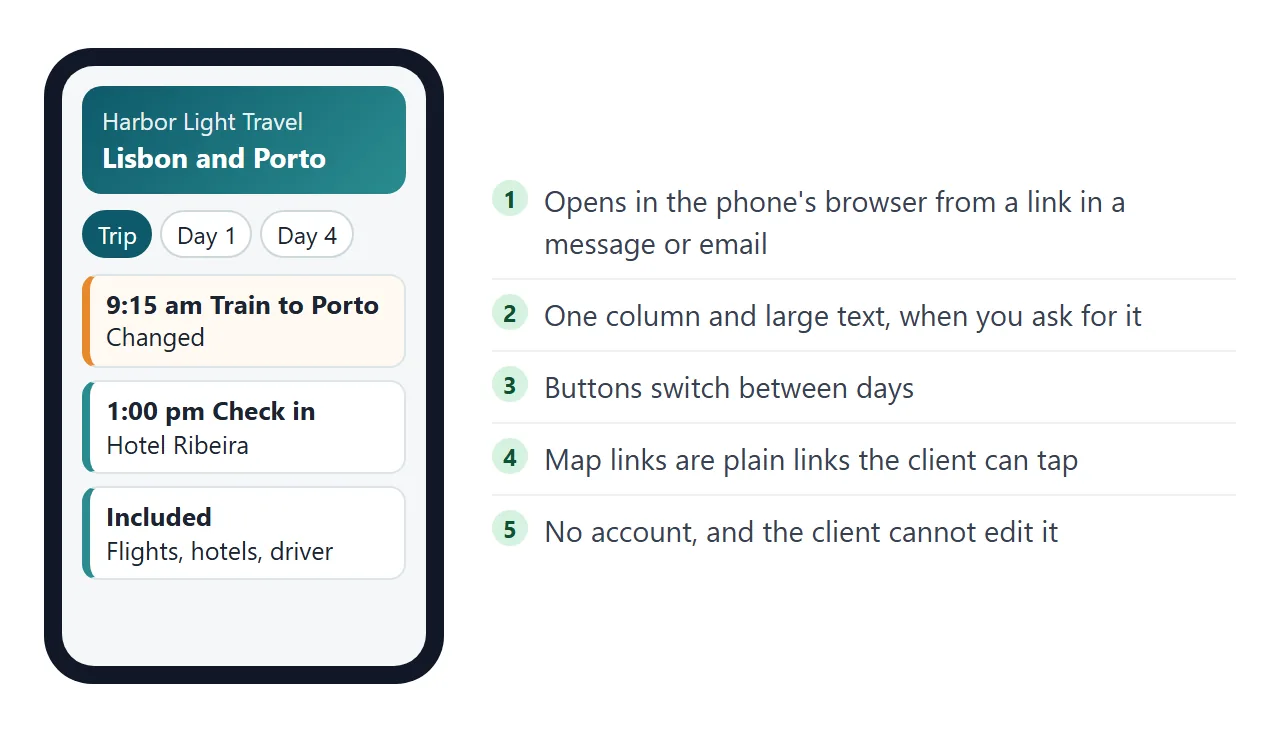
So each day gets a heading, and each item under it carries the same few things:
- Time, in local time, with the city named if the trip crosses time zones.
- What it is, in plain words: "Train, Lisbon to Porto".
- Where, with an address that can go into a map.
- A note, only when it helps: where to meet, how long it takes.
After the days, add two short blocks. One lists what the price includes, the other what it does not. Writing both down leaves less for the client to guess.
Leave booking references and phone numbers out. Anyone who has the link can open the page, so say where to find them: "in your email".
Make it with AI
You do not need to write HTML. Paste your trip notes into the AI chat you already use, with this prompt. Replace the text in square brackets.
Make one self-contained HTML page for a client's trip,
sent by a travel agent. It will be opened on a phone, so use
one column and large text. Use only inline CSS and a small
inline script. No images, no external fonts, no external
scripts, no forms that send data.

Show: the agency name, the trip title, dates and number of
travellers. Then one section per day. Each item has a time
(local time), a name, a place and a short note. Add buttons to
show one day or the whole trip. After the days add two lists:
"Included" and "Not included". Do not add booking references,
phone numbers or prices.

My trip notes: [paste your days, times, hotels and inclusions]
When the page comes back, check it before you send it:
- Every time, name and address matches your booking records. Read each line against your notes; do not assume it was copied correctly.
- Nothing you did not supply has been added, such as a restaurant, a website or a phone number.
- The included and not-included lists say what you sold, no more and no less.
- The page fits a phone. Paste it into NOS and look at it narrow before sharing.
Send it as a link
Paste the HTML into a NOS document and choose Create share link. HTML to link walks through it.
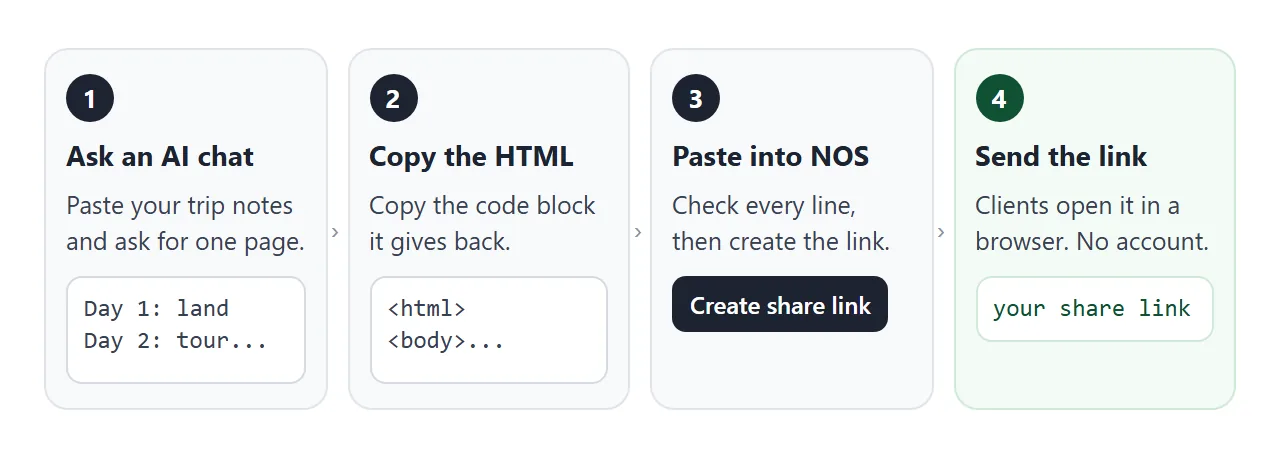
Your client opens the link in a browser, on a phone too, without an account. They cannot edit the page. The scripts in it run, so the day buttons work for them. Editing the code later keeps the same link.
The link is plain text, so it can go into an email or a message. If it also goes on paper, QR code link covers that. For how this fits a longer trip, see the itinerary link guide.
A map link helps on the road. Google documents a link form that opens a search for a place or address, with spaces written as plus signs:
https://www.google.com/maps/search/?api=1&query=Rua+das+Flores+18+Lisbon
That is how Google describes it as of October 2026. Open each link yourself to check that it lands on the right place.
PDF or page: how the two compare
The difference shows when something changes, and something usually does.
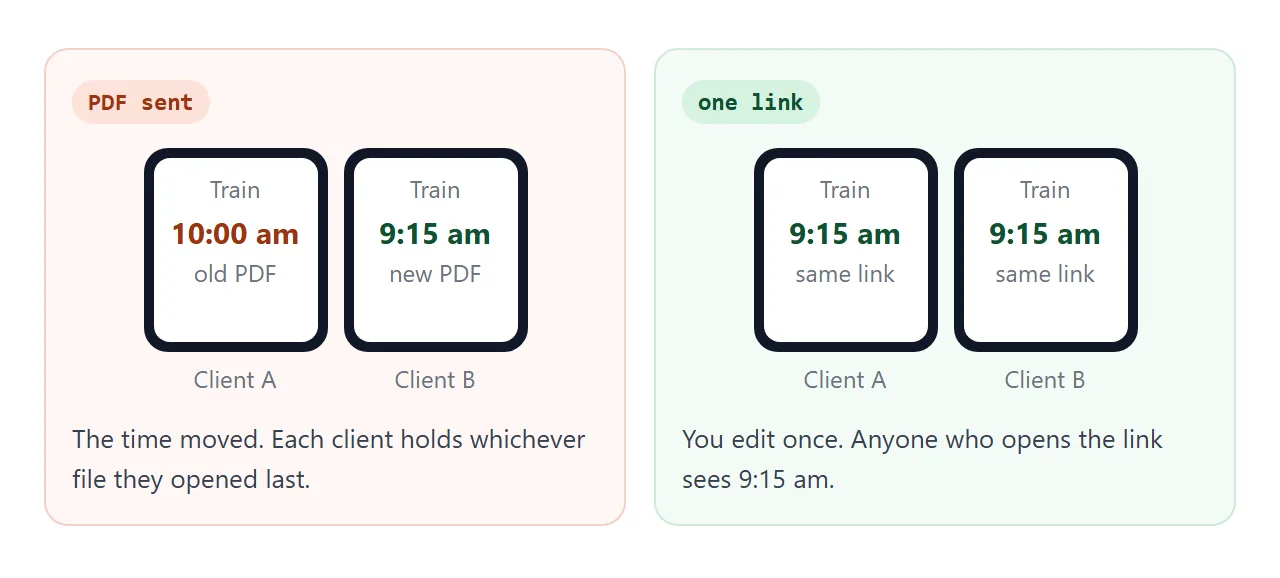
| PDF or file attachment | Link to one page | |
|---|---|---|
| After a change | A new file to send; old copies stay in inboxes | Edit the page; the same link shows it |
| Which version the client has | Whichever they opened last | The current one |
| Reading on a phone | Depends on the file and the app | A page built for one column |
| Map links | Depends on how the PDF was made | Ordinary links on the page |
Some agents send both: the page for the daily plan, and the PDF or email for booking documents. The HTML vs PDF for clients guide goes through the trade-offs.
A second page: before you fly
Trip pages are not only itineraries. This one is a pre-departure list with a payment schedule. Tick an item to see the progress bar move, and add your own.
<!doctype html>
<html lang="en">
<head>
<meta charset="utf-8">
<meta name="viewport" content="width=device-width, initial-scale=1">
<title>Before you fly</title>
<style>
*{box-sizing:border-box;margin:0;padding:0}
body{font-family:"Segoe UI",system-ui,sans-serif;background:#f4f7f8;color:#1f2a30;line-height:1.45;padding:16px}
.wrap{max-width:620px;margin:0 auto}
h1{font:600 22px/1.2 Georgia,serif}
.sub{color:#587079;font-size:14px;margin:4px 0 12px}
.bar{height:10px;border-radius:99px;background:#d8e3e6;overflow:hidden}
.bar i{display:block;height:100%;width:0;background:#2a8c8f;transition:width .25s}
#count{font-size:13.5px;color:#46606a;margin:6px 0 12px}
ul{list-style:none}
li{background:#fff;border:1px solid #dbe4e7;border-radius:10px;padding:10px 12px;margin-bottom:7px}
li label{display:flex;gap:10px;align-items:flex-start;cursor:pointer;font-size:15px}
li input{margin-top:4px;width:18px;height:18px;flex:none}
li small{display:block;font-size:13px;color:#587079}
li.done span{text-decoration:line-through;color:#7b8f96}
form{display:flex;gap:8px;margin:12px 0 18px}
form input{flex:1;min-width:0;font:inherit;font-size:15px;padding:9px 11px;border:1px solid #bccbd0;border-radius:9px}
form button{font:inherit;font-weight:600;font-size:15px;padding:9px 14px;border:0;border-radius:9px;background:#0e5a6b;color:#fff;cursor:pointer}
h2{font:700 13px/1 "Segoe UI",system-ui,sans-serif;letter-spacing:.07em;text-transform:uppercase;color:#587079;margin:0 0 8px}
table{width:100%;border-collapse:collapse;background:#fff;border:1px solid #dbe4e7;border-radius:10px;overflow:hidden;font-size:14px}
th,td{text-align:left;padding:8px 10px;border-bottom:1px solid #e6edef}
th{background:#eef3f4;font-size:13px}
tr:last-child td{border-bottom:0}
</style>
</head>
<body>
<div class="wrap">
<h1>Before you fly</h1>
<p class="sub">Lisbon and Porto, 14 to 19 March 2027 · Harbor Light Travel</p>
<div class="bar" aria-hidden="true"><i id="fill"></i></div>
<p id="count">0 of 5 done</p>
<ul id="list">
<li><label><input type="checkbox"><span>Check every traveller's passport<small>Look at the expiry date and the name spelling against the booking.</small></span></label></li>
<li><label><input type="checkbox"><span>Take out travel insurance<small>Not included in the price on the itinerary page.</small></span></label></li>
<li><label><input type="checkbox"><span>Tell your bank you are travelling</span></label></li>
<li><label><input type="checkbox"><span>Save the driver's sign name<small>The sign will say LINDQVIST.</small></span></label></li>
<li><label><input type="checkbox"><span>Pack chargers and a plug adapter</span></label></li>
</ul>
<form id="add">
<input id="newItem" type="text" placeholder="Add an item" aria-label="New item">
<button type="submit">Add</button>
</form>
<h2>Payment dates</h2>
<table>
<tr><th>What</th><th>Due</th><th>Status</th></tr>
<tr><td>Deposit</td><td>10 Dec 2026</td><td>Received</td></tr>
<tr><td>Balance</td><td>14 Jan 2027</td><td>Open</td></tr>
</table>
</div>
<script>
// Update the bar and the count whenever a box changes or an item is added.
const list = document.getElementById('list');
function refresh() {
const boxes = list.querySelectorAll('input[type=checkbox]');
let done = 0;
boxes.forEach(function (b) {
b.closest('li').classList.toggle('done', b.checked);
if (b.checked) done++;
});
document.getElementById('fill').style.width = (boxes.length ? done / boxes.length * 100 : 0) + '%';
document.getElementById('count').textContent = done + ' of ' + boxes.length + ' done';
}
list.addEventListener('change', refresh);
document.getElementById('add').addEventListener('submit', function (e) {
e.preventDefault();
const field = document.getElementById('newItem');
const text = field.value.trim();
if (!text) return;
const li = document.createElement('li');
const label = document.createElement('label');
const box = document.createElement('input');
box.type = 'checkbox';
const span = document.createElement('span');
span.textContent = text;
label.append(box, span);
li.append(label);
list.append(li);
field.value = '';
refresh();
});
refresh();
</script>
</body>
</html>
Changes you make in View mode, such as ticks and added rows, are saved. A visitor's ticks and added rows are not.
So the page works as your own working copy, or as a page a client reads. A client's ticks do not come back to you.
When it does not work
| Symptom | Cause | Fix |
|---|---|---|
| The page looks cramped on a phone | The prompt did not ask for one column | Ask for one column and large text, then paste again |
| A client says the time is still the old one | They are looking at an old PDF, not the link | Put the link in a message and say the time changed |
| Pictures are missing | Outside images are blocked in NOS | Ask for a page without images, or for shapes drawn in the page |
| A form on the page does nothing | Sending a form to a server is blocked | Collect answers by email, or keep forms inside the page |
| Your ticks were gone for the client | A visitor's changes are not saved | Edit the code for what clients need to read |
| The map link opens the wrong place | The address in the link is incomplete | Add the street and town to the address in the link |
Put it at one address
Collect the days, times, hotels and inclusions, have an AI chat write the page, check every line, and share the link. When plans change, edit the code and the same link shows the change.