A travel itinerary template that works for a group is a single web page: a block for each day, the first time of the day in large type, and a Map link on every place.
If you are looking for a way to share a trip with friends, a page with one address does it. Everyone opens the same version, and one edit reaches all of them.
Here is a three-day example with fictional plans. Switch between the days, and try the buttons on a phone-sized window too.
<!doctype html>
<html lang="en">
<head>
<meta charset="utf-8">
<meta name="viewport" content="width=device-width, initial-scale=1">
<title>Porto long weekend</title>
<style>
* { box-sizing: border-box; }
body { margin: 0; font-family: system-ui, sans-serif; background: #f4f5f7; color: #1d2330; }
.wrap { max-width: 560px; margin: 0 auto; padding: 16px 14px 28px; }
h1 { font-size: 22px; margin: 0 0 4px; }
.meta { font-size: 14px; color: #4b5563; margin: 0 0 4px; }
.tz { display: inline-block; font-size: 13px; background: #e8f0fe; color: #1e40af; border-radius: 6px; padding: 3px 8px; margin: 6px 0 14px; }
.tabs { display: flex; gap: 8px; margin-bottom: 14px; }
.tabs button { flex: 1; font: 600 15px system-ui, sans-serif; padding: 10px 6px; border: 1px solid #d5d9e0; border-radius: 10px; background: #fff; color: #374151; cursor: pointer; }
.tabs button[aria-selected="true"] { background: #1d4ed8; border-color: #1d4ed8; color: #fff; }
.day { display: none; }
.day.on { display: block; }
.day h2 { font-size: 16px; margin: 0 0 10px; color: #374151; }
.stop { background: #fff; border: 1px solid #e1e4ea; border-radius: 12px; padding: 12px 14px; margin-bottom: 10px; }
.stop .time { font-size: 20px; font-weight: 700; }
.stop:first-of-type .time { font-size: 28px; color: #1d4ed8; }
.stop .what { font-size: 16px; font-weight: 600; margin: 2px 0; }
.stop .note { font-size: 14px; color: #4b5563; margin: 0 0 8px; }
.links a { display: inline-block; font-size: 14px; font-weight: 600; text-decoration: none; padding: 8px 12px; border-radius: 8px; margin-right: 6px; background: #eef2ff; color: #1d4ed8; }
.links a.dir { background: #ecfdf3; color: #0f5132; }
.chg { display: inline-block; font-size: 12px; font-weight: 700; background: #fff1e0; color: #9a3412; border-radius: 5px; padding: 2px 6px; margin-left: 6px; vertical-align: middle; }
.foot { font-size: 13px; color: #6b7280; margin-top: 14px; }
</style>
</head>
<body>
<div class="wrap">
<h1>Porto long weekend</h1>
<p class="meta">4 friends · 12–14 June</p>
<span class="tz">All times are Porto local time</span>
<div class="tabs" role="tablist" id="tabs">
<button role="tab" aria-selected="true" data-day="d1">Day 1</button>
<button role="tab" aria-selected="false" data-day="d2">Day 2</button>
<button role="tab" aria-selected="false" data-day="d3">Day 3</button>
</div>
<section class="day on" id="d1">
<h2>Arrive and walk the river</h2>
<div class="stop">
<div class="time">10:40</div>
<div class="what">Land at Porto Airport</div>
<p class="note">Meet at arrivals. Buy metro tickets together.</p>
<div class="links"><a href="https://www.google.com/maps/search/?api=1&query=Porto+Airport" target="_blank" rel="noopener">Map</a><a class="dir" href="https://www.google.com/maps/dir/?api=1&destination=Rua+das+Flores+Porto&travelmode=transit" target="_blank" rel="noopener">Directions to the flat</a></div>
</div>
<div class="stop">
<div class="time">14:00</div>
<div class="what">Walk down to the river</div>
<p class="note">Easy, flat along the water. Coffee stop on the way.</p>
<div class="links"><a href="https://www.google.com/maps/search/?api=1&query=Ribeira+Porto" target="_blank" rel="noopener">Map</a><a class="dir" href="https://www.google.com/maps/dir/?api=1&destination=Ribeira+Porto&travelmode=walking" target="_blank" rel="noopener">Walking directions</a></div>
</div>
<div class="stop">
<div class="time">17:30</div>
<div class="what">Cross the Dom Luís I bridge</div>
<p class="note">Sunset photos from the upper deck.</p>
<div class="links"><a href="https://www.google.com/maps/search/?api=1&query=Dom+Luis+I+Bridge+Porto" target="_blank" rel="noopener">Map</a></div>
</div>
<div class="stop">
<div class="time">20:30 <span class="chg">changed: was 20:00</span></div>
<div class="what">Dinner near Praça da Ribeira</div>
<p class="note">Table for four. Booking details are on the pre-trip page.</p>
<div class="links"><a href="https://www.google.com/maps/search/?api=1&query=Praca+da+Ribeira+Porto" target="_blank" rel="noopener">Map</a></div>
</div>
</section>
<section class="day" id="d2">
<h2>Old town and viewpoints</h2>
<div class="stop">
<div class="time">09:30</div>
<div class="what">Breakfast near São Bento station</div>
<p class="note">Then look at the tile panels in the main hall.</p>
<div class="links"><a href="https://www.google.com/maps/search/?api=1&query=Sao+Bento+Station+Porto" target="_blank" rel="noopener">Map</a><a class="dir" href="https://www.google.com/maps/dir/?api=1&destination=Sao+Bento+Station+Porto&travelmode=walking" target="_blank" rel="noopener">Walking directions</a></div>
</div>
<div class="stop">
<div class="time">11:30</div>
<div class="what">Cathedral and its terrace</div>
<p class="note">Uphill from the station. Allow time for the view.</p>
<div class="links"><a href="https://www.google.com/maps/search/?api=1&query=Porto+Cathedral" target="_blank" rel="noopener">Map</a><a class="dir" href="https://www.google.com/maps/dir/?api=1&destination=Porto+Cathedral&travelmode=walking" target="_blank" rel="noopener">Walking directions</a></div>
</div>
<div class="stop">
<div class="time">14:00</div>
<div class="what">Lunch at the Bolhão market</div>
<p class="note">Split into pairs, meet back at the entrance at 15:00.</p>
<div class="links"><a href="https://www.google.com/maps/search/?api=1&query=Bolhao+Market+Porto" target="_blank" rel="noopener">Map</a></div>
</div>
<div class="stop">
<div class="time">16:30</div>
<div class="what">Free time</div>
<p class="note">Shops, a rest at the flat, or the gardens by the river.</p>
</div>
</section>
<section class="day" id="d3">
<h2>Beach and flight home</h2>
<div class="stop">
<div class="time">09:00</div>
<div class="what">Check out and leave bags</div>
<p class="note">Keys go in the lockbox. Bags stay with the host until 15:00.</p>
<div class="links"><a href="https://www.google.com/maps/search/?api=1&query=Rua+das+Flores+Porto" target="_blank" rel="noopener">Map</a></div>
</div>
<div class="stop">
<div class="time">10:15</div>
<div class="what">Metro to the beach</div>
<p class="note">Lunch by the sea afterwards.</p>
<div class="links"><a href="https://www.google.com/maps/search/?api=1&query=Matosinhos+Beach" target="_blank" rel="noopener">Map</a><a class="dir" href="https://www.google.com/maps/dir/?api=1&destination=Matosinhos+Beach&travelmode=transit" target="_blank" rel="noopener">Transit directions</a></div>
</div>
<div class="stop">
<div class="time">15:30</div>
<div class="what">Collect bags, go to the airport</div>
<p class="note">Flight at 18:15. Be at the airport by 16:00.</p>
<div class="links"><a href="https://www.google.com/maps/dir/?api=1&destination=Porto+Airport&travelmode=transit" target="_blank" rel="noopener" class="dir">Transit directions</a></div>
</div>
</section>
<p class="foot">Map and Directions buttons are ordinary links to Google Maps. Directions links have no start point, so Maps uses your location if it can.</p>
</div>
<script>
const tabs = document.querySelectorAll('#tabs button');
const days = document.querySelectorAll('.day');
tabs.forEach((btn) => {
btn.addEventListener('click', () => {
tabs.forEach((b) => b.setAttribute('aria-selected', String(b === btn)));
days.forEach((d) => d.classList.toggle('on', d.id === btn.dataset.day));
});
});
</script>
</body>
</html>
The map buttons point to real Google Maps addresses. This example box is sandboxed and may not open them, so test the buttons on your own shared link instead.
What each day needs
People rarely read an itinerary from top to bottom. They open it to answer one question: what is next, and where? Build each day around that.
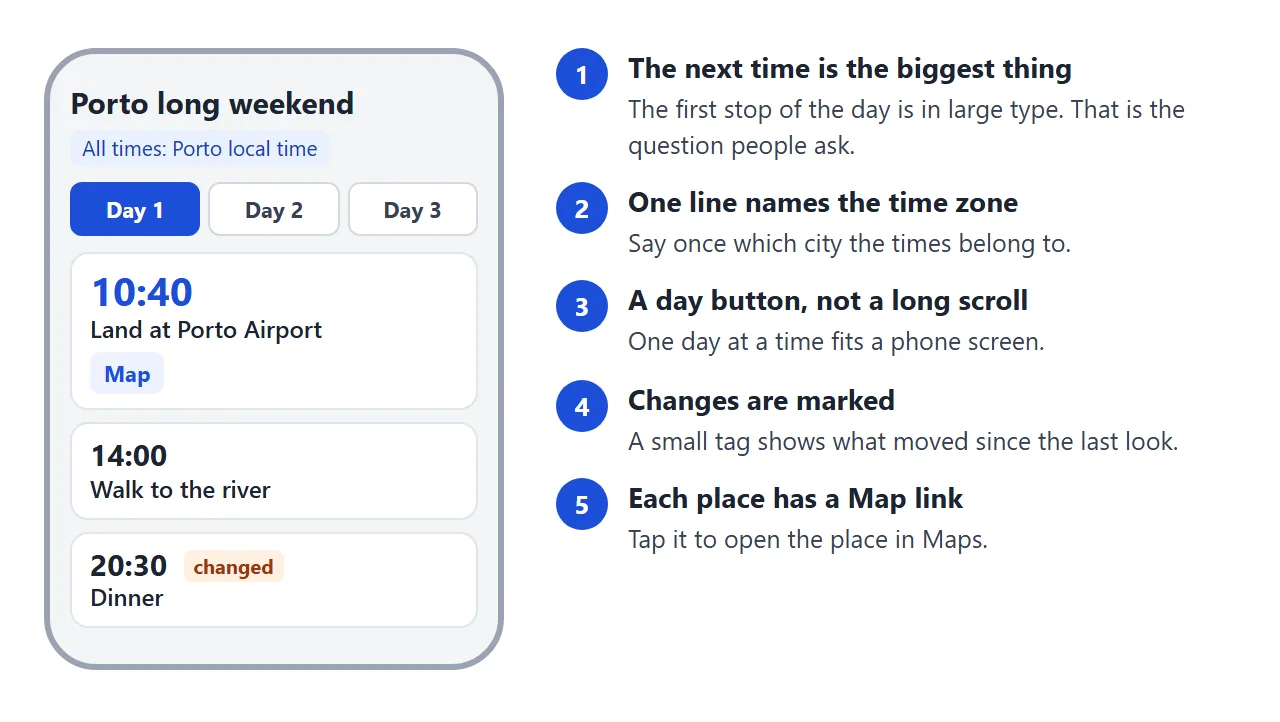
- The first time and place, in large type. Everything else on the day can be smaller.
- One line naming the time zone. Say once which city the times belong to.
- A Map link on every place. Describing directions in words is slower than a tap.
- A short note per stop. What to bring, who is meeting whom, or what is booked.
- A mark on anything that changed. People can see what moved since they last looked.
Itinerary link goes deeper on what belongs at the top of a day and what belongs nowhere.
Make it with AI
You do not have to write the HTML. Paste this prompt into ChatGPT, Claude or Gemini, replace the square brackets with your trip, and ask for the full file.
Write one self-contained HTML file for a day-by-day travel itinerary.

Trip: [city], [number] days, [number] friends, [dates].
Plan: Day 1: [places and times]. Day 2: [places and times].

Rules:
- One section per day, shown one at a time with buttons for Day 1, Day 2, and so on.
- Each stop shows the local time in large type, the place name and a one-line note.
- One line under the title says which city's local time is used.
- Give every place a Map link like this:
  https://www.google.com/maps/search/?api=1&query=PLACE+CITY
- For a walk or ride, add a Directions link like this:
  https://www.google.com/maps/dir/?api=1&destination=PLACE+CITY&travelmode=walking
- Do not embed maps and do not use iframes.
- No external images, fonts or scripts. Inline CSS and a little inline JavaScript only.
- It must read well on a phone 390 pixels wide, with buttons at least 40 pixels tall.
- No forms that send data anywhere.
Then check the result before you send it:
- Open every Map link. A vague place name can land on the wrong place.
- Check times and distances. An AI chat can pack a day with stops that cannot be reached in the time given.
- Check that each place exists and is open on the day you plan to go, using the place's own website.
- Look for map frames or pictures from other sites. Ask for a rewrite without them.
- Narrow the window to phone width and tap the day buttons.
Send it as a link
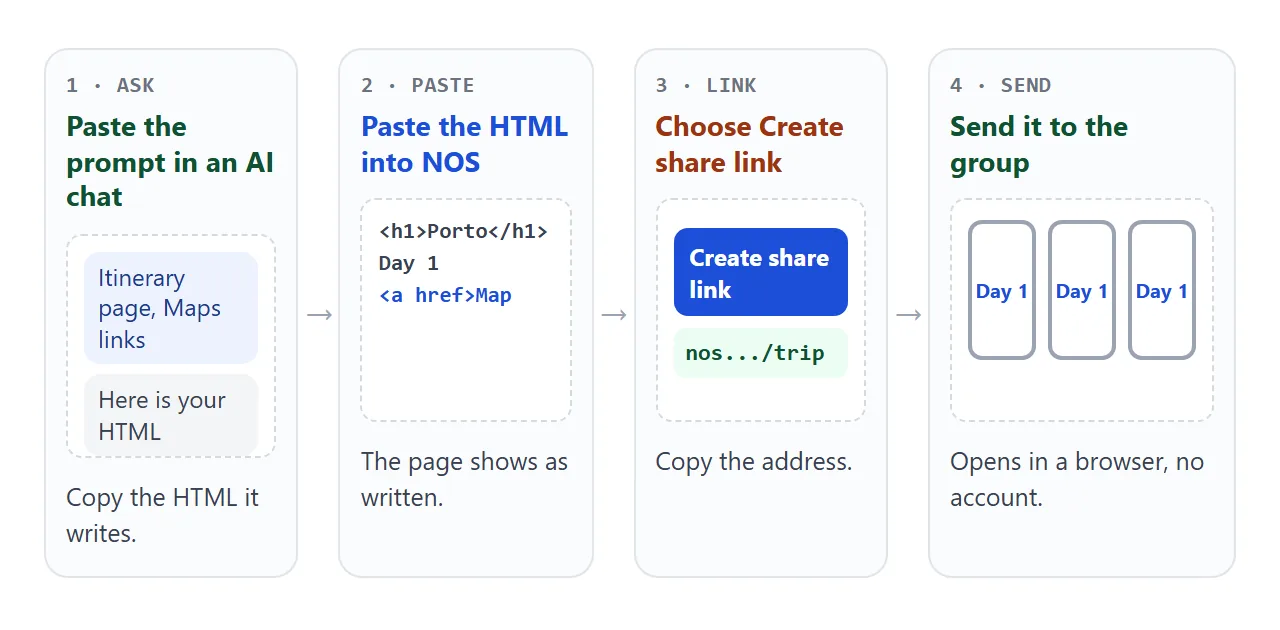
- Copy the HTML the chat wrote.
- Paste it into a NOS document. The page shows as written, with its scripts running, so the day buttons work.
- Choose Create share link.
- Send the address in your group chat or by email.
Whoever opens the link sees the finished page in a browser, on a phone or a computer. They do not need an account, and they cannot edit the page. HTML to link walks through the steps with screenshots.
When the plan changes, edit the code and the same link shows the new version. Nobody has to find the latest copy in a message thread.
When someone taps a Map link on a shared page, NOS first shows a notice, Leave for another site?, with the full address. They choose Open link and Maps opens in a new tab. That was how NOS handled outside links as of October 2026.
An HTML file sent as an attachment is a different case. It can open as plain code on a phone, which is covered in opening an HTML file on a phone.
Link the maps, do not embed them
The usual first idea is to put a Google Map into each day. That needs an iframe, and NOS blocks iframes, so the frame stays empty.
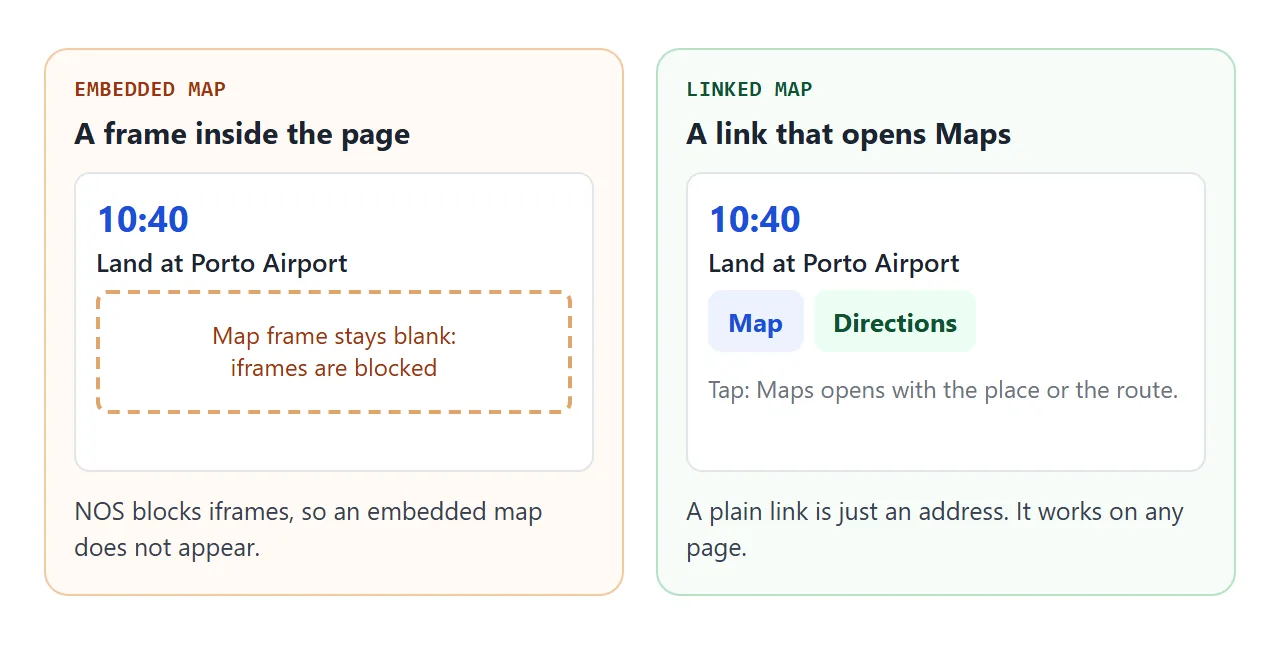
A link needs no frame. Google documents two link shapes. As of October 2026, they look like this:
https://www.google.com/maps/search/?api=1&query=Sao+Bento+Station+Porto
https://www.google.com/maps/dir/?api=1&destination=Sao+Bento+Station+Porto&travelmode=walking
The first shows a place. The second starts directions. Google says the api=1 part is required in every link, and that all other parts are ignored without it.
| Part | What it does |
|---|---|
query |
A place name, an address, or latitude and longitude separated by a comma |
destination |
Where the route ends, in the same forms |
origin |
Where it starts. Leave it out and Maps uses the device location if it can |
travelmode |
driving, walking, bicycling, two-wheeler or transit |
Google also asks that the address is URL-encoded. In plain terms, spaces become plus signs, as in the examples above. On a phone, the link opens the Google Maps app if it is installed. Linking to a map location covers other map apps.
A pre-trip page for bookings and packing
Times and places are half of the job. The other half is the reference numbers and the packing list. A second small page keeps them together, so the day-by-day page stays clean.
<!doctype html>
<html lang="en">
<head>
<meta charset="utf-8">
<meta name="viewport" content="width=device-width, initial-scale=1">
<title>Before we go: Porto</title>
<style>
* { box-sizing: border-box; }
body { margin: 0; font-family: system-ui, sans-serif; background: #f4f5f7; color: #1d2330; }
.wrap { max-width: 560px; margin: 0 auto; padding: 16px 14px 28px; }
h1 { font-size: 22px; margin: 0 0 4px; }
h2 { font-size: 16px; margin: 22px 0 8px; }
.sub { font-size: 14px; color: #4b5563; margin: 0; }
.card { background: #fff; border: 1px solid #e1e4ea; border-radius: 12px; overflow: hidden; }
.book { display: grid; grid-template-columns: 1fr auto; gap: 2px 10px; padding: 11px 14px; border-top: 1px solid #eef0f4; }
.book:first-child { border-top: 0; }
.book b { font-size: 15px; }
.book .when { font-size: 14px; color: #4b5563; }
.book .ref { grid-row: 1 / span 2; grid-column: 2; align-self: center; font: 600 13px ui-monospace, Consolas, monospace; background: #eef1f5; border-radius: 6px; padding: 4px 8px; }
.prog { font-size: 14px; color: #4b5563; margin: 0 0 8px; }
.list { list-style: none; margin: 0; padding: 0; }
.list li { border-top: 1px solid #eef0f4; }
.list li:first-child { border-top: 0; }
.list label { display: flex; align-items: center; gap: 12px; padding: 12px 14px; font-size: 16px; cursor: pointer; }
.list input[type="checkbox"] { width: 22px; height: 22px; flex: none; }
.list li.done label span:not(.who) { color: #9ca3af; text-decoration: line-through; }
.who { margin-left: auto; font-size: 13px; color: #6b7280; }
form { display: flex; gap: 8px; margin-top: 10px; }
form input { flex: 1; min-width: 0; font: 16px system-ui, sans-serif; padding: 10px 12px; border: 1px solid #d5d9e0; border-radius: 10px; }
form button { font: 600 15px system-ui, sans-serif; padding: 10px 14px; border: 0; border-radius: 10px; background: #1d4ed8; color: #fff; cursor: pointer; }
.tip { font-size: 13px; color: #6b7280; margin-top: 10px; }
</style>
</head>
<body>
<div class="wrap">
<h1>Before we go</h1>
<p class="sub">Porto long weekend · 12–14 June · booking codes below are made up</p>
<h2>Bookings</h2>
<div class="card">
<div class="book"><b>Flights out</b><span class="when">Day 1, lands 10:40</span><span class="ref">ZX4Q7P</span></div>
<div class="book"><b>Flat, 2 nights</b><span class="when">Check-in from 12:30, check-out 09:00</span><span class="ref">FL-20418</span></div>
<div class="book"><b>Dinner for four</b><span class="when">Day 1, 20:30</span><span class="ref">TBL-77</span></div>
<div class="book"><b>Flights home</b><span class="when">Day 3, departs 18:15</span><span class="ref">ZX9M2K</span></div>
</div>
<h2>Who brings what</h2>
<p class="prog" id="prog"></p>
<div class="card">
<ul class="list" id="list">
<li><label><input type="checkbox"><span>Passports or ID cards</span><span class="who">everyone</span></label></li>
<li><label><input type="checkbox"><span>Phone charger and plug adapter</span><span class="who">everyone</span></label></li>
<li><label><input type="checkbox"><span>Printed flat address</span><span class="who">Mira</span></label></li>
<li><label><input type="checkbox"><span>Rain jackets</span><span class="who">everyone</span></label></li>
<li><label><input type="checkbox"><span>Cash for small shops</span><span class="who">Jonas</span></label></li>
</ul>
</div>
<form id="add">
<input id="newItem" type="text" placeholder="Add an item" aria-label="Add an item" autocomplete="off">
<button type="submit">Add</button>
</form>
<p class="tip">Tick items off as you pack, or add one of your own.</p>
</div>
<script>
const list = document.getElementById('list');
const prog = document.getElementById('prog');
function update() {
const boxes = list.querySelectorAll('input[type="checkbox"]');
const done = list.querySelectorAll('input:checked').length;
prog.textContent = done + ' of ' + boxes.length + ' packed';
boxes.forEach((b) => b.closest('li').classList.toggle('done', b.checked));
}
list.addEventListener('change', update);
document.getElementById('add').addEventListener('submit', (e) => {
e.preventDefault(); // keep it on the page, nothing is sent anywhere
const input = document.getElementById('newItem');
const text = input.value.trim();
if (!text) return;
const li = document.createElement('li');
const label = document.createElement('label');
const box = document.createElement('input');
box.type = 'checkbox';
const span = document.createElement('span');
span.textContent = text; // textContent keeps typed HTML from running
label.append(box, span);
li.append(label);
list.append(li);
input.value = '';
update();
});
update();
</script>
</body>
</html>
This page uses an ordinary checkbox list and a one-field form that adds a line. Nothing is sent anywhere, because the form is handled inside the page.
In NOS, ticks and added rows you make as the owner in View mode are saved. A visitor's changes are not saved. So this works as a checklist you keep for the group, not one the group fills in together.
Ways to share a trip plan
| HTML file as an attachment | Link to a shared page | |
|---|---|---|
| What the group gets | A copy of the file | The page itself, at one address |
| After you change the plan | Copies already sent stay as they were | The same link shows the new version |
| How it opens | The recipient opens the file in a browser | In a browser, with no account |
| Map links | Work once the file is open | Work |
When it does not work
| What you see | Cause | Fix |
|---|---|---|
| A map frame is blank | NOS blocks iframes | Replace the frame with a Map link |
| A Map button does nothing in an example box | Sandboxed frames silently block links that open a new tab | Open the shared link in your browser and test there |
| Maps opens on the wrong place | The query is too vague | Add the city, or use the address or coordinates |
| Maps opens with an empty start box | A Directions link has no origin and no device location is available | Add an origin part, or let the phone share its location |
| The link opens in the browser, not the app | The Maps app may not be installed | Install the app, or use the page in the browser |
| Pictures or a map image are missing | Images from other sites are blocked | Use inline SVG or CSS, or leave them out |
| Friends do not see your ticks | Only the owner's changes are saved | Treat the checklist as your own, and tell them what is packed |
| Some people see old times | They are holding an old attached copy | Send the link instead, and edit the page there |
If you plan trips often, keep the first page as your template. Replace the city, the days and the places, and send a new link each time. See also why links beat attachments.