A UGC media kit is one page that answers three questions a brand has before it replies: what do you make, can you prove it, and what does it cost.
On Quora, someone asks which Canva template is best for a beginner. The template matters less than the content and how it gets to the brand.
Here is a kit you can copy. Tap the sample tiles, switch the usage option and watch the prices change.
<!doctype html>
<html lang="en">
<head>
<meta charset="utf-8">
<meta name="viewport" content="width=device-width, initial-scale=1">
<title>UGC media kit</title>
<style>
  * { box-sizing: border-box; }
  body { margin: 0; font-family: system-ui, sans-serif; color: #1d2330; background: #f6f4f1; line-height: 1.5; }
  .wrap { max-width: 720px; margin: 0 auto; padding: 22px 18px 30px; }
  header { display: flex; gap: 14px; align-items: center; }
  .av { flex: none; width: 64px; height: 64px; }
  h1 { margin: 0; font-size: 24px; line-height: 1.2; }
  .sub { margin: 2px 0 0; color: #5b6472; font-size: 15px; }
  .date { margin: 14px 0 0; font-size: 12.5px; color: #6b7280; }
  h2 { font-size: 13px; letter-spacing: .08em; text-transform: uppercase; color: #8a4b2a; margin: 20px 0 8px; }
  .pitch { margin: 0; font-size: 16px; }
  .chips { display: flex; flex-wrap: wrap; gap: 8px; margin-top: 12px; }
  .chip { padding: 5px 11px; border: 1px solid #d9d4cc; border-radius: 99px; background: #fff; font-size: 13px; }
  .filters button, .usage button {
    font: inherit; font-size: 13.5px; padding: 6px 12px; border: 1px solid #d9d4cc; border-radius: 99px;
    background: #fff; cursor: pointer; margin: 0 6px 6px 0; color: #1d2330;
  }
  .filters button[aria-pressed="true"], .usage button[aria-pressed="true"] { background: #1d2330; color: #fff; border-color: #1d2330; }
  .grid { display: grid; grid-template-columns: repeat(auto-fill, minmax(150px, 1fr)); gap: 12px; margin-top: 6px; }
  .tile { all: unset; box-sizing: border-box; cursor: pointer; display: block; border-radius: 12px; overflow: hidden; background: #fff; border: 2px solid transparent; box-shadow: 0 2px 8px rgba(0,0,0,.08); }
  .tile[aria-pressed="true"] { border-color: #c2571a; }
  .tile:focus-visible { outline: 3px solid #2563eb; }
  .thumb { height: 84px; display: grid; place-items: center; }
  .thumb svg { width: 34px; height: 34px; }
  .tile .t { display: block; padding: 8px 10px 9px; font-size: 13px; font-weight: 600; }
  .tile .t small { display: block; font-weight: 400; color: #6b7280; }
  .caption { margin: 12px 0 0; padding: 12px 14px; background: #fff; border-left: 4px solid #c2571a; border-radius: 6px; font-size: 14px; min-height: 56px; }
  table { width: 100%; border-collapse: collapse; background: #fff; border-radius: 10px; overflow: hidden; font-size: 14.5px; }
  th, td { text-align: left; padding: 10px 12px; border-bottom: 1px solid #eee9e2; }
  th { background: #efe9e0; font-size: 12.5px; }
  td.p { font-weight: 700; white-space: nowrap; }
  .note { font-size: 13px; color: #6b7280; margin: 8px 0 0; }
  .contact { background: #1d2330; color: #fff; border-radius: 12px; padding: 16px 18px; }
  .contact a { color: #ffd9bf; }
  .contact p { margin: 0; }
</style>
</head>
<body>
<div class="wrap">
  <header>
    <svg class="av" viewBox="0 0 64 64" aria-hidden="true"><circle cx="32" cy="32" r="32" fill="#c2571a"/><text x="32" y="40" text-anchor="middle" font-size="22" font-weight="700" fill="#fff" font-family="system-ui, sans-serif">NA</text></svg>
    <div>
      <h1>Noor Alvarsen</h1>
      <p class="sub">UGC creator for skincare and home brands</p>
    </div>
  </header>
  <p class="date">Rates and availability updated 1 October 2026</p>

  <h2>What I make</h2>
  <p class="pitch">Short vertical videos and product photos that look like a real person using the product, shot on a phone in daylight, delivered ready to post or to run as ads.</p>
  <div class="chips"><span class="chip">9:16 video, 15 to 45 s</span><span class="chip">Product photos</span><span class="chip">Hook and caption options</span><span class="chip">5 working days</span></div>

  <h2>Samples</h2>
  <div class="filters" id="filters">
    <button type="button" data-f="all" aria-pressed="true">All</button>
    <button type="button" data-f="unboxing" aria-pressed="false">Unboxing</button>
    <button type="button" data-f="tutorial" aria-pressed="false">Tutorial</button>
    <button type="button" data-f="review" aria-pressed="false">Review</button>
  </div>
  <div class="grid" id="grid"></div>
  <p class="caption" id="caption">Tap a sample to see the brief and the result.</p>

  <h2>Rates</h2>
  <div class="usage" id="usage">
    <button type="button" data-m="1" aria-pressed="true">Organic use only</button>
    <button type="button" data-m="1.5" aria-pressed="false">Paid ads, 30 days</button>
    <button type="button" data-m="2" aria-pressed="false">Paid ads, 90 days</button>
  </div>
  <table>
    <thead><tr><th>Package</th><th>What you get</th><th>Price</th></tr></thead>
    <tbody>
      <tr><td>1 video</td><td>One 15 to 30 s video, one revision</td><td class="p" data-base="150"></td></tr>
      <tr><td>3 videos</td><td>Three angles of the same product</td><td class="p" data-base="400"></td></tr>
      <tr><td>5 photos</td><td>Product in use, edited</td><td class="p" data-base="120"></td></tr>
    </tbody>
  </table>
  <p class="note">Example prices in USD. Replace them with your own. Raw footage is extra.</p>

  <h2>Work with me</h2>
  <div class="contact">
    <p>Email <a href="mailto:noor@example.com">noor@example.com</a> with the product, the format and the date you need it by. I reply within two working days.</p>
  </div>
</div>

<script>
  // Samples: edit this list. A brief and a result make a sample believable.
  const samples = [
    { type: 'unboxing', title: 'Serum unboxing', len: '24 s', c: ['#f6c9a8', '#e58a5a'], brief: 'Brief: first look at a new serum, no voice-over. Result: kept the first frame on the label and added a hook caption.' },
    { type: 'tutorial', title: 'Night routine', len: '38 s', c: ['#cfd9f0', '#7f95cf'], brief: 'Brief: show three steps of an evening routine. Result: one take, text on screen for each step.' },
    { type: 'review', title: 'Candle, 2 weeks in', len: '19 s', c: ['#d7e8cf', '#7fae6b'], brief: 'Brief: honest two-week review of a home candle. Result: spoken to camera, one pro and one con.' },
    { type: 'unboxing', title: 'Mug set', len: '27 s', c: ['#f3dcae', '#d9a73d'], brief: 'Brief: unbox a set of four mugs. Result: overhead shot, ends on a table setting.' },
    { type: 'tutorial', title: 'Shelf styling', len: '41 s', c: ['#e2d3ec', '#a07ac2'], brief: 'Brief: style a bookshelf using three products. Result: before and after in the first three seconds.' },
    { type: 'review', title: 'Cleanser, 30 days', len: '33 s', c: ['#cfe7e7', '#58a6a6'], brief: 'Brief: 30-day cleanser review. Result: day 1 and day 30 side by side, same light.' }
  ];
  const grid = document.getElementById('grid');
  const caption = document.getElementById('caption');
  const play = '<svg viewBox="0 0 24 24" aria-hidden="true"><circle cx="12" cy="12" r="12" fill="rgba(255,255,255,.85)"/><path d="M9.5 7.5v9l7-4.5z" fill="#1d2330"/></svg>';

  function draw(filter) {
    grid.innerHTML = '';
    samples.filter(s => filter === 'all' || s.type === filter).forEach(s => {
      const b = document.createElement('button');
      b.type = 'button'; b.className = 'tile'; b.setAttribute('aria-pressed', 'false');
      b.innerHTML = '<span class="thumb" style="background:linear-gradient(160deg,' + s.c[0] + ',' + s.c[1] + ')">' + play + '</span>' +
        '<span class="t">' + s.title + '<small>' + s.len + ' · ' + s.type + '</small></span>';
      b.addEventListener('click', () => {
        grid.querySelectorAll('.tile').forEach(t => t.setAttribute('aria-pressed', 'false'));
        b.setAttribute('aria-pressed', 'true');
        caption.textContent = s.brief;
      });
      grid.appendChild(b);
    });
  }
  document.getElementById('filters').addEventListener('click', e => {
    const b = e.target.closest('button'); if (!b) return;
    document.querySelectorAll('#filters button').forEach(x => x.setAttribute('aria-pressed', String(x === b)));
    caption.textContent = 'Tap a sample to see the brief and the result.';
    draw(b.dataset.f);
  });

  // Rates: base price times a usage multiplier
  function price(m) {
    document.querySelectorAll('td[data-base]').forEach(td => {
      td.textContent = '$' + Math.round(td.dataset.base * m);
    });
  }
  document.getElementById('usage').addEventListener('click', e => {
    const b = e.target.closest('button'); if (!b) return;
    document.querySelectorAll('#usage button').forEach(x => x.setAttribute('aria-pressed', String(x === b)));
    price(Number(b.dataset.m));
  });

  draw('all');
  price(1);
</script>
</body>
</html>
The sample list sits at the top of the script and the base prices are numbers in the rates table, so you can swap in your own without touching the layout.
What the page needs, in order
A brand opening your pitch wants a quick answer, so the order of the page is the whole design.
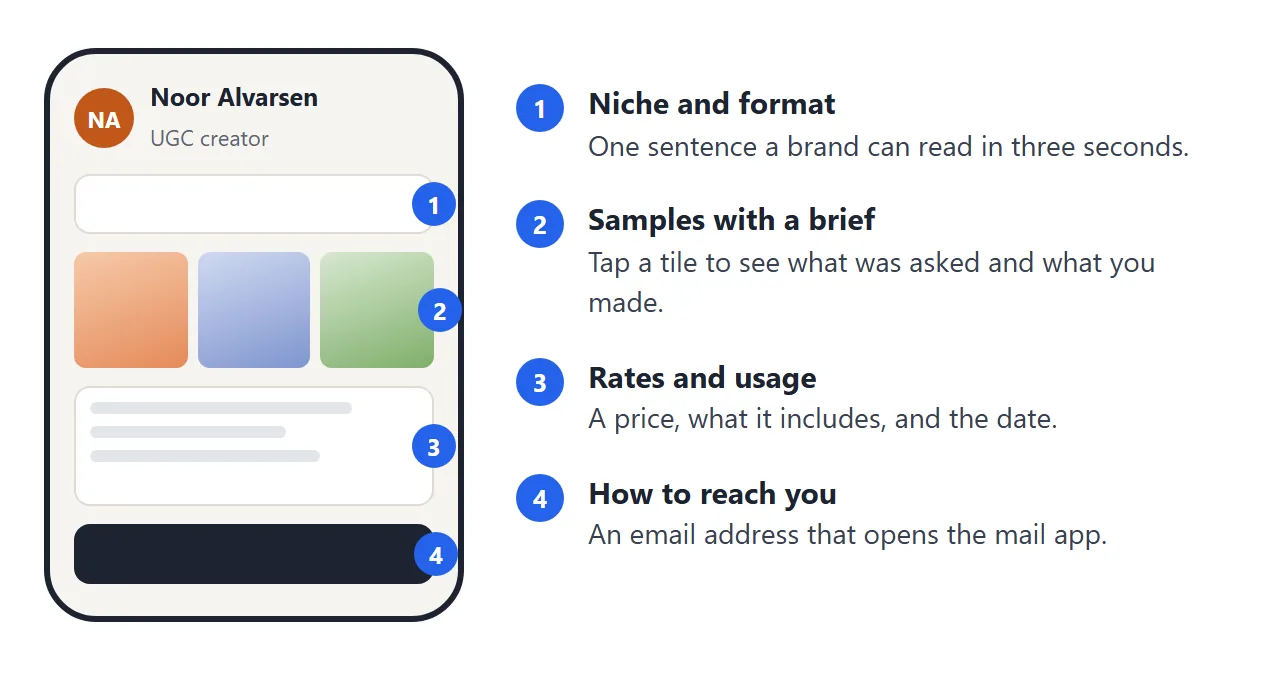
- Niche and format. One sentence, such as the kinds of products you film and the shape of the video.
- Samples. Three to six is enough. Add one line on what the brief was and what you did, so the sample reads as work for a client.
- Rates. A price, what it includes, and how long a brand may use the content in ads.
- Contact. An email address, and a date on the page.
Leave out a long story about yourself. The media kit guide covers the audience-figures side if you also post for brands.
Make it with AI
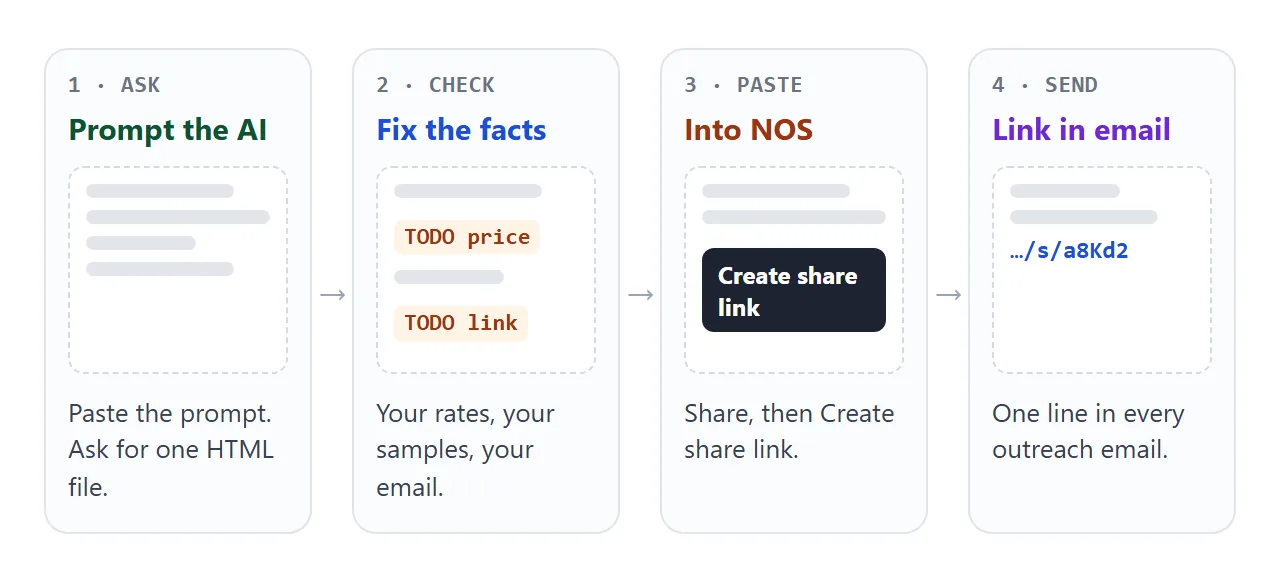
Open ChatGPT, Claude or Gemini and paste this, with your details in the square brackets.
Write one self-contained HTML page: a one-page UGC creator media kit.
Sections in this order: my name and one-sentence niche; a grid of 6
sample tiles, each with a title, length and a one-line brief and result;
a rates table with three packages and a switch for organic use or paid
ads for 30 or 90 days; delivery time; my email address.
My details: [name], [niche], [formats], [rates], [email].
Rules: no external images, fonts or scripts; draw thumbnails with CSS
gradients; works on a phone; no frameworks. Where you do not know a
number, write TODO instead of inventing one.
Then check the result before it goes anywhere:
- Every TODO is replaced by something true.
- The prices and the dates are yours, not the AI's.
- The email address is spelled correctly.
- No sample claims a brand, a result or a view count you cannot back up.
Send it as a link
Paste the HTML into a NOS document, open Share and choose Create share link. HTML to link walks through it.
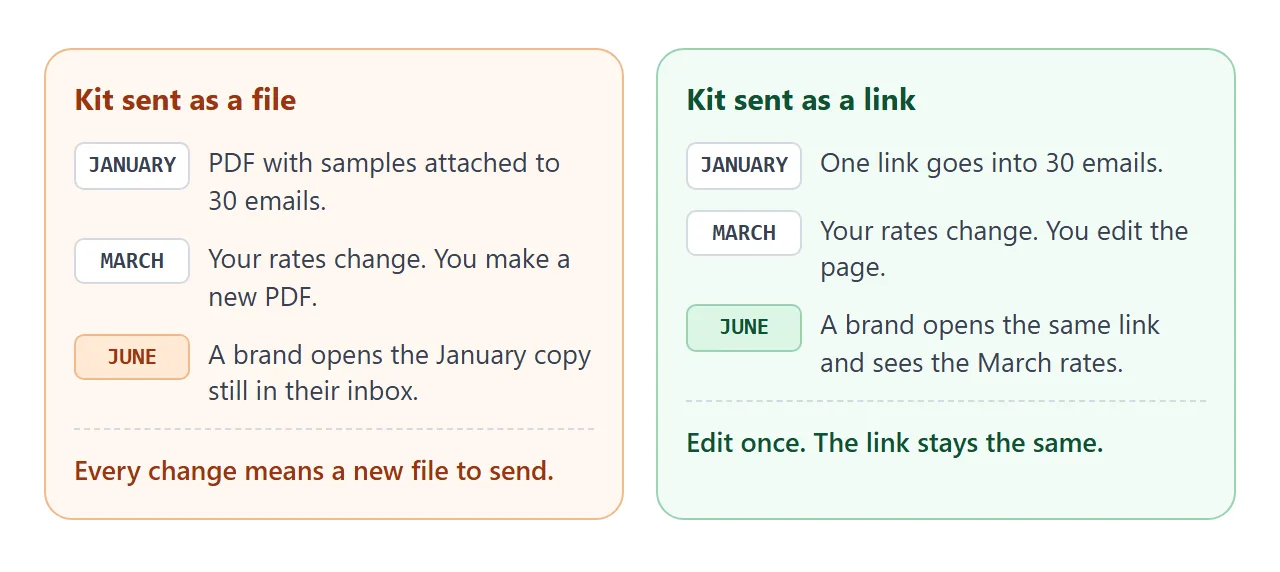
The page renders as written and opens in a browser, phone included, for anyone with the link. Nobody needs an account, and nobody can edit it. When you change a rate, edit the code and the same link shows the new version.
A link from the page to a post or a folder is an ordinary link. Outside images and iframes are blocked, so a video cannot play inside the page.
As of October 2026, Gmail lets a personal account attach up to 25 MB and turns a larger attachment into a Google Drive link, so a kit with videos is usually better kept off the attachment route.
Ways to send a kit compared
| PDF attached | Your own page, shared as a link | |
|---|---|---|
| Change a rate later | Make a new file and resend | Edit the page, same link |
| What a brand holds | The copy from the day you sent it | The address, which shows the current page |
| Tappable samples | Only if you add links | Yes, with a brief on each |
| Opens in | A PDF viewer or the mail app | The browser, phone included |
| What you send | A file | One line of text |
Put the link in the outreach email
Keep the email short. One sentence on what you make, the link, one offer. Fill in the boxes and the email writes itself.
<!doctype html>
<html lang="en">
<head>
<meta charset="utf-8">
<meta name="viewport" content="width=device-width, initial-scale=1">
<title>Outreach email with kit link</title>
<style>
  * { box-sizing: border-box; }
  body { margin: 0; font-family: system-ui, sans-serif; color: #1d2330; background: #f4f5f7; line-height: 1.5; }
  .wrap { max-width: 640px; margin: 0 auto; padding: 18px; }
  h1 { font-size: 20px; margin: 0 0 4px; }
  .lead { margin: 0 0 14px; color: #5b6472; font-size: 14.5px; }
  .fields { display: grid; grid-template-columns: 1fr 1fr; gap: 10px 12px; }
  label { display: block; font-size: 12.5px; font-weight: 600; color: #374151; }
  input { width: 100%; margin-top: 3px; padding: 8px 10px; font: inherit; font-size: 14.5px; border: 1px solid #cfd4dc; border-radius: 8px; background: #fff; }
  .full { grid-column: 1 / -1; }
  textarea { width: 100%; height: 250px; margin-top: 14px; padding: 12px; font: inherit; font-size: 14.5px; line-height: 1.55; border: 1px solid #cfd4dc; border-radius: 10px; resize: vertical; background: #fff; }
  .bar { display: flex; align-items: center; gap: 12px; margin-top: 10px; flex-wrap: wrap; }
  button { font: inherit; font-size: 14.5px; font-weight: 600; padding: 9px 16px; border: 0; border-radius: 8px; background: #1d2330; color: #fff; cursor: pointer; }
  #info { font-size: 13px; color: #5b6472; }
  @media (max-width: 480px) { .fields { grid-template-columns: 1fr; } }
</style>
</head>
<body>
<div class="wrap">
  <h1>Outreach email with your kit link</h1>
  <p class="lead">Fill in the boxes. The email updates as you type. Short, one link, one ask.</p>
  <div class="fields">
    <label>Your name<input id="me" value="Noor"></label>
    <label>Brand contact<input id="who" value="Sam"></label>
    <label>Brand<input id="brand" value="Brightleaf"></label>
    <label>Product<input id="prod" value="the new hand cream"></label>
    <label class="full">Your kit link<input id="link" value="https://your-kit-link"></label>
  </div>
  <textarea id="out" aria-label="Email text"></textarea>
  <div class="bar"><button type="button" id="sel">Select all text</button><span id="info"></span></div>
</div>

<script>
  const $ = id => document.getElementById(id);
  const out = $('out');

  function build() {
    const t =
      'Subject: UGC videos for ' + $('brand').value + '\n\n' +
      'Hi ' + $('who').value + ',\n\n' +
      'I make short vertical videos and product photos for skincare and home brands. ' +
      'My one-page kit has samples, what I charge and how fast I deliver: ' + $('link').value + '\n\n' +
      'If ' + $('prod').value + ' needs fresh content, I can send two concept ideas before you decide anything.\n\n' +
      'Thanks,\n' + $('me').value;
    out.value = t;
    const words = t.trim().split(/\s+/).length;
    $('info').textContent = words + ' words';
  }

  ['me', 'who', 'brand', 'prod', 'link'].forEach(id => $(id).addEventListener('input', build));
  $('sel').addEventListener('click', () => { out.focus(); out.select(); });
  build();
</script>
</body>
</html>
Write the first line of the email for the brand. Name the product, not just the brand. If you send paper cards at an event, the QR code guide shows how to point one at the same link.
When it does not work
| Symptom | Cause | Fix |
|---|---|---|
| A video does not play on the page | Iframes and outside embeds are blocked | Show a tile and link to the post or folder |
| Thumbnails are empty boxes | The AI used pictures from other sites | Ask for CSS gradients or inline SVG |
| Invented numbers appear | The AI filled a gap | Ask for TODO, then fill it yourself |
| The brand sees old rates | They have an old PDF | Send the link instead and mention the date |
| The layout is too wide on a phone | No viewport tag or fixed widths | Ask the AI to make it work on a phone |
| The link opens a half-finished page | Only part of the HTML was pasted | Paste the whole file, from the first line to the last |