To use WebGPU in an HTML page, check for navigator.gpu, ask it for an adapter and then a device, and connect a <canvas> to that device. Write the shaders in WGSL, build a pipeline, record a render pass and submit it to the GPU queue.
No library or build step is needed. Here is one file that draws a triangle with a colour at each corner:
<!doctype html>
<html lang="en">
<head>
<meta charset="utf-8">
<meta name="viewport" content="width=device-width, initial-scale=1">
<title>WebGPU triangle</title>
<style>
  body { margin: 0; padding: 12px; font-family: system-ui, sans-serif; background: #f4f5f7; }
  canvas { display: block; width: 100%; height: 230px; border-radius: 10px; background: #111827; }
  .bar { display: flex; gap: 8px; align-items: center; margin-top: 10px; }
  button { font: inherit; font-size: 14px; padding: 7px 12px; border-radius: 8px; border: 1px solid #c9cdd4; background: #fff; cursor: pointer; }
  pre { margin: 8px 0 0; font-size: 12px; white-space: pre-wrap; color: #374151; }
  .warn { color: #9a3412; }
</style>
</head>
<body>
<canvas id="c"></canvas>
<div class="bar"><button id="bad">Compile a broken shader</button></div>
<pre id="log"></pre>

<script>
  const canvas = document.getElementById('c');
  const log = document.getElementById('log');

  // One WGSL module holds both shaders
  const shaderCode = `
struct VOut {
  @builtin(position) pos : vec4f,
  @location(0) color : vec3f,
}

@vertex
fn vs(@location(0) pos : vec2f, @location(1) color : vec3f) -> VOut {
  var out : VOut;
  out.pos = vec4f(pos, 0.0, 1.0);
  out.color = color;
  return out;
}

@fragment
fn fs(v : VOut) -> @location(0) vec4f {
  return vec4f(v.color, 1.0);
}`;

  // x, y, r, g, b for each corner. x and y run from -1 to 1.
  const corners = new Float32Array([
     0.0,  0.8,   1.0, 0.3, 0.3,
    -0.8, -0.7,   0.3, 1.0, 0.4,
     0.8, -0.7,   0.3, 0.5, 1.0,
  ]);

  let device = null;

  async function start() {
    // 1. Is WebGPU here at all?
    if (!navigator.gpu) return fallback('navigator.gpu is undefined');
    let adapter = null;
    try { adapter = await navigator.gpu.requestAdapter(); } catch (err) { return fallback(err.message); }
    if (!adapter) return fallback('requestAdapter() returned null');
    device = await adapter.requestDevice();

    // 2. Connect the canvas to the device
    canvas.width = Math.round(canvas.clientWidth * devicePixelRatio);
    canvas.height = Math.round(canvas.clientHeight * devicePixelRatio);
    const context = canvas.getContext('webgpu');
    const format = navigator.gpu.getPreferredCanvasFormat();
    context.configure({ device, format });

    // 3. Copy the corners into a GPU buffer
    const buffer = device.createBuffer({
      size: corners.byteLength,
      usage: GPUBufferUsage.VERTEX | GPUBufferUsage.COPY_DST,
    });
    device.queue.writeBuffer(buffer, 0, corners);

    // 4. The pipeline: shaders + how to read the buffer
    const module = device.createShaderModule({ code: shaderCode });
    const pipeline = device.createRenderPipeline({
      layout: 'auto',
      vertex: {
        module, entryPoint: 'vs',
        buffers: [{
          arrayStride: 5 * 4,  // 5 floats of 4 bytes per corner
          attributes: [
            { shaderLocation: 0, offset: 0, format: 'float32x2' },
            { shaderLocation: 1, offset: 2 * 4, format: 'float32x3' },
          ],
        }],
      },
      fragment: { module, entryPoint: 'fs', targets: [{ format }] },
      primitive: { topology: 'triangle-list' },
    });

    // 5. Record the commands, then submit them
    const encoder = device.createCommandEncoder();
    const pass = encoder.beginRenderPass({
      colorAttachments: [{
        view: context.getCurrentTexture().createView(),
        clearValue: { r: 0.07, g: 0.09, b: 0.15, a: 1 },
        loadOp: 'clear',
        storeOp: 'store',
      }],
    });
    pass.setPipeline(pipeline);
    pass.setVertexBuffer(0, buffer);
    pass.draw(3);
    pass.end();
    device.queue.submit([encoder.finish()]);
    log.textContent = 'Drawn with WebGPU. Canvas format: ' + format;
  }

  // No WebGPU: draw the same triangle with canvas 2D and say why
  function fallback(reason) {
    canvas.width = canvas.clientWidth;
    canvas.height = canvas.clientHeight;
    const ctx = canvas.getContext('2d');
    const w = canvas.width, h = canvas.height;
    const px = (x, y) => [(x + 1) / 2 * w, (1 - y) / 2 * h];
    ctx.beginPath();
    ctx.moveTo(...px(0, 0.8)); ctx.lineTo(...px(-0.8, -0.7)); ctx.lineTo(...px(0.8, -0.7));
    ctx.fillStyle = '#6b7280';
    ctx.fill();
    log.className = 'warn';
    log.textContent = 'WebGPU is not available here (' + reason + ').\nFallback: the grey triangle is drawn with canvas 2D.';
  }

  start();

  // A missing ")" in the vertex shader. createShaderModule does not throw.
  document.getElementById('bad').addEventListener('click', async () => {
    if (!device) return;
    const broken = device.createShaderModule({ code: shaderCode.replace('color : vec3f) ->', 'color : vec3f ->') });
    const info = await broken.getCompilationInfo();
    log.textContent = info.messages.map(m => m.type + ' at line ' + m.lineNum + ':' + m.linePos + '\n' + m.message).join('\n');
  });
</script>
</body>
</html>
The whole recipe is five steps:
- Check for WebGPU. If
navigator.gpuisundefined, show a fallback. - Get an adapter and a device. Await
requestAdapter(), check the result is notnull, then awaitrequestDevice(). - Configure the canvas. Call
canvas.getContext('webgpu')and pass the device andgetPreferredCanvasFormat()toconfigure. - Build a pipeline. Put the WGSL code in
createShaderModule, then describe the shaders and the buffer layout increateRenderPipeline. - Record and submit. Begin a render pass on
getCurrentTexture(), set the pipeline, draw, end the pass, and submit.
Which browsers run WebGPU
The WebGPU specification and its shading language, WGSL, are both W3C Candidate Recommendation Drafts. Support still depends on the browser and the operating system, so check for it in code rather than assuming it.
MDN's compatibility data lists support in these browsers:
| Browser | What MDN's data says |
|---|---|
| Chrome, Edge, Opera | Supported. Chrome on Linux is limited to certain Intel GPUs |
| Chrome for Android, Samsung Internet | Supported |
| Safari on Mac, iPhone and iPad | Supported |
| Firefox | Partial: Windows and Apple-silicon Macs, not Linux |
| Firefox for Android | Not supported |
What was tested for this page: Chrome and Edge on Windows ran all three examples, at desktop and phone width. A Chromium build with no GPU access returned null from requestAdapter(), and every example showed its fallback message.
WebGPU also needs a secure context. Pages on https, on localhost and opened from a file qualify. The same file served over plain http on a network address had no navigator.gpu at all in Chrome.
Four calls before the first draw
WebGL gives you a context straight away. WebGPU makes you ask for the hardware first, and two of the calls return promises.
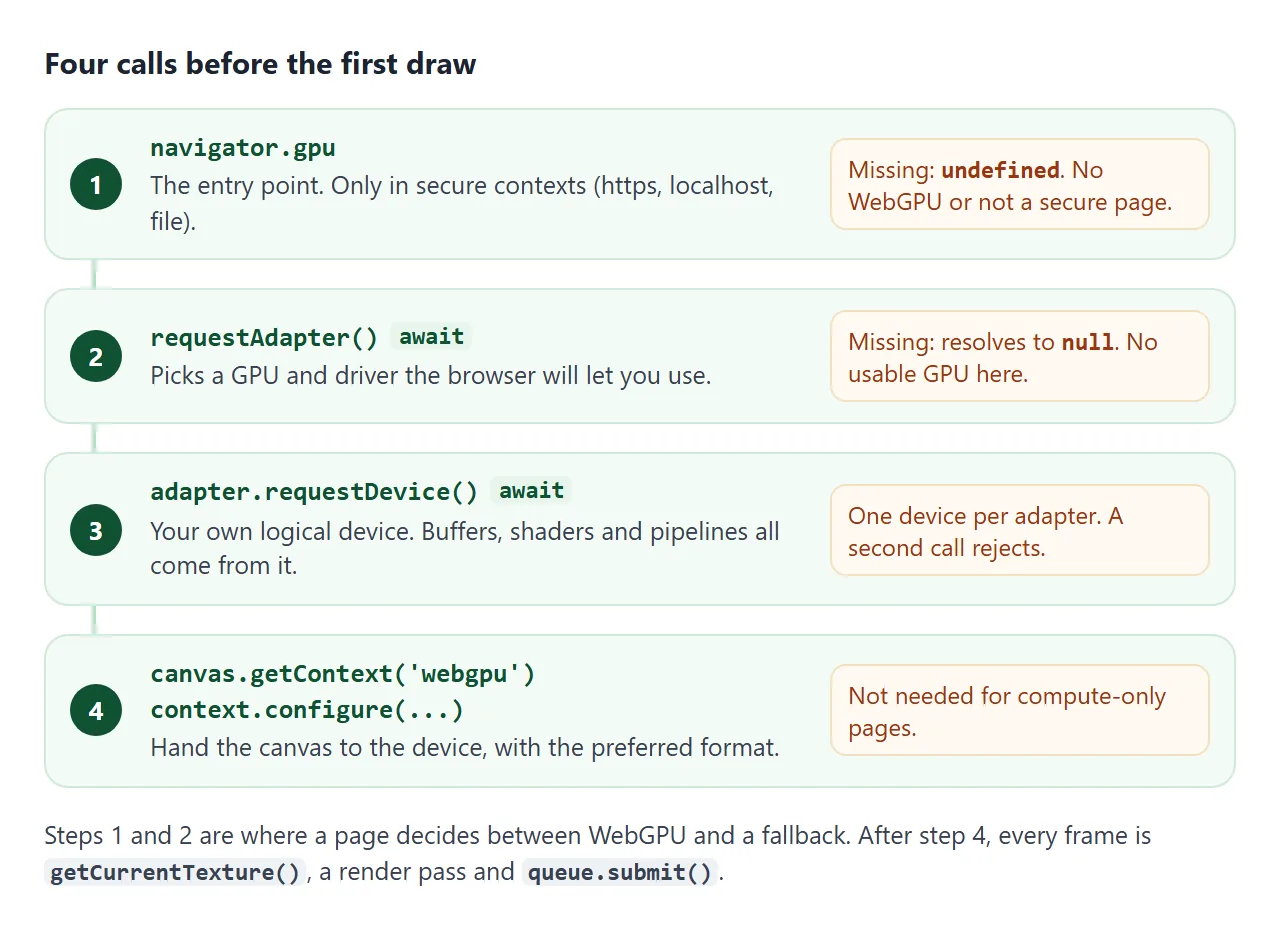
if (!navigator.gpu) return fallback('no navigator.gpu');
const adapter = await navigator.gpu.requestAdapter();
if (!adapter) return fallback('no adapter');
const device = await adapter.requestDevice();

const context = canvas.getContext('webgpu');
const format = navigator.gpu.getPreferredCanvasFormat();
context.configure({ device, format });
- The adapter stands for a physical GPU and its driver.
requestAdapter()resolves tonullwhen no suitable one is available. - The device is your page's own logical view of that GPU. Every buffer, shader and pipeline is created from it.
- An adapter hands out one device. Calling
requestDevice()on it a second time rejects with anOperationError.
getPreferredCanvasFormat() returns the format that suits the screen, either bgra8unorm or rgba8unorm. It was bgra8unorm on the Windows machine used here.
A canvas starts at 300 x 150 pixels, whatever its CSS size. Set canvas.width and canvas.height from clientWidth and clientHeight times devicePixelRatio, or the drawing looks soft. HTML canvas blurry covers the size mismatch.
One WGSL module, two shaders
WebGPU shaders are written in WGSL, the WebGPU Shading Language. One module can hold both the vertex shader and the fragment shader, marked with @vertex and @fragment:
struct VOut {
  @builtin(position) pos : vec4f,
  @location(0) color : vec3f,
}

@vertex
fn vs(@location(0) pos : vec2f, @location(1) color : vec3f) -> VOut {
  var out : VOut;
  out.pos = vec4f(pos, 0.0, 1.0);
  out.color = color;
  return out;
}

@fragment
fn fs(v : VOut) -> @location(0) vec4f {
  return vec4f(v.color, 1.0);
}
The vertex shader runs once per corner and returns its position. The fragment shader runs once per covered pixel and returns its colour. @location(0) on the inputs matches shaderLocation: 0 in the buffer layout below.
Compile errors are quiet. createShaderModule does not throw on a typo. Ask the module for its messages:
const info = await module.getCompilationInfo();
for (const m of info.messages) {
  console.log(m.type, m.lineNum, m.linePos, m.message);
}
The button in the first example removes one ) and prints what Chrome returns: an error at line 8 saying a ) was expected.
Record the commands, then submit
The corner data goes into a GPU buffer, and the pipeline describes how to read it. Each corner here is five 4-byte floats, so the stride is 20 bytes and the colour starts 8 bytes in:
const buffer = device.createBuffer({
  size: corners.byteLength,
  usage: GPUBufferUsage.VERTEX | GPUBufferUsage.COPY_DST,
});
device.queue.writeBuffer(buffer, 0, corners);

const pipeline = device.createRenderPipeline({
  layout: 'auto',
  vertex: { module, entryPoint: 'vs', buffers: [{
    arrayStride: 20,
    attributes: [
      { shaderLocation: 0, offset: 0, format: 'float32x2' },
      { shaderLocation: 1, offset: 8, format: 'float32x3' },
    ],
  }] },
  fragment: { module, entryPoint: 'fs', targets: [{ format }] },
});
Drawing is two phases. First you record commands into an encoder. Nothing reaches the GPU until you submit the finished command buffer to device.queue.
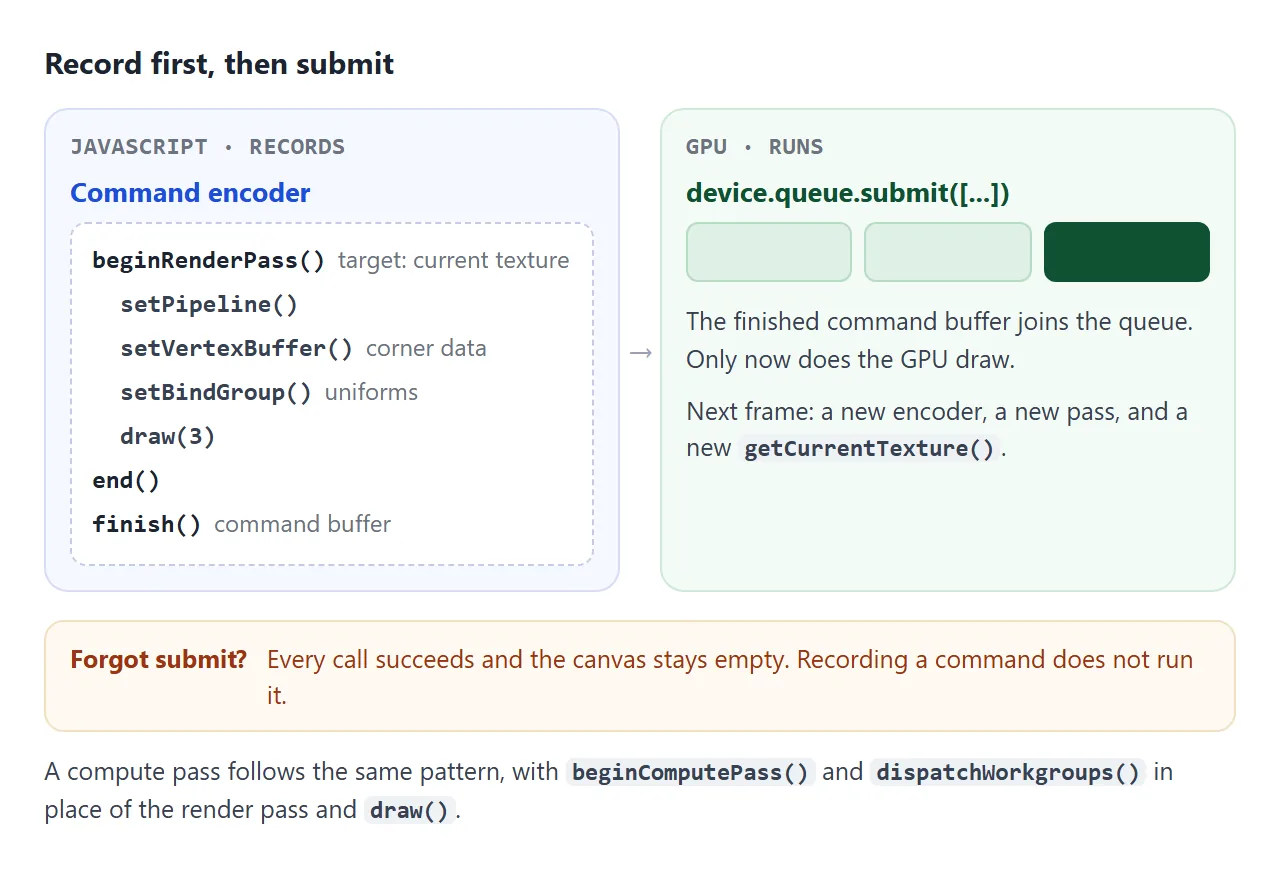
const encoder = device.createCommandEncoder();
const pass = encoder.beginRenderPass({
  colorAttachments: [{
    view: context.getCurrentTexture().createView(),
    clearValue: { r: 0.07, g: 0.09, b: 0.15, a: 1 },
    loadOp: 'clear',
    storeOp: 'store',
  }],
});
pass.setPipeline(pipeline);
pass.setVertexBuffer(0, buffer);
pass.draw(3);
pass.end();
device.queue.submit([encoder.finish()]);
Leave out the last line and every call still succeeds, but the canvas stays empty. In the test, a pass that cleared to red and was never submitted left the canvas fully transparent.
Animate it with a uniform buffer
A uniform is a value that every corner and pixel in a draw can read, set from JavaScript. In WebGPU it lives in a buffer, and a bind group tells the pipeline which buffer to use.
<!doctype html>
<html lang="en">
<head>
<meta charset="utf-8">
<meta name="viewport" content="width=device-width, initial-scale=1">
<title>WebGPU uniform buffer</title>
<style>
  body { margin: 0; padding: 12px; font-family: system-ui, sans-serif; background: #f4f5f7; }
  canvas { display: block; width: 100%; height: 250px; border-radius: 10px; background: #111827; }
  .bar { display: flex; flex-wrap: wrap; gap: 14px; align-items: center; margin-top: 10px; font-size: 14px; }
  label { display: flex; gap: 6px; align-items: center; }
  input[type=range] { width: 120px; }
  p { margin: 8px 0 0; font-size: 12px; color: #9a3412; }
</style>
</head>
<body>
<canvas id="c"></canvas>
<div class="bar">
  <label>Color <input type="color" id="color" value="#f59e0b"></label>
  <label>Speed <input type="range" id="speed" min="0" max="4" step="0.1" value="1"></label>
</div>
<p id="msg"></p>

<script>
  const canvas = document.getElementById('c');
  const colorInput = document.getElementById('color');
  const speedInput = document.getElementById('speed');

  const shaderCode = `
struct Params {
  angleAspect : vec4f,  // x = angle, y = width / height
  color : vec4f,
}
@group(0) @binding(0) var<uniform> u : Params;

@vertex
fn vs(@builtin(vertex_index) i : u32) -> @builtin(position) vec4f {
  // Three corners written in the shader, no vertex buffer needed
  var p = array<vec2f, 3>(vec2f(0.0, 0.7), vec2f(-0.6, -0.45), vec2f(0.6, -0.45));
  let a = u.angleAspect.x;
  let r = vec2f(p[i].x * cos(a) - p[i].y * sin(a), p[i].x * sin(a) + p[i].y * cos(a));
  return vec4f(r.x / u.angleAspect.y, r.y, 0.0, 1.0);
}

@fragment
fn fs() -> @location(0) vec4f {
  return u.color;
}`;

  async function start() {
    const adapter = navigator.gpu && await navigator.gpu.requestAdapter().catch(() => null);
    if (!adapter) {
      document.getElementById('msg').textContent = 'WebGPU is not available in this browser, so nothing is drawn. Try a browser listed in the article.';
      return;
    }
    const device = await adapter.requestDevice();
    const context = canvas.getContext('webgpu');
    const format = navigator.gpu.getPreferredCanvasFormat();
    context.configure({ device, format });

    // 8 floats = 32 bytes: two vec4f
    const params = new Float32Array(8);
    const uniformBuffer = device.createBuffer({
      size: params.byteLength,
      usage: GPUBufferUsage.UNIFORM | GPUBufferUsage.COPY_DST,
    });

    const module = device.createShaderModule({ code: shaderCode });
    const pipeline = device.createRenderPipeline({
      layout: 'auto',
      vertex: { module, entryPoint: 'vs' },
      fragment: { module, entryPoint: 'fs', targets: [{ format }] },
    });

    // Tells the pipeline which buffer is @group(0) @binding(0)
    const bindGroup = device.createBindGroup({
      layout: pipeline.getBindGroupLayout(0),
      entries: [{ binding: 0, resource: { buffer: uniformBuffer } }],
    });

    let angle = 0, last = performance.now();

    function frame(now) {
      // Keep the drawing buffer the same size as the element
      const w = Math.round(canvas.clientWidth * devicePixelRatio);
      const h = Math.round(canvas.clientHeight * devicePixelRatio);
      if (canvas.width !== w || canvas.height !== h) { canvas.width = w; canvas.height = h; }

      angle += (now - last) / 1000 * Number(speedInput.value);
      last = now;
      const hex = colorInput.value;
      params.set([angle, w / h, 0, 0,
        parseInt(hex.slice(1, 3), 16) / 255, parseInt(hex.slice(3, 5), 16) / 255, parseInt(hex.slice(5, 7), 16) / 255, 1]);
      device.queue.writeBuffer(uniformBuffer, 0, params);  // new values every frame

      const encoder = device.createCommandEncoder();
      const pass = encoder.beginRenderPass({
        colorAttachments: [{
          view: context.getCurrentTexture().createView(),  // a fresh texture each frame
          clearValue: { r: 0.07, g: 0.09, b: 0.15, a: 1 },
          loadOp: 'clear', storeOp: 'store',
        }],
      });
      pass.setPipeline(pipeline);
      pass.setBindGroup(0, bindGroup);
      pass.draw(3);
      pass.end();
      device.queue.submit([encoder.finish()]);
      requestAnimationFrame(frame);
    }
    requestAnimationFrame(frame);
  }

  start();
</script>
</body>
</html>
struct Params {
  angleAspect : vec4f,  // x = angle, y = width / height
  color : vec4f,
}
@group(0) @binding(0) var<uniform> u : Params;
const uniformBuffer = device.createBuffer({
  size: 32,  // two vec4f
  usage: GPUBufferUsage.UNIFORM | GPUBufferUsage.COPY_DST,
});
const bindGroup = device.createBindGroup({
  layout: pipeline.getBindGroupLayout(0),
  entries: [{ binding: 0, resource: { buffer: uniformBuffer } }],
});

function frame(now) {
  device.queue.writeBuffer(uniformBuffer, 0, params);
  // ...begin a pass on a fresh getCurrentTexture()...
  pass.setBindGroup(0, bindGroup);
  requestAnimationFrame(frame);
}
With layout: 'auto', the pipeline builds its bind group layout from the @group and @binding lines in the shader, and getBindGroupLayout(0) hands it back.
getCurrentTexture() returns the next texture the canvas will show, so call it inside the frame function, not once at the start. The loop itself is ordinary requestAnimationFrame.
This example has no vertex buffer at all. The three corners are written in the shader, and @builtin(vertex_index) says which corner is being processed.
Compute: use the GPU as a calculator
WebGPU has a second kind of pipeline that draws nothing. A compute shader reads and writes buffers, and many copies of it run in parallel.
@group(0) @binding(0) var<storage, read_write> data : array<f32>;

@compute @workgroup_size(64)
fn main(@builtin(global_invocation_id) id : vec3u) {
  if (id.x >= arrayLength(&data)) { return; }
  data[id.x] = data[id.x] * data[id.x];
}
Each workgroup covers 64 numbers, so the page dispatches Math.ceil(n / 64) workgroups. The last group can reach past the end of the array, which is why the shader checks the index first.
<!doctype html>
<html lang="en">
<head>
<meta charset="utf-8">
<meta name="viewport" content="width=device-width, initial-scale=1">
<title>WebGPU compute shader</title>
<style>
  body { margin: 0; padding: 12px; font-family: system-ui, sans-serif; background: #f4f5f7; color: #1d2330; }
  .bar { display: flex; flex-wrap: wrap; gap: 10px; align-items: center; font-size: 14px; }
  select, button { font: inherit; font-size: 14px; padding: 7px 10px; border-radius: 8px; border: 1px solid #c9cdd4; background: #fff; }
  button { cursor: pointer; }
  .out { margin-top: 12px; padding: 12px; border-radius: 10px; background: #fff; border: 1px solid #e1e4ea; min-height: 150px; }
  .out b { display: block; font-size: 13px; margin-bottom: 6px; }
  .nums { font: 13px/1.6 ui-monospace, Consolas, monospace; word-break: break-all; color: #374151; }
  .ok { color: #0f5132; font-size: 13px; margin-top: 8px; }
  .warn { color: #9a3412; font-size: 13px; }
</style>
</head>
<body>
<div class="bar">
  <label>Numbers
    <select id="count">
      <option value="1000">1,000</option>
      <option value="100000" selected>100,000</option>
      <option value="1000000">1,000,000</option>
    </select>
  </label>
  <button id="run">Square them on the GPU</button>
</div>
<div class="out" id="out"><span class="nums">Press the button.</span></div>

<script>
  const out = document.getElementById('out');

  // One compute shader: each invocation squares one number
  const shaderCode = `
@group(0) @binding(0) var<storage, read_write> data : array<f32>;

@compute @workgroup_size(64)
fn main(@builtin(global_invocation_id) id : vec3u) {
  if (id.x >= arrayLength(&data)) { return; }
  data[id.x] = data[id.x] * data[id.x];
}`;

  let device = null, pipeline = null;

  async function setup() {
    const adapter = navigator.gpu && await navigator.gpu.requestAdapter().catch(() => null);
    if (!adapter) return false;
    device = await adapter.requestDevice();
    pipeline = device.createComputePipeline({
      layout: 'auto',
      compute: { module: device.createShaderModule({ code: shaderCode }), entryPoint: 'main' },
    });
    return true;
  }

  async function run() {
    if (!device && !(await setup())) {
      out.innerHTML = '<span class="warn">WebGPU is not available in this browser, so the shader cannot run here.</span>';
      return;
    }
    const n = Number(document.getElementById('count').value);
    const input = new Float32Array(n).map((_, i) => i);

    // The GPU works on a storage buffer...
    const work = device.createBuffer({
      size: input.byteLength,
      usage: GPUBufferUsage.STORAGE | GPUBufferUsage.COPY_SRC | GPUBufferUsage.COPY_DST,
    });
    device.queue.writeBuffer(work, 0, input);
    // ...and JavaScript can only read a MAP_READ buffer
    const readback = device.createBuffer({
      size: input.byteLength,
      usage: GPUBufferUsage.MAP_READ | GPUBufferUsage.COPY_DST,
    });

    const bindGroup = device.createBindGroup({
      layout: pipeline.getBindGroupLayout(0),
      entries: [{ binding: 0, resource: { buffer: work } }],
    });

    const encoder = device.createCommandEncoder();
    const pass = encoder.beginComputePass();
    pass.setPipeline(pipeline);
    pass.setBindGroup(0, bindGroup);
    pass.dispatchWorkgroups(Math.ceil(n / 64));  // 64 numbers per workgroup
    pass.end();
    encoder.copyBufferToBuffer(work, 0, readback, 0, input.byteLength);
    device.queue.submit([encoder.finish()]);

    // Wait until the GPU is done, then copy the result out
    await readback.mapAsync(GPUMapMode.READ);
    const result = new Float32Array(readback.getMappedRange().slice(0));
    readback.unmap();
    work.destroy(); readback.destroy();

    // Check every value against plain JavaScript
    let wrong = 0;
    for (let i = 0; i < n; i++) if (result[i] !== Math.fround(i * i)) wrong++;
    out.innerHTML = '<b>First 10 results</b><div class="nums">' + Array.from(result.slice(0, 10)).join(', ') +
      '</div><b style="margin-top:8px">Last result</b><div class="nums">' + (n - 1) + '² = ' + result[n - 1] +
      '</div><div class="ok">' + (wrong ? wrong + ' values differ from JavaScript' : 'All ' + n.toLocaleString('en') + ' values match JavaScript.') + '</div>';
  }

  document.getElementById('run').addEventListener('click', run);
</script>
</body>
</html>
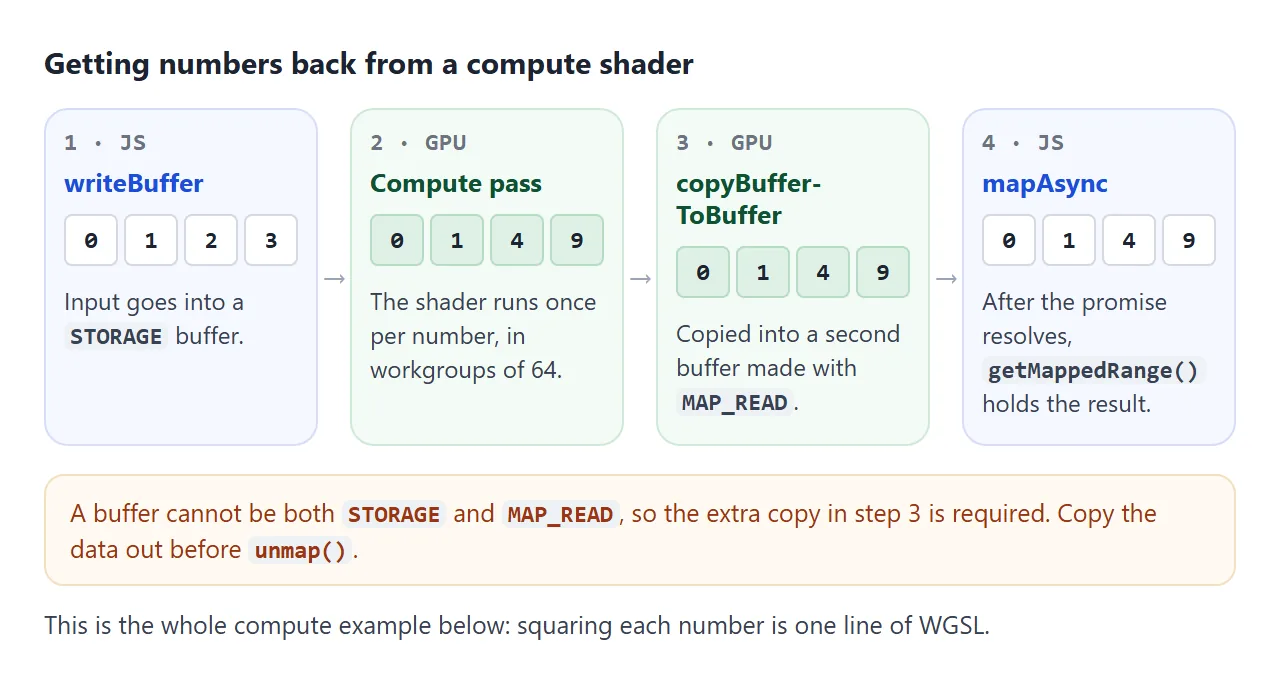
Reading the result back takes three steps:
- Copy the storage buffer into a buffer made with
MAP_READ | COPY_DST. A buffer withMAP_READcan have no other usage exceptCOPY_DST, so it cannot be the storage buffer itself. - Await
mapAsync(GPUMapMode.READ). - Copy the data out of
getMappedRange()before callingunmap(). Afterunmap(), thatArrayBufferis detached and its length is 0.
A long compute job can also run in a Web Worker, where navigator.gpu is available too.
WebGPU or WebGL
Both draw on a <canvas> with the GPU and need no library. WebGL in HTML walks through the same triangle in WebGL.
| WebGL | WebGPU | |
|---|---|---|
| Getting started | getContext('webgl2') returns a context at once |
Await an adapter and a device, then configure the canvas |
| Shader language | GLSL | WGSL |
| Shaders | Separate vertex and fragment sources linked into a program | One module can hold both entry points |
| General computation | Not designed for it | Compute pipelines |
| Errors | getError(), which waits for the GPU |
Error scopes that resolve a promise |
To catch a validation error from a specific call, wrap it in device.pushErrorScope('validation') and await device.popErrorScope(). The promise resolves to the first error in the scope, or null.
When it does not work
| What you see | Cause | Fix |
|---|---|---|
navigator.gpu is undefined |
No WebGPU in this browser, or the page is not a secure context | Serve over https or localhost, and show a fallback |
requestAdapter() gives null |
No GPU adapter available to the page | Show a fallback |
| Canvas stays empty, no error | The command buffer was never submitted | Pass encoder.finish() to queue.submit() |
InvalidStateError from getCurrentTexture() |
The context is not configured yet | Call context.configure first |
| Nothing drawn after a shader edit | WGSL compile error, and createShaderModule does not throw |
Await getCompilationInfo() and print the messages |
OperationError from requestDevice() |
A second device from the same adapter | Request a new adapter first |
getContext('2d') returns null |
The canvas already has a webgpu context |
Use one context type per canvas |
Validation error on createBuffer |
MAP_READ combined with STORAGE |
Use a separate read-back buffer |
| Result array has length 0 | It was read after unmap() |
Copy it with slice() before unmapping |
| Soft or stretched drawing | The canvas is still 300 x 150 | Set width and height from the element size |
Share it as a link
A WebGPU page is hard to show in a screenshot. The triangle stops turning, and the viewer cannot drag the speed slider or run the compute shader on their own GPU.
An .html attachment may open as plain code on a phone. Opening an HTML file on a phone explains why.
To send the working version, paste the page into a NOS document and choose Create share link. HTML to link walks through it.
The page renders as written and its scripts run, so the people you send it to see the shape move and can press the buttons themselves.
Anyone whose browser has no WebGPU sees your fallback message instead. If you change the code later, the same link shows the new version.
Inside NOS, a page cannot load images, frames or data from other sites, so keep everything in the one file. The shaders here are plain strings in the script, and every number is generated in the page.