To use WebGL in an HTML page, put a <canvas> on it and ask for a webgl2 context. Compile a vertex shader and a fragment shader into a program, copy your shape into a buffer, and call drawArrays.
No library or build step is needed.
Here is the whole thing in one file: a triangle with a colour at each corner.
<!doctype html>
<html lang="en">
<head>
<meta charset="utf-8">
<meta name="viewport" content="width=device-width, initial-scale=1">
<title>WebGL triangle</title>
<style>
  body { margin: 0; padding: 12px; font-family: system-ui, sans-serif; background: #f4f5f7; }
  canvas { display: block; width: 100%; height: 230px; border-radius: 10px; background: #111827; }
  .bar { display: flex; gap: 8px; align-items: center; margin-top: 10px; }
  button { font: inherit; font-size: 14px; padding: 7px 12px; border-radius: 8px; border: 1px solid #c9cdd4; background: #fff; cursor: pointer; }
  pre { margin: 8px 0 0; font-size: 12px; white-space: pre-wrap; color: #374151; }
</style>
</head>
<body>
<canvas id="c"></canvas>
<div class="bar"><button id="bad">Compile a broken shader</button></div>
<pre id="log"></pre>

<script>
  const canvas = document.getElementById('c');
  const log = document.getElementById('log');
  const gl = canvas.getContext('webgl2') || canvas.getContext('webgl');

  // Runs on the GPU once per corner (vertex)
  const vsSource = `
attribute vec2 a_pos;
attribute vec3 a_color;
varying vec3 v_color;
void main() {
  v_color = a_color;
  gl_Position = vec4(a_pos, 0.0, 1.0);
}`;

  // Runs once per pixel inside the triangle
  const fsSource = `
precision mediump float;
varying vec3 v_color;
void main() {
  gl_FragColor = vec4(v_color, 1.0);
}`;

  function compile(type, source) {
    const shader = gl.createShader(type);
    gl.shaderSource(shader, source);
    gl.compileShader(shader);  // never throws: you have to ask
    if (!gl.getShaderParameter(shader, gl.COMPILE_STATUS)) {
      const msg = gl.getShaderInfoLog(shader);
      gl.deleteShader(shader);
      throw new Error(msg);
    }
    return shader;
  }

  function createProgram(vs, fs) {
    const program = gl.createProgram();
    gl.attachShader(program, compile(gl.VERTEX_SHADER, vs));
    gl.attachShader(program, compile(gl.FRAGMENT_SHADER, fs));
    gl.linkProgram(program);
    if (!gl.getProgramParameter(program, gl.LINK_STATUS)) {
      throw new Error(gl.getProgramInfoLog(program));
    }
    return program;
  }

  function draw() {
    // Match the drawing buffer to the size on screen
    canvas.width = Math.round(canvas.clientWidth * devicePixelRatio);
    canvas.height = Math.round(canvas.clientHeight * devicePixelRatio);
    gl.viewport(0, 0, canvas.width, canvas.height);

    const program = createProgram(vsSource, fsSource);
    gl.useProgram(program);

    // x, y, r, g, b for each corner. x and y run from -1 to 1.
    const data = new Float32Array([
       0.0,  0.8,   1.0, 0.3, 0.3,
      -0.8, -0.7,   0.3, 1.0, 0.4,
       0.8, -0.7,   0.3, 0.5, 1.0,
    ]);
    gl.bindBuffer(gl.ARRAY_BUFFER, gl.createBuffer());
    gl.bufferData(gl.ARRAY_BUFFER, data, gl.STATIC_DRAW);

    const stride = 5 * 4;  // 5 floats of 4 bytes per corner
    const pos = gl.getAttribLocation(program, 'a_pos');
    gl.enableVertexAttribArray(pos);
    gl.vertexAttribPointer(pos, 2, gl.FLOAT, false, stride, 0);
    const color = gl.getAttribLocation(program, 'a_color');
    gl.enableVertexAttribArray(color);
    gl.vertexAttribPointer(color, 3, gl.FLOAT, false, stride, 2 * 4);

    gl.clearColor(0.07, 0.09, 0.15, 1);
    gl.clear(gl.COLOR_BUFFER_BIT);
    gl.drawArrays(gl.TRIANGLES, 0, 3);
    log.textContent = 'Drawn with ' + gl.getParameter(gl.VERSION);
  }

  if (!gl) {
    log.textContent = 'This browser did not give a WebGL context.';
  } else {
    draw();
  }

  // gl_FragColor needs 4 numbers and v_color has 3, so this fails to compile
  document.getElementById('bad').addEventListener('click', () => {
    if (!gl) return;
    try {
      compile(gl.FRAGMENT_SHADER, fsSource.replace('vec4(v_color, 1.0)', 'v_color'));
    } catch (err) {
      log.textContent = 'Compile error:\n' + err.message;
    }
  });
</script>
</body>
</html>
The rest of this guide takes that file apart, then adds animation and a texture.
WebGL or WebGL2
Both are built into the browser and both come from the same call. Ask for the newer one and fall back:
const gl = canvas.getContext('webgl2') || canvas.getContext('webgl');
if (!gl) { /* show a message instead */ }
A canvas keeps the first kind of context it hands out. Once it has given a webgl2 context, asking the same canvas for webgl or 2d returns null.
| WebGL 1 | WebGL 2 | |
|---|---|---|
| Ask for | getContext('webgl') |
getContext('webgl2') |
| Shader language | GLSL ES 1.00 | GLSL ES 3.00, and 1.00 still works |
| Shader keywords | attribute, varying |
in, out |
| Pixel colour output | gl_FragColor |
Your own out vec4 |
| Texture sizes like 300 x 200 | Only with clamping and no mipmaps | Work like any other size |
The examples here use GLSL ES 1.00 shaders, so they run in either context.
To write WebGL 2 shaders, the first line of the source must be #version 300 es. Even a blank line before it is a compile error, which matters when the source sits in a template string that starts with a line break.
Two shaders make a program
A shader is a small program in GLSL, a C-like language, that runs on the graphics chip. WebGL needs two of them for every draw.
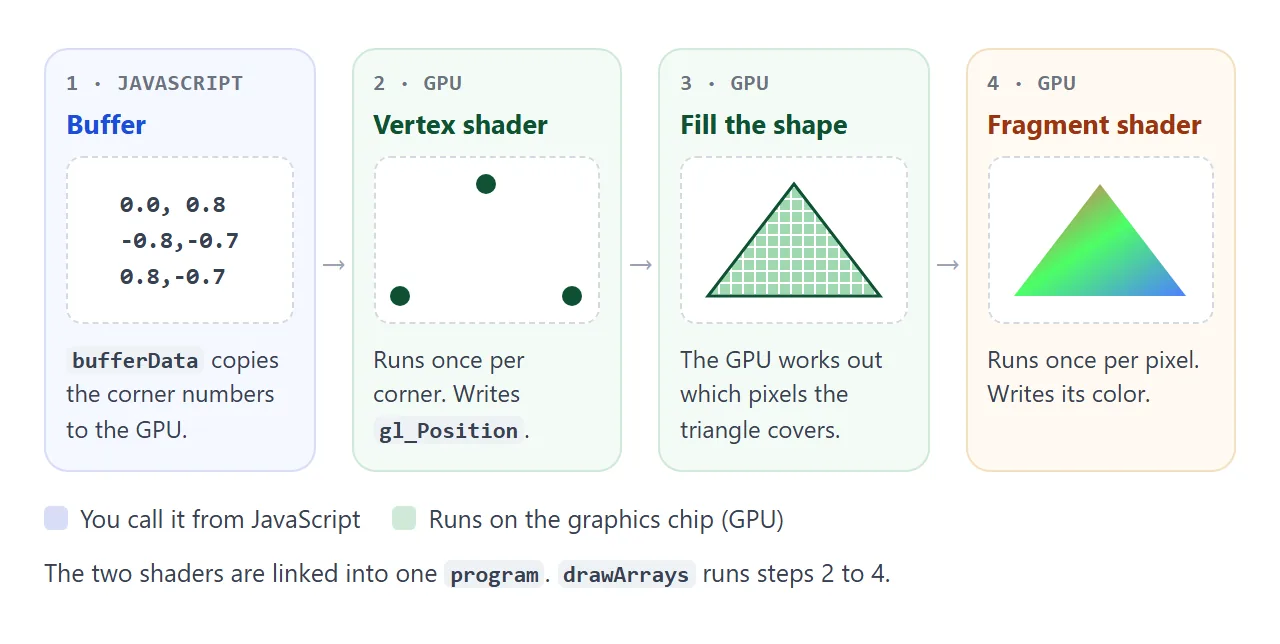
- The vertex shader runs once for each corner and sets
gl_Position, where that corner goes. - The fragment shader runs once for each pixel the shape covers and sets its colour.
// vertex shader
attribute vec2 a_pos;
attribute vec3 a_color;
varying vec3 v_color;
void main() {
  v_color = a_color;
  gl_Position = vec4(a_pos, 0.0, 1.0);
}

// fragment shader
precision mediump float;
varying vec3 v_color;
void main() {
  gl_FragColor = vec4(v_color, 1.0);
}
The precision mediump float; line is required in a GLSL ES 1.00 fragment shader. Without it, compiling fails with a "no precision specified" message.
Check every compile. compileShader never throws. A shader with a typo fails without a word in the console, and the only clue is a blank canvas. Ask for the status and read the log:
function compile(type, source) {
  const shader = gl.createShader(type);
  gl.shaderSource(shader, source);
  gl.compileShader(shader);
  if (!gl.getShaderParameter(shader, gl.COMPILE_STATUS)) {
    throw new Error(gl.getShaderInfoLog(shader));
  }
  return shader;
}
Then attach both shaders to a program with attachShader, call linkProgram, and check LINK_STATUS the same way with getProgramInfoLog. The button in the first example compiles a shader that assigns 3 numbers where 4 are needed, and prints the log the browser returns.
Buffers: getting the triangle to the GPU
Shaders cannot read JavaScript arrays. The corner data goes into a buffer, and vertexAttribPointer tells WebGL how to read it:
const data = new Float32Array([
   0.0,  0.8,   1.0, 0.3, 0.3,   // x, y, r, g, b
  -0.8, -0.7,   0.3, 1.0, 0.4,
   0.8, -0.7,   0.3, 0.5, 1.0,
]);
gl.bindBuffer(gl.ARRAY_BUFFER, gl.createBuffer());
gl.bufferData(gl.ARRAY_BUFFER, data, gl.STATIC_DRAW);

const pos = gl.getAttribLocation(program, 'a_pos');
gl.enableVertexAttribArray(pos);
gl.vertexAttribPointer(pos, 2, gl.FLOAT, false, 20, 0);   // 2 floats, 20 bytes per corner
const color = gl.getAttribLocation(program, 'a_color');
gl.enableVertexAttribArray(color);
gl.vertexAttribPointer(color, 3, gl.FLOAT, false, 20, 8); // 3 floats, starting 8 bytes in

gl.drawArrays(gl.TRIANGLES, 0, 3);
Each corner is five 4-byte numbers, so the stride is 20 bytes and the colour starts 8 bytes in. Forget enableVertexAttribArray and every corner reads the same constant value, so nothing is drawn and no error is raised.
The positions are not pixels. WebGL uses clip space, where the canvas runs from -1 to 1 on both axes, with up as positive y.
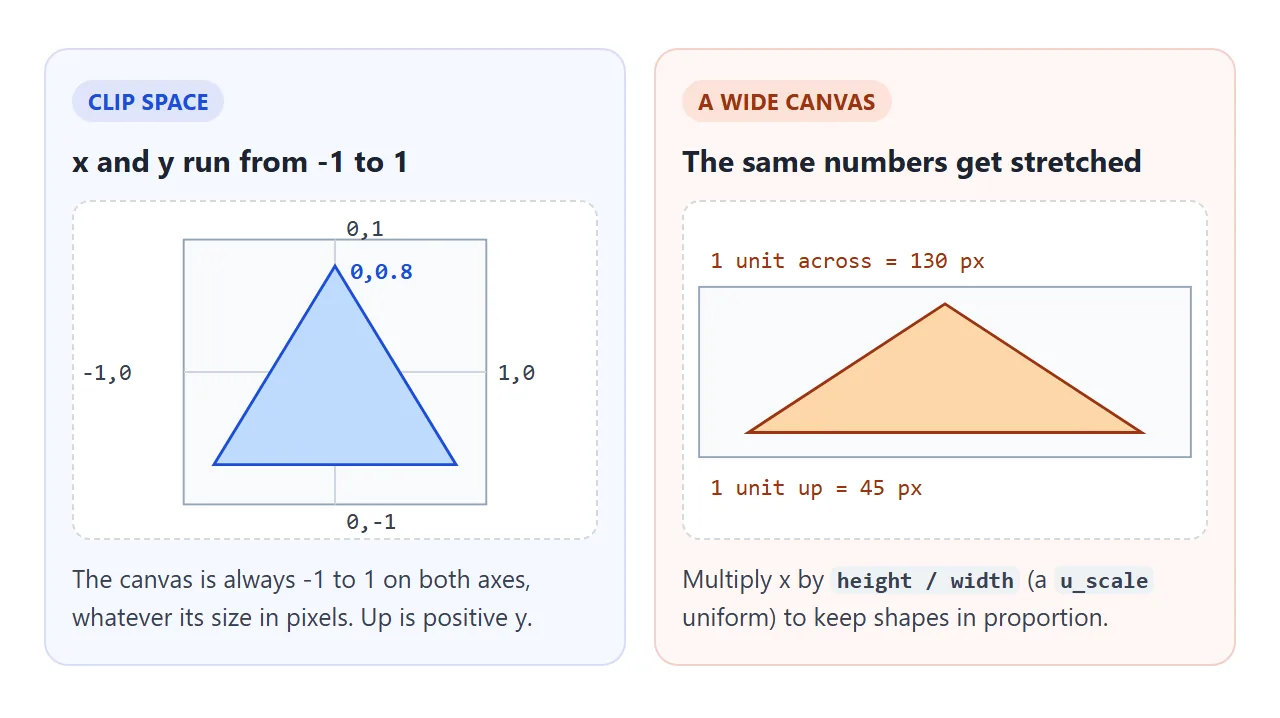
The canvas also has its own pixel count, separate from its size on screen. A canvas starts at 300 x 150.
Set canvas.width and canvas.height from clientWidth times devicePixelRatio, then call gl.viewport with the same numbers. HTML canvas blurry explains the size mismatch in more detail.
Animate it with uniforms
A uniform is a value that stays the same for every corner and pixel in one draw, set from JavaScript. Change it every frame and the shape moves.
<!doctype html>
<html lang="en">
<head>
<meta charset="utf-8">
<meta name="viewport" content="width=device-width, initial-scale=1">
<title>WebGL uniforms</title>
<style>
  body { margin: 0; padding: 12px; font-family: system-ui, sans-serif; background: #f4f5f7; }
  canvas { display: block; width: 100%; height: 250px; border-radius: 10px; background: #111827; }
  .bar { display: flex; flex-wrap: wrap; gap: 14px; align-items: center; margin-top: 10px; font-size: 14px; }
  label { display: flex; gap: 6px; align-items: center; }
  input[type=range] { width: 120px; }
</style>
</head>
<body>
<canvas id="c"></canvas>
<div class="bar">
  <label>Color <input type="color" id="color" value="#f59e0b"></label>
  <label>Speed <input type="range" id="speed" min="0" max="4" step="0.1" value="1"></label>
</div>

<script>
  const canvas = document.getElementById('c');
  const gl = canvas.getContext('webgl2') || canvas.getContext('webgl');

  const vsSource = `
attribute vec2 a_pos;
uniform float u_angle;   // one value for every corner, set from JavaScript
uniform vec2 u_scale;    // undoes the stretch of a wide canvas
void main() {
  float c = cos(u_angle), s = sin(u_angle);
  vec2 p = vec2(a_pos.x * c - a_pos.y * s, a_pos.x * s + a_pos.y * c);
  gl_Position = vec4(p * u_scale, 0.0, 1.0);
}`;

  const fsSource = `
precision mediump float;
uniform vec3 u_color;
void main() {
  gl_FragColor = vec4(u_color, 1.0);
}`;

  function compile(type, source) {
    const shader = gl.createShader(type);
    gl.shaderSource(shader, source);
    gl.compileShader(shader);
    if (!gl.getShaderParameter(shader, gl.COMPILE_STATUS)) throw new Error(gl.getShaderInfoLog(shader));
    return shader;
  }

  const program = gl.createProgram();
  gl.attachShader(program, compile(gl.VERTEX_SHADER, vsSource));
  gl.attachShader(program, compile(gl.FRAGMENT_SHADER, fsSource));
  gl.linkProgram(program);
  if (!gl.getProgramParameter(program, gl.LINK_STATUS)) throw new Error(gl.getProgramInfoLog(program));
  gl.useProgram(program);

  // One triangle around 0,0 so it spins in place
  gl.bindBuffer(gl.ARRAY_BUFFER, gl.createBuffer());
  gl.bufferData(gl.ARRAY_BUFFER, new Float32Array([0, 0.8, -0.7, -0.4, 0.7, -0.4]), gl.STATIC_DRAW);
  const pos = gl.getAttribLocation(program, 'a_pos');
  gl.enableVertexAttribArray(pos);
  gl.vertexAttribPointer(pos, 2, gl.FLOAT, false, 0, 0);

  // Look up each uniform once, set it every frame
  const uAngle = gl.getUniformLocation(program, 'u_angle');
  const uScale = gl.getUniformLocation(program, 'u_scale');
  const uColor = gl.getUniformLocation(program, 'u_color');

  const colorInput = document.getElementById('color');
  const speedInput = document.getElementById('speed');
  let angle = 0, last = performance.now();

  function frame(now) {
    const w = Math.round(canvas.clientWidth * devicePixelRatio);
    const h = Math.round(canvas.clientHeight * devicePixelRatio);
    if (canvas.width !== w || canvas.height !== h) {
      canvas.width = w; canvas.height = h;
      gl.viewport(0, 0, w, h);
    }
    angle += (now - last) / 1000 * speedInput.value;
    last = now;

    // "#rrggbb" to three numbers from 0 to 1
    const n = parseInt(colorInput.value.slice(1), 16);
    gl.uniform3f(uColor, (n >> 16) / 255, (n >> 8 & 255) / 255, (n & 255) / 255);
    gl.uniform1f(uAngle, angle);
    gl.uniform2f(uScale, h / w, 1);

    gl.clearColor(0.07, 0.09, 0.15, 1);
    gl.clear(gl.COLOR_BUFFER_BIT);
    gl.drawArrays(gl.TRIANGLES, 0, 3);
    requestAnimationFrame(frame);
  }
  requestAnimationFrame(frame);
</script>
</body>
</html>
const uAngle = gl.getUniformLocation(program, 'u_angle'); // once

function frame(now) {
  gl.uniform1f(uAngle, now / 1000);   // every frame
  gl.clear(gl.COLOR_BUFFER_BIT);
  gl.drawArrays(gl.TRIANGLES, 0, 3);
  requestAnimationFrame(frame);
}
requestAnimationFrame(frame);
The loop uses requestAnimationFrame, covered in requestAnimationFrame in JavaScript. The function name after uniform matches the type: uniform1f for a float, uniform2f for a vec2, uniform3f for a vec3.
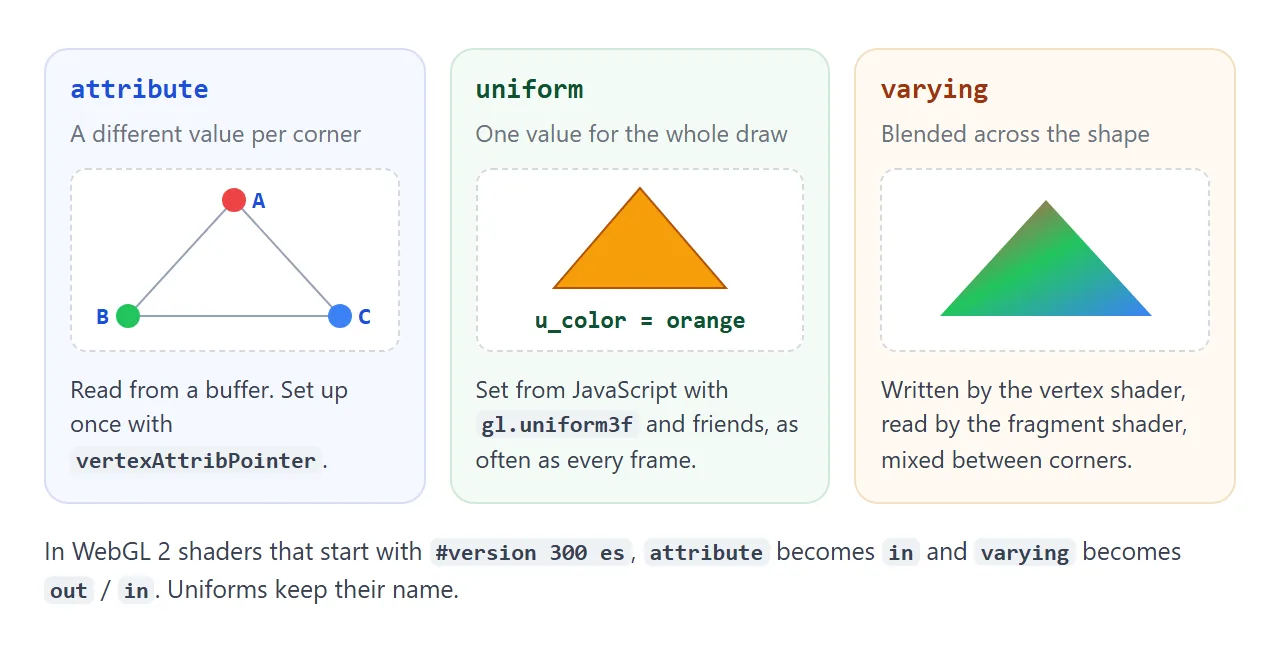
One trap: if a shader declares a uniform but never uses it, the compiler can remove it. getUniformLocation then returns null, and setting a null location does nothing without raising an error.
A texture from a generated canvas
A texture is an image the fragment shader can sample. The source does not have to be a file. A 2D canvas you draw with ordinary fillRect and fillText calls works, and needs no download.
<!doctype html>
<html lang="en">
<head>
<meta charset="utf-8">
<meta name="viewport" content="width=device-width, initial-scale=1">
<title>WebGL texture from a canvas</title>
<style>
  body { margin: 0; padding: 12px; font-family: system-ui, sans-serif; background: #f4f5f7; }
  canvas { display: block; width: 100%; height: 270px; border-radius: 10px; background: #111827; }
  .bar { display: flex; gap: 10px; align-items: center; margin-top: 10px; font-size: 14px; }
  button { font: inherit; padding: 7px 12px; border-radius: 8px; border: 1px solid #c9cdd4; background: #fff; cursor: pointer; }
  #log { color: #9a3412; font-size: 12px; }
</style>
</head>
<body>
<canvas id="c"></canvas>
<div class="bar"><button id="repaint">Paint a new texture</button><span id="log"></span></div>

<script>
  const canvas = document.getElementById('c');
  const log = document.getElementById('log');
  const gl = canvas.getContext('webgl2') || canvas.getContext('webgl');

  const vsSource = `
attribute vec2 a_pos;
attribute vec2 a_uv;
uniform float u_time;
uniform vec2 u_scale;
varying vec2 v_uv;
void main() {
  v_uv = a_uv;
  float turn = cos(u_time * 0.8);             // swings between -1 and 1
  vec2 p = vec2(a_pos.x * (0.6 + 0.4 * turn), a_pos.y) * 0.8;
  gl_Position = vec4(p * u_scale, 0.0, 1.0);
}`;

  const fsSource = `
precision mediump float;
uniform sampler2D u_tex;
varying vec2 v_uv;
void main() {
  gl_FragColor = texture2D(u_tex, v_uv);
}`;

  function compile(type, source) {
    const shader = gl.createShader(type);
    gl.shaderSource(shader, source);
    gl.compileShader(shader);
    if (!gl.getShaderParameter(shader, gl.COMPILE_STATUS)) throw new Error(gl.getShaderInfoLog(shader));
    return shader;
  }

  function createProgram() {
    const program = gl.createProgram();
    gl.attachShader(program, compile(gl.VERTEX_SHADER, vsSource));
    gl.attachShader(program, compile(gl.FRAGMENT_SHADER, fsSource));
    gl.linkProgram(program);
    if (!gl.getProgramParameter(program, gl.LINK_STATUS)) throw new Error(gl.getProgramInfoLog(program));
    return program;
  }

  // Draw the picture with the ordinary 2D canvas API. No image file needed.
  const art = document.createElement('canvas');
  art.width = art.height = 256;  // a power of two also works in WebGL 1
  function paint(hue) {
    const ctx = art.getContext('2d');
    for (let y = 0; y < 8; y++) for (let x = 0; x < 8; x++) {
      ctx.fillStyle = `hsl(${hue + (x + y) * 8}, 70%, ${(x + y) % 2 ? 55 : 35}%)`;
      ctx.fillRect(x * 32, y * 32, 32, 32);
    }
    ctx.fillStyle = '#fff';
    ctx.textAlign = 'center';
    ctx.font = 'bold 30px system-ui, sans-serif';
    ctx.fillText('TOP', 128, 44);
    ctx.font = 'bold 56px system-ui, sans-serif';
    ctx.fillText('WebGL', 128, 148);
  }

  function upload(texture) {
    gl.bindTexture(gl.TEXTURE_2D, texture);
    gl.pixelStorei(gl.UNPACK_FLIP_Y_WEBGL, true);  // canvas rows run top-down, texture v runs bottom-up
    gl.texImage2D(gl.TEXTURE_2D, 0, gl.RGBA, gl.RGBA, gl.UNSIGNED_BYTE, art);
    gl.texParameteri(gl.TEXTURE_2D, gl.TEXTURE_MIN_FILTER, gl.LINEAR);  // no mipmaps needed
    gl.texParameteri(gl.TEXTURE_2D, gl.TEXTURE_WRAP_S, gl.CLAMP_TO_EDGE);
    gl.texParameteri(gl.TEXTURE_2D, gl.TEXTURE_WRAP_T, gl.CLAMP_TO_EDGE);
  }

  function start() {
    const program = createProgram();
    gl.useProgram(program);

    // A square as a strip of two triangles: x, y, u, v per corner
    gl.bindBuffer(gl.ARRAY_BUFFER, gl.createBuffer());
    gl.bufferData(gl.ARRAY_BUFFER, new Float32Array([
      -1, -1, 0, 0,   1, -1, 1, 0,   -1, 1, 0, 1,   1, 1, 1, 1,
    ]), gl.STATIC_DRAW);
    const pos = gl.getAttribLocation(program, 'a_pos');
    const uv = gl.getAttribLocation(program, 'a_uv');
    gl.enableVertexAttribArray(pos);
    gl.vertexAttribPointer(pos, 2, gl.FLOAT, false, 16, 0);
    gl.enableVertexAttribArray(uv);
    gl.vertexAttribPointer(uv, 2, gl.FLOAT, false, 16, 8);

    const texture = gl.createTexture();
    paint(200);
    upload(texture);
    document.getElementById('repaint').addEventListener('click', () => {
      paint(Math.floor(Math.random() * 360));
      upload(texture);  // same texture object, new pixels
    });

    const uTime = gl.getUniformLocation(program, 'u_time');
    const uScale = gl.getUniformLocation(program, 'u_scale');

    function frame(now) {
      const w = Math.round(canvas.clientWidth * devicePixelRatio);
      const h = Math.round(canvas.clientHeight * devicePixelRatio);
      if (canvas.width !== w || canvas.height !== h) {
        canvas.width = w; canvas.height = h;
        gl.viewport(0, 0, w, h);
      }
      gl.uniform1f(uTime, now / 1000);
      gl.uniform2f(uScale, Math.min(h / w, 1), Math.min(w / h, 1));  // keep the square square
      gl.clearColor(0.07, 0.09, 0.15, 1);
      gl.clear(gl.COLOR_BUFFER_BIT);
      gl.drawArrays(gl.TRIANGLE_STRIP, 0, 4);
      requestAnimationFrame(frame);
    }
    requestAnimationFrame(frame);
  }

  if (!gl) {
    log.textContent = 'This browser did not give a WebGL context.';
  } else {
    try { start(); } catch (err) { log.textContent = err.message; }
  }
</script>
</body>
</html>
const art = document.createElement('canvas');
art.width = art.height = 256;
// ...draw on art.getContext('2d')...

gl.bindTexture(gl.TEXTURE_2D, gl.createTexture());
gl.pixelStorei(gl.UNPACK_FLIP_Y_WEBGL, true);
gl.texImage2D(gl.TEXTURE_2D, 0, gl.RGBA, gl.RGBA, gl.UNSIGNED_BYTE, art);
gl.texParameteri(gl.TEXTURE_2D, gl.TEXTURE_MIN_FILTER, gl.LINEAR);
gl.texParameteri(gl.TEXTURE_2D, gl.TEXTURE_WRAP_S, gl.CLAMP_TO_EDGE);
gl.texParameteri(gl.TEXTURE_2D, gl.TEXTURE_WRAP_T, gl.CLAMP_TO_EDGE);
Three details matter here:
Flip. A canvas stores its rows top to bottom, and texture coordinates count up from the bottom. Without
UNPACK_FLIP_Y_WEBGL, the picture shows upside down.Filter. By default, a texture expects smaller copies of itself called mipmaps. With none, it samples as black. Set the minifying filter to
LINEAR, or callgl.generateMipmap.Size. In WebGL 1, a texture whose sides are not powers of two (256, 512, and so on) also needs
CLAMP_TO_EDGEon both axes. WebGL 2 does not have this limit.
In the shader, texture2D(u_tex, v_uv) reads a colour at a coordinate from 0 to 1. In a #version 300 es shader the same function is called texture.
When it does not work
| What you see | Cause | Fix |
|---|---|---|
| Blank canvas, no console error | A shader failed to compile or link | Check COMPILE_STATUS and LINK_STATUS, print the log |
| "No precision specified for (float)" | GLSL ES 1.00 fragment shader without a precision line | Add precision mediump float; |
| "#version directive must occur on the first line" | A line break before #version 300 es |
Start the template string with #version |
getContext('webgl') returns null |
The canvas already has a different context | Use one context type per canvas |
| Shape drawn nowhere, no error | enableVertexAttribArray missing |
Enable each attribute you use |
INVALID_OPERATION from drawArrays |
No program in use | Call gl.useProgram(program) first |
| Shape stretched or blurry | Drawing buffer does not match the element size | Set width and height from the element size, then gl.viewport |
| Texture is black | Default filter expects mipmaps | Set TEXTURE_MIN_FILTER to LINEAR |
| Texture is upside down | Canvas rows run top to bottom | Set UNPACK_FLIP_Y_WEBGL to true before upload |
SecurityError in texImage2D |
Image from another origin without CORS | Use a same-origin image, CORS headers, or a generated canvas |
| Uniform has no effect | Unused uniform removed, location is null |
Use it in the shader, check the location |
Share it as a link
A WebGL page is hard to show in a screenshot. The animation stops, and the viewer cannot change the colour or repaint the texture. An .html attachment may open as plain code on a phone.
To send the working version, paste the page into a NOS document and choose Create share link. HTML to link walks through it.
The page renders as written and its scripts run, so the people you send it to see the shape move and can press the buttons themselves. If you change the code later, the same link shows the new version.