Babylon.js is a JavaScript library for 3D graphics in the browser. It draws into a <canvas> element, and you load it with a plain script tag.
This guide is the shortest path from an empty file to a 3D scene you can orbit with a mouse or a finger.
Try it first. Drag the cube to turn the camera, and use the mouse wheel to zoom.
<!doctype html>
<html lang="en">
<head>
<meta charset="utf-8">
<meta name="viewport" content="width=device-width, initial-scale=1">
<title>Babylon.js in one HTML file</title>
<style>
  html, body { margin: 0; height: 100%; overflow: hidden; background: #eef1f6; font-family: system-ui, sans-serif; }
  /* the canvas needs a real size, or nothing is drawn */
  #stage { display: block; width: 100%; height: 100%; outline: none; }
  #msg { position: absolute; left: 10px; bottom: 8px; font-size: 13px; color: #374151; pointer-events: none; }
</style>
</head>
<body>
<canvas id="stage"></canvas>
<div id="msg">Drag to orbit, mouse wheel to zoom.</div>

<!-- load the library BEFORE the script that uses it; pin the version -->
<script src="https://cdn.jsdelivr.net/npm/babylonjs@9.28.0/babylon.js"></script>
<script>
  const canvas = document.getElementById('stage');
  const engine = new BABYLON.Engine(canvas, true);   // true = antialiasing
  const scene = new BABYLON.Scene(engine);
  scene.clearColor = new BABYLON.Color4(0.93, 0.95, 0.97, 1);

  // camera that orbits a target: name, alpha, beta, radius, target
  const camera = new BABYLON.ArcRotateCamera('cam', -Math.PI / 3, Math.PI / 3, 6, BABYLON.Vector3.Zero(), scene);
  camera.attachControl(canvas, false);               // mouse, touch and wheel control
  camera.lowerRadiusLimit = 3;                       // keep zoom from passing through the cube
  camera.upperRadiusLimit = 14;

  new BABYLON.HemisphericLight('light', new BABYLON.Vector3(0.3, 1, 0.2), scene);

  const box = BABYLON.MeshBuilder.CreateBox('box', { size: 2 }, scene);
  const mat = new BABYLON.StandardMaterial('mat', scene);
  mat.diffuseColor = new BABYLON.Color3(0.15, 0.45, 0.9);
  box.material = mat;

  scene.onBeforeRenderObservable.add(() => { box.rotation.y += 0.01; });

  engine.runRenderLoop(() => scene.render());
  window.addEventListener('resize', () => engine.resize());
</script>
</body>
</html>
The whole page is the example. Copy it into an empty .html file and it runs, as long as the browser can reach the CDN.
What the file needs
A Babylon.js page has three parts, in this order.
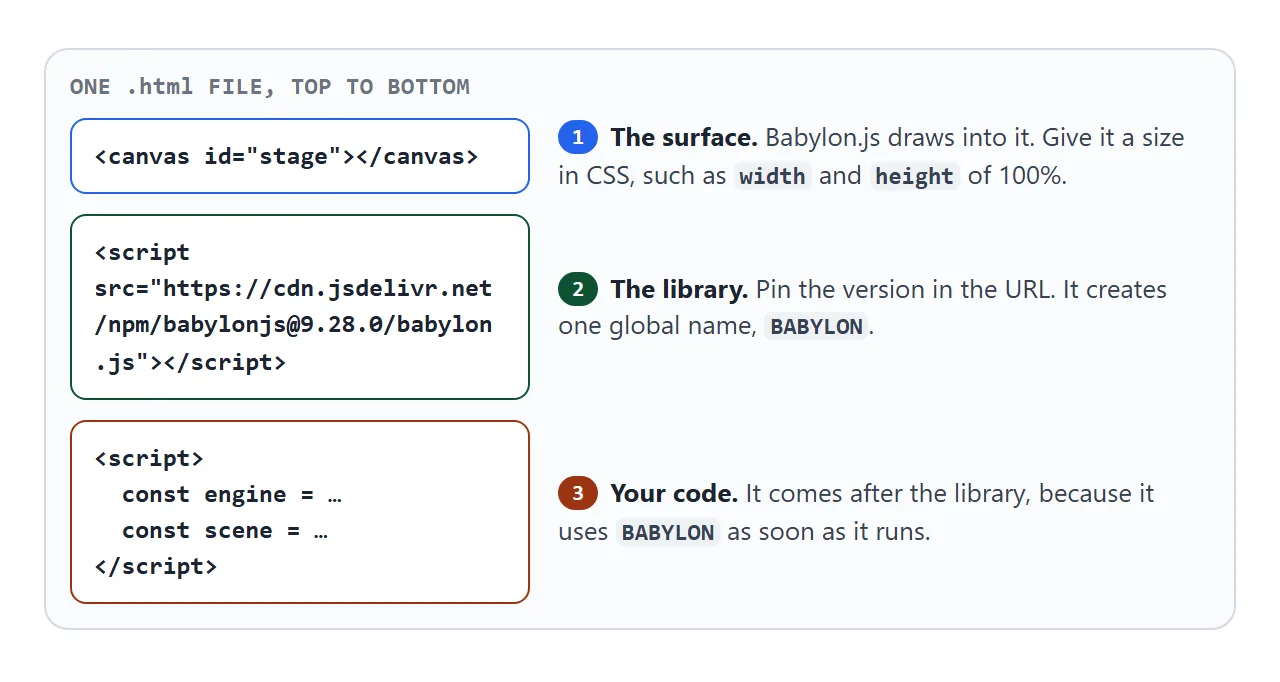
The canvas is where the picture appears. The library script creates the global name BABYLON. Your script uses that name, so it has to come after the library tag.
The five things every scene has
Every Babylon.js scene is built from the same short list. Nothing shows up if one of them is missing.
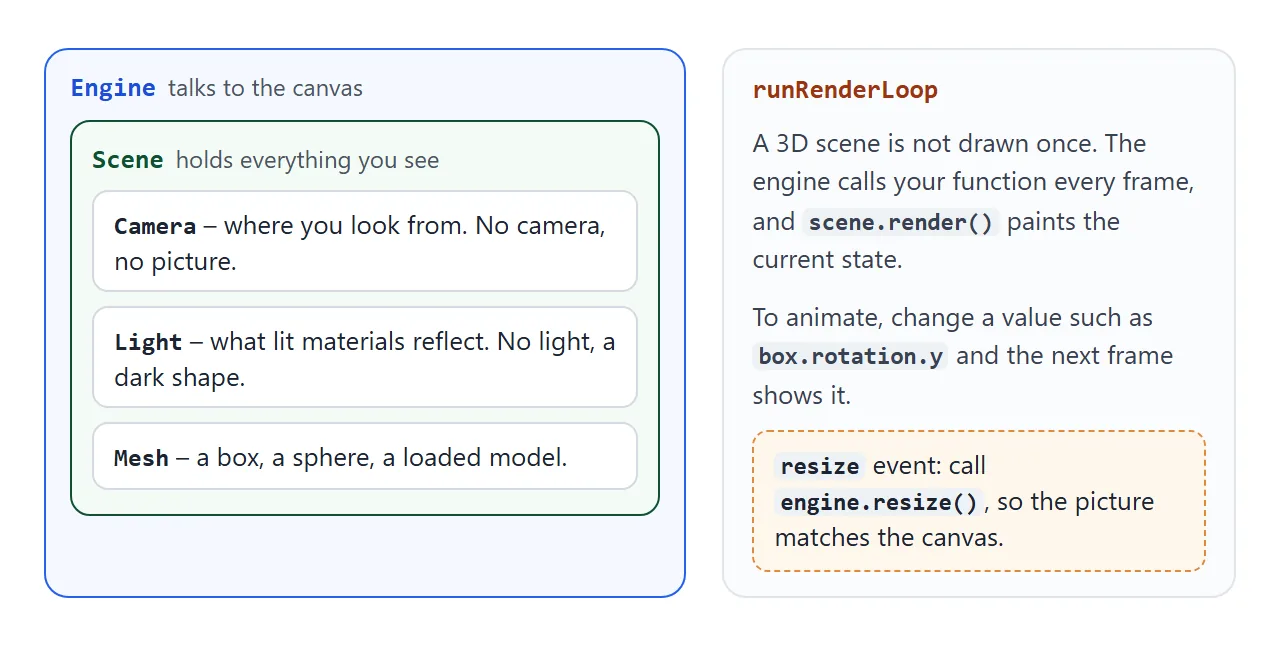
- Engine –
new BABYLON.Engine(canvas, true)connects to the canvas. The second argument turns on antialiasing. - Scene –
new BABYLON.Scene(engine)is the container for everything you can see. - Camera – an
ArcRotateCameraorbits a target point.attachControllets the mouse, a finger and the wheel move it. - Light – a
HemisphericLightgives the shapes something to reflect. - Mesh –
MeshBuilder.CreateBoxand its siblings make a ready-made shape.
Then engine.runRenderLoop calls your function every frame. To animate, change a value inside onBeforeRenderObservable, such as the box rotation, and the next frame shows it.
Load the library before your code
Browsers run script tags from top to bottom. If your code comes first, the library has not loaded yet and the console says the name does not exist.
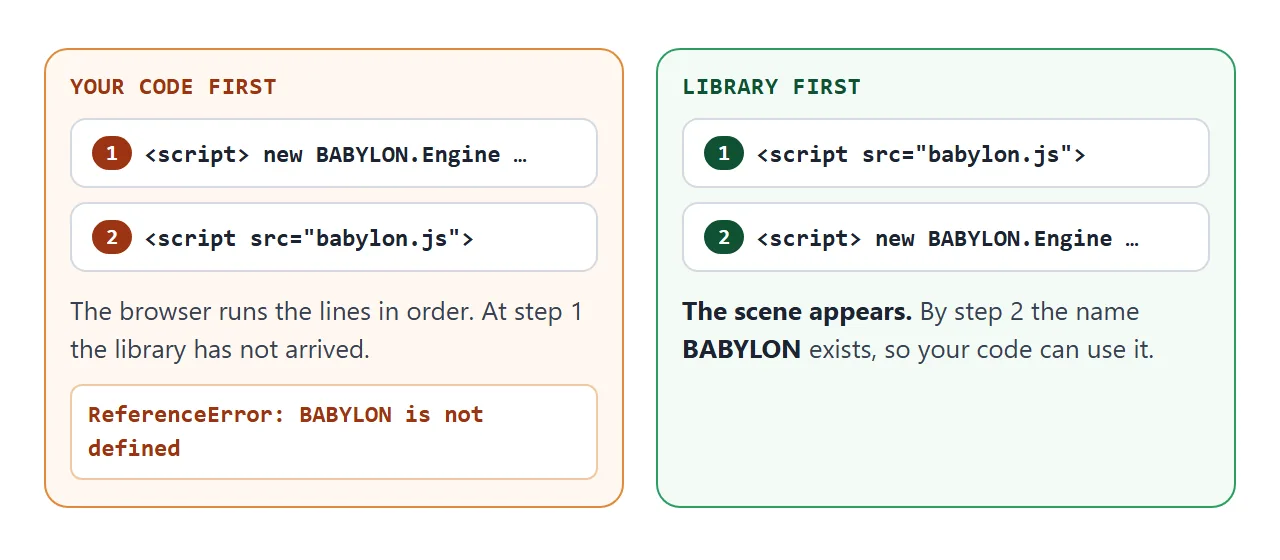
I checked this in a browser: with the order reversed, the page reports BABYLON is not defined. Nothing is drawn.
Pin the version and mind the size
The examples load this file:
<script src="https://cdn.jsdelivr.net/npm/babylonjs@9.28.0/babylon.js"></script>
The @9.28.0 part pins the release. Without it, the same URL answers with the newest release, so a page you wrote today can change when a new version ships. unpkg serves the same file under the same pinned name.
The file is 8.6 MB before compression (8,592,001 bytes), so the first load takes a moment. The Babylon.js README adds that its own CDN is meant for learning and small experiments, and that a finished app should serve the library from its own hosting.
Break it on purpose
Blank pages usually trace back to a few causes. Switch each one on and read what happens.
<!doctype html>
<html lang="en">
<head>
<meta charset="utf-8">
<meta name="viewport" content="width=device-width, initial-scale=1">
<title>Break a Babylon.js scene on purpose</title>
<style>
  html, body { margin: 0; height: 100%; font-family: system-ui, sans-serif; background: #eef1f6; }
  body { display: flex; flex-direction: column; }
  .bar { display: flex; flex-wrap: wrap; gap: 6px; padding: 8px; background: #fff; border-bottom: 1px solid #dde1e8; }
  .bar button { font: inherit; font-size: 13px; padding: 6px 10px; border: 1px solid #b9c0cc; border-radius: 8px; background: #f7f8fa; cursor: pointer; }
  .bar button[aria-pressed="true"] { background: #fde8d4; border-color: #e08a3c; }
  #note { padding: 6px 10px; font-size: 13px; color: #374151; min-height: 18px; background: #fff; }
  .wrap { position: relative; flex: 1; min-height: 0; }
  #stage { display: block; width: 100%; height: 100%; outline: none; }
</style>
</head>
<body>
<div class="bar">
  <button id="bLight" aria-pressed="false">No light</button>
  <button id="bCam" aria-pressed="false">No camera control</button>
  <button id="bSize" aria-pressed="false">Canvas 0px tall</button>
</div>
<div id="note">Everything works. Press a button to see what each mistake looks like.</div>
<div class="wrap"><canvas id="stage"></canvas></div>

<script src="https://cdn.jsdelivr.net/npm/babylonjs@9.28.0/babylon.js"></script>
<script>
  const canvas = document.getElementById('stage');
  const note = document.getElementById('note');
  const engine = new BABYLON.Engine(canvas, true);
  const scene = new BABYLON.Scene(engine);
  scene.clearColor = new BABYLON.Color4(0.93, 0.95, 0.97, 1);

  const camera = new BABYLON.ArcRotateCamera('cam', -Math.PI / 3, Math.PI / 3, 7, BABYLON.Vector3.Zero(), scene);
  camera.attachControl(canvas, false);
  camera.lowerRadiusLimit = 4;
  camera.upperRadiusLimit = 14;
  const light = new BABYLON.HemisphericLight('light', new BABYLON.Vector3(0.3, 1, 0.2), scene);

  const ball = BABYLON.MeshBuilder.CreateSphere('ball', { diameter: 2.4 }, scene);
  const mat = new BABYLON.StandardMaterial('mat', scene);
  mat.diffuseColor = new BABYLON.Color3(0.9, 0.35, 0.2);
  ball.material = mat;
  scene.onBeforeRenderObservable.add(() => { ball.rotation.y += 0.01; });

  engine.runRenderLoop(() => scene.render());
  window.addEventListener('resize', () => engine.resize());

  const state = { light: true, cam: true, size: true };
  function say() {
    const msgs = [];
    if (!state.light) msgs.push('No light: a lit material has nothing to reflect, so the sphere is dark.');
    if (!state.cam) msgs.push('Camera not attached: dragging does nothing.');
    if (!state.size) msgs.push('Canvas has no height: nothing can be drawn.');
    note.textContent = msgs.length ? msgs.join(' ') : 'Everything works. Press a button to see what each mistake looks like.';
  }
  function flip(btn, key, apply) {
    btn.addEventListener('click', () => {
      state[key] = !state[key];
      btn.setAttribute('aria-pressed', String(!state[key]));
      apply(state[key]);
      say();
    });
  }
  flip(document.getElementById('bLight'), 'light', (on) => light.setEnabled(on));
  flip(document.getElementById('bCam'), 'cam', (on) => {
    if (on) camera.attachControl(canvas, false); else camera.detachControl();
  });
  flip(document.getElementById('bSize'), 'size', (on) => {
    canvas.style.height = on ? '100%' : '0px';
    engine.resize();   // tell Babylon the canvas size changed
  });
</script>
</body>
</html>
A canvas without a CSS size falls back to 300 by 150 pixels, a default that MDN documents.
A canvas with a parent of zero height has nothing to draw into. Give html, body and the canvas real sizes, and call engine.resize() when the window changes.
On a phone, a camera attached with false calls preventDefault on the events it handles. A full-screen canvas then orbits under a finger instead of scrolling the page.
Leave some page outside the canvas if people need to scroll. Add the viewport meta tag so the page is sized for a phone.
A finished example: pick and colour
Interaction is where a 3D scene starts to feel like an app. This version lets people tap a shape and recolour it with ordinary HTML buttons.
<!doctype html>
<html lang="en">
<head>
<meta charset="utf-8">
<meta name="viewport" content="width=device-width, initial-scale=1">
<title>Pick and colour 3D shapes</title>
<style>
  html, body { margin: 0; height: 100%; font-family: system-ui, sans-serif; background: #eef1f6; }
  body { display: flex; flex-direction: column; }
  .bar { display: flex; flex-wrap: wrap; align-items: center; gap: 8px; padding: 8px 10px; background: #fff; border-bottom: 1px solid #dde1e8; font-size: 13px; }
  .sw { width: 28px; height: 28px; border-radius: 50%; border: 2px solid #fff; box-shadow: 0 0 0 1px #b9c0cc; cursor: pointer; padding: 0; }
  .bar button.t { font: inherit; font-size: 13px; padding: 5px 10px; border: 1px solid #b9c0cc; border-radius: 8px; background: #f7f8fa; cursor: pointer; }
  #pick { color: #1d2330; font-weight: 600; min-width: 130px; }
  .wrap { flex: 1; min-height: 0; }
  #stage { display: block; width: 100%; height: 100%; outline: none; }
  #fail { display: none; padding: 20px; color: #9a3412; }
</style>
</head>
<body>
<div class="bar">
  <span id="pick">Tap a shape</span>
  <button class="sw" data-c="#e4572e" style="background:#e4572e" aria-label="Orange"></button>
  <button class="sw" data-c="#2e86e4" style="background:#2e86e4" aria-label="Blue"></button>
  <button class="sw" data-c="#2fb26a" style="background:#2fb26a" aria-label="Green"></button>
  <button class="sw" data-c="#f2c230" style="background:#f2c230" aria-label="Yellow"></button>
  <button class="t" id="spin" aria-pressed="true">Spin: on</button>
</div>
<div class="wrap"><canvas id="stage"></canvas></div>
<div id="fail">This browser could not start WebGL, so the 3D scene cannot be drawn.</div>

<script src="https://cdn.jsdelivr.net/npm/babylonjs@9.28.0/babylon.js"></script>
<script>
  const canvas = document.getElementById('stage');
  const label = document.getElementById('pick');
  let engine;
  try {
    engine = new BABYLON.Engine(canvas, true);
  } catch (err) {
    document.querySelector('.wrap').style.display = 'none';
    document.getElementById('fail').style.display = 'block';
  }

  if (engine) {
    const scene = new BABYLON.Scene(engine);
    scene.clearColor = new BABYLON.Color4(0.93, 0.95, 0.97, 1);
    const cam = new BABYLON.ArcRotateCamera('cam', -Math.PI / 2, 1.1, 9, new BABYLON.Vector3(0, 0.5, 0), scene);
    cam.attachControl(canvas, false);
    cam.lowerRadiusLimit = 4;
    cam.upperRadiusLimit = 24;
    if (canvas.clientWidth < 500) cam.radius = 17;   // narrow screen: step back to fit all three
    new BABYLON.HemisphericLight('light', new BABYLON.Vector3(0.3, 1, 0.2), scene);

    const shapes = [
      BABYLON.MeshBuilder.CreateBox('Cube', { size: 1.8 }, scene),
      BABYLON.MeshBuilder.CreateSphere('Sphere', { diameter: 2 }, scene),
      BABYLON.MeshBuilder.CreateTorusKnot('Knot', { radius: 0.7, tube: 0.25, radialSegments: 80 }, scene),
    ];
    shapes.forEach((m, i) => {
      m.position.x = (i - 1) * 3;
      m.material = new BABYLON.StandardMaterial('m' + i, scene);
      m.material.diffuseColor = BABYLON.Color3.FromHexString('#8a94a6');
    });

    const ground = BABYLON.MeshBuilder.CreateGround('ground', { width: 12, height: 6 }, scene);
    ground.position.y = -1.4;
    ground.material = new BABYLON.StandardMaterial('g', scene);
    ground.material.diffuseColor = new BABYLON.Color3(0.82, 0.85, 0.9);
    ground.isPickable = false;               // clicks pass through the floor

    let selected = null, spin = true;
    function select(mesh) {
      if (selected) selected.material.emissiveColor = BABYLON.Color3.Black();
      selected = mesh;
      if (selected) selected.material.emissiveColor = new BABYLON.Color3(0.12, 0.12, 0.12);
      label.textContent = selected ? 'Selected: ' + selected.name : 'Tap a shape';
    }

    // POINTERTAP fires for a tap or click, not at the end of an orbit drag
    scene.onPointerObservable.add((info) => {
      if (info.type !== BABYLON.PointerEventTypes.POINTERTAP) return;
      select(info.pickInfo.hit ? info.pickInfo.pickedMesh : null);
    });

    document.querySelectorAll('.sw').forEach((b) => b.addEventListener('click', () => {
      if (selected) selected.material.diffuseColor = BABYLON.Color3.FromHexString(b.dataset.c);
    }));
    const spinBtn = document.getElementById('spin');
    spinBtn.addEventListener('click', () => {
      spin = !spin;
      spinBtn.textContent = 'Spin: ' + (spin ? 'on' : 'off');
      spinBtn.setAttribute('aria-pressed', String(spin));
    });

    scene.onBeforeRenderObservable.add(() => {
      if (spin) shapes.forEach((m) => { m.rotation.y += 0.008; });
    });
    engine.runRenderLoop(() => scene.render());
    window.addEventListener('resize', () => engine.resize());
  }
</script>
</body>
</html>
- Tap detection:
PointerEventTypes.POINTERTAPfires for a tap or click, andpickInfo.pickedMeshsays which shape was hit. I checked that an orbit drag over a shape does not select it. - Floor ignored:
ground.isPickable = falselets taps pass through the floor. - HTML controls: the colour buttons are normal buttons that change
diffuseColoron the selected material. - No WebGL: the engine is created inside
try, and a plain message shows if the browser cannot start WebGL.
Babylon.js is one route to 3D. For drawing a triangle with no library at all, see WebGL in HTML. For a cube made only of CSS, see CSS 3D cube.
When it does not work
| What you see | Cause | Fix |
|---|---|---|
| Console: BABYLON is not defined | Your script runs before the library tag | Put the library tag first |
| Blank page, no error | The canvas has no height | Size html, body and the canvas in CSS |
| A small 300 by 150 picture | No CSS size on the canvas | Set width and height in CSS |
| The shape is black | The scene has no light | Add a HemisphericLight |
| The mouse does nothing | The camera is not attached | Call camera.attachControl(canvas, false) |
| The picture ignores window size | The engine is never told | Call engine.resize() on resize |
| Works today, changes later | The URL has no version | Pin it, such as @9.28.0 |
| Blank on one device | That browser cannot start WebGL | Wrap the engine in try and show a message |
Share it as a link
A 3D page is hard to show in words, and a screenshot cannot be orbited. An .html attachment may open as plain code, or not at all, on a phone. Opening an HTML file on a phone covers why.
To send the working version, paste the page into a NOS document and choose Create share link. HTML to link walks through it.
The page renders as written, the Babylon.js script loads from jsDelivr, and the scene runs, so anyone with the link can orbit and tap it without an account. If you change the code later, the same link shows the new version.