To run three.js in an HTML5 page, you need no install. Add an import map that says where three lives on a CDN, then write your code in a <script type="module">. three.js creates a <canvas> and draws your 3D scene into it.
Here is the whole thing in one file: a lit cube that turns.
<!doctype html>
<html lang="en">
<head>
<meta charset="utf-8">
<meta name="viewport" content="width=device-width, initial-scale=1">
<title>three.js in one HTML file</title>
<style>
  html, body { margin: 0; height: 100%; background: #111827; }
  canvas { display: block; width: 100%; height: 100%; }
  #ver {
    position: fixed; left: 10px; bottom: 8px;
    font: 12px system-ui, sans-serif; color: #9ca3af;
  }
</style>
<!-- 1. Tell the browser where "three" lives (pinned version) -->
<script type="importmap">
{
  "imports": {
    "three": "https://cdn.jsdelivr.net/npm/three@0.186.1/build/three.module.js"
  }
}
</script>
</head>
<body>
<span id="ver"></span>

<!-- 2. Your code must be a module to use import -->
<script type="module">
  import * as THREE from 'three';

  // scene + camera + renderer: the three things every three.js page needs
  const scene = new THREE.Scene();
  const camera = new THREE.PerspectiveCamera(60, innerWidth / innerHeight, 0.1, 100);
  camera.position.z = 3;  // step back, or the camera sits inside the cube

  const renderer = new THREE.WebGLRenderer({ antialias: true });
  renderer.setPixelRatio(devicePixelRatio);  // sharp on phones
  renderer.setSize(innerWidth, innerHeight);
  document.body.appendChild(renderer.domElement);  // the <canvas>

  // a cube = geometry (shape) + material (surface)
  const cube = new THREE.Mesh(
    new THREE.BoxGeometry(1, 1, 1),
    new THREE.MeshStandardMaterial({ color: 0x22c55e })
  );
  scene.add(cube);

  // MeshStandardMaterial is black without light
  scene.add(new THREE.AmbientLight(0xffffff, 0.6));
  const sun = new THREE.DirectionalLight(0xffffff, 2);
  sun.position.set(2, 3, 4);
  scene.add(sun);

  // draw every frame
  renderer.setAnimationLoop((time) => {
    cube.rotation.x = time / 2000;
    cube.rotation.y = time / 1000;
    renderer.render(scene, camera);
  });

  // keep the shape correct when the window changes size
  addEventListener('resize', () => {
    camera.aspect = innerWidth / innerHeight;
    camera.updateProjectionMatrix();
    renderer.setSize(innerWidth, innerHeight);
  });

  document.getElementById('ver').textContent = 'three.js r' + THREE.REVISION;
</script>
</body>
</html>
Copy the code into an empty .html file and it runs as it is. The version is pinned in the address, so the page keeps working when a newer three.js comes out.
What three.js is
three.js is a JavaScript 3D library. Its own README describes the aim as an easy-to-use, lightweight, cross-browser, general-purpose 3D library. It ships WebGL and WebGPU renderers, and it is free under the MIT licence.
"HTML5" here simply means a modern web page. The page gives three.js a <canvas> element and the browser's WebGL support. three.js gives you objects such as scenes, cameras, shapes, materials and lights, so you do not write shader code by hand.
If you want to see what that saves you, WebGL in HTML draws a triangle with no library at all.
The smallest working file, part by part
Every three.js page follows the same order. The official guide puts it as three things you need: a scene, a camera and a renderer.
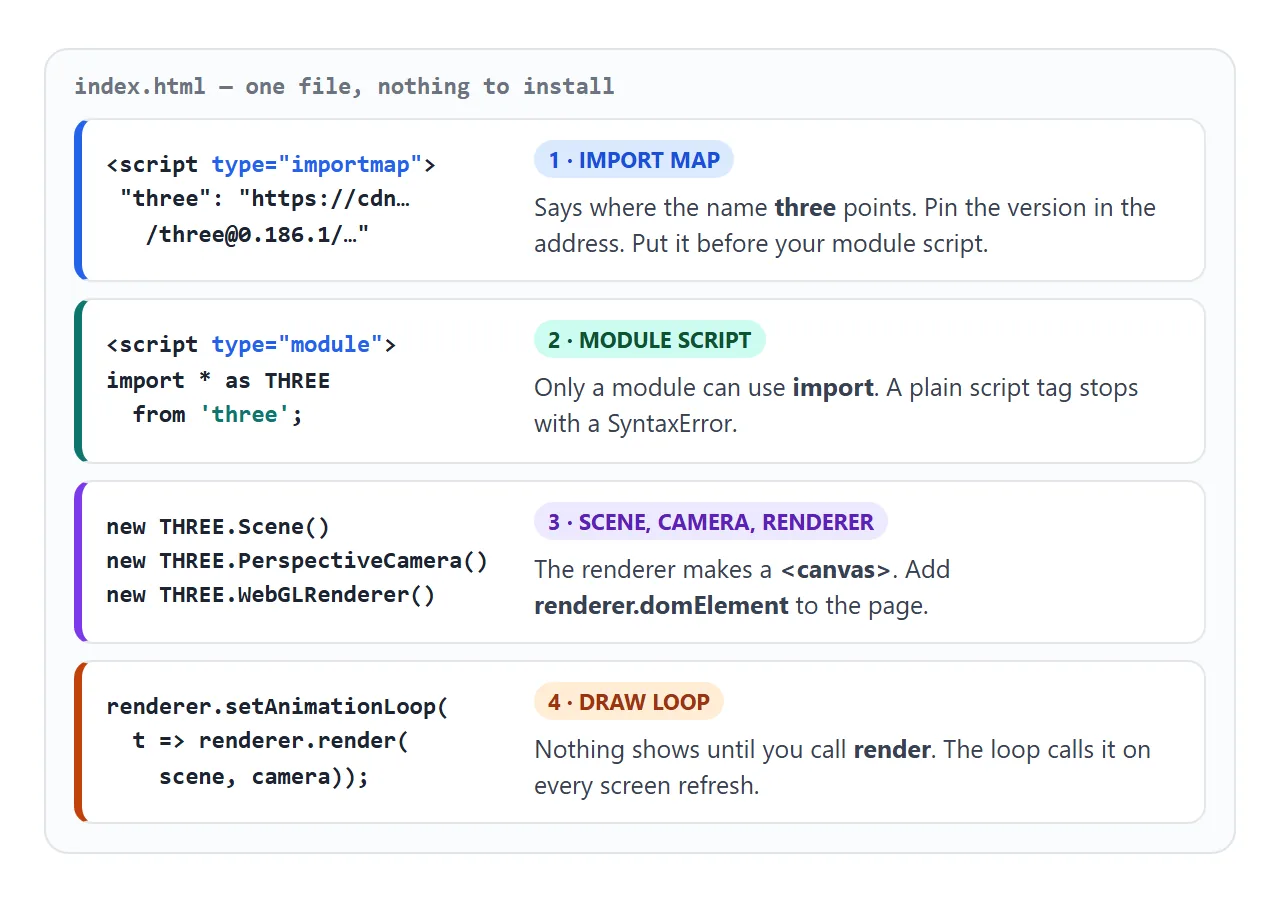
- Import map. A
<script type="importmap">in the head maps the namethreeto a full CDN address. MDN notes it must come before any module script that uses it. - Module script. Only a
type="module"script may useimport. In a plain script tag, the browser stops at the import line. - Scene, camera, renderer. The renderer creates a canvas. Append
renderer.domElementto the body, and move the camera back from the centre. - Draw loop. Nothing appears until
renderer.render(scene, camera)runs.setAnimationLoopcalls your function on every screen refresh.
The import map from the first example looks like this:
<script type="importmap">
{
  "imports": {
    "three": "https://cdn.jsdelivr.net/npm/three@0.186.1/build/three.module.js"
  }
}
</script>
The version, 0.186.1, was the latest on npm on 1 October 2026. Any later version works the same way. Keep one number for every three.js file you load.
Old tutorials use three.min.js
Many older guides start with a plain <script src> pointing at build/three.min.js, then use a global THREE. The three.js migration guide says that build file, along with build/three.js, was removed in r161.
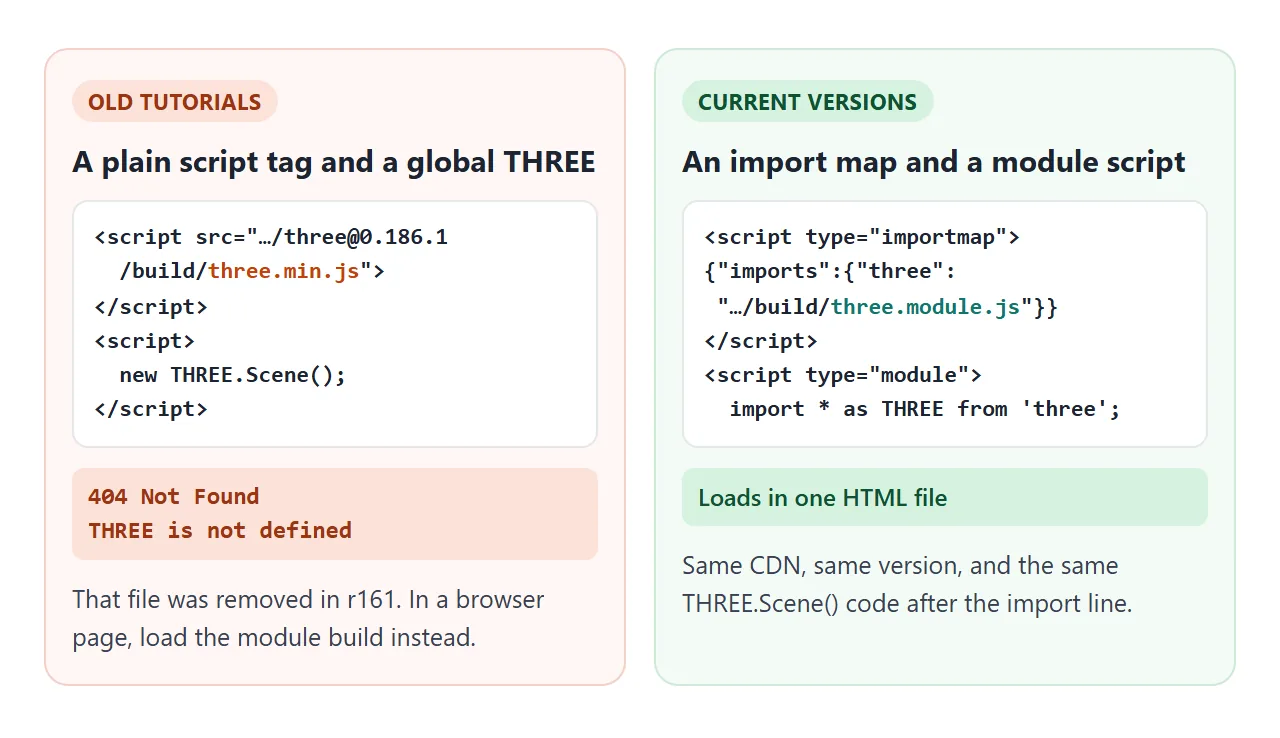
With a current version number, the old address returns 404 and the next line throws THREE is not defined.
The fix keeps the rest of your code. Swap the script tag for the import map above, and put import * as THREE from 'three'; at the top of a module script.
Why the model is black
Sometimes the shape is there, but it is a black silhouette. Materials such as MeshStandardMaterial calculate shading from lights. With no light in the scene, there is nothing to reflect.
<!doctype html>
<html lang="en">
<head>
<meta charset="utf-8">
<meta name="viewport" content="width=device-width, initial-scale=1">
<title>Why is my three.js mesh black?</title>
<style>
  html, body { margin: 0; height: 100%; }
  body { display: flex; flex-direction: column; font-family: system-ui, sans-serif; background: #f4f5f7; }
  #view { flex: 1; min-height: 0; }
  canvas { display: block; width: 100%; height: 100%; }
  .bar { display: flex; flex-wrap: wrap; gap: 8px; align-items: center; padding: 10px 12px; background: #fff; }
  button {
    font: inherit; font-size: 14px; padding: 8px 12px; border: 1px solid #d1d5db;
    border-radius: 8px; background: #fff; cursor: pointer;
  }
  button[aria-pressed="true"] { background: #0f766e; border-color: #0f766e; color: #fff; }
  #note { flex-basis: 100%; font-size: 13px; color: #374151; margin: 0; }
</style>
<script type="importmap">
{ "imports": { "three": "https://cdn.jsdelivr.net/npm/three@0.186.1/build/three.module.js" } }
</script>
</head>
<body>
<div id="view"></div>
<div class="bar">
  <button id="light" aria-pressed="true">Lights: on</button>
  <button id="mat" aria-pressed="true">Material: Standard</button>
  <p id="note"></p>
</div>

<script type="module">
  import * as THREE from 'three';

  const view = document.getElementById('view');
  const scene = new THREE.Scene();
  scene.background = new THREE.Color(0xe5e7eb);
  const camera = new THREE.PerspectiveCamera(50, 1, 0.1, 100);
  camera.position.set(0, 0.5, 5);

  const renderer = new THREE.WebGLRenderer({ antialias: true });
  renderer.setPixelRatio(devicePixelRatio);
  view.appendChild(renderer.domElement);

  // two materials for the same shape
  const standard = new THREE.MeshStandardMaterial({ color: 0xf97316 }); // needs light
  const basic = new THREE.MeshBasicMaterial({ color: 0xf97316 });       // ignores light
  const knot = new THREE.Mesh(new THREE.TorusKnotGeometry(0.8, 0.28, 128, 16), standard);
  scene.add(knot);

  const lights = new THREE.Group();
  lights.add(new THREE.AmbientLight(0xffffff, 0.5));
  const sun = new THREE.DirectionalLight(0xffffff, 2.5);
  sun.position.set(3, 4, 5);
  lights.add(sun);
  scene.add(lights);

  const lightBtn = document.getElementById('light');
  const matBtn = document.getElementById('mat');
  const note = document.getElementById('note');

  function update() {
    const isStd = knot.material === standard;
    lightBtn.textContent = 'Lights: ' + (lights.visible ? 'on' : 'off');
    lightBtn.setAttribute('aria-pressed', lights.visible);
    matBtn.textContent = 'Material: ' + (isStd ? 'Standard' : 'Basic');
    matBtn.setAttribute('aria-pressed', isStd);
    note.textContent = isStd && !lights.visible
      ? 'Black: MeshStandardMaterial with no light. Turn a light on.'
      : isStd ? 'Shaded: MeshStandardMaterial reacts to the lights.'
      : 'Flat: MeshBasicMaterial is not affected by lights.';
  }

  lightBtn.addEventListener('click', () => { lights.visible = !lights.visible; update(); });
  matBtn.addEventListener('click', () => {
    knot.material = knot.material === standard ? basic : standard;
    update();
  });
  update();

  // size the canvas to its box, not the window
  new ResizeObserver(() => {
    const w = view.clientWidth, h = view.clientHeight;
    renderer.setSize(w, h, false);
    camera.aspect = w / h;
    camera.updateProjectionMatrix();
  }).observe(view);

  renderer.setAnimationLoop((t) => {
    knot.rotation.y = t / 1500;
    renderer.render(scene, camera);
  });
</script>
</body>
</html>
| Material | Needs a light? | Looks like |
|---|---|---|
MeshBasicMaterial |
No | One flat colour, no shading |
MeshNormalMaterial |
No | Colours mapped from the surface direction |
MeshStandardMaterial |
Yes | Shaded, with roughness and metalness |
For lit materials, an AmbientLight lights every side equally and a DirectionalLight gives the bright and dark faces. The three.js source notes that MeshBasicMaterial "is not affected by lights".
Size, sharpness and phones
The renderer's canvas has two sizes: how big it looks on the page, and how many pixels it draws. If either is wrong, the scene stretches or looks soft.
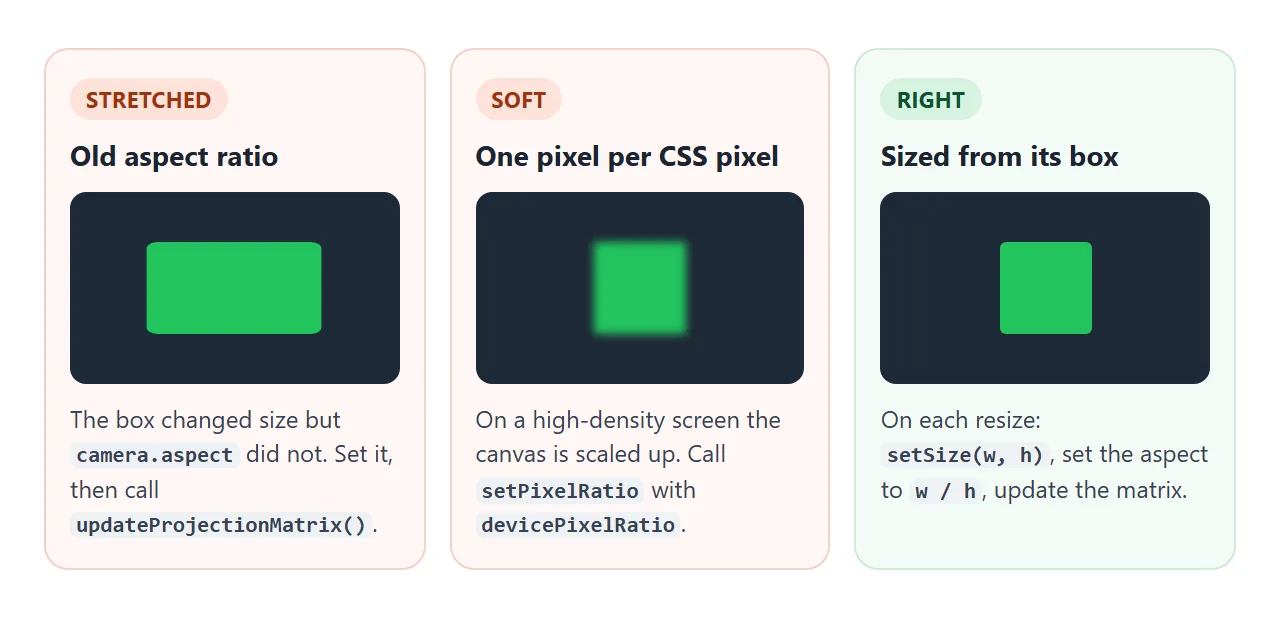
- Call
setPixelRatio(devicePixelRatio)on the renderer once, so phones with dense screens get a sharp picture. - When the space changes size, call
setSizewith the new width and height, setcamera.aspectto width divided by height, then callcamera.updateProjectionMatrix(). - If the canvas fills a box instead of the window, watch the box with a
ResizeObserver. The second and third examples do this.
Add the viewport meta tag too, or a phone lays the page out at desktop width.
A finished example: a viewer you can turn
Controls, loaders and effects live in the addons folder. The installation guide says addons need no separate install, only a separate import. Add a second entry to the import map for that folder, with the same version.
"three/addons/": "https://cdn.jsdelivr.net/npm/three@0.186.1/examples/jsm/"
Then import OrbitControls and hand it the camera and the canvas. Drag to turn, scroll or pinch to zoom.
<!doctype html>
<html lang="en">
<head>
<meta charset="utf-8">
<meta name="viewport" content="width=device-width, initial-scale=1">
<title>three.js viewer with OrbitControls</title>
<style>
  html, body { margin: 0; height: 100%; }
  body { display: flex; flex-direction: column; font-family: system-ui, sans-serif; background: #f4f5f7; }
  #view { flex: 1; min-height: 0; position: relative; }
  canvas { display: block; width: 100%; height: 100%; touch-action: none; }
  #hint {
    position: absolute; left: 10px; top: 8px; margin: 0;
    font-size: 12px; color: #4b5563; pointer-events: none;
  }
  .bar { display: flex; flex-wrap: wrap; gap: 8px; align-items: center; padding: 10px 12px; background: #fff; }
  .sw { width: 30px; height: 30px; border-radius: 50%; border: 2px solid #fff; box-shadow: 0 0 0 1px #d1d5db; cursor: pointer; }
  .sw[aria-pressed="true"] { box-shadow: 0 0 0 2px #111827; }
  #reset { font: inherit; font-size: 14px; padding: 7px 12px; border: 1px solid #d1d5db; border-radius: 8px; background: #fff; cursor: pointer; margin-left: auto; }
</style>
<script type="importmap">
{
  "imports": {
    "three": "https://cdn.jsdelivr.net/npm/three@0.186.1/build/three.module.js",
    "three/addons/": "https://cdn.jsdelivr.net/npm/three@0.186.1/examples/jsm/"
  }
}
</script>
</head>
<body>
<div id="view"><p id="hint">Drag to turn. Scroll or pinch to zoom.</p></div>
<div class="bar">
  <button class="sw" data-color="#2563eb" style="background:#2563eb" aria-label="Blue" aria-pressed="true"></button>
  <button class="sw" data-color="#e11d48" style="background:#e11d48" aria-label="Red" aria-pressed="false"></button>
  <button class="sw" data-color="#f59e0b" style="background:#f59e0b" aria-label="Amber" aria-pressed="false"></button>
  <button class="sw" data-color="#10b981" style="background:#10b981" aria-label="Green" aria-pressed="false"></button>
  <button id="reset">Reset view</button>
</div>

<script type="module">
  import * as THREE from 'three';
  import { OrbitControls } from 'three/addons/controls/OrbitControls.js';

  const view = document.getElementById('view');
  const scene = new THREE.Scene();
  scene.background = new THREE.Color(0xf8fafc);
  const camera = new THREE.PerspectiveCamera(45, 1, 0.1, 100);
  camera.position.set(3, 2.2, 4);

  const renderer = new THREE.WebGLRenderer({ antialias: true });
  renderer.setPixelRatio(devicePixelRatio);
  view.appendChild(renderer.domElement);

  // drag / wheel / pinch moves the camera around the target
  const controls = new OrbitControls(camera, renderer.domElement);
  controls.target.set(0, 0.6, 0);
  controls.enableDamping = true;
  controls.minDistance = 2.5;
  controls.maxDistance = 10;
  controls.update();
  controls.saveState();  // remembered for "Reset view"

  // a texture drawn in the page: no image file to load
  const c = document.createElement('canvas');
  c.width = c.height = 128;
  const g = c.getContext('2d');
  g.fillStyle = '#e2e8f0'; g.fillRect(0, 0, 128, 128);
  g.fillStyle = '#cbd5e1'; g.fillRect(0, 0, 64, 64); g.fillRect(64, 64, 64, 64);
  const tex = new THREE.CanvasTexture(c);
  tex.colorSpace = THREE.SRGBColorSpace;
  tex.wrapS = tex.wrapT = THREE.RepeatWrapping;
  tex.repeat.set(4, 4);
  const floor = new THREE.Mesh(new THREE.PlaneGeometry(6, 6), new THREE.MeshStandardMaterial({ map: tex }));
  floor.rotation.x = -Math.PI / 2;
  scene.add(floor);

  // the object we look at
  const paint = new THREE.MeshStandardMaterial({ color: 0x2563eb, roughness: 0.35, metalness: 0.1 });
  const knot = new THREE.Mesh(new THREE.TorusKnotGeometry(0.5, 0.18, 160, 20), paint);
  knot.position.y = 0.9;
  const base = new THREE.Mesh(new THREE.CylinderGeometry(0.7, 0.8, 0.2, 48), new THREE.MeshStandardMaterial({ color: 0x334155 }));
  base.position.y = 0.1;
  scene.add(knot, base);

  scene.add(new THREE.HemisphereLight(0xffffff, 0x94a3b8, 1.2));
  const sun = new THREE.DirectionalLight(0xffffff, 2);
  sun.position.set(3, 5, 2);
  scene.add(sun);

  // colour buttons change the material, not the mesh
  document.querySelectorAll('.sw').forEach((btn) => {
    btn.addEventListener('click', () => {
      paint.color.set(btn.dataset.color);
      document.querySelectorAll('.sw').forEach((b) => b.setAttribute('aria-pressed', b === btn));
    });
  });
  document.getElementById('reset').addEventListener('click', () => controls.reset());

  new ResizeObserver(() => {
    const w = view.clientWidth, h = view.clientHeight;
    renderer.setSize(w, h, false);
    camera.aspect = w / h;
    camera.updateProjectionMatrix();
  }).observe(view);

  renderer.setAnimationLoop((t) => {
    knot.rotation.y = t / 2500;
    controls.update();  // needed every frame when damping is on
    renderer.render(scene, camera);
  });
</script>
</body>
</html>
- Same version for every file. The guide warns that mixing versions or CDNs can include duplicate code or break the page.
- Damping needs an update call. With
enableDampingon, callcontrols.update()in the draw loop. - No image files. The checkered floor is a
CanvasTexturedrawn by the page itself, so there is nothing extra to load.
Opening the file, and when you need a server
In our tests, every example here ran when opened straight from disk, because all of the code is inline and three.js comes from the CDN. That stops when you split your code into a local main.js file.
Loading a local module from a file:// address is blocked by the browser. MDN describes this as a CORS error and recommends testing through a server. The three.js guide also notes that some features do not work when the page is opened by double-click.
The guide's other route is npm and the Vite build tool. That is the right fit once a project grows into several files. It does not run inside a single HTML file:
npm install --save three
npm install --save-dev vite
npx vite          # local dev server
npx vite build    # output in dist/
For one page you want to send to someone, inline code plus the import map is enough. Self-contained HTML files covers that approach in general.
When it does not work
| What you see | Cause | Fix |
|---|---|---|
| Failed to resolve module specifier "three" | No import map, or it comes after the module script | Add the import map in the head, first |
| Cannot use import statement outside a module | The script tag has no type="module" |
Add type="module" |
| THREE is not defined | An old tutorial's three.min.js, removed in r161 |
Use the import map and three.module.js |
| The same error names an addon path | The map has no three/addons/ entry |
Add it with the same version |
| A black shape | A lit material and no light | Add lights, or use MeshBasicMaterial |
| An empty scene, no error | The camera is inside the object, or render never runs |
Move the camera back and start the draw loop |
| A stretched shape | camera.aspect not updated after a resize |
Set it, then updateProjectionMatrix() |
| Soft, blurry edges | No pixel ratio set | setPixelRatio(devicePixelRatio) |
| main.js blocked by CORS | A local module file opened from disk | Keep the code inline, or use a local server |
For errors outside three.js, HTML JavaScript not working walks through the console checks.
Share it as a link
A 3D scene is hard to show in a screenshot: the point is turning it yourself. An .html attachment may open as plain code on a phone, or not at all.
To send the working version, paste the page into a NOS document and choose Create share link. HTML to link walks through it.
The page renders as written and its scripts run, including three.js loaded from cdn.jsdelivr.net, so anyone with the link can turn the model without an account.
Images, models or data fetched from other sites are blocked there, so build shapes and textures in the page as the viewer does. If you change the code later, the same link shows the new version.