A WebSocket is a JavaScript object built into the browser. You create it in a <script> tag, give it the address of a server, and it keeps that connection open so messages can flow both ways. This guide means that browser API, not a library.
Try it first. The page below talks to a small stand-in written inside the page, so it runs anywhere. Press Connect, then press Send quickly and watch what happens.
<!doctype html>
<html lang="en">
<head>
<meta charset="utf-8">
<meta name="viewport" content="width=device-width, initial-scale=1">
<title>WebSocket basics</title>
<style>
  * { box-sizing: border-box; }
  body { margin: 0; padding: 14px; font-family: system-ui, sans-serif; background: #f4f5f7; color: #1d2330; }
  .top { display: flex; align-items: center; gap: 10px; flex-wrap: wrap; margin-bottom: 10px; }
  #state { font: 700 13px ui-monospace, Consolas, monospace; padding: 5px 10px; border-radius: 999px; background: #e5e7eb; }
  #state.s1 { background: #d1fae5; color: #065f46; }
  #state.s0, #state.s2 { background: #fef3c7; color: #92400e; }
  button { font: inherit; padding: 8px 12px; border: 1px solid #c9ced8; border-radius: 8px; background: #fff; cursor: pointer; }
  button:disabled { opacity: .5; cursor: default; }
  form { display: flex; gap: 8px; margin-bottom: 10px; }
  input { flex: 1; min-width: 0; font: inherit; padding: 8px 10px; border: 1px solid #c9ced8; border-radius: 8px; }
  #log { margin: 0; padding: 10px; height: 230px; overflow: auto; background: #fff; border-radius: 10px;
         font: 13px/1.5 ui-monospace, Consolas, monospace; list-style: none; }
  #log li.err { color: #b45309; }
</style>
</head>
<body>
<div class="top">
  <span id="state">no socket</span>
  <button id="connect">Connect</button>
  <button id="close" disabled>Close</button>
</div>
<form id="form">
  <input id="msg" value="hello" aria-label="Message">
  <button>Send</button>
</form>
<ul id="log"></ul>

<script>
  // Stand-in for a server: same events and methods as WebSocket, but it runs inside this page.
  // For a real server, delete this class and write new WebSocket('wss://your-server.example/').
  class MockSocket extends EventTarget {
    constructor(url) {
      super(); this.url = url; this.readyState = 0;
      setTimeout(() => { this.readyState = 1; this.dispatchEvent(new Event('open')); }, 1200);
    }
    send(text) {
      if (this.readyState === 0) throw new DOMException('Still CONNECTING', 'InvalidStateError');
      if (this.readyState !== 1) return; // a real socket drops it silently
      setTimeout(() => this.readyState === 1 &&
        this.dispatchEvent(new MessageEvent('message', { data: text })), 400); // the "server" echoes
    }
    close(code = 1000) {
      if (this.readyState >= 2) return;
      this.readyState = 2;
      setTimeout(() => { this.readyState = 3;
        this.dispatchEvent(new CloseEvent('close', { code, wasClean: true })); }, 300);
    }
  }
</script>

<script>
  const $ = (id) => document.getElementById(id);
  const names = ['CONNECTING', 'OPEN', 'CLOSING', 'CLOSED'];
  let socket = null;

  function log(text, cls) {
    const li = document.createElement('li');
    li.textContent = text; if (cls) li.className = cls;
    $('log').append(li); $('log').scrollTop = $('log').scrollHeight;
  }
  function show() {
    const s = socket.readyState;
    $('state').textContent = s + ' ' + names[s];
    $('state').className = 's' + s;
    $('close').disabled = s > 1;
    $('connect').disabled = s < 3;
  }

  $('connect').addEventListener('click', () => {
    socket = new MockSocket('wss://echo.example/'); // real code: new WebSocket(url)
    log('connecting...'); show();
    socket.addEventListener('open', () => { log('open'); show(); });
    socket.addEventListener('message', (e) => log('received: ' + e.data));
    socket.addEventListener('close', (e) => { log('closed, code ' + e.code); show(); });
  });

  $('close').addEventListener('click', () => { socket.close(); log('closing...'); show(); });

  $('form').addEventListener('submit', (e) => {
    e.preventDefault();
    if (!socket) return log('no socket yet - press Connect', 'err');
    try {
      socket.send($('msg').value);
      log('sent: ' + $('msg').value);
    } catch (err) {
      log(err.name + ': ' + err.message, 'err'); // send() while CONNECTING throws
    }
  });
</script>
</body>
</html>
What a WebSocket does that fetch does not
With fetch(), the page asks and the server answers, one request at a time. A WebSocket stays open. Either side can send a message whenever it has something, and the page reacts in a message listener.
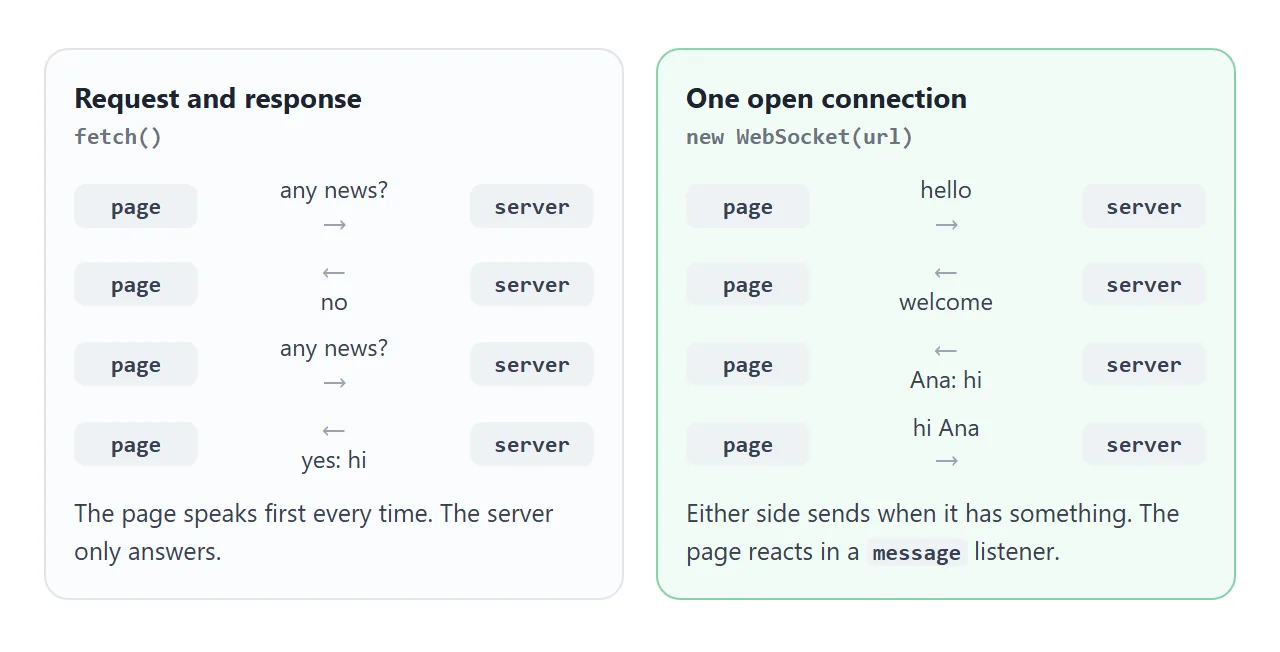
MDN describes the API as a way to open a two-way interactive session between the browser and a server, without having to poll the server for a reply. It is also available in Web Workers.
The smallest client
Four lines of setup are enough. Everything happens in events, so each listener is registered with addEventListener.
// placeholder address: it needs a real WebSocket server behind it
const socket = new WebSocket('wss://example.com/chat');

socket.addEventListener('open', () => socket.send('hello'));
socket.addEventListener('message', (e) => console.log(e.data));
socket.addEventListener('close', (e) => console.log('closed', e.code));
The connection is established asynchronously, so send() right after new WebSocket() is too early. Every attempt ends with either an open event or a close event. An error event can also fire when something goes wrong.
The address must start with ws, wss, http or https, and it cannot contain a #fragment. Anything else throws a SyntaxError.
The four states
The readyState property tells you where the connection is. It is a number, and the WebSocket object has a constant for each value.
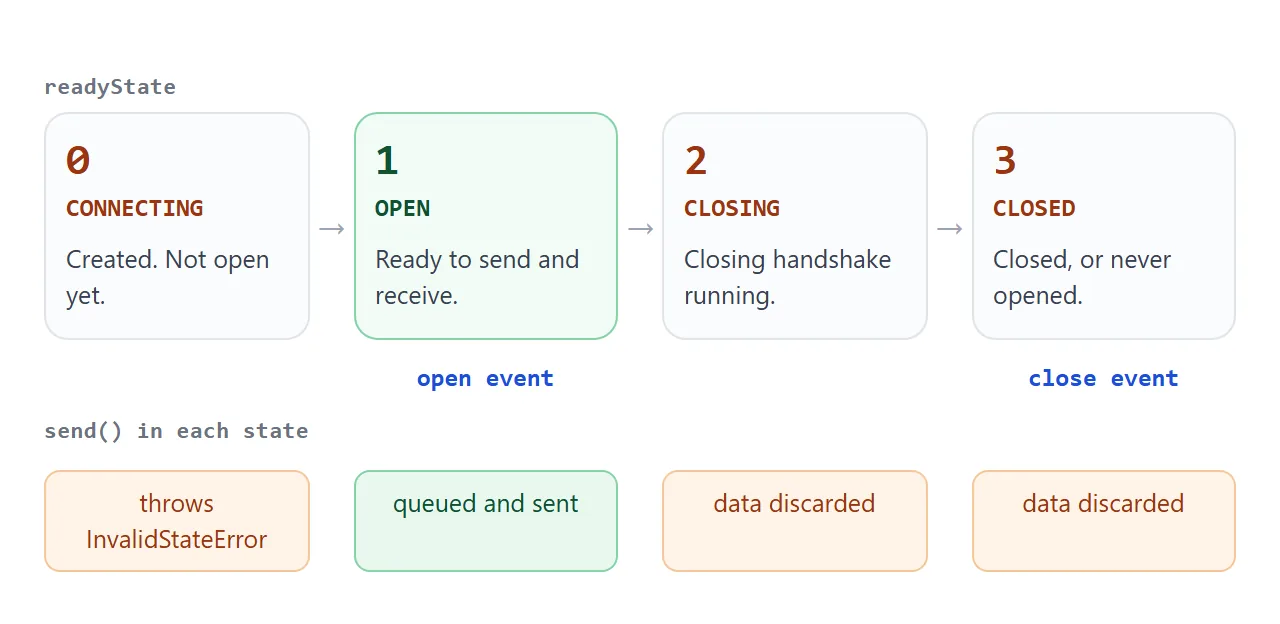
Calling send() while the state is CONNECTING throws an InvalidStateError. Calling it while the state is CLOSING or CLOSED does not throw: the browser silently discards the data. So a guard is worth having.
if (socket.readyState === WebSocket.OPEN) {
  socket.send('hello');
}
The close event carries code, reason and wasClean. When you call socket.close() yourself, a code is optional; if you pass one, it must be 1000 or in the range 3000 to 4999.
Sending and receiving JSON
A WebSocket carries text or binary data. For most pages, text is enough: turn an object into a string with JSON.stringify before sending, and read it back with JSON.parse in the message listener.
socket.send(JSON.stringify({ type: 'chat', text: 'hi' }));

socket.addEventListener('message', (e) => {
  const msg = JSON.parse(e.data);
  if (msg.type === 'chat') show(msg.text);
});
A type field on every message lets one connection carry chat lines, join notices and anything else you add later. When the text comes from other people, put it on the page with textContent, not innerHTML.
A page cannot be the server
Your HTML file holds the client. The server is a separate program that listens at the address you pass to new WebSocket(), accepts the connection and decides who receives which message. No HTML file can do that part.
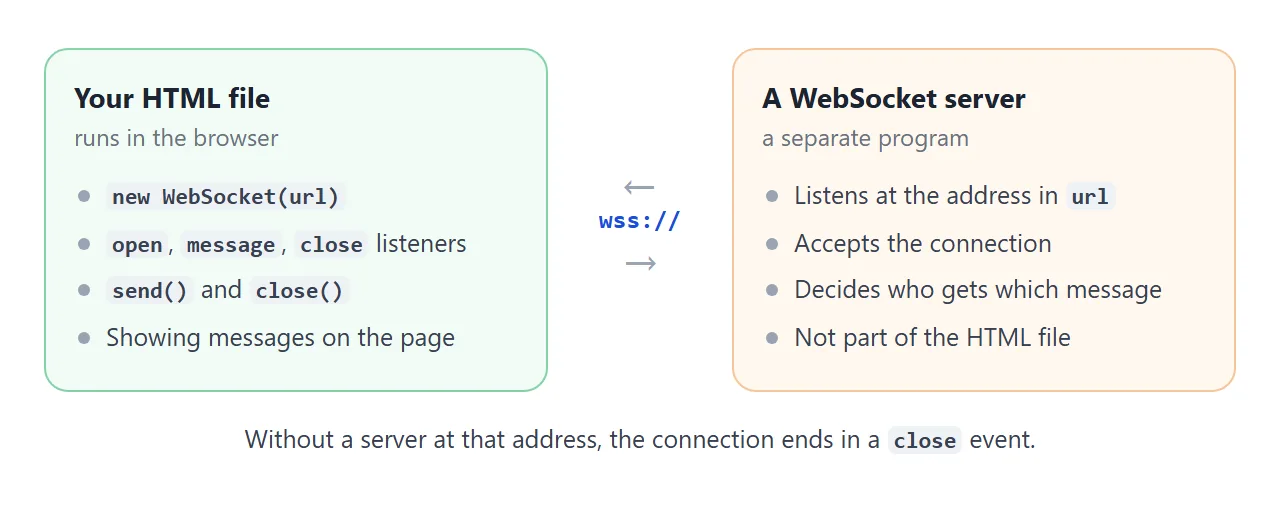
MDN has guides for writing WebSocket servers in several languages. If no server is listening, the attempt ends in a close event and readyState becomes 3.
Use wss:// for a page served over HTTPS. MDN advises against opening a non-secure WebSocket from an HTTPS page, which is a case of mixed content.
Reconnecting after a drop
A closed socket cannot be reopened. The interface has no method for it. To reconnect, create a new WebSocket and attach the listeners again.
Wait a little before each retry, and wait longer after each failure, so a server that is down does not get a request every instant. Reset the wait when a connection succeeds.
<!doctype html>
<html lang="en">
<head>
<meta charset="utf-8">
<meta name="viewport" content="width=device-width, initial-scale=1">
<title>WebSocket reconnect</title>
<style>
  * { box-sizing: border-box; }
  body { margin: 0; padding: 14px; font-family: system-ui, sans-serif; background: #f4f5f7; color: #1d2330; }
  .top { display: flex; align-items: center; gap: 10px; flex-wrap: wrap; margin-bottom: 10px; }
  #state { font: 700 13px ui-monospace, Consolas, monospace; padding: 5px 10px; border-radius: 999px; background: #e5e7eb; }
  #state.up { background: #d1fae5; color: #065f46; }
  #state.wait { background: #fef3c7; color: #92400e; }
  .row { display: flex; gap: 8px; flex-wrap: wrap; margin-bottom: 10px; }
  button { font: inherit; padding: 8px 12px; border: 1px solid #c9ced8; border-radius: 8px; background: #fff; cursor: pointer; }
  #log { margin: 0; padding: 10px; height: 220px; overflow: auto; background: #fff; border-radius: 10px;
         font: 13px/1.5 ui-monospace, Consolas, monospace; list-style: none; }
  #log li.bad { color: #b45309; } #log li.good { color: #047857; }
  p { margin: 0 0 10px; font-size: 13px; color: #4b5563; }
</style>
</head>
<body>
<div class="top"><span id="state">starting</span><span id="server">server: up</span></div>
<div class="row">
  <button id="drop">Drop connection</button>
  <button id="toggle">Take server down</button>
  <button id="leave">Leave</button>
</div>
<p>Take the server down, then drop the connection. The page retries after 1, 2, 4 and 8 seconds, then keeps using 8.</p>
<ul id="log"></ul>

<script>
  // Stand-in for a server (see the first example). serverUp = false makes every attempt fail.
  let serverUp = true;
  const live = new Set();
  class MockSocket extends EventTarget {
    constructor(url) {
      super(); this.url = url; this.readyState = 0;
      setTimeout(() => {
        if (!serverUp) { this.readyState = 3; this.dispatchEvent(new CloseEvent('close', { code: 1006, wasClean: false })); return; }
        this.readyState = 1; live.add(this); this.dispatchEvent(new Event('open'));
      }, 500);
    }
    send() {}
    close(code = 1000) {
      if (this.readyState >= 2) return;
      this.readyState = 3; live.delete(this);
      this.dispatchEvent(new CloseEvent('close', { code, wasClean: true }));
    }
    serverDrop() { // the server side vanishes without a closing handshake
      this.readyState = 3; live.delete(this);
      this.dispatchEvent(new CloseEvent('close', { code: 1006, wasClean: false }));
    }
  }
</script>

<script>
  const $ = (id) => document.getElementById(id);
  let socket, attempt = 0, timer = null, leaving = false;

  function log(t, cls) {
    const li = document.createElement('li'); li.textContent = t; if (cls) li.className = cls;
    $('log').append(li); $('log').scrollTop = $('log').scrollHeight;
  }
  function status(t, cls) { $('state').textContent = t; $('state').className = cls || ''; }

  function connect() {
    status('connecting', 'wait');
    socket = new MockSocket('wss://example.invalid/'); // real code: new WebSocket(url)

    socket.addEventListener('open', () => {
      attempt = 0;                       // a good connection resets the back-off
      status('open', 'up'); log('open', 'good');
    });

    socket.addEventListener('close', (e) => {
      if (leaving) { status('closed (you left)'); log('closed on purpose, code ' + e.code); return; }
      const delay = Math.min(1000 * 2 ** attempt, 8000);  // 1s, 2s, 4s, 8s, 8s...
      attempt++;
      log('lost, code ' + e.code + '. Retry #' + attempt + ' in ' + delay / 1000 + 's', 'bad');
      status('waiting ' + delay / 1000 + 's', 'wait');
      timer = setTimeout(connect, delay);
    });
  }

  $('drop').addEventListener('click', () => { [...live].forEach((s) => s.serverDrop()); });
  $('toggle').addEventListener('click', () => {
    serverUp = !serverUp;
    $('server').textContent = 'server: ' + (serverUp ? 'up' : 'down');
    $('toggle').textContent = serverUp ? 'Take server down' : 'Bring server up';
  });
  $('leave').addEventListener('click', () => {
    leaving = true; clearTimeout(timer);
    if (socket.readyState < 2) socket.close(); else { status('closed (you left)'); log('stopped retrying'); }
  });

  connect();
</script>
</body>
</html>
The retry logic sits in the close listener, and a leaving flag stops it when the user closes the connection on purpose.
A finished example: a chat room
This chat joins the pieces: a status pill from readyState, JSON messages with a type, a short outbox for text typed while the socket is not open, and textContent for incoming text.
<!doctype html>
<html lang="en">
<head>
<meta charset="utf-8">
<meta name="viewport" content="width=device-width, initial-scale=1">
<title>WebSocket chat</title>
<style>
  * { box-sizing: border-box; }
  body { margin: 0; padding: 14px; font-family: system-ui, sans-serif; background: #f4f5f7; color: #1d2330; }
  .top { display: flex; align-items: center; gap: 10px; margin-bottom: 10px; flex-wrap: wrap; }
  #state { font: 700 13px ui-monospace, Consolas, monospace; padding: 5px 10px; border-radius: 999px; background: #fef3c7; color: #92400e; }
  #state.open { background: #d1fae5; color: #065f46; }
  button { font: inherit; padding: 8px 12px; border: 1px solid #c9ced8; border-radius: 8px; background: #fff; cursor: pointer; }
  #room { margin: 0 0 10px; padding: 10px; height: 270px; overflow: auto; background: #fff; border-radius: 10px; list-style: none; }
  #room li { margin: 0 0 8px; padding: 7px 10px; border-radius: 10px; background: #eef1f5; max-width: 85%; font-size: 14px; word-break: break-word; }
  #room li b { display: block; font-size: 12px; color: #4b5563; }
  #room li.me { margin-left: auto; background: #dbeafe; }
  #room li.queued { opacity: .55; }
  #room li.sys { max-width: 100%; background: none; color: #6b7280; font-size: 12px; padding: 0; }
  form { display: flex; gap: 8px; }
  input { flex: 1; min-width: 0; font: inherit; padding: 8px 10px; border: 1px solid #c9ced8; border-radius: 8px; }
</style>
</head>
<body>
<div class="top">
  <span id="state">closed</span>
  <button id="toggle">Connect</button>
  <span id="queue" style="font-size:13px;color:#6b7280"></span>
</div>
<ul id="room"></ul>
<form id="form">
  <input id="text" placeholder="Type a message" autocomplete="off" aria-label="Message">
  <button>Send</button>
</form>

<script>
  // Stand-in for a chat server: it reads the JSON you send and answers as "Ana".
  // For a real server, delete this class and write new WebSocket('wss://your-server.example/').
  class MockSocket extends EventTarget {
    constructor(url) {
      super(); this.url = url; this.readyState = 0;
      setTimeout(() => { this.readyState = 1; this.dispatchEvent(new Event('open')); }, 600);
    }
    send(text) {
      if (this.readyState === 0) throw new DOMException('Still CONNECTING', 'InvalidStateError');
      if (this.readyState !== 1) return;
      const msg = JSON.parse(text);
      const reply = msg.type === 'join'
        ? { type: 'chat', user: 'Ana', text: 'Welcome, ' + msg.user + '!' }
        : { type: 'chat', user: 'Ana', text: 'You said: ' + msg.text };
      setTimeout(() => this.readyState === 1 &&
        this.dispatchEvent(new MessageEvent('message', { data: JSON.stringify(reply) })), 700);
    }
    close(code = 1000) {
      if (this.readyState >= 2) return;
      this.readyState = 3;
      this.dispatchEvent(new CloseEvent('close', { code, wasClean: true }));
    }
  }
</script>

<script>
  const $ = (id) => document.getElementById(id);
  const me = 'You';
  let socket = null;
  const outbox = [];   // messages typed while the socket is not open

  function add(user, text, cls) {
    const li = document.createElement('li');
    if (cls) li.className = cls;
    if (user) { const b = document.createElement('b'); b.textContent = user; li.append(b); }
    li.append(document.createTextNode(text));          // text, never innerHTML: messages are untrusted
    $('room').append(li); $('room').scrollTop = $('room').scrollHeight;
    return li;
  }
  function refresh() {
    const open = socket && socket.readyState === WebSocket.OPEN;
    $('state').textContent = open ? 'open' : 'closed';
    $('state').className = open ? 'open' : '';
    $('toggle').textContent = open ? 'Disconnect' : 'Connect';
    $('queue').textContent = outbox.length ? outbox.length + ' waiting to send' : '';
  }

  function connect() {
    socket = new MockSocket('wss://chat.example/room');   // real code: new WebSocket(url)
    $('state').textContent = 'connecting';

    socket.addEventListener('open', () => {
      add('', 'connected', 'sys');
      socket.send(JSON.stringify({ type: 'join', user: me }));
      while (outbox.length) {                              // flush what was typed while offline
        const item = outbox.shift();
        socket.send(JSON.stringify({ type: 'chat', user: me, text: item.text }));
        item.li.classList.remove('queued');
      }
      refresh();
    });
    socket.addEventListener('message', (e) => {
      const msg = JSON.parse(e.data);                      // every message is one JSON text
      if (msg.type === 'chat') add(msg.user, msg.text);
    });
    socket.addEventListener('close', () => { add('', 'disconnected', 'sys'); refresh(); });
  }

  $('toggle').addEventListener('click', () => {
    if (socket && socket.readyState === WebSocket.OPEN) socket.close();
    else if (!socket || socket.readyState === WebSocket.CLOSED) connect();
  });

  $('form').addEventListener('submit', (e) => {
    e.preventDefault();
    const text = $('text').value.trim();
    if (!text) return;
    $('text').value = '';
    if (socket && socket.readyState === WebSocket.OPEN) {
      socket.send(JSON.stringify({ type: 'chat', user: me, text }));
      add(me, text, 'me');
    } else {
      outbox.push({ text, li: add(me, text, 'me queued') });  // keep it until the socket opens
    }
    refresh();
  });
  refresh();
</script>
</body>
</html>
To use a real server, delete the MockSocket class and change one line. The rest of the code stays the same, because the stand-in has the same events and methods.
socket = new WebSocket('wss://your-server.example/');
One limit to know: MDN notes that the WebSocket API has no way to apply backpressure, so a flood of messages can fill memory or keep the CPU busy. WebSocketStream is its alternative that handles this.
When it does not work
| What you see | Cause | Fix |
|---|---|---|
| InvalidStateError on send | send() ran while CONNECTING | Send from the open listener |
| SyntaxError on new WebSocket | Bad address, wrong scheme or a #fragment | Use ws:// or wss://, no fragment |
| Messages vanish | send() ran while CLOSING or CLOSED | Check readyState first |
| Nothing opens, close event only | No server at that address | Start the server, check the URL |
| Blocked on an HTTPS page | ws:// used from a secure page | Use wss:// |
| JSON.parse throws | The message was plain text | Wrap in try/catch or agree on a format |
| InvalidAccessError on close | Close code is not 1000 or 3000-4999 | Use an allowed code |
| Page stops updating after a drop | The closed socket is not reopened | Create a new WebSocket |
If the script itself does not run, see HTML JavaScript not working.
Share it as a link
A WebSocket page is hard to explain with a screenshot, and an attached .html file may open as plain code on a phone. The stand-in examples work well as a shared demo: people can press Connect and type themselves.
To send the working version, paste the page into a NOS document and choose Create share link. HTML to link walks through it.
The page renders as written and its scripts run, so the receiver can use it directly. If you change the code later, the same link shows the new version.
NOS blocks fetch calls to other sites, so test any connection to a real server in the shared link before you send it.