A wedding weekend is a small trip for everyone you invite. It has the usual trip problem: the plan sits in a group chat, a PDF and an email, and each change makes one of them wrong.
One person put the question on Quora: "With which site can I share my trip with my friends?"
For a wedding weekend the answer is one web page behind one link. It holds the events, the dress codes and the hotels. You change the page when plans shift, and the link stays the same.
Here is a page you can copy. Tick Mark as changed on a row to see how a change is flagged, and use the day buttons to see what a guest sees on a phone.
<!doctype html>
<html lang="en">
<head>
<meta charset="utf-8">
<meta name="viewport" content="width=device-width, initial-scale=1">
<title>Wedding weekend itinerary</title>
<style>
*{box-sizing:border-box;margin:0;padding:0}
body{font-family:"Segoe UI",system-ui,sans-serif;background:#faf7f2;color:#2b2623;line-height:1.45;padding:16px}
.wrap{max-width:640px;margin:0 auto}
h1{font:600 24px/1.2 Georgia,serif}
.sub{color:#6b625b;font-size:14px;margin-top:4px}
#chg{margin:14px 0 10px;padding:9px 12px;border-radius:10px;background:#eef3ee;color:#2f5a3a;font-size:14px}
#chg.on{background:#fff1e0;color:#8a4a0b}
.tabs{display:flex;gap:6px;flex-wrap:wrap;margin-bottom:12px}
.tabs button{font:inherit;font-size:14px;padding:7px 14px;border:1px solid #d9d0c6;border-radius:99px;background:#fff;color:#2b2623;cursor:pointer}
.tabs button[aria-pressed="true"]{background:#2b2623;color:#fff;border-color:#2b2623}
.day{margin-bottom:16px}
.day h2{font:600 13px/1 "Segoe UI",system-ui,sans-serif;letter-spacing:.08em;text-transform:uppercase;color:#8a7f75;margin:0 0 8px}
.ev{background:#fff;border:1px solid #e6ded4;border-left:5px solid #9bb59f;border-radius:10px;padding:10px 12px;margin-bottom:8px}
.ev.changed{border-left-color:#e8892b;background:#fffaf3}
.top{display:flex;gap:10px;align-items:baseline}
.time{font-weight:700;min-width:72px;font-variant-numeric:tabular-nums}
.name{font-weight:600}
.meta{font-size:14px;color:#5d554e;margin:3px 0 0 82px}
.wear{display:inline-block;font-size:12.5px;background:#f1ebe3;color:#5d554e;border-radius:6px;padding:1px 7px;margin:5px 0 0 82px}
.flag{margin:6px 0 0 82px;font-size:13px;color:#8a4a0b}
.flag label{cursor:pointer}
.tag{display:none;font-size:11.5px;font-weight:700;background:#e8892b;color:#fff;border-radius:5px;padding:1px 6px;margin-left:auto}
.changed .tag{display:inline-block}
.hotels{display:grid;grid-template-columns:1fr 1fr;gap:8px}
.hotel{background:#fff;border:1px solid #e6ded4;border-radius:10px;padding:10px 12px;font-size:14px}
.hotel b{display:block;font-size:15px}
@media(max-width:480px){.hotels{grid-template-columns:1fr}.meta,.flag,.wear{margin-left:0}.wear{margin-top:5px}.top{flex-wrap:wrap;gap:2px 10px}}
</style>
</head>
<body>
<div class="wrap">
<h1>Mira & Jonas: wedding weekend</h1>
<p class="sub">12 to 14 June · Alder Bay · all times local</p>
<p id="chg">No changes since the first version.</p>
<div class="tabs" role="group" aria-label="Show day">
<button type="button" data-day="all" aria-pressed="true">All</button>
<button type="button" data-day="fri" aria-pressed="false">Fri</button>
<button type="button" data-day="sat" aria-pressed="false">Sat</button>
<button type="button" data-day="sun" aria-pressed="false">Sun</button>
</div>
<section class="day" data-day="fri">
<h2>Friday 12 June</h2>
<div class="ev">
<div class="top"><span class="time">6:30 pm</span><span class="name">Welcome dinner</span><span class="tag">Changed</span></div>
<p class="meta">Lantern Terrace, 4 Quay Road</p>
<span class="wear">Wear: smart casual</span>
<p class="flag"><label><input type="checkbox"> Mark as changed</label></p>
</div>
</section>
<section class="day" data-day="sat">
<h2>Saturday 13 June</h2>
<div class="ev">
<div class="top"><span class="time">2:00 pm</span><span class="name">Ceremony</span><span class="tag">Changed</span></div>
<p class="meta">Maple Hall garden. Arrive by 1:40 pm.</p>
<span class="wear">Wear: dark suit or long dress</span>
<p class="flag"><label><input type="checkbox"> Mark as changed</label></p>
</div>
<div class="ev">
<div class="top"><span class="time">4:30 pm</span><span class="name">Reception and dinner</span><span class="tag">Changed</span></div>
<p class="meta">Maple Hall ballroom</p>
<span class="wear">Wear: same as the ceremony</span>
<p class="flag"><label><input type="checkbox"> Mark as changed</label></p>
</div>
</section>
<section class="day" data-day="sun">
<h2>Sunday 14 June</h2>
<div class="ev">
<div class="top"><span class="time">10:30 am</span><span class="name">Farewell brunch</span><span class="tag">Changed</span></div>
<p class="meta">Harbor Inn courtyard</p>
<span class="wear">Wear: anything comfortable</span>
<p class="flag"><label><input type="checkbox"> Mark as changed</label></p>
</div>
</section>
<section class="day" data-day="all-only">
<h2>Where to stay</h2>
<div class="hotels">
<div class="hotel"><b>Harbor Inn</b>5 min walk to Maple Hall. Mention the wedding when booking.</div>
<div class="hotel"><b>Lantern Hotel</b>10 min by taxi. Book before 1 May.</div>
</div>
</section>
</div>
<script>
// Show one day, or all of them. The hotels block only shows under "All".
const tabs = document.querySelectorAll('.tabs button');
const days = document.querySelectorAll('.day');
tabs.forEach(function (b) {
b.addEventListener('click', function () {
tabs.forEach(function (t) { t.setAttribute('aria-pressed', t === b ? 'true' : 'false'); });
days.forEach(function (d) {
const k = d.dataset.day;
d.hidden = !(b.dataset.day === 'all' || k === b.dataset.day);
});
});
});
// Ticking "Mark as changed" flags the row and updates the count at the top.
const note = document.getElementById('chg');
document.querySelectorAll('.ev input').forEach(function (box) {
box.addEventListener('change', function () {
box.closest('.ev').classList.toggle('changed', box.checked);
const n = document.querySelectorAll('.ev.changed').length;
note.classList.toggle('on', n > 0);
note.textContent = n === 0 ? 'No changes since the first version.'
: n + (n === 1 ? ' change' : ' changes') + ' since the first version, marked in orange below.';
});
});
</script>
</body>
</html>
What goes on the page
Think of the guest who opens it on a Saturday morning. They want one thing: the next time, the next place, and what to wear there.
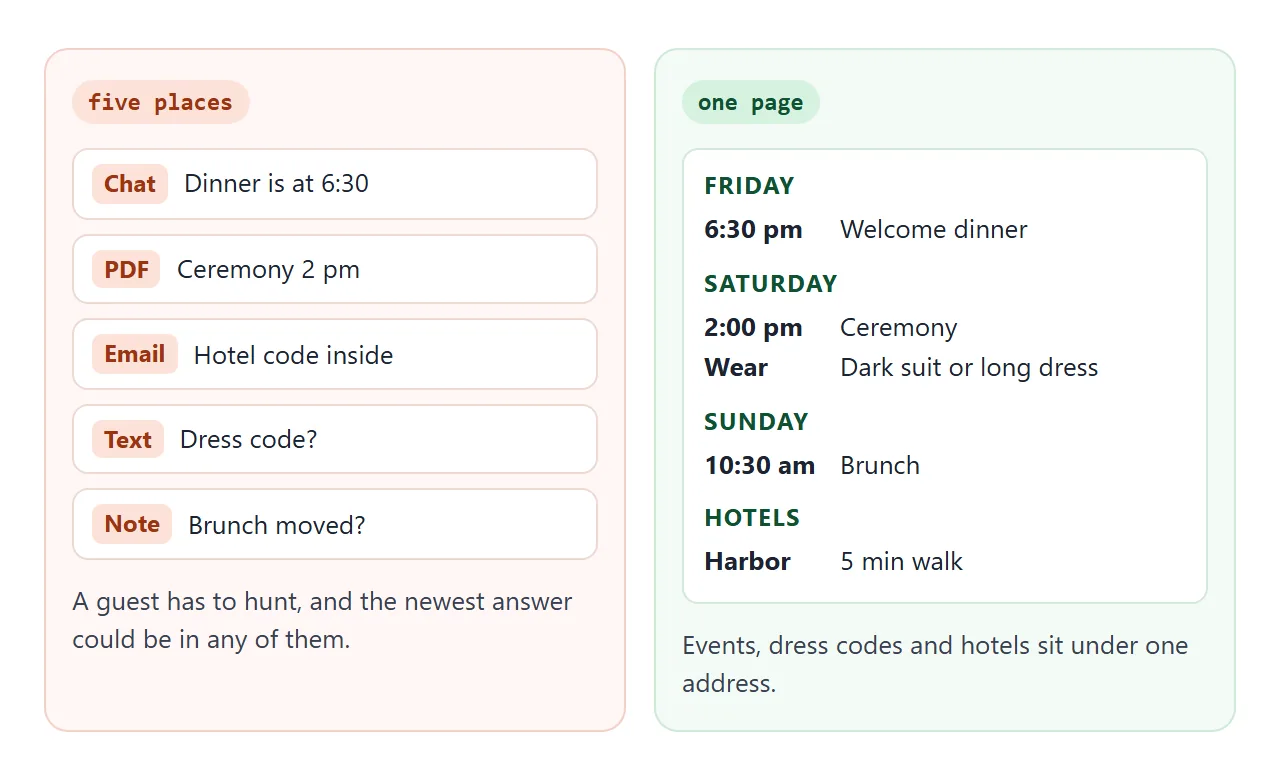
So each day gets a heading, and each event under it carries four things:
- Time, written the same way every time, with the city if guests travel across time zones.
- Event name, in plain words: "Welcome dinner", not "Pre-celebration".
- Place, with the street address so it can be copied into a map.
- What to wear, in a few words.
Hotels go last, below the events guests will check again and again. For each hotel give the name, how far it is from the venue and the booking deadline.
A map link helps on the road. Google documents a link form that opens a search for a place or address, with spaces written as plus signs:
https://www.google.com/maps/search/?api=1&query=Maple+Hall+Alder+Bay
That is how Google describes it as of October 2026. Check that your link opens the right place before you share it.
Make it with AI
You do not need to write HTML. Paste your list into the AI chat you already use, with this prompt. Replace the text in square brackets.
Make one self-contained HTML page for guests of a wedding weekend.
It will be opened on a phone, so use one column and large text.
Use only inline CSS and a small inline script. No images, no
external fonts, no external scripts, no forms that send data.

Show: the title, the dates, then one section per day. Each event
has a time, a name, a place, and a short "Wear:" line. Add day
buttons (All, Fri, Sat, Sun) that show or hide the days. At the
end add a "Where to stay" section with name, distance and
booking deadline for each hotel.

Add a "Mark as changed" checkbox to each event. When it is
ticked, give that event an orange edge and a "Changed" label.

My plan: [paste your events, dress codes and hotels here]
When the page comes back, check it before you send it:
- Every time, name and address matches your notes. Read each line against your notes, and do not assume it was copied correctly.
- Nothing you did not supply has been added, such as a phone number or a website.
- The page fits a phone. Paste it into NOS and look at it narrow before sharing.
- No pictures or links to other sites that you did not ask for. Outside images do not load in NOS.
Send it as a link
Paste the HTML into a NOS document and choose Create share link. HTML to link walks through it.
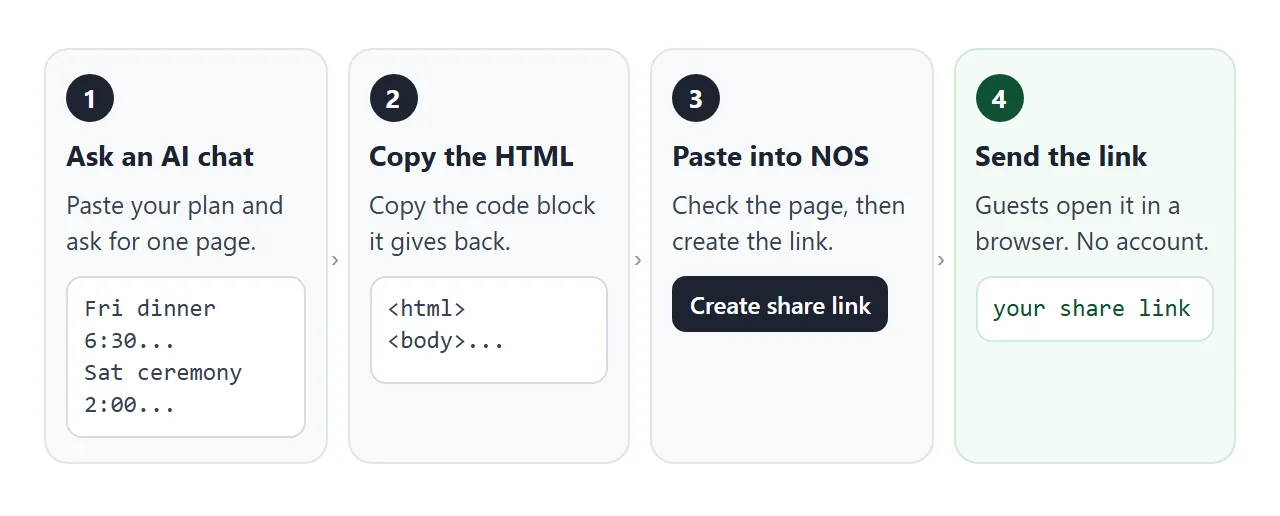
Your guests open the link in a browser, on a phone too, without an account. They cannot edit the page. The scripts in it run, so the day buttons work for them.
The link is plain text, so it can go into an email, a text message or a group chat. If it also goes on paper, QR code link covers that. For the wedding details around this page, see Share wedding details with guests.
Ways to share a weekend plan compared
The difference shows up when something changes.
| Way to share | After a change | Everything in one place |
|---|---|---|
| PDF or file attachment | A new file to send; old copies stay in inboxes | Yes, until it changes |
| Messages in a group chat | A new message; older ones stay above it | No, it is spread over messages |
| Printed card | A reprint | Only what fits on the card |
| Link to one page | Edit the page; the same link shows it | Yes |
Two of these can work together: the card carries the date and venue, and the link carries the rest. The longer itinerary link guide covers the same idea for any trip.
Update it when plans shift
Plans move, and they usually move late. There are two ways to update this page, and they do different jobs.
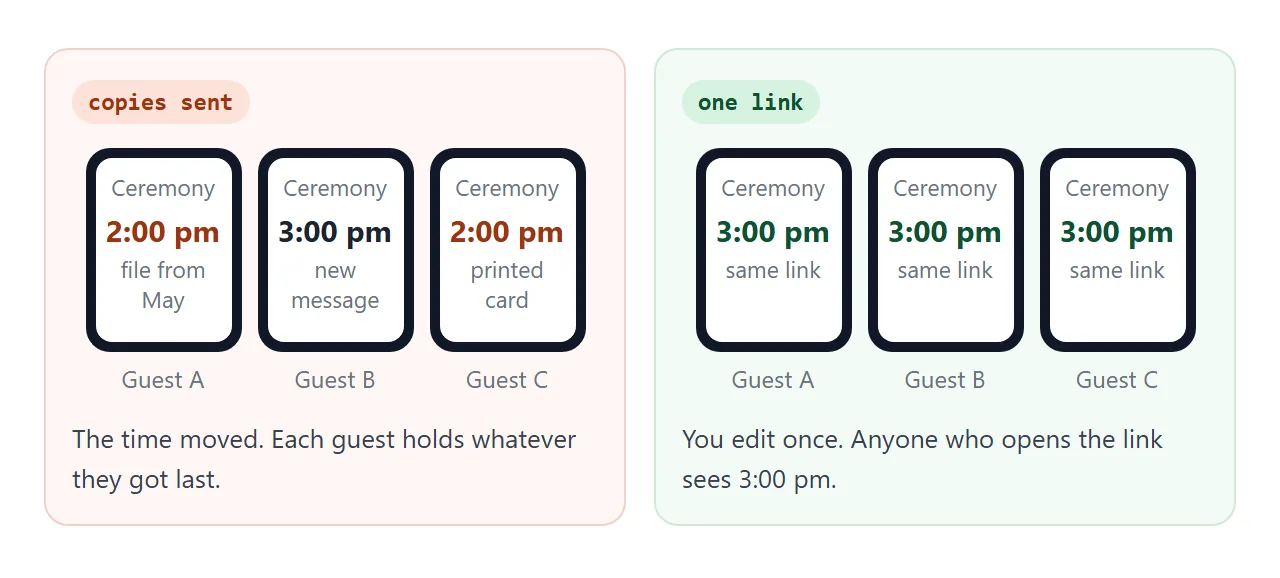
Edit the code for anything guests must read: a new time, a changed venue, a new hotel. Editing the code keeps the same link, so everyone who opens it afterwards sees the new version. Add a line at the top saying what changed.
Click in View mode for your own working lists. Changes you make in View mode, such as ticks and added rows, are saved. A visitor's ticks and added rows are not. That makes a page like the checklist below useful for you, not for guests.
<!doctype html>
<html lang="en">
<head>
<meta charset="utf-8">
<meta name="viewport" content="width=device-width, initial-scale=1">
<title>Host checklist for the weekend</title>
<style>
*{box-sizing:border-box;margin:0;padding:0}
body{font-family:"Segoe UI",system-ui,sans-serif;background:#f6f7f9;color:#1f2430;line-height:1.45;padding:16px}
.wrap{max-width:640px;margin:0 auto}
h1{font-size:21px}
.sub{color:#5b6372;font-size:14px;margin:4px 0 12px}
.bar{height:8px;background:#e1e5ec;border-radius:99px;overflow:hidden}
.bar i{display:block;height:100%;width:0;background:#2f8f5b;transition:width .2s}
#count{font-size:13.5px;color:#5b6372;margin:6px 0 14px}
table{width:100%;border-collapse:collapse;background:#fff;border:1px solid #dfe3ea;border-radius:10px;overflow:hidden}
th{text-align:left;font-size:12px;letter-spacing:.06em;text-transform:uppercase;color:#6b7383;background:#eef0f4;padding:8px 10px}
td{padding:9px 10px;border-top:1px solid #e8ebf0;font-size:14.5px;vertical-align:top}
td.chk{width:38px}
td.chk input{width:20px;height:20px}
tr.done td.what{text-decoration:line-through;color:#8a92a1}
.day{font-size:13px;color:#5b6372;white-space:nowrap}
form{display:flex;gap:8px;flex-wrap:wrap;margin-top:14px}
form input[type=text]{flex:1 1 200px;font:inherit;font-size:14.5px;padding:8px 10px;border:1px solid #c8cfda;border-radius:8px}
form select,form button{font:inherit;font-size:14.5px;padding:8px 12px;border:1px solid #c8cfda;border-radius:8px;background:#fff}
form button{background:#1f2430;color:#fff;border-color:#1f2430;cursor:pointer}
@media(max-width:480px){.day{white-space:normal}}
</style>
</head>
<body>
<div class="wrap">
  <h1>Host checklist: wedding weekend</h1>
  <p class="sub">Tick a task when it is done. Add a task at the bottom.</p>
  <div class="bar"><i id="fill"></i></div>
  <p id="count"></p>

  <table>
    <thead><tr><th></th><th>Task</th><th>When</th></tr></thead>
    <tbody id="rows">
      <tr><td class="chk"><input type="checkbox" aria-label="done"></td><td class="what">Confirm the Friday dinner headcount with Lantern Terrace</td><td class="day">Wed</td></tr>
      <tr><td class="chk"><input type="checkbox" aria-label="done"></td><td class="what">Send the final itinerary link to all guests</td><td class="day">Wed</td></tr>
      <tr><td class="chk"><input type="checkbox" aria-label="done"></td><td class="what">Check the Harbor Inn room list</td><td class="day">Thu</td></tr>
      <tr><td class="chk"><input type="checkbox" aria-label="done"></td><td class="what">Drop the welcome bags at both hotels</td><td class="day">Fri</td></tr>
      <tr><td class="chk"><input type="checkbox" aria-label="done"></td><td class="what">Walk through the garden plan with the Maple Hall manager</td><td class="day">Sat</td></tr>
      <tr><td class="chk"><input type="checkbox" aria-label="done"></td><td class="what">Settle the brunch bill</td><td class="day">Sun</td></tr>
    </tbody>
  </table>

  <form id="add">
    <input type="text" id="what" placeholder="New task" aria-label="New task" required>
    <select id="when" aria-label="Day">
      <option>Wed</option><option>Thu</option><option>Fri</option><option>Sat</option><option>Sun</option>
    </select>
    <button type="submit">Add task</button>
  </form>
</div>

<script>
const rows = document.getElementById('rows');
const fill = document.getElementById('fill');
const count = document.getElementById('count');

function update() {
  const all = rows.querySelectorAll('tr');
  const done = rows.querySelectorAll('tr.done');
  fill.style.width = (all.length ? done.length / all.length * 100 : 0) + '%';
  count.textContent = done.length + ' of ' + all.length + ' done';
}

// One listener on the table body handles every row, including rows added later.
rows.addEventListener('change', function (e) {
  if (e.target.type === 'checkbox') {
    e.target.closest('tr').classList.toggle('done', e.target.checked);
    update();
  }
});

document.getElementById('add').addEventListener('submit', function (e) {
  e.preventDefault();
  const text = document.getElementById('what');
  const tr = document.createElement('tr');
  tr.innerHTML = '<td class="chk"><input type="checkbox" aria-label="done"></td><td class="what"></td><td class="day"></td>';
  tr.querySelector('.what').textContent = text.value;
  tr.querySelector('.day').textContent = document.getElementById('when').value;
  rows.appendChild(tr);
  text.value = '';
  update();
});

update();
</script>
</body>
</html>
If a change is close to the day, send a message too. The page is the record, and the message is the alert.
When it does not work
| Symptom | Cause | Fix |
|---|---|---|
| The page looks cramped on a phone | The prompt did not ask for one column | Ask the AI chat for one column and large text, then paste again |
| A guest says the time is still the old one | They are looking at a file or card, not the link | Put the link in a message and say the time changed |
| Pictures are missing | Outside images are blocked in NOS | Ask for a page without images, or for shapes drawn in the page |
| A form on the page does nothing | Sending a form to a server is blocked | Collect replies by message, or keep forms inside the page |
| Your ticks were gone for a guest | A visitor's changes are not saved | Edit the code for what guests need to read |
| The map link opens the wrong place | The address in the link is incomplete | Add the street and town to the address in the link |
Put it at one address
List the events day by day with a dress code on each, add the hotels, have an AI chat write the page, check every line, and share the link. When plans shift, edit the code and the same link shows the change.