Here WordPress means the website software, and "custom HTML and CSS" means two boxes. The Custom HTML block holds your markup. Additional CSS holds your styles.
The quickest way to get both right is to build the widget in one ordinary HTML file first, test it in a browser, then split it into those two places.
Here is a small widget written that way. Click the button, then read the three marked parts in the code.
<!doctype html>
<html lang="en">
<head>
<meta charset="utf-8">
<meta name="viewport" content="width=device-width, initial-scale=1">
<title>One-file widget</title>
<style>
  /* PART 1 - CSS: later goes into Additional CSS */
  body { margin: 0; padding: 16px; font-family: system-ui, sans-serif; background: #f4f5f7; }
  .nc-box {
    max-width: 340px; padding: 16px 18px; border-radius: 12px;
    background: #fff; box-shadow: 0 6px 20px rgba(0, 0, 0, .12);
  }
  .nc-box h3 { margin: 0 0 6px; font-size: 18px; }
  .nc-box p { margin: 0 0 12px; color: #444; }
  .nc-box button {
    padding: 9px 16px; border: 0; border-radius: 8px;
    background: #1d4ed8; color: #fff; font: inherit; cursor: pointer;
  }
  .nc-box button.on { background: #15803d; }
</style>
</head>
<body>

<!-- PART 2 - HTML: later goes into the Custom HTML block -->
<div class="nc-box">
  <h3>Saturday walk</h3>
  <p id="nc-count">12 people are going.</p>
  <button type="button" id="nc-join">I'm in</button>
</div>

<!-- PART 3 - JavaScript: after the markup it uses -->
<script>
  const join = document.getElementById('nc-join');
  const count = document.getElementById('nc-count');
  let going = 12;

  join.addEventListener('click', () => {
    join.classList.toggle('on');
    going += join.classList.contains('on') ? 1 : -1;
    join.textContent = join.classList.contains('on') ? 'Going - undo' : "I'm in";
    count.textContent = going + ' people are going.';
  });
</script>
</body>
</html>
The class names all start with nc-. That is a habit worth keeping, and the reason is further down.
The three places your code goes
A single file mixes three jobs. WordPress gives each job its own home.
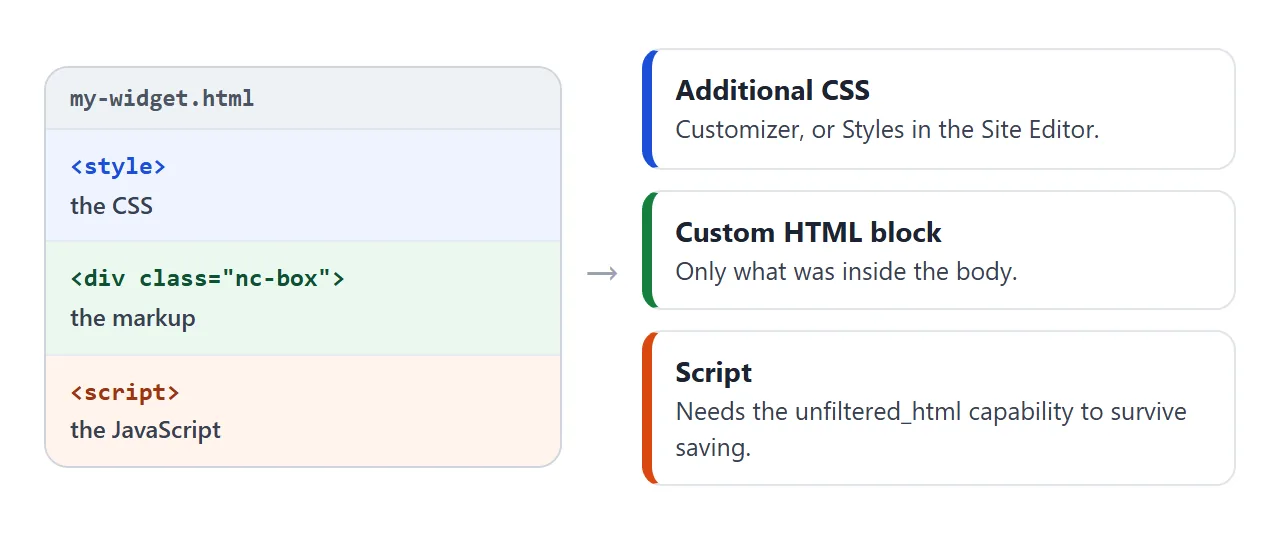
- The CSS goes into Additional CSS, which WordPress describes as a panel for CSS that overrides the current theme.
- The markup goes into a Custom HTML block, which the block editor's reference describes as a block to add custom HTML code and preview it as you edit.
- The script is the touchy part. Whether it survives depends on who saves the post, as the section on scripts explains.
Add the HTML with the Custom HTML block
The block is named core/html. Add it from the editor:
- Click the Block Inserter icon, or type
/htmlin a new paragraph and press Enter. - Click Edit HTML to open the editing window.
- Paste the code. A preview of the output appears to the right of the code.
- Press Update.
Paste only what was inside the <body> tag. The <html> element is the root of a document, and every other element must sit inside it. Your block already sits inside a page, so the wrapper tags do not belong in it.
Add the CSS with Additional CSS
Where the box lives depends on the kind of theme.
With a theme that supports the Customizer, choose Appearance, then Customize, then Additional CSS. The Customizer previews changes before you publish them, and WordPress notes that changes made there are kept, whereas edits to theme files can be lost when the theme updates.
WordPress says a block theme hides the Customizer, so there you work in the Site Editor. Open Appearance, then Editor, open Styles, and choose Additional CSS from the three-dot menu. This has existed since WordPress 6.2.
One detail from the Styles documentation: CSS added there is not overwritten by a theme update, but it is cleared when you switch themes. Keep your tested file as the master copy.
Keep your CSS from changing the whole site
Your widget does not live alone. The page around it already has the theme's styles, and your Additional CSS applies to the entire site, not just to the block.
So a rule written for the widget can hit things you never meant to touch. Try it: switch between the two selectors and watch the theme's own buttons.
<!doctype html>
<html lang="en">
<head>
<meta charset="utf-8">
<meta name="viewport" content="width=device-width, initial-scale=1">
<title>Selector scope</title>
<style>
  body { margin: 0; padding: 14px; font-family: system-ui, sans-serif; background: #eef0f3; color: #1d2330; }
  .pick { display: flex; flex-wrap: wrap; gap: 8px 18px; margin-bottom: 10px; font-size: 14px; }
  .pick label { cursor: pointer; }
  pre { margin: 0 0 12px; padding: 8px 10px; border-radius: 8px; background: #1d2330; color: #e8ecf3; font: 13px/1.5 ui-monospace, Consolas, monospace; white-space: pre-wrap; }
  .page { background: #fff; border-radius: 10px; overflow: hidden; border: 1px solid #d9dde4; }
  .bar { display: flex; gap: 8px; padding: 10px 12px; background: #f7f8fa; border-bottom: 1px solid #e3e6ec; font-size: 13px; align-items: center; }
  .bar span { margin-right: auto; color: #6b7280; }
  .main { padding: 14px 12px; }
  .nc-box { padding: 12px 14px; border: 2px dashed #9aa3b2; border-radius: 10px; }
  .nc-box p { margin: 0 0 10px; }
  .note { margin: 10px 0 0; font-size: 13px; color: #374151; }
</style>
<!-- Stands in for the theme's stylesheet: it styles every button on the site -->
<style id="theme">
  button { padding: 7px 14px; border: 1px solid #1d2330; border-radius: 0; background: #fff; color: #1d2330; font: inherit; cursor: pointer; }
</style>
<!-- Stands in for your Additional CSS: swapped by the radio buttons -->
<style id="mine"></style>
</head>
<body>

<div class="pick">
  <label><input type="radio" name="scope" value="generic" checked> Generic selector</label>
  <label><input type="radio" name="scope" value="scoped"> Scoped selector</label>
</div>
<pre id="rule"></pre>

<div class="page">
  <div class="bar"><span>Theme header</span><button type="button">Menu</button><button type="button">Search</button></div>
  <div class="main">
    <div class="nc-box">
      <p>My widget</p>
      <button type="button">Join</button>
    </div>
    <p class="note" id="note"></p>
  </div>
</div>

<script>
  const mine = document.getElementById('mine');
  const rule = document.getElementById('rule');
  const note = document.getElementById('note');
  const body = 'background: #e8590c; color: #fff; border-color: #e8590c; border-radius: 20px;';
  const options = {
    generic: { sel: 'button', text: 'Every button on the page changed, including the theme\'s Menu and Search.' },
    scoped:  { sel: '.nc-box button', text: 'Only the button inside the widget changed.' }
  };

  function show(key) {
    const o = options[key];
    const css = o.sel + ' { ' + body + ' }';
    mine.textContent = css;
    rule.textContent = css;
    note.textContent = o.text;
  }

  document.querySelectorAll('input[name="scope"]').forEach((r) => {
    r.addEventListener('change', () => show(r.value));
  });
  show('generic');
</script>
</body>
</html>
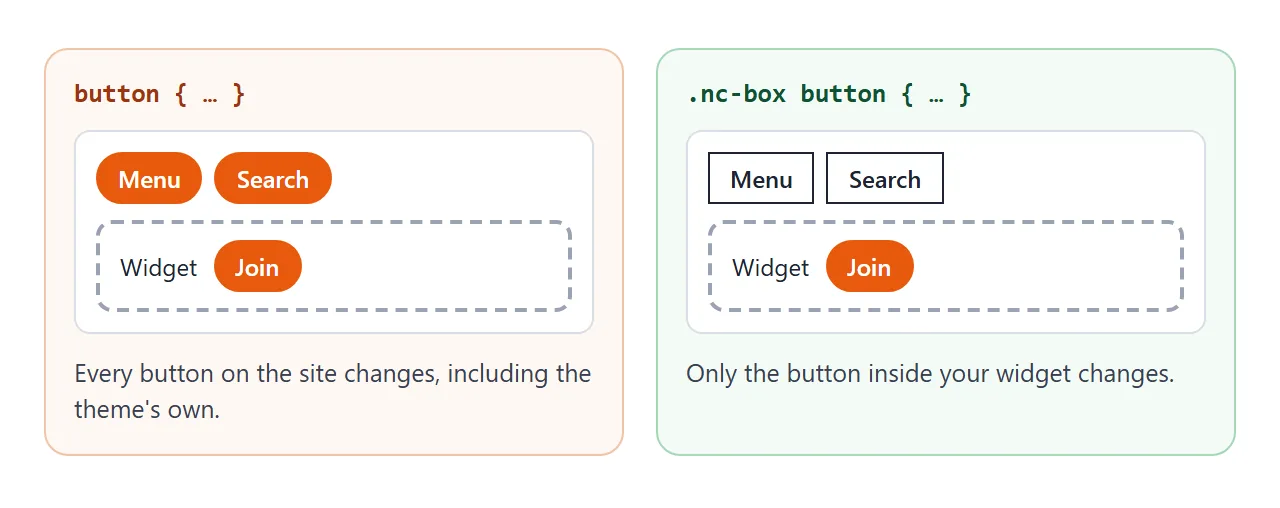
The fix is the nc- habit. Start every rule with a class that only your markup carries, such as .nc-box button.
A class selector also outweighs a plain type selector such as button, so if a theme rule beats yours, the scoped version usually wins without any extra tricks.
Why a script can disappear after saving
WordPress documents that users without the unfiltered_html capability, a Contributor for example, get their Custom HTML sanitized with wp_kses(). That function allows only the permitted tags and attributes, and the documentation names <script> and <iframe> as examples of what gets stripped.
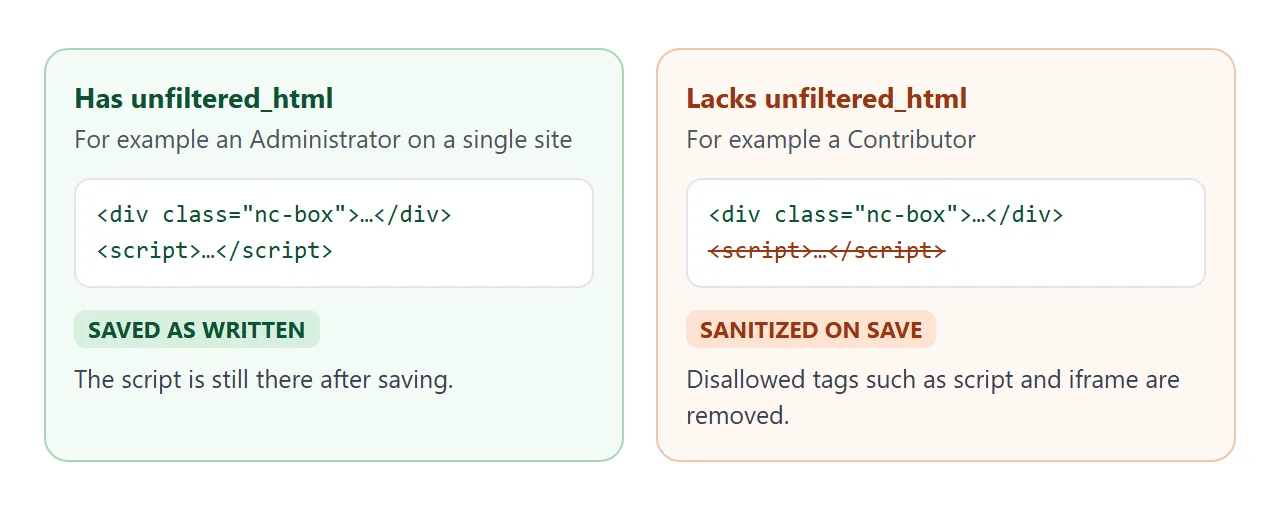
The capability allows a user to post HTML markup or even JavaScript in pages, posts, comments and widgets. On a single site, Administrators and Editors have it by default. On Multisite, only a Super Admin does.
The documentation also says that starting in WordPress 7.0 the block has separate HTML, CSS and JavaScript panels, and that the CSS and JavaScript panels appear only for users with the capability.
If you maintain a theme or plugin, WordPress recommends loading scripts and styles through its standard method, shown here:
function add_theme_scripts() {
  wp_enqueue_style( 'style', get_stylesheet_uri() );
  wp_enqueue_script( 'script', get_template_directory_uri() . '/js/script.js', array( 'jquery' ), 1.1, true );
}
add_action( 'wp_enqueue_scripts', 'add_theme_scripts' );
That runs on the server, so it cannot be tried in a plain HTML file.
Split the file in one click
Copying three parts by hand invites mistakes. This page reads a full HTML file and sorts it into the three boxes, then lists what needs attention.
<!doctype html>
<html lang="en">
<head>
<meta charset="utf-8">
<meta name="viewport" content="width=device-width, initial-scale=1">
<title>Split a page into WordPress parts</title>
<style>
body { margin: 0; padding: 14px; font-family: system-ui, sans-serif; background: #f4f5f7; color: #1d2330; }
h1 { margin: 0 0 4px; font-size: 18px; }
.hint { margin: 0 0 10px; font-size: 13px; color: #4b5563; }
label { display: block; margin: 10px 0 4px; font-size: 13px; font-weight: 700; }
label small { font-weight: 400; color: #4b5563; }
textarea {
box-sizing: border-box; width: 100%; padding: 8px 10px; border: 1px solid #c9ced8; border-radius: 8px;
font: 12.5px/1.45 ui-monospace, Consolas, monospace; background: #fff; color: #1d2330; resize: vertical;
}
#src { height: 150px; }
.out { height: 96px; background: #fafbfc; }
ul { margin: 12px 0 0; padding: 0; list-style: none; font-size: 13px; line-height: 1.45; }
li { margin: 0 0 6px; padding: 7px 10px; border-radius: 8px; background: #fff; border-left: 4px solid #15803d; }
li.warn { border-left-color: #d9480f; }
</style>
</head>
<body>
<h1>Split a page into WordPress parts</h1>
<p class="hint">Paste a whole HTML file, or edit the sample. Nothing is sent anywhere.</p>
<label for="src">Your single HTML file</label>
<textarea id="src" spellcheck="false"><!doctype html>
<html>
<head>
<style>
.nc-box { padding: 14px; border-radius: 10px; background: #fff; }
.nc-box button { padding: 8px 14px; }
</style>
</head>
<body>
<div class="nc-box">
<p id="nc-count">12 people are going.</p>
<button type="button" id="nc-join">I'm in</button>
</div>
<script>
document.getElementById('nc-join').addEventListener('click', () => {
document.getElementById('nc-count').textContent = '13 people are going.';
});
</script>
</body>
</html></textarea>
<label for="html">Custom HTML block <small>(the body contents)</small></label>
<textarea id="html" class="out" readonly spellcheck="false"></textarea>
<label for="css">Additional CSS <small>(every style block)</small></label>
<textarea id="css" class="out" readonly spellcheck="false"></textarea>
<label for="js">JavaScript <small>(every inline script)</small></label>
<textarea id="js" class="out" readonly spellcheck="false"></textarea>
<ul id="notes"></ul>
<script>
const $ = (id) => document.getElementById(id);
function split() {
const src = $('src').value;
// Parsing builds a document but does not run its scripts
const doc = new DOMParser().parseFromString(src, 'text/html');
const css = [...doc.querySelectorAll('style')].map((s) => s.textContent.trim());
const inline = [...doc.querySelectorAll('script:not([src])')].map((s) => s.textContent.trim());
const external = [...doc.querySelectorAll('script[src], link[rel~="stylesheet"]')]
.map((el) => el.getAttribute('src') || el.getAttribute('href'));
const frames = doc.querySelectorAll('iframe').length;
const scripts = doc.querySelectorAll('script').length;
const body = doc.body.cloneNode(true);
body.querySelectorAll('style, script').forEach((el) => el.remove());
$('html').value = body.innerHTML.trim();
$('css').value = css.join('\n\n');
$('js').value = inline.join('\n\n');
const notes = [];
if (/<(html|head|body)[\s>]/i.test(src)) {
notes.push(['ok', 'The html, head and body wrapper tags are left out. The block sits inside a page that already has them.']);
}
if (css.length) notes.push(['ok', css.length + ' style block(s) moved to the CSS box.']);
if (scripts) notes.push(['warn', scripts + ' script tag(s) found. WordPress strips script tags on save for users without the unfiltered_html capability.']);
if (frames) notes.push(['warn', frames + ' iframe(s) found. These are stripped for users without unfiltered_html too.']);
external.forEach((u) => notes.push(['warn', 'External file: ' + u + '. Check that it also loads on the WordPress page.']));
if (!scripts && !frames) notes.push(['ok', 'No script or iframe tags found.']);
$('notes').innerHTML = '';
notes.forEach(([kind, text]) => {
const li = document.createElement('li');
if (kind === 'warn') li.className = 'warn';
li.textContent = text;
$('notes').appendChild(li);
});
}
$('src').addEventListener('input', split);
split();
</script>
</body>
</html>
It parses the text with DOMParser, which builds a document without running its scripts. The same warnings apply as above: a script or iframe in your file needs a user with the capability.
Everything on this page was tested in a plain browser file, not inside a WordPress install. After you paste, open the published page and check how your theme treats the result.
When it does not work
| What you see | Cause | Fix |
|---|---|---|
| The script does nothing after saving | The saving user lacks unfiltered_html | Have a user with the capability add it |
| The iframe is gone | iframe is stripped for the same reason | Same fix |
| Buttons or links all over the site changed | A generic selector in Additional CSS | Scope with a class: .nc-box button |
| My rule loses to the theme | The theme's selector is more specific | Use a class-based selector |
| Additional CSS is not in the menu | A block theme hides the Customizer | Appearance, Editor, Styles, three-dot menu |
| Styles vanished after changing theme | Site Editor CSS is cleared on a theme switch | Re-paste from your tested file |
| Extra html, head and body tags inside the block | The whole file was pasted | Paste only the body contents |
Share it as a link
Before the widget goes into a live WordPress site, you may want someone else to try it. A screenshot cannot be clicked. A single working file can.
To send the working version, paste the page into a NOS document and choose Create share link. HTML to link walks through it.
The page renders as written and its scripts run, so the people you send it to can click the button themselves, without an account. If you change the code later, the same link shows the new version.
For the file habit behind this, see self-contained HTML files. If the whole site is the real goal, turning a managed site into static files covers that path.