A workshop handout that people can open on any device and come back to later is a web page, not a file. Ask an AI chat to draft it, check the details yourself, paste it into NOS and send one link.
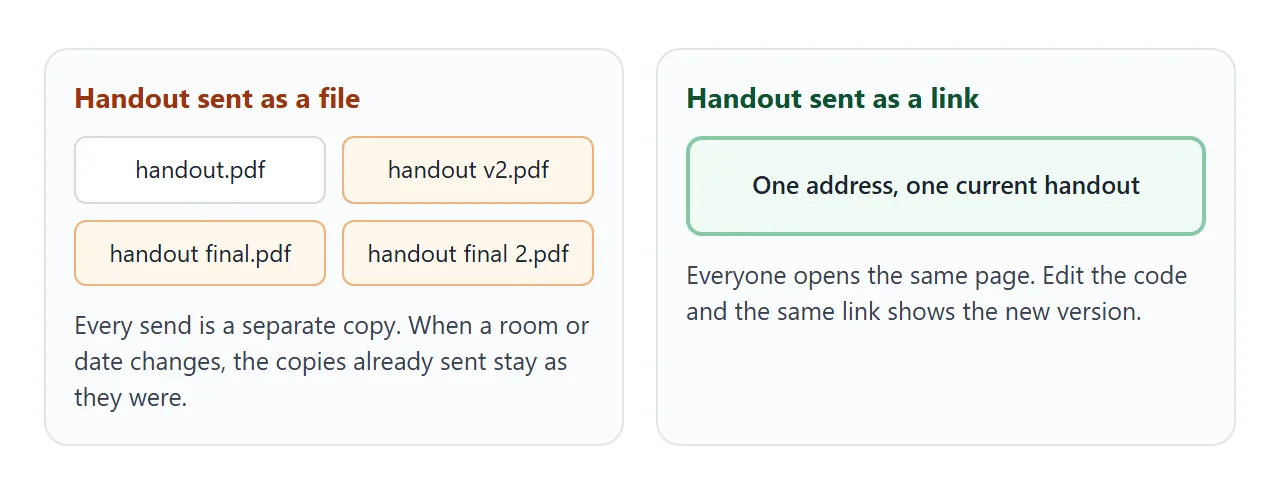
Handouts change until the last minute. A room moves, an exercise gets a fix, a step is reordered. Sent as a file, each version becomes another copy. Joseph Darnell of Automaton wrote about this in a July 2026 post on sharing HTML files.
He was describing a client project, not a workshop, but the problem is the same: "By presentation day there were four versions of the file floating around Slack and no one could say with certainty which one was final."
Here is a finished handout for a made-up session, with made-up names. Tick the boxes and open the hints.
<!doctype html>
<html lang="en">
<head>
<meta charset="utf-8">
<meta name="viewport" content="width=device-width, initial-scale=1">
<title>Scope It Before You Price It - workshop handout</title>
<style>
* { box-sizing: border-box; }
body { margin: 0; font-family: system-ui, -apple-system, "Segoe UI", sans-serif; color: #1d2433; background: #f4f6f8; line-height: 1.55; }
.page { max-width: 720px; margin: 0 auto; padding: 24px 18px 36px; }
.kicker { font-size: 13px; letter-spacing: .08em; text-transform: uppercase; color: #0b6b63; font-weight: 700; }
h1 { font-size: 28px; line-height: 1.2; margin: 6px 0 10px; }
.meta { display: flex; flex-wrap: wrap; gap: 8px; margin: 0 0 6px; padding: 0; list-style: none; }
.meta li { background: #fff; border: 1px solid #dde2e8; border-radius: 999px; padding: 4px 12px; font-size: 14px; }
.updated { font-size: 13px; color: #5b6575; margin: 8px 0 0; }
h2 { font-size: 13px; letter-spacing: .08em; text-transform: uppercase; color: #5b6575; margin: 28px 0 10px; }
.grid { display: grid; grid-template-columns: 1fr 1fr; gap: 10px; }
.card { background: #fff; border: 1px solid #dde2e8; border-radius: 12px; padding: 13px 14px; break-inside: avoid; }
.card b { display: block; font-size: 16px; margin-bottom: 4px; }
.card span { display: block; font-size: 14.5px; color: #3c4658; }
.card em { display: block; margin-top: 8px; font-size: 13.5px; font-style: normal; color: #0b6b63; }
.list { background: #fff; border: 1px solid #dde2e8; border-radius: 12px; padding: 6px 14px; }
.list label { display: flex; gap: 10px; align-items: flex-start; padding: 9px 0; border-bottom: 1px solid #edf0f3; cursor: pointer; font-size: 15px; }
.list label:last-child { border-bottom: 0; }
.list input { width: 20px; height: 20px; margin-top: 2px; accent-color: #0b6b63; flex: none; }
.list input:checked + span { color: #6b7686; text-decoration: line-through; }
.progress { display: flex; align-items: center; gap: 10px; margin-top: 10px; font-size: 14px; color: #3c4658; }
.bar { flex: 1; height: 8px; background: #e3e8ee; border-radius: 99px; overflow: hidden; }
.bar i { display: block; height: 100%; width: 0; background: #0b6b63; transition: width .2s; }
.note { font-size: 13px; color: #5b6575; margin: 6px 0 0; }
blockquote { margin: 0 0 10px; background: #fff; border-left: 4px solid #0b6b63; border-radius: 0 10px 10px 0; padding: 12px 14px; font-size: 15px; }
details { background: #fff; border: 1px solid #dde2e8; border-radius: 10px; margin-bottom: 8px; padding: 0 14px; }
summary { cursor: pointer; padding: 11px 0; font-weight: 600; font-size: 15px; }
summary:focus-visible, .list input:focus-visible, .btn:focus-visible { outline: 3px solid #f2b84b; outline-offset: 2px; }
details p { margin: 0 0 12px; font-size: 14.5px; color: #3c4658; }
.contact { margin-top: 26px; background: #0b6b63; color: #fff; border-radius: 12px; padding: 16px; display: flex; flex-wrap: wrap; gap: 12px; align-items: center; justify-content: space-between; }
.contact p { margin: 0; font-size: 15px; }
.btn { display: inline-block; background: #fff; color: #0b6b63; text-decoration: none; font-weight: 700; padding: 10px 16px; border-radius: 8px; }
@media (max-width: 560px) {
.grid { grid-template-columns: 1fr; }
h1 { font-size: 24px; }
.btn { width: 100%; text-align: center; }
}
@media print {
body { background: #fff; }
.card, .list, details, blockquote { border-color: #999; }
.contact { background: #fff; color: #000; border: 1px solid #999; }
.btn, .progress { display: none; }
}
</style>
</head>
<body>
<main class="page">
<header>
<div class="kicker">Workshop handout · Freelance foundations</div>
<h1>Scope it before you price it</h1>
<ul class="meta">
<li>Thursday 9 October, 10:00 to 11:30</li>
<li>Room B</li>
<li>With Noor Hale</li>
</ul>
<p class="updated">Updated 2 October. Sample handout for this demo; all names are made up.</p>
</header>
<h2>The four questions</h2>
<div class="grid">
<div class="card"><b>1. Outcome</b><span>What will be different for the client when this is done?</span><em>"Their price list is on one page they can edit."</em></div>
<div class="card"><b>2. Done when</b><span>What can both of you check to agree it is finished?</span><em>"Three rounds of feedback used, files handed over."</em></div>
<div class="card"><b>3. Not included</b><span>What might the client assume you are doing, that you are not?</span><em>"Writing the text. Photos. Hosting."</em></div>
<div class="card"><b>4. Change rule</b><span>What happens when the request grows?</span><em>"New items are quoted before I start them."</em></div>
</div>
<h2>During the session</h2>
<div class="list" id="list">
<label><input type="checkbox"><span>Pick one real project you are quoting this month</span></label>
<label><input type="checkbox"><span>Write the outcome in one sentence</span></label>
<label><input type="checkbox"><span>List three things that are not included</span></label>
<label><input type="checkbox"><span>Swap with a neighbour and ask: what did I miss?</span></label>
<label><input type="checkbox"><span>Write your change rule in one line</span></label>
</div>
<div class="progress"><div class="bar"><i id="fill"></i></div><span id="count">0 of 5 done</span></div>
<p class="note">Ticks are for use in the room. They are not saved when you reload the page.</p>
<h2>Exercise</h2>
<blockquote>"Can you do a quick refresh of our website? Maybe new photos too. We would like it live by the end of the month."</blockquote>
<details>
<summary>Hint: what is missing from this request?</summary>
<p>"Refresh" has no outcome. "Maybe new photos" has no owner, so it could land on you. "Live by the end of the month" has no start date or feedback schedule behind it.</p>
</details>
<details>
<summary>A worked answer</summary>
<p>Outcome: the five main pages use the new layout. Done when: two feedback rounds are used and the pages are live. Not included: photography and copywriting. Change rule: extra pages are quoted before work starts.</p>
</details>
<h2>Keep going</h2>
<div class="grid">
<div class="card"><b>Scope checklist</b><span>The four questions on one line each. Paste into your next proposal.</span></div>
<div class="card"><b>Change request note</b><span>A three-sentence reply for when the request grows.</span></div>
</div>
<div class="contact">
<p><b>Questions after today?</b><br>noor@example.com</p>
<a class="btn" href="mailto:noor@example.com?subject=Scoping%20workshop%20question">Email Noor</a>
</div>
</main>
<script>
// Count ticked boxes and fill the bar. Nothing is stored.
const boxes = document.querySelectorAll('#list input');
const fill = document.getElementById('fill');
const count = document.getElementById('count');
function update() {
const done = [...boxes].filter(b => b.checked).length;
fill.style.width = (done / boxes.length * 100) + '%';
count.textContent = done + ' of ' + boxes.length + ' done';
}
boxes.forEach(b => b.addEventListener('change', update));
</script>
</body>
</html>
What goes on it
A handout earns its place by being used during the session and after it. If attendees will not look at a section twice, it belongs in your slides, not here.
- The point: one sentence on what attendees can do after the session that they could not before.
- The reusable part: the steps, questions or template they will want again next week.
- One activity: a checklist or exercise for the room, with hints that stay closed until someone opens them.
- Where next: two or three things to read or try, and one way to reach you.
- An updated date: so anyone who reopens it can see which version they have.
Make it with AI
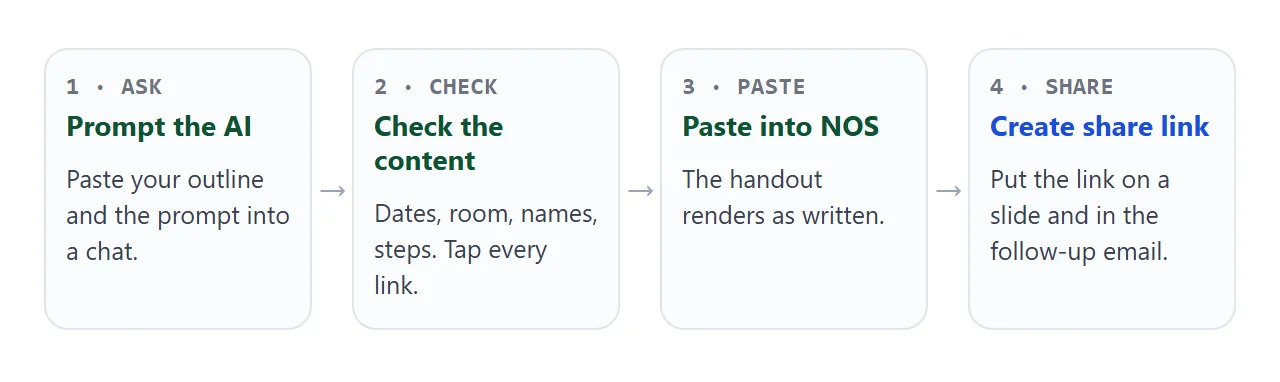
Open ChatGPT, Claude or Gemini, paste the prompt below, and add your outline under it. The prompt asks for a plain page with no outside files, so it keeps working when it is shared.
Build one complete, self-contained HTML file: a handout
for a workshop that I will share as a link.

STRUCTURE
1. Header: session title, date, room, my name
2. The reusable part: 3 to 5 short cards
3. In-room checklist with a progress count
4. One exercise, hints inside details elements
5. Where next: 2 or 3 items
6. Contact: one mailto link with a subject
7. A line "Updated" with today's date

RULES
- where I give no date, room or link, write [TO CONFIRM]
- no localStorage, no forms that send data, no iframes
- no outside images or fonts; system fonts only
- single column, max-width 720px, works at 390px wide
- add a print stylesheet: white background, no buttons

MY OUTLINE
(title, date, room, steps, exercise, resources, email)
Before you share it, check four things:
- Every date, room and name. Compare them with your own notes. A fluent page can hold a wrong time.
- Every [TO CONFIRM]. Fill each one, or delete the line.
- Every link and button. Tap them. A mailto link opens the reader's email program, as MDN describes for the link element.
- A phone screen. Narrow your browser window to a phone width and read it once.
The hints use the details element, which MDN describes as a disclosure widget. It opens and closes without any script.
Send it as a link
Copy the HTML from the chat and paste it into a NOS document. The page renders as written, and its scripts run. Choose Create share link and you get an address.
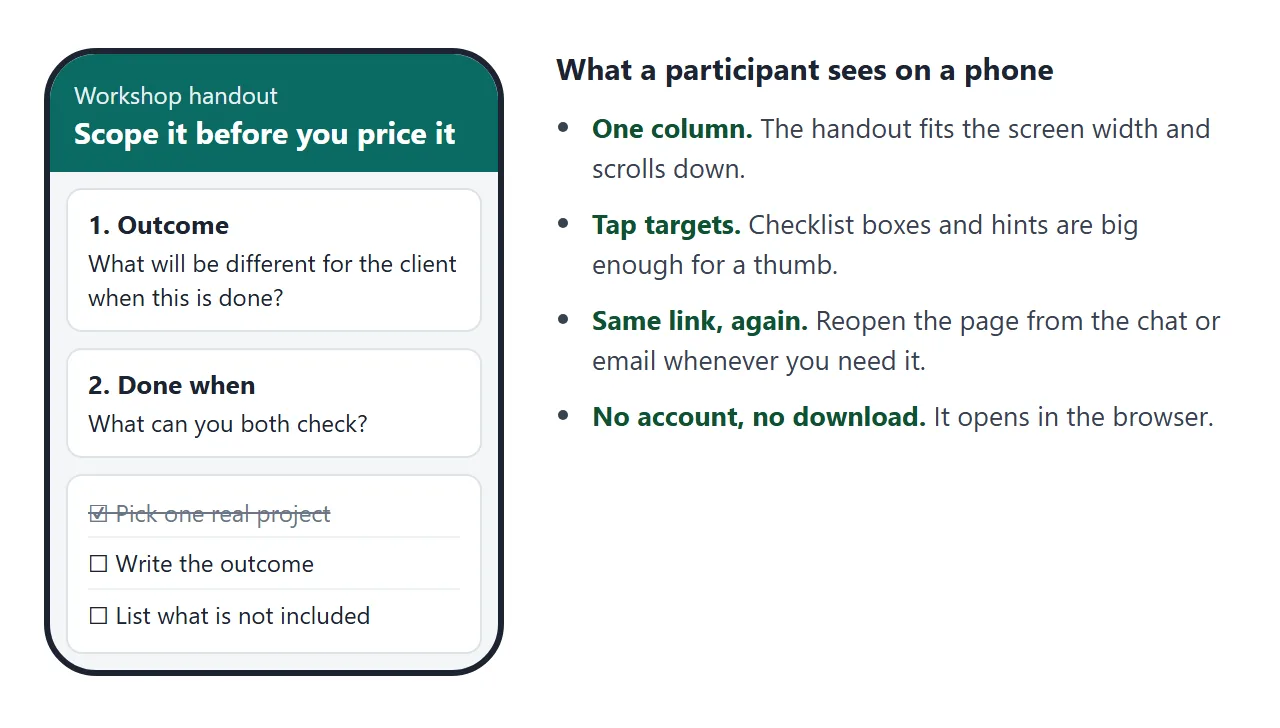
Anyone with the link can open it in a browser, a phone included, without an account. They cannot edit it. HTML to link walks through the steps.
If a room or time changes, edit the code in your document. The same link shows the new version, so you do not send a corrected file and hope people use it.
Ticks and typed answers from people who open the link are not saved, so a reload clears them. Say so in the page itself, as the demo does, and nobody is surprised.
Where to put the link
Put the link where people already look. Show it on the first and last slides, and paste it into the chat or email for the session.
On a printed agenda or a poster, use a QR code. HTML to QR code explains why the code holds the link and how to size it. Scan it once on a real phone first.
For a team workspace, sending an HTML file in Slack covers what to paste.
| Link | PDF attachment | Paper | |
|---|---|---|---|
| Opens on a phone | In the browser | In whatever PDF viewer the phone has | Not applicable |
| After you fix a mistake | Same link, new version | Copies already sent stay as they were | Reprint |
| Attendee needs an account | No | No | No |
| Checklist and hints | Work on the page | Usually static | Static |
| Best for | Handouts that may change | Documents that must stay fixed | Rooms with no screens |
When a client or an organiser asks for a PDF, send one. HTML or PDF for client documents covers that decision.
After the session: a follow-up page
The handout is for the room. A second page can be for the week after. This one asks each attendee to choose one thing to try, then builds a note they can select and copy into their own tools.
<!doctype html>
<html lang="en">
<head>
<meta charset="utf-8">
<meta name="viewport" content="width=device-width, initial-scale=1">
<title>My next step - workshop follow-up</title>
<style>
* { box-sizing: border-box; }
body { margin: 0; font-family: system-ui, -apple-system, "Segoe UI", sans-serif; color: #1d2433; background: #f4f6f8; line-height: 1.55; }
.page { max-width: 640px; margin: 0 auto; padding: 24px 18px 32px; }
.kicker { font-size: 13px; letter-spacing: .08em; text-transform: uppercase; color: #0b6b63; font-weight: 700; }
h1 { font-size: 26px; line-height: 1.2; margin: 6px 0 8px; }
p.lead { margin: 0 0 18px; color: #3c4658; }
form { background: #fff; border: 1px solid #dde2e8; border-radius: 12px; padding: 16px; }
fieldset { border: 0; margin: 0 0 16px; padding: 0; }
legend, label.t { font-weight: 600; font-size: 15px; margin-bottom: 6px; display: block; padding: 0; }
.opt { display: flex; gap: 10px; align-items: center; padding: 8px 10px; border: 1px solid #dde2e8; border-radius: 8px; margin-bottom: 6px; cursor: pointer; font-size: 15px; }
.opt input { width: 18px; height: 18px; accent-color: #0b6b63; flex: none; }
input[type=text], select, textarea { width: 100%; font: inherit; font-size: 16px; padding: 10px; border: 1px solid #bfc7d1; border-radius: 8px; background: #fff; }
textarea { min-height: 84px; resize: vertical; }
.row { margin-bottom: 16px; }
.btn { background: #0b6b63; color: #fff; border: 0; border-radius: 8px; font: inherit; font-weight: 700; padding: 11px 18px; cursor: pointer; }
.btn.alt { background: #fff; color: #0b6b63; border: 1px solid #0b6b63; }
.btn:focus-visible, input:focus-visible, select:focus-visible, textarea:focus-visible { outline: 3px solid #f2b84b; outline-offset: 2px; }
.err { color: #9a2a12; font-size: 14px; margin: 8px 0 0; min-height: 20px; }
#result { margin-top: 18px; }
.done { background: #e8f5f1; border: 1px solid #9fd3c6; border-radius: 12px; padding: 14px 16px; }
.done h2 { font-size: 16px; margin: 0 0 6px; }
.done textarea { background: #fff; margin: 8px 0 10px; min-height: 96px; }
@media (max-width: 480px) { h1 { font-size: 22px; } .btn { width: 100%; margin-bottom: 8px; } }
</style>
</head>
<body>
<main class="page">
<div class="kicker">After the workshop · Scope it before you price it</div>
<h1>Pick one thing to try this week</h1>
<p class="lead">Choose one of the four questions, name the project, and write it down. You get a note you can copy into your own tools.</p>
<form id="f" novalidate>
<fieldset>
<legend>Which question will you use first?</legend>
<label class="opt"><input type="radio" name="q" value="Outcome"> Outcome</label>
<label class="opt"><input type="radio" name="q" value="Done when"> Done when</label>
<label class="opt"><input type="radio" name="q" value="Not included"> Not included</label>
<label class="opt"><input type="radio" name="q" value="Change rule"> Change rule</label>
</fieldset>
<div class="row">
<label class="t" for="proj">Which project?</label>
<input type="text" id="proj" placeholder="e.g. Bakery website refresh">
</div>
<div class="row">
<label class="t" for="day">By when?</label>
<select id="day">
<option>Monday</option><option>Tuesday</option><option>Wednesday</option><option>Thursday</option><option>Friday</option>
</select>
</div>
<div class="row">
<label class="t" for="how">In one sentence, what will you write or say?</label>
<textarea id="how"></textarea>
</div>
<button class="btn" type="submit">Make my note</button>
<p class="err" id="err" role="alert"></p>
</form>
<div id="result" aria-live="polite"></div>
</main>
<script>
const f = document.getElementById('f');
const err = document.getElementById('err');
const result = document.getElementById('result');
f.addEventListener('submit', function (e) {
e.preventDefault(); // nothing is sent anywhere
const q = f.querySelector('input[name=q]:checked');
const proj = document.getElementById('proj').value.trim();
const how = document.getElementById('how').value.trim();
if (!q || !proj || !how) {
err.textContent = 'Please choose a question and fill in the project and your sentence.';
return;
}
err.textContent = '';
const day = document.getElementById('day').value;
const note = 'Workshop next step\nQuestion: ' + q.value + '\nProject: ' + proj + '\nBy: ' + day + '\nI will: ' + how;
result.innerHTML = '<div class="done"><h2>Your note</h2><textarea id="note" readonly></textarea>' +
'<button class="btn alt" type="button" id="sel">Select the text</button></div>';
const ta = document.getElementById('note');
ta.value = note;
document.getElementById('sel').addEventListener('click', function () { ta.focus(); ta.select(); });
});
</script>
</body>
</html>
The form is handled inside the page, which works on a shared link. Sending a form to a server is blocked, so you will not receive these answers. If you want replies, ask attendees to email you.
Put this link in your follow-up message with one sentence about what to do first. Email or link for documents compares both for the message itself.
When it does not work
| What you see | Cause | Fix |
|---|---|---|
| Attendees see an old version | They saved or forwarded a file | Send only the link, and say so on the slide |
| A date or room is wrong | The AI filled a gap you left | Ask for [TO CONFIRM] and fix each one |
| Ticks are gone after reload | Changes by visitors are not saved | Say so on the page, or offer a note to copy |
| An image or font is missing | Outside images are blocked | Ask for CSS shapes or inline SVG |
| A form sends nothing to you | Sending a form to a server is blocked | Use a mailto link for replies |
| Print looks cluttered | No print styles | Ask for a print stylesheet and check print preview |
| You cannot tell who opened it | NOS does not report who opened a link | Ask for a reply in your message |
If the page looks crowded on a phone, the cause is usually length. Cut the section you would not point to during the session.