An academic CV website is one page that holds your education, research experience and publications, with one address you can send. List your record, ask an AI for the page, paste it into a NOS document and create a share link.
Read the application instructions first, because some programs want a file upload.
On Quora, someone asks "For presenting academic research, what are some alternatives to PowerPoint presentations?" A page you scroll is one alternative, and it also works as your CV.
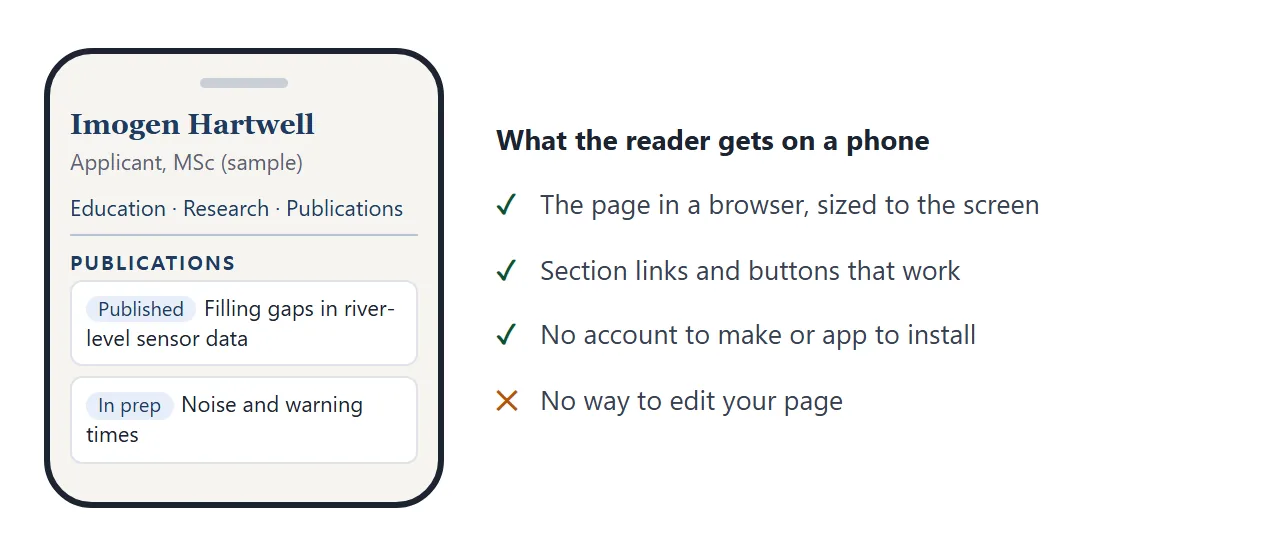
The sample below is the kind of page you can get. Filter the list, open an abstract, and try the section links. Every name, title and date is made up.
<!doctype html>
<html lang="en">
<head>
<meta charset="utf-8">
<meta name="viewport" content="width=device-width, initial-scale=1">
<title>Imogen Hartwell - Academic CV (sample)</title>
<style>
* { box-sizing: border-box; }
body { margin: 0; font-family: Georgia, "Times New Roman", serif; color: #1f2430; background: #f6f5f1; line-height: 1.55; }
.wrap { max-width: 800px; margin: 0 auto; padding: 24px 18px 40px; }
header { border-bottom: 2px solid #1f3a5f; padding-bottom: 14px; }
h1 { margin: 0; font-size: 30px; font-weight: 700; color: #1f3a5f; }
.tag { margin: 4px 0 8px; font: 15px system-ui, sans-serif; color: #4a5160; }
.contact { font: 14px system-ui, sans-serif; color: #4a5160; }
.contact a { color: #1f3a5f; }
nav { display: flex; flex-wrap: wrap; gap: 6px 14px; margin: 14px 0 4px; font: 14px system-ui, sans-serif; }
nav a { color: #1f3a5f; text-decoration: none; border-bottom: 1px solid #b6c2d4; }
h2 { margin: 28px 0 8px; font: 700 13px system-ui, sans-serif; letter-spacing: .12em; text-transform: uppercase; color: #1f3a5f; }
.row { display: grid; grid-template-columns: 110px minmax(0, 1fr); gap: 4px 16px; margin-bottom: 12px; }
.when { font: 14px system-ui, sans-serif; color: #5b6272; }
.what b { display: block; }
.what span { font-size: 15px; color: #3b4252; }
.filters { display: flex; flex-wrap: wrap; gap: 8px; margin: 6px 0 12px; }
.filters button { font: 14px system-ui, sans-serif; padding: 6px 12px; border-radius: 999px; border: 1px solid #b6c2d4; background: #fff; color: #1f3a5f; cursor: pointer; }
.filters button[aria-pressed="true"] { background: #1f3a5f; color: #fff; border-color: #1f3a5f; }
.pub { background: #fff; border: 1px solid #dfe3ea; border-radius: 8px; padding: 12px 14px; margin-bottom: 10px; }
.pub .t { font-weight: 700; }
.pub .m { font: 14px system-ui, sans-serif; color: #5b6272; margin-top: 2px; }
.badge { display: inline-block; font: 12px system-ui, sans-serif; padding: 1px 8px; border-radius: 999px; background: #e7eef8; color: #1f3a5f; margin-right: 6px; }
.badge.prep { background: #fdf0d9; color: #7a4a00; }
.pub button { margin-top: 8px; font: 13px system-ui, sans-serif; background: none; border: 0; padding: 0; color: #1f3a5f; text-decoration: underline; cursor: pointer; }
.abs { margin: 8px 0 0; font-size: 15px; color: #3b4252; }
.abs[hidden] { display: none; }
.note { font: 13px system-ui, sans-serif; color: #6b7280; margin-top: 28px; }
@media (max-width: 520px) { .row { grid-template-columns: 1fr; } h1 { font-size: 26px; } }
@media print { nav, .filters, .pub button { display: none; } .abs[hidden] { display: block; } body { background: #fff; } }
</style>
</head>
<body>
<div class="wrap">
<header>
<h1>Imogen Hartwell</h1>
<div class="tag">Applicant, MSc Environmental Data Science · Sample page, all names made up</div>
<div class="contact"><a href="mailto:imogen@example.com">imogen@example.com</a> · Northfield University, Class of 2026</div>
</header>
<nav>
<a href="#education">Education</a>
<a href="#research">Research</a>
<a href="#publications">Publications</a>
<a href="#skills">Skills</a>
</nav>
<h2 id="education">Education</h2>
<div class="row"><div class="when">2022 - 2026</div><div class="what"><b>BSc Geography, Northfield University</b><span>Final-year grade: First. Thesis: river sensors and flood warnings.</span></div></div>
<div class="row"><div class="when">2025</div><div class="what"><b>Exchange term, Lakeside College</b><span>Courses in statistics and remote sensing.</span></div></div>
<h2 id="research">Research experience</h2>
<div class="row"><div class="when">2025 - 2026</div><div class="what"><b>Undergraduate thesis</b><span>Compared three ways to clean noisy river-level readings. Supervisor: Dr. A. Marlowe.</span></div></div>
<div class="row"><div class="when">Summer 2025</div><div class="what"><b>Research assistant, Catchment Lab</b><span>Built a script that flags gaps in sensor data and wrote the lab's method note.</span></div></div>
<h2 id="publications">Publications and posters</h2>
<div class="filters" id="filters">
<button type="button" data-f="all" aria-pressed="true">All</button>
<button type="button" data-f="published" aria-pressed="false">Published</button>
<button type="button" data-f="prep" aria-pressed="false">In preparation</button>
</div>
<div id="pubs"></div>
<h2 id="skills">Skills</h2>
<div class="row"><div class="when">Tools</div><div class="what"><span>Python, R, QGIS, reproducible notebooks</span></div></div>
<div class="row"><div class="when">Languages</div><div class="what"><span>English (native), Spanish (working)</span></div></div>
<p class="note">Last updated: 1 October 2026. Available as a PDF on request.</p>
</div>
<script>
// EDIT HERE: one entry per item. status is "published" or "prep".
var pubs = [
{ status: 'published', title: 'Filling gaps in river-level sensor data', where: 'Northfield Undergraduate Research Journal, 2026', abs: 'Compares three gap-filling methods on one year of readings and reports where each one fails.' },
{ status: 'published', title: 'Poster: Flood warnings from cheap sensors', where: 'Regional Student Geography Meeting, 2025', abs: 'A one-page summary of the thesis method, presented in the poster session.' },
{ status: 'prep', title: 'Noise and warning times in small catchments', where: 'With A. Marlowe, in preparation', abs: 'Extends the thesis to four more rivers. Draft available to the committee on request.' }
];
var list = document.getElementById('pubs');
function draw(filter) {
list.innerHTML = '';
pubs.forEach(function (p, i) {
if (filter !== 'all' && p.status !== filter) return;
var card = document.createElement('div');
card.className = 'pub';
card.innerHTML =
'<div class="t"></div><div class="m"></div>' +
'<button type="button" aria-expanded="false">Show abstract</button>' +
'<p class="abs" hidden></p>';
var label = p.status === 'prep' ? 'In preparation' : 'Published';
card.querySelector('.t').textContent = p.title;
card.querySelector('.m').innerHTML = '<span class="badge' + (p.status === 'prep' ? ' prep' : '') + '">' + label + '</span>';
card.querySelector('.m').appendChild(document.createTextNode(p.where));
card.querySelector('.abs').textContent = p.abs;
var btn = card.querySelector('button');
btn.addEventListener('click', function () {
var abs = card.querySelector('.abs');
var open = abs.hidden;
abs.hidden = !open;
btn.setAttribute('aria-expanded', open);
btn.textContent = open ? 'Hide abstract' : 'Show abstract';
});
list.appendChild(card);
});
}
document.getElementById('filters').addEventListener('click', function (e) {
var b = e.target.closest('button');
if (!b) return;
document.querySelectorAll('#filters button').forEach(function (x) { x.setAttribute('aria-pressed', x === b); });
draw(b.dataset.f);
});
draw('all');
</script>
</body>
</html>
Make it with AI
Open ChatGPT, Claude or Gemini and paste a prompt like this. Replace the words in capitals with your own facts. Give it real titles and years, because the chat cannot know them. CV link covers what to put at the top of a CV.
Make one complete HTML file for my academic CV page.
Name: NAME. Applying to: PROGRAM. Email: EMAIL.
Sections: Education, Research experience,
Publications and posters, Skills.
Use only the facts I paste below. Do not add any
publication, grade or date I did not give you.
Publications: a filter for Published and In
preparation, and a Show abstract button on each.
Rules: it must work on a phone, use one serif font
and one accent colour, keep all CSS and JavaScript
inside the file, and add a print style that hides
the buttons. No images from other sites. Put a
comment above the publication list: EDIT HERE.
My facts: PASTE THEM HERE
Then check the result before you use it:
- Every fact: read each year, title, journal and grade against your own records. An AI can invent details you never gave it.
- Publication status: make sure drafts say In preparation and nothing unpublished looks published.
- Buttons: press every filter and every abstract button.
- Phone width: narrow the browser window and look for text running off the side.
If something is wrong, reply in the same chat and change one thing at a time.
Send it as a link
- Copy the whole HTML block from the chat, from the first line to the last.
- Paste it into a NOS document. The page appears as written, with its buttons working.
- Click a wrong word on the page and type the right one. Editing without code shows how.
- Choose Share, then Create share link, and copy the link.
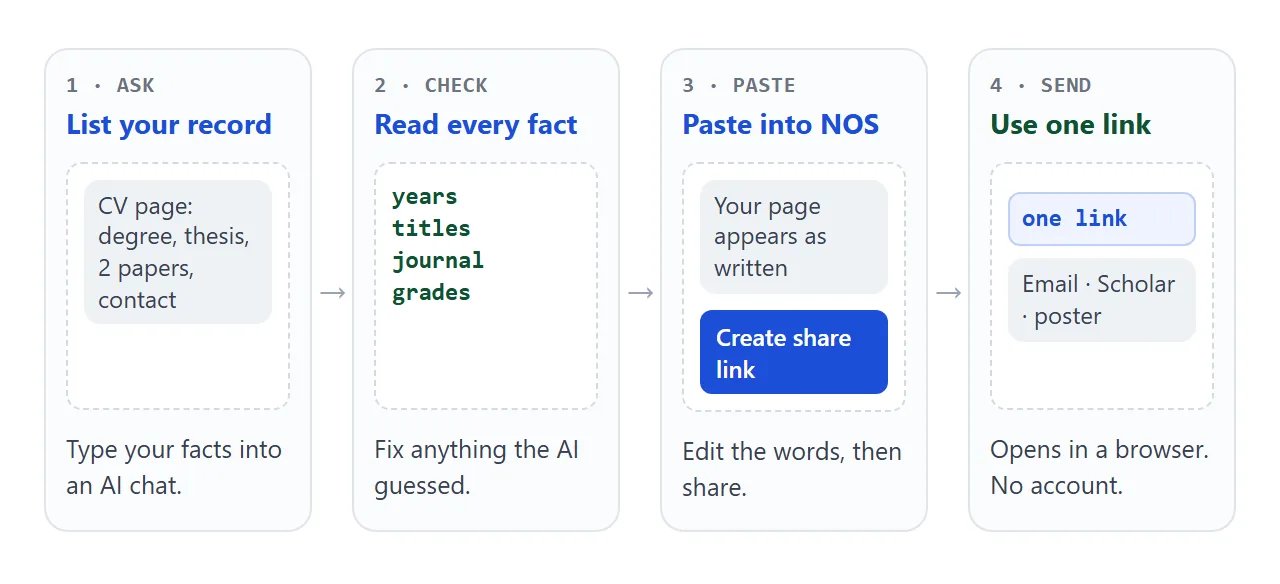
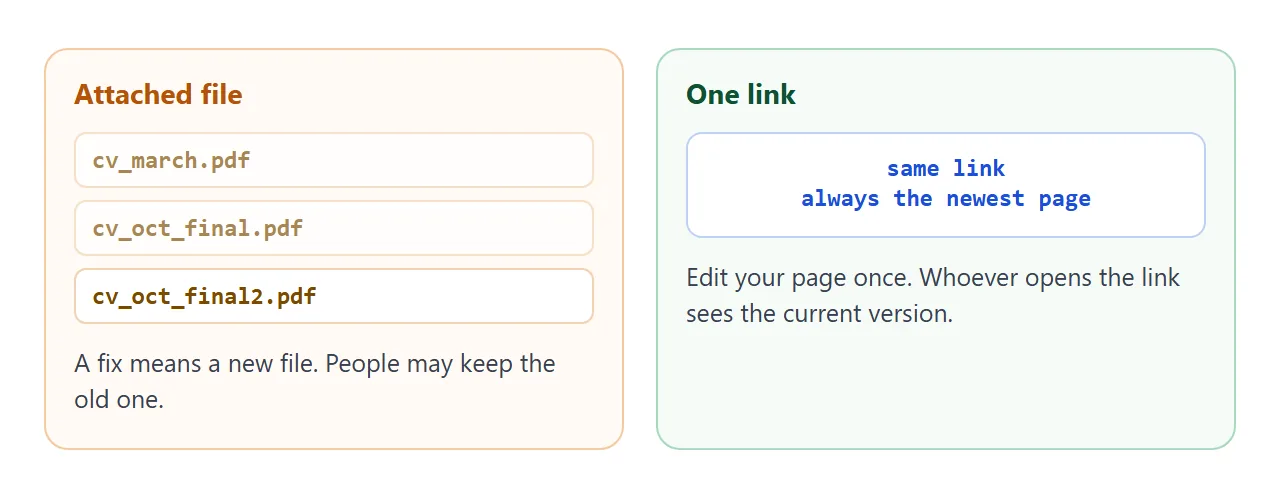
Whoever opens the link sees your page in their browser, on a phone too. They need no account and cannot edit it. If you add a paper later, edit it in the same document and the same link shows the new version.
Where the link can go
The link is plain text, so it goes wherever you already write your details. Which of these you use depends on the program and on your accounts.
- Email: paste it under your signature or in the first lines. Gmail's list of blocked file types does not include .html, but its help says a message with too large an attachment will not send, so a link avoids the question.
- Google Scholar profile: Google's help says you click Edit next to your name, paste the URL into the Homepage field and click Save. Making the profile public is a separate checkbox.
- ORCID: its help centre has a page on adding links to personal websites. As of October 2026, check the page for the current steps, since this guide could not open it.
- Poster: put the link in a QR code. QR code link covers the code itself.
The same link also fits on a CV. How to link a portfolio in a resume shows where.
Ways to share compared
| Way | What the reader needs | If you add a paper |
|---|---|---|
| PDF attached to an email | Download it, then open it | Send a new file |
| NOS link in an email | Tap the link | Edit once, same link |
| Link in a Scholar Homepage field | The profile to be public | Edit once, same link |
| QR code on a poster | A phone camera | Edit once, same code |
| PDF uploaded to a form | Whatever the form shows reviewers | Upload again if the form allows |
Keep the last row. If a form asks for a PDF, a link does not replace it. Research paper link and thesis link cover sharing the work itself.
A second page: a one-page research summary
A CV lists what you did. A summary page explains one project. Tabs hold the question, method, result and limits, and a small bar chart shows the numbers. The chart is drawn with plain HTML, so no chart library is needed.
Try the tabs below. The figures are invented, so replace them with your own and say where they come from.
<!doctype html>
<html lang="en">
<head>
<meta charset="utf-8">
<meta name="viewport" content="width=device-width, initial-scale=1">
<title>Research summary - sample</title>
<style>
* { box-sizing: border-box; }
body { margin: 0; font-family: system-ui, "Segoe UI", sans-serif; background: #fff; color: #1d2330; line-height: 1.55; }
.wrap { max-width: 760px; margin: 0 auto; padding: 24px 18px 36px; }
.kicker { font-size: 13px; letter-spacing: .1em; text-transform: uppercase; color: #0f6b5c; font-weight: 700; }
h1 { margin: 6px 0 6px; font-size: 27px; line-height: 1.25; }
.by { color: #5b6272; font-size: 14px; margin-bottom: 18px; }
.tabs { display: flex; flex-wrap: wrap; gap: 8px; margin-bottom: 12px; }
.tabs button { font: inherit; font-size: 14px; padding: 8px 14px; border: 1px solid #c9d3dd; background: #f4f7fa; color: #1d2330; border-radius: 8px; cursor: pointer; }
.tabs button[aria-selected="true"] { background: #0f6b5c; border-color: #0f6b5c; color: #fff; }
.panel { border: 1px solid #dfe5ec; border-radius: 10px; padding: 14px 16px; min-height: 120px; }
.panel h2 { margin: 0 0 6px; font-size: 17px; }
.panel p { margin: 0; font-size: 16px; }
.chart { margin-top: 20px; }
.chart h3 { font-size: 15px; margin: 0 0 8px; }
.bar { display: grid; grid-template-columns: 112px minmax(0, 1fr) 44px; gap: 10px; align-items: center; margin-bottom: 8px; font-size: 14px; }
.track { background: #eef2f6; border-radius: 6px; height: 18px; }
.fill { height: 18px; border-radius: 6px; background: #0f6b5c; }
.fill.base { background: #8b97a6; }
.src { font-size: 13px; color: #6b7280; margin-top: 10px; }
.next { margin-top: 20px; font-size: 15px; background: #f1f8f6; border-left: 4px solid #0f6b5c; padding: 10px 14px; border-radius: 0 8px 8px 0; }
@media (max-width: 480px) { .bar { grid-template-columns: 92px minmax(0, 1fr) 40px; } h1 { font-size: 23px; } }
</style>
</head>
<body>
<div class="wrap">
<div class="kicker">One-page research summary</div>
<h1>Can cheap river sensors give earlier flood warnings?</h1>
<div class="by">Imogen Hartwell · BSc thesis, Northfield University, 2026 · sample page, all data made up</div>
<div class="tabs" role="tablist" id="tabs">
<button type="button" role="tab" aria-selected="true" data-k="question">Question</button>
<button type="button" role="tab" aria-selected="false" data-k="method">Method</button>
<button type="button" role="tab" aria-selected="false" data-k="result">Result</button>
<button type="button" role="tab" aria-selected="false" data-k="limits">Limits</button>
</div>
<div class="panel" id="panel" role="tabpanel"></div>
<div class="chart">
<h3>Median warning time gained, minutes (sample numbers)</h3>
<div id="bars"></div>
<div class="src">Made-up figures for the demo. Replace them with your own and say where they come from.</div>
</div>
<div class="next"><b>Next:</b> repeat on four more rivers, then test how the result changes when a sensor fails.</div>
</div>
<script>
// EDIT HERE: the four panels and the bar values.
var text = {
question: ['Question', 'Low-cost sensors are noisy. Does cleaning their readings first change how early a flood warning can be issued?'],
method: ['Method', 'One year of readings from one river. Three cleaning methods were compared with no cleaning, using the same warning rule each time.'],
result: ['Result', 'All three methods warned earlier than no cleaning. The simplest method came close to the most complex one.'],
limits: ['Limits', 'One river and one year. The sensors were all the same model, so the result may not carry over to other kinds.']
};
var data = [
{ name: 'No cleaning', v: 12, base: true },
{ name: 'Moving median', v: 31 },
{ name: 'Kalman filter', v: 34 },
{ name: 'Spline fill', v: 28 }
];
var panel = document.getElementById('panel');
function show(k) {
panel.innerHTML = '<h2></h2><p></p>';
panel.querySelector('h2').textContent = text[k][0];
panel.querySelector('p').textContent = text[k][1];
}
document.getElementById('tabs').addEventListener('click', function (e) {
var b = e.target.closest('button');
if (!b) return;
document.querySelectorAll('#tabs button').forEach(function (x) { x.setAttribute('aria-selected', x === b); });
show(b.dataset.k);
});
show('question');
var max = 40, bars = document.getElementById('bars');
data.forEach(function (d) {
var row = document.createElement('div');
row.className = 'bar';
row.innerHTML = '<span></span><div class="track"><div class="fill"></div></div><b></b>';
row.children[0].textContent = d.name;
var fill = row.querySelector('.fill');
fill.style.width = (d.v / max * 100) + '%';
if (d.base) fill.className = 'fill base';
row.children[2].textContent = d.v;
bars.appendChild(row);
});
</script>
</body>
</html>
Link to it from your CV page, or send it on its own to a possible supervisor. Student portfolio covers how to show the thinking behind work.
Keep a PDF as well
Some applications want a file, and some readers print. Chrome's help says to choose File, then Print, then Save as PDF.
MDN explains that a print style can change how a page looks on paper or as a PDF. The sample page uses one to hide the buttons.
Check the saved PDF before you send it. The page and the PDF are two copies, so update both when your record changes.
When it does not work
| What you see | Cause | Fix |
|---|---|---|
| The chat shows code, not a page | You are reading the code block | Copy it into NOS and it renders |
| The page is cut off at the end | The copy missed the last lines | Copy again to the closing html line |
| A paper or grade you did not write | The AI guessed | Click it and type the real one, or delete it |
| A photo or logo does not show | Images from other sites are blocked | Ask for text only, or an inline drawing |
| A contact form does not send | Sending a form to a server is blocked | Show an email address instead |
| Scholar profile does not show the page | The profile is not public, or the field was not saved | Check the public box and the Homepage field |
| The application has no place for a link | The form wants a file | Upload the PDF and use the link in your email |