An AI resume website is one web page that an AI chat writes from your notes. You paste your roles and dates into ChatGPT, Claude or Gemini, get HTML back, look at it, fix what is wrong and share it as a link.
The question shows up in plain words on Quora: How can I create a link for my resume? A resume is a file, and a form, an email or a profile wants an address.
The page below is what you are aiming for. It is a made-up student, so none of it is real.
<!doctype html>
<html lang="en">
<head>
<meta charset="utf-8">
<meta name="viewport" content="width=device-width, initial-scale=1">
<title>Tomas Reyes - Environmental Science student</title>
<style>
body { margin: 0; padding: 20px 16px 28px; background: #f3f5f4; color: #1c2321;
font: 16px/1.55 system-ui, -apple-system, "Segoe UI", sans-serif; }
main { max-width: 680px; margin: 0 auto; background: #fff; border-radius: 12px;
padding: 26px 24px 22px; box-shadow: 0 1px 6px rgba(0,0,0,.08); }
h1 { margin: 0; font-size: 1.7rem; line-height: 1.2; }
.goal { margin: 6px 0 4px; color: #2f5d50; font-weight: 600; }
.contact { margin: 0; color: #55605c; font-size: .95rem; }
h2 { margin: 24px 0 8px; font-size: .9rem; letter-spacing: .08em; text-transform: uppercase;
color: #2f5d50; border-bottom: 2px solid #dbe7e2; padding-bottom: 4px; }
.row { display: flex; justify-content: space-between; gap: 12px; flex-wrap: wrap; }
.row strong { font-weight: 650; }
.when { color: #667; font-size: .92rem; }
.item { margin: 0 0 12px; }
ul { margin: 4px 0 0; padding-left: 1.15rem; }
li { margin: 2px 0; }
.tags { display: flex; flex-wrap: wrap; gap: 6px; padding: 0; margin: 0; list-style: none; }
.tags li { margin: 0; padding: 3px 10px; border-radius: 99px; background: #e6f1ed; font-size: .9rem; }
a { color: #1d5fa8; }
.upd { margin: 22px 0 0; font-size: .85rem; color: #78837f; }
@media (max-width: 480px) {
body { padding: 10px 8px 16px; }
main { padding: 18px 16px 16px; }
h2 { margin-top: 18px; }
.when { flex-basis: 100%; margin-top: -2px; }
}
@media print {
body { background: #fff; padding: 0; font-size: 12pt; }
main { box-shadow: none; border-radius: 0; max-width: none; padding: 0; }
.item { break-inside: avoid; }
a { color: #000; text-decoration: none; }
}
</style>
</head>
<body>
<main>
<h1>Tomas Reyes</h1>
<p class="goal">Environmental science student looking for a summer internship in sustainability data</p>
<p class="contact">tomas.reyes@example.com · <a href="#projects">Projects below</a></p>
<h2>Education</h2>
<div class="item">
<div class="row"><strong>B.Sc. Environmental Science, Northfield University</strong><span class="when">Expected May 2027</span></div>
<ul>
<li>Coursework: statistics, GIS mapping, waste management.</li>
</ul>
</div>
<h2 id="projects">Projects</h2>
<div class="item">
<div class="row"><strong>Campus compost audit</strong><span class="when">Spring 2026</span></div>
<ul>
<li>Led a team of 4 that weighed food waste at two dining halls for six weeks.</li>
<li>Cut the weighing routine from 40 minutes to 15 with a shared tally sheet.</li>
</ul>
</div>
<div class="item">
<div class="row"><strong>Stream sampling map</strong><span class="when">Fall 2025</span></div>
<ul>
<li>Mapped 12 sampling points in QGIS and wrote a two-page method note.</li>
</ul>
</div>
<h2>Experience</h2>
<div class="item">
<div class="row"><strong>Barista, Campus Cafe</strong><span class="when">2024 - 2025</span></div>
<ul>
<li>Ran the morning counter during exam weeks and trained two new hires.</li>
</ul>
</div>
<h2>Skills</h2>
<ul class="tags">
<li>Python</li><li>QGIS</li><li>Excel</li><li>Field sampling</li><li>Report writing</li>
</ul>
<p class="upd">Updated October 2026</p>
</main>
</body>
</html>
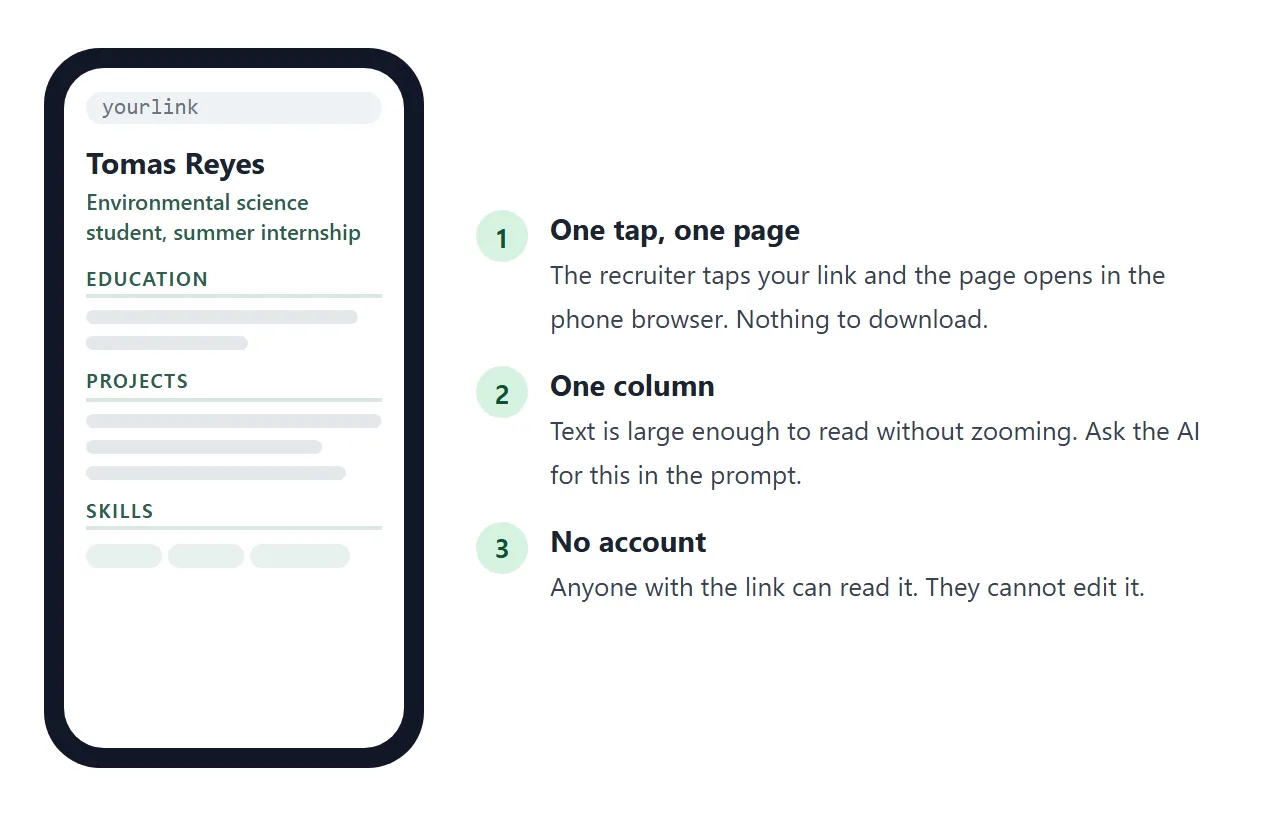
It is plain on purpose. A reader sees the goal, the school and two projects without scrolling far, and there is nothing to download.
Make it with AI
Write your notes first, in your own words, even if they are rough. The AI should only arrange them. Open the chat you already use and paste the prompt below, then your notes under it.
Make a single-file HTML page that is my one-page resume.
I am a student looking for [type of internship or job].
Use only the facts in my notes. Do not invent employers,
dates, numbers or skills. Where something is missing,
leave a clearly marked placeholder.
Sections in this order: name and one-line goal; Education;
Projects; Experience; Skills. Show my email as plain text.
No home address, no phone number.
One column, text 16px or larger, readable on a phone.
Put each bullet on its own line in the HTML.
Add a print style so it fits on one page.
No external images, fonts or scripts. Return only the HTML.

My notes:
[paste your roles, dates, projects and skills here]
"Each bullet on its own line" matters later, because it makes a wrong word easy to find in the code. The print style is for the PDF you will make at the end.
Check the render before you share it
Paste the HTML into a NOS document and the page renders right there. Read it the way a recruiter would, from the top, against your notes. Do not trust a page because it looks tidy.
This small page is a checklist you can use while you read. Tap each line to mark it right or needing a fix.
<!doctype html>
<html lang="en">
<head>
<meta charset="utf-8">
<meta name="viewport" content="width=device-width, initial-scale=1">
<title>Check the AI's page against your notes</title>
<style>
  body { margin: 0; padding: 16px; background: #f3f5f4; color: #1c2321;
         font: 16px/1.45 system-ui, -apple-system, "Segoe UI", sans-serif; }
  .wrap { max-width: 640px; margin: 0 auto; }
  h1 { margin: 0 0 4px; font-size: 1.15rem; }
  .hint { margin: 0 0 12px; color: #55605c; font-size: .95rem; }
  ul { list-style: none; margin: 0; padding: 0; display: grid; gap: 8px; }
  button.line { width: 100%; text-align: left; display: flex; gap: 10px; align-items: flex-start;
                font: inherit; color: inherit; background: #fff; border: 2px solid #dfe5e2;
                border-radius: 10px; padding: 10px 12px; cursor: pointer; }
  button.line:focus-visible { outline: 3px solid #1d5fa8; outline-offset: 2px; }
  .mark { flex: none; width: 26px; height: 26px; border-radius: 50%; border: 2px solid #b7c2bd;
          display: grid; place-items: center; font-weight: 700; font-size: .85rem; color: #fff; }
  .src { display: block; font-size: .85rem; color: #6b7672; }
  button.line[data-state="ok"] { border-color: #8fcaa6; background: #f2fbf5; }
  button.line[data-state="ok"] .mark { background: #1f7a45; border-color: #1f7a45; }
  button.line[data-state="fix"] { border-color: #eab08f; background: #fff6f0; }
  button.line[data-state="fix"] .mark { background: #b9501a; border-color: #b9501a; }
  .bar { margin-top: 14px; padding: 12px 14px; border-radius: 10px; background: #e8eeec; font-weight: 600; }
  .bar.ready { background: #d6f2df; color: #0f5132; }
  .bar.todo { background: #ffe8d9; color: #7a3410; }
</style>
</head>
<body>
<div class="wrap">
  <h1>Check each line against your own notes</h1>
  <p class="hint">Tap a line to cycle: unchecked, right, needs a fix.</p>
  <ul id="lines">
    <li><button class="line" data-state="none"><span class="mark" aria-hidden="true"></span><span>Email: tomas.reyes@example.com<span class="src">Compare letter by letter with your real address</span></span></button></li>
    <li><button class="line" data-state="none"><span class="mark" aria-hidden="true"></span><span>B.Sc. Environmental Science, expected May 2027<span class="src">Check the degree name and the year</span></span></button></li>
    <li><button class="line" data-state="none"><span class="mark" aria-hidden="true"></span><span>Led a team of 4 on a campus compost audit<span class="src">Was it really 4 people, and did you lead?</span></span></button></li>
    <li><button class="line" data-state="none"><span class="mark" aria-hidden="true"></span><span>Cut the routine from 40 minutes to 15<span class="src">An AI can guess a number. Match your notes.</span></span></button></li>
    <li><button class="line" data-state="none"><span class="mark" aria-hidden="true"></span><span>Skills: Python, QGIS, Excel, Tableau<span class="src">Tableau is not in the notes. Remove what you cannot do.</span></span></button></li>
    <li><button class="line" data-state="none"><span class="mark" aria-hidden="true"></span><span>The Projects link opens the right place<span class="src">Click it on the page itself</span></span></button></li>
  </ul>
  <div class="bar" id="bar" role="status" aria-live="polite"></div>
</div>

<script>
  const buttons = [...document.querySelectorAll('button.line')];
  const bar = document.getElementById('bar');
  const next = { none: 'ok', ok: 'fix', fix: 'none' };
  const symbol = { none: '', ok: '✓', fix: '!' };
  const words = { none: 'unchecked', ok: 'right', fix: 'needs a fix' };

  function update() {
    const n = (s) => buttons.filter((b) => b.dataset.state === s).length;
    const open = n('none'), fix = n('fix'), ok = n('ok');
    bar.className = 'bar';
    if (open) {
      bar.textContent = ok + ' right, ' + fix + ' to fix, ' + open + ' still to check';
    } else if (fix) {
      bar.textContent = fix + ' to fix. Change it in the code, then check again.';
      bar.classList.add('todo');
    } else {
      bar.textContent = 'All lines match your notes. Ready to share.';
      bar.classList.add('ready');
    }
  }

  buttons.forEach((b) => {
    b.addEventListener('click', () => {
      b.dataset.state = next[b.dataset.state];
      b.querySelector('.mark').textContent = symbol[b.dataset.state];
      b.setAttribute('aria-label', b.textContent.replace(/[✓!]/, '').trim() + ' - ' + words[b.dataset.state]);
      update();
    });
  });
  update();
</script>
</body>
</html>
These are places where an AI can go wrong:
- Numbers and dates. If your notes have no number, the AI may add one. Delete it or replace it with the real one.
- Skills you do not have. A tool you cannot use is a problem in an interview, not an advantage.
- Names and spelling. Check your own name, your school and your email letter by letter.
- Links. Click every link on the page. An invented address leads nowhere.
- Leftovers. Square brackets, "Lorem ipsum" and "your name here" mean the AI left a placeholder.
Fix typos without starting over
You do not need to ask the AI again for every small fault. The text on the page is also text in the code, so you can fix it where it sits.
- Find the wrong word or number in the code. Because each bullet is on its own line, it is easy to spot.
- Click just before it, delete it and type the right one.
- Look at the page again to confirm.
For a bigger change, such as a section in the wrong order or a bullet that should be rewritten, say so in the same chat and paste the new version over the old one.
Keep your notes open and correct them first, so the AI does not repeat the mistake.
Put an "Updated" month at the bottom of the page. The demo above does. A reader who opens the link next month can see it is current.
Send it as a link
When the page reads right, choose Create share link in NOS and copy the address. HTML to link walks through it.
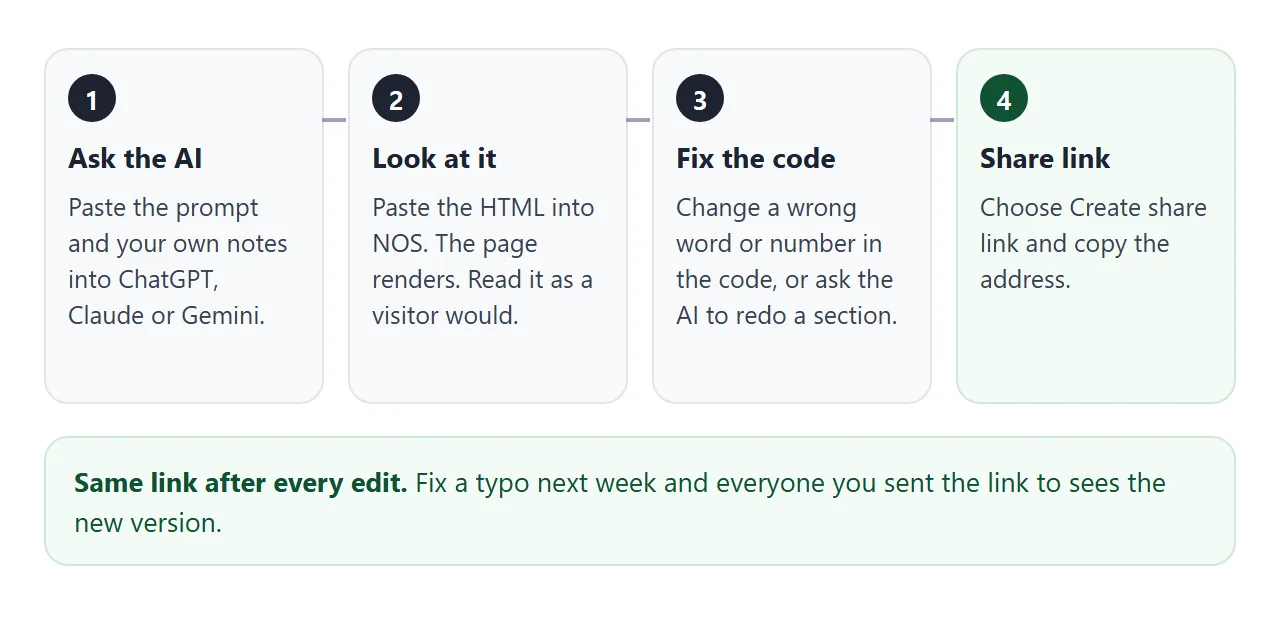
Anyone with the address can open the page in a browser, on a phone too, without an account. They can read it but not edit it.
If you fix a typo later, the same link shows the new version, so you never send a second copy.
For a plain layout to compare with what the AI gave you, see a simple HTML resume. For the wider case for links over attachments, see sharing a resume as a link.
Keep a PDF for application systems
An applicant tracking system is, in Wikipedia's words, a software application that enables the electronic handling of recruitment and hiring processes. An online application form may ask you to upload a file instead of pasting a link.
I have not read how any particular employer's system handles links, so check the form in front of you. If it has an upload field, give it a PDF. If it has a website or portfolio field, give it the link.
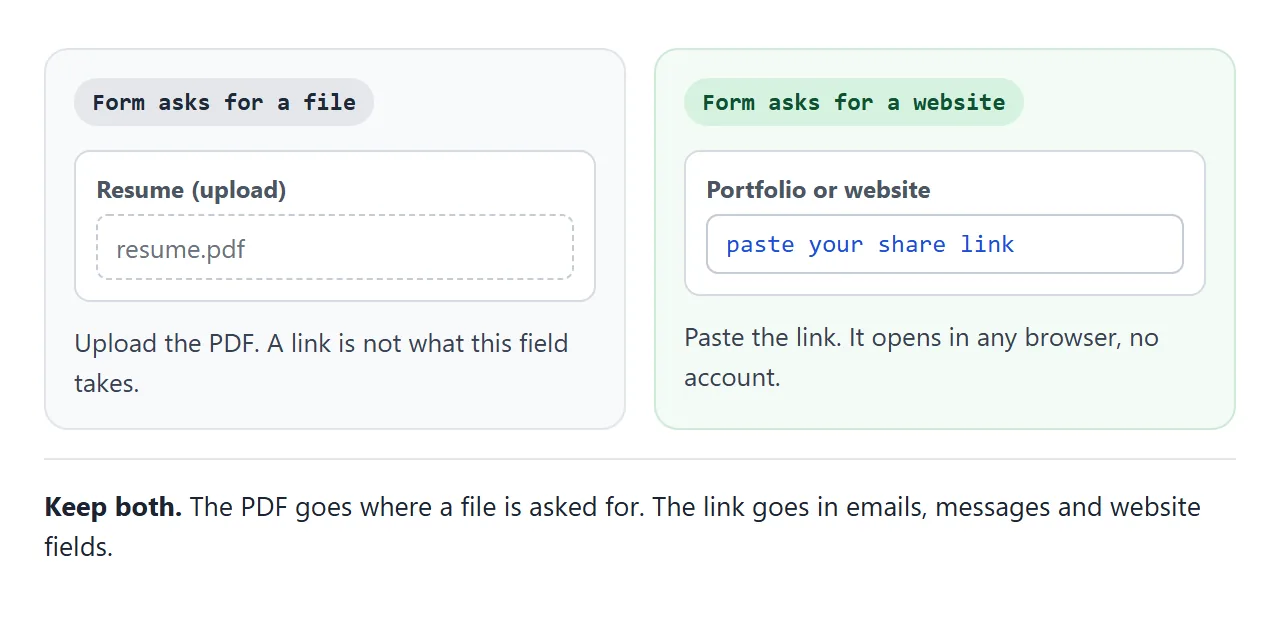
To make the PDF from your page, open the page in your browser, press Ctrl+P (Cmd+P on a Mac) and choose Save as PDF as the destination, as Chrome's print help describes.
Check the preview first. The print style you asked for tells the browser how to lay out the page on paper.
| Link | ||
|---|---|---|
| Best for | Emails, messages, website fields | Forms with a file upload |
| Opens | In a browser, phone included, no account | In a PDF viewer or the browser |
| After a fix | The same link shows the new version | You make and send a new file |
Whenever you fix the page, make the PDF again. Otherwise the file you upload and the page you link will say different things.
When it does not work
| Symptom | Cause | Fix |
|---|---|---|
| A number or date is wrong | The AI guessed where your notes had a gap | Compare every line with your notes and correct it in the code |
| A skill or job you never had appears | The AI padded the page | Delete it before you share |
| A link on the page opens an error | The AI made up the address | Click every link and replace the bad ones |
| The page looks tiny on a phone | The page was not made for narrow screens | Ask for one column and text of 16px or larger |
| A picture is missing | The AI used an outside image, which is blocked | Ask for shapes and colours only |
| The form rejects the link | The field wants a file | Upload the PDF and keep the link for other fields |
| The old text still shows | The code still holds the old words | Change the code. The same link then shows the new text |
If the page will not open on a phone at all, opening an HTML file on a phone covers the usual causes.