A bachelorette itinerary is one page where each day runs in time order. Every stop has a time, a place with a map link, and a short line on what to wear or bring.
A pack list sits at the end. Send that page as a link, and the whole group reads the same plan.
People ask which site is best for sharing a trip plan with friends. For a weekend with a fixed list of stops, one page you control can be enough.
Here is a plan like the one the prompt below produces. Pick a day with the buttons.
<!doctype html>
<html lang="en">
<head>
<meta charset="utf-8">
<meta name="viewport" content="width=device-width, initial-scale=1">
<title>Tessa's weekend: 18-20 June 2027</title>
<style>
* { box-sizing: border-box; }
body {
margin: 0; padding: 18px 14px 30px;
font-family: system-ui, -apple-system, 'Segoe UI', sans-serif;
background: #fbf3f4; color: #2b2227; line-height: 1.5;
}
.page { max-width: 560px; margin: 0 auto; }
header { background: #7a2e4d; color: #fff; border-radius: 16px; padding: 20px 20px 18px; }
.tag { font-size: 13px; font-weight: 700; letter-spacing: .14em; text-transform: uppercase; color: #f4c9da; }
h1 { margin: 6px 0 4px; font-size: 26px; line-height: 1.2; }
.where { margin: 0; font-size: 15px; color: #fbe3ec; }
.changed { margin: 14px 0 0; background: rgba(255,255,255,.16); border-radius: 10px; padding: 8px 12px; font-size: 14px; }
.tabs { display: flex; gap: 8px; margin: 16px 0 12px; }
.tabs button {
flex: 1; padding: 10px 6px; font: inherit; font-weight: 700; font-size: 15px;
border: 2px solid #7a2e4d; border-radius: 12px; background: #fff; color: #7a2e4d; cursor: pointer;
}
.tabs button[aria-pressed="true"] { background: #7a2e4d; color: #fff; }
.day[hidden] { display: none; }
.first { margin: 0 0 12px; background: #fff; border: 2px solid #e8b9cb; border-radius: 14px; padding: 12px 16px; font-size: 16px; }
.first b { color: #7a2e4d; }
ol { list-style: none; margin: 0; padding: 0; }
li { display: grid; grid-template-columns: 76px 1fr; gap: 10px; background: #fff; border: 1px solid #efd9e1; border-radius: 14px; padding: 12px 14px; margin-bottom: 10px; }
.time { font-weight: 800; font-size: 17px; color: #7a2e4d; }
.title { font-weight: 700; font-size: 17px; }
.place { font-size: 15px; color: #5a4a52; }
.note { margin-top: 4px; font-size: 14px; color: #5a4a52; }
.note b { color: #2b2227; }
a.map { display: inline-block; margin-top: 8px; padding: 6px 12px; border-radius: 999px; background: #fbe3ec; color: #7a2e4d; font-weight: 700; font-size: 14px; text-decoration: none; }
a.map:hover, a.map:focus { background: #f4c9da; }
.foot { margin: 14px 0 0; font-size: 14px; color: #5a4a52; }
</style>
</head>
<body>
<div class="page">
<header>
<div class="tag">Bachelorette weekend</div>
<h1>Tessa's last weekend as a single woman</h1>
<p class="where">Fri 18 - Sun 20 June 2027 · Marlow Bay · all times are local</p>
<p class="changed"><b>Changed:</b> Saturday boat trip now leaves at 1:30 pm, not 2:00 (updated 3 June).</p>
</header>
<div class="tabs" id="tabs">
<button type="button" data-day="fri" aria-pressed="true">Fri 18</button>
<button type="button" data-day="sat" aria-pressed="false">Sat 19</button>
<button type="button" data-day="sun" aria-pressed="false">Sun 20</button>
</div>
<section class="day" id="fri">
<p class="first">First up: <b>4:00 pm</b> check-in at the Seagrass House.</p>
<ol>
<li>
<div class="time">4:00 pm</div>
<div><div class="title">Check in, drop bags</div>
<div class="place">Seagrass House, 12 Pier Road</div>
<div class="note"><b>Bring:</b> photo ID, your room-share name.</div>
<a class="map" href="https://www.google.com/maps/search/?api=1&query=Seagrass+House+12+Pier+Road+Marlow+Bay" target="_blank" rel="noopener">Open in Maps</a></div>
</li>
<li>
<div class="time">7:30 pm</div>
<div><div class="title">Welcome dinner</div>
<div class="place">Salt & Fig Kitchen, 3 minutes' walk</div>
<div class="note"><b>Wear:</b> casual. Table is booked under Tessa.</div>
<a class="map" href="https://www.google.com/maps/search/?api=1&query=Salt+and+Fig+Kitchen+Marlow+Bay" target="_blank" rel="noopener">Open in Maps</a></div>
</li>
<li>
<div class="time">10:00 pm</div>
<div><div class="title">Games on the terrace</div>
<div class="place">Back at the house</div>
<div class="note"><b>Bring:</b> your own drink. Quiet after 11.</div></div>
</li>
</ol>
</section>
<section class="day" id="sat" hidden>
<p class="first">First up: <b>9:30 am</b> brunch at Morning Gull Cafe.</p>
<ol>
<li>
<div class="time">9:30 am</div>
<div><div class="title">Brunch</div>
<div class="place">Morning Gull Cafe</div>
<div class="note"><b>Wear:</b> anything. Tell Imani about allergies by Friday.</div>
<a class="map" href="https://www.google.com/maps/search/?api=1&query=Morning+Gull+Cafe+Marlow+Bay" target="_blank" rel="noopener">Open in Maps</a></div>
</li>
<li>
<div class="time">11:30 am</div>
<div><div class="title">Spa hour</div>
<div class="place">Harbour Lane Spa</div>
<div class="note"><b>Bring:</b> swimsuit, flip-flops.</div>
<a class="map" href="https://www.google.com/maps/search/?api=1&query=Harbour+Lane+Spa+Marlow+Bay" target="_blank" rel="noopener">Open in Maps</a></div>
</li>
<li>
<div class="time">1:30 pm</div>
<div><div class="title">Boat trip around the bay</div>
<div class="place">Sunny Tern Boat Co., Dock 4</div>
<div class="note"><b>Bring:</b> sunscreen, flat shoes, a layer. Arrive 15 minutes early.</div>
<a class="map" href="https://www.google.com/maps/search/?api=1&query=Sunny+Tern+Boat+Co+Dock+4+Marlow+Bay" target="_blank" rel="noopener">Open in Maps</a></div>
</li>
<li>
<div class="time">8:00 pm</div>
<div><div class="title">Dinner, then dancing</div>
<div class="place">The Velvet Anchor</div>
<div class="note"><b>Wear:</b> white or cream for Tessa, anything for the rest.</div>
<a class="map" href="https://www.google.com/maps/search/?api=1&query=The+Velvet+Anchor+Marlow+Bay" target="_blank" rel="noopener">Open in Maps</a></div>
</li>
</ol>
</section>
<section class="day" id="sun" hidden>
<p class="first">First up: <b>10:30 am</b> check-out, then a slow breakfast.</p>
<ol>
<li>
<div class="time">10:30 am</div>
<div><div class="title">Check out</div>
<div class="place">Seagrass House</div>
<div class="note"><b>Do:</b> strip your bed, leave keys on the table.</div></div>
</li>
<li>
<div class="time">11:00 am</div>
<div><div class="title">Slow breakfast, then goodbyes</div>
<div class="place">Morning Gull Cafe</div>
<div class="note">Trains and taxis are your own. Text Imani if you will be late.</div>
<a class="map" href="https://www.google.com/maps/search/?api=1&query=Morning+Gull+Cafe+Marlow+Bay" target="_blank" rel="noopener">Open in Maps</a></div>
</li>
</ol>
</section>
<p class="foot">Questions about the plan: message Imani, the maid of honour.</p>
</div>
<script>
const buttons = document.querySelectorAll('#tabs button');
const days = document.querySelectorAll('.day');
buttons.forEach((b) => b.addEventListener('click', () => {
buttons.forEach((x) => x.setAttribute('aria-pressed', x === b ? 'true' : 'false'));
days.forEach((d) => { d.hidden = d.id !== b.dataset.day; }); // show one day at a time
}));
</script>
</body>
</html>
What goes on each day
Think about the moment someone opens it: standing outside a restaurant, wondering what time and where. So lead every day with the first time and the first place, then list the rest in order.
- Time and place for every stop. One line each, in the order they happen.
- A map link per address. It opens the map on that place, so nobody types a name by hand.
- Wear or bring, on the stop that needs it. Swimsuit at the spa, flat shoes at the boat.
- A line for changes. Say what moved and the date you changed it.
- One person to ask. A name and a phone number or email, so questions do not fill the group chat.
Say in the header that all times are local. If someone arrives by train from another time zone, a single line saves an argument.
Make it with AI
Paste this into ChatGPT, Claude or Gemini. Replace everything in square brackets with your real details first.
Make a weekend itinerary as ONE self-contained HTML file.
All CSS and JavaScript go inside the file. No images, no
fonts or scripts from other sites, no forms.

Event: [Bachelorette weekend for Tessa], [Marlow Bay],
[Fri 18 - Sun 20 June 2027], all times local.
Organiser to contact: [name, phone or email].

Stops, exactly as written:
[Fri 4:00 pm - Check in - Seagrass House, 12 Pier Road]
[Fri 7:30 pm - Welcome dinner - Salt & Fig Kitchen]
[add the rest here, one line per stop, with wear or bring]

Design: one centred column that reads well on a phone
390 px wide, a button for each day that shows that day
only, one accent colour. Start each day with a line
"First up: time and place". Give every stop its time, its
place and a link "Open in Maps" using this form:
https://www.google.com/maps/search/?api=1&query=NAME+CITY
(spaces as plus signs). Add a line at the top for
"Changed: ..." and include the viewport meta tag.
Do not invent any detail I did not give. Where something
is missing, write TODO.

Return the complete file in one code block.
The prompt does three jobs. "Do not invent" and "write TODO" stop the AI from guessing times or venues. "No forms" keeps it from adding a vote button that cannot send anywhere. The map form tells it exactly what a working link looks like.
Check the result before you send it:
- Every time, weekday and spelling matches your notes. June 18 2027 is a Friday; look dates up, because AI tools can slip.
- Each map link opens the place you meant. Tap all of them once.
- No TODO is left, and no home address or door code slipped in.
- The code starts with a doctype line and ends with a closing html tag. If it is cut off, ask it to continue, or see how to save HTML from ChatGPT.
Send it as a link
The steps are the same whichever AI wrote the page.
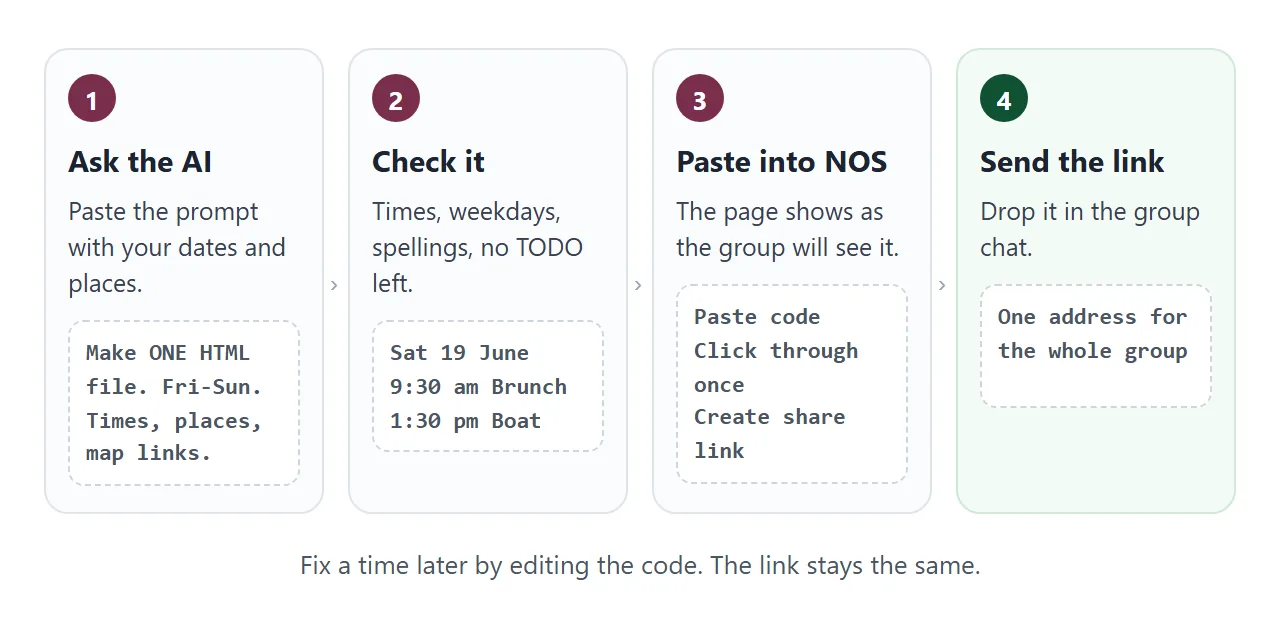
- Open a new NOS document and paste the whole code block.
- The page appears as the group will see it. Click through each day once.
- Choose Create share link and copy the address.
- Paste the address into the group chat or an email.
HTML to link walks through the same steps with screenshots, and sharing a page on WhatsApp covers the chat side.
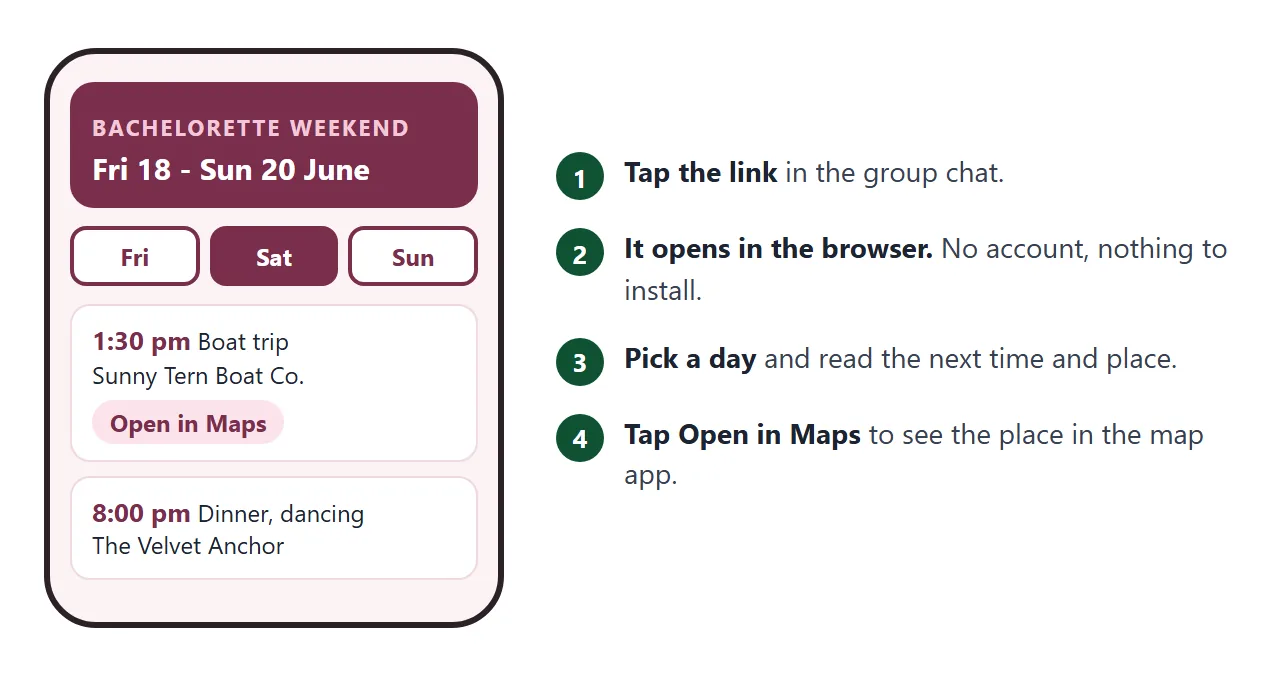
Anyone with the link can open it in a browser, phone included, without an account. They cannot edit it.
Map links go to Google Maps. Google's documentation says the URL opens the Maps app on Android or iOS if it is installed, and otherwise opens Maps in a browser (as of October 2026).
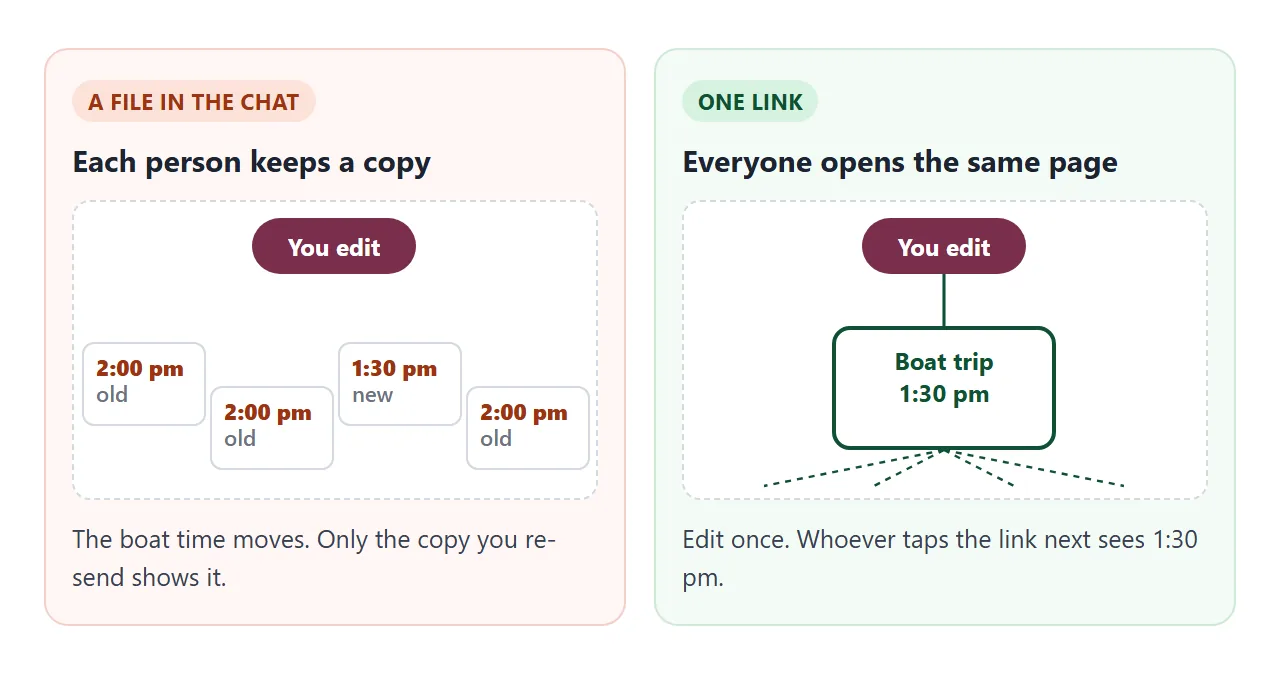
When a time changes, edit the code in your document. The link stays the same and shows the new version. Add the "Changed" line, and send a short message too, because people who already have the page open may need to reload it.
For the longer reasoning behind this, see why links beat attachments. A plainer treatment of the same idea for any trip is in itinerary link.
A second page: what to pack and who brings what
The pack list can live on its own page, so people can tick things off while they get ready. This one has a progress bar, an add-item box, and a button that turns the list into text you can paste into a message.
<!doctype html>
<html lang="en">
<head>
<meta charset="utf-8">
<meta name="viewport" content="width=device-width, initial-scale=1">
<title>Tessa's weekend: what to pack</title>
<style>
  * { box-sizing: border-box; }
  body {
    margin: 0; padding: 18px 14px 30px;
    font-family: system-ui, -apple-system, 'Segoe UI', sans-serif;
    background: #fbf3f4; color: #2b2227; line-height: 1.5;
  }
  .page { max-width: 560px; margin: 0 auto; }
  h1 { margin: 0 0 4px; font-size: 24px; line-height: 1.2; color: #7a2e4d; }
  .sub { margin: 0 0 12px; font-size: 15px; color: #5a4a52; }
  .bar { height: 10px; background: #f0dbe3; border-radius: 99px; overflow: hidden; margin: 6px 0 16px; }
  .bar span { display: block; height: 100%; width: 0; background: #b5456f; transition: width .25s; }
  section { background: #fff; border: 1px solid #efd9e1; border-radius: 14px; padding: 14px 16px 6px; margin-bottom: 12px; }
  h2 { margin: 0 0 4px; font-size: 17px; }
  ul { list-style: none; margin: 0; padding: 0; }
  li { border-top: 1px solid #f6e9ee; }
  label { display: flex; gap: 12px; align-items: flex-start; padding: 11px 2px; cursor: pointer; font-size: 16px; }
  input[type=checkbox] { width: 22px; height: 22px; margin: 1px 0 0; accent-color: #b5456f; flex: none; }
  li.done label span { color: #7a6a72; text-decoration: line-through; }
  .who { font-size: 14px; color: #7a2e4d; font-weight: 700; }
  form { display: flex; gap: 8px; margin: 4px 0 12px; }
  input[type=text] { flex: 1; min-width: 0; padding: 10px 12px; font: inherit; font-size: 16px; border: 1px solid #d8b9c6; border-radius: 10px; }
  button { padding: 10px 14px; font: inherit; font-weight: 700; font-size: 15px; border: 0; border-radius: 10px; background: #7a2e4d; color: #fff; cursor: pointer; }
  button.alt { background: #fff; color: #7a2e4d; border: 2px solid #7a2e4d; }
  textarea { width: 100%; height: 150px; margin-top: 10px; padding: 10px; font: 14px/1.4 ui-monospace, Consolas, monospace; border: 1px solid #d8b9c6; border-radius: 10px; }
  textarea[hidden] { display: none; }
</style>
</head>
<body>
<div class="page">
  <h1>What to pack</h1>
  <p class="sub">Tessa's weekend, 18-20 June 2027. Tick a line when it is in your bag.</p>
  <div id="progress" class="sub"></div>
  <div class="bar" aria-hidden="true"><span id="fill"></span></div>

  <section>
    <h2>Everyone</h2>
    <ul>
      <li><label><input type="checkbox"><span>Photo ID for check-in</span></label></li>
      <li><label><input type="checkbox"><span>Phone charger</span></label></li>
      <li><label><input type="checkbox"><span>Comfortable walking shoes</span></label></li>
      <li><label><input type="checkbox"><span>Sunscreen and a hat</span></label></li>
    </ul>
  </section>

  <section>
    <h2>By day</h2>
    <ul>
      <li><label><input type="checkbox"><span>Friday: casual dinner outfit</span></label></li>
      <li><label><input type="checkbox"><span>Saturday: swimsuit, flip-flops, flat shoes for the boat</span></label></li>
      <li><label><input type="checkbox"><span>Saturday night: white or cream outfit (Tessa), anything (guests)</span></label></li>
      <li><label><input type="checkbox"><span>Sunday: something comfortable for the trip home</span></label></li>
    </ul>
  </section>

  <section>
    <h2>Shared items: who brings what</h2>
    <ul>
      <li><label><input type="checkbox"><span><span class="who">Imani:</span> bride sash and welcome bags</span></label></li>
      <li><label><input type="checkbox"><span><span class="who">Noor:</span> Bluetooth speaker</span></label></li>
      <li><label><input type="checkbox"><span><span class="who">Lena:</span> card games for the terrace</span></label></li>
      <li><label><input type="checkbox"><span><span class="who">Priya:</span> first-aid kit and plasters</span></label></li>
    </ul>
  </section>

  <form id="add">
    <input type="text" name="item" placeholder="Add an item" aria-label="Add an item" required>
    <button type="submit">Add</button>
  </form>
  <button type="button" class="alt" id="txt">Show as text</button>
  <textarea id="out" hidden readonly aria-label="Packing list as text"></textarea>
</div>

<script>
  const progress = document.getElementById('progress');
  const fill = document.getElementById('fill');
  const out = document.getElementById('out');

  function boxes() { return document.querySelectorAll('li input'); }

  function refresh() {
    let done = 0;
    boxes().forEach((b) => {
      b.closest('li').classList.toggle('done', b.checked);
      if (b.checked) done++;
    });
    progress.textContent = done + ' of ' + boxes().length + ' packed';
    fill.style.width = (done / boxes().length * 100) + '%';
  }

  document.addEventListener('change', (e) => { if (e.target.matches('li input')) refresh(); });

  // Add a line to the last section; the page does not send anything anywhere
  document.getElementById('add').addEventListener('submit', (e) => {
    e.preventDefault();
    const text = new FormData(e.target).get('item').trim();
    if (!text) return;
    const li = document.createElement('li');
    const label = document.createElement('label');
    const box = document.createElement('input');
    const span = document.createElement('span');
    box.type = 'checkbox';
    span.textContent = text;
    label.append(box, span);
    li.append(label);
    document.querySelector('section:last-of-type ul').append(li);
    e.target.reset();
    refresh();
  });

  document.getElementById('txt').addEventListener('click', () => {
    const lines = [];
    document.querySelectorAll('section').forEach((s) => {
      lines.push(s.querySelector('h2').textContent);
      s.querySelectorAll('li').forEach((li) => {
        lines.push((li.querySelector('input').checked ? '[x] ' : '[ ] ') + li.textContent.trim());
      });
      lines.push('');
    });
    out.value = lines.join('\n');
    out.hidden = false;
  });

  refresh();
</script>
</body>
</html>
On a NOS page you own, ticks you make in View mode are saved. A guest's ticks are not, so the page shows your list, not theirs.
That suits a "who brings what" list that you keep up to date. If guests need their own checklist, ask for the list as plain text with the button, and let them paste it into their own notes.
Ask the AI for this page with a second prompt: "Make a pack list page with sections Everyone, By day, and Shared items with a name per item." Then apply the same checks.
Ways to share the plan
| Long chat message | PDF or photo | Link to this page | |
|---|---|---|---|
| Pick a day, see only that day | No, scroll | Scroll or zoom | Day buttons |
| A time changes | Re-send, old message stays | Re-send the file | Edit once, same link |
| Map for each stop | Copy each address | Depends on the file | Tap Open in Maps |
| Pack list you can tick | Re-type | Tick on the page | |
| Reader needs | The chat | A file viewer | A browser |
A QR code on a printed welcome card can point at the same link, so a change reaches people who scan it later.
Turning HTML into a QR code covers it. A checklist in HTML explains the tick boxes, and map links in HTML explains how the buttons work.
When it does not work
| What you see | Cause | Fix |
|---|---|---|
| A map link opens the wrong place | The name was ambiguous or the city is missing | Add the street and city to the link |
| TODO shows on the page | You left a detail out of the prompt | Fill it in, or delete the line |
| The weekday is wrong | The AI guessed it | Check a calendar and correct the code |
| A vote or RSVP button does nothing | A form that sends to a server is blocked | Put a phone or email line on the page |
| An image is missing | It came from another site, which is blocked | Use text, or ask for an inline drawing |
| The page shows code as text | The paste included chat wording, or missed the ending | Paste only the code block, start to end |
| Someone sees the old time | They opened the page before your edit | Ask them to reload the page |