A bridal shower website can be one page: the date, the place, the schedule and a few notes for guests. You do not need a site builder. An AI chat writes the page as one HTML file, and NOS turns it into a link.
People ask which free invitation maker is best. For a shower, a page can beat a card, because details move: a start time shifts, the gift question comes up again. Here is a finished page to copy.
<!doctype html>
<html lang="en">
<head>
<meta charset="utf-8">
<meta name="viewport" content="width=device-width, initial-scale=1">
<title>Bridal shower for Nora, 20 March 2027</title>
<style>
* { box-sizing: border-box; }
body {
margin: 0; background: #fbf3f1; color: #2e2528;
font-family: Georgia, "Times New Roman", serif; line-height: 1.55;
}
.wrap { max-width: 560px; margin: 0 auto; padding: 0 18px 40px; }
header { text-align: center; padding: 34px 0 20px; }
header svg { width: 64px; height: 56px; }
.kicker { margin: 6px 0 0; font: 700 .75rem system-ui, sans-serif; letter-spacing: 1.6px; text-transform: uppercase; color: #a35a6b; }
h1 { font-size: 2.1rem; font-weight: 400; margin: 4px 0 2px; }
.sub { margin: 0; color: #75666b; font-style: italic; }
.date { margin: 14px 0 2px; font-size: 1.2rem; }
.count { margin: 0; font: 600 .85rem system-ui, sans-serif; color: #a35a6b; letter-spacing: .4px; }
section { background: #fff; border-radius: 12px; padding: 16px 18px; margin-top: 14px; box-shadow: 0 1px 4px rgba(90, 40, 60, .08); }
h2 { font: 700 .78rem system-ui, sans-serif; letter-spacing: 1.4px; text-transform: uppercase; color: #a35a6b; margin: 0 0 8px; }
.venue { font-size: 1.15rem; margin: 0; }
.addr { margin: 2px 0 12px; color: #75666b; }
.btn {
display: inline-block; padding: 10px 16px; border-radius: 8px;
background: #a35a6b; color: #fff; text-decoration: none; font: 600 .95rem system-ui, sans-serif;
}
ul.times { list-style: none; margin: 0; padding: 0; }
ul.times li { display: flex; gap: 14px; padding: 7px 0; border-top: 1px solid #f1e3e1; }
ul.times li:first-child { border-top: 0; }
ul.times b { flex: 0 0 74px; font: 700 .95rem system-ui, sans-serif; }
details { border-top: 1px solid #f1e3e1; padding: 9px 0; }
details:first-of-type { border-top: 0; }
summary { cursor: pointer; font-weight: 700; }
details p { margin: 6px 0 0; color: #4d4146; }
footer { text-align: center; margin-top: 22px; color: #75666b; font-size: .92rem; }
</style>
</head>
<body>
<div class="wrap">
<header>
<svg viewBox="0 0 64 56" aria-hidden="true">
<g fill="#e8a8b6"><circle cx="32" cy="14" r="9"/><circle cx="46" cy="24" r="9"/><circle cx="40" cy="40" r="9"/><circle cx="24" cy="40" r="9"/><circle cx="18" cy="24" r="9"/></g>
<circle cx="32" cy="28" r="7" fill="#f6d27a"/>
</svg>
<p class="kicker">Bridal shower</p>
<h1>For Nora</h1>
<p class="sub">Nora marries Sam in June. Come and celebrate with her.</p>
<p class="date">Saturday 20 March 2027</p>
<p class="count" id="count"></p>
</header>
<section>
<h2>Where</h2>
<p class="venue">Clover Tea Room</p>
<p class="addr">8 Orchard Row, Fernhill</p>
<a class="btn" href="https://www.google.com/maps/search/?api=1&query=Clover+Tea+Room+8+Orchard+Row+Fernhill" target="_blank" rel="noopener">Open in maps</a>
</section>
<section>
<h2>The afternoon</h2>
<ul class="times">
<li><b>1:00 pm</b> Arrive and find a seat</li>
<li><b>1:30 pm</b> Welcome and afternoon tea</li>
<li><b>2:15 pm</b> Games: how well do you know Nora?</li>
<li><b>3:15 pm</b> Cake</li>
<li><b>3:45 pm</b> Gifts and cards</li>
<li><b>4:30 pm</b> Home</li>
</ul>
</section>
<section>
<h2>Good to know</h2>
<details open>
<summary>Gifts</summary>
<p>Nora has a short list. Message Priya and she will send it, so nobody doubles up.</p>
</details>
<details>
<summary>Bring a memory</summary>
<p>Write a favourite memory of Nora on a card. We will read a few out loud.</p>
</details>
<details>
<summary>Food and drink</summary>
<p>Tea, sandwiches and cake. Tell Priya about allergies by 10 March.</p>
</details>
<details>
<summary>Getting there</summary>
<p>Paid parking on Orchard Row. The tea room is a five minute walk from Fernhill station.</p>
</details>
</section>
<footer>Hosted by Priya, maid of honour. Questions? Message her.</footer>
</div>
<script>
// days left until the shower, counted at midnight so the number changes once a day
const shower = new Date(2027, 2, 20); // months start at 0, so 2 is March
const today = new Date();
today.setHours(0, 0, 0, 0);
const days = Math.round((shower - today) / 86400000);
document.getElementById('count').textContent =
days > 1 ? days + ' DAYS TO GO' : days === 1 ? 'TOMORROW' : days === 0 ? 'TODAY' : 'THANK YOU FOR COMING';
</script>
</body>
</html>
The names, venue and times are made up. Swap in yours. The countdown at the top is a small script, and it runs on the shared link too.
What goes on the page
Guests open the link on a phone, so the page is one column and the answer to "when and where" sits on the first screen.
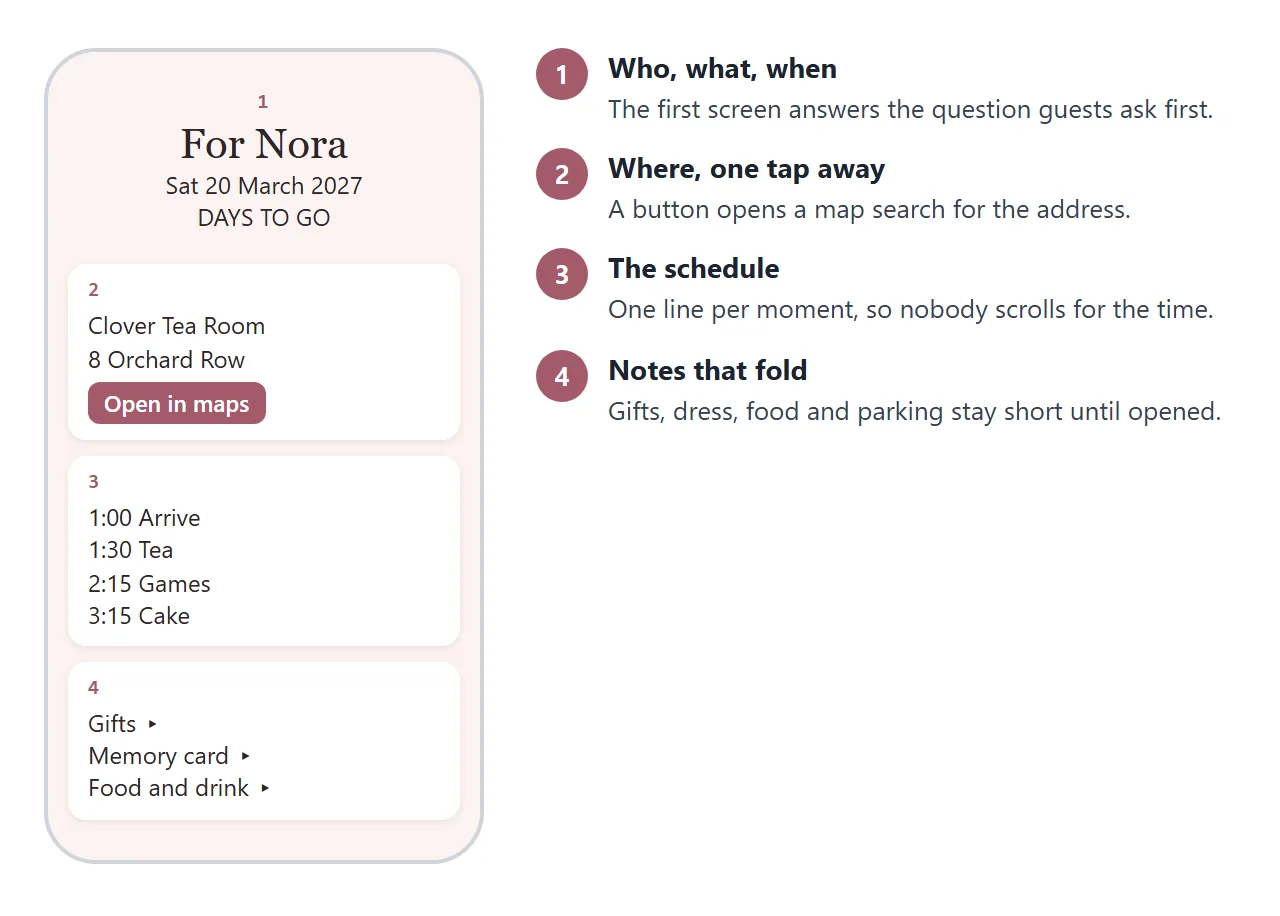
Four blocks cover it: who and when, the place with a map button, the schedule, and notes. For the questions guests ask most and how to word the answers, see sharing wedding details with guests.
The notes use a native HTML element called details. It shows a heading that opens and closes the text under it, and MDN documents that it needs no JavaScript. That keeps a long page short.
Make it with AI
Paste this prompt into ChatGPT, Claude or Gemini after replacing the details in capitals.
Write one self-contained HTML file for a bridal shower page.
Bride: NAME. Host: NAME, maid of honour.
Date: DAY, DATE, YEAR. Venue: NAME, FULL ADDRESS.
Schedule: TIME - WHAT HAPPENS (one line each).
Notes: gifts, food and allergies, parking, a memory card.
Layout: one column, readable on a phone, with the viewport meta tag.
Put the date at the top. Under the venue, add a button that
links to a Google Maps search URL for the address.
Show the schedule as a list, and the notes with details and summary.
No external images, no iframes, no libraries. Decorate with CSS or
inline SVG only. Return only the code.
Then check the result yourself. The AI can get facts wrong without any sign.
- The day of the week matches the date.
- Every time and the address are as you wrote them.
- The map button opens the right place when you tap it.
- The bride's name is spelled correctly.
- No placeholder text such as "Your venue here" is left.
Send it as a link
Paste the finished code into a NOS document and choose Create share link. The page renders as written, scripts included. HTML to link walks through it.
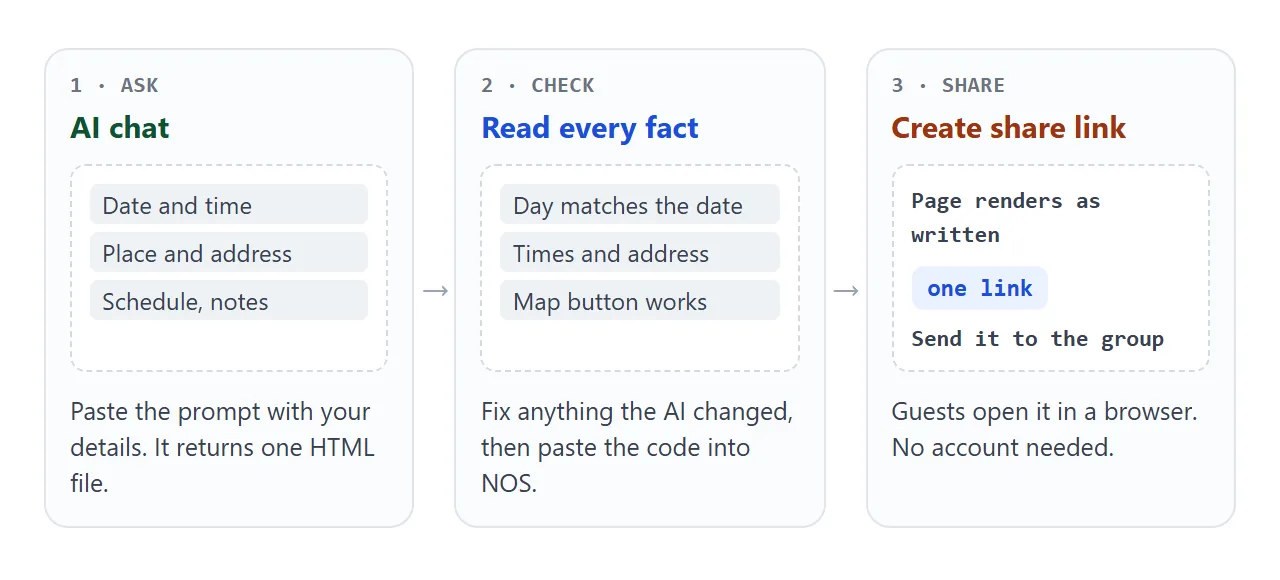
Anyone with the link opens the page in a browser, on a phone too, with no account. They cannot edit it. When a time changes, edit the code and the same link shows the new version.
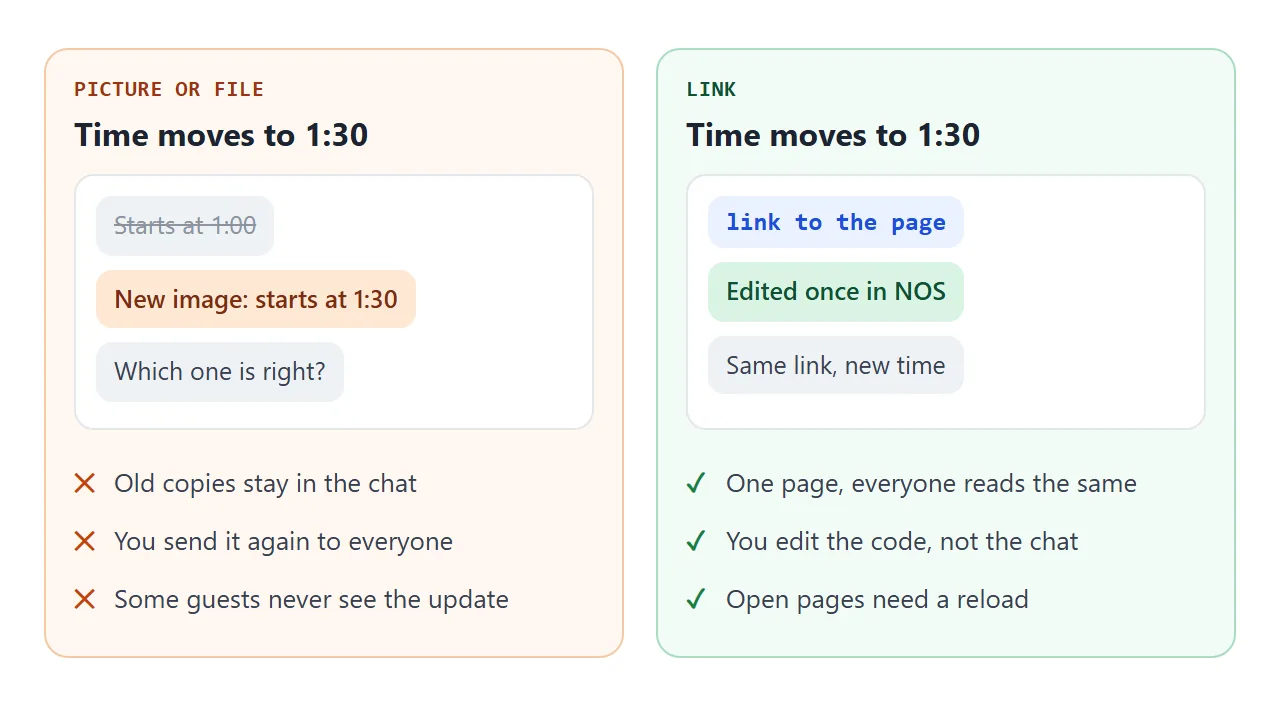
A file is a copy, and a picture of the invitation is a copy too. A link is the page itself. Why a file often fails on a phone is in opening an HTML file on a phone.
To put the link on a paper invitation, turn it into a QR code. QR code link shows how. For the invitation itself, see invitation to link.
Ways to share the page compared
| Way | Guest opens it | A change reaches guests |
|---|---|---|
| Picture of the invitation | In the chat | Only if you send a new one |
| HTML file as attachment | Depends on the phone and the app | Only if you send it again |
| NOS share link | In the browser, no account | Yes, the same link updates |
| Google Sites page | In the browser, once published | See Google's help |
Google Sites is a separate tool for building pages with an editor. As of October 2026, Google's help says you publish a site with a web address and choose whether it is restricted to people you share it with or public.
The map button uses a search URL that Google documents. It needs no API key, and on Android and iOS it opens the Maps app when that is installed and a browser when it is not.
Who is bringing what
A shower often needs a short list: drinks, cake, decorations, photos for a game. Put it on the page so the group stops asking in the chat.
<!doctype html>
<html lang="en">
<head>
<meta charset="utf-8">
<meta name="viewport" content="width=device-width, initial-scale=1">
<title>Who is bringing what</title>
<style>
  * { box-sizing: border-box; }
  body { margin: 0; padding: 16px; background: #fbf3f1; color: #2e2528; font-family: system-ui, sans-serif; line-height: 1.45; }
  .card { max-width: 520px; margin: 0 auto; background: #fff; border-radius: 12px; padding: 18px; box-shadow: 0 1px 4px rgba(90, 40, 60, .1); }
  h1 { font-size: 1.15rem; margin: 0 0 2px; }
  .note { margin: 0 0 14px; color: #75666b; font-size: .9rem; }
  .bar { height: 10px; border-radius: 5px; background: #f1e3e1; overflow: hidden; }
  .bar i { display: block; height: 100%; width: 0; background: #a35a6b; transition: width .2s; }
  .sum { margin: 6px 0 12px; font-weight: 600; font-size: .92rem; color: #a35a6b; }
  .filter { margin-bottom: 8px; font: 600 .88rem system-ui, sans-serif; padding: 8px 12px; border-radius: 8px; border: 1px solid #d9b7bf; background: #fff; color: #a35a6b; cursor: pointer; }
  .filter[aria-pressed="true"] { background: #a35a6b; color: #fff; }
  ul { list-style: none; margin: 0; padding: 0; }
  li { display: flex; align-items: center; gap: 12px; padding: 10px 0; border-top: 1px solid #f1e3e1; }
  li[hidden] { display: none; }
  li input { width: 22px; height: 22px; flex: none; accent-color: #a35a6b; }
  li label { flex: 1; min-width: 0; }
  .item { display: block; font-weight: 600; }
  .who { display: block; font-size: .88rem; color: #75666b; }
  li.done .item { text-decoration: line-through; color: #8d7f84; }
  li.open .who { color: #b4531a; font-weight: 600; }
</style>
</head>
<body>
<div class="card">
  <h1>Who is bringing what</h1>
  <p class="note">Message Priya to claim a line. She ticks it once you confirm.</p>
  <div class="bar"><i id="fill"></i></div>
  <p class="sum" id="sum"></p>
  <button class="filter" id="only" aria-pressed="false">Show only what is still needed</button>
  <ul id="list">
    <li><input type="checkbox" id="c1" checked><label for="c1"><span class="item">Sparkling water</span><span class="who">Amara</span></label></li>
    <li><input type="checkbox" id="c2" checked><label for="c2"><span class="item">Lemon cake</span><span class="who">Priya</span></label></li>
    <li><input type="checkbox" id="c3"><label for="c3"><span class="item">Paper napkins and cups</span><span class="who">Jo</span></label></li>
    <li><input type="checkbox" id="c4"><label for="c4"><span class="item">Balloons for the doorway</span><span class="who">Lena</span></label></li>
    <li><input type="checkbox" id="c5" checked><label for="c5"><span class="item">Memory cards and pens</span><span class="who">Priya</span></label></li>
    <li class="open"><input type="checkbox" id="c6"><label for="c6"><span class="item">Childhood photos of Nora for the game</span><span class="who">Nobody yet</span></label></li>
    <li class="open"><input type="checkbox" id="c7"><label for="c7"><span class="item">A card box for the gift table</span><span class="who">Nobody yet</span></label></li>
  </ul>
</div>

<script>
  const boxes = [...document.querySelectorAll('#list input')];
  const only = document.getElementById('only');

  function update() {
    const done = boxes.filter((b) => b.checked).length;
    document.getElementById('sum').textContent = done + ' of ' + boxes.length + ' confirmed';
    document.getElementById('fill').style.width = (done / boxes.length * 100) + '%';
    boxes.forEach((b) => {
      const li = b.closest('li');
      li.classList.toggle('done', b.checked);
      li.hidden = only.getAttribute('aria-pressed') === 'true' && b.checked;  // hide confirmed lines
    });
  }

  boxes.forEach((b) => b.addEventListener('change', update));
  only.addEventListener('click', () => {
    const on = only.getAttribute('aria-pressed') === 'true';
    only.setAttribute('aria-pressed', String(!on));
    update();
  });
  update();
</script>
</body>
</html>
In NOS, changes the owner makes in View mode, such as ticking a box, are saved. A visitor's ticks are not. So a guest cannot claim a line by ticking it. They message you, and you tick it.
When it does not work
| What you see | Cause | Fix |
|---|---|---|
| The page looks tiny on a phone | The viewport meta tag is missing | Ask the AI to add it, see viewport meta tag |
| A photo is missing | The image is hosted on another site, which NOS blocks | Use CSS or inline SVG |
| The map area is empty | An embedded map uses an iframe, which NOS blocks | Replace it with a button that links to the map |
| Replies do not arrive | A form cannot send to a server in NOS | Ask guests to message you |
| A guest still sees the old time | They have the old page open | Ask them to reload the link |
| The AI changed a date or name | Generated text can drift from your input | Read every fact before sharing |