A case study portfolio is a few project write-ups, each showing the problem, what you did, and what came out of it. For an application, one finished case study at one link is enough to start.
The short route: write down your notes, ask an AI to turn them into a single HTML page, check every number against your own records, then publish the page as a link.
Deadlines can be short. One data analyst, describing a take-home case study round, wrote: "I had less than 24 hours to send back a presentation." A project page you wrote before the request arrives is already finished and ready to send.
Here is a sample you can copy. Press Before and After in the Outcome section. Every name and number in it is made up, so replace them with yours.
<!doctype html>
<html lang="en">
<head>
<meta charset="utf-8">
<meta name="viewport" content="width=device-width, initial-scale=1">
<title>Case study: bike-share sign-up</title>
<style>
  * { box-sizing: border-box; }
  body { margin: 0; font-family: system-ui, sans-serif; color: #1d2330; background: #f4f5f7; line-height: 1.55; }
  .page { max-width: 720px; margin: 0 auto; padding: 22px 18px 30px; background: #fff; }
  .tag { display: inline-block; font-size: 12px; font-weight: 700; letter-spacing: .4px; color: #9a3412; background: #ffedd5; border-radius: 999px; padding: 2px 10px; }
  h1 { font-size: 26px; line-height: 1.2; margin: 10px 0 6px; }
  .meta { color: #5b6473; font-size: 14px; margin: 0 0 16px; }
  .result { display: grid; grid-template-columns: repeat(3, 1fr); gap: 10px; margin: 0 0 6px; }
  .result div { background: #eff6ff; border-radius: 10px; padding: 10px 12px; }
  .result b { display: block; font-size: 22px; color: #1d4ed8; line-height: 1.1; }
  .result span { font-size: 13px; color: #374151; }
  h2 { font-size: 18px; margin: 24px 0 6px; }
  p { margin: 0 0 10px; }
  ol.steps { padding-left: 20px; margin: 0; }
  ol.steps li { margin-bottom: 6px; }
  .toggle { display: flex; gap: 8px; margin: 8px 0 10px; }
  .toggle button { font: inherit; font-size: 14px; padding: 6px 14px; border-radius: 999px; border: 1px solid #c9ceda; background: #fff; cursor: pointer; }
  .toggle button[aria-pressed="true"] { background: #1d4ed8; border-color: #1d4ed8; color: #fff; }
  .flow { display: flex; flex-wrap: wrap; gap: 6px; min-height: 40px; }
  .chip { font-size: 13px; padding: 5px 10px; border-radius: 8px; background: #f3f4f6; border: 1px solid #e1e4ea; }
  .flow.after .chip { background: #dcfce7; border-color: #86efac; }
  .note { font-size: 13px; color: #5b6473; border-left: 3px solid #d5d9e0; padding-left: 10px; margin-top: 10px; }
  footer { margin-top: 22px; padding-top: 12px; border-top: 1px solid #e5e7eb; font-size: 14px; color: #374151; }
  @media (max-width: 480px) { h1 { font-size: 22px; } .result b { font-size: 19px; } }
</style>
</head>
<body>
<main class="page">
  <span class="tag">SAMPLE - replace with your project</span>
  <h1>Shortening a bike-share sign-up from 7 steps to 4</h1>
  <p class="meta">Course project, UX class - 6 weeks - team of 3 - my role: user testing and prototype</p>

  <div class="result" aria-label="Result">
    <div><b>7 to 4</b><span>steps to sign up</span></div>
    <div><b>5 of 5</b><span>testers finished</span></div>
    <div><b>5</b><span>test sessions</span></div>
  </div>

  <h2>Problem</h2>
  <p>The sample app asked new riders to complete seven screens before they could unlock a bike. In the first round of testing, two of five classmates stopped at the payment screen.</p>

  <h2>Process</h2>
  <ol class="steps">
    <li>Watched five classmates sign up and wrote down where each one hesitated.</li>
    <li>Grouped the notes and found three screens that asked for the same information.</li>
    <li>Built a clickable prototype with the screens merged, then tested it with the same five people.</li>
  </ol>

  <h2>Outcome</h2>
  <p>Press a button to compare the flow before and after the redesign.</p>
  <div class="toggle" role="group" aria-label="Choose a version">
    <button type="button" id="b-before" aria-pressed="true">Before</button>
    <button type="button" id="b-after" aria-pressed="false">After</button>
  </div>
  <div class="flow" id="flow"></div>
  <p class="note" id="note"></p>

  <h2>Where the numbers come from</h2>
  <p>My own notes from five 15-minute test sessions with classmates in week 5. Small sample, so it shows where people got stuck, not how all riders behave.</p>

  <h2>What I would do next</h2>
  <p>Test with people who have never used a bike-share app, and try the payment step on its own.</p>

  <footer>Your Name - yourname@example.com</footer>
</main>

<script>
  const flows = {
    before: {
      steps: ['Email', 'Password', 'Phone', 'Verify phone', 'Name', 'Address', 'Payment'],
      note: '7 screens. Two of five testers stopped at Payment.'
    },
    after: {
      steps: ['Email and password', 'Phone and verify', 'Name', 'Payment'],
      note: '4 screens. All five testers reached the unlock screen.'
    }
  };
  const flow = document.getElementById('flow');
  const note = document.getElementById('note');
  const buttons = { before: document.getElementById('b-before'), after: document.getElementById('b-after') };

  function show(which) {
    flow.className = 'flow ' + which;
    flow.innerHTML = '';
    flows[which].steps.forEach((s, i) => {
      const c = document.createElement('span');
      c.className = 'chip';
      c.textContent = (i + 1) + '. ' + s;  // textContent keeps the text safe
      flow.appendChild(c);
    });
    note.textContent = flows[which].note;
    for (const k in buttons) buttons[k].setAttribute('aria-pressed', String(k === which));
  }
  buttons.before.addEventListener('click', () => show('before'));
  buttons.after.addEventListener('click', () => show('after'));
  show('before');
</script>
</body>
</html>
The three parts a case study needs
Keep the structure simple. Put the result in one sentence at the top, then give the problem, the process, and the outcome, in that order.
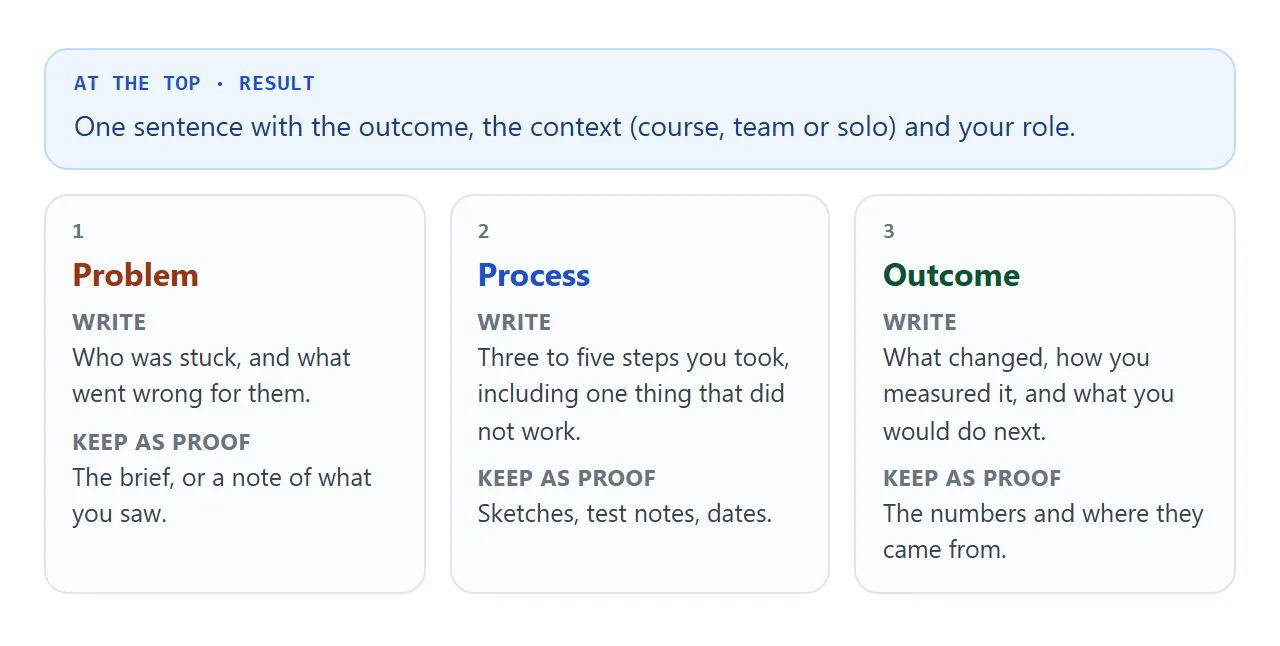
- Problem. Who was stuck, and what went wrong for them.
- Process. Three to five steps, including one thing that did not work.
- Outcome. What changed, how you measured it, and what you would do next.
Say what kind of project it was. Coursework, a team project, or something you set yourself are all fine, as long as the page says which, and says which part was yours.
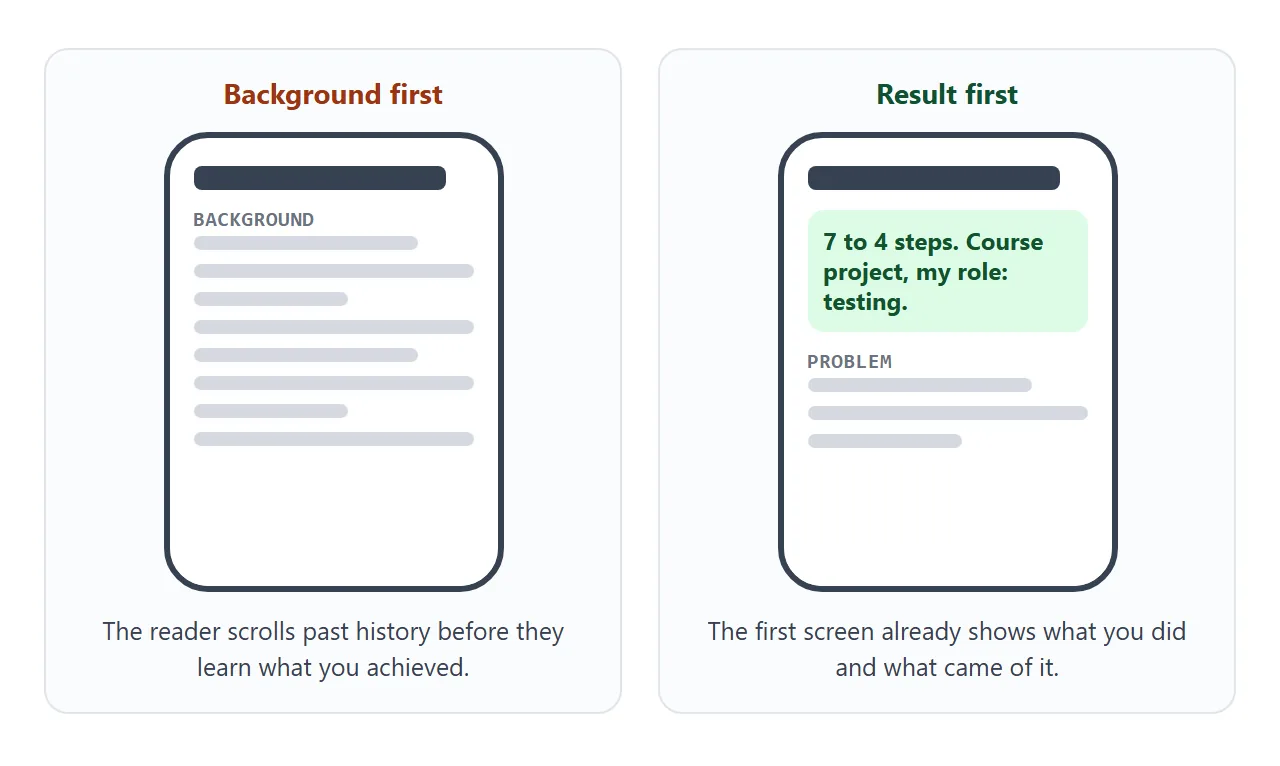
The reader's first screen matters on a phone. Put the result and your role there, so the page shows what you achieved before the reader has scrolled.
Make it with AI
An AI is good at turning rough notes into a tidy page. It is also willing to fill gaps with plausible numbers, so the prompt has to forbid that.
Anthropic's documentation on reducing hallucinations suggests letting the model say it does not have enough information, and basing its answer on text you provide. It adds that these techniques reduce hallucinations but do not eliminate them.
The prompt below follows that advice. Paste it into ChatGPT, Claude or Gemini, then replace the notes at the bottom.
Turn my notes into a one-page case study as ONE self-contained HTML file.

Rules:
- Use only the facts in my notes. Do not invent numbers, quotes, tools or results.
- If something is missing, write [ADD: what is missing] instead of guessing.
- Sections in order: Result (one sentence), Problem, My role, Process (3-5 steps), Outcome, What I would do next.
- Say whether it was coursework, a team project or solo, and what I did myself.
- Plain HTML and CSS. It must work on a phone. No external images or scripts. Draw any diagram with inline SVG.
- Keep it under 400 words.

My notes:
Project:
Course or context:
Dates:
Problem:
What I did:
What I measured, and how:
Result:
Then check the result before you use it:
- Numbers. Match every number and date to your notes. Delete any you cannot find there.
- [ADD] marks. Fill each one with a fact you can back up, or remove the sentence.
- Role. Make sure it says what you did, not what the team did.
- Names. Remove classmates, teachers and clients unless they agreed to be named.
- Phone. Open it narrow, or ask the AI to confirm it adds a viewport meta tag.
Send it as a link
A file attached to an application is a copy that you cannot fix once it is sent. A link points at one page that you can still improve. Case study link covers why that suits proof that gets forwarded.
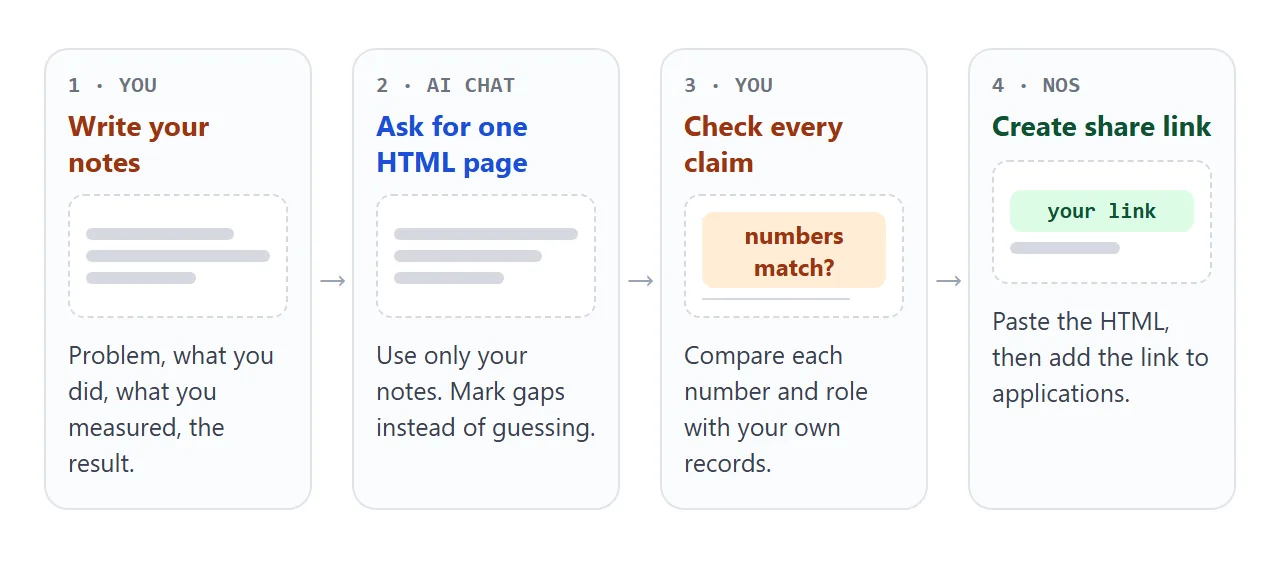
- Copy the whole HTML the AI gave you. Saving HTML from ChatGPT shows how.
- Paste it into a NOS document. The page renders as written.
- Choose Create share link. HTML to link walks through it.
- Open the link on your phone once, as a visitor would.
- Paste the link into the application.
Whoever opens it sees the page in a browser, on a phone or a laptop, with no account to create. They cannot edit it.
If you fix a typo later, you edit the code and the same link shows the new version, so applications you already sent do not go stale.
As of October 2026, LinkedIn's help page on featured work says you can feature links to external websites, such as a portfolio, on your profile. A case study link fits there. Other platforms vary, so use the link field each one gives you.
Ways to share a case study compared
| Attach the .html file | Share link | |
|---|---|---|
| What the reader needs | To download the file and open it in a browser | A browser, no account |
| Fixing a typo later | Send a new file | Edit the code, same link |
| Copies in circulation | One per message or forward | One page |
| Can the reader edit it | They hold their own copy | No, view only |
| Opens on a phone | See the guide below | Yes, in the browser |
If the reader is on a phone, opening an HTML file on a phone explains what can go wrong with an attached file.
From one case study to a portfolio
When you have two or three projects, put them all on one page, each as an opening section, so you still have one link to maintain.
<!doctype html>
<html lang="en">
<head>
<meta charset="utf-8">
<meta name="viewport" content="width=device-width, initial-scale=1">
<title>Case study portfolio</title>
<style>
* { box-sizing: border-box; }
body { margin: 0; font-family: system-ui, sans-serif; color: #1d2330; background: #f4f5f7; line-height: 1.5; }
.wrap { max-width: 720px; margin: 0 auto; padding: 22px 16px 28px; }
h1 { font-size: 24px; margin: 0 0 4px; }
.sub { color: #5b6473; margin: 0 0 16px; font-size: 15px; }
.filters { display: flex; flex-wrap: wrap; gap: 8px; margin-bottom: 14px; }
.filters button { font: inherit; font-size: 14px; padding: 6px 14px; border-radius: 999px; border: 1px solid #c9ceda; background: #fff; cursor: pointer; }
.filters button[aria-pressed="true"] { background: #1d4ed8; border-color: #1d4ed8; color: #fff; }
.card { background: #fff; border-radius: 12px; border: 1px solid #e1e4ea; margin-bottom: 10px; overflow: hidden; }
.card[hidden] { display: none; }
.head { width: 100%; display: flex; gap: 12px; align-items: center; text-align: left; font: inherit; background: none; border: 0; padding: 14px; cursor: pointer; }
.thumb { flex: 0 0 52px; height: 52px; border-radius: 10px; }
.t1 { background: linear-gradient(135deg, #93c5fd, #1d4ed8); }
.t2 { background: linear-gradient(135deg, #fcd34d, #ea580c); }
.t3 { background: linear-gradient(135deg, #86efac, #15803d); }
.head b { display: block; font-size: 16px; }
.head span { font-size: 13px; color: #5b6473; }
.arrow { margin-left: auto; color: #6b7280; transition: transform .15s; }
.head[aria-expanded="true"] .arrow { transform: rotate(90deg); }
.body { padding: 0 14px 14px; font-size: 14.5px; }
.body[hidden] { display: none; }
.body dt { font-weight: 700; margin-top: 8px; }
.body dd { margin: 0; }
.result { display: inline-block; background: #eff6ff; color: #1d4ed8; font-weight: 700; border-radius: 8px; padding: 3px 10px; font-size: 14px; margin-bottom: 4px; }
.sample { font-size: 12px; font-weight: 700; color: #9a3412; }
footer { margin-top: 16px; font-size: 14px; color: #374151; }
</style>
</head>
<body>
<div class="wrap">
<div class="sample">SAMPLE - replace with your own projects</div>
<h1>Your Name: case studies</h1>
<p class="sub">Three projects. Open one to see the problem, the process and the outcome.</p>
<div class="filters" role="group" aria-label="Filter projects">
<button type="button" data-f="all" aria-pressed="true">All</button>
<button type="button" data-f="research" aria-pressed="false">Research</button>
<button type="button" data-f="data" aria-pressed="false">Data</button>
</div>
<section class="card" data-type="research">
<button class="head" type="button" aria-expanded="false" aria-controls="p1">
<div class="thumb t1"></div>
<div><b>Bike-share sign-up</b><span>Research - course project - 6 weeks</span></div>
<span class="arrow">▸</span>
</button>
<div class="body" id="p1" hidden>
<div class="result">7 steps down to 4</div>
<dl>
<dt>Problem</dt><dd>New riders dropped out before unlocking a bike.</dd>
<dt>Process</dt><dd>Five test sessions, merged three screens, tested again.</dd>
<dt>Outcome</dt><dd>All five testers finished the shorter flow.</dd>
</dl>
</div>
</section>
<section class="card" data-type="data">
<button class="head" type="button" aria-expanded="false" aria-controls="p2">
<div class="thumb t2"></div>
<div><b>Library opening hours</b><span>Data - solo - 3 weeks</span></div>
<span class="arrow">▸</span>
</button>
<div class="body" id="p2" hidden>
<div class="result">Busiest hour found: 2 pm</div>
<dl>
<dt>Problem</dt><dd>Staff did not know which hours were busiest.</dd>
<dt>Process</dt><dd>Counted entries from a sample sheet and charted them by hour.</dd>
<dt>Outcome</dt><dd>A one-page chart and a suggestion to move a shift.</dd>
</dl>
</div>
</section>
<section class="card" data-type="research">
<button class="head" type="button" aria-expanded="false" aria-controls="p3">
<div class="thumb t3"></div>
<div><b>Recycling signs</b><span>Research - team of 4 - 5 weeks</span></div>
<span class="arrow">▸</span>
</button>
<div class="body" id="p3" hidden>
<div class="result">Mix-ups dropped in a short test</div>
<dl>
<dt>Problem</dt><dd>Residents put paper in the wrong bin.</dd>
<dt>Process</dt><dd>Observed one bin area, redrew the labels with pictures.</dd>
<dt>Outcome</dt><dd>Fewer wrong items in the same bins over one week.</dd>
</dl>
</div>
</section>
<footer>Your Name - yourname@example.com</footer>
</div>
<script>
const cards = document.querySelectorAll('.card');
const filterButtons = document.querySelectorAll('.filters button');
cards.forEach((card) => {
const head = card.querySelector('.head');
const body = card.querySelector('.body');
head.addEventListener('click', () => {
const open = head.getAttribute('aria-expanded') === 'true';
head.setAttribute('aria-expanded', String(!open));
body.hidden = open;
});
});
filterButtons.forEach((btn) => {
btn.addEventListener('click', () => {
filterButtons.forEach((b) => b.setAttribute('aria-pressed', String(b === btn)));
cards.forEach((card) => {
card.hidden = btn.dataset.f !== 'all' && card.dataset.type !== btn.dataset.f;
});
});
});
</script>
</body>
</html>
Give the AI the notes for each project and ask for one page with a collapsible card per project, using the same sections. Then check each project the way you checked the first one.
For ideas on what to include, see student portfolio and linking a portfolio in a resume.
When it does not work
| What you see | Cause | Fix |
|---|---|---|
| A picture is missing | The image is hosted somewhere else, and outside images are blocked | Ask the AI for inline SVG or CSS shapes instead |
| A contact form does not send | Sending a form to a server is blocked | Show your email address as plain text |
| A font or script is missing | It loads from a site that is not allowed | Use Google Fonts, cdnjs, jsDelivr, unpkg or no extras |
| Numbers you never gave | The AI filled a gap | Re-run with "use only my notes", then compare line by line |
| Text is tiny on a phone | No viewport meta tag | Ask the AI to add one, see viewport meta tag |
| A typo after sending | The page was already shared | Edit the code, the same link shows the fix |