A catering menu template is one page with three things on it: your packages, what each one serves, and what it costs per guest.
Built as a web page instead of a PDF, it goes out as one link. When a price changes you edit the page, and nobody has to be sent a new file.
Here is a page you can copy. Pick a package, tick the extras and change the guest count. The total follows, and the package minimum is applied.
<!doctype html>
<html lang="en">
<head>
<meta charset="utf-8">
<meta name="viewport" content="width=device-width, initial-scale=1">
<title>Catering packages</title>
<style>
  * { box-sizing: border-box; }
  body { margin: 0; font-family: system-ui, sans-serif; color: #26221d; background: #faf7f2; }
  .wrap { max-width: 880px; margin: 0 auto; padding: 22px 18px 28px; }
  header h1 { margin: 0; font-size: 24px; font-family: Georgia, serif; color: #3d4a2a; }
  header p { margin: 4px 0 0; font-size: 14px; color: #6b645a; }
  h2 { font-size: 13px; letter-spacing: .08em; text-transform: uppercase; color: #8a5a2b; margin: 22px 0 10px; }
  .pk { display: grid; grid-template-columns: repeat(3, 1fr); gap: 12px; }
  .pk label { display: block; cursor: pointer; }
  .pk input { position: absolute; opacity: 0; pointer-events: none; }
  .card { height: 100%; background: #fff; border: 2px solid #e6dfd3; border-radius: 12px; padding: 14px 14px 12px; }
  .pk input:checked + .card { border-color: #5b7a2e; box-shadow: 0 0 0 3px rgba(91, 122, 46, .15); }
  .pk input:focus-visible + .card { outline: 2px solid #1d4ed8; outline-offset: 2px; }
  .card h3 { margin: 0; font-size: 17px; font-family: Georgia, serif; }
  .price { margin: 4px 0 8px; font-size: 22px; font-weight: 700; color: #3d4a2a; font-variant-numeric: tabular-nums; }
  .price small { font-size: 13px; font-weight: 500; color: #6b645a; }
  .card ul { margin: 0; padding-left: 18px; font-size: 14px; line-height: 1.5; }
  .meta { margin-top: 8px; font-size: 13px; color: #6b645a; }
  .opts { background: #fff; border: 1px solid #e6dfd3; border-radius: 12px; padding: 4px 14px; }
  .opt { display: flex; align-items: center; gap: 10px; padding: 9px 0; font-size: 15px; }
  .opt + .opt { border-top: 1px solid #efe9de; }
  .opt span:nth-child(2) { flex: 1; }
  .opt em { font-style: normal; font-variant-numeric: tabular-nums; color: #6b645a; }
  .est { margin-top: 18px; background: #3d4a2a; color: #fff; border-radius: 12px; padding: 14px 16px; }
  .row { display: flex; align-items: center; justify-content: space-between; gap: 12px; flex-wrap: wrap; }
  .row label { font-size: 15px; }
  .row input[type=number] { width: 84px; font: inherit; padding: 6px 8px; border-radius: 8px; border: 0; }
  .total { font-size: 28px; font-weight: 700; font-variant-numeric: tabular-nums; }
  .note { margin: 6px 0 0; font-size: 13px; color: #dfe8cf; min-height: 18px; }
  .foot { margin-top: 14px; font-size: 13px; color: #6b645a; }
  @media (max-width: 640px) {
    .pk { grid-template-columns: 1fr; gap: 8px; }
    .card { padding: 9px 12px 8px; }
    .price { margin: 0 0 3px; font-size: 19px; }
    .card ul { font-size: 13px; line-height: 1.4; }
    .meta { margin-top: 4px; font-size: 12px; }
    .wrap { padding: 16px 14px 20px; }
    h2 { margin: 16px 0 8px; }
    .opt { padding: 7px 0; font-size: 14px; }
  }
</style>
</head>
<body>
<div class="wrap">
  <header>
    <h1>Juniper Table Catering</h1>
    <p>Drop-off and staffed events. Prices are per guest. Updated 1 October 2026.</p>
  </header>

  <h2>1. Pick a package</h2>
  <div class="pk" id="pk">
    <label>
      <input type="radio" name="pkg" value="18" data-min="15" data-name="Garden Lunch" checked>
      <div class="card">
        <h3>Garden Lunch</h3>
        <div class="price">$18 <small>per guest</small></div>
        <ul><li>1 main, 2 sides, 1 salad</li><li>Rolls and butter</li></ul>
        <div class="meta">Main: 6 oz per guest. Minimum 15 guests.</div>
      </div>
    </label>
    <label>
      <input type="radio" name="pkg" value="26" data-min="20" data-name="Classic Buffet">
      <div class="card">
        <h3>Classic Buffet</h3>
        <div class="price">$26 <small>per guest</small></div>
        <ul><li>2 mains, 3 sides, 1 salad</li><li>Rolls, one dessert</li></ul>
        <div class="meta">Mains: 8 oz per guest in total. Minimum 20 guests.</div>
      </div>
    </label>
    <label>
      <input type="radio" name="pkg" value="42" data-min="25" data-name="Evening Plated">
      <div class="card">
        <h3>Evening Plated</h3>
        <div class="price">$42 <small>per guest</small></div>
        <ul><li>Starter, main, dessert</li><li>Two servers included</li></ul>
        <div class="meta">Main: 7 oz per guest. Minimum 25 guests.</div>
      </div>
    </label>
  </div>

  <h2>2. Add extras</h2>
  <div class="opts">
    <label class="opt"><input type="checkbox" class="add" value="4"><span>Dessert platter</span><em>+$4 per guest</em></label>
    <label class="opt"><input type="checkbox" class="add" value="2.5"><span>Coffee and tea service</span><em>+$2.50 per guest</em></label>
    <label class="opt"><input type="checkbox" class="add" value="3"><span>Compostable plates and cutlery</span><em>+$3 per guest</em></label>
  </div>

  <div class="est">
    <div class="row">
      <label for="guests">Guests</label>
      <input id="guests" type="number" min="1" value="30" inputmode="numeric">
      <div class="total" id="total">$540</div>
    </div>
    <p class="note" id="note"></p>
  </div>
  <p class="foot">An estimate, not a quote. Delivery and tax are added when we confirm the date.</p>
</div>

<script>
  const guests = document.getElementById('guests');
  const total = document.getElementById('total');
  const note = document.getElementById('note');

  function update() {
    const pkg = document.querySelector('input[name=pkg]:checked');
    const min = Number(pkg.dataset.min);
    let perGuest = Number(pkg.value);
    document.querySelectorAll('.add:checked').forEach((a) => { perGuest += Number(a.value); });

    const entered = Math.max(1, Number(guests.value) || 0);
    const billed = Math.max(entered, min);  // never price below the package minimum
    const sum = billed * perGuest;

    total.textContent = '$' + sum.toLocaleString('en-US', { maximumFractionDigits: 2 });
    note.textContent = entered < min
      ? pkg.dataset.name + ' has a ' + min + '-guest minimum, so this is priced for ' + min + '.'
      : billed + ' guests at $' + perGuest.toFixed(2) + ' each.';
  }

  document.addEventListener('input', update);
  document.addEventListener('change', update);
  update();
</script>
</body>
</html>
What to put on the page
Put the packages first. Each card carries four things: the name, the price per guest, what a guest receives, and the minimum number of guests.
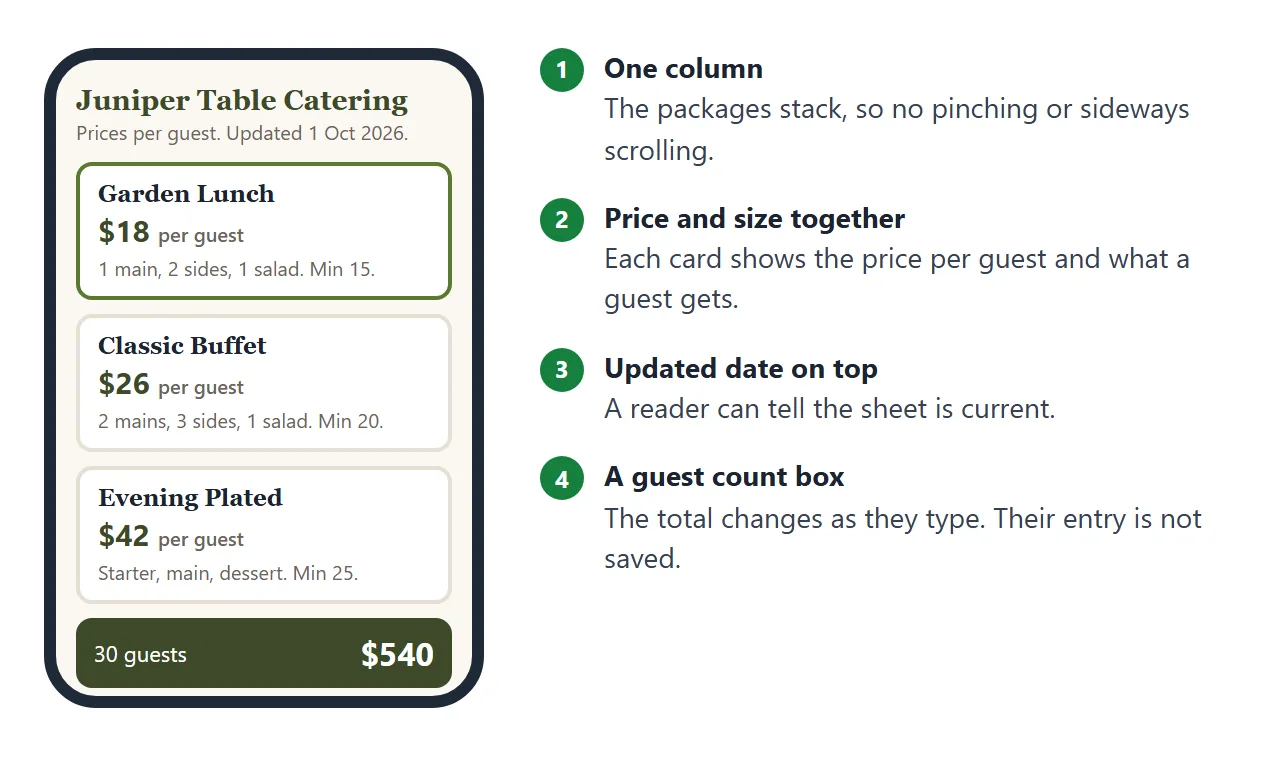
Serving sizes are where menus usually go vague. Write them in the unit you quote in: ounces of main per guest for a buffet, or how many people a half and a full tray serve. The second demo below uses trays.
Then add the small print that makes an estimate honest:
- Minimum guests. If the client types fewer, price the minimum and say so on the page.
- Lead time. How many days ahead you need the order.
- Updated date. Put it at the top so a saved link can be trusted.
- Allergies. One line on how to tell you. Write the wording yourself instead of accepting a draft from an AI.
- Contact. A phone number and an email address at the bottom.
Prices read best when the digits line up. The CSS value tabular-nums gives every digit the same width, and both demo pages use it.
The page also needs the viewport meta tag. MDN notes that some mobile devices draw a page in a wider virtual window and shrink it to fit, and the tag prevents that.
Make it with AI
Paste this into ChatGPT, Claude or Gemini. Replace everything in square brackets with your own details and leave the rules as they are.
Make one self-contained HTML page for a catering menu.
Use inline CSS and JavaScript only. No external images,
fonts or libraries. Include a viewport meta tag and make
it read well on a phone.

Business name: [your business name]
Updated: [date]

Packages (use only these; do not add dishes or change prices):
1. [Name], [price] per guest, minimum [number] guests.
   Includes: [items]. Serving size: [for example 6 oz of main per guest].
2. [Name], [price] per guest, minimum [number] guests.
   Includes: [items]. Serving size: [...].
3. [Name], [price] per guest, minimum [number] guests.
   Includes: [items]. Serving size: [...].

Extras, each priced per guest: [name and price], [name and price]

Layout: packages as cards side by side on a wide screen and
stacked on a phone, price large, minimum in small text. Under
them: extras as tick boxes, a guest count box, and a total that
updates. If the guest count is below the package minimum, price
the minimum and say so. Show prices in a column of equal-width
digits. End with: [phone and email]. Do not add a form that
sends data anywhere. Add an allergy line that says only:
[your own wording].
Before you use the result, check these:
- Every price, minimum and serving size matches what you quote. An AI can round or invent a number.
- Type a guest count below the minimum. The total should switch to the minimum.
- Tick every extra and compare the total with a calculator.
- No dish appears that is not on your list.
- If a photo is missing, the AI probably used an image from a web address. Ask for colour blocks or inline SVG instead.
If you use Claude, sharing HTML from Claude covers the route from the chat to a page.
Send it as a link
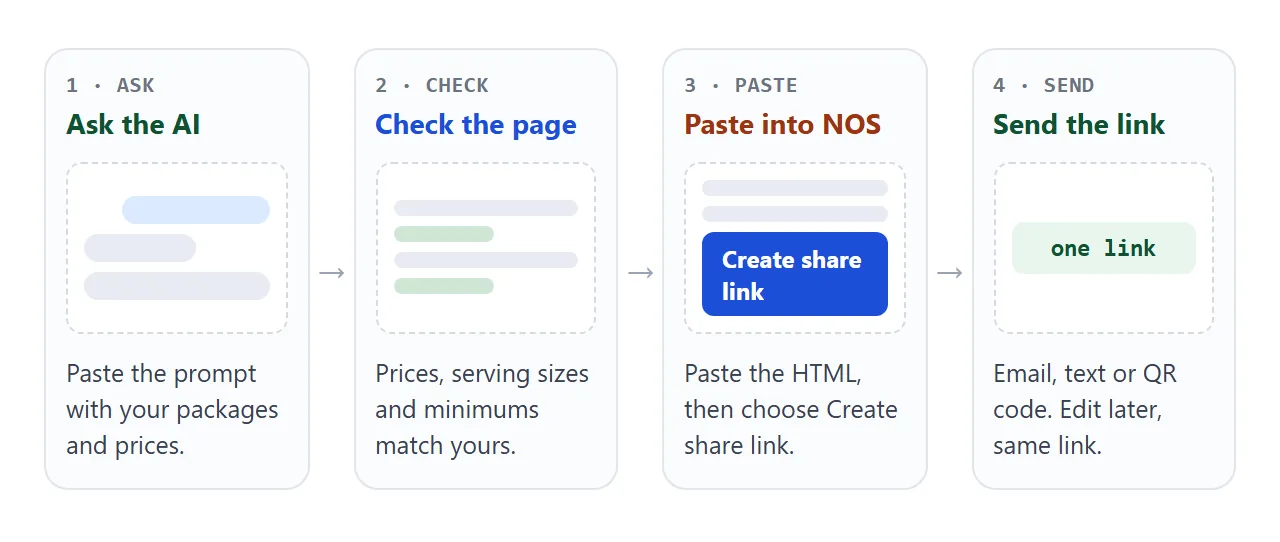
Copy the HTML the AI gave you, paste it into a NOS document and choose Create share link. HTML to link walks through it.
Whoever opens the link sees the page in a browser, on a phone too, with no account. They cannot edit it. The scripts run, so the guest-count box works for them, although what they type is not saved.
When a price changes, edit the code in the same document. The link stays the same, so a client who saved it in the spring sees the October prices.
Put the link in an email or a text message. For a flyer, a van or a printed menu, turn it into a QR code. QR code link explains why the code should point at an address you keep.
For a plain price sheet without packages, see price list link. For a priced proposal for one event, see quote link.
Link or attachment
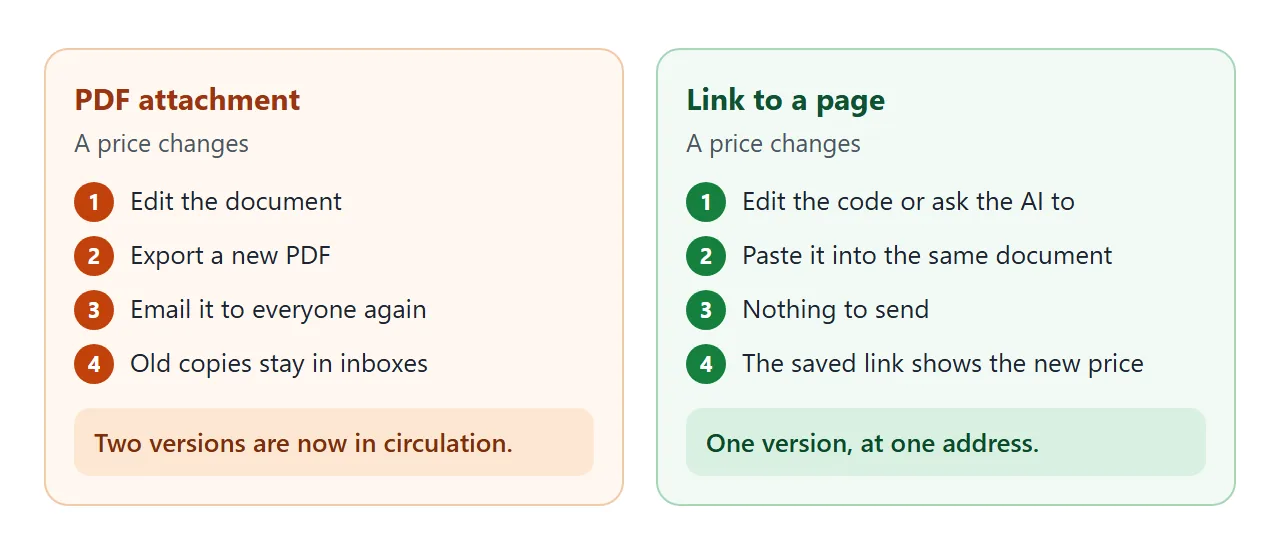
The difference shows up the first time a price changes.
| PDF attachment | Link to a page | |
|---|---|---|
| A price changes | Export a new file and send it again | Edit the page. The link stays the same |
| Copies in circulation | Every saved copy keeps the old price | The saved link shows the current page |
| Opening it | Open the attachment | Opens in a browser, phone included, no account |
Trays instead of packages
Not every caterer sells packages. If you sell by the tray, the same idea works as a table: dish, half tray, full tray, and a line saying how many people each serves.
<!doctype html>
<html lang="en">
<head>
<meta charset="utf-8">
<meta name="viewport" content="width=device-width, initial-scale=1">
<title>Catering trays</title>
<style>
  * { box-sizing: border-box; }
  body { margin: 0; font-family: system-ui, sans-serif; color: #26221d; background: #fff; }
  .wrap { max-width: 880px; margin: 0 auto; padding: 20px 16px 24px; }
  h1 { margin: 0; font-size: 22px; font-family: Georgia, serif; color: #7a3b1d; }
  .sub { margin: 4px 0 14px; font-size: 14px; color: #6b645a; }
  .filters { display: flex; flex-wrap: wrap; gap: 8px; margin-bottom: 14px; }
  .filters button { font: inherit; font-size: 14px; padding: 7px 12px; border-radius: 999px; border: 1px solid #d9cfc0; background: #fff; cursor: pointer; }
  .filters button[aria-pressed=true] { background: #7a3b1d; border-color: #7a3b1d; color: #fff; }
  table { width: 100%; border-collapse: collapse; font-size: 15px; }
  th { text-align: left; font-size: 12px; letter-spacing: .06em; text-transform: uppercase; color: #6b645a; padding: 6px 8px; border-bottom: 2px solid #e6dfd3; }
  td { padding: 10px 8px; border-bottom: 1px solid #efe9de; vertical-align: top; }
  td.p, th.p { text-align: right; white-space: nowrap; font-variant-numeric: tabular-nums; }
  td small { display: block; color: #6b645a; font-size: 13px; margin-top: 2px; }
  .tag { display: inline-block; font-size: 11px; font-weight: 600; padding: 1px 7px; border-radius: 999px; background: #eaf2dc; color: #3d5a1c; margin-left: 6px; vertical-align: 1px; }
  .empty { padding: 14px 8px; color: #6b645a; display: none; }
  .foot { margin-top: 14px; font-size: 13px; color: #6b645a; }
  @media (max-width: 560px) {
    thead { display: none; }
    tr { display: grid; grid-template-columns: 1fr 1fr; gap: 0 10px; padding: 10px 0; border-bottom: 1px solid #efe9de; }
    td { border: 0; padding: 2px 0; }
    td:first-child { grid-column: 1 / -1; font-weight: 600; }
    td small { font-weight: 400; }
    td.p { text-align: left; }
    td.p::before { content: attr(data-label) " "; font-weight: 400; color: #6b645a; font-size: 13px; }
  }
</style>
</head>
<body>
<div class="wrap">
  <h1>Hot trays and salads</h1>
  <p class="sub">Juniper Table Catering. Order 48 hours ahead. Updated 1 October 2026.</p>

  <div class="filters" id="filters">
    <button type="button" data-f="all" aria-pressed="true">All</button>
    <button type="button" data-f="veg" aria-pressed="false">Vegetarian</button>
    <button type="button" data-f="gf" aria-pressed="false">Gluten-free</button>
  </div>

  <table>
    <thead><tr><th>Dish</th><th class="p">Half tray</th><th class="p">Full tray</th></tr></thead>
    <tbody id="rows">
      <tr data-tags="gf"><td>Herb roast chicken<small>Half serves 10-12. Full serves 20-24.</small></td><td class="p" data-label="Half tray">$68</td><td class="p" data-label="Full tray">$128</td></tr>
      <tr data-tags="veg"><td>Baked penne, three cheeses<span class="tag">Veg</span><small>Half serves 10-12. Full serves 20-24.</small></td><td class="p" data-label="Half tray">$54</td><td class="p" data-label="Full tray">$98</td></tr>
      <tr data-tags="veg gf"><td>Roasted vegetable tray<span class="tag">Veg</span><span class="tag">GF</span><small>Half serves 10-12. Full serves 20-24.</small></td><td class="p" data-label="Half tray">$46</td><td class="p" data-label="Full tray">$84</td></tr>
      <tr data-tags="veg gf"><td>Harvest salad<span class="tag">Veg</span><span class="tag">GF</span><small>Half serves 8-10. Full serves 16-20.</small></td><td class="p" data-label="Half tray">$38</td><td class="p" data-label="Full tray">$70</td></tr>
      <tr data-tags=""><td>Slow-cooked beef brisket<small>Half serves 10-12. Full serves 20-24.</small></td><td class="p" data-label="Half tray">$92</td><td class="p" data-label="Full tray">$172</td></tr>
    </tbody>
  </table>
  <div class="empty" id="empty">Nothing matches that filter today.</div>
  <p class="foot">Check the allergen sheet with your order. Tell us about allergies when you book.</p>
</div>

<script>
  const buttons = document.querySelectorAll('#filters button');
  const rows = document.querySelectorAll('#rows tr');
  const empty = document.getElementById('empty');

  buttons.forEach((b) => b.addEventListener('click', () => {
    buttons.forEach((x) => x.setAttribute('aria-pressed', x === b));
    let shown = 0;
    rows.forEach((r) => {
      const ok = b.dataset.f === 'all' || r.dataset.tags.split(' ').includes(b.dataset.f);
      r.style.display = ok ? '' : 'none';
      if (ok) shown++;
    });
    empty.style.display = shown ? 'none' : 'block';
  }));
</script>
</body>
</html>
Ask the AI to add the filter buttons, then check every tag yourself. The tags are only as right as the information you gave it. For a longer menu with sections, see menu link.
When it does not work
| What you see | Cause | Fix |
|---|---|---|
| Prices do not line up | The font uses digits of different widths | Add tabular-nums to the price cells |
| A photo is missing | The page loads it from a web address, and outside images are blocked | Use colour blocks or inline SVG |
| The total ignores the minimum | The AI did not apply it | Ask it to bill the larger of the guests and the minimum |
| Tiny text on a phone | The viewport meta tag is missing | Ask the AI to add it |
| A send-enquiry button does nothing | Sending a form to a server is blocked | Replace it with your phone and email |
| An embedded map is blank | Iframes are blocked | Write the address as text |
| The guest count resets on reopening | A visitor's changes are not saved | Nothing to fix. Each visit starts from the page as you wrote it |
| The link still shows an old price | The change went into a different copy | Edit the document the link was made from |
Brochures and menus share the same habit: the file goes out once and the facts keep changing. Digital brochure takes that idea further.