A class reunion website can be one page. Put the date, the venue, the cost and a contact on it, and send classmates a single link. It opens in a browser on a phone or a computer, with nothing to install and no account.
If you have been asking which site lets you share the plan with a scattered group of friends, this is a lighter route. You describe the reunion in plain words, an AI writes the page, and you send the link.
Here is a page you can copy.
<!doctype html>
<html lang="en">
<head>
<meta charset="utf-8">
<meta name="viewport" content="width=device-width, initial-scale=1">
<title>Hillcrest High, Class of 2006 - 20-year reunion</title>
<style>
  * { box-sizing: border-box; }
  body { margin: 0; background: #e8ecf3; font-family: system-ui, -apple-system, "Segoe UI", sans-serif; color: #1f2937; line-height: 1.55; }
  .page { max-width: 560px; margin: 0 auto; background: #fff; min-height: 100vh; padding-bottom: 28px; }
  .hero { background: #1e3a5f; color: #fff; text-align: center; padding: 22px 20px 20px; }
  .hero svg { width: 120px; height: 70px; display: block; margin: 0 auto 6px; }
  .hero p { margin: 0; font-size: 14px; letter-spacing: .08em; text-transform: uppercase; color: #bcd0ea; }
  h1 { margin: 4px 0 0; font-size: 29px; line-height: 1.15; }
  .days { margin: 0; padding: 10px 20px; background: #f4c542; color: #3b2a00; text-align: center; font-weight: 700; font-size: 17px; }
  section { padding: 0 20px; }
  h2 { margin: 24px 0 8px; font-size: 13px; letter-spacing: .08em; text-transform: uppercase; color: #1e3a5f; }
  p { margin: 0 0 10px; font-size: 17px; }
  .when { border: 2px solid #1e3a5f; border-radius: 14px; padding: 12px 16px; background: #f5f8fc; }
  .when b { display: block; font-size: 22px; color: #1e3a5f; }
  .card { border: 1px solid #d5dbe6; border-radius: 12px; padding: 12px 14px; background: #fafbfd; }
  .card b { display: block; font-size: 18px; }
  .price { display: flex; align-items: baseline; gap: 10px; flex-wrap: wrap; }
  .price strong { font-size: 34px; color: #1e3a5f; line-height: 1; }
  table { width: 100%; border-collapse: collapse; font-size: 16px; }
  td { padding: 8px 4px; border-bottom: 1px solid #e5e7eb; vertical-align: top; }
  td:first-child { width: 84px; font-weight: 700; color: #1e3a5f; white-space: nowrap; }
  .who { display: flex; flex-wrap: wrap; gap: 8px; margin: 0; padding: 0; list-style: none; }
  .who li { background: #eef2f8; border-radius: 99px; padding: 5px 12px; font-size: 16px; }
  .small { font-size: 15px; color: #6b7280; }
  .contact { margin-top: 24px; border: 2px solid #1e3a5f; border-radius: 14px; padding: 14px 16px; background: #f5f8fc; }
  .contact b { display: block; font-size: 19px; margin-bottom: 4px; }
  .contact a { display: inline-block; margin: 4px 10px 0 0; padding: 10px 16px; border-radius: 10px; background: #1e3a5f; color: #fff; text-decoration: none; font-size: 17px; font-weight: 600; }
  .contact a.alt { background: #fff; color: #1e3a5f; border: 2px solid #1e3a5f; padding: 8px 14px; }
</style>
</head>
<body>
<div class="page">
  <div class="hero">
    <!-- school crest drawn in SVG, so no image file is needed -->
    <svg viewBox="0 0 120 70" role="img" aria-label="A school crest">
      <path d="M60 4 L92 14 V36 Q92 54 60 66 Q28 54 28 36 V14 Z" fill="#f4c542" stroke="#fff" stroke-width="3"/>
      <path d="M60 18 L66 32 H52 Z M48 38 H72 V44 H48 Z" fill="#1e3a5f"/>
    </svg>
    <p>Hillcrest High School</p>
    <h1>Class of 2006<br>20-year reunion</h1>
  </div>

  <p class="days" id="days">Saturday 14 November 2026</p>

  <section>
    <h2>When</h2>
    <div class="when">
      <b><time datetime="2026-11-14">Saturday 14 November 2026</time></b>
      Doors open 6:30pm, finish 11:00pm
    </div>

    <h2>Where</h2>
    <div class="card"><b>The Granary Room</b>8 Mill Street, above the bakery. Street parking after 6pm, and a car park behind the library.</div>

    <h2>Cost</h2>
    <div class="price"><strong>$45</strong><span>per person, buffet dinner and one drink included</span></div>
    <p class="small">Pay Dana by Saturday 31 October. Message her for how to pay. Partners are welcome at the same price.</p>

    <h2>The evening</h2>
    <table>
      <tr><td>6:30pm</td><td>Doors open, name badges</td></tr>
      <tr><td>7:30pm</td><td>Buffet dinner</td></tr>
      <tr><td>9:00pm</td><td>Slideshow of old photos</td></tr>
      <tr><td>11:00pm</td><td>Finish</td></tr>
    </table>

    <h2>Coming so far</h2>
    <ul class="who" id="who">
      <li>Maya R.</li><li>Tomas B.</li><li>Priya S.</li><li>Jonas K.</li><li>Lena H.</li><li>Omar D.</li>
    </ul>
    <p class="small" id="count"></p>
  </section>

  <section>
    <div class="contact">
      <b>Please reply by Saturday 24 October</b>
      <p style="margin:0">Tell Dana Ruiz you are coming, and how many.</p>
      <a href="tel:+15550142">Call 555 0142</a>
      <a class="alt" href="mailto:dana.reunion@example.com">Email Dana</a>
      <p class="small" style="margin-top:10px">Email: dana.reunion@example.com</p>
    </div>
  </section>
</div>

<script>
  // Days to go, counted from the browser's own date
  const days = document.getElementById('days');
  const party = new Date(2026, 10, 14);  // months start at 0, so 10 is November
  const today = new Date(); today.setHours(0, 0, 0, 0);
  const left = Math.round((party - today) / 86400000);
  if (left > 1) days.textContent = left + ' days to go';
  else if (left === 1) days.textContent = 'Tomorrow';
  else if (left === 0) days.textContent = 'Tonight';
  else days.textContent = 'This reunion has happened. Thank you all.';

  // Count the names in the list, so the number never disagrees with it
  const n = document.querySelectorAll('#who li').length;
  document.getElementById('count').textContent = n + ' classmates have replied. First names and an initial, shared with their OK.';
</script>
</body>
</html>
The school, names, prices and phone number are made up. Replace them with yours, or let an AI do it, as the next section shows.
What goes on the page
Classmates open a reunion page to answer four questions: when is it, where is it, what does it cost, and who do I tell. Put those first, in that order, in large type.
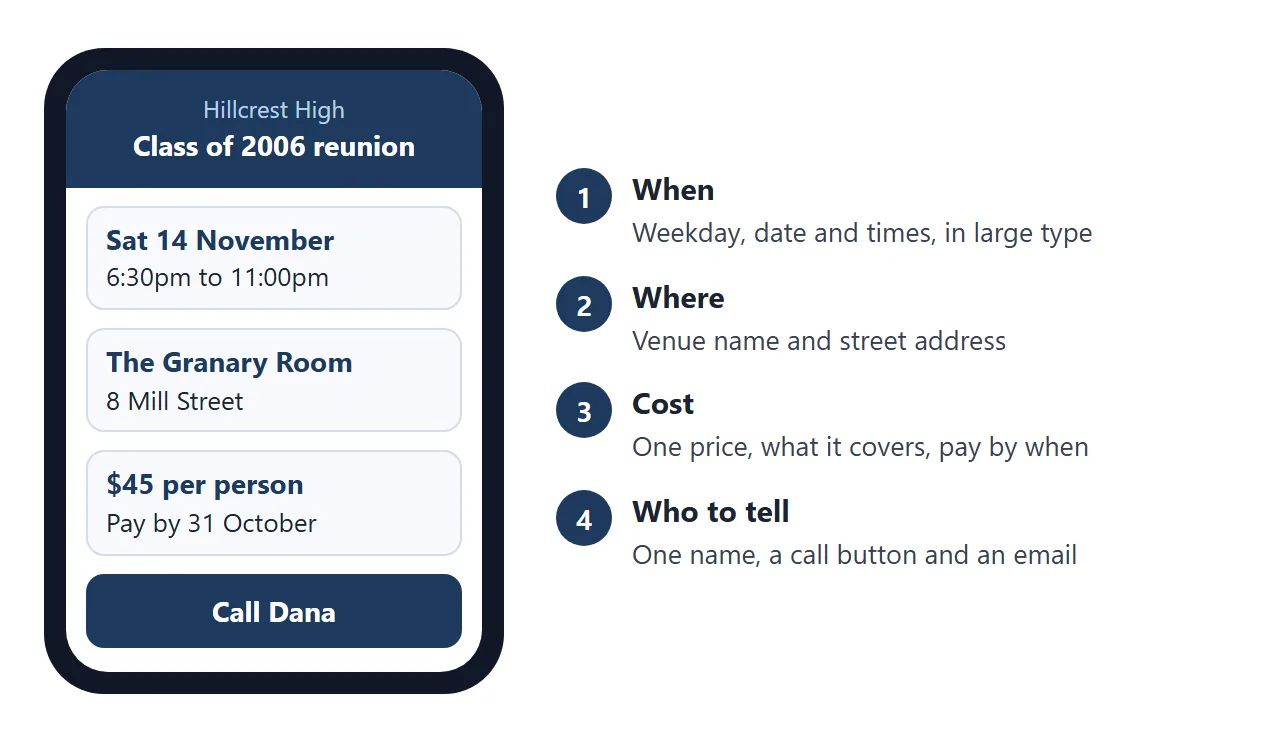
- Date and time. Weekday, date, doors open and finish. A date typed without its weekday is where mistakes hide.
- Venue. The name and the street address, plus one line on parking.
- Cost. One price per person, what it covers, and the date to pay by.
- Contact. One name, one phone number and one email.
- Reply by. A date, so you can give the venue a head count.
MDN says the datetime attribute of the time element gives a date in machine-readable form, and that this can help a user agent offer to add an event to a calendar. Write the date in words as well.
For the contact, MDN describes the tel: and mailto: link types. A tel: link autodials on cellular devices, and other devices may do something else, such as save the number. Show the number as text too, and test both links from your share link.
Anyone who has the link can open the page, and NOS has no password option. Do not put other people's phone numbers or home addresses on it, and do not put bank details on it.
If you list who is coming, use a first name and an initial, and ask first. Longer advice on the facts an event page needs is in event link and event landing page.
Make it with AI
Paste this into ChatGPT, Claude or Gemini. Replace the brackets with your own facts first.
Write one self-contained HTML page for a high school class
reunion. Mobile first, single column, body text at least 17px,
no external images, fonts or scripts, no form.

Sections, in this order:
1. Header: [school], Class of [year], [number]-year reunion
2. When: [weekday, date], doors [time], finish [time]
3. Where: [venue name], [street address], [parking note]
4. Cost: [price] per person, [what it covers], pay by [date]
5. The evening: a short table of times and what happens
6. A box: "Please reply by [date]", [name], a button that
   calls [phone] using a tel: link, and a mailto: link to [email]

Use only the facts I gave. Do not invent times, prices or names.
Return only the HTML.
Then check the result against your own list. Read every date, time, address, price and phone number. AI tools fill gaps with plausible details, so look for anything you did not write.
Also check that the weekday matches the date on a calendar, that there is no form or Submit button, and that no picture comes from another website.
Send it as a link
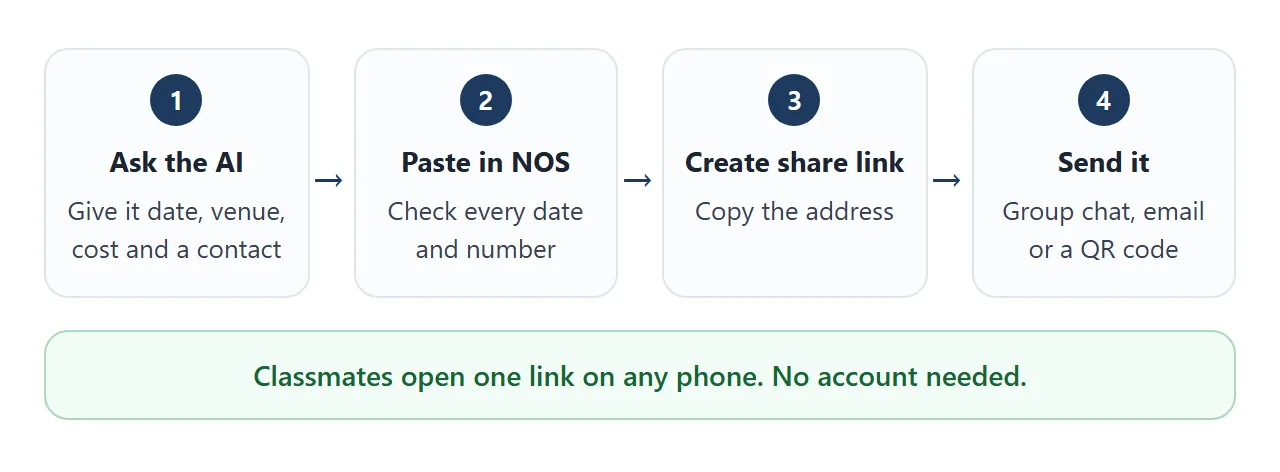
Open a NOS document and paste the HTML in. The page renders right there and its scripts run, so you can test it on your own screen. Then choose Create share link and copy the address. HTML to link walks through it.
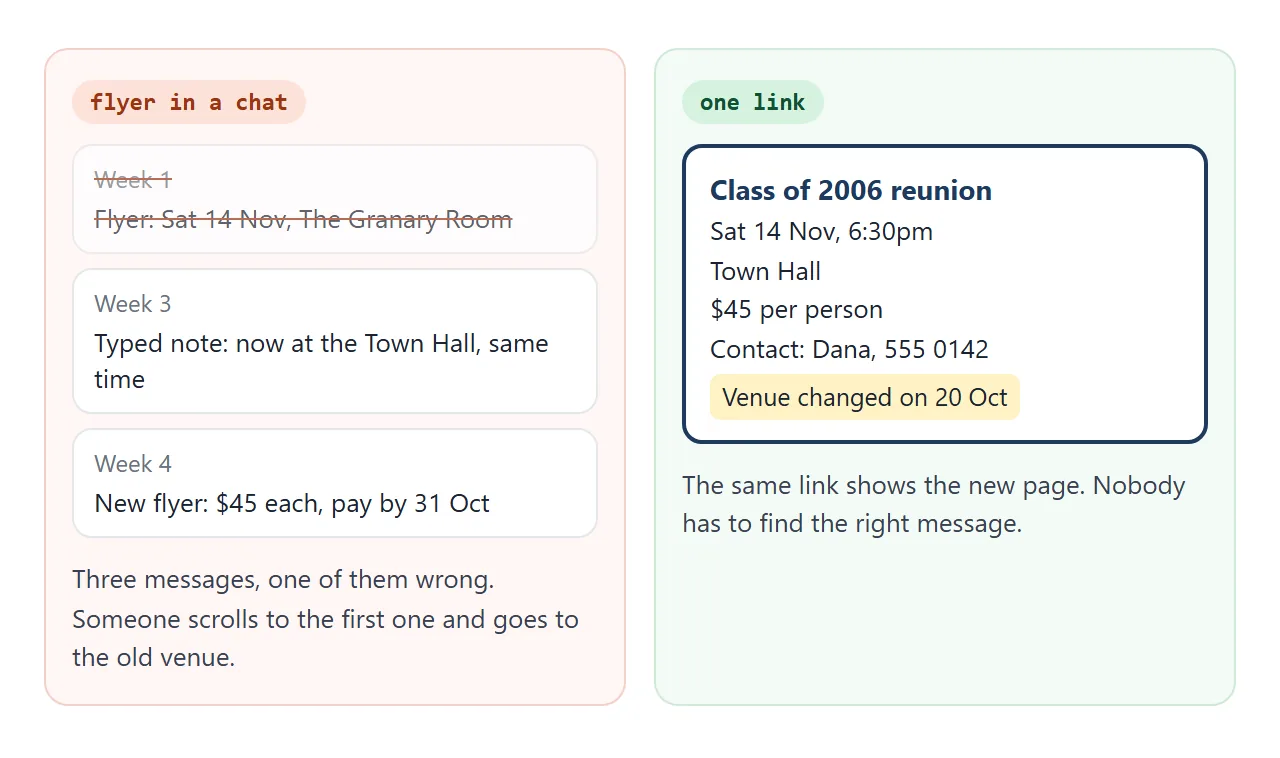
Anyone with that address can open the page in a browser, a phone included, with no account. They can read it but not edit it. If you change the code later, the same link shows the new version.
Classmates reach you through different routes, so use more than one.
| Way to send | What a classmate gets | If the venue changes |
|---|---|---|
| Flyer image or PDF in a chat | A file to open and find again | Send a new file. The old one stays in the chat |
| Details typed in a message | Plain text | Send another message |
| Link to a NOS page | A page in the browser, no account | Change the code. The same link shows the change |
| Email with the link | The link in the message | Same as the link |
| QR code on a printed card | A camera scan that leads to the link | Same as the link. The printed code does not change |
For a QR code, Google's help says that in Chrome on a computer you open the page, choose the three dots, then Cast, save, and share, then Create QR code. You can download it (as of October 2026).
Scan the printout yourself before you hand out cards.
The page must exist before the code does. QR code link covers the printing side, and why links beat attachments covers the file side.
Work out the cost before you publish
The cost line is the one classmates remember, so set it once. Fixed costs, such as the venue, are shared by whoever comes. Fewer guests means a higher price each.
<!doctype html>
<html lang="en">
<head>
<meta charset="utf-8">
<meta name="viewport" content="width=device-width, initial-scale=1">
<title>Reunion ticket price</title>
<style>
  * { box-sizing: border-box; }
  body { margin: 0; padding: 16px; background: #f4f5f7; font-family: system-ui, -apple-system, "Segoe UI", sans-serif; color: #1f2937; line-height: 1.45; }
  .box { max-width: 520px; margin: 0 auto; background: #fff; border-radius: 14px; padding: 16px 18px 18px; box-shadow: 0 4px 16px rgba(0,0,0,.08); }
  h1 { margin: 0 0 4px; font-size: 20px; }
  .hint { margin: 0 0 12px; font-size: 14px; color: #6b7280; }
  label { display: flex; justify-content: space-between; align-items: center; gap: 12px; padding: 7px 0; font-size: 16px; border-bottom: 1px solid #eef0f3; }
  label span:first-child { flex: 1; }
  input { width: 96px; padding: 8px 10px; font-size: 16px; border: 1px solid #c7ccd4; border-radius: 8px; text-align: right; }
  .out { margin-top: 14px; border-radius: 12px; background: #eaf1fb; padding: 12px 14px; }
  .out .big { font-size: 30px; font-weight: 800; color: #1e3a5f; line-height: 1.1; }
  .out p { margin: 4px 0 0; font-size: 15px; }
  table { width: 100%; border-collapse: collapse; margin-top: 12px; font-size: 15px; }
  th, td { padding: 6px 4px; text-align: right; border-bottom: 1px solid #e5e7eb; }
  th:first-child, td:first-child { text-align: left; }
  th { font-size: 13px; color: #6b7280; font-weight: 600; }
  .say { margin-top: 12px; font-size: 15px; background: #fffbe6; border: 1px solid #f1e3a0; border-radius: 10px; padding: 10px 12px; }
</style>
</head>
<body>
<div class="box">
  <h1>Ticket price for the reunion</h1>
  <p class="hint">Made-up numbers. Type your own quotes in.</p>

  <label><span>Venue hire (whole evening)</span><input id="venue" type="number" min="0" value="450"></label>
  <label><span>Music, decorations, badges</span><input id="extras" type="number" min="0" value="150"></label>
  <label><span>Food per person</span><input id="food" type="number" min="0" value="22"></label>
  <label><span>Drinks per person</span><input id="drink" type="number" min="0" value="8"></label>
  <label><span>Guests you expect</span><input id="guests" type="number" min="1" value="40"></label>

  <div class="out">
    <div class="big" id="price"></div>
    <p id="total"></p>
  </div>

  <table>
    <thead><tr><th>If this many come</th><th>Price each</th></tr></thead>
    <tbody id="rows"></tbody>
  </table>

  <p class="say" id="say"></p>
</div>

<script>
  const ids = ['venue', 'extras', 'food', 'drink', 'guests'];
  const v = (id) => Math.max(0, parseFloat(document.getElementById(id).value) || 0);

  // Fixed costs are shared by the guests; food and drink are paid per head
  function priceFor(count) {
    const fixed = v('venue') + v('extras');
    return Math.ceil((fixed + count * (v('food') + v('drink'))) / count);  // round up to a whole dollar
  }

  function update() {
    const g = Math.max(1, Math.round(v('guests')));
    const price = priceFor(g);
    document.getElementById('price').textContent = '$' + price + ' per person';
    document.getElementById('total').textContent = 'Total cost for ' + g + (g === 1 ? ' guest' : ' guests') + ': $' + (v('venue') + v('extras') + g * (v('food') + v('drink')));

    const rows = document.getElementById('rows');
    rows.innerHTML = '';
    [g - 10, g, g + 10].filter((c) => c >= 1).forEach((c) => {
      const tr = document.createElement('tr');
      tr.innerHTML = '<td>' + c + (c === 1 ? ' guest' : ' guests') + '</td><td>$' + priceFor(c) + '</td>';
      rows.appendChild(tr);
    });

    document.getElementById('say').textContent =
      'For the page: "$' + price + ' per person, buffet dinner and one drink included. Pay by [date]."';
  }

  ids.forEach((id) => document.getElementById(id).addEventListener('input', update));
  update();
</script>
</body>
</html>
That is why the page asks for a reply by a set date. With a head count you can confirm the price with the venue, and then write it on the page.
Copy the sentence the calculator writes into your prompt. Use quotes you have actually received, not the made-up numbers here.
Replies come by message
There is no sign-up form on this page, and that is a choice. A NOS page can handle a form inside the page, but sending a form to a server is blocked, so nothing would reach you. A text or an email does.
Put your number and email on the page with the reply-by date, and say what to include: name, how many are coming, and any food needs. Keep the list yourself in a note or a spreadsheet.
You can also keep a coming-so-far list on the page. Open your own link in View mode and tick or add rows, and in NOS the owner's changes are saved. A visitor's changes are not saved.
Sending the link to a group chat? Sending an HTML file in WhatsApp explains why a link works better than an attached file. For the invite itself, see HTML for event invites.
When it does not work
| Symptom | Cause | Fix |
|---|---|---|
| A classmate went to the old venue | They read an old flyer or message, not the link | Put "latest version at the link" on every message and printout |
| The Call button does nothing | The device cannot make calls | Show the number as plain text too |
| A sign-up form sends nothing | Sending a form to a server is blocked | Ask for a reply by text or email |
| A photo from another site is missing | Outside images are blocked | Use shapes drawn in the page, or leave pictures out |
| A classmate ticked a box and it vanished | A visitor's changes are not saved | Ask them to tell you, and tick it yourself |
| The weekday does not match the date | They were written separately | Check a calendar, fix the code, and message the change |
| The QR code does not scan | Too small or blurry on paper | Print it larger and scan the printout |
Start small. Send the date and venue first, then add the cost and the evening as they get settled. Each edit keeps the same link.