A Claude HTML design skill is a reusable block of rules you attach to every page request, so the output stops varying between generations.
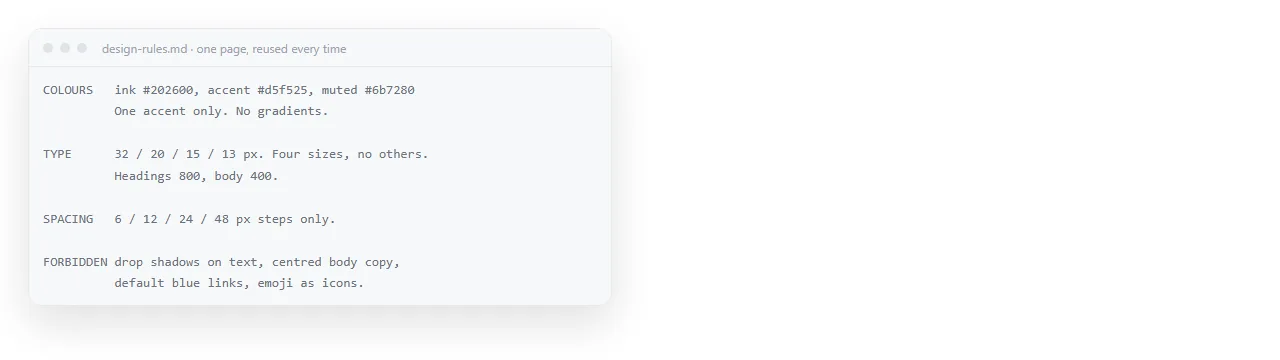
The reason to write it down is not tidiness. Generated pages drift because nothing pins them, and every drift costs a correction round.
What a Claude HTML design skill actually changes
| Instruction | Effect |
|---|---|
| "Make it clean and modern" | None, the model chooses freshly each time |
| "Accent colour #1F6FEB, one accent only" | The page is consistent with the last one |
| "Content column max 720px" | Line lengths stop varying |
| "Base font 16px, headings 1.5 and 2 times that" | The type scale repeats |
| "No gradients, no shadows, no rounded cards" | Removes the default decoration in one line |
| "Tables: header row shaded, thin row rules, no vertical lines" | Tables match across pages |
The pattern is that values constrain and adjectives do not. A rules file made of adjectives reads well and changes nothing.
The rules worth writing
Six areas cover almost everything.
- Colour. Background, text, one accent, and a muted tone for secondary text. State whether the page is light or dark, since that decision changes everything below it.
- Type. Base size, the heading scale, the font stack, and whether a network font is allowed. If the page will be exported as an image, a system font stack avoids fallback surprises.
- Spacing. A small fixed set of steps, such as 4, 8, 16, 32 pixels. Without this, generated pages use arbitrary values and never look related.
- Layout. Maximum content width, column behaviour on a phone, and whether full bleed sections are allowed.
- Components. How tables, code blocks, callouts and captions look. Tables are the highest value entry, because they appear in most business pages.
- Motion. Duration limits, which properties may be animated, and a reduced motion requirement. Claude HTML animation covers the detail.
State the page shell as well
Design rules are wasted if the file itself is the wrong shape.
Output a complete single file HTML document.
Doctype, <html lang="en">, a <title>, and the viewport meta tag.
All CSS in one <style> tag in the head. No external files, no CDN links.
Images embedded or on absolute URLs. No local file paths.
Reply with the file only, no prose around it.
The viewport line matters more than it looks. Without it the page is unreadable on a phone, and most people reviewing a page are on one. The viewport meta tag is what tells the browser to use the device width.
The rule against external files is what makes the page survive being moved. A page that reaches for a stylesheet next to it arrives unstyled anywhere else, which is the most common way a good looking page turns into plain text on someone else's screen.
Forbidding beats describing
A short list of what not to do removes more variation than a long list of preferences, because it targets the defaults directly.
- No gradient backgrounds.
- No drop shadows on cards.
- No more than one accent colour.
- No emoji in headings.
- No animation on anything that is not a state change.
- No placeholder text such as sample company names.
The last one is worth keeping permanently. Placeholder content that survives into a sent page is the most embarrassing failure in this whole workflow.
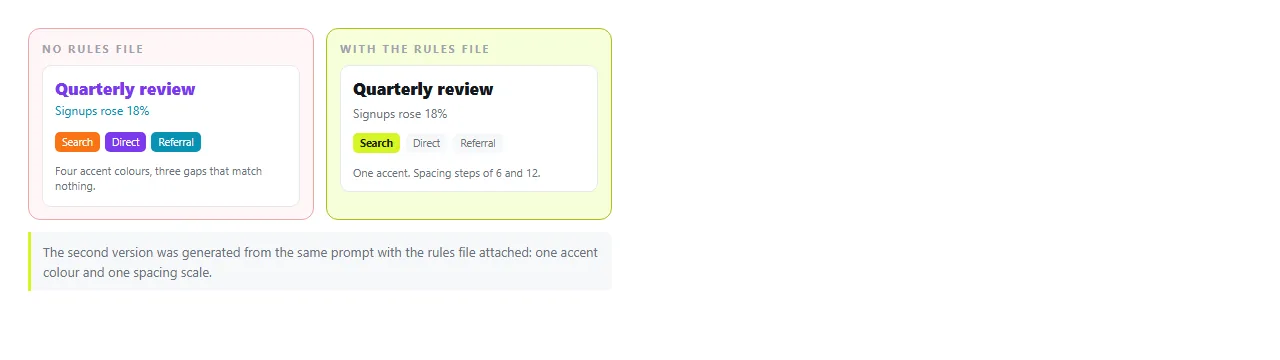
Starting from an approved page
Rules described in text are inferred. A page is seen.
Once you have one page you are happy with, keep it and ask for new content in the same structure, same styles, same table treatment. This is usually more reliable than a rules file alone, and the two combine well.
Reusing an AI HTML template covers what to keep fixed and what to regenerate each time. AI HTML brand colours covers getting the specific values in and keeping them.
Review the rendered page, not the source
A design rule either held or it did not, and you cannot tell from the code.
Paste the file into the HTML viewer or a NOS document. It renders exactly as written, dark theme, charts and scripts included, and you see the actual result.
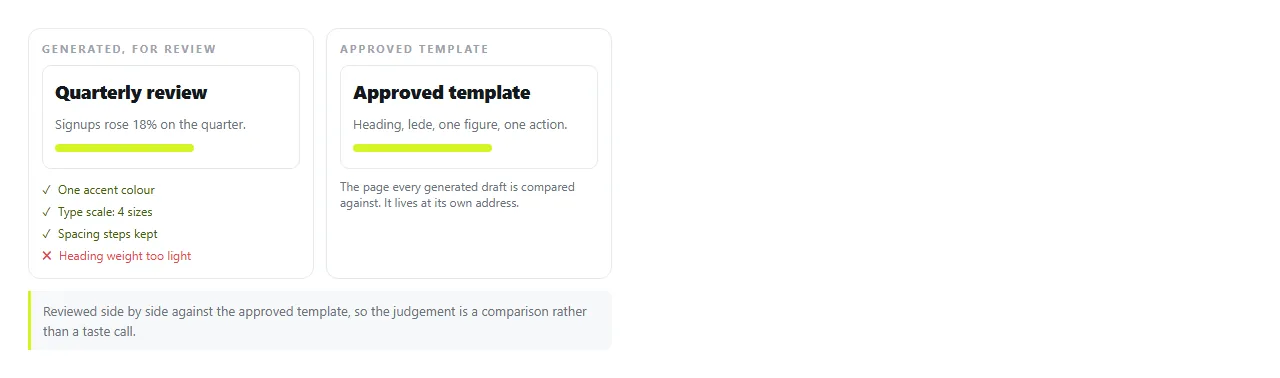
Check four things: one accent colour or several, spacing values that repeat or that drift, table styling matching the template, and the page at phone width.
Corrections at this stage rarely need a new generation. Clicking the text in a document and typing over it handles wording and numbers, which is what editing AI generated HTML without code describes.
Keeping the approved page where people can find it
A template that lives in a chat history is a template nobody reuses.
Paste the approved page into a NOS document and give it an address through Share, then Share link, then Create link.
The link is unlisted by default, and the address does not change when the page is updated, so a rules change reaches everyone using it.

That turns the design rules into something a team shares rather than something each person retypes. Tick Public on the web only if the page should be findable in search. Turning HTML into a link is that step alone.
The shortest version that works. If you write nothing else, write this: one accent colour with its value, a maximum content width, a base font size, a spacing scale of four steps, no gradients or shadows, complete single file output with a viewport tag.
That fits in six lines, and it removes most of the variation between one generated page and the next.